
DietPress
Active Installs
2,000+
Last Updated
October 13, 2026
First Released
October 17, 2017
Download History (Last one month)
DietPress is a free WordPress speed optimization plugin with a built-in page cache. Page caching, browser caching, GZIP and Brotli compression, deferred JavaScript, critical CSS, image loading attributes, preloading, locally hosted Google Fonts and selective asset loading, all in one plugin and all free.
And it goes further than a caching plugin: it also puts WordPress itself on a diet, switching off the features your site never uses. It pairs that with a clean, risk-based interface. Everything is configurable, the optimizations are already on by default, and nothing is hidden behind a paid tier. Activate it and your site is faster, or open the settings and tune every detail.
By default WordPress loads functions, services and scripts that most sites do not need. They slow down loading times and consume hosting resources. DietPress lets you trim that fat and apply battle-tested performance tweaks, with a clear description of what each option does and what might break, organized by risk level so you always know what is safe.
WHY CHOOSE DIETPRESS
- Page caching, for free. Serve anonymous visitors a copy stored on disk instead of building the page again. The feature people buy WP Rocket or a NitroPack subscription for, with no licence and no monthly fee.
- Served by your web server, not by PHP. With the accelerator on, Apache or nginx hands out the stored copy by itself, without starting PHP or WordPress, and so can LiteSpeed when the test passes there. It is tested on your home page before it stays on, and cached pages still expire on time.
- No drop-in, no changes to wp-config.php. Unlike WP Super Cache or W3 Total Cache, DietPress installs no
advanced-cache.phpand never editswp-config.php. Switching it off leaves your site exactly as it was, with nothing orphaned behind. - It tells you why. Most cache plugins leave you guessing when nothing is cached. DietPress reports its own status, tests any page you choose the way an anonymous visitor gets it, and names the exact reason a page was skipped.
- WooCommerce-safe by design. Carts, checkout, my account and any visitor carrying a cart cookie always get the live site, so nobody ever sees somebody else’s basket.
- Diet as well as speed. Where Perfmatters focuses on disabling scripts, DietPress covers that ground and adds page caching, critical CSS, local Google Fonts and a dashboard, admin and email cleanup, in one plugin.
- Light on your server. No account, no external service, no telemetry, no upsell nags. Everything runs on your own hosting.
WHAT THE PAGE CACHE DOES TO YOUR RESPONSE TIME
Measured on a WordPress 7.1 install with Astra, WooCommerce and 29 active plugins, PHP 8.5 and Apache, taking the median of 15 requests per URL. Your own hosting will give different figures, but the shape of the result will not change.
Server response time for the same pages without the page cache, with the page cache served by PHP, and with the accelerator:
- Home page – 112.3 ms without, 13.7 ms with the page cache, 3.0 ms with the accelerator
- A blog post – 105.5 ms without, 14.9 ms with the page cache, 3.0 ms with the accelerator
- WooCommerce shop – 117.2 ms without, 14.9 ms with the page cache, 3.8 ms with the accelerator
The interesting part is not the percentage, it is that the cached figures barely move. Serving a stored file costs the same whether the page was cheap or expensive to build, so the saving grows with the size of your site rather than with the power of your server. The accelerator also takes away the start of WordPress itself, which is most of what a page served from the cache by PHP still costs.
It also changes how much traffic your hosting can take at once. In the same test the home page went from about 17 visits a second without the page cache to 159 with it and 732 with the accelerator, more than forty times as many, on exactly the same machine. That is what keeps a small site standing up when one of your posts does well.
TWO THINGS IN ONE PLUGIN
1. Performance optimizations (on by default)
- Automatic Critical CSS inlined in the head (optional experimental deferral of non-critical CSS)
- JavaScript defer parsing with smart dependency handling
- Image loading attributes safety net: lazy loading, decoding=async and fetchpriority for images that bypass core
- Automatic image dimensions for better CLS scores (including picture elements)
- Resource hints: preconnect and DNS prefetch for common third-party origins
- Theme stylesheet, critical fonts and logo preloading for a faster LCP
- Google Fonts display=swap
- Google Fonts local hosting: serve the fonts your theme uses from your own server, GDPR-friendly with a silent fallback to the Google CDN (opt-in)
- Selective third-party loading: WooCommerce, Contact Form 7, block library, Slider Revolution, TablePress, Smash Balloon, Formidable Forms and Everest Forms assets only load where they are used (opt-in)
- RSS feed optimization (cache headers and item limit)
- Server rules in .htaccess: browser caching with a configurable lifetime for media, for styles and scripts and for fonts, GZIP and Brotli compression, immutable cache headers, CORS for fonts and keep-alive (master switch plus per-feature toggles)
- Database maintenance: daily expired-transient cleanup and safe query optimizations
- Page cache: store each page on disk and serve it to anonymous visitors without building it again, with automatic purging, gzip precompression, a cleanup schedule you choose and a status panel that says whether it is working, plus an accelerator that lets Apache or nginx serve those pages without starting PHP (opt-in, in its own tab)
2. Put WordPress on a diet (risk-based, opt-in)
- Light (safe for any site): emojis, RSD/WLW tags, shortlinks, self-pingbacks, comment pagination, and more
- Moderate (evaluate first): oEmbed, jQuery Migrate, Dashicons on the frontend, Global Styles and Duotone, remote block patterns, avatars and Gravatar, comment threading, and more
- Strict (site-specific): granular RSS feed control, Heartbeat API mode, post revisions and autosave, disable comments, XML sitemap, native lazy loading/fetchpriority, content types, selective loading for WooCommerce, Contact Form 7, block assets, Slider Revolution, TablePress, Smash Balloon, Formidable Forms and Everest Forms, and more
- Widgets: dashboard widgets (including third-party ones from Yoast, WooCommerce, Elementor, Jetpack, Wordfence, Rank Math, Gravity Forms), classic sidebar widgets, block-editor widgets and the Customizer
- Emails: silence the automatic emails WordPress sends on its own, grouped by area: auto-update results for core, plugins and themes (plus the new-version notice), comment moderation and new-comment notices, and new user, password and email-change notices, plus toggles for the admin email verification prompt and post-by-email. Every option is off by default, and critical notices such as a failed core update are always kept
SCALE, PROFILES AND ANALYZER
- Savings indicator: HTTP requests removed, CSS/JS saved and active optimizations at a glance
- Quick profiles: Personal Blog, WooCommerce Store, Landing Page and Maximum Cleanup
- Site analyzer: personalized recommendations based on your active plugins and content, page cache included
- Import and export your whole configuration as a JSON file
COMPATIBILITY AND EXTENSIBILITY
The plugin includes filters for developers:
dietpress_critical_css– Customize the inline critical CSSdietpress_critical_css_handles– Define which CSS handles are criticaldietpress_skip_defer_script_handles– Opt scripts out of the JavaScript deferdietpress_skip_defer_style_handles– Opt stylesheets out of the CSS deferraldietpress_preconnect_hints– Customize preconnect originsdietpress_dns_prefetch_domains– Customize DNS prefetch domainsdietpress_critical_fonts– Define critical fonts to preloaddietpress_exclude_local_fonts– Exclude Google Fonts stylesheets from local hostingdietpress_selective_{module}_has_content– Mark a page as showing the content of a selective loading module, so its assets are kept. The module iswc,cf7,formidable,everest_formsorrevsliderdietpress_selective_{module}_styles/dietpress_selective_{module}_scripts– Adjust the handles removed by each moduledietpress_selective_page_hides_content– Mark a page as rendering content the content scan cannot reach, so no module removes anything (this is what handles Elementor)dietpress_selective_is_wc_page– Override the WooCommerce page detection of selective loadingdietpress_selective_wc_keep_cart_fragments– Keep the cart fragments script when your theme has a hand-coded mini-cartdietpress_selective_cf7_has_form– Mark pages that load a Contact Form 7 form dynamicallydietpress_selective_blocks_dequeue– Override the block library dequeue decisiondietpress_selective_everest_forms_dequeue_dashicons– Keep Dashicons when another plugin enqueues it directlydietpress_native_sitemap_in_use– Tell DietPress your plugin builds on the native WordPress sitemap, so the option that removes it becomes unavailabledietpress_cache_bypass– Keep the current page out of the page cachedietpress_cache_bypass_request– Keep a request away from the page cache altogether, before anything is read from diskdietpress_cache_bypass_accept– Adjust the media types that keep a request out of the page cachedietpress_cache_bypass_cookies– Adjust the cookie name prefixes that make a visitor uncacheabledietpress_cache_ignored_params– Adjust the query parameters that do not change the pagedietpress_cache_exclude_urls– Adjust the excluded URL patternsdietpress_cache_post_urls– Adjust the URLs purged along with a post
Compatible with:
- Well-coded themes and page builders (Divi, Elementor, Beaver Builder, Bricks Gutenberg)
- Cache plugins (WP Rocket, LiteSpeed Cache, W3 Total Cache, WP Super Cache, etc.). The one exception is the optional page cache module, which will not run beside another page cache and says so; everything else in DietPress works alongside them as it always has
- Security plugins (DietPress focuses on performance and deliberately leaves security to them; we recommend our free Vigilant). With the page cache accelerator on, the pages the server serves by itself skip what they do in PHP, as the FAQ explains
- CDNs (Cloudflare, StackPath, KeyCDN, etc.) thanks to CORS and Vary headers. Behind a CDN or proxy, the page cache needs WordPress to know when a visit arrives over HTTPS, and the Cache tab tells you when it does not
- WordPress Multisite (except the optional page cache module, which does not support it yet)
HOW TO VERIFY THE OPTIMIZATIONS
- Cache rules: check your
.htaccessfor a block marked# BEGIN DietPresswithimmutableCache-Control headers - Page cache: open a page in a private window and look at the
X-DietPress-Cacheresponse header:HIT-STATICwhen the server served it without PHP,HITwhen PHP served it from the cache,MISSwhen it was built - Accelerator rules: on Apache or LiteSpeed, your
.htaccesshas a block marked# BEGIN Page Cache by DietPressright before the WordPress block - Logo preload: view page source and look for
<link rel="preload" ... fetchpriority="high">pointing to your logo - Critical CSS: view source and look for
<style id="core-diet-critical-css">in the head - Compression: test at giftofspeed.com/gzip-test
Always measure with tools like Google PageSpeed, GTMetrix or WebPageTest, and run each test at least twice to account for caching.
Support
Need private support or custom development?
Do you need one-on-one help, priority troubleshooting, or a custom feature, integration, or tweak built specifically for your site? I offer private support and custom development. Just contact me and tell me what you need.
Need help or have suggestions?
Love the plugin? Please leave us a 5-star review and help spread the word!
About AyudaWP
We are specialists in WordPress security, SEO, AI and performance optimization plugins. We create tools that solve real problems for WordPress site owners while maintaining the highest coding standards and accessibility requirements.
- Go to your WP Dashboard > Plugins > Add New and search for ‘DietPress’, or upload the
wpo-tweaksfolder to/wp-content/plugins/. - Activate the plugin through the ‘Plugins’ menu in WordPress.
- Open the DietPress menu to review the settings. Performance optimizations are already on; the diet options are off until you enable them.
Screenshot Gallery


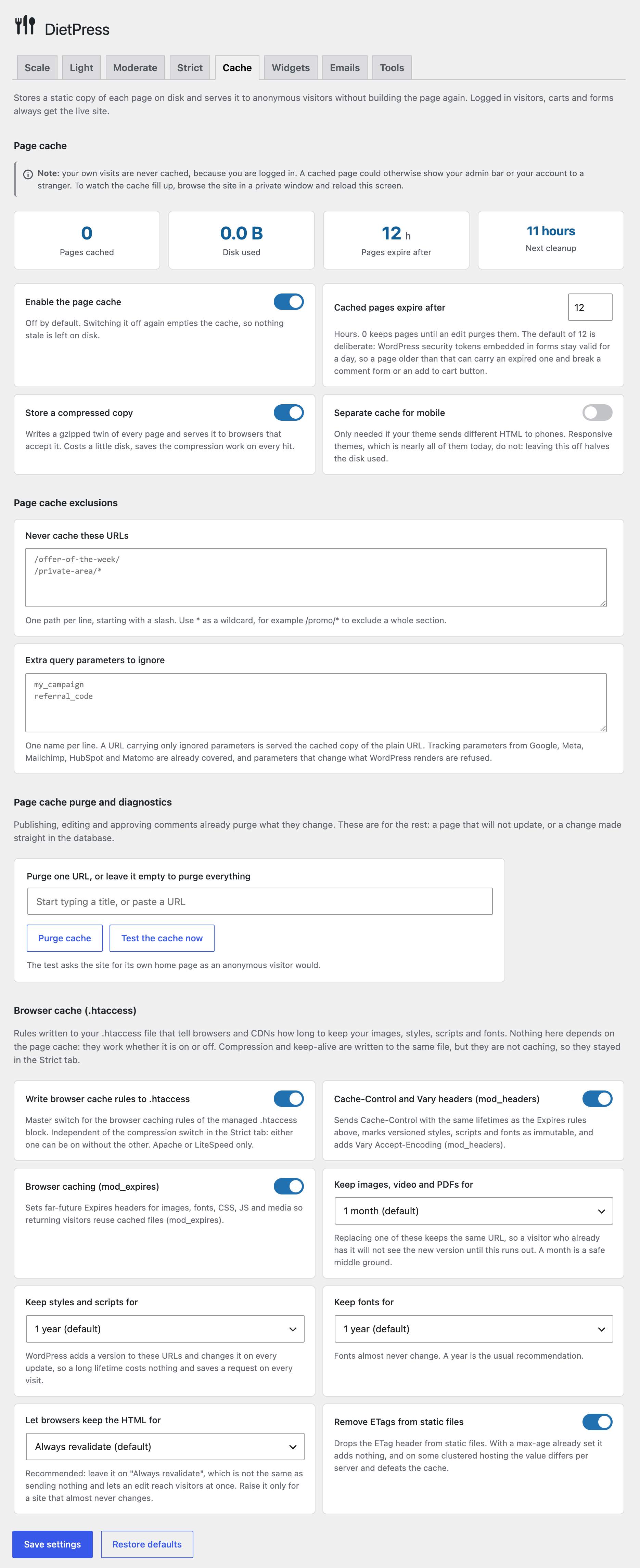
Every time somebody visits your site, WordPress queries the database, runs your plugins, builds the page from your theme and sends it. For a visitor who is not logged in, the result is the same every time until you change something, so doing all of that again is wasted work.
A page cache does it once and stores the finished HTML on disk. The next visitor gets that file, skipping the database, the theme and most of the loading time. It is normally the single biggest speed gain a WordPress site can get, and it is also what keeps a small hosting plan standing up when a post does well on social media.
You need one unless your hosting already provides it. DietPress detects the usual managed hosts and tells you when that is the case.
The page cache normally serves its stored copy from PHP, as soon as WordPress has loaded the plugins. That skips the database and the theme, but not the start of WordPress itself, and on a site with many plugins that start is most of what a cached page still costs.
The accelerator removes that start too. On Apache, DietPress writes a block of rules to your .htaccess, marked Page Cache by DietPress, and the server hands out the stored copy by itself, without starting PHP or WordPress at all. That is the fastest a page can be served. On nginx, which does not read .htaccess, the Cache tab gives you the same rules to paste into your server configuration.
Phones are served by the server too. With the separate mobile cache on, each address has a copy built for a phone and one built for a desktop, and the rules hand out the right one with the same test WordPress uses, so what PageSpeed measures on mobile is the served copy. Those pages go out with a Vary header, so a CDN or proxy in front keeps the two apart.
Switch it on once the page cache is working, if your site runs on Apache (with mod_rewrite and mod_headers, which nearly every hosting has) or nginx, which is where it has been measured. LiteSpeed reads the same rules as Apache, and there the test is what tells whether they work. It is tested on your home page the moment you switch it on: if the server does not serve that page by itself, with its headers and for the right scheme, the rules are taken out again and the tab says why. Everything the rules leave alone, a logged in visitor, a URL with a query string, a forced reload, is still served or rebuilt by PHP, exactly as without it.
Stored pages still expire on time, even on a site so well cached that WordPress hardly runs its scheduled tasks: each copy is linked under the name of every hour it is still valid in, and the server only looks for the current one. The one exception is the night the clock of the server goes back, when a copy can be served for up to an hour longer. Those extra names are also why a backup that includes wp-content/cache can grow: exclude that folder, as most backup plugins already do, because a backup that does not keep hard links stores each name as a file.
Partly, and it is worth knowing how. The server answers before any PHP runs, so whatever a security plugin does in PHP does not see those visits: blocking an IP address, rate limiting, a bot filter or an under attack challenge. The rules a security plugin writes to your .htaccess, or to the server configuration, still apply: a bot that those rules block still gets its 403 on a page the server serves, while a client that is only blocked in PHP gets the cached page. The same goes for a site closed at server level, by IP address or with a password: on Apache the stored copies are only reachable through the address of their page, which those rules protect. On nginx, see the next question. Pages are never served this way to a logged in visitor or to one with a cart.
If your site relies on the PHP side of a security plugin for anonymous visitors, leave the accelerator off. Keep in mind that the page cache answers very early without it too, before many security plugins run their checks.
nginx does not read .htaccess, so DietPress cannot write the rules for you. With the page cache on, the Cache tab shows them in four parts, each with a comment that says where it goes in the configuration of your site: two inside the server block, one at the start of the location that handles your pages, and one in the location that passes PHP files to PHP-FPM. Paste them, check the configuration with nginx -t, reload nginx and then switch the accelerator on, which tests them on your home page before it stays on. The rules also close the cache folder, which nginx would otherwise let anyone read by its address. One thing to check before pasting: access rules inside your location / block (allow, deny, auth_basic or auth_request) do not reach the pages served from the cache, because nginx sends the request on before it looks at them. Move them up to the server block, or repeat them inside the location of part 2, as its comment says.
If you later change an exclusion, the cookies that keep visitors out, the separate mobile cache or how long browsers keep pages, the tab says the rules changed: paste them again and reload nginx. On a managed hosting where you cannot edit the nginx configuration, leave the accelerator off; the page cache keeps working through PHP.
Open a page in a private window and look at its response headers in the developer tools of your browser: X-DietPress-Cache: HIT-STATIC means the server served it without PHP, HIT means PHP served it from the cache, and MISS means it was built. The first visit to a page after it changes is always a MISS. “Test the cache now” in the Cache tab does the same check for you on the home page. It switches the accelerator off if the server fails that page where the accelerator serves it (with an error, with a copy missing its headers, or with something other than the page DietPress stored) while WordPress still builds it fine. When the accelerator is switched on but cannot run, the test names the reason, and if the server is still answering from the cache by itself, it takes away the names the server finds the stored pages under.
On a local WordPress 7.1 install with Astra, WooCommerce and 29 active plugins, on PHP 8.5 and Apache. Each URL was requested twice to warm up and then fifteen times straight to the web server, and the median was taken; the visits per second come from 300 requests with ten in flight at a time, with the security plugin of the site told not to rate limit them. The only things that changed between the three columns were the page cache and accelerator switches, on the same content, in the same session.
You can repeat it on your own site with any tool that reports time to first byte. From a terminal, curl -o /dev/null -w "%{time_starttransfer}\n" https://yoursite.com/ a dozen times with the cache off, then a dozen with it on, and compare the medians rather than any single reading. Do it while logged out, because your own visits are never cached.
Two honest caveats. A local install has no network latency, so the absolute milliseconds are lower than you will see in production, where the saving is usually larger rather than smaller. And these numbers say nothing about a Lighthouse score: that measures mostly what the browser does with your theme and your scripts after the page arrives, which is a different problem from how fast your server answers.
A browser will not paint anything until it has downloaded every stylesheet in the page. Those files are render-blocking: your visitor stares at a blank screen while they arrive.
Critical CSS is the small subset of rules needed to draw what fits on the screen at first sight. DietPress writes it straight into the page, so the browser can paint immediately and load the rest of the styles afterwards. It is the usual fix for the “eliminate render-blocking resources” warning in PageSpeed Insights, and it improves Largest Contentful Paint, one of the Core Web Vitals Google measures.
By default a script tag stops the browser: it downloads the file, runs it, and only then carries on reading your page. A theme with half a dozen scripts in the head can hold the first paint for a second or more.
Deferring tells the browser to keep building the page and run the scripts once it has finished. Nothing is removed and nothing loads later than it should, it just stops blocking. DietPress handles the dependency order for you and lets you exclude any script that misbehaves, from the settings or with a filter.
Two reasons. Speed: a font from fonts.gstatic.com needs a fresh DNS lookup, TCP connection and TLS handshake to a domain the browser has never contacted, and browser cache partitioning means the visitor gets no benefit from having downloaded that font on another site. Privacy: serving them from Google transfers your visitor’s IP address to Google, which German and other European courts have ruled a GDPR violation.
DietPress downloads the fonts your theme uses to your own uploads folder and rewrites the stylesheets to point there. If anything fails it quietly falls back to Google, so a font never goes missing.
Plugins tend to load their CSS and JavaScript on every page of your site, whether or not the page uses them. A contact form plugin loads its scripts on every blog post; a slider plugin loads its libraries on pages with no slider; WooCommerce loads its cart on your About page.
DietPress detects which pages actually use each one and removes the rest, for WooCommerce, Contact Form 7, the block library, Slider Revolution, TablePress, Smash Balloon, Formidable Forms and Everest Forms. Pages built with a builder such as Elementor keep everything, because their content is not readable from the database and guessing there is how things break.
They cache different things for different people. The page cache stores your HTML on your server, so the next visitor is served it without rebuilding the page. Browser caching tells each visitor’s own browser to keep your images, styles, scripts and fonts on their machine, so their second visit downloads almost nothing.
You want both, and they do not overlap. DietPress lets you set how long each family of files is kept: media, styles and scripts, and fonts, each on its own, because the right answer is different for each.
It decides how long a visitor’s browser may reuse the page itself, as opposed to its images and styles. Zero, “Always revalidate”, is not the same as sending nothing at all.
With no answer at all the browser invents a lifetime of its own, normally about a tenth of the age of the document, which on an old page can be hours and is entirely out of your hands. With “Always revalidate” the browser asks every time, and the usual answer is a 304 Not Modified of a few hundred bytes, so the page is not downloaded again either: you get almost all of the saving and none of the staleness.
Raise it only for a site that genuinely almost never changes, and be aware of the trade: an edit then takes that long to reach anyone who has already visited, because their browser will not even ask. This one is sent as an HTTP header rather than an .htaccess rule, so it works on nginx too, and pages served from the cache follow it as well, whether PHP or the server hands them out. Above zero it also tells a CDN or a proxy in front of the site that it may keep the page, which a purge in DietPress does not reach.
Risk, not importance. Light is safe on any site: things nobody misses, like the emoji script or the Windows Live Writer tag. Moderate deserves a look first, because a plugin or theme might use it, oEmbed or jQuery Migrate for example. Strict depends on what your site actually does: disabling comments, feeds or a whole content type is only right if you really do not use them.
Every option says what it does and what might break, and the Scale tab analyses your site and recommends only what applies to you, so you never have to guess.
They are the three measurements Google uses to judge how a page feels: how quickly the main content appears (LCP), how quickly the page responds to a click (INP) and how much things jump around while loading (CLS).
DietPress works on all three. The page cache and preloading cut the time to the first byte and to the largest element; deferring JavaScript and trimming what loads leaves the main thread free to answer clicks; and adding width and height to images that lack them stops the layout from shifting as they arrive.
Yes, if you want it to be. The performance optimizations are on by default, so you can just activate and go. The difference is that now you can fine-tune everything and, optionally, put WordPress on a diet by disabling features you do not use.
The performance optimizations are designed to be safe and are tested across many sites. The diet options only change something when you explicitly enable each toggle, and every option has a description of what might break. If something fails, turn the toggle off; deactivating the plugin restores default WordPress behavior.
When you enable it (Light tab, Performance section), DietPress detects the Google Fonts stylesheets your theme enqueues, downloads the stylesheet and its font files once, stores them in your uploads folder, and serves everything from your own server. Visitors no longer connect to Google (faster fonts and GDPR-friendly, since no visitor data is sent to a third party). If any download fails, the fonts silently keep loading from the Google CDN. The local copies are refreshed when you switch themes and removed when you disable the option or deactivate the plugin. Fonts hardcoded by a theme outside the standard WordPress enqueue system are left untouched.
Each selective loading module only removes assets where its target content is not detected, but unusual setups exist: a hand-coded header mini-cart, a form injected via AJAX, a slider printed by the theme, or a classic theme that reuses block styles everywhere. Turn the specific toggle off, or use the escape filters (dietpress_selective_{module}_has_content, dietpress_selective_page_hides_content, dietpress_selective_wc_keep_cart_fragments, dietpress_selective_cf7_has_form, dietpress_selective_blocks_dequeue) to keep exactly what your site needs.
Pages built with Elementor, and any request an Elementor Theme Builder template applies to, are left alone on purpose: their content lives in the database, out of reach of the content scan.
No. Both plugins already have a conditional loading mode of their own, off by default in the case they cover, and those two modules simply turn it on for visitors. The plugin itself then loads its stylesheet when a table or a feed is rendered, so nothing can end up unstyled. The Formidable Forms module does dequeue, but it puts the plugin own footer fallback back in play for the same reason.
It turns the “Include libraries globally” setting of Slider Revolution off for each visit, without saving anything and without touching your configuration. From there Slider Revolution decides on its own, exactly as if you had turned that setting off in its Global Settings: it loads its libraries in preview mode, when one of its shortcodes is in the content, when its widget is active, and on any page you listed in its own “List of pages to include RevSlider libraries”. DietPress only adds the cases its check misses, such as a shortcode inside a text widget or an archive page. If you already turned that setting off yourself, the module does nothing at all and your page list stays in charge.
One thing to know: with the global loading off, the add_revslider() PHP function that some themes use to print a slider from a template refuses to render and shows a notice instead. That is how Slider Revolution behaves on its own, and the remedy is the one it documents: add those pages to its list.
Because it cannot do what it says right now, and saying so is better than letting you switch on something inert. Two things can happen. An option is unavailable when it would contradict another one or break another plugin: “Disable WordPress XML sitemap” while a plugin builds its own sitemap on top of the native one, or “Disable native lazy loading” and “Disable fetchpriority attribute” while “Enhance image loading attributes” is on and already sets those attributes itself. And an option simply says it has no effect when another option already covers it: the granular RSS feed toggles while “Disable ALL RSS feeds” is on, or the .htaccess sub-options while the master switch is off. Those ones stay usable, so you can set them up before turning the master switch on.
Whatever you had saved is kept. An option that cannot apply is not switched off behind your back: it stays stored and starts working again as soon as the thing blocking it changes.
Yes. DietPress works alongside caching plugins and includes CORS and Vary headers for full CDN compatibility. Behind a CDN or proxy, the page cache needs WordPress to know when a visit arrives over HTTPS, as the rest of WordPress does: when the proxy headers disagree with the HTTPS WordPress detects, those visits are left out of the cache, and the Cache tab explains why and how to fix it.
If a plugin or theme does not enqueue scripts correctly, the JavaScript defer may affect it; you can turn that option off or use the dietpress_skip_defer_script_handles filter. If you get a 500 error, edit your .htaccess and remove the blocks that start with # BEGIN Page Cache by DietPress and # BEGIN DietPress (or # BEGIN Zero Config Performance if you updated from 2.x and the rules have not been rewritten yet), or disable the “.htaccess server rules” option and the page cache accelerator.
Open DietPress and go to the Cache tab. Type or pick a page in the field of the purge section, or leave it empty for the home page, and press “Test the cache now”: the site asks itself for that page as an anonymous visitor would, and tells you whether the server served it, PHP served it from disk, it was rebuilt, it was skipped, with the exact reason, or a cache in front of the site answered before WordPress. You can also turn WP_DEBUG on and read the last line of a page’s HTML source: DietPress writes the reason there, for example that the response set a cookie or that a plugin declared the page uncacheable. A page that was stored gets no comment. And if you check the X-DietPress-Cache header in your browser’s developer tools, untick Disable cache there first: with it ticked, as with a forced reload, the browser asks for a fresh copy and DietPress rebuilds the page on purpose, so it shows MISS. An ordinary reload is served from the cache.
The three usual causes are a plugin that sets a cookie on every visit (a consent banner, some analytics scripts), a page that is genuinely personal (cart, checkout, my account, a password protected post), and a cache directory the server cannot write to. The status panel reports the third one on its own. On a site behind a proxy or CDN there is a fourth one: proxy headers that disagree with the HTTPS WordPress detects keep those visits out of the cache. Those visits are left out before the page is built, so they get no comment in the HTML source, except when WordPress only learns about HTTPS later in the request, where the comment says that HTTPS changed after the cache lookup. Either way the Cache tab tells you about them, and how to fix it.
Publishing, editing, deleting or renaming a post purges it and everything that lists it, and approving a comment purges the post it belongs to. Changing the theme, the menus, the widgets, the permalinks or the front page settings empties the whole cache, and so does activating or updating any plugin.
If a change made outside WordPress (straight in the database, or by an importer) is not showing, use the purge button on the Page Cache screen. And check with a private window first: DietPress asks browsers not to keep the HTML, but an aggressive browser cache, a CDN or a hosting cache in front of the site are outside its reach.
Yes. WooCommerce marks the cart, the checkout and my account as uncacheable itself, and DietPress obeys that mark rather than guessing from the URL, so it keeps working if you move or rename those pages. On top of that, any visitor carrying a WooCommerce cart or session cookie is served the live site everywhere, so a mini cart in the header never shows somebody else’s basket. A store in “coming soon” mode is not cached at all.
With another page cache plugin, no, and DietPress will not let you: two page caches on the same site serve each other’s stale HTML and the result is very hard to diagnose. If W3 Total Cache, WP Super Cache, LiteSpeed Cache, WP Fastest Cache, Cache Enabler, Surge, WP Rocket or any of about thirty similar plugins is active, the toggle stays disabled and says which one. Object cache plugins such as Redis Object Cache are a different thing and are fine.
With a hosting cache (Kinsta, WP Engine, SpinupWP, Cloudways and others) it is possible but rarely a good idea, because purging one does not purge the other. DietPress detects the usual ones and, while their page cache is on, asks you to tick a confirmation in the page cache card before switching its own on. With the DietPress page cache on, the pages it stores tell the caches in front not to keep them, so each page is cached in one place only. If the test of the Cache tab says a cache in front of the site answered, purge that cache once. On LiteSpeed servers the LiteSpeed Cache plugin is the other natural choice, since it caches at server level, so use one of the two. The accelerator of DietPress reads the same rules there as on Apache, and its test tells whether LiteSpeed serves the stored pages without PHP.
Never, and there is no option to change that. The same goes for anyone with a cart, an unlocked password protected post or a comment awaiting moderation.
Yes. See the filters listed in the description (the dietpress_* hooks). The page cache adds dietpress_cache_bypass, dietpress_cache_bypass_request, dietpress_cache_bypass_accept, dietpress_cache_bypass_cookies, dietpress_cache_ignored_params, dietpress_cache_exclude_urls and dietpress_cache_post_urls, the dietpress_cache_purge_all action and the dietpress_purge_page_cache( $url ) function. Defining DIETPRESS_DISABLE_CACHE as true switches the engine off without deactivating anything; with the accelerator on, its rules and the names of the stored pages are taken out the next time an administrator opens the dashboard.
With the accelerator on, the cookies, media types and URL patterns those filters return are written into the server rules, so a value added only on some requests, or only on the front end, does not reach them. A callback on dietpress_cache_bypass_request, or on wp_is_mobile with the separate mobile cache on, keeps the accelerator from running at all, because the server cannot run that code.
Changelog
3.7.2
The RSS feed of a logged in user, and a page that sets a cookie when a lifetime is chosen for HTML, no longer go out marked as public. Adds a Purge cache entry to the DietPress menu, marks the selective loading modules whose plugin is on the site and lists the scheduled tasks in Tools.
- Improved: While the page cache is on, the DietPress menu has a Purge cache entry. It empties the cache from any screen of the dashboard and brings you back to it, with a note of how much was deleted.
- Improved: In Selective loading, on the Strict tab, the modules that have something to act on come first and carry a “Detected on this site” label, so it is clear which ones are yours. The label follows what the module would do and not only whether its plugin is installed: Formidable Forms gets it while it loads its styles on every page, and TablePress on a classic theme.
- Improved: The site analyzer asks the same question as the module, so it no longer suggests the Formidable Forms module when Formidable already loads its styles only where a form is.
- Improved: The Tools tab has a Scheduled tasks section that shows when the daily cleanup of transients and the cleanup of the page cache are due next. When one is late or missing it says so, with the likely reason and what it does and does not affect.
- Improved: The site analyzer warns when the WooCommerce “Recently Viewed Products list” widget sits in a sidebar, even one the theme never shows. While it is there every product page sets a cookie, and no cache stores a page that sets a cookie: not this one, and not the one of the hosting.
- Improved: The DNS prefetch hints for ajax.googleapis.com and stats.wp.com are printed only on pages that load a script or a style from them, or while Jetpack Stats is on. They were printed on every page of every site. The
dietpress_dns_prefetch_domainsfilter still adds them back. - Fix: With Optimize RSS feeds on, which is the default, the RSS feed went out marked as public for an hour for everybody, logged in visitors included. For them it replaced the private, do not store answer WordPress gives, and the feed of somebody who can read private posts includes them, so a cache in front of the site that took the header at its word could hand that feed to other visitors. The header is now sent only to visitors who are not logged in, and never on a response that sets a cookie or is already marked private.
- Fix: With a lifetime chosen for HTML pages under browser caching, a page that set a cookie went out marked as public, which lets a cache in front of the site keep it and hand that cookie to other visitors. It now goes out as private, with the same lifetime, so a cache in front that used to keep such pages anyway stops keeping them. Sites with the default, no lifetime for HTML, were not affected.
- Fix: The answer the page cache gives a visitor who already has the current copy (a 304) was sent before declaring the type of the page, so on a site whose charset is not UTF-8 it could leave with the wrong one. Apache and PHP-FPM remove the type from that answer, so most sites never sent it.
3.7.1
Fixes the cache test behind a hosting cache, which kept the pages DietPress builds and served them ahead of it: purge that cache once after updating. The test now checks the page you choose, and the accelerator no longer switches on while the page cache is off.
- Improved: “Test the cache now” tests the page in the field above it, typed or picked from the search, or the home page when the field is empty, and every result says which page it tested. Switching the accelerator on still tests the home page.
- Improved: When a cache in front of the site answers the test instead of WordPress, the test says so and names the header that gave it away, instead of blaming the cache folder.
- Improved: A page left out of the cache for setting a cookie now names the cookie, which usually tells which plugin sets it.
- Improved: The confirmation for running on top of a hosting cache is now a tick box inside the page cache card, next to its warning, instead of a card of its own. Once ticked, the warning turns into a plain note there and no longer shows on the dashboard.
- Fix: With the DietPress page cache on, the pages it builds go out telling the caches in front not to keep them, as the copies it serves already did. Since 3.7.0 they went out without saying anything, so a hosting cache could keep them and serve them ahead of DietPress, out of reach of its purges, and switching the accelerator on failed saying the cache folder could not be written.
- Fix: The accelerator could be switched on while the page cache was off, and showed as on while nothing ran. It now stays locked until the page cache is on, and unlocks as soon as that toggle is ticked.
- Fix: Saving any setting without the confirmation for a second cache switched off, and emptied, a page cache that was already running when a hosting cache appeared. The confirmation is now asked only when switching the page cache on, and the message says what to tick.
- Fix: With a hosting whose page cache is switched on from its own plugin, the warning and the confirmation it asks for showed while that cache was off. They now appear only while it is on. On LiteSpeed servers the note about LiteSpeed Cache no longer asks for the confirmation, since that cache only runs through its own plugin, which already keeps this one off.
- Fix: Two cache tests at the same time, by two administrators or by a save that tests the accelerator while someone presses the button, broke each other: the reasons went missing and the accelerator could refuse to switch on.
- Fix: With a separate cache for mobile, the server rules of the accelerator took any character between Opera and Mini or Mobi as a phone, where WordPress takes only a space. On nginx the Cache tab asks to paste the rules again.
3.7.0
DietPress no longer tells browsers how long to keep your pages, so the cache of your hosting or your CDN can store them again. Also fixes a page cache that went on running after it had been blocked.
- New: A new choice in “Let browsers keep the HTML for”, called “Send no rules for HTML”, and it is what a new install gets. With it DietPress says nothing at all about how long one of your pages may be kept. Sites that were on the old default, “Always revalidate”, are moved to it once when they update, with a notice that explains it; sites that had chosen 5 minutes, an hour or a day keep what they chose, and those values still work the same. The lifetimes of images, styles, scripts and fonts are not affected by this in any way.
- Improved: However long you let browsers keep your pages, that is now decided in one place, when the page is built, instead of also being written into the .htaccess. The server rules could not know whether a visitor was logged in, whether the page was a cart or a checkout, or whether another plugin had already declared the page uncacheable, so on a page marked as not to be stored the response left with a second, contradictory instruction saying it could be kept for an hour. The setting itself works exactly as before.
- Improved: The compression rules no longer switch the compressor on for every response the server sends. The list of file types to compress is unchanged, so the same things are compressed, without the global filter that duplicated it and cost processor time on every dynamic page.
- Improved: The Keep-alive connections option is gone. The header it wrote is forbidden in HTTP/2, which is what almost every site is served over today, and on HTTP/1.1 it is the server, not the page, that decides whether the connection stays open. Nothing else changes for your site.
- Improved: The Vary header written for static files is merged instead of appended, so it is no longer sent twice on files the server also compressed, and it is written in the form every server understands.
- Improved: SiteGround Speed Optimizer is recognised by name, so when its cache is the one in charge the Cache tab says so instead of describing it as an unknown drop-in, and the browser caching options warn when the value chosen would stop it from storing your pages.
- Fix: With the default settings, every page left the site with a lifetime of zero seconds, which browsers read as “ask me again” and every cache in front of the site reads as “do not store this”. On hosting that caches pages for you, such as SiteGround, that meant the cache never stored anything and every visit paid for a full page build: one store saw 2 cached responses out of 480,000 requests in a week. Nothing is sent now unless you pick a lifetime yourself.
- Fix: Feeds, robots.txt, ads.txt and any other plain text file were told they could be kept for a month, which is the lifetime of your images, because they had no rule of their own and inherited the default one. That inherited rule is gone: what is meant to be cached is now named one file type at a time, MP3, WAV and MOV among them, and anything not named is left alone. Sitemaps, XML and JSON are no longer sent an Expires date in the past either, which is what kept a CDN from storing them.
- Fix: A Cache-Control header set by another plugin, or by a PHP session, straight with header() instead of through the WordPress filter was replaced without trace. DietPress now looks at the headers already sent and leaves the response alone when one is there. The cart, the checkout and the account page of WooCommerce are never touched either, whatever their headers say, and a new dietpress_html_cache_control_skip filter marks any other page as personal.
- Fix: The page cache went on serving and storing pages when another page cache had taken charge through an advanced-cache.php drop-in, which is what a hosting plugin installs when its own file cache is switched on. The Cache tab said the module was blocked while the engine answered every visit, so the site had two page caches running and pages carried an X-DietPress-Cache header on a cache its owner believed was off. The engine now stops as soon as a foreign drop-in is in charge, and the module switches itself off on the next visit to the administration.
Thanks to @webvillalba for the help and for testing this release on real sites.
For older changelog entries, please check the changelog.txt file.
Available Versions
| Version | Download | Type |
|---|---|---|
| 3.7.2 | Download | Stable |
| 3.7.1 | Download | Stable |
| 3.7.0 | Download | Stable |
| 3.6.0 | Download | Stable |
| 3.5.6 | Download | Stable |
| 3.5.5 | Download | Stable |
| 3.5.4 | Download | Stable |
| 3.5.3 | Download | Stable |
| 3.5.2 | Download | Stable |
| 3.5.1 | Download | Stable |
| 3.5.0 | Download | Stable |
| 3.4.1 | Download | Stable |
| 3.4.0 | Download | Stable |
| 3.3.1 | Download | Stable |
| 3.3.0 | Download | Stable |
| 3.2.1 | Download | Stable |
| 3.2.0 | Download | Stable |
| 3.1.0 | Download | Stable |
| 3.0.1 | Download | Stable |
| 3.0.0 | Download | Stable |
| 2.3.2 | Download | Stable |
| 2.3.1 | Download | Stable |
| 2.3.0 | Download | Stable |
| 2.2.2 | Download | Stable |
| 2.2.1 | Download | Stable |
| 2.2.0 | Download | Stable |
| 2.1.3 | Download | Stable |
| 2.1.2 | Download | Stable |
| 2.1.1 | Download | Stable |
| 2.1.0 | Download | Stable |
| 2.0.3 | Download | Stable |
| 2.0.2 | Download | Stable |
| 2.0.1 | Download | Stable |
| 2.0 | Download | Stable |
| 1.0.7 | Download | Stable |
| 1.0.6 | Download | Stable |
| 1.0.5 | Download | Stable |
| 1.0.4 | Download | Stable |
| 1.0.3 | Download | Stable |
| 1.0.2 | Download | Stable |
| 1.0.1 | Download | Stable |
| 1.0 | Download | Stable |
| 0.9.31 | Download | Stable |
| 0.9.30 | Download | Stable |
| 0.9.29 | Download | Stable |
| 0.9.28 | Download | Stable |
| 0.9.27 | Download | Stable |
| 0.9.26 | Download | Stable |
| 0.9.25 | Download | Stable |
| 0.9.24 | Download | Stable |
| 0.9.23 | Download | Stable |
| 0.9.22 | Download | Stable |
| 0.9.21 | Download | Stable |
| 0.9.20 | Download | Stable |
| 0.9.19 | Download | Stable |
| 0.9.18 | Download | Stable |
| 0.9.17 | Download | Stable |
| 0.9.16 | Download | Stable |
| 0.9.15 | Download | Stable |
| 0.9.14 | Download | Stable |
| 0.9.13 | Download | Stable |
| 0.9.12 | Download | Stable |
| 0.9.11 | Download | Stable |
| 0.9.10 | Download | Stable |
| 0.9.9 | Download | Stable |
| 0.9.8 | Download | Stable |
| Development | Download | Trunk |
