
Social Media Auto Poster – Schedule & Publish to Buffer
Active Installs
8,000+
Last Updated
April 8, 2026
First Released
April 30, 2012
Download History (Last one month)
Social Media Auto Poster connects your WordPress site to Buffer, enabling automatic social media publishing whenever you create or update content. Share your blog posts, pages, and custom post types to multiple social networks without manual posting.
Why Choose This Social Media Automation Plugin?
This plugin eliminates repetitive social media posting by automatically adding your WordPress content to your Buffer queue. Buffer then intelligently schedules posts to your connected social networks at optimal times for maximum engagement.
Automatic Social Media Publishing – Set it once and your content automatically shares to social media when published or updated.
Smart Scheduling with Buffer – Buffer’s queue system prevents spam by spacing out posts according to your schedule. Your social media profiles stay active without overwhelming followers.
Compatible Social Networks – Auto post to Facebook Pages, Twitter (X), LinkedIn Pages and Profiles, Threads, Google Business Profile, Mastodon, Bluesky, and TikTok.
Dynamic Content Templates – Customize each social media post using template tags that pull your post title, excerpt, content, featured image, categories, tags, and custom fields.
Don’t have a Buffer account? Sign up for free
How to Auto Post to Social Media with Buffer
- Connect Your Buffer Account – Simple one-click authorization, no API keys or technical setup required
- Link Your Social Networks – Connect Facebook, X/Twitter, LinkedIn, and other profiles through Buffer’s interface
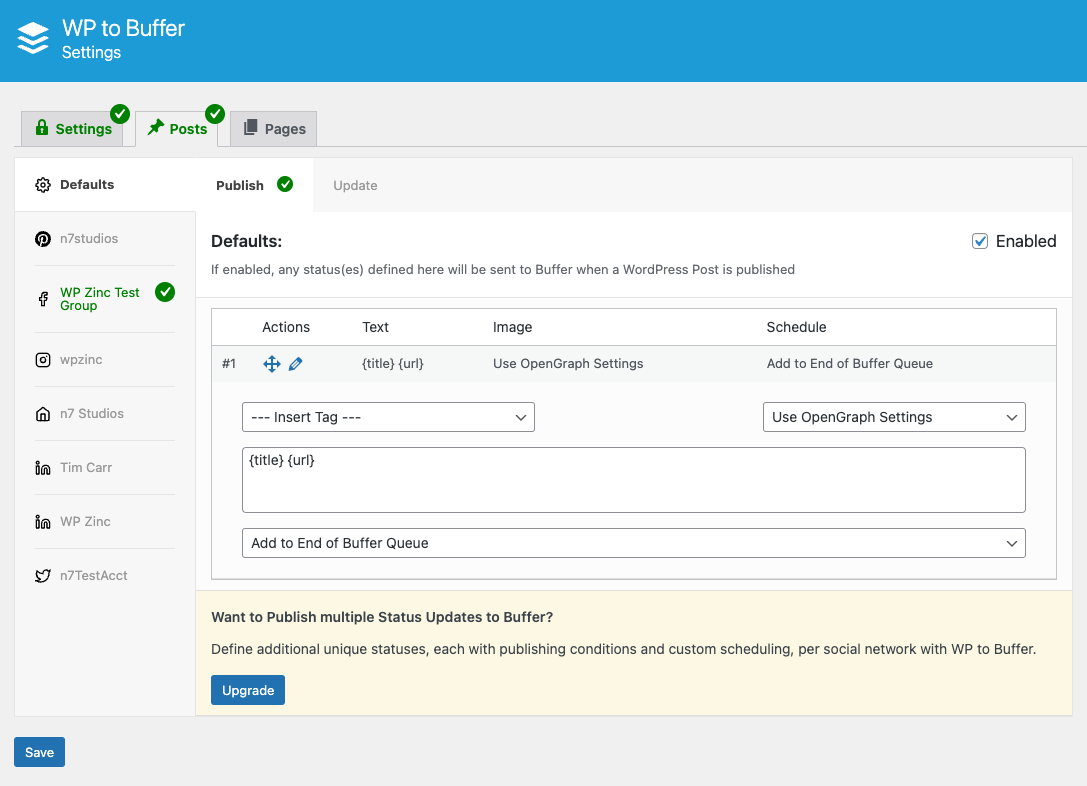
- Configure Post Settings – Choose which post types to share and customize your social media message templates
- Publish Content – Your WordPress posts automatically share to social media according to your Buffer schedule
Social Media Networks Supported
Facebook Auto Posting – Share to Facebook Pages automatically when you publish WordPress content.
X/Twitter Auto Posting – Still works! Buffer is not impacted by X/Twitter API changes. Auto post to Twitter (X) reliably.
LinkedIn Auto Posting – Publish to LinkedIn Company Pages and personal LinkedIn Profiles to grow your professional network.
Instagram & Pinterest (Pro) – Direct posting to Instagram Business Profiles (Feed and Stories) and Pinterest Boards available in Pro version.
Additional Networks – Threads, Google Business Profile, Mastodon, Bluesky, and TikTok support included.
Dynamic Template Tags for Customized Posts
Create unique social media messages using template tags:
- {title} – Your post title
- {excerpt} – Post excerpt (with character/word limits)
- {content} – Post content (with character/word limits)
- {url} – Post permalink
- {date} – Publication date
- {taxonomy_post_tag} – Tags as hashtags
- {taxoomy_category} – Categories as hashtags
Better Than Traditional Auto Posting Plugins
Unlike direct posting plugins (WP to Facebook, WP to Twitter clones), this plugin uses Buffer’s smart queue system. Benefits include:
Prevents Social Media Penalties – Buffer spaces posts naturally, avoiding spam flags from posting too frequently
Optimized Timing – Schedule posts for when your audience is most active
Cross-Network Management – Manage all social networks from one Buffer dashboard
No API Complications – Buffer handles all social network API connections and changes
Duplicate Prevention – Built-in protection ensures you never post the same content twice
Trusted Buffer API Partner
We’re an official Buffer Partner (since October 2020), ensuring reliable access to Buffer’s API for seamless social media automation.
Pro Version Features
WordPress to Buffer Pro includes advanced social media automation features:
Instagram and Pinterest Support – Direct posting to Instagram Business Profiles (Feed and Stories) and Pinterest Boards
Multiple Buffer Accounts – Connect multiple Buffer accounts to one WordPress site
Advanced Scheduling Options – Post immediately, add to start/end of Buffer queue, or schedule for specific times
Conditional Publishing – Send posts to social media based on author, category, tags, or custom field values
Multiple Status Templates – Create different messages for each social network with unique templates per post type
Repost Old Posts – Automatically reshare evergreen content on social media at scheduled intervals
Bulk Publish Feature – Manually select and republish multiple posts to social media at once
Event Calendar Integration – Schedule social posts based on event dates from The Events Calendar, Event Manager, and Modern Events Calendar
WooCommerce Integration – Display product prices, SKUs, and other WooCommerce data in social media posts
SEO Plugin Integration – Use SEO titles, descriptions, and meta data from Yoast SEO, Rank Math, All-In-One SEO Pack, and SEOPress
Advanced Custom Fields Support – Pull any custom field data into social media messages
Multiple Images – Share multiple images from Featured Image, Media Gallery, Post Content, or ACF Image fields
WP-Cron Support – Queue posts to send via WP-Cron for better performance on high-traffic sites
Priority Email Support – One-on-one support with our team
How to Schedule Social Media Posts
Default Buffer Schedule – Buffer automatically spaces posts throughout the day based on your time zone preferences
Custom Posting Schedule (Pro) – Define specific days and times in Buffer when posts should publish to each social network
Immediate Posting (Pro) – Override the queue and post immediately to social media
Scheduled Publishing (Pro) – Set exact date and time for each social media post
Support for Free Version
We provide community support through the WordPress support forums.
For priority email support, comprehensive documentation, and faster response times, consider upgrading to Pro.
Privacy and Data Usage
Our API connects your website to Buffer. An account with Buffer is required.
We connect directly to your Buffer (buffer.com) account, via their API, to:
– Fetch your social media profile names and IDs,
– Send your WordPress Posts to one or more of your social media profiles. The profiles and content sent will depend on the plugin settings you have configured.
We connect to our own API to pass the following requests through to Buffer:
– Connect our Plugin to Buffer, when you click the Authorize button (this obtains an access token from Buffer, once you have approved authorization)
Both of these are done via our own API, to ensure that no secret data (such as oAuth client secret keys) are included in this Plugin’s code or made public.
We never store any information on our web site or API during this process.
Automatic Installation (Recommended)
- Log in to your WordPress admin dashboard
- Navigate to Plugins > Add New
- Search for “WP to Buffer”
- Click “Install Now” on the WordPress to Buffer plugin
- Click “Activate” once installation completes
- Go to WordPress to Buffer in your admin menu
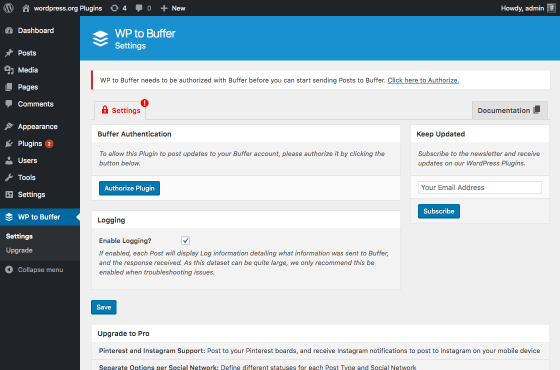
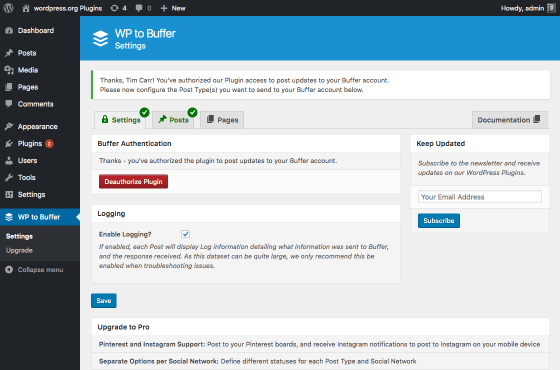
- Click “Authorize” to connect your Buffer account
- Configure your social media posting settings
Manual Installation
- Download the plugin ZIP file
- Log in to your WordPress admin dashboard
- Navigate to Plugins > Add New > Upload Plugin
- Choose the downloaded ZIP file and click “Install Now”
- Click “Activate Plugin”
- Go to WordPress to Buffer in your admin menu
- Click “Authorize” to connect your Buffer account
- Configure your social media posting settings
Yes! Buffer is not impacted by Twitter’s 2023 API changes. You can continue using this plugin to auto post to Twitter (now called X) without interruption. Buffer maintains its Twitter API access as an approved partner.
The free version supports:
* Facebook Pages
* Twitter (X)
* LinkedIn Pages and Profiles
* Threads
* Google Business Profile
* Mastodon
* Bluesky
* TikTok
Pro version adds Instagram and Pinterest support.
Yes. We’re an official Buffer Partner (since October 2020), which guarantees continued API access. The plugin is actively maintained and fully compatible with Buffer’s current API.
No. Buffer offers a free plan that works with this plugin. However, Buffer’s free plan has limitations on the number of scheduled posts and connected social profiles. You can upgrade your Buffer plan at any time for additional features.
Unlike plugins that post directly to social networks, we integrate with Buffer’s smart scheduling system. This provides several advantages:
Spam Prevention – Buffer spaces posts naturally to avoid social media penalties
Flexible Scheduling – Control when posts publish with Buffer’s schedule settings
API Reliability – Buffer handles all social network API complexities and updates
Cross-Platform Management – Manage all networks from Buffer’s unified dashboard
Yes. Use template tags to dynamically build messages:
- {title} – Post title
- {excerpt} – Post excerpt
- {content} – Post content
- {url} – Post URL
- {date} – Publication date
- {author} – Author name
- {tags} – Post tags as hashtags
- {categories} – Categories as hashtags
Pro version allows different templates per social network and per post type.
Posts are added to your Buffer queue, which publishes according to your Buffer schedule. You control the schedule within your Buffer dashboard.
Pro version adds options to post immediately, add to start/end of queue, or schedule for specific date/time.
Yes. The plugin is fully compatible with Gutenberg (WordPress block editor), Classic Editor, and most page builders including Elementor, Divi, and Beaver Builder.
Yes. WooCommerce products are custom post types that can be shared to social media.
Pro version includes special WooCommerce template tags to display product price, sale price, SKU, stock status, and other product data in social media messages.
Enable “Use Featured Image” in the plugin settings. The post’s featured image will automatically attach to the social media update.
Pro version provides advanced image options:
* Multiple images per post
* Images from Media Gallery
* Images from post content
* Advanced Custom Fields images
* Custom image selection
Yes. When a scheduled WordPress post publishes automatically, the plugin detects the publication and adds the content to your Buffer queue.
Pro version includes automatic evergreen content reposting. Configure how often to reshare old posts (days, weeks, or months), and the plugin automatically adds them back to your Buffer queue. Perfect for driving traffic to your best content.
You’ll see an error in the plugin log indicating the queue is full. Solutions:
- Upgrade your Buffer plan for larger queue capacity
- Manually publish or remove queued items from Buffer
- Adjust how frequently content is added to Buffer
Yes. Enable “Test Mode” in General Settings. This logs what would be sent to Buffer without actually creating posts. Perfect for testing your message templates and settings.
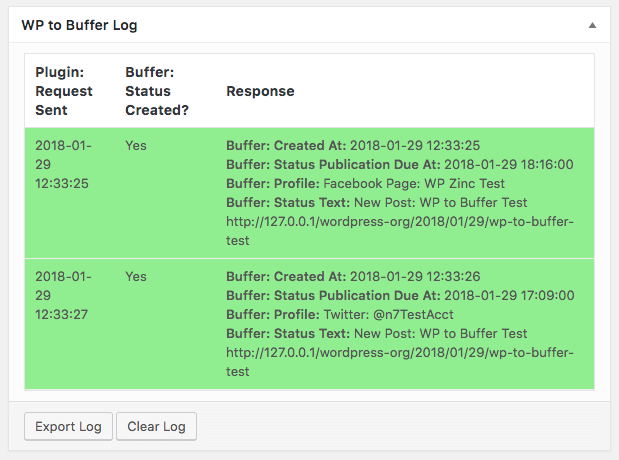
The plugin includes a logging system. View logs by:
- Go to WordPress to Buffer > Logs in your admin menu
- View logs for all posts or filter by specific posts
- See what was sent, when, and any errors encountered
Enable logging in WordPress to Buffer > Settings > Log Settings.
Yes. The plugin supports all public custom post types including:
* WooCommerce Products
* Events (The Events Calendar, Event Manager, Modern Events Calendar with Pro)
* Portfolio items
* Testimonials
* Any custom post type registered by themes or plugins
Pro version includes conditional publishing based on:
* Post author
* Categories and tags
* Custom field values
* Custom taxonomies
You can also override settings on individual posts to disable auto posting selectively.
No. The plugin uses WordPress’s standard HTTP API for communication with Buffer. For high-traffic sites, Pro version includes WP-Cron support to queue posts in the background without impacting page load times.
Free version support is available through the WordPress support forums.
Pro version includes priority email support with detailed documentation and setup assistance.
Visit our website to purchase Pro. After purchase, you’ll receive a license key and download link. Install Pro alongside Free (it will automatically deactivate Free), enter your license key, and import your existing settings.
Changelog
4.0.9 (2026-04-08)
- Removed: Settings: Products section
4.0.8 (2026-04-02)
- Added: Status: Display notice if settings do not save and WordPress options table charset and default collation are invalid
- Updated: Dashboard submodule
4.0.7 (2026-02-12)
- Updated: Dashboard submodule
4.0.6 (2025-11-17)
- Fix: Logs: PHP Warning: Undefined array key
0
4.0.5 (2025-10-17)
- Fix: Status: Text: Taxonomy: Retain non-Latin characters
4.0.4
- Fix: Remove unnecessary
migrate_settingsroutine
4.0.3.1 (2025-05-02)
- Added: Support for TikTok Images
4.0.2 (2025-04-23)
- Fix: Notice: Function
_load_textdomain_just_in_timewas called incorrectly in WordPress 6.8 and higher
4.0.1 (2025-03-27)
- Updated: Coding standards
4.0.0 (2025-03-06)
- Fix: Logs: Add nonce check on Bulk Actions and Clear Log functionality
3.9.9 (2025-02-27)
- Added: Optimized admin CSS for better performance
3.9.8 (2025-02-19)
- Added: Updated UI
3.9.7 (2025-01-27)
- Fix: Status: Tags: Character Limit, Sentence Limit, Word Limit: Ensure status is not blank when emojis are included in text
3.9.6 (2024-12-11)
- Fix: Bluesky: Include image
widthandheightproperties in API call to ensure image aspect ratio maintained
3.9.5 (2024-11-25)
- Fix: Notice: Function _load_textdomain_just_in_time was called incorrectly in WordPress 6.7 and higher
3.9.4 (2024-11-18)
- Fix: Log: Provide more verbose error when Buffer queue limit reached
- Fix: Log: Provide more verbose error when Featured Image failure
- Fix: Log: Improve formatting of verbose error messages
3.9.3 (2024-07-22)
- Added: Settings: Icons for Threads and Bluesky
- Added: Status: Text: Convert HTML links to plain text without link in brackets when using {excerpt}.
- Fix: Status: Strip inline styles when using {content}
3.9.2 (2024-05-31)
- Fix: Removed Facebook in Plugin name
3.9.1 (2023-10-09)
- Added: Don’t convert webp images, as these are now supported by Buffer
- Fix: Correctly detect and differentiate REST API requests from Gutenberg REST API requests, ensuring REST API requests trigger status(es)
3.9.0 (2023-09-07)
- Fix: Updated dashboard submodule
3.8.9 (2023-08-23)
- Fix: Updated WordPress Coding Standards to 3.0.0
3.8.8 (2023-08-03)
- Fix: PHP Deprecated notices in PHP 8.2
3.8.7 (2023-06-28)
- Added: Plugins: Link to settings screen
- Fix: Remove duplicate call to load_language_files()
3.8.6 (2023-05-16)
- Fix: Post: Log: Export Log: Check user can edit posts to permit export log functionality
3.8.5 (2023-05-04)
- Added: Status: Image: Use Feat. Image, not Linked to Post: Include alt text
3.8.4 (2023-01-26)
- Added: Settings: Mastodon Icon
- Added: Log: Log errors when image operations (resizing, converting, uploading to Media Library) fails
- Fix: Use get_temp_dir() instead of assumed /tmp folder for writing temporary images when resizing, converting or generating text to image
- Fix: Status: Clear profiles cache when deauthorizing and authorizing with a different Buffer account
- Fix: Improved WordPress Coding Standards
- Fix: Removed clipboard.js, as WordPress provides this library
3.8.3 (2022-10-25)
- Fix: Remove unused 1200×1200 registered image size
3.8.2 (2022-06-21)
- Fix: Status: Correctly sanitize and escape status textarea field value to prevent possible XSS
3.8.1 (2022-06-09)
- Added: Support for WordPress 6.0
3.8.0 (2022-05-12)
- Fix: Multisite: Activation: Conditionally load required hook depending on WordPress version
3.7.9 (2022-04-24)
- Fix: Upgrade link would incorrectly redirect to WordPress Admin dashboard
3.7.8 (2022-03-08)
- Fix: Call to undefined function _disable_block_editor_for_navigation_post_type when creating/updating Post in Gutenberg or via the REST API in WordPress 5.9+
- Fix: Scheduled Posts: Publish action would not run when using Gutenberg
- Fix: Customizer: Don’t load inline CSS for menu icon when loading WordPress Admin > Theme > Customize
3.7.7 (2022-03-03)
- Added: Status: Insert Tags: Insert tag at textarea caret position, with leading/trailing space as applicable
- Fix: Multisite: Activation: Use wp_insert_site hook when available in WordPress 5.1 and higher
3.7.6 (2021-12-22)
- Added: Support for images added to the Media Library by Plugins that don’t store images locally e.g. External Media without Import
- Added: Status: Tags: {date} uses WordPress Admin > Settings > Site Language and Date Format options. See Docs: https://www.wpzinc.com/documentation/wordpress-buffer-pro/status-text-tags/#available-tags
- Fix: Always include WordPress media functions when converting a WebP image to JPEG and storing it in the Media Library to avoid PHP errors
3.7.5 (2021-09-17)
- Fix: Logs: Correctly escape search and form action
3.7.4 (2021-09-16)
- Fix: PHP Deprecated notices in PHP 8
3.7.3 (2021-09-09)
- Added: Status: Text: Convert HTML links to plain text with link in brackets, instead of just displaying the unlinked text
- Added: Status: Text: Convert HTML lists to plain text with hyphens, instead of just displaying plain text
- Added: Status: Image: Support for .webp images when Use Feat. Image enabled and .webp image used as Featured Image. See Docs: https://www.wpzinc.com/documentation/wordpress-buffer-pro/featured-image-settings/#webp-image-support
- Added: Status: Remove HTML from shortcodes included in status text
- Fix: Status: Use OpenGraph Settings: Ensure that Post URL is sent to Buffer so that correct OpenGraph metadata is parsed by Buffer
3.7.2 (2021-07-15)
- Added: New Installations: Clearer workflow for connecting to Buffer and connecting social media profiles to Buffer account. See Docs: https://www.wpzinc.com/documentation/wordpress-buffer-pro/authentication-settings/
- Added: Status: Tags: Character Limit, Sentence Limit, Word Limit, Date and URL Encoding transformations. See Docs: https://www.wpzinc.com/documentation/wordpress-buffer-pro/status-text-tags/#applying-transformations
- Fix: Don’t minify Plugin Javascript if a third party minification Plugin is active, which would prevent status settings from sometimes saving
- Fix: Status: PowerPress: Prevent PowerPress from appending podcast URL to Content and Excerpt tags.
3.7.1 (2021-04-29)
- Added: Status: Text: Autocomplete suggestions for Tags. See Docs: https://www.wpzinc.com/documentation/wordpress-buffer-pro/status-text-tags/#autocomplete-suggestions
3.7.0 (2021-04-15)
- Added: Settings: Post Type: Show prompt if changes made but unsaved when navigating away from the status settings
- Fix: Log: Warning:
Edit the Postlink correctly loads the Edit Post screen
3.6.9 (2021-04-01)
- Added: Settings: Post Type: Immediately show/hide green tick on Post Type tab after clicking Save, to confirm whether the Post Type is configured to send status(es) to Buffer
- Fix: Settings: Post Type: Profile: Text order and links were incorrect when displaying a Timezone warning
3.6.8 (2021-03-25)
- Fix: Status: Image: No Image: Honor setting when a Post doesn’t have a Featured Image, but an SEO Plugin might define a default OpenGraph image
3.6.7 (2021-03-18)
- Added: Log: Enable wp-content/debug.log only when WP_DEBUG=true, WP_DEBUG_LOG=true, WP_DEBUG_DISPLAY=false and Plugin Logging enabled. See Docs: https://www.wpzinc.com/documentation/wordpress-buffer-pro/repost-settings/#testing
- Added: Localization support, with .pot file and translators comments
- Fix: Status: Retain paragraphs when using {content} tag
- Fix: Settings: Log Settings: Corrected link to Logs screen, and don’t link “Plugin Logs” text when logging not enabled
- Fix: Log: Don’t show Logs in Plugin Submenu if Logging is disabled
3.6.6 (2021-01-07)
- Added: Status: If a Featured Image is required, attempt to fetch it from the Post Content when a Featured Image has not been specified
- Added: Log: More relevant error message when a Post is sent to Instagram or Pinterest and is missing a Featured Image
3.6.5 (2020-12-21)
- Fix: Status: Include Featured Image with status when required
3.6.4 (2020-11-27)
- Added: Status: Image: No Image option. See Docs: https://www.wpzinc.com/documentation/wordpress-buffer-pro/featured-image-settings/#no-image
- Added: Display error notice if PHP cURL extension is not installed
- Added: Settings: Force Trailing Forwardslash: Updated description to clarify why this setting might need to be enabled i.e. for correct status image
- Fix: Settings: Force Trailing Forwardslash: Truly force a forwardslash if Permalink settings don’t add one.
3.6.3 (2020-09-03)
- Added: Logs: Screen Options: Choose table columns to display. See Docs: https://www.wpzinc.com/documentation/wordpress-buffer-pro/log-settings/#define-table-columns-to-display
- Added: Logs: Screen Options: Choose number of logs per page to display. See Docs: https://www.wpzinc.com/documentation/wordpress-buffer-pro/log-settings/#define-number-of-logs-per-page
- Fix: Status: Enabling/Disabling Publish or Update wouldn’t update green tick in tab UI in WordPress 5.5+
- Fix: Status: Don’t display “Post sucessfully added” admin notification if Test Mode is enabled
- Fix: Logs: Lighter success/error row background colors to make text easier to read
- Fix: Logs: When filtering by date, include results matching the date, not just results between the dates
3.6.2 (2020-08-20)
- Added: Settings: General Settings: Enable Test Mode. See Docs: https://www.wpzinc.com/documentation/wordpress-buffer-pro/general-settings/#enable-test-mode
- Added: Settings: Logs: Option to choose specific Log Levels. See Docs: https://www.wpzinc.com/documentation/wordpress-buffer-pro/log-settings/#log-level
- Added: Settings: Logs: Added Pending Log Level, for status(es) due to be sent when Use WP Cron enabled in Plugin’s Settings. See Docs: https://www.wpzinc.com/documentation/wordpress-buffer-pro/log-settings/#log-level
- Added: Logs: Confirmation when clicking Clear Log button
- Fix: Logs: Set Clear Log button to red
- Fix: Logs: Clear Log: Contextualized confirmation message based on whether the Log is being cleared at Post or Plugin level
- Fix: Authorization: Don’t enable Profiles that have a default flag, as the default option in Buffer’s Publish UI no longer exists
- Fix: Fatal error when detecting current admin screen on some Page Builders
- Fix: Some notifications weren’t dismissible
3.6.1
- Fix: Prevent fatal error when upgrading to Pro when Free is still active
3.6.0
- Added: Settings: General Settings: Use Proxy option. See Docs: https://www.wpzinc.com/documentation/wordpress-buffer-pro/general-settings/#use-proxy-
- Added: Settings: Log Settings: Log Level option. See Docs: https://www.wpzinc.com/documentation/wordpress-buffer-pro/log-settings/#log-level
- Fix: Log: Honor Enabled Setting, ensuring logging does not take place if not enabled
3.5.9
- Added: Status: Option to specify Taxonomy Tags
- Fix: Status: Taxonomy Tags: Remove non-alphanumeric characters to avoid breaking tag links
3.5.8
- Fix: CSS: Renamed option class to wpzinc-option to avoid CSS conflicts with third party Plugins
- Fix: Log: Unknown column ‘status’ in ‘where clause’ for query when clearing pending status log entries
- Fix: Elementor: Removed unused tooltip classes to prevent Menu and Element Icons from not displaying
3.5.7
- Fix: Load CRON class for Log Cleanup
3.5.6
- Added: Forms: Accessibility: Replaced Titles with elements that focus the given input element on click
- Added: General Settings: Option to force trailing forwardslash on {url}. See Docs: https://www.wpzinc.com/documentation/wordpress-buffer-pro/general-settings/#force-trailing-forwardslash
- Fix: Activation: Prevent DB character set / collation errors on table creation by using WordPress’ native get_charset_collate()
- Fix: Authentication: Handle Buffer revoking older, insecure Access Tokens by prompting for re-authentication instead of timing out
- Fix: Log: Call to undefined method WP_To_Social_Pro_Log::clear_pending_log()
- Fix: Log: Display Status Text’s breaklines
- Fix: Status: Don’t send status(es) to Buffer for non-public Post Types containing Post-level Status Settings copied from a public Post.
- Fix: Status: More verbose error message when a status is too long for the target social network
- Fix: Status: Use AJAX to save statuses to avoid settings not saving or changing when PHP’s max_input_vars is exceeded due to e.g. several profiles and statuses defined
- Fix: Status: Better method to remove double/triple spaces in text whilst retaining newlines/breaklines and unicode/accented characters
- Fix: Status: Strip query parameters (added by e.g. Jetpack) from images before sending status to prevent errors
- Fix: Settings: Removed disabled CSS class on tabs, as not used and avoids potential conflicts with third party Plugins
- Fix: Settings: Display confirmation notice that settings have saved
3.5.5
- Added: Log: Option to filter Logs by Request Sent Date. See Docs: https://www.wpzinc.com/documentation/wordpress-to-buffer-pro/log-settings/#filtering-logs
- Added: Log: Provide solutions to common issues
- Added: Log: New Log screen with filters and searching to view Status Logs across all Posts for all actions (Publish, Update, Repost, Bulk Publish). See Docs: https://www.wpzinc.com/documentation/wordpress-to-buffer-pro/logs/
- Added: Log: Improved messages explaining why a Post is not sent to Buffer
- Added: Log: Use separate database table for storing Plugin Status Logs instead of Post Meta, for performance
3.5.4
- Added: Status: Tags: Content and Excerpt Tag options with Word or Character Limits
- Added: Gutenberg: Better detection to check if Gutenberg is enabled
- Added: Gutenberg: Better detection to check if Post Content contains Gutenberg Block Markup
- Fix: Status: Removed loading of unused tags.js dependency for performance
- Fix: Status: Buffer API Error: HTTP Code 400. #1011 – You do not have permission to post to any of the profile_id’s provided, which would occur when a profile has been disconnected from Buffer
- Fix: Status: {content} would return blank on WordPress 5.1.x or older
3.5.3
- Added: Status: Textarea will automatically expand based on the length of the status text. Fixes issues for some iOS devices where textarea scrolling would not work
- Fix: Status: {content} and {excerpt} tags always return the full content / excerpt, which can then be limited using word / character limits
- Fix: Publish: Add checks to prevent duplicate statuses being sent when a Page Builder (Elementor) fires wp_update_post multiple times when publishing
- Fix: Status: Strip additional unwanted newlines produced by Gutenberg when using {content}
- Fix: Status: Convert
and
in Post Content to newlines when using {content} - Fix: Status: Trim Post Content when using {content}
3.5.2
- Added: Settings: Display notice if the Buffer account does not have any social media profiles attached to it
- Fix: Publish: Display errors and log if authentication fails, or profiles cannot be fetched
3.5.1
- Fix: Settings: Status: Display warning if a timezone in WordPress or Buffer is not a valid timezone, instead of throwing a fatal error
3.5.0
- Fix: Network Activation: Fatal error
3.4.9
- Added: Status: Secondary level tabbed UI for Profile actions (Publish, Update)
- Added: Settings: Post Type: Profile: Display warning with instructions when the WordPress Timezone and Buffer Profile Timezone do not match
- Added: Settings: Warning if the max_input_vars PHP setting might be too low for the Plugin’s settings to successfully be saved
- Fix: Status: Documentation Tab Link
3.4.8
- Added: New Installations: Automatically enable Publish and Update Statuses on Posts
- Added: Plugin Activation: Enable Logging by default
- Added: Authorize with Buffer: Once authorized, automatically enable scheduling to social media profiles marked as “share by default” on Buffer
- Added: Status: Option to limit the number of characters output on a Template Tag
- Fix: Log: Output dates according to WordPress’ installation date locale formatting
- Fix: Log: Split data into more table columns for easier reading
- Fix: Status: Don’t attempt publishing to any existing linked Google+ Accounts, as Google+ no longer exists.
- Fix: Publish: Improved performance when sending several statuses for a single Post.
- Fix: Publish: Display errors on Post Edit screen if status(es) failed to send to Buffer
3.4.7
- Fix: Menu Icon size preserved when Gravity Forms no conflict mode is set to on
- Fix: Display White Menu Icon unless the User is using WordPress’ Light Admin Color Scheme, in which case display the Dark Menu Icon
3.4.6
- Added: Profiles: Fetch Twitter Usernames from Twitter API instead of Buffer API (which no longer provides this information), as required by Buffer and Twitter’s Development Policies effective Feb. 19th 2019.
- Fix: Publish: Removed global $post reference, which caused some installations to fetch the wrong Post to send to Buffer
3.4.5
- Added: Status: Featured Image: Option to choose between using OpenGraph image (clicking image links to URL) and using image, not linked to URL. See Docs: https://www.wpzinc.com/documentation/wordpress-buffer-pro/featured-image-settings/
- Fix: Compatibility when using multiple WP Zinc Plugins
- Fix: Minified all CSS and JS for performance
3.4.4
- Fix: Multisite: Network Activation: Ensure activation routines automatically run on all existing sites
- Fix: Multisite: Network Activation: Ensure activation routines automatically run created on new sites created after Network Activation of Plugin
- Fix: Multisite: Site Activation: Ensure activation routines automatically run
3.4.3
- Added: Settings: Header UI enhancements
- Fix: PHP warning on count() when trying to fetch an excerpt for a Post
- Fix: Settings: Only load settings for the displayed screen, for better performance
- Fix: Settings: Save settings more efficiently, for better performance
3.4.2
- Fix: Settings: Changed Authentication Tab Icon
- Fix: Settings and Status Settings: UI Enhancements for mobile compatibility
- Fix: {title} would sometimes result in HTML encoded characters on Facebook
3.4.1
- Fix: Status: Apply WordPress default filters to Post Title, Excerpt and Content. Ensures third party Plugins e.g. qtranslate can process content and remove shortcodes
3.4.0
- Added: Gutenberg: Support for Custom Field Tags when Custom Fields / Meta are registered as a meta box outside of the Gutenberg editor.
- Added: REST API: Support for Custom Field Tags when Posts are created or updated via the REST API with Custom Field / Meta data.
3.3.9
- Added: Gutenberg Support
- Added: Settings and Status Settings: UI Enhancements to allow for a larger number of connected social media profiles
- Added: Status: Tag: Post ID option
- Fix: Removed unused datepicker dependency
- Fix: CRON Scheduled Posts: Don’t rely on wp_get_current_user() for User Access settings, as it’s not always available
- Added: Status: Support for Shortcode processing on Status Text
3.3.8
- Fix: Publish: Ensure Post has fully saved (including all Custom Fields / ACF / Yoast data etc) before sending status to Buffer
- Fix: Publish: Removed duplicate do_action() call on save_post to prevent some third party plugins running routines twice
- Fix: Log: Report ‘Plugin: Request Sent’ and ‘Created At’ datetime using WordPress configured date time zone.
- Fix: Profiles: Serve social media profile images over SSL to avoid mixed content warning messages
- Fix: Settings: Changed WordPress standard .nav-tab-active class to .wpzinc-nav-tab-active, to prevent third party plugins greedily trying to control our UI.
3.3.7
- Fix: Publish: Only consider publishing statuses to Buffer on supported Post Types (resolves issues with Advanced Custom Fields Free Version saving Fields).
3.3.6
- Fix: Call to member function get_error_message() on null when attempting to fetch Buffer User Profile.
3.3.5
- Added: Don’t initialize plugin if the Pro version is installed; prevents 500 internal server errors when users wrongly attempt to run both Free + Pro versions at the same time
3.3.4
- Added: Changed select2 to selectize to improve performance
- Fix: Code refactor to improve performance
- Fix: Removed jQuery Tooltipster, as it’s not used
- Fix: Moved Log Meta Box into own view file
- Fix: Log: Clear Log functionality
- Fix: Log: Sanitize Post ID for exporting and clearing Post logs
- Fix: Log: Store Profile Name in Log, so an undefined offset error isn’t thrown when showing a Log for a Profile that was previously enabled, but is now disabled
3.3.3
- Added: Filter for defining max timeout on Buffer API requests (default: 10 seconds)
- Added: Re-authorize option when Plugin’s access is revoked by a user via their buffer.com account
- Fix: Some cURL timeouts, despite statuses going through to Buffer
- Fix: Menu Icon size preserved when Gravity Forms no conflict mode is set to on
- Fix: Use ‘thumbnail’ WordPress image size for Buffer thumbnail, instead of ‘small’
3.3.2
- Added: Settings: Notice if Plugin is not authorized with Buffer
- Added: Settings: UI indicator for each Post Type denoting if enabled
- Added: Install: Enable on Post Publish by default for new installations
- Fix: Settings: DatePicker UI conflict with Advanced Custom Fields
3.3.1
- Added: Improved UI
- Fix: Define CURLOPT_RESOLVE on fallback PHP cURL requests, when wp_remote_get() / wp_remote_post() fails, to prevent DNS name lookup errors.
- Fix: Uncaught TypeError: Illegal constructor in admin-min.js for clipboard.js functionality
3.3.0
- Fix: Clarified Pinterest + Instagram support; added tested with WordPress 4.8.1 flag
3.2.9
- Fix: Set priority of 1 on wp_loaded for register_publish_hooks, to ensure Publish Hooks are fired on imports and some third party Plugins
3.2.8
- Added: Simplified authentication process with Buffer. No need to enter Access Tokens or Register Apps any more!
- Fix: Publish / Update: Fallback PHP cURL requests when wp_remote_get() / wp_remote_post() fail and WP_DEBUG enabled. May resolve ‘undefined’ errors on buffer.com and occasional timeouts.
- Fix: Posts: Log: Include Buffer API error code in output for easier debugging
3.2.7
- Fix: Always attach Featured Image to status if available (per 3.0.5 and below)
3.2.6
- Fix: Undefined variable errors
3.2.5
- Fix: Only display Review Helper for Super Admin and Admin
3.2.4
- Added: Review Helper to check if the user needs help
- Updated: Dashboard Submodule
3.2.3
- Fix: Removed “Shorten Twitter status to 140 characters” in 3.2.1; too many bugs. Users will need to revert back to ensuring their Twitter statuses are short to avoid Buffer API errors.
3.2.2
- Added: User-Agent to wp_remote_get and wp_remote_post on Buffer API calls, to potentially resolve timeout connection issues for one edge case.
- Fix: Conditionally load sortable and datepicker listeners to avoid JS errors
3.2.1
- Added: Version bump to match Pro version, using same core codebase and UI for basic features. Fixes several oustanding bugs.
- Added: Tooltips to Profile Tabs, to show the profile service and name
- Added: Contextual Documentation links in Tabs
- Fix: Shorten Twitter status to 140 characters, excluding first URL, to prevent 400 errors from Buffer when a Twitter status message is too long.
- Fix: Removed unused image library code
3.0.5
- Fix: Changed branding from WP Cube to WP Zinc
3.0.4
- Fix: Removed var_dump()
3.0.3
- Fix: Changed from publish_post to transition_post_status for better detection of Post/Page Publish/Update
- Fix: Removed sslverify = false on wp_remote_* requests
3.0.2
- Fix: Dashboard Feed URL
3.0.1
- Fix: Shorten links
3.0
- Fix: WordPress 4.2 compatibility
- Fix: Better security on form submissions
2.3.6
- Fix: … HTML character code appearing on Facebook + Google+ status updates when no excerpt defined on a Post
2.3.5
- Fix: Removed logging
2.3.4
- Fix: Double posts in Buffer when a scheduled Post goes live.
2.3.3
- Dropped html_entity_decode and apply_filters on Post Title – causing too many issues.
2.3.2
- Fix: Settings tabs not working / all settings panels displaying at once
- Added translation support and .pot file
2.3.1
- Fix: Issue with characters in the title being HTML encoded
2.3
- Fix: Uses get_the_title() when generating status updates for social networks
- Fix: Check that at least one social media profile has been chosen before trying to update via the API
2.2.1
- Fix: Prevent double posting when Posts with category filtering are enabled, and a Post is added via third party apps using the XML RPC API
- Fix: Pages can be posted to Buffer via XML RPC API
2.2
- Fix: Twitter Images attached to tweets
- Fix: Featured Images on Facebook
2.1.8
- Fix: Stops URLs and images being stripped from some updates to LinkedIn
2.1.7
- Fix: Removed unused addPublishActions function
2.1.6
- Fix: Dashboard widget
- Fix: Some Posts not adding to Buffer due to meta key check
2.1.5
- Fix: Don’t show success message when Post/Page not posted to Buffer
- Fix: Removed Post to Buffer meta box, which wasn’t honouring settings / causing double postings
- Settings: changed to tabbed interface
2.1.4
- Fix: Dashboard: PHP fatal error
2.1.3
- Fix: Posts with an image no longer show the image link, but instead show the Page / Post URL
2.1.2
- Fix: Donation Form
2.1.1
- Fix: Some assets missing from SVN checkin on 2.1
2.1
- Fix: ‘Creating default object from empty value’ warning
- Fix: {excerpt} tag working on Pages and Custom Post Types that do not have an Excerpt field
- Fix: Capabilities for add_menu_page
- Fix: Check for page $_GET variable
2.0.1
- Fix: Removed console.log messages
- Fix: Added Google+ icon for Buffer accounts linked to Google+ Pages
2.0
- Fix: admin_enqueue_scripts used to prevent 3.6+ JS errors
- Fix: Force older versions of WP to Buffer to upgrade to 2.x branch.
- Fix: Check for Buffer accounts before outputting settings (avoids invalid argument errors).
- Enhancement: Validation of access token to prevent several errors.
- Enhancement: Add callback URL value (not required, but avoids user confusion).
- Enhancement: Check the access token pasted into the settings field is potentially valid (avoids questions asking why the plugin doesn’t work,
because the user hasn’t carefully checked the access token).
1.1
- Enhancement: Removed spaces from categories in hashtags (thanks, Douglas!)
- Fix: “Error creating default object from empty value” message.
- Enhancement: Added Featured Image when posting to Buffer, if available.
- Fix: Simplified authentication process using Access Token. Fixes many common oAuth issues.
1.03
- Fix: Publish hooks now based on settings instead of registered post types, to ensure they hook early enough to work on custom post types.
1.02
- Fix: Scheduled Posts now post to Buffer on scheduled publication.
1.01
- SSL verification fix for Buffer API authentication.
1.0
- First release.
" width="120" height="120">
Available Versions
| Version | Download | Type |
|---|---|---|
| 4.0.9 | Download | Stable |
| 4.0.8 | Download | Stable |
| 4.0.7 | Download | Stable |
| 4.0.6 | Download | Stable |
| 4.0.5 | Download | Stable |
| 4.0.4 | Download | Stable |
| 4.0.3.1 | Download | Stable |
| 4.0.3 | Download | Stable |
| 4.0.2 | Download | Stable |
| 4.0.1 | Download | Stable |
| 4.0.0 | Download | Stable |
| 3.9.9 | Download | Stable |
| 3.9.8 | Download | Stable |
| 3.9.7 | Download | Stable |
| 3.9.6 | Download | Stable |
| 3.9.5 | Download | Stable |
| 3.9.4 | Download | Stable |
| 3.9.3 | Download | Stable |
| 3.9.2 | Download | Stable |
| 3.9.1 | Download | Stable |
| 3.9.0 | Download | Stable |
| 3.8.9 | Download | Stable |
| 3.8.8 | Download | Stable |
| 3.8.7 | Download | Stable |
| 3.8.6 | Download | Stable |
| 3.8.5 | Download | Stable |
| 3.8.4 | Download | Stable |
| 3.8.3 | Download | Stable |
| 3.8.2 | Download | Stable |
| 3.8.1 | Download | Stable |
| 3.8.0 | Download | Stable |
| 3.7.9 | Download | Stable |
| 3.7.8 | Download | Stable |
| 3.7.7 | Download | Stable |
| 3.7.6 | Download | Stable |
| 3.7.5 | Download | Stable |
| 3.7.4 | Download | Stable |
| 3.7.3 | Download | Stable |
| 3.7.2 | Download | Stable |
| 3.7.1 | Download | Stable |
| 3.7.0 | Download | Stable |
| 3.6.9 | Download | Stable |
| 3.6.8 | Download | Stable |
| 3.6.7 | Download | Stable |
| 3.6.5 | Download | Stable |
| 3.6.4 | Download | Stable |
| 3.6.3 | Download | Stable |
| 3.6.2 | Download | Stable |
| 3.6.1 | Download | Stable |
| 3.6.0 | Download | Stable |
| 3.5.9 | Download | Stable |
| 3.5.8 | Download | Stable |
| 3.5.7 | Download | Stable |
| 3.5.6 | Download | Stable |
| 3.5.5 | Download | Stable |
| 3.5.4 | Download | Stable |
| 3.5.3 | Download | Stable |
| 3.5.2 | Download | Stable |
| 3.5.1 | Download | Stable |
| 3.5.0 | Download | Stable |
| 3.4.9 | Download | Stable |
| 3.4.8 | Download | Stable |
| 3.4.7 | Download | Stable |
| 3.4.6 | Download | Stable |
| 3.4.5 | Download | Stable |
| 3.4.4 | Download | Stable |
| 3.4.3 | Download | Stable |
| 3.4.2 | Download | Stable |
| 3.4.1 | Download | Stable |
| 3.4.0 | Download | Stable |
| 3.3.8 | Download | Stable |
| 3.3.7 | Download | Stable |
| 3.3.5 | Download | Stable |
| 3.3.4 | Download | Stable |
| 3.3.3 | Download | Stable |
| 3.3.2 | Download | Stable |
| 3.3.1 | Download | Stable |
| 3.3.0 | Download | Stable |
| 3.2.9 | Download | Stable |
| 3.2.8 | Download | Stable |
| 3.2.7 | Download | Stable |
| 3.2.6 | Download | Stable |
| 3.2.5 | Download | Stable |
| 3.2.4 | Download | Stable |
| 3.2.3 | Download | Stable |
| 3.2.2 | Download | Stable |
| 3.2.1 | Download | Stable |
| 3.0.5 | Download | Stable |
| 3.0.4 | Download | Stable |
| 3.0.3 | Download | Stable |
| 3.0.2 | Download | Stable |
| 3.0.1 | Download | Stable |
| 3.0 | Download | Stable |
| 2.3.6 | Download | Stable |
| 2.3.5 | Download | Stable |
| 2.3.4 | Download | Stable |
| 2.3.3 | Download | Stable |
| 2.3.2 | Download | Stable |
| 2.0.1 | Download | Stable |
| 2.0 | Download | Stable |
| 1.03 | Download | Stable |
| 1.02 | Download | Stable |
| 1.1 | Download | Stable |
| 1.01 | Download | Stable |
| 1.0 | Download | Stable |
| Development | Download | Trunk |
