
Dynamic Team Manager – Team Member Showcase with grid, slider, table Elementor widget & shortcode
Active Installs
900+
Last Updated
October 5, 2026
First Released
January 26, 2014
Download History (Last one month)
Contributors
WP Team Manager helps you create professional team displays. With fully customizable layouts, responsive design, and Elementor integration, it lets you showcase team members in grid, list, slider, table or isotope pro formats. Highlight names, roles, bios, and social media links to create a team section. Suitable for businesses, nonprofits, sports teams, and creative agencies with performance and SEO optimization.
NEW: Dashboard Mode Presets – Switch between Corporate/Business mode and Sports League mode with one click! Field labels automatically adapt to your use case (e.g., “Job Title” becomes “Position”, “Location” becomes “Jersey Number”, “Departments” becomes “Teams”).
The plugin offers five layout presets and styling options. Create team member sections on your site. Whether you’re displaying corporate staff, sports rosters, or creative portfolios, the plugin adapts to your needs!
For displaying and managing the members of your staff, team, sports roster, or workforce.
👉 Live Demo | Documentation | Support | Go Pro 👈
🏆 How To install Dynamic Team Manager:
Why Dynamic Team Manager is Important?
Your visitors want to know more about the people who make up your company or organization because it matters. Showcase your team members to build trust and credibility between your business and your customers. Enhance your team members page design with Dynamic Team Manager.
We believe that you shouldn’t need to be a programmer or hire a developer to create a beautiful team members page on your WordPress site. That’s why we built the ultimate WordPress Team Manager plugin that’s both EASY and POWERFUL.
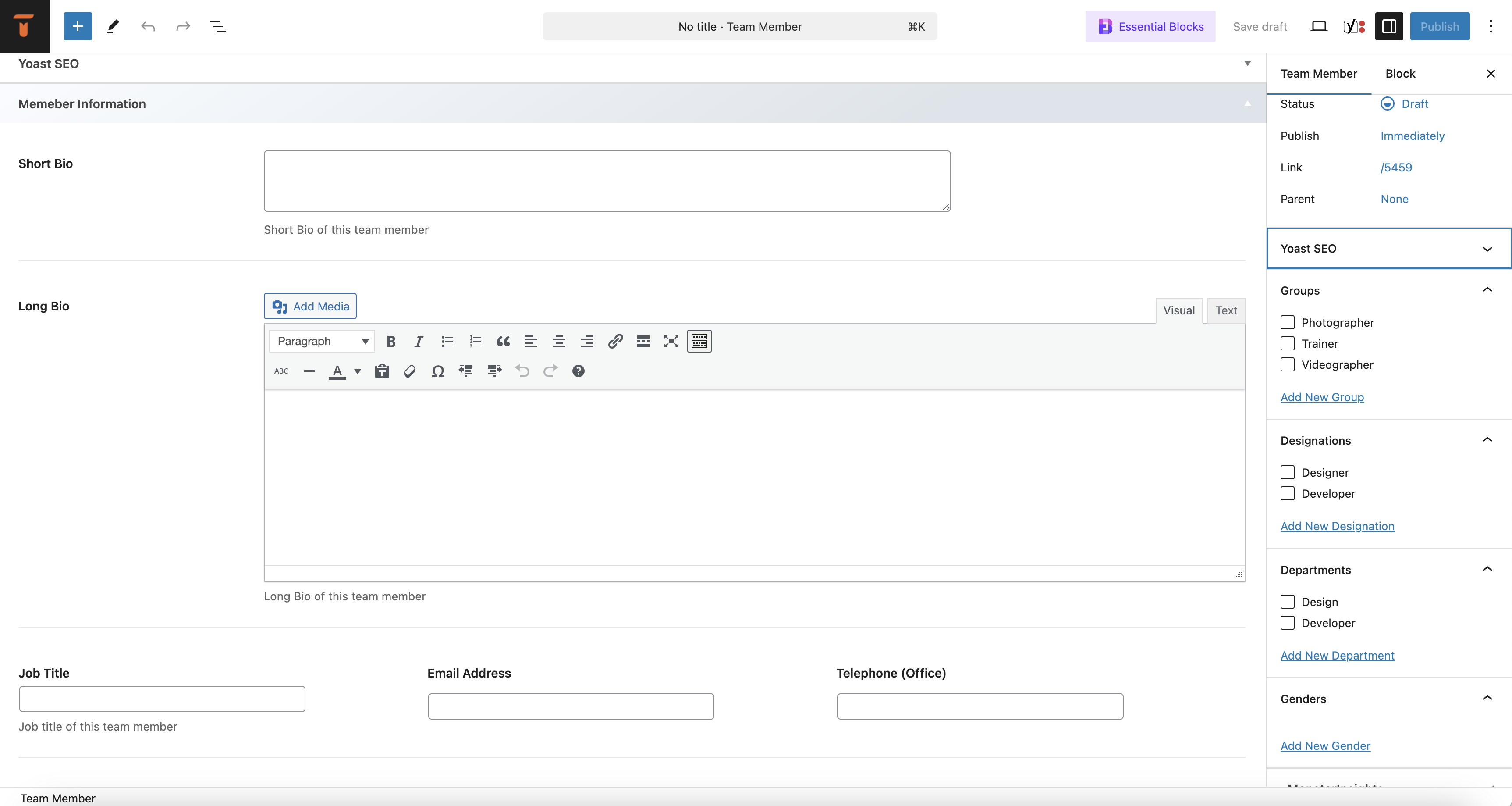
🏆 How To add new team Member:
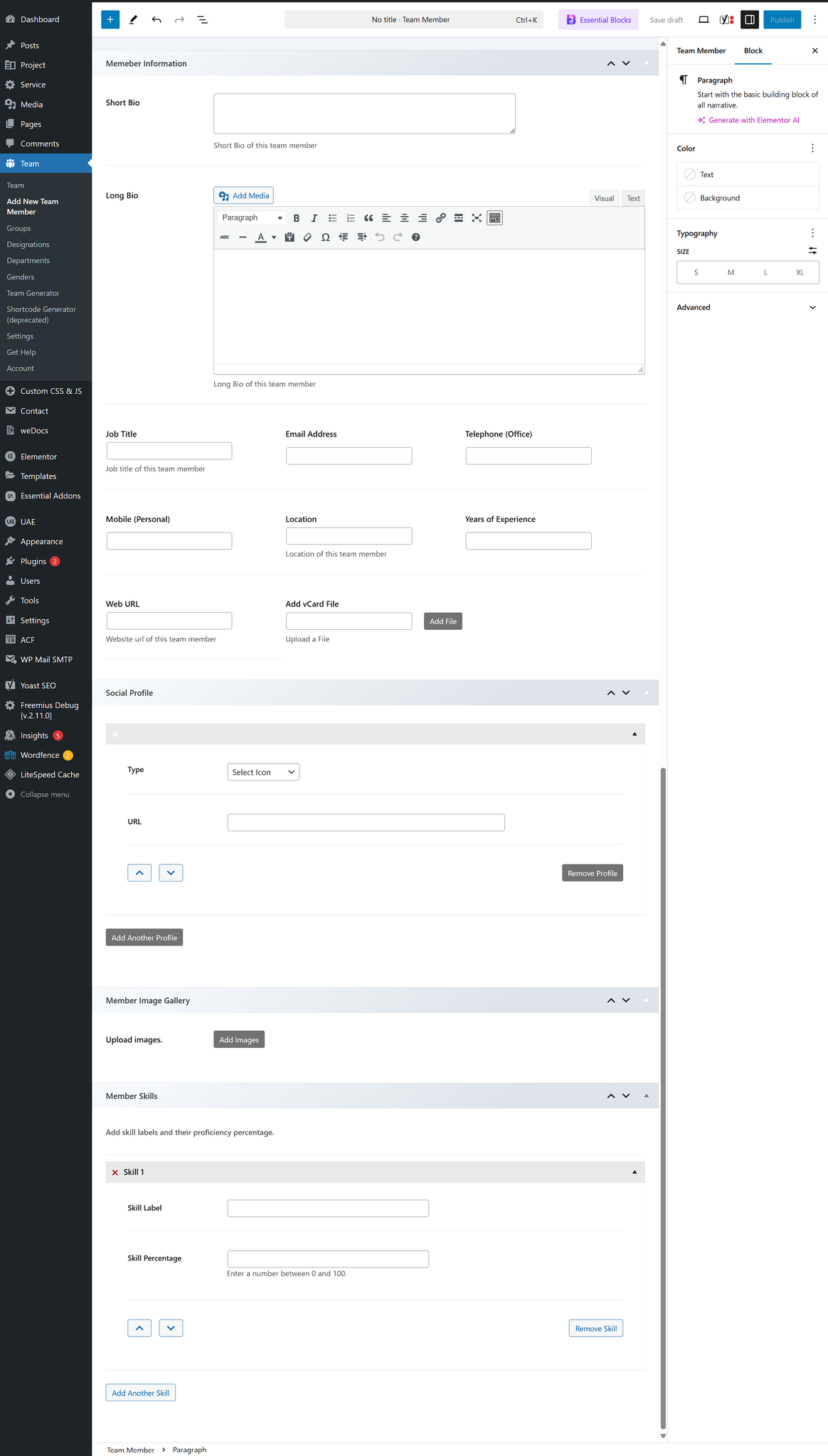
🏆 Fields available for input:
- Team/Member name – Member Name
- Short Bio – A brief description of the team member.
- Long Bio – A detailed description of the team member with a rich text editor.
- Job Title – The official role/designation of the team member.
- Email Address – The professional email contact.
- Telephone (Office) – Office contact number for business inquiries.
- Mobile (Personal) – Personal mobile number for direct contact.
- Location – The geographical location or office branch of the team member.
- Years of Experience – Number of years the team member has been in their profession.
- Social Profile – Show all popular social profile links.
- Member Skill – Show member skills with Skill Name and Percentage.
- Member gallery – Display additional images of a team member.
You can easily show/hide and customize every field.
🏆 Available Shortcode Builder Layouts:
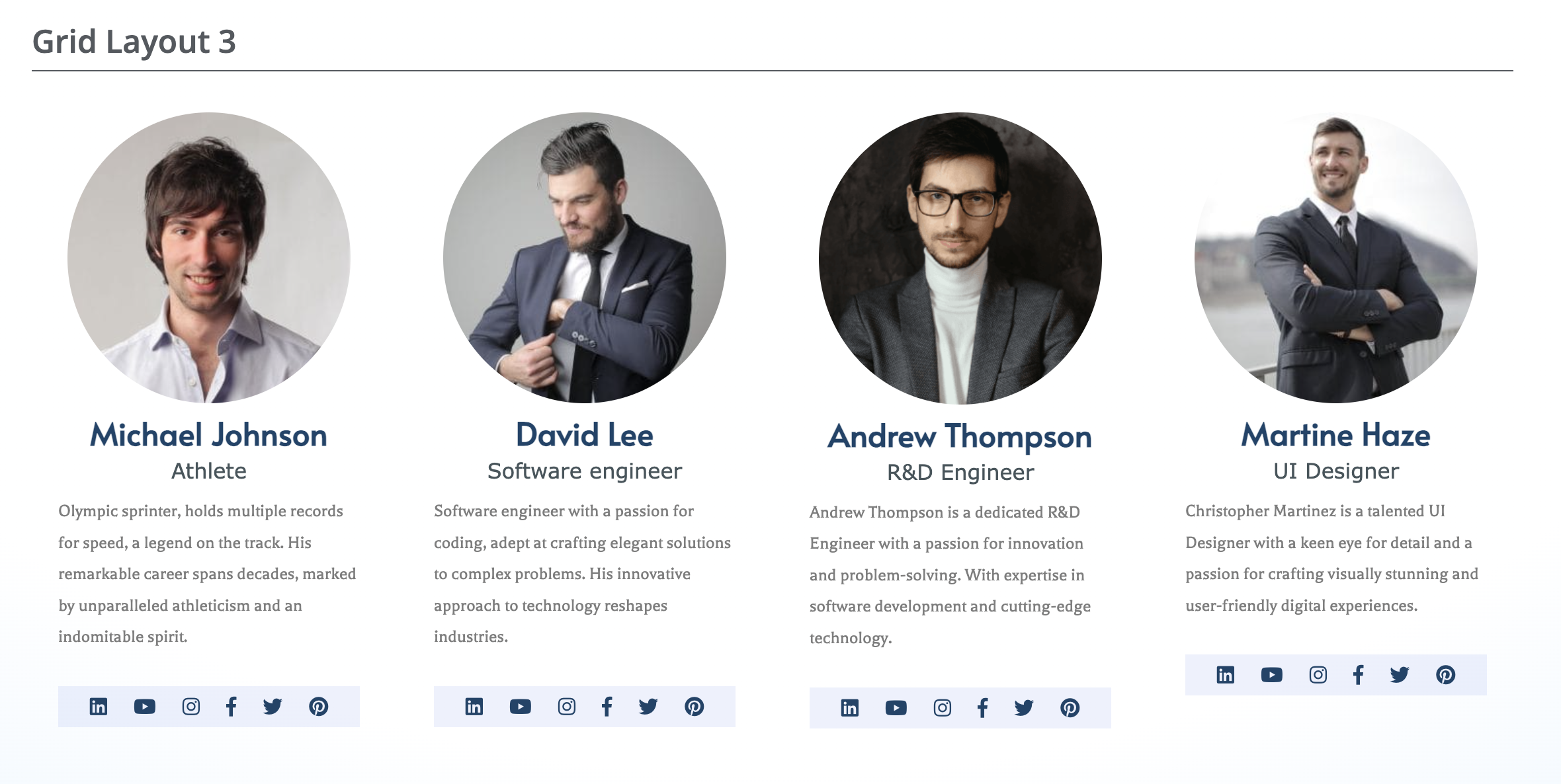
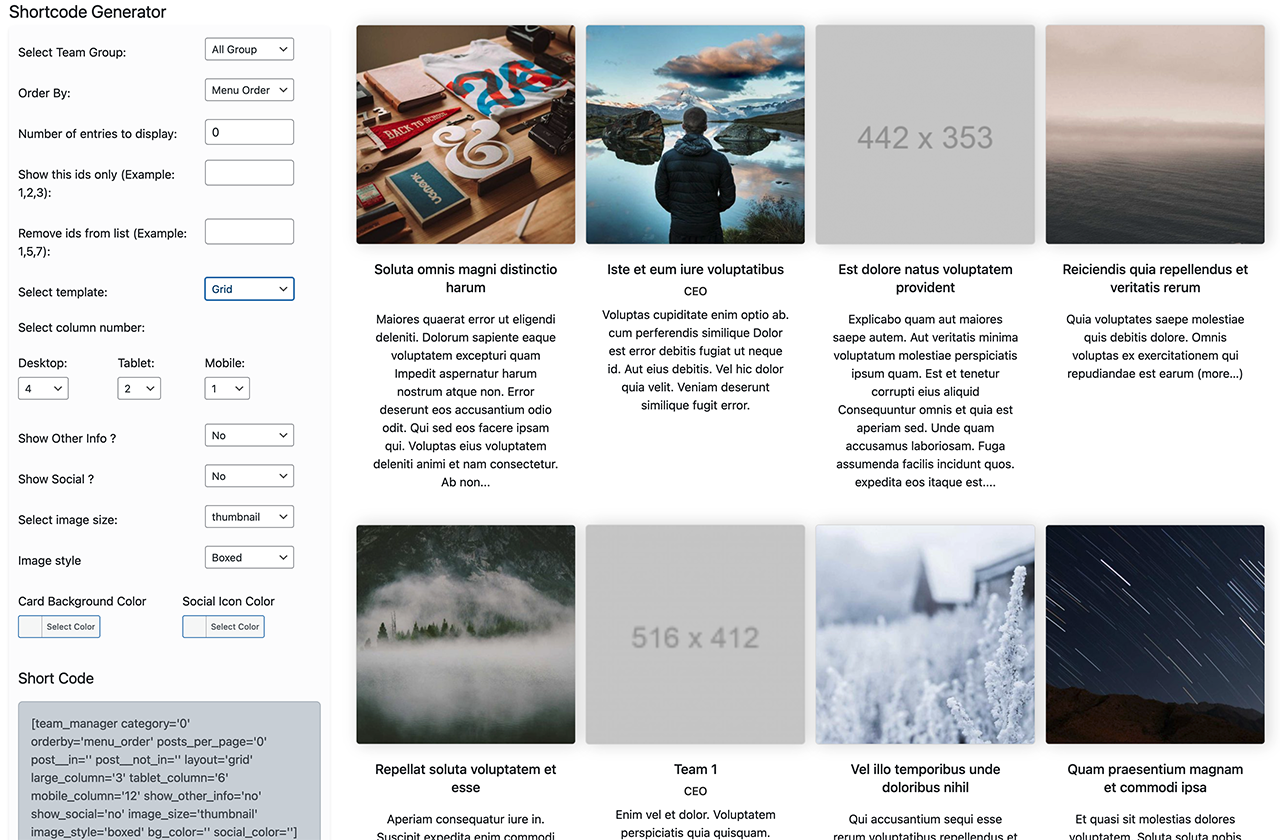
👉 Grid Layouts: The WordPress Team plugin’s grid layout arranges your posts in a responsive and visually appealing grid format, making it easy for visitors to browse through multiple posts at once while maintaining a clean and organized presentation on your website.
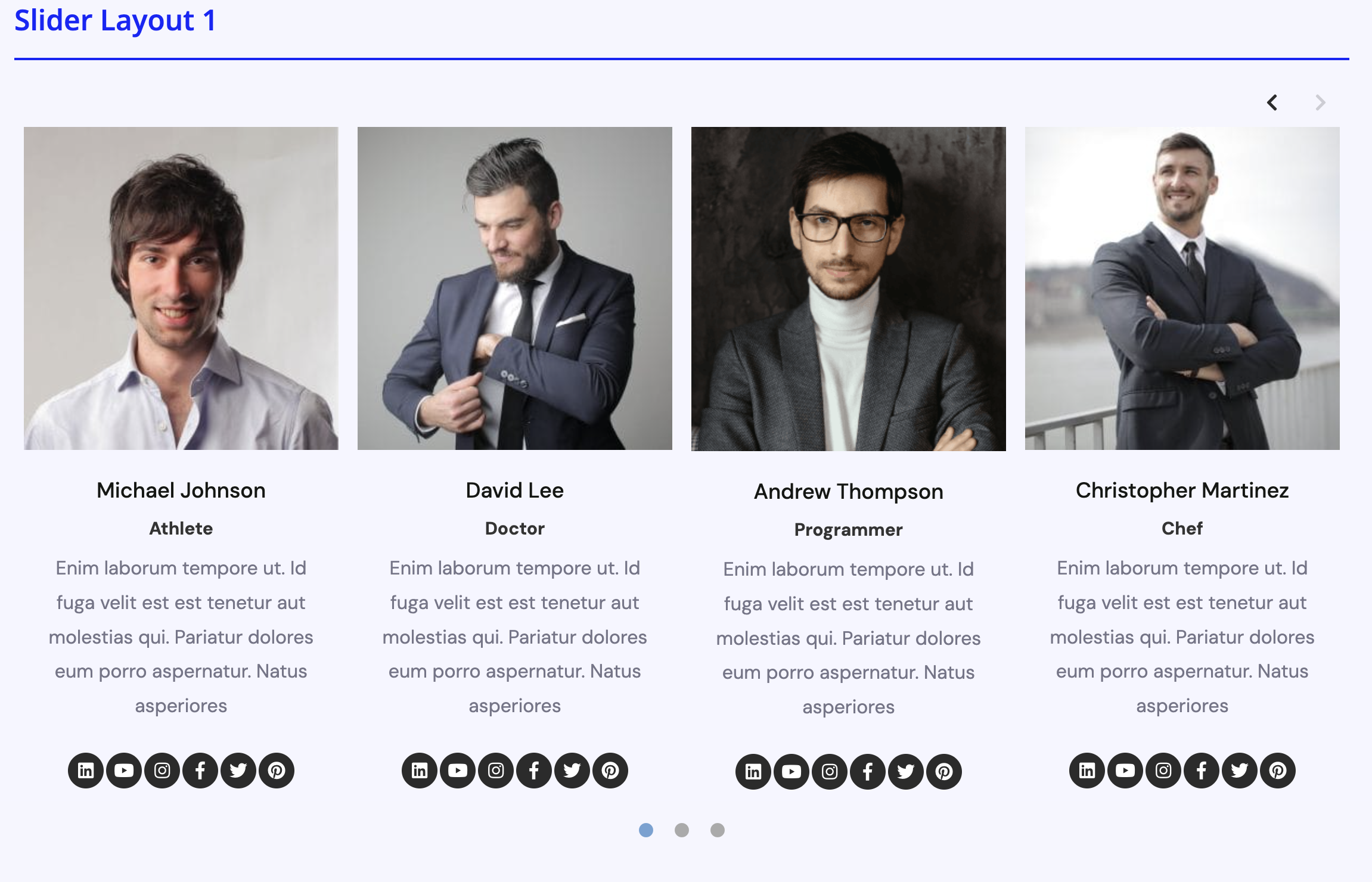
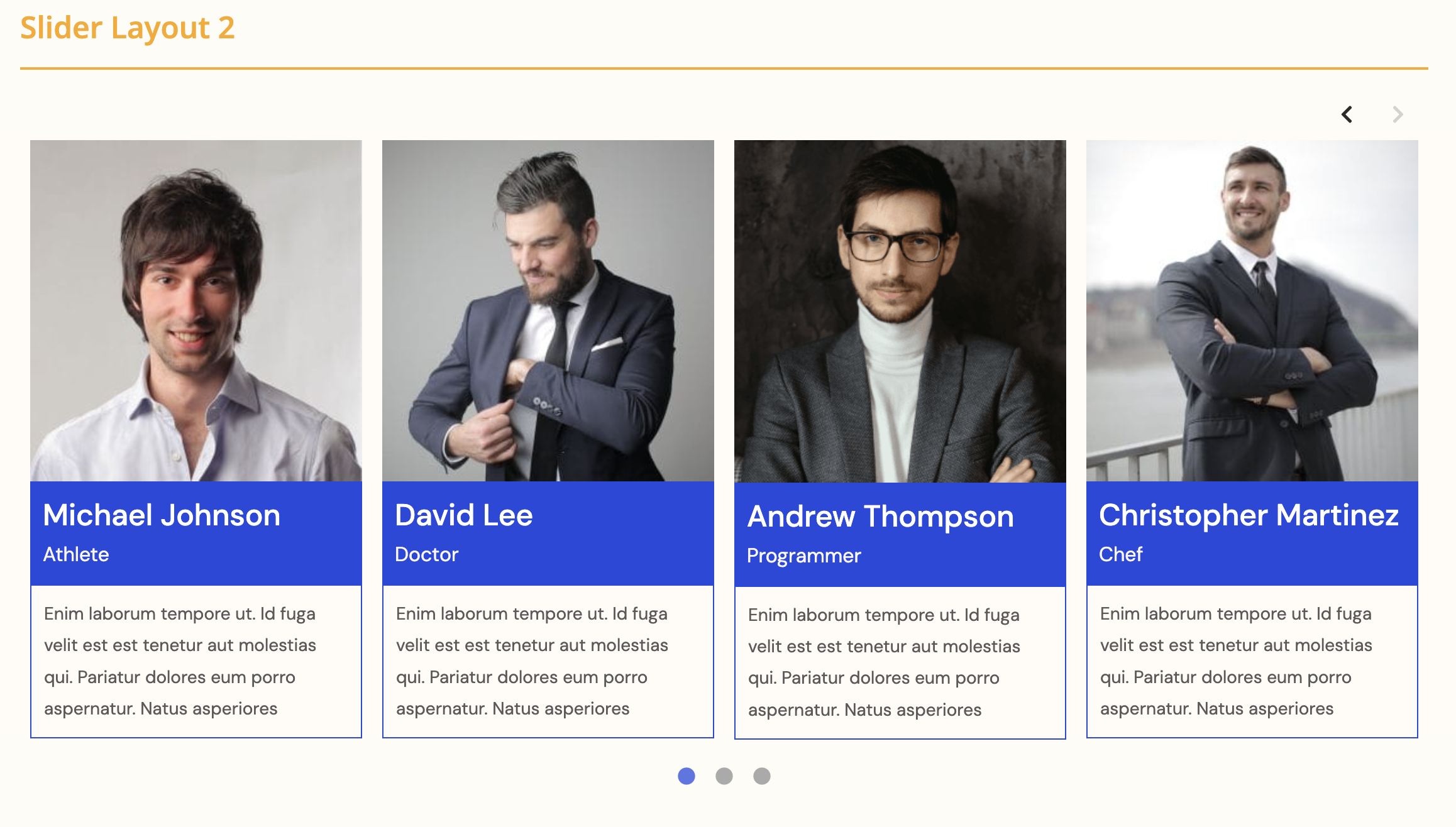
👉 Slider Layout: The plugin provides a list layout option that displays your posts in a clean and structured format, allowing readers to easily scan through titles, excerpts, and meta information in a familiar and user-friendly layout.
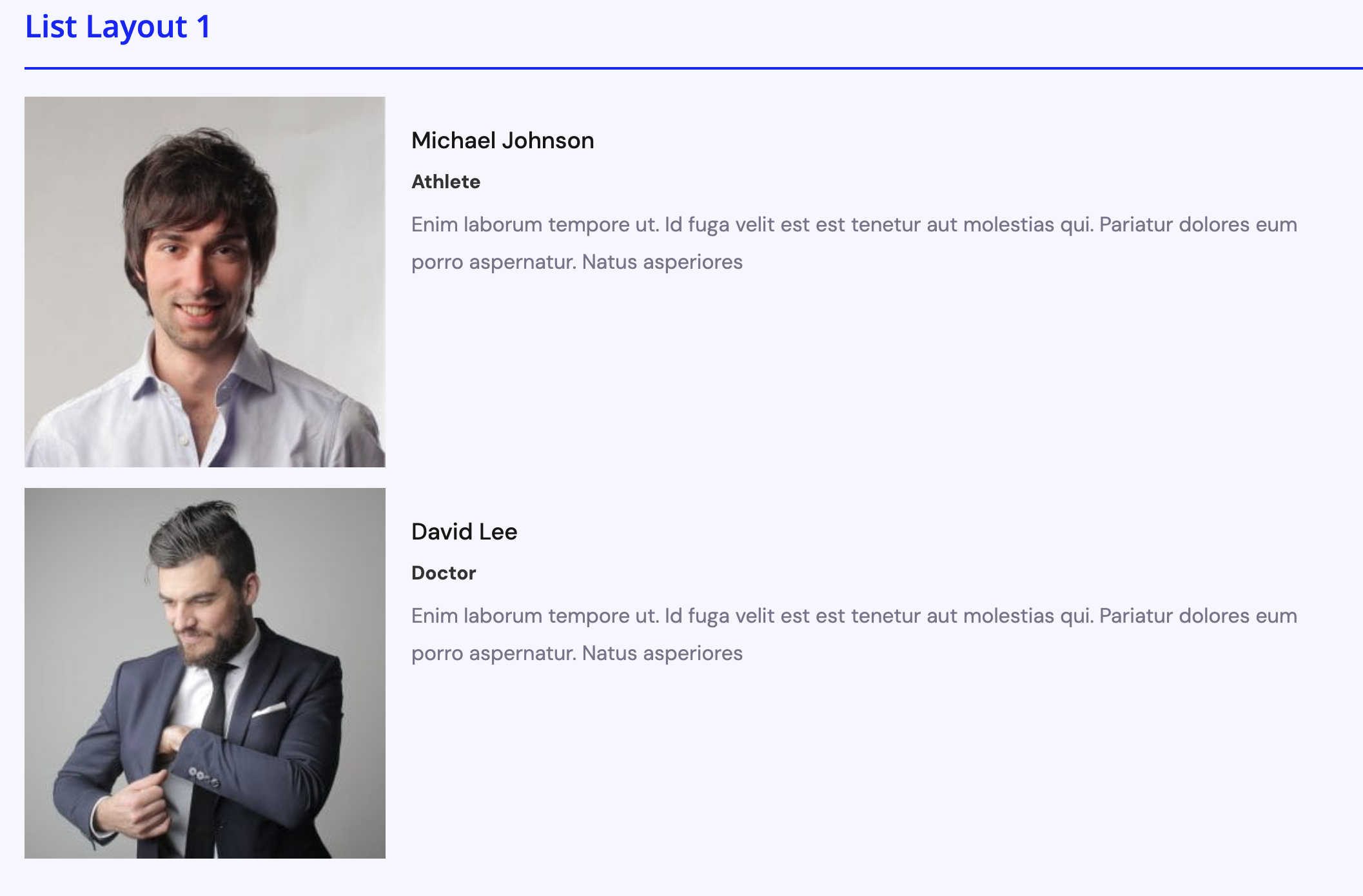
👉 List Layouts: For an engaging layout, the plugin incorporates a slider feature that displays featured posts or categories in a rotating carousel format, allowing visitors to easily navigate through highlighted content.
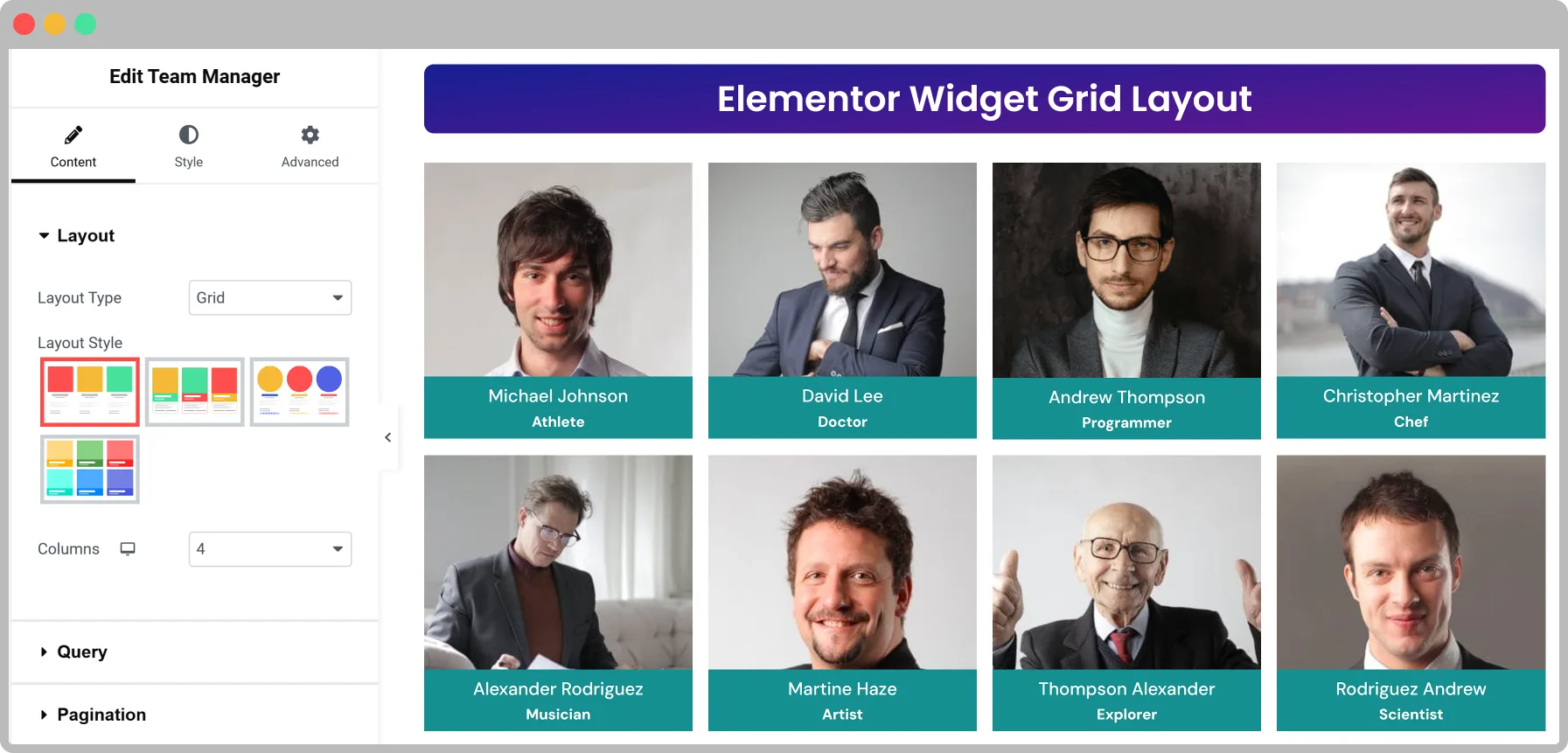
🏆 Elementor Widget
You can display team members with Elementor widget with customization options.
🏆 Elementor Table layout
With Table layout display team members’ details, such as names, photos, designations, and social media links, in an organized layout.
**🏆 Elementor Isotope layout (Pro) **
The Isotope layout in the WP Team Manager plugin offers a dynamic, filterable team showcase for WordPress. Ideal for large teams, it allows visitors to sort members based on categories or roles. Fully responsive and optimized for SEO, this interactive layout enhances user experience with smooth filtering animations and custom styling options.
🏆 League Manager
You can display League Manager with customization options.
🏆 Features of The Team Plugin
- NEW: Dashboard Mode Presets – Switch between Corporate and Sports League modes instantly.
- Create unlimited teams, members, or player rosters.
- 5 Unique layouts (Carousel, Grid, Table, list and Isotope).
- Fully responsive and mobile-ready.
- Shortcode Generator.
- Multiple team shortcodes on one page.
- Clean design and fast performance.
- Simple and intuitive settings panel-no coding required!
- Select Team Group
- Control columns in different devices.
- Control total members to display.
- Display random order & order by members.
- Display show this ids only (Example:1, 2, 3)
- Display remove ids from list (Example:4, 5, 6)
- Margin or space between members.
- Member border, radius, and background color.
- Show/hide every element of a member.
- Social icon position, margin, and color.
- Choose the image size from the available crop sizes.
- Photo/Image box background color.
- Image hover effect.
- Customizable options.
- Touch enabled carousels.
- Fully translatable
- Multisite supported.
- Accessibility for disabled people.
- Custom CSS options.
- Cross-browser supported.
- Compatible with any theme.
- AJAX-powered live search and taxonomy filtering (Pro).
- Dynamic pagination with compact layout and ellipsis.
- Multi-widget support with scoped search/filter per instance.
- WPML-compatible translatable labels and settings.
- Caching support for large datasets with automatic clearing on post updates.
- New developer action hooks for customizing output and extending templates.
- And many more options.
👉 Carousel controls:
- Enable AutoPlay
- Slide scrolling speed
- Slide to scroll
- Pause on hover
- Show/hide navigation
- Navigation color
- Show/hide pagination bullets
- Pagination color and active color
- Auto height etc.
👉 Page Builders Ready
- Gutenberg
- Elementor
👉 Free AI & Automation Features:
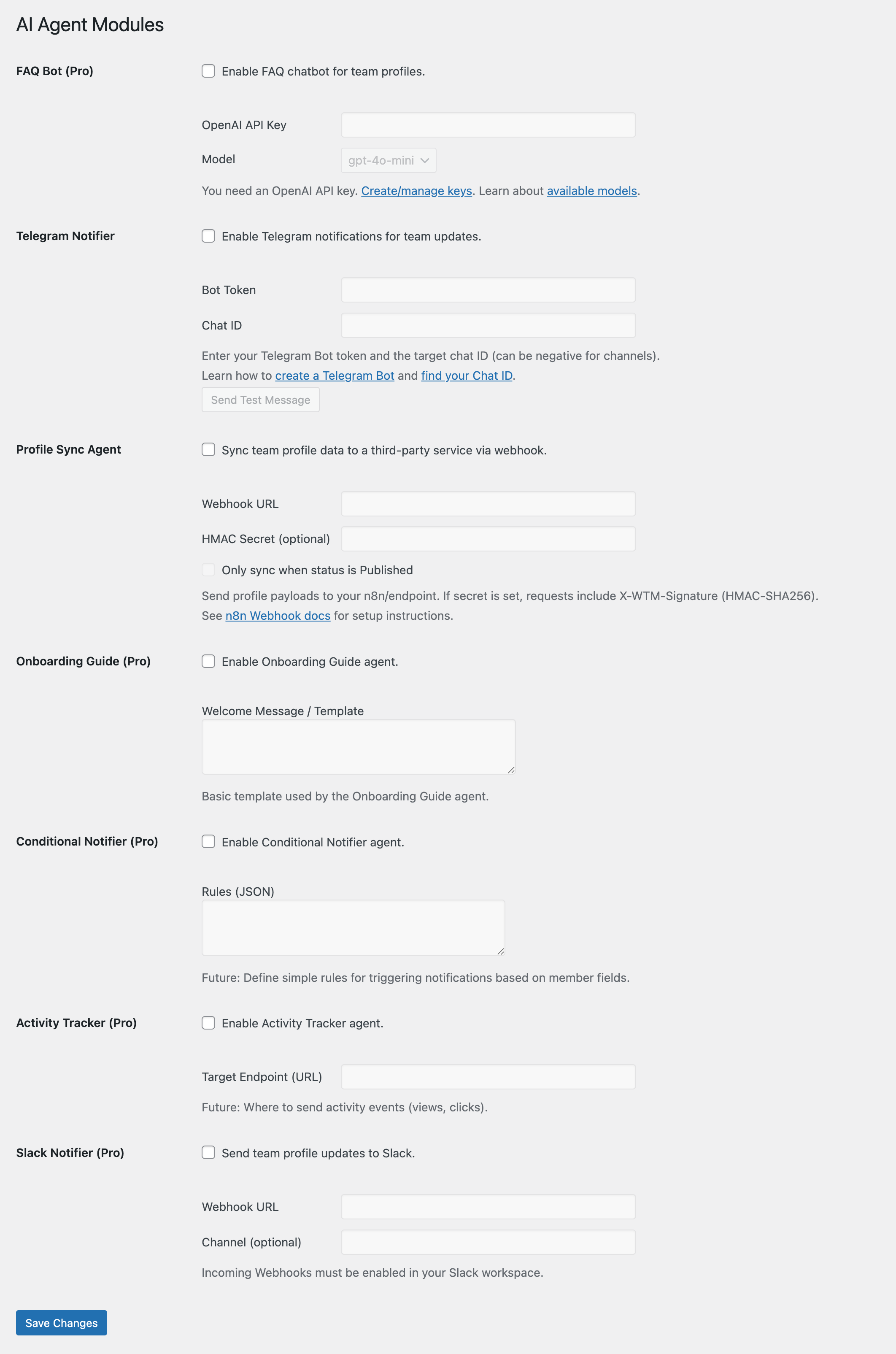
* Telegram Notifier – Notify your group/channel when team members are added or updated.
* Profile Sync Agent – Send updates to Google Sheets/Airtable via n8n automation.
👉 AI & Automation Pro Features:
* Slack Agent – Send updates directly to Slack channels.
* FAQ Bot – AI assistant to answer questions about your team.
* Onboarding Guide – Auto-generate an onboarding page for each new hire.
- Upload
wp-team-managerto the/wp-content/plugins/directory - Activate the plugin through the ‘Plugins’ menu in WordPress
- A new Team tab will be available in the admin section



Dashboard Mode lets you switch the plugin’s field labels to match your use case. Choose Corporate/Business (default) for companies and organizations, or Sports League for sports teams and athletic rosters. When you switch modes, labels automatically change (e.g., “Job Title” becomes “Position”, “Location” becomes “Jersey Number”). Your data remains unchanged – it’s just a display change.
Go to Team Manager Settings General and find the Dashboard Mode dropdown. Select “Sports League” and save. All field labels throughout the admin and frontend will update instantly.
No. Switching between Corporate and Sports modes only changes the display labels. Your actual data (stored in the database) remains completely unchanged. You can switch back and forth without losing any information.
Yes! Developers can use the wp_team_manager_dashboard_presets filter to customize labels or add entirely new modes (e.g., Medical, Education, Creative Portfolio).
Yes, this plugin works with any theme. Contact our support if you face any issues.
Yes, we have added slider layout options.
Yes, it supports social profile integration.
You can create shortcodes using the shortcode generator under the Team menu.
You can disable it in the team manager settings page.
You can see the ID in the ID column on the team members list.
Team manager lists all available image sizes. To change default image sizes, go to Settings > Media.
Yes! WP Team Manager works perfectly with the Elementor Team Member Widget, allowing you to easily design and customize your team showcase using Elementor’s drag-and-drop interface.
Go to Team Manager AI Agents Telegram Notifier.
Enter your Telegram Bot Token and Chat ID. You can create a bot using @BotFather and get the chat ID from @userinfobot. Once saved, new or updated team members will trigger a message to your Telegram group or channel.
Use the Profile Sync Agent (free).
1. Sign up for a free n8n account or install it on your server.
2. Create a webhook workflow in n8n that sends data to Google Sheets or Airtable.
3. Paste the webhook URL into the Profile Sync Agent settings.
Every time a team member is added or updated, the data will be sent to your automation workflow.
No. Only AI-powered modules like the FAQ Bot require an OpenAI (or compatible) API key.
Modules such as the Telegram Notifier or Profile Sync Agent don’t require AI credits.
Pro unlocks:
– Slack Agent (send updates to Slack channels)
– AI FAQ Bot
– Onboarding Guide
– Advanced layouts and customization
Visit WP Team Manager Pro to upgrade.
- Enable debug logging in Team Manager Settings Advanced Enable Debug Log.
- Check the generated log file for errors (path shown in settings).
- Make sure your API keys and webhook URLs are correct.
Yes. WP Team Manager works with Gutenberg, Elementor, Beaver Builder, and other major page builders. You can use the shortcode generator to insert layouts anywhere.
Yes. AI Agents are modular. Simply leave their settings blank and they won’t run.
Please email us at info@dynamicweblab.com or Submit a request
Changelog
2.6.8
- Security: Further Broken Access Control hardening (CVE-2025-58222) — password-protected team members no longer expose their details to visitors who have not entered the password (team listings, AJAX search, load more, popup and single member page)
- Security: Team Generator shortcode and its AJAX endpoint now only load Team Generator posts the visitor is allowed to view, and no longer output protected post meta
- Security: AI FAQ assistant only answers about published, non-password-protected team members
- Security: Search meta filters limited to public member fields; removed request data echoed in an error response; added direct-access guards to plugin files
- Fix: Elementor Isotope widget showed no members when only “Exclude” taxonomy terms were set
- Fix: Elementor Isotope widget now keeps Include/Exclude member IDs and the “By Keyword” setting when filtering, searching, paginating or loading more
- Fix: Elementor Isotope widget keeps the selected “Other Info” elements after AJAX filtering
- Fix: Elementor Team widget AJAX search now respects the taxonomy terms, Include/Exclude IDs, date range, order and limit chosen in the Query settings
- Fix: Elementor Team widget AJAX search no longer serves cached results from a different widget
- Fix: Elementor Isotope widget AJAX search, filtering and load more now keep excluded taxonomy terms out of results
- Fix: Shortcode AJAX search and “All” filter now respect the taxonomy terms selected in the shortcode settings
- Fix: Shortcode filter buttons keep excluded taxonomy terms out of results
- Fix: Team Generator “Include Terms (IDs)” and “Exclude Terms (IDs)” now work for any team taxonomy (groups, departments, designations, genders), not only the filter taxonomy
- Fix: Team Generator “Exclude Terms (IDs)” is always applied, including when “Taxonomy Relation” is OR
- Fix: Team Generator filter buttons no longer show excluded terms
- Fix: Team Generator Load More / infinite scroll now uses the same default sort order as the first page (no repeated or missing members)
- Fix: Team Generator with “Total Members” set to -1 no longer repeats members on Load More, and search returns all matches
- Fix: Team Generator hides the Load More button when there is nothing more to load
- Fix: Team Generator “Random Order” keeps the same order across Load More pages
- Fix: Team Generator search now narrows the “Keyword” setting instead of replacing it
- Fix: Team Generator “Total Members” set to 0 now falls back to the site default instead of showing one member
- Fix: Team Generator infinite scroll resumes after filtering or searching back to more results
- Tweak: Removed debug console logging from Team Generator AJAX pagination
- Fix: Elementor Team widget “Taxonomies Relation” (AND/OR) setting now applies to the query and AJAX search
- Fix: Elementor Isotope widget “All” filter, search and load more no longer hide members that have no taxonomy term
- Fix: Elementor Isotope widget with “Show All” off now shows only the first filter’s members on load, matching the active button
- Fix: Elementor Isotope widget pagination works on a static front page
- Fix: Elementor Isotope widget no longer adds the current page’s post classes to its wrappers
- Fix: Removed the Elementor Isotope widget “Taxonomies Relation” control, which had no effect
- Tweak: Elementor Isotope widget uses register_controls() instead of the deprecated _register_controls()
- Tweak: Removed a duplicate, unused Elementor search AJAX handler
- Security: Properly escape the Elementor Isotope widget settings attribute (apostrophes in text settings broke filters and allowed attribute injection)
- Tweak: Removed debug HTML comments from Elementor Isotope widget output
2.6.7
- Security: Fixed CVE-2025-58222 Broken Access Control — added missing capability checks across AJAX handlers (dashboard, onboarding, search settings, analytics)
- Security: FAQ agent restricted to authenticated users with rate limiting; popup endpoint now returns published team members only
- Security: All public team queries now explicitly enforce post_status=publish to prevent private/draft data leakage
- Security: Fixed broken color sanitization in shortcode theming (CR-01) — invalid CSS color values are now rejected instead of passed through
- Security: Removed internal query arguments from AJAX JSON responses to prevent information disclosure
- Security: Added custom capabilities for team_manager post type (admin/editor only) instead of inheriting generic post capabilities
- Fix: Team member popups work again for logged-out visitors
- Enhancement: Per-user search presets stored in user meta instead of global options
2.6.6
- New: Added Grid Style 6 layout for team member display
- New: Added Slider Style 7 layout for team member display
- New: Added Isotope Style 4 layout for Elementor widget
- Enhancement: Enabled new styles in shortcode pagination and Elementor widget options
- Enhancement: Added SVG preview icons for new layout styles
- Tweak: Updated CSS for read-more links and title styling in new layouts
2.6.5
- Security: Fixed missing authorization (Broken Access Control) in AJAX handlers — added capability checks to dashboard quick actions, onboarding, search settings, and preset endpoints, resolving CVE-2025-58222
- Security: FAQ agent no longer available to unauthenticated visitors and is rate-limited to prevent OpenAI API key abuse
- Security: Public search endpoints rate-limited; search analytics recording capped to prevent option table abuse
- Security: Escaped and sanitized output across admin, onboarding, migration, popup, and shortcode areas to prevent stored XSS
- Security: Short bio now sanitized with wp_kses_post in all free and Pro layout templates
- Security: Enhanced Telegram notifier output escaping for unauthorized message and button attributes
- Security: Preset options and compatibility notice output escaped with esc_html to prevent injection
- Enhancement: Updated Freemius SDK to version 2.13.4 with improved API timeout handling and error resilience
- Enhancement: Improved plugin updater logic to avoid unnecessary rescheduling
- Tweak: Commented out unused “Style 6” grid option from the Team Elementor widget
2.6.4
- New: WordPress 7.1 compatibility
- Enhancement: Team Manager block now registers with Block API version 3, ensuring compatibility with the enforced iframed block editor in WordPress 7.1
- Tweak: Tested up to WordPress 7.1
2.6.3
- Security: Onboarding agent message now rendered with wp_kses_post for safe HTML output
- Security: Search results output sanitized in Enhanced Search (Pro)
- Security: “No results” message output escaped to prevent XSS (Pro)
2.6.2
- New: Chat widget revamped with modern bot theme, enhanced UI elements, and improved functionality across admin pages
- New: Isotope filtering with taxonomy class support on team member layout elements
- New: Filter Taxonomy option added to shortcode pagination settings in TeamMetabox
- New: Live search functionality with AJAX support and pagination improvements
- Enhancement: AJAX search response now includes total pages and current page information for better UX
- Enhancement: AJAX search functionality enhanced with pagination, keyword handling, and dynamic widget settings
- Enhancement: AJAX search condition and info notice added for pagination options in Team Elementor widget
- Enhancement: Table layout handling improved in AJAX pagination with better transition duration for team member info
- Enhancement: Isotope re-initialization updated to skip style-3 table layout
- Enhancement: Unnecessary HTML wrapper removed from search results rendering
- Enhancement: Load More and search pagination handling improved for smoother user experience
- Enhancement: Optimized Isotope reinitialization and item insertion for Load More functionality
- Enhancement: Taxonomy filter handling improved in LoadMore and Shortcodes classes
- Enhancement: Caching improvements in taxonomy terms retrieval function
- Enhancement: Team member grid arrow center-aligned in style 2
- Fix: Taxonomy query now respects the selected Filter Taxonomy setting instead of always filtering by Team Groups
- Fix: Frontend filter buttons now only show terms selected in the shortcode builder, not all taxonomy terms
- Fix: AJAX Load More handler taxonomy filter now matches the selected Filter Taxonomy
- Fix: get_team_setting() properly handles false return values from get_post_meta
- Tweak: Shortcode builder Content & Query tab now uses the Filter Taxonomy setting for both query and frontend filters
2.6.1
- New: Hide Thumbnail setting on single team member detail pages (Pro)
- New: AJAX search results now display a live result count (Pro)
- New: Pagination is automatically set to Ajax when AJAX Search is enabled (Pro)
- New: Modernized Getting Started section with dashicons and card-based layout
- Fix: Search icon alignment issue when result count is shown (Pro)
- Fix: Tab overlap issue on admin tools page caused by CSS overflow clipping
- Tweak: Added info notice in Elementor when pagination is auto-set to Ajax (Pro)
- Tweak: Improved tab navigation design with pill-style tabs and dashicons
- Tweak: Updated doc cards layout to 2-column grid below introduction video
- Tweak: Scoped Get Help page CSS to prevent style leaking into other admin pages
2.6.0
- Fixed: Load More button stopping after 2 clicks due to incorrect pagination count calculation
- Fixed: Added no_found_rows => false to Elementor Load More AJAX handler so has_more is calculated correctly
- Fixed: Removed duplicate click event listener in pagination.js that fired two AJAX requests per click
- Fixed: Added concurrency guard to prevent parallel Load More requests
- Fixed: Error handler no longer permanently disables the Load More button on transient failures
- Fixed: Failed Load More requests now allow retry by restoring the page counter
- Fixed: Scoped load more button selector in search results to current widget instance
- Fixed: ajax-load-more.js now skips shortcode containers already handled by pagination.js, preventing triple data loads
- UX: Added animated loading spinner and results fade-out during live search so users see search is in progress
- UX: Added opacity dimming and centered spinner to isotope/shortcode team search results during AJAX requests
- Fixed: Shortcode search now works — fixed container selector mismatch (dwl-team-wrapper vs dwl-wp-team-wrapper)
- Fixed: Shortcode search returns results — fixed response key (html instead of data) matching what JS expects
- Fixed: Shortcode search renders content — switched from Elementor templates to shortcode templates (renderTeamLayout)
- Fixed: Search result count now displays below search input in shortcode
- Fixed: Taxonomy filter now works — resolved slug-to-term-ID mismatch in legacy search handler
- Fixed: Filter buttons now use correct class selector (.dwl-team-filter) and read correct data attributes
- Fixed: Load More carries search keyword and filter term forward via wrapper data-settings
- Fixed: Pagination type defaults to Ajax when Enable Filter or Enable Search is checked
- Fixed: Search input no longer causes empty results when filter is clicked
- Performance: Capped default posts_per_page to WordPress site setting instead of loading all team members into memory
- Performance: Enabled no_found_rows by default to eliminate SQL_CALC_FOUND_ROWS overhead on team queries
- Performance: Added object cache to basic team member search to avoid redundant database queries on each keystroke
- Performance: Replaced page reload with cached DOM restore when clearing live search input
- Performance: Added 350ms debounce to isotope/shortcode AJAX search to prevent request flooding on rapid typing
- Performance: Switched live search result caching from database transients to object cache to reduce wp_options table bloat
- Performance: Replaced raw SQL subquery (IN SELECT) in enhanced search meta field lookup with WordPress meta_query JOINs for better index utilization
- Performance: Unified autocomplete into a single UNION query instead of two separate database roundtrips
- Performance: Added object cache for search suggestions to avoid iterating all analytics data on every search response
- Performance: Excluded post_content from search queries (LIKE scan on large bio fields is extremely slow with 1000+ members)
- Performance: Capped posts_per_page at 100 in all uncapped AJAX search handlers to prevent resource exhaustion
- Performance: Added per-SELECT LIMIT 10 to autocomplete UNION query so MySQL stops scanning once enough matches are found
- Performance: Set suppress_filters => true on search AJAX handlers to prevent third-party plugin JOIN overhead
- Performance: Removed ORDER BY RAND() from search AJAX handlers (causes MySQL filesort on 1000+ rows)
- Performance: Added 300ms debounce to filter change events in enhanced search to prevent rapid-fire AJAX requests
- Security: Added missing nonce validation to handle_elementor_search AJAX endpoint
- Security: Added wp_unslash() to all $_POST reads in pro EnhancedSearch per WordPress coding standards
- Security: Added allowed-orderby whitelist to handle_elementor_search preventing arbitrary column sorting
- Dev: Added comprehensive unit tests for all fixes (7 test files, 100 test cases)
- New: Added Enable Search option to shortcode generator (Pagination & Filters tab) — renders a live AJAX search box with all performance optimizations
- Dev: Synced TM_VERSION and Core::version constants with plugin header version
2.5.3
- Fixed: Taxonomy filter not displaying due to inconsistent default value for tm_show_taxonomy_filter option
- Fixed: PHP parse error in Pro helper caused by stray character in get_post_meta call
2.5.2
- Fix Broken Access Control
2.5.1
- social icon url issue fix
- popup class conflicts fix
2.5.0
- New: Dashboard Mode Presets – Switch between Corporate/Business and Sports League modes
- New: Sports League mode with automatic field label transformation:
- “Position/Job Title” “Position”
- “Location” “Jersey Number”
- “Years of Experience” “Seasons / Games Played”
- “Short Bio” “Player Stats”
- “Departments” taxonomy “Teams”
- “Designations” taxonomy “Positions”
- “Groups” taxonomy “Leagues”
- New: Automatic field hiding based on mode (vCard and Resume hidden in Sports mode)
- New: Centralized configuration system with
wp_team_manager_dashboard_presetsfilter for developers - New: Helper functions for mode-aware label retrieval (
get_field_label(),get_taxonomy_labels(),is_field_hidden()) - Enhanced: Frontend templates now respect dashboard mode settings
- Enhanced: Zero database changes – all existing data preserved when switching modes
- Architecture: Implemented “Soft Renaming” strategy for backward compatibility
- Dev: Code review and documentation updates for Dashboard Mode system
- Dev: Refined preset configuration architecture and helper method implementations
- Fixed: Single Team Member Pager Gallery Style Issue Fix
- Fixed: Single Team Member Gallery Image popup issue fix
- popup style update.
- fix: Corrected single member page link conditional logic in various Elementor layouts and adjusted PRO version loading.
2.4.9
- Fixed: Elementor isotope “Invalid nonce” error by correcting nonce name mismatch between JavaScript and PHP handler
- Fixed: Team filter functionality issues in shortcode implementation
- Fixed: Load More pagination not working correctly with filtered results
- Fixed: AJAX pagination conflicts when multiple team widgets are present on same page
- Improved: Enhanced error handling for AJAX requests with proper nonce validation
- Security: Strengthened nonce verification across all AJAX endpoints
2.4.8
- Updated team filter for shortcode
2.4.7
- Diable FSE Support
2.4.6
- Implemented centralized pro feature validation system
- Added server-side validation for all pro settings to prevent database manipulation
- Fixed 40+ template files to properly validate pro feature access
- Added pro-aware sanitizers for global settings (single_team_member_view, tm_custom_labels, team_image_size_change, tm_schema_markup, tm_meta_description)
- Fixed critical bug in single-team_manager.php with missing enable_links parameter
- Implemented defense-in-depth with multiple validation layers
2.4.5
- Style: Updated pricing and upgrade button styles in onboarding.
- Security: Fixed a security issue.
2.4.4
- Security: Added sanitize_file_name() to clean template names for FSESupport
- Security: Added path verification to prevent directory traversal for FSESupport
- UI Improvements: Dashboard styling
2.4.3
- pricing Table button style update
- bug fix Initial loading
- Settings default color issue fix
2.4.2
- Enhanced: Search box design improvements for better user experience
- New: Hover animations added for interactive elements
- New: Live search functionality with popup display
2.4.1
- Fix Treat not found issue
2.4.0
- New: Modern Admin Dashboard with performance metrics and quick actions
- New: Guided Onboarding Flow for new users
- New: Performance monitoring with real-time metrics display
- New: One-click quick actions (sample team creation, cache clearing, image optimization)
- Enhanced: Modern admin interface with improved user experience
- Enhanced: WordPress 6.8 compatibility
- Improved: Admin navigation and workflow optimization
2.3.17
- Change plugin name for trademark compliance
2.3.16
- Add html support for short bio on list layout
2.3.15
- Performance: Improved Telegram notification performance by using non-blocking requests.
- Security: Popup team id validation.
2.3.14
- UI Improvements: reorganized settings panels for clearer usability.
- UI Improvement: Separated Toolbox tabs into “Getting Started”, “Recommended”, “Changelog”, and “Join the Community”.
- Migration Tool (Free): Added a basic migration tool to import team members from other plugins.
- Import/Export (Free): Added support for importing and exporting team members via CSV.
- New Pro Fields: Resume URL, Hire Me URL
- Freemius Integration: Improved handling of free vs. pro user restrictions on individual fields.
- Settings UI: Added toggle UI for enabling/disabling certain features like Debug Log and AI Agents.
- Code Cleanup: Removed inline styles and replaced with consistent CSS class-based styling.
- Resolved CSS conflicts with grid layout on specific themes.
2.3.13
- Added 4 new Pro layouts for the Slider.
- Added 2 new Pro layouts for the Grid.
- Added 1 new Pro layout for the List style.
- Improved Team Generator settings by hiding/showing certain layout-based options.
- Updated Table Layout 2 design for the Free version.
2.3.12
- New: Added “Team Generator” List Layout Style 3 — a fresh and modern design option for displaying team members.
2.3.11
- New: Added “Team Generator” Grid Layout Style 3 — a fresh and modern design option for displaying team members.
2.3.10
- New: Telegram Notifier (Free) – Send team updates to Telegram groups/channels.
- New: Profile Sync Agent (Free) – Push updates to Google Sheets/Airtable via n8n.
- New: Slack Agent (Pro) – Notify Slack channels on team updates.
- New: FAQ Bot (Pro) – AI-powered Q&A assistant for your team.
- New: Onboarding Guide (Pro) – Personalized onboarding pages for new hires.
- Security: Whitelisted risky shortcode attributes.
- Performance: Added
no_found_rowsto improve query efficiency. - Docs: Expanded AI Agents & Automation guides.
2.3.9
- Team Details Page PHP warning Issue fix
- Search Result Not Found Message added (Pro)
- Update Ajax Pagination Filter (Pro)
2.3.8
- Enabled multi-widget support with isolated search and filter contexts.
- Implemented output caching in get_team_data() for better performance.
- Automatically clears cache on team post save/update.
- Improved WPML compatibility with suppress_filters support.
- Added new action hooks around layout templates for extensibility.
- Updated Elementor widgets and shortcode builder UX.
- Various UI/UX and frontend performance enhancements.
- Updated pagiantion and search
- isotope layout Query option updated Order, Orderby, date rang, keyword, avoid sticky post.
- Add few custom actions on single team template
2.3.6
- Add excpert, revision and comment support
- Update isotope layout (pro)
2.3.5
- Update version
2.3.4
- Added more control for team widget
- Update css
- Add a new Control
- Isotope Table Layout Added
- isotope Ajax search
- Isotope Pagination
2.3.3
- Added more control for team widget
- Fix a php warning
2.3.2
- elementor Table layout 1 readmore button added
- elementor Table layout 2 readmore button added
2.3.1
- add condition for error log
- Update elementor widget icons
2.3.0
- Added two new table templates for the Team Generator layout
- Refactored AJAX loading logic for improved Pro compatibility
- Wrapped all error_log() calls in WP_DEBUG checks for production safety
- Enhanced Elementor layout rendering logic to support new template structure
- Improved template path sanitization and validation in fallback loaders
- Minor performance optimizations and security hardening
2.2.9
- Improve AJAX handling reliability for Load More functionality
- Fix AJAX callback issue for Pro version
- Update documentation reference links
- Fix typo in social profile label
- Added 2 new table templates for Team Generator
2.2.8
- Added short bio control in team generator
- Added New Feature Gutenberg block
- Update css for slider
- Add WPML support
2.2.7
- Fix load more class not found issue
2.2.6
- Update read more position on elementor widget
- Update gallery css
2.2.5
- Fix settings for team generator
- Update css
2.2.4
- Fix securty issue on team settings page
- Add few settings on elementor and settings page
- Update css for list layout
- Update helper function for performance
- Update single page template
2.2.3
- Update css for list layout
2.2.2
- Added New list layout for elementor widget
- Added few new settings for elementor
- Improved code for performance and security
- Remove few old template file
- Update PO file
2.2.1
- Added flush_rewrite_rules
- update single team file
2.2.0
- Add Layouts of Grid and Slider
- Add Skills Progress bar in grid Layout, slider Layout, List Layout.
- Add Feature Image gallery popup
- Update few security issues
2.1.23
- Update table css
2.1.22
- Fix list layout not displaying social icon bug
2.1.21
- Improve css for table 1 and 2 layout
2.1.20
- Update helper function for table layout 2
2.1.19
- [Bug] Fix js issue for slider
- Update css for slider
2.1.18
- [Bug] Search empty issue
2.1.17
- [Bug] fix Optional parameter $layout declared
2.1.16
- Add new Team Generator grid style (Style 2)
- Improve plugin folder structure
- Add new Elementor Table style (Style 2)
2.1.15
- Improve CSS for table and list layout
2.1.14
- [Bug] add include on elementor block
- Add new Elementor Table style (Style 1)
2.1.13
- [Security Fix] Add sanitize_file_name() and trim for post id on admin.
- Updated support link and added document link.
2.1.12
- [Security Fix] Fix a Local File Inclusion issue.
2.1.11
- Add Read More link
2.1.10
- Add new Elementor grid style (Style 6)
- Css update for memeber image gallery
2.1.9
- Add new Elementor grid style
- Updated style layout icons for Elementor Widget
- Small css fix for list layout
2.1.8
- Add shortcode on admin
- Update elementor control name
2.1.7
- [Bug] add wp_kses_post on elementor member block
- Update team admin layout
- Update Style type with image control for elementor widget
- Clean up php code
2.1.6
- [Feature] Add Style 2 layout for Elementor widget
2.1.5
- [Security] Use wp_kses_post for memeber area
2.1.4
- [Feature] Add Free tempalte on elementor widget
- [Feature] Add Slider control
- [Feature] Updated team builder admin layout
2.1.0
- Add Elementor Widget
- New Team Design module
- Add image gallery
- Add slug change options
- Admin style update
- Admin performance update
- New isotop layout
- Make Shortcode generator (deprecated)
2.0.17
- Add Gender Taxonomy
- Add effect on image hover
2.0.16
- Add Long Bio
2.0.15
- Update list layout css
2.0.14
- Update WP Version compatibility
- Update admin menu name
2.0.13
- Update Read Me
2.0.12
- Bring Back Team single view with new design
- Added Slider Layout
2.0.11
- Remove Open New window Settings
- Few data escaping fix
- Social Font size css
2.0.10
- Fix permalink issue
2.0.9
- Add new fields for general information
2.0.8
- Fix Short Code Generator
2.0.7
- Fix PHP warning
2.0.6
- Add short code Preview on setting page
- Bring back image style settings
- Remove list default BG bug
- Fix custom css not working
2.0.5
- Fix Category 0 bug
2.0.4
- Fix team_groups filter bug
2.0.3
- Add HTML support on Bio
- Show/hide “Show Other Info” section
2.0.2
- Update CSS
2.0.1
- Fix Few security check lists
- Update CSS
- Remove image style option
- Remove single team view template
2.0.0
- Remove a third party script causing security issue
- Add Font Awesome Icons
1.6.9
- Remove Social icon type, Social icon size, Open social links on new window Settings
- Clean up code
- Remove some php warning
1.6.8
- Fix bug on shortcode generator
- Added Short Bio field
- Updated Custom Meta box style
1.6.7
- Added Font Awesome icon support
- Added color, column and Hide team member info option on short code
- Improved coding
1.6.6
- Update meta box class
- Cleanup code and remove team icon
1.6.5
- Fix shortcode not working on text widget bug
1.6.4
- Add Instagram
- Update css for mobile devices
- Fix some style issue
- Fix translation bug
1.6.1
- Enable team member search
- Add team member details page
- Disable single team member view settings option
- Add language support
- Add telephone hyperlink
1.6.3
- Make compatible up to version 4.5
- Fix translation bug
1.6.0
- Fix open in new window bug for website link
- Added ID column on the team manager tab
1.5.9
- Fix tag bug
1.5.8
- Fix Design layout bug
1.5.7
- Added design layout option on setting page.
- Show selected member only using shortcode.
- Improved UI design.
1.5.6
- Make compatable with qTranslate plugin and clean up coding
1.5.5
- Translation text is updated
1.5.4
- Link open on new window option is added on settings page
1.5.3
- Clean up some code
1.5.2
- Remove some notice
1.5.1
- Fix order bug
1.5
- Fix some bug
1.4
- Fix wrong placement of shortcode
1.3
- Add image size support
1.2
- Add email field on team member page
- Add featured image support
1.1
- [Bug] Fix php bug
1.0
- Initial Release
" width="120" height="120">
Available Versions
| Version | Download | Type |
|---|---|---|
| 2.6.8 | Download | Stable |
| 2.6.7 | Download | Stable |
| 2.6.6 | Download | Stable |
| 2.6.5 | Download | Stable |
| 2.6.4 | Download | Stable |
| 2.6.3 | Download | Stable |
| 2.6.1 | Download | Stable |
| 2.5.3 | Download | Stable |
| 2.5.2 | Download | Stable |
| 2.5.1 | Download | Stable |
| 2.5.0 | Download | Stable |
| 2.4.9 | Download | Stable |
| 2.4.8 | Download | Stable |
| 2.4.7 | Download | Stable |
| 2.4.6 | Download | Stable |
| 2.4.5 | Download | Stable |
| 2.4.4 | Download | Stable |
| 2.4.3 | Download | Stable |
| 2.4.2 | Download | Stable |
| 2.4.1 | Download | Stable |
| 2.4.0 | Download | Stable |
| 2.3.17 | Download | Stable |
| 2.3.16 | Download | Stable |
| 2.3.15 | Download | Stable |
| 2.3.14 | Download | Stable |
| 2.3.13 | Download | Stable |
| 2.3.12 | Download | Stable |
| 2.3.11 | Download | Stable |
| 2.3.10 | Download | Stable |
| 2.3.8 | Download | Stable |
| 2.3.5 | Download | Stable |
| 2.3.4 | Download | Stable |
| 2.3.3 | Download | Stable |
| 2.3.2 | Download | Stable |
| 2.3.1 | Download | Stable |
| 2.2.9 | Download | Stable |
| 2.2.8 | Download | Stable |
| 2.2.7 | Download | Stable |
| 2.2.6 | Download | Stable |
| 2.2.5 | Download | Stable |
| 2.2.4 | Download | Stable |
| 2.2.3 | Download | Stable |
| 2.2.2 | Download | Stable |
| 2.2.1 | Download | Stable |
| 2.2.0 | Download | Stable |
| 2.1.23 | Download | Stable |
| 2.1.22 | Download | Stable |
| 2.1.21 | Download | Stable |
| 2.1.20 | Download | Stable |
| 2.1.19 | Download | Stable |
| 2.1.18 | Download | Stable |
| 2.1.17 | Download | Stable |
| 2.1.16 | Download | Stable |
| 2.1.15 | Download | Stable |
| 2.1.14 | Download | Stable |
| 2.1.12 | Download | Stable |
| 2.1.11 | Download | Stable |
| 2.1.8 | Download | Stable |
| 2.1.7 | Download | Stable |
| 2.1.6 | Download | Stable |
| 2.1.4 | Download | Stable |
| 2.1.2 | Download | Stable |
| 2.1.1 | Download | Stable |
| 2.1.0 | Download | Stable |
| 2.0.17 | Download | Stable |
| 2.0.16 | Download | Stable |
| 2.0.15 | Download | Stable |
| 2.0.14 | Download | Stable |
| 2.0.13 | Download | Stable |
| 2.0.12 | Download | Stable |
| 2.0.11 | Download | Stable |
| 2.0.10 | Download | Stable |
| 2.0.9 | Download | Stable |
| 2.0.8 | Download | Stable |
| 2.0.7 | Download | Stable |
| 2.0.6 | Download | Stable |
| 2.0.5 | Download | Stable |
| 2.0.4 | Download | Stable |
| 2.0.3 | Download | Stable |
| 2.0.2 | Download | Stable |
| 2.0.1 | Download | Stable |
| 2.0.0 | Download | Stable |
| 1.6.8 | Download | Stable |
| 1.6.7 | Download | Stable |
| 1.6.6 | Download | Stable |
| 1.6.5 | Download | Stable |
| 1.6.4 | Download | Stable |
| 1.6.3 | Download | Stable |
| 1.6.2 | Download | Stable |
| 1.6.1 | Download | Stable |
| 1.6.0 | Download | Stable |
| 1.5.7 | Download | Stable |
| 1.5.6 | Download | Stable |
| 1.5.5 | Download | Stable |
| 1.5.4 | Download | Stable |
| 1.5.3 | Download | Stable |
| 1.5.2 | Download | Stable |
| 1.5.1 | Download | Stable |
| 1.5 | Download | Stable |
| 1.4 | Download | Stable |
| 1.3 | Download | Stable |
| 1.2 | Download | Stable |
| Development | Download | Trunk |
