
WP Stripe
Active Installs
100+
Last Updated
April 23, 2014
First Released
January 20, 2012
Download History (Last one month)
Introduction
WP Stripe is a plugin designed to handle single payments using Stripe, a refreshing and accessible alternative to PayPal. This is particularly awesome for charities, non-profit organizations and other websites accepting smaller payments where transaction fees are unnecessarily high (no setup or monthly fees either).
Will it work on my Theme?
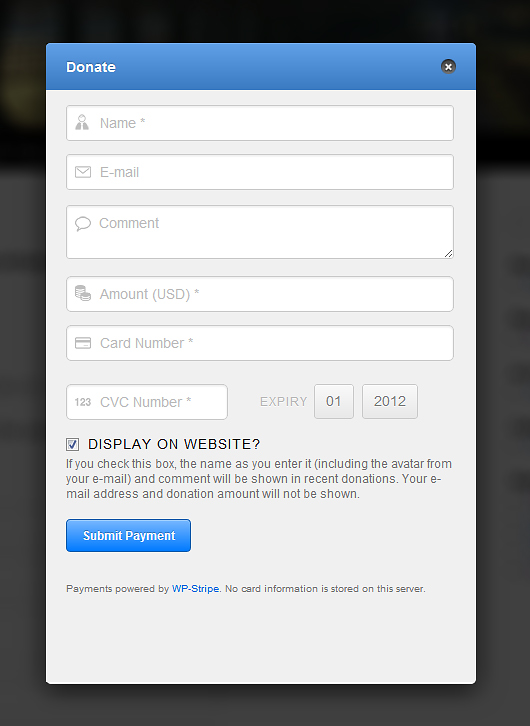
Yes! WP-Stripe features an inline form or pop-up modal so that it can fit any theme. There’s also a simple option to turn off the default CSS so that you can customize it yourself.
Features
This plugin allows you to do a number of things (see screenshots too):
- Add a Donation/Payment Form via Shortcode or Template insert
- Add a Widget showing Recent Donations/Payments (using Gravatars)
- View latest Donations/Payments in a Widget (donors can opt-in/opt-out).
- View latest Donations/Payments in a WP-Admin (makes use of custom post types to store transactions without sensitive data, see FAQ for more information).
Using SSL (Important)
In order to process transactions in a secure manner, you need to purchase an SSL Certificate. This way consumers can purchase/donate with confidence. There are multiple plugins for then enforcing that SSL be used on your page, here’s one.
Stripe Limitations
Stripe is available in a number of countries, check here to see if your country is supported.
Updates
Follow us for updates at @humanmadeltd
Feedback & Bugs
As this is a new plugin, there are likely to be a few issues. Kindly post any issues, questions or suggestions on the WP-Stripe forums .
WP Stripe can be used by either calling up a simple shortcode or adding the function to your template as below:
- Upload the folder
wp-stripeto the/wp-content/plugins/directory - Activate the plugin through the ‘Plugins’ menu in WordPress
- Go to Settings -> WP Stripe and add your API Keys (for both Test & Live)
- Place
[wp-stripe]in your content or<?php wp_stripe_form(); ?>in your template. - Add the
Stripe - Recentwidget to show recent payments/donations.
IMPORTANT (SSL)
In order to process transactions in a secure manner, you need to purchase an SSL Certificate. This way consumers can purchase/donate with confidence. There are multiple plugins for then enforcing that SSL be used on your page, here’s one.


How does WP Stripe work ?
WP Stripe uses a simple to add form to capture person & payment details. Credit card information is then passed to the Stripe servers in the form of a token, increasing security and hindering duplication.
What information does WP Stripe store?
WP Stripe DOES store basic transaction data (Transaction ID, Amounts & User Data that was voluntarily provided by the donor).
WP Stripe DOES NOT store credit card information. Upon form submission, a token is generated by stripe.js and passed through POST and then on to the stripe servers, that is the extent of it.
Does WP Stripe offer a shopping cart module?
WP Stripe is not intended to be used as an e-commerce solution, but rather to handle single payments and donations.
Does WP Stripe offer any actions or filters?
Actions
wp_stripe_post_successful_charge(after a successful charge and saving to WP)wp_stripe_post_fail_charge(after a failed charge, for whatever reason)
Filter
wp_stripe_filter_form(to filter/edit the content of the form)
Changelog
1.5
- Tested for latest versions of WordPress & Stripe
- Various security fixes/enhancements
- Fixed UI bugs within WP-Admin
- Update to latest version of Stripe PHP library
- Updated ReadMe
1.4.7
- Added admin option for other currencies supported by Stripe
- Fixed issue with commas in amount (e.g. $1,000)
1.4.6
- Added Actions & Filters (for successful/failed charges and form output). Will allow you to add functions such as confirmation e-mails.
- Fixed bug with comments/widget
- Updated Stripe PHP
1.4.5
- Enhanced description sent to Stripe to include e-mail
- Moved widget quotes to CSS (as opposed to being hardcoded)
- Put in safeguard to strip out any ‘$’ symbols dropped in from end-user (for amount field)
- Added conditional to only show “Display on Website” if widget is also ticked
1.4.4
- Fix for deprecated charge/amount
- Fix for American Express CVC
1.4.3
- Fix issue where Stripe php class is conflicting
- Fix z-index issue
1.4.2
- AJAX Fix
1.4.1
- Security Fix
- SSL Option for Modal
- Updated Stripe PHP
- Ability to page through transactions (i.e. next/previous page, not limited to 50 anymore)
1.4.0
- Updated Stripe PHP
- Tested for WordPress 3.4
- Optimized/Refactored jQuery
- Replaced standard POST submission through AJAX (no more page switches)
- Enhanced form to use HTML5 form UI elements that are built within browsers (i.e. required, autofocus, maxlength, etc.)
- Validates as HTML5
- Added NONCE security check
- Cleaned up iFrame, provided proper headers
1.3.3
- Updated Stripe PHP
- Allow button shortcode anywhere on website (as opposed to only on page)
- Better submit state
- Notification Fix
1.3.2
- Remove function
1.3.1
- Quick fix for sites running older PHP
1.3
- Added Pop-up / Modal Box for making a payment (better plug & play), you can still use the inline form with
[wp-legacy-stripe] - Added cards accepted below button, to disable use
[wp-stripe cards="false"] - Simple Form Validation
- “Submit Payment” button is replaced with spinner onclick (avoids multiple clicks)
- Added Button on transactions page to delete all Test transactions
- Added Name of person paying to Stripe charge
- Fix: Issue with Shortcode bumping to the top of a page
- Fix : CSS Hardening of Form (to make it more compatible with your theme)
1.2
- Small fix
1.1
- Few ReadMe Tweaks
1.0
- Initial Release
- Added Stripe Payment Form
- Added Stripe Recent Donations Widget (users can opt-in/out)
- Added Stripe Transaction Overview in WP-Admin
" width="120" height="120">
Available Versions
| Version | Download | Type |
|---|---|---|
| 1.5 | Download | Stable |
| 1.4.6 | Download | Stable |
| 1.4.5 | Download | Stable |
| 1.4.4 | Download | Stable |
| 1.4.3 | Download | Stable |
| 1.4.2 | Download | Stable |
| 1.4.1 | Download | Stable |
| 1.4.0 | Download | Stable |
| 1.3.3 | Download | Stable |
| 1.3.2 | Download | Stable |
| 1.3.1 | Download | Stable |
| 1.3 | Download | Stable |
| 1.2 | Download | Stable |
| 1.1 | Download | Stable |
| 1.0 | Download | Stable |
| Development | Download | Trunk |
