
SlimStat Analytics – Real-Time Stats, Heatmaps & Ecommerce
Active Installs
70,000+
Last Updated
October 26, 2026
First Released
April 12, 2010
Download History (Last one month)
Contributors
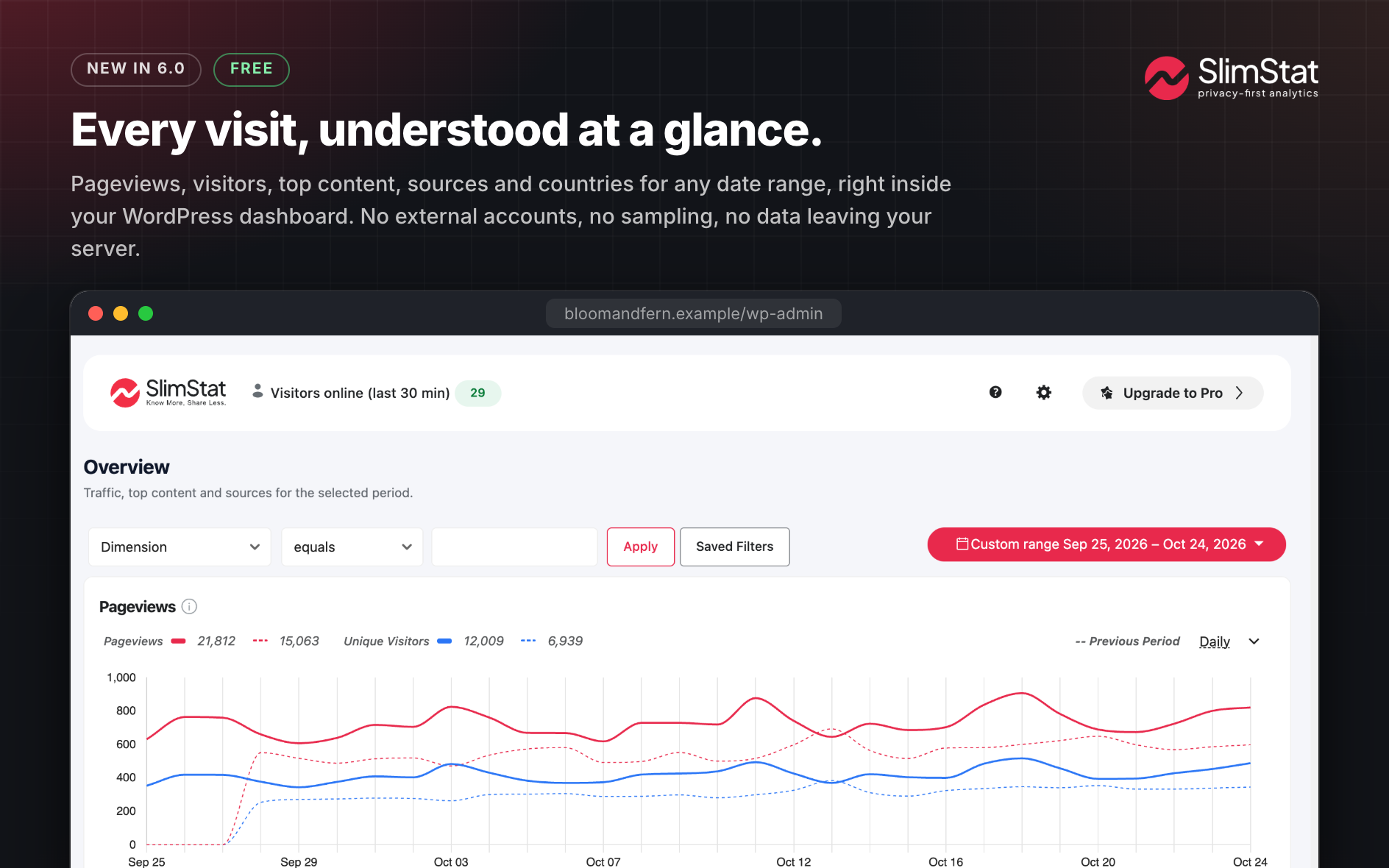
SlimStat Analytics is the real-time WordPress analytics plugin that keeps every visitor on your own server. Most analytics tools quietly hand your audience to someone else’s cloud. SlimStat doesn’t. Every pageview, click and visitor lands in your WordPress database and stays there: yours to read the moment it happens, yours to purge whenever you like, never shipped off to Google or anyone else.
SlimStat 6 turns that data into answers. A WooCommerce revenue dashboard puts net sales, orders and top products right beside your traffic. Heatmaps show which pages and buttons people actually click. Channels and UTM Campaigns tell you whether a visit came from search, social, email, paid ads or an AI assistant, and which campaign earned it. Set a goal and watch it convert, or chain steps into a funnel and see exactly where people slip away. And it is all faster: SlimStat 6 reads half as many database rows for its charts and writes far less on every pageview, so your site stays quick while you learn more.
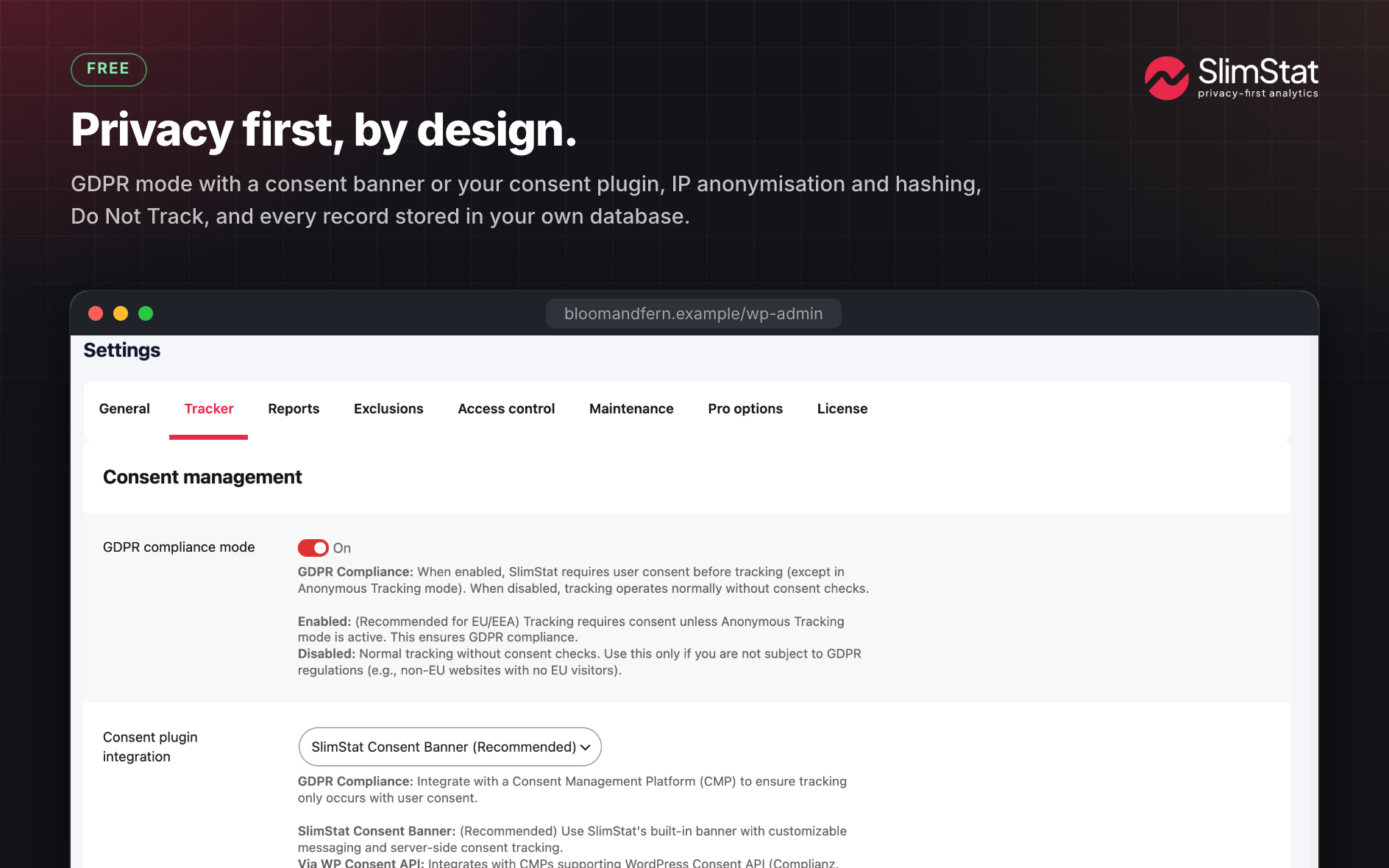
Best of all, privacy isn’t a setting you have to hunt for. Anonymized IPs, Do Not Track, a consent banner and scheduled data cleanup are GDPR-ready from the first activation. Thousands of WordPress sites already trust SlimStat to keep their analytics honest, fast and entirely their own.
See SlimStat 6 in action:
Main Features
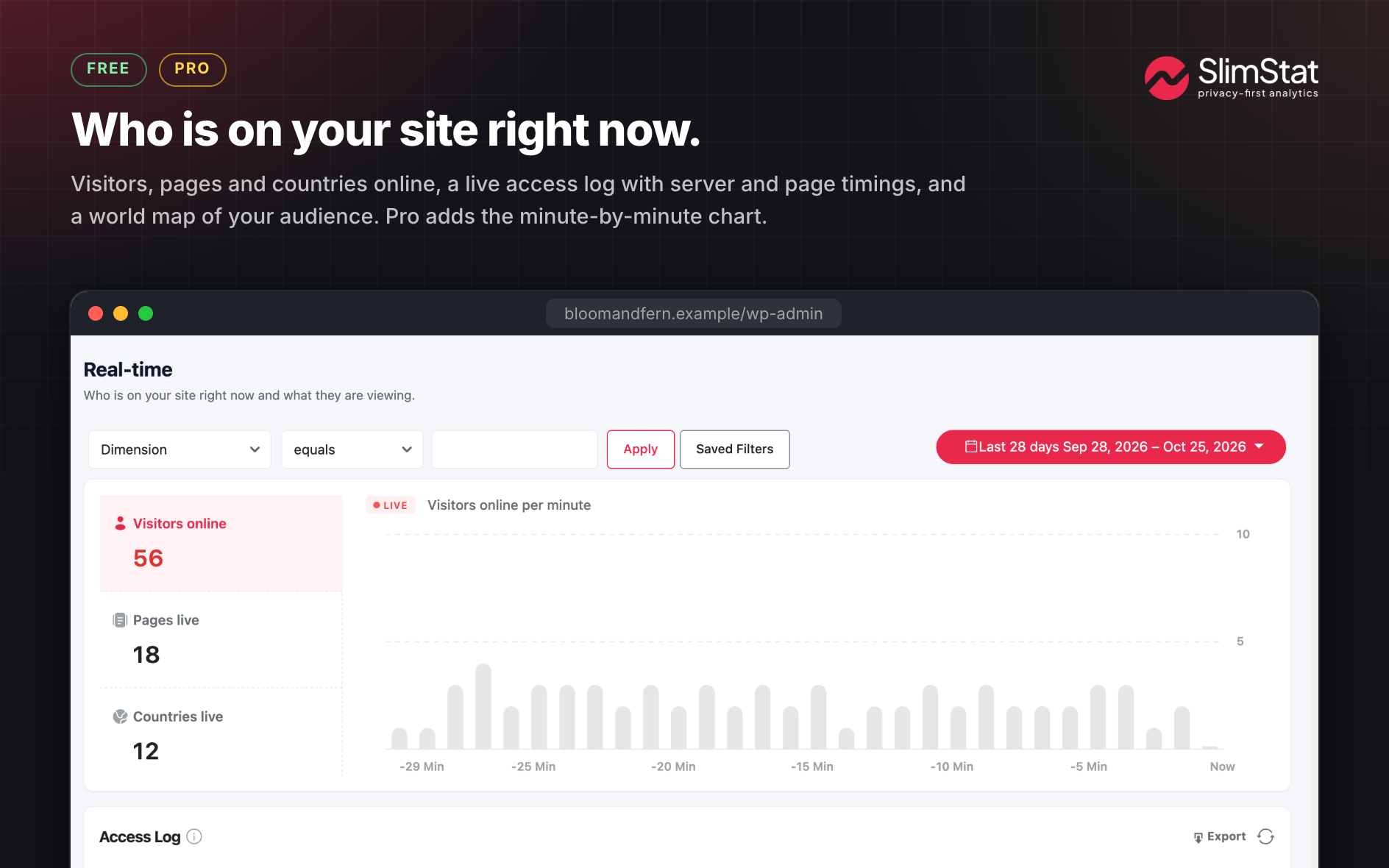
- Real-time analytics — Your site’s pulse, live. Watch each visit land the instant it happens: the page, the spot on the map, the search or link that sent them, how quickly your server replied, human or bot. No sampling, no 24-hour delay.
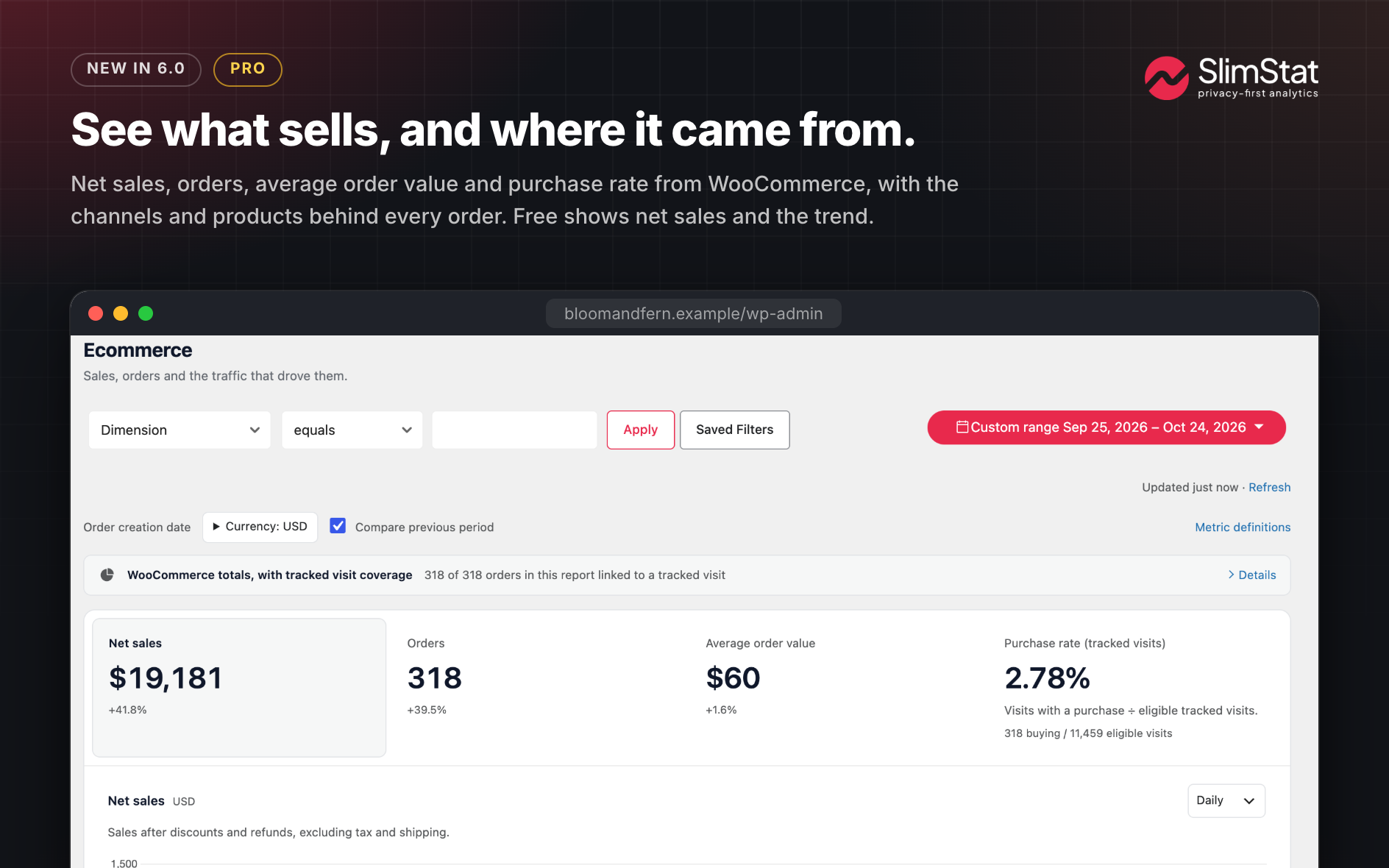
- WooCommerce revenue dashboard — Net sales, orders, period comparisons, top products and where your buyers came from, in one page next to your traffic. Switch it on when you’re ready; order sync runs quietly in the background and supports HPOS. WooCommerce 8.3+ required.
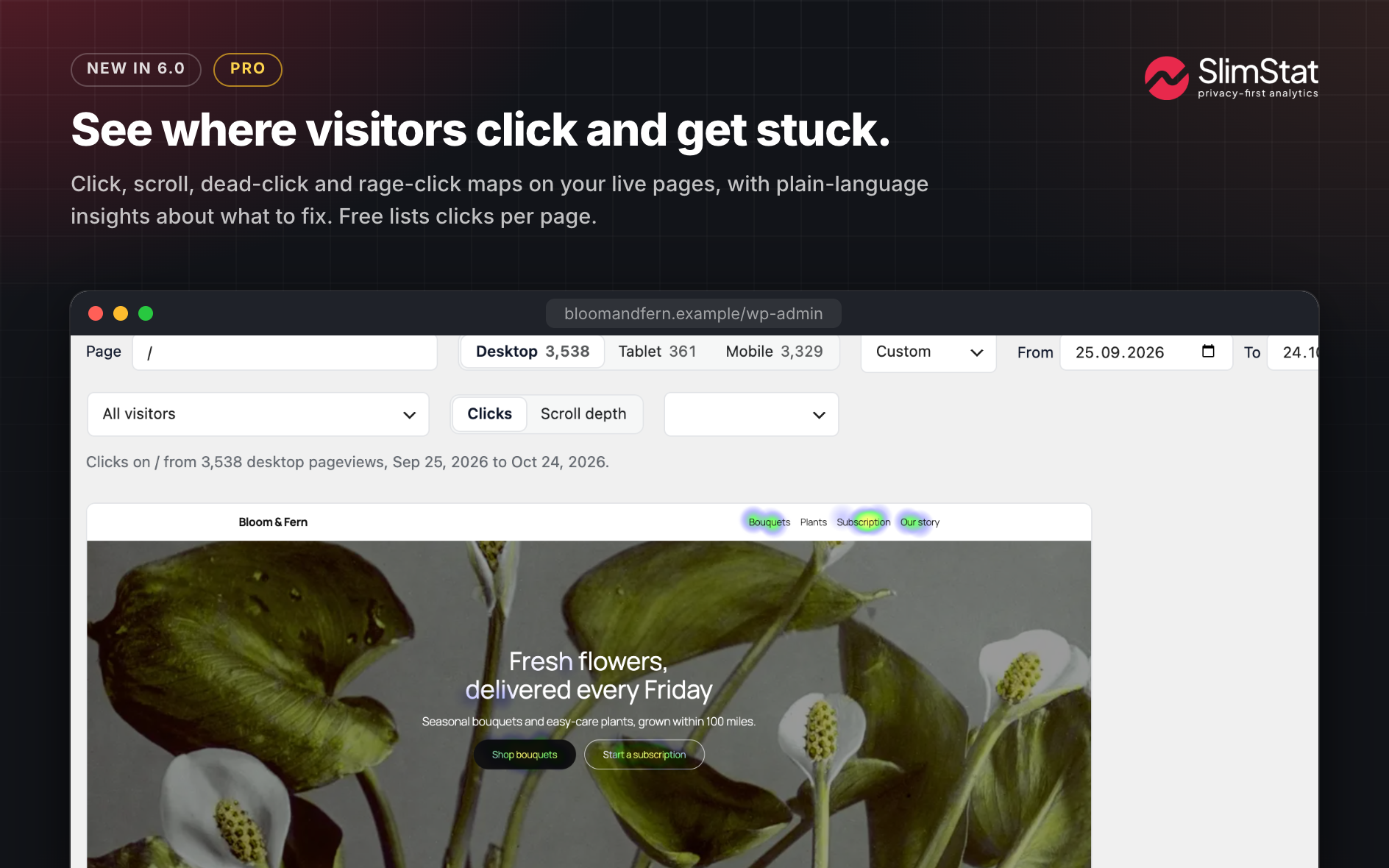
- Heatmaps — See which pages get clicked, how often, on which devices, and the five most clicked links and buttons on each page. SlimStat Pro paints full click and scroll heatmaps over your live pages.
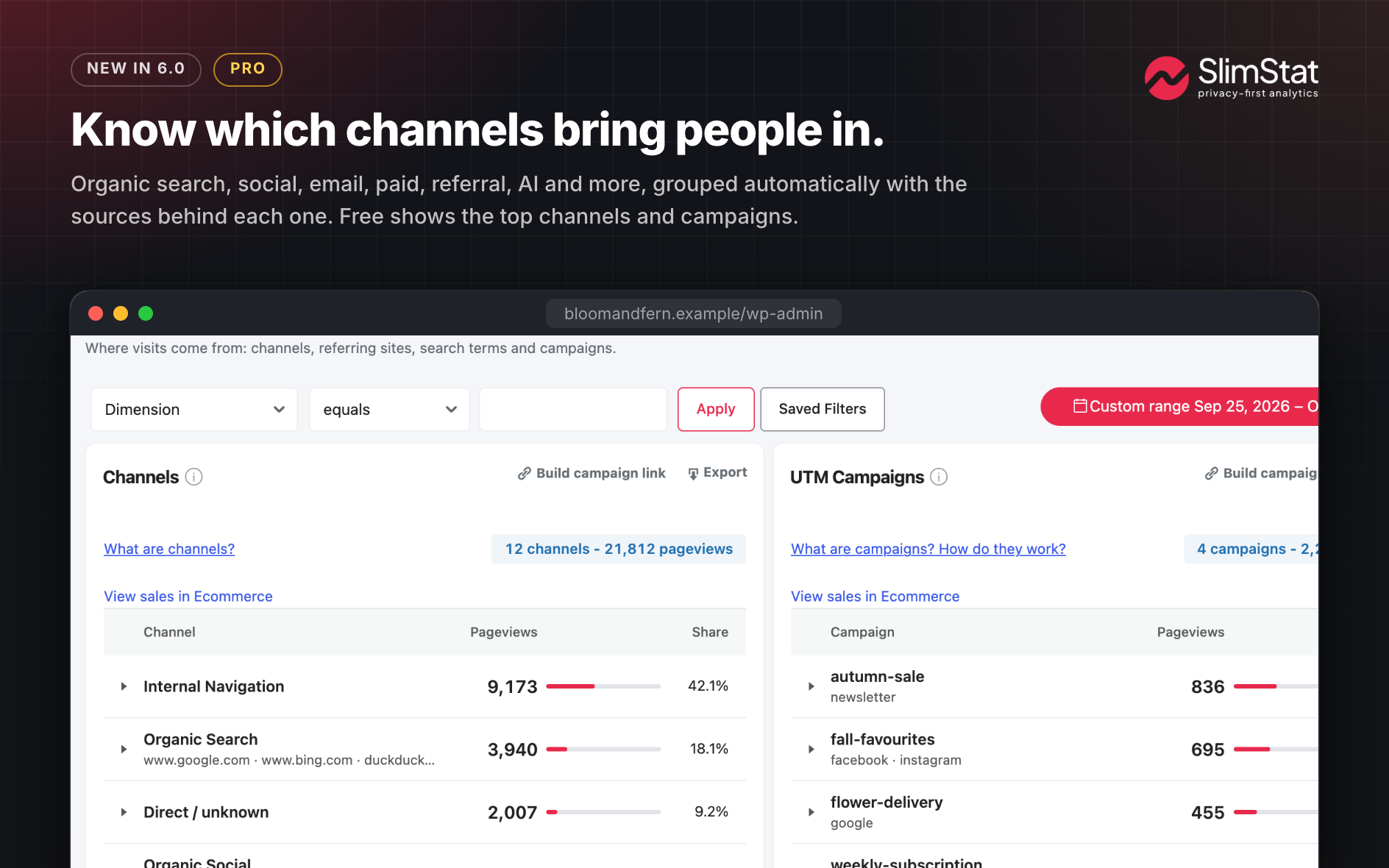
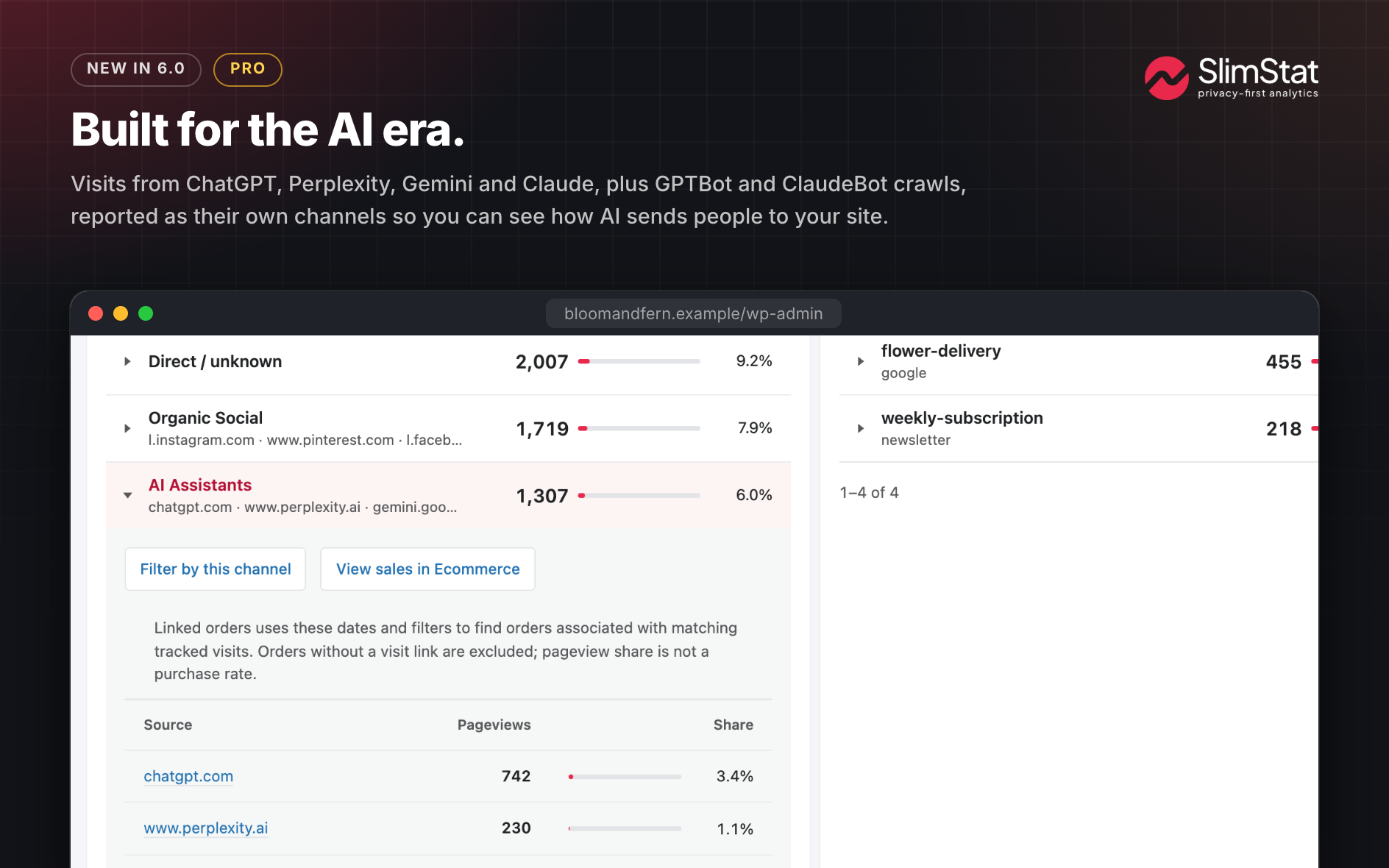
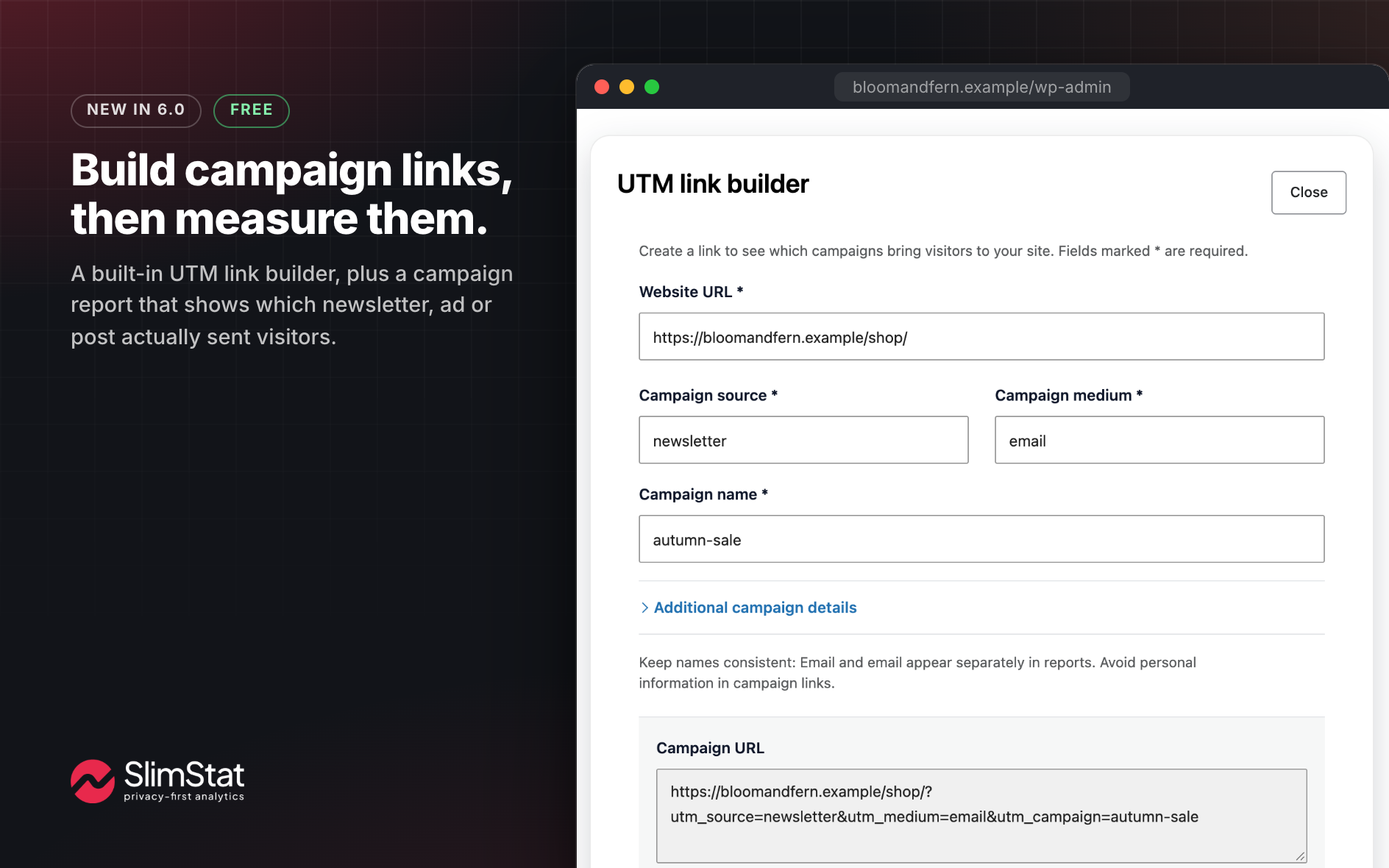
- Channels and UTM campaigns — Know where every visit really came from: search, social, email, paid, AI assistants and crawlers, or a campaign you tagged. Build and copy campaign links straight from the report.
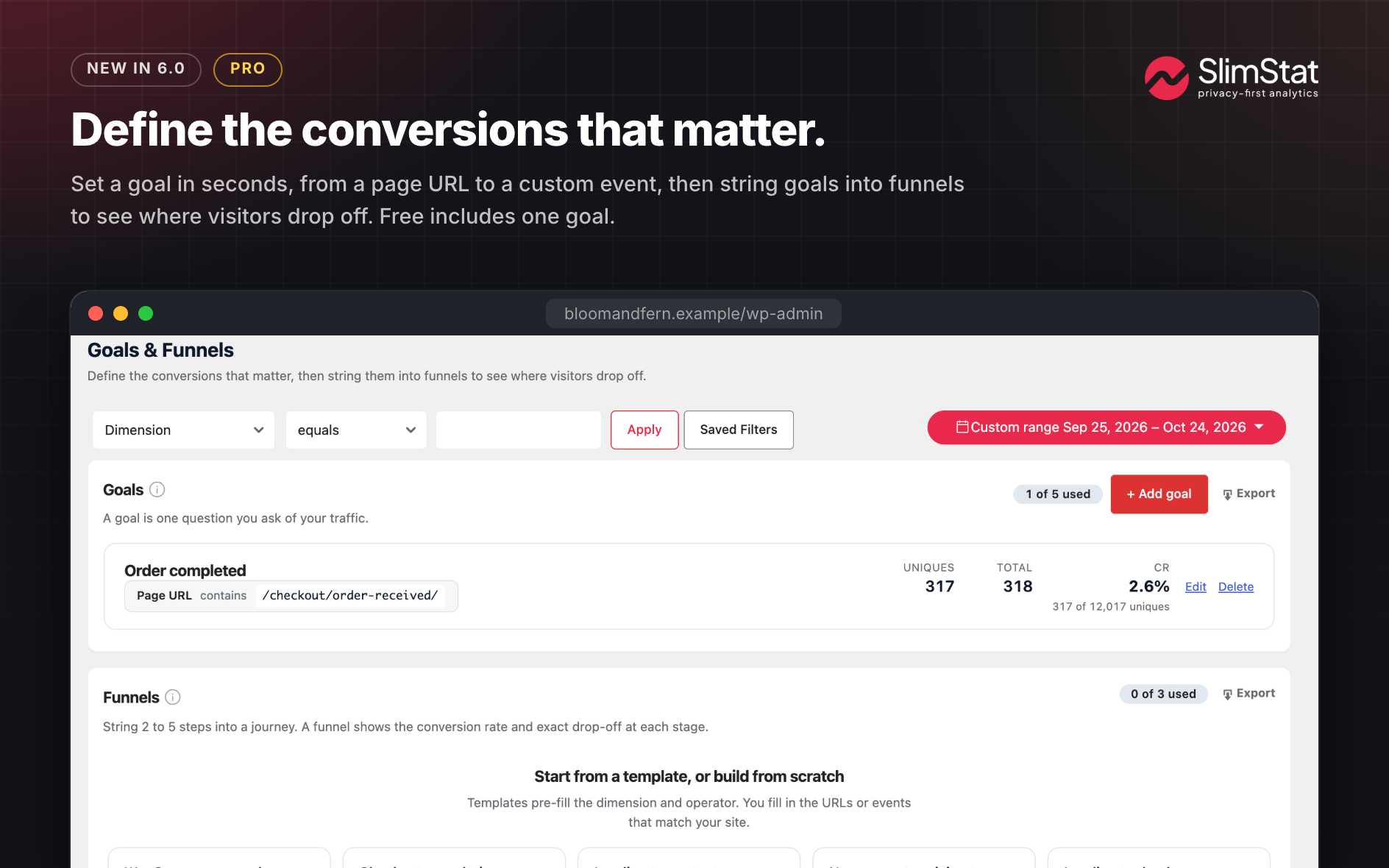
- Goals & funnels — Turn raw traffic into answers. Define a goal (a WooCommerce sale, a signup, a key pageview) and see uniques, totals and conversion rate. Chain steps into a funnel to spot exactly where visitors drop off. One goal is free; up to five goals and full funnels unlock with Pro.
- Built for performance — A light tracker that writes far less per pageview, charts that read half as many database rows, and a choice of client-side tracking for cached sites or server-side to catch every request.
- Complete access log — Every visit in one searchable table. Drill into the full history and break it down by date, country, browser, OS, referrer, search term or content type to answer the questions the summary charts can’t.
- Outbound links & downloads — See which external links and files actually earn clicks, so you know what sends traffic off your site and which partnerships pull their weight.
- Know your visitors — Go past pageviews to the people behind them: returning readers, logged-in users, and a full audience breakdown by country, language, browser, OS and screen size. (Pro’s User Overview adds per-visitor journeys, time on site and Gravatars.)
- Your data, your server — No third-party cloud, no Google looking over your shoulder. Every byte lives in your WordPress database, and one-way IP hashing lets you count unique visitors without ever storing who they are.
- GDPR, sorted — Anonymize or hash IPs, honor Do Not Track, auto-purge old records on a schedule, and drop in a translatable consent banner that snaps straight into the WP Consent API (WPML and Polylang welcome). Compliance by design, not an afterthought.
- Geolocation & world map — Put a city and country to every visitor, plus their browser and operating system, powered by MaxMind and Browscap. Watch your audience light up across the globe, even from your phone (map by JQVMap).
- Shortcodes & Shortcode Playground — Drop any report, live counter or Ecommerce KPI into a post, page or widget. Browse, preview with your own data and copy the shortcode under SlimStat Shortcodes.
- Admin bar stats — Keep an eye on the numbers without leaving your work. Online visitors, pageviews and top pages sit one glance away in the WordPress admin bar, on every screen.
- Make every report yours — Rearrange, add or hide widgets across Real-Time, Overview, Audience, Site Analysis and Traffic Sources until each screen shows exactly what you care about.
- Filters — Decide who counts. Skip your own team, known bots, whole IP ranges, admin pages or entire countries so your stats reflect real visitors, not noise.
- Export & email — Download your reports as CSV files, or get the numbers that matter in your inbox each morning (email reports and Excel export via Pro).
- Cache-friendly — Plays nicely with W3 Total Cache, WP Super Cache, Cloudflare and most caching plugins.
Pro Pack Features
Love the free plugin? SlimStat Pro is for sites that live by their numbers. It adds the heavier tools without changing a thing about how SlimStat respects your data:
- Heatmaps that show you what to fix — Click and scroll heatmaps on a phone, tablet or desktop preview, with plain-language insights on dead clicks, rage clicks and scroll drop-off, and an overlay painted right over your live pages.
- WooCommerce, deeper — Campaigns, landing pages, devices, guest and account buyers, coupons and product refunds added to the revenue dashboard, plus filtered CSV export.
- Email reports — Wake up to the numbers that matter. Schedule the reports you care about, including store revenue and heatmap insights, and have them land in your inbox as clean HTML tables or CSV.
- More goals & funnels — Up to five conversion goals and three full funnels, with ready-made templates for WooCommerce checkout, signups and content engagement.
- User overview — Follow individual registered users: what they viewed, how long they stayed and how fast your server answered, with Gravatars to put a face to the visit.
- Extended overview — Add your own columns to the User Overview report and export file, so it tracks exactly what your site cares about.
- Network analytics — Run reports and settings across an entire multisite network from one place.
- MaxMind integration — Connect MaxMind’s geolocation API for richer, more precise detail on where your visitors come from.
- Custom database — Store all your analytics in a separate, external database to keep your main WordPress DB lean.
- Export to Excel — Download any report as a ready-to-share Excel file.
Requirements
- WordPress 5.6+
- PHP 7.4+
- MySQL 5.6+ (or MariaDB 10.0+)
- At least 5 MB of free web space (240 MB if you plan on using the external libraries for geolocation and browser detection)
- At least 10 MB of free DB space
- At least 32 Mb of free PHP memory for the tracker (peak memory usage)
Please note
- Optional database downloads: If an administrator enables or updates browser detection or DB-IP geolocation, SlimStat downloads the Browscap database from GitHub and the DB-IP Lite database from jsDelivr. No analytics data is sent with these requests.
- Your stats survive uninstalling. Deleting Slimstat Analytics keeps every visit, setting and table in your database, so reinstalling picks up exactly where you left off.
- If you want the data gone — decommissioning a site, or honouring a data-erasure request — turn on Settings Maintenance “Delete Data on Uninstall” before deleting the plugin, then delete it. That is the only one-step option that removes everything, archive tables included. Deleting the plugin on its own will not clear the database.
- Delete Records (Settings Maintenance) clears your live records but not the archived ones in
wp_slim_stats_archive/wp_slim_events_archive, which still count as retained data under GDPR. If you are handling an erasure request and want to keep the plugin installed, clear the records and empty those archive tables. - Slimstat’s browser-detection cache (in
wp-content/uploads/wp-slimstat) is always removed on uninstall — it is a rebuildable cache, not your analytics. The geolocation database there is removed only if you opted into full deletion, because some hosts require it to be uploaded by hand.
Report Bugs
Found a bug, or want to suggest a feature? Please open an issue on GitHub and pick the matching form. Kindly note that GitHub is for bug reports and feature requests only — support questions belong in the WordPress.org support forum and will be closed there.
For security vulnerabilities, please report them through the Patchstack Vulnerability Disclosure Program. The Patchstack team will validate, triage, and handle any security issues.
- In your WordPress admin, go to Plugins > Add New
- Search for Slimstat Analytics
- Click on Install Now next to Slimstat Analytics and then activate the plugin
- Make sure your template calls
wp_footer()or the equivalent hook somewhere (possibly just before the</body>tag)
Screenshot Gallery

Where is my analytics data stored?
In your own WordPress database, full stop. Core tracking makes no external calls, so your numbers never go to Google, to us, or to any third-party cloud.
Is SlimStat a good alternative to Google Analytics or Jetpack Stats?
Yes, if you care about ownership and timing. Your data never leaves your server, there is no sampling and no 24-hour delay, and you decide how long to keep it. You see visits the moment they happen, with the depth you’d expect from a hosted service.
Does SlimStat work with WooCommerce?
Yes. SlimStat 6 adds a WooCommerce revenue dashboard with net sales, orders, period comparisons, top products and where your buyers came from, all next to your traffic reports. Switch it on in the Ecommerce page; order sync runs in small background jobs and supports HPOS. WooCommerce 8.3 or newer is required.
SlimStat Pro adds campaigns, landing pages, devices, coupons, refunds and CSV export.
Can I see where visitors click?
Yes. The Heatmaps page lists every page with clicks, pageviews, clicks per pageview and device split, and shows the five most clicked links and buttons on each page.
SlimStat Pro adds full click and scroll heatmaps on phone, tablet and desktop previews, with insights on dead clicks, rage clicks and scroll drop-off.
Does SlimStat track UTM campaigns and traffic channels?
Yes. Traffic Sources opens with Channels and UTM Campaigns side by side, and tells search, social, email, paid, AI assistants and crawlers apart. A campaign link builder sits in the report header.
Attribution starts with new pageviews after you update.
Can SlimStat tell when ChatGPT or another AI assistant sends me visitors?
Yes. Visits referred from ChatGPT, Perplexity, Claude, Gemini, Copilot, Grok and other assistants get their own AI Assistants channel in Traffic Sources, so you can see how much traffic they send and what those visitors read. Automated requests from AI crawlers such as GPTBot and ClaudeBot are reported separately when your tracking settings collect them.
Google AI Overviews cannot be told apart from a normal Google search, so those visits stay in Organic Search.
Will SlimStat slow down my site?
It’s built to stay light, and version 6 is lighter still: the tracker writes far fewer option updates per pageview and the admin charts read half as many database rows. Choose client-side tracking for cached sites or server-side to catch every request, and SlimStat plays nicely with W3 Total Cache, WP Super Cache, Cloudflare and the rest.
Is it really GDPR-ready out of the box?
Yes. IP anonymization and hashing, Do Not Track, a translatable consent banner, WP Consent API integration and scheduled data purging are all built in, no extra plugins required.
Can SlimStat track without cookies?
Yes. Turn off Set tracking cookie and turn on Hash IP addresses under Settings Tracker, and SlimStat counts unique visitors with a daily one-way hash instead of a cookie. Prefer server-side tracking? Set Tracking mode to Server under Settings General to record every visit without JavaScript (best on sites without page caching).
Is it safe to update to SlimStat 6?
Yes, and we designed the update to be boring in the best way. Your settings and data carry over. The database steps only add columns and indexes, remove no rows, and run only when you click them on the new Migration screen. Older versions keep working on the updated tables if you ever go back. As with any major release, back up your database first.
Do I need the Pro version?
Not to get real value. The free plugin covers real-time tracking, dozens of reports, the WooCommerce revenue dashboard, heatmap click counts, channels and campaigns, geolocation and one conversion goal. Pro adds full heatmaps, email reports, funnels, more goals, multisite and more.
Where can I find more help?
An extensive knowledge base is available on our website.
Changelog
6.0.0 – 2026-10-24
SlimStat 6: see where visitors click, which campaigns bring sales, and trust every number. Your settings and data carry over, migration steps wait for your click, and older versions keep working if you ever go back.
New
- Heatmaps: a new Heatmaps page shows which pages, links and buttons visitors click, with device split and any date range. Clicks SlimStat already recorded appear right away. SlimStat Pro adds opt-in recording of any element, scroll depth, dead clicks and rage clicks; it follows consent and Do Not Track and never stores what visitors type.
- WooCommerce Analytics: an opt-in revenue dashboard puts net sales, orders, top products and the purchase journey next to your traffic, on your own server. Works with HPOS and legacy order storage.
- Channels and UTM Campaigns: see whether visits come from search, social, email, paid ads or AI assistants, and which campaign earned them. Build campaign links right from the report. Attribution starts with new pageviews.
- Shortcode Playground: preview any report with your own data, tune its filters and copy the shortcode. New live visitor, page and country counters.
- Migration screen: lists the database steps the update needs. Required steps only add columns and indexes, wait for your click, and tracking keeps working meanwhile. As in every release, the first admin visit after updating creates any missing tables and small indexes.
Improved
- Faster reports: admin charts read half as many database rows, and tracking writes 62% fewer option updates per pageview.
- A cleaner admin: consistent wording, accessible dialogs, empty reports that explain what to do next, a Get started panel for new sites and a rewritten Help panel.
- Goals and Funnels share one tidy panel, and the Funnels preview names the five ready-made templates in Pro.
- The admin bar’s real-time Online preview is back, chart included.
- Changing dates keeps your filters, and saved segments keep their dates.
- Email Report previews the weekly email built from your own last 7 days and can send you a sample.
- Supports PHP 7.4+ and WordPress 5.6+, tested up to WordPress 7.1.
Fixed
- More accurate numbers: consent given through the WP Consent API, anonymous page refreshes and overlapping funnel steps no longer count twice, so some totals go down to their true value.
- Form-submit, tel: and mailto: conversion goals record one hit per press, and funnels no longer show silent zeros.
- Overview “Today” and “Yesterday” no longer read 0, and cookieless visits no longer split every 5 minutes.
- Sites that had “Enable CDN” on record visits again; the setting is removed. If you track external pages, replace your old tracking snippet.
- Multisite subsites created on WordPress 5.1+ or activated with WP-CLI now track, and Network View totals are network-wide.
- Per-author email reports show each author’s own numbers.
- Deleting the plugin keeps your analytics unless you turned on “Delete Data on Uninstall”. (#327)
- No more white-screen lockouts after an interrupted update. (#325)
Security
- Fixed a SQL injection that logged-in users could reach when the optional “Posts and Pages” report column was on (off by default). Found in-house; no report of it in the wild.
- Shortcodes show personal data, access logs and user reports only to people allowed to view analytics.
- WooCommerce order-access keys are removed from newly stored page URLs and referrers.
Available Versions
| Version | Download | Type |
|---|---|---|
| 6.0.0 | Download | Stable |
| 5.5.0 | Download | Stable |
| 5.4.12 | Download | Stable |
| 5.4.11 | Download | Stable |
| 5.4.9 | Download | Stable |
| 5.4.8 | Download | Stable |
| 5.4.6 | Download | Stable |
| 5.4.5 | Download | Stable |
| 5.4.4 | Download | Stable |
| 5.4.3 | Download | Stable |
| 5.4.2 | Download | Stable |
| 5.4.1 | Download | Stable |
| 5.4.0 | Download | Stable |
| 5.3.5 | Download | Stable |
| 5.3.4 | Download | Stable |
| 5.3.3 | Download | Stable |
| 5.3.2 | Download | Stable |
| 5.3.1 | Download | Stable |
| 5.3.0 | Download | Stable |
| 5.2.13 | Download | Stable |
| 5.2.12 | Download | Stable |
| 5.2.11 | Download | Stable |
| 5.2.10 | Download | Stable |
| 5.2.9 | Download | Stable |
| 5.2.8 | Download | Stable |
| 5.2.7 | Download | Stable |
| 5.2.6 | Download | Stable |
| 5.2.5 | Download | Stable |
| 5.2.4 | Download | Stable |
| 5.2.3 | Download | Stable |
| 5.2.2 | Download | Stable |
| 5.2.1 | Download | Stable |
| 5.2 | Download | Stable |
| 5.1.5 | Download | Stable |
| 5.1.4 | Download | Stable |
| 5.1.3 | Download | Stable |
| 5.1.2 | Download | Stable |
| 5.1.1 | Download | Stable |
| 5.1 | Download | Stable |
| 5.0.10.2 | Download | Stable |
| 5.0.10.1 | Download | Stable |
| 5.0.10 | Download | Stable |
| 5.0.9 | Download | Stable |
| 5.0.8 | Download | Stable |
| 5.0.7 | Download | Stable |
| 5.0.6 | Download | Stable |
| 5.0.5.1 | Download | Stable |
| 5.0.5 | Download | Stable |
| 5.0.4 | Download | Stable |
| 5.0.3 | Download | Stable |
| 5.0.2 | Download | Stable |
| 5.0.1 | Download | Stable |
| 5.0 | Download | Stable |
| 4.9.4 | Download | Stable |
| 4.9.3.3 | Download | Stable |
| 4.9.3.2 | Download | Stable |
| 4.9.3.1 | Download | Stable |
| 4.9.3 | Download | Stable |
| 4.9.2 | Download | Stable |
| 4.9.1.1 | Download | Stable |
| 4.9.1 | Download | Stable |
| 4.9.0.1 | Download | Stable |
| 4.9 | Download | Stable |
| 4.8.8.1 | Download | Stable |
| 4.8.8 | Download | Stable |
| 4.8.7.3 | Download | Stable |
| 4.8.7.2 | Download | Stable |
| 4.8.7.1 | Download | Stable |
| 4.8.7 | Download | Stable |
| 4.8.6.1 | Download | Stable |
| 4.8.6 | Download | Stable |
| 4.8.5.1 | Download | Stable |
| 4.8.5 | Download | Stable |
| 4.8.4.1 | Download | Stable |
| 4.8.4 | Download | Stable |
| 4.8.3 | Download | Stable |
| 4.8.2 | Download | Stable |
| 4.8.1 | Download | Stable |
| 4.8 | Download | Stable |
| 4.7.9.1 | Download | Stable |
| 4.7.9 | Download | Stable |
| 4.7.8.3 | Download | Stable |
| 4.7.8.2 | Download | Stable |
| 4.7.8.1 | Download | Stable |
| 4.7.8 | Download | Stable |
| 4.7.7 | Download | Stable |
| 4.7.6.1 | Download | Stable |
| 4.7.6 | Download | Stable |
| 4.7.5.3 | Download | Stable |
| 4.7.5.2 | Download | Stable |
| 4.7.5.1 | Download | Stable |
| 4.7.5 | Download | Stable |
| 4.7.4.1 | Download | Stable |
| 4.7.4 | Download | Stable |
| 4.7.3.1 | Download | Stable |
| 4.7.3 | Download | Stable |
| 4.7.2.2 | Download | Stable |
| 4.7.2.1 | Download | Stable |
| 4.7.2 | Download | Stable |
| 4.7.1 | Download | Stable |
| 4.7 | Download | Stable |
| 4.6.9.1 | Download | Stable |
| 4.6.9 | Download | Stable |
| 4.6.8 | Download | Stable |
| 4.6.7 | Download | Stable |
| 4.6.6 | Download | Stable |
| 4.6.5 | Download | Stable |
| 4.6.4 | Download | Stable |
| 4.6.3 | Download | Stable |
| 4.6.2 | Download | Stable |
| 4.6.1 | Download | Stable |
| 4.6 | Download | Stable |
| 4.5.2 | Download | Stable |
| 4.5.1 | Download | Stable |
| 4.5 | Download | Stable |
| 4.4.5 | Download | Stable |
| 4.4.4 | Download | Stable |
| 4.4.3 | Download | Stable |
| 4.4.2 | Download | Stable |
| 4.4.1 | Download | Stable |
| 4.4 | Download | Stable |
| 4.3.7 | Download | Stable |
| 4.3.6 | Download | Stable |
| 4.3.5 | Download | Stable |
| 4.3.4 | Download | Stable |
| 4.3.3 | Download | Stable |
| 4.3.2.3 | Download | Stable |
| 4.3.2.2 | Download | Stable |
| 4.3.2.1 | Download | Stable |
| 4.3.2 | Download | Stable |
| 4.3.1.2 | Download | Stable |
| 4.3.1.1 | Download | Stable |
| 4.3.1 | Download | Stable |
| 4.3 | Download | Stable |
| 4.2.7 | Download | Stable |
| 4.2.6 | Download | Stable |
| 4.2.5 | Download | Stable |
| 4.2.4 | Download | Stable |
| 4.2.3 | Download | Stable |
| 4.2.2 | Download | Stable |
| 4.2.1 | Download | Stable |
| 4.2.0.1 | Download | Stable |
| 4.2 | Download | Stable |
| 4.1.8.1 | Download | Stable |
| 4.1.8 | Download | Stable |
| 4.1.7 | Download | Stable |
| 4.1.6.3 | Download | Stable |
| 4.1.6.2 | Download | Stable |
| 4.1.6.1 | Download | Stable |
| 4.1.6 | Download | Stable |
| 4.1.5.2 | Download | Stable |
| 4.1.5.1 | Download | Stable |
| 4.1.5 | Download | Stable |
| 4.1.4.1 | Download | Stable |
| 4.1.4 | Download | Stable |
| 4.1.3.2 | Download | Stable |
| 4.1.3.1 | Download | Stable |
| 4.1.3 | Download | Stable |
| 4.1.2 | Download | Stable |
| 4.1.1 | Download | Stable |
| 4.1 | Download | Stable |
| 4.0.2 | Download | Stable |
| 4.0.1 | Download | Stable |
| 4.0 | Download | Stable |
| 3.9.9 | Download | Stable |
| 3.9.8.2 | Download | Stable |
| 3.9.8.1 | Download | Stable |
| 3.9.8 | Download | Stable |
| 3.9.7.1 | Download | Stable |
| 3.9.7 | Download | Stable |
| 3.9.6 | Download | Stable |
| 3.9.5 | Download | Stable |
| 3.9.4 | Download | Stable |
| 3.9.3 | Download | Stable |
| 3.9.2 | Download | Stable |
| 3.9.1 | Download | Stable |
| 3.9 | Download | Stable |
| 3.8.5 | Download | Stable |
| 3.8.4 | Download | Stable |
| 3.8.3 | Download | Stable |
| 3.8.2 | Download | Stable |
| 3.8 | Download | Stable |
| 3.7.5 | Download | Stable |
| 3.7.4 | Download | Stable |
| 3.7.3 | Download | Stable |
| 3.7.2 | Download | Stable |
| 3.7.1 | Download | Stable |
| 3.7 | Download | Stable |
| 3.6.9 | Download | Stable |
| 3.6.8 | Download | Stable |
| 3.6.7 | Download | Stable |
| 3.6.6 | Download | Stable |
| 3.6.5 | Download | Stable |
| 3.6.4 | Download | Stable |
| 3.6.3 | Download | Stable |
| 3.6.2 | Download | Stable |
| 3.6.1 | Download | Stable |
| 3.6 | Download | Stable |
| 3.5.9 | Download | Stable |
| 3.5.8 | Download | Stable |
| 3.5.7 | Download | Stable |
| 3.5.6 | Download | Stable |
| 3.5.5 | Download | Stable |
| 3.5.4 | Download | Stable |
| 3.5.3 | Download | Stable |
| 3.5.2 | Download | Stable |
| 3.5.1 | Download | Stable |
| 3.5 | Download | Stable |
| 3.4.3 | Download | Stable |
| 3.4.2 | Download | Stable |
| 3.4.1 | Download | Stable |
| 3.4 | Download | Stable |
| Development | Download | Trunk |
