
WP Rollback – Rollback Plugins and Themes
Active Installs
300,000+
Last Updated
April 29, 2026
First Released
May 12, 2015
Download History (Last one month)
Contributors
Quickly and easily rollback any theme or plugin from WordPress.org to any previous (or newer) version without any of the manual fuss. Works just like the plugin updater, except you’re rolling back (or forward) to a specific version. No need for manually downloading and FTPing the files or learning Subversion. This plugin takes care of the trouble for you.
🔙 Rollback WordPress.org Plugins and Themes
While it’s considered best practice to always keep your WordPress plugins and themes updated, we understand there are times you may need to quickly revert to a previous version. This plugin makes that process as easy as a few mouse clicks. Simply select the version of the plugin or theme that you’d like to rollback to, confirm, and in a few moments you’ll be using the version requested. No more fumbling to find the version, downloading, unzipping, FTPing, learning Subversion or hair pulling.
For advanced features including rollback support for premium plugins and themes you already have licensed and installed (Elementor Pro, Gravity Forms, WooCommerce extensions, Kadence Pro, Astra Pro, GeneratePress Premium, Divi, Envato/ThemeForest products, and more), comprehensive activity logging, multisite network management, and priority support, consider upgrading to WP Rollback Pro.
Muy Importante (Very Important): Always Test and Backup
Important Disclaimer: This plugin is not intended to be used without first taking the proper precautions to ensure zero data loss or site downtime. Always be sure you have first tested the rollback on a staging or development site prior to using WP Rollback on a live site.
We provide no (zero) assurances, guarantees, or warranties that the plugin, theme, or WordPress version you are downgrading to will work as you expect. Use this plugin at your own risk.
Translation Ready
Do you speak another language? Want to contribute in a meaningful way to WP Rollback? There’s no better way than to help us translate the plugin. This plugin is translation ready. Simply header over to the WP Rollback translation project that’s powered by WordPress.org volunteer translators. There you can contribute to the translation of the plugin into your language.
Support and Documentation
We answer all free user support requests on the WordPress.org support forum. For pro users, please submit your questions to WP Rollback Pro support.
WP Rollback was created to be as intuitive to the natural WordPress experience as possible. We believe that once you activate WP Rollback, you’ll quickly discover exactly how it works without question.
BUT!!
We do have documentation on our website. See WP Rollback Documentation.
Minimum Requirements
- WordPress 6.5 or greater
- PHP version 7.4 or greater
- MySQL version 5.0 or greater
Automatic installation
Automatic installation is the easiest option as WordPress handles the file transfers itself and you don’t need to leave your web browser. To do an automatic install of WP Rollback, log in to your WordPress dashboard, navigate to the Plugins menu and click Add New.
In the search field type “WP Rollback” and click Search Plugins. Once you have found the plugin you can view details about it such as the point release, rating and description. Most importantly of course, you can install it by simply clicking “Install Now”.
Manual installation
The manual installation method involves downloading our donation plugin and uploading it to your server via your favorite FTP application. The WordPress codex contains instructions on how to do this here.
Updating
Automatic updates should work like a charm; as always though, ensure you backup your site just in case.
Screenshot Gallery
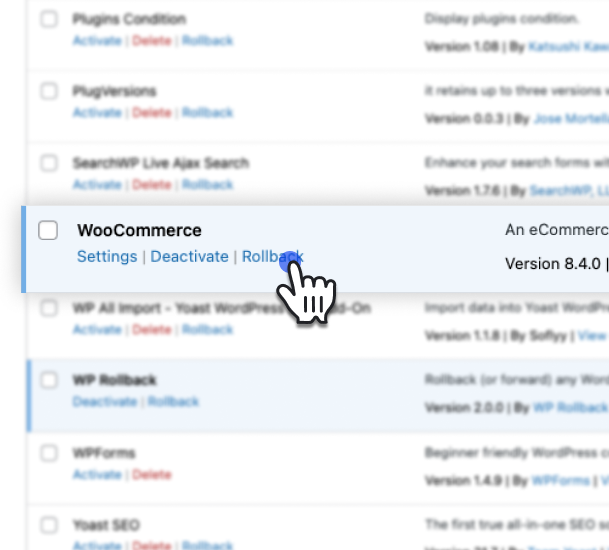
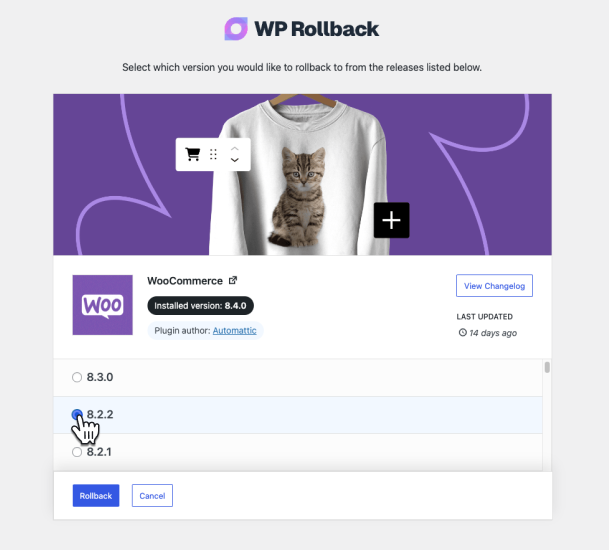
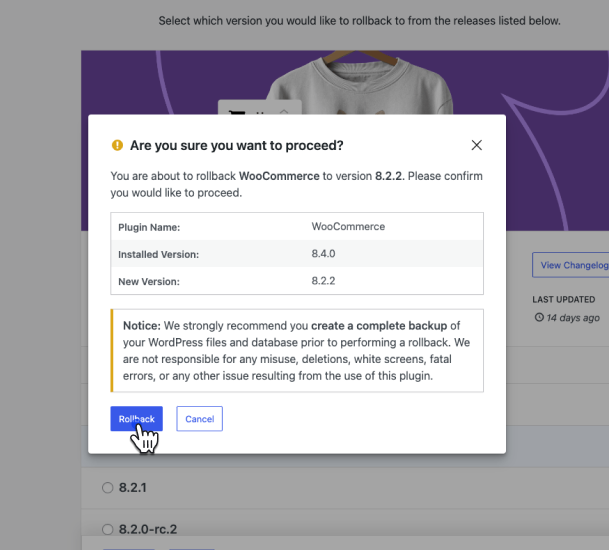
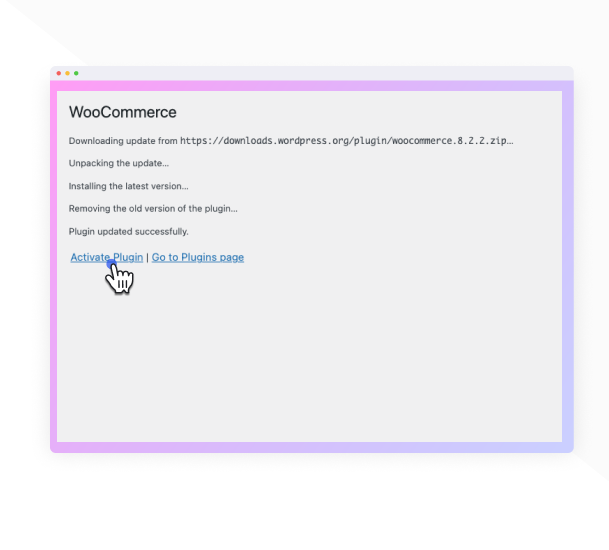
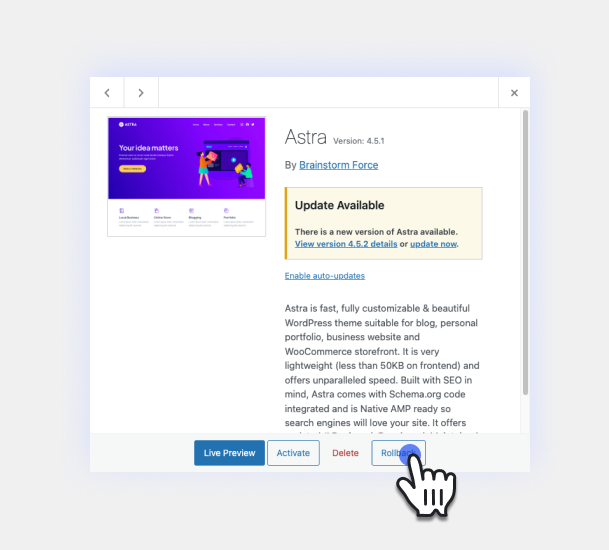
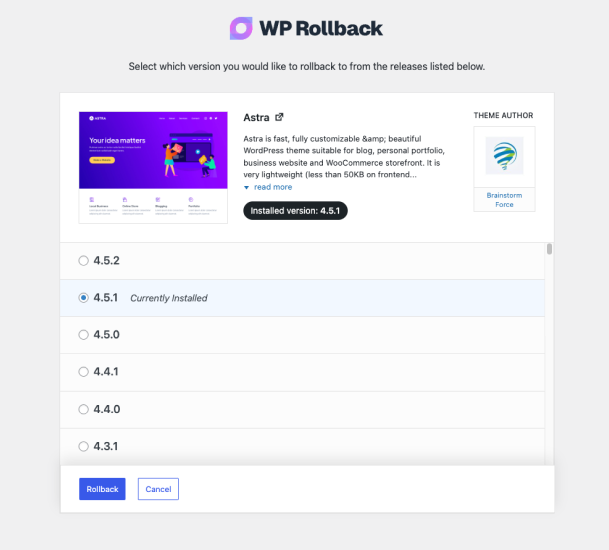
Short answer = Yes. Longer answer = It depends on how you use it.
WP Rollback is completely safe because all it does is take publicly available versions of the plugins you already have on your site and install the version that you designate. There is no other kinds of trickery or fancy offsite calls or anything. BUT!!!
Safety largely depends on you. The WordPress website admin. We absolutely do NOT recommend rolling back any plugins or themes on a live site. Test the rollback locally first, have backups, use all the best practice tools available to you. This is intended to make rolling back easier, that’s all.
WP Rollback (free) only works with plugins or themes hosted on the WordPress.org repository. If you don’t see the rollback link, that plugin or theme is not available on WordPress.org and cannot be rolled back with the free version.
If you need to roll back a premium plugin or theme that you are licensed to use, WP Rollback Pro supports that use case.
Nope. We warned you in bold print several times in many places. And our plugin delivered exactly what it said it would do. May the Gods of the internet pity your broken site’s soul.
The documentation for this plugin is located on our the WP Rollback site. This is where we make regular updates.
WP Rollback Free provides rollback functionality for any plugin or theme hosted on the WordPress.org repository.
WP Rollback Pro adds support for rolling back premium plugins and themes that you already have a valid license for and have installed on your site. This is handled through Plugin Vault — a shared library of verified version archives contributed by Pro users. Pro also includes comprehensive activity logging, multisite network management, and priority support. Learn more about Pro features.
Yes! All strings are internationalized and ready to be translated. You can either use your favorite translation plugin, or help translate the plugin on WordPress.org.
Changelog
3.1.2
- Fix: Resolved a fatal
TypeErrorthrown from theadmin_footer_textfilter when another plugin or theme passes a non-string value (such asnull) into the footer text chain. This affected sites running Classic Editor and other admin-customizing plugins, where the WP Rollback admin footer hook could blank out or partially break admin screens. The footer filter callbacks now safely accept and normalize any input type.
3.1.1
- New: WordPress Command Palette integration — press Cmd+K (Mac) or Ctrl+K (Windows) from any admin page and type “Rollback” to instantly find and navigate to any installed plugin or theme rollback. Type “Rollback plugin” to filter to plugins only, or “Rollback theme” for themes only.
- Enhancement: The default WordPress admin footer is now replaced with subtle WP Rollback branding on all WP Rollback pages — the left side shows “Thank you for using WP Rollback” and the right side shows the current plugin version.
3.1.0
- Enhancement: Redesigned rollback confirmation modal — replaced the generic admin table with a visual version comparison showing the installed version and target version side by side, making the rollback action immediately clear at a glance.
- Enhancement: Redesigned rollback progress modal — steps now display a shimmer skeleton before loading to prevent layout jump, running step messages appear in real-time, and the spinning header icon switches to a checkmark once all steps complete.
- Enhancement: Duplicate step message text is no longer shown while a step is actively running; the detail message now only appears on completion with meaningful server-side feedback.
- Enhancement: Added Lottie success animation to the rollback complete screen (Pro) along with redesigned “What’s next?” step cards featuring contextual icons.
- Fix: Rollback complete modal no longer shows a spurious scrollbar on the complete screen at typical viewport heights.
3.0.13
- New: Added “Rollback Plugins” and “Rollback Themes” quick-access links to the native WordPress plugins.php and themes.php page headers, appearing alongside the existing “Add New Plugin” / “Add New Theme” buttons for faster navigation to WP Rollback.
- Fix: “Return to Plugin/Theme Screen” button after a completed rollback now redirects correctly when WordPress is installed in a subdirectory. The URL is now generated server-side via
admin_url()instead of being constructed fromwindow.location.origin, which omits the subdirectory path.
3.0.12
- Enhancement: Users can now reinstall the currently installed version of a plugin or theme. The rollback button now adapts its label based on the selected version — “Reinstall” when selecting the current version, “Rollback” when selecting an older version, and “Update” when selecting a newer version. Confirmation messaging updates accordingly for each action type.
- Fix: Resolved critical issue where rolling back a plugin with an uninstall.php file or registered uninstall hook would trigger the plugin’s uninstall routine, potentially deleting database tables, options, and other user data. Rollbacks now use direct filesystem deletion matching WordPress Core’s Plugin_Upgrader behavior.
3.0.11
- Fix: Resolved fatal error that occurred on servers without the PHP ZipArchive extension when any plugin or theme was updated. The plugin now automatically uses WordPress Core’s PclZip library as a fallback, ensuring backups work on all server configurations and updates never fail.
- Fix: Column sorting now works correctly for Version and Status columns in plugin and theme lists.
- Enhancement: Added PclZip fallback for backup creation when ZipArchive extension is unavailable, ensuring universal compatibility across all hosting environments.
- Enhancement: Improved error handling throughout the backup system to catch both Exceptions and PHP Errors, preventing any interruption to plugin/theme updates.
- Enhancement: Optimized DataView components with reusable hooks and improved performance.
3.0.10
- Fix: Resolved fatal error when Visual Composer page builder is active. The plugin now properly validates screen IDs to handle cases where page builders return non-standard screen ID values.
3.0.9
- New: Re-added “Trunk” as an available rollback version option for testing development versions.
- New: Added support for pre-release versions including beta, alpha, and RC versions (e.g., 15.1-beta.2, 15.2-a.7, 2.5.0-RC1).
- Enhancement: Improved version sorting algorithm to properly order pre-release versions alongside stable releases.
- Tweak: Added smooth rotating animation to loading indicators for better visual feedback.
- Tweak: Updated compatibility to WordPress 6.9.
3.0.8
- Fix: Changed the filesystem type in BackupService from WP_Filesystem_Direct to WP_Filesystem_Base to allow for broader compatibility with different filesystem implementations.
3.0.7
- Fix: Updated the WP_Filesystem call in BackupService to set $allow_relaxed_file_ownership to true, enabling support for Group/World writable files. This change aims to prevent potential issues with file permissions during backup operations. Thanks to @hanno from WP.org support forums.
3.0.6
- Enhancement: Premium plugin and theme archives are no longer recreated if an archive already exists for the current version. This improves performance during updates and rollbacks by skipping unnecessary backup operations.
- Fix: Resolved critical issue where WooCommerce and other plugins with autoloaders would cause fatal errors during rollback. The plugin is now properly deactivated before deletion to prevent PHP errors when files are removed.
3.0.5
- Fix: Resolved conflict where maintenance mode was interfering with external monitoring tools like Nagios, WP-CLI, and automated WordPress update checks. The maintenance page is now only shown to regular site visitors, allowing monitoring tools and admin processes to function normally.
- Fix: Maintenance mode now only activates when rolling back active plugins or themes. Inactive plugins and themes no longer trigger maintenance mode unnecessarily.
- Fix: Corrected an issue where the maintenance mode step wasn’t displaying in the Free version’s rollback progress UI due to incorrect service provider load order.
- Improvement: Refactored rollback step registration for better code maintainability across Free and Pro versions, ensuring consistent behavior.
3.0.4
- New: Added maintenance mode support during rollback operations to prevent site access while files are being replaced, following WordPress Core update patterns.
- Improvement: Enhanced rollback safety with automatic maintenance mode cleanup that ensures your site never gets stuck in maintenance mode, even if a rollback fails.
- Fix: Removed overly restrictive package validation that required plugin main files to match the plugin slug. This fix allows plugins like Visual Composer (with main file “plugin-wordpress.php”) and other legitimate plugins with non-standard main file names to be rolled back successfully.
- Fix: Resolved fatal error when using WP CLI bulk updates (
wp plugin update --all) due to missing string type check. The backup service now properly handles cases where the package parameter is boolean instead of a string during bulk operations. - Fix: WordPress Multisite network admin pages now properly load rollback scripts and styles.
- Fix: Resolved package validation errors on multisite installations where ZIP files were incorrectly flagged as invalid.
- Fix: Fixed multisite upload size restrictions that prevented rollbacks due to the default 1MB limit.
3.0.3
- Fix: Resolved fatal error when attempting to rollback plugins that return boolean false for requires_php field instead of a string value. This fix ensures proper type validation for WordPress requirement fields.
- Fix: Plugin and theme names containing HTML entities (like &, <, etc.) now display correctly in rollback modals instead of showing raw HTML characters.
3.0.2
- Improvement: Simplified theme rollback button display functionality – all themes now display rollback buttons without checking WordPress.org availability.
- Improvement: Consolidated theme rollback JavaScript handlers between free and pro versions for better code maintainability.
- Improvement: Removed visual distinction between WordPress.org and premium plugin rollback links for a more consistent UI.
- Fix: Resolved fatal error on themes.php page caused by incorrect namespace references.
3.0.1
- Fix: Resolved an error with JetPack Sync and potentially other plugins that modify plugin data and return null.
3.0.0
- New: Added additional “WP Rollback” menu item under WP-Admin > Tools.
- New: Added new “Plugin” and “Themes” list views to select a rollback more easily.
- New: WP Rollback now stores premium assets locally on your server for easy future access.
- New: Added upsells to the new WP Rollback Pro.
- New: Updated plugin to support PHP versions 7.4 – 8.4.
2.0.7
- Fix: Resolved a bug with plain permalink websites which caused a
rest_no_routeerror when trying to rollback a plugin or theme. Thanks, @afizesan for helping pinpoint the issue. - Fix: Update the way the React app is loaded to suppress React 18+ warnings.
- Tweak: Bumped the plugin’s minimum required WordPress version to 6.0+ for best compatibility with new React components in UI.
2.0.6
Fix: The release corrects the paths used in plugin file includes and requires. The unnecessary forward slashes at the start of each file path have been removed. This change ensures proper file inclusion and requirement, avoiding potential issues with file not found errors.
2.0.5
- New: In this version we’ve brought back the “trunk” option to rollback to. This allows plugin or theme developers who use trunk for beta testing to rollback to the latest trunk version. Thanks, @megamenu for suggesting this be brought back.
- Fix: Refactored how plugin avatar images are checked so that all available image types and sizes are checked. This resolves an issue where some plugins would not display an avatar image.
- Fix: On the final rollback confirmation screen, the plugin name field was outputting raw HTML. This has been fixed to properly display the plugin name, even if it contains some html characters.
2.0.4
- Fix: Resolved issue REST route not including proper permission callback which created a PHP notice. Thanks, @rom1our for submitting the issue.
- Fix: Resolve issue with REST API and multisite installs not being able to properly communicate with the endpoint.
2.0.3
- Fix: A few additional strings in JavaScript needed to be internationalized. Thanks, @pedro-mendonca for contributing the fix.
2.0.2
- Fix: Resolves an issue with WP Rollback not being able to communicate to its REST API on WordPress subdirectory installs. Thanks, @emaralive for reporting the issue.
2.0.1
- Fix: Resolved an issue with the POT file not properly being generated at release. This resolves the issue with the new UI not being able to be translated.
2.0.0
- New: Introducing version 2.0! In this new version the UI is now better looking and snappier than ever. The branding has also been updated to look and feel more modern.
1.7.3
- Fix: Resolved an issue with plugin rollbacks not correctly setting a filepath for the plugin being rolled back. Props to WP.org user @itmesteren for the fix.
1.7.2
- Fix: Ensure that the “Rollback” button displays properly when a WordPress site only has a single theme installed. Thanks @eldertech for your help uncovering this bug.
- Fix: Minor CSS fixes for the Rollback page.
- Tweak: Update the WordPress.org readme.txt file to have better instructions for translating the plugin. We also fixed a few typos.
1.7.1
- Fix: Prevent PHP notice when rolling back a plugin or theme on PHP 7.4.
1.7.0
- Tweak: Removed the WP Time Capsule staging button and banner.
1.6.0
- New: You now have the ability to rollback to the trunk for plugins. This is useful for beta testing releases and more. Thanks to karpstrucking for making this happen. #45
- New: Add actions “wpr_plugin_success”, “wpr_plugin_failure”, “wpr_theme_success”, and “wpr_theme_failure” for developers.
- New: If a plugin or theme does not have any tagged releases to select from then then an informative notice appears rather than empty space for a better user experience. #42
- Tweak: Use the WP.org API to retrieve plugin release version information for more reliable results. #35
1.5.1
- Tweak: Added additional information about the importance of Staging and Backups and links to our preferred plugin.
1.5
- New: You can now view plugin changelogs within the rollback screen. #7
- New: Added support for WordPress Multisite rollbacks for themes and plugins. #22
- New: Rollback button is fixed to the bottom of the page now to prevent long scrolls for rollbacks with many versions. #23
- New: Updated the WP.org plugin header graphic. #37
1.4
- New: Updated plugin’s text domain to the plugin’s slug of ‘wp-rollback’ to support WordPress’ GlotPress translations. #28
- New: Gulp automated POT file generation and text domain checker. #28
- Fix: Check the WP install’s themes transient is present, if not fetch it to see if a theme can be rolled back. Allows rollbacks for new WP installs or in a case where the transient is not set properly.#27
1.3
- Tested compatibility with WordPress 4.4 and verified as working; bumped up compatibility
- Fix: Trying to get property of non-object warning. #20
- Improvement: Better version sorting now using usort & version_compare. #16
1.2.4
1.2.3
- Fixed: XSS hardening. Thanks @secupress
- Fixed: CSRF patch regarding missing nonces. Thanks @secupress
- Improvement: escape all of the things.
1.2.2
- New: Russian translations from @Flector – thanks!
- Fix: Replaced use of wp_json_encode to support older WordPress versions. Report
1.2.1
- Fix: Rollback link appears on non wp.org plugins – thanks @scottopolis. #14
- Removed unnecessary WP_ROLLBACK_VERSION constant.
1.2
- New: Swedish translation files – Thanks @WPDailyThemes.
1.1
- Fixed “Cancel” button which was falsely submitting the form.
1.0
- Initial plugin release. Yippee!
- Adds “Rollback” link to all plugins from the WordPress repo on the plugin screen.
- Adds “Rollback” link to all themes from the WordPress repo inside the modal details screen.
- The “Rollback” page allows you to choose which version you want to rollback to.
" width="120" height="120">
Available Versions
| Version | Download | Type |
|---|---|---|
| 3.1.2 | Download | Stable |
| 3.1.1 | Download | Stable |
| 3.1.0 | Download | Stable |
| 3.0.12 | Download | Stable |
| 3.0.11 | Download | Stable |
| 3.0.10 | Download | Stable |
| 3.0.9 | Download | Stable |
| 3.0.8 | Download | Stable |
| 3.0.7 | Download | Stable |
| 3.0.6 | Download | Stable |
| 3.0.5 | Download | Stable |
| 3.0.4 | Download | Stable |
| 3.0.3 | Download | Stable |
| 3.0.2 | Download | Stable |
| 3.0.1 | Download | Stable |
| 3.0.0 | Download | Stable |
| 2.0.7 | Download | Stable |
| 2.0.6 | Download | Stable |
| 2.0.5 | Download | Stable |
| 2.0.4 | Download | Stable |
| 2.0.3 | Download | Stable |
| 2.0.2 | Download | Stable |
| 2.0.1 | Download | Stable |
| 2.0 | Download | Stable |
| 1.7.3 | Download | Stable |
| 1.7.2 | Download | Stable |
| 1.7.1 | Download | Stable |
| 1.7.0 | Download | Stable |
| 1.6 | Download | Stable |
| 1.5.1 | Download | Stable |
| 1.5 | Download | Stable |
| 1.4 | Download | Stable |
| 1.3 | Download | Stable |
| 1.2.4 | Download | Stable |
| 1.2.3 | Download | Stable |
| 1.2.2 | Download | Stable |
| 1.2.1 | Download | Stable |
| 1.2 | Download | Stable |
| 1.1 | Download | Stable |
| 1.0 | Download | Stable |
| Development | Download | Trunk |
