
WP-PageNavi
Active Installs
500,000+
Last Updated
August 28, 2026
First Released
January 3, 2006
Download History (Last one month)
Contributors
Want to replace the old ← Older posts | Newer posts → links with some page links?
This plugin provides the wp_pagenavi() template tag which generates fancy pagination links.
Much of the 2.x line was the work of scribu, whose write-ups on using it with secondary queries are still the ones the FAQ below points at. The plugin icon is by SimpleIcon from Flaticon.
Donations
I spent most of my free time creating, updating, maintaining and supporting these plugins, if you really love my plugins and could spare me a couple of bucks, I will really appreciate it. If not feel free to use it without any obligations.
Usage
In your theme, you need to find calls to next_posts_link() and previous_posts_link() and replace them.
In the Twentyten theme, it looks like this:
<div class="nav-previous"><?php next_posts_link( __( '<span class="meta-nav">←</span> Older posts', 'twentyten' ) ); ?></div>
<div class="nav-next"><?php previous_posts_link( __( 'Newer posts <span class="meta-nav">→</span>', 'twentyten' ) ); ?></div>
You would replace those two lines with this:
<?php wp_pagenavi(); ?>
For multipart pages, you would look for code like this:
<?php wp_link_pages( ... ); ?>
and replace it with this:
<?php wp_pagenavi( array( 'type' => 'multipart' ) ); ?>
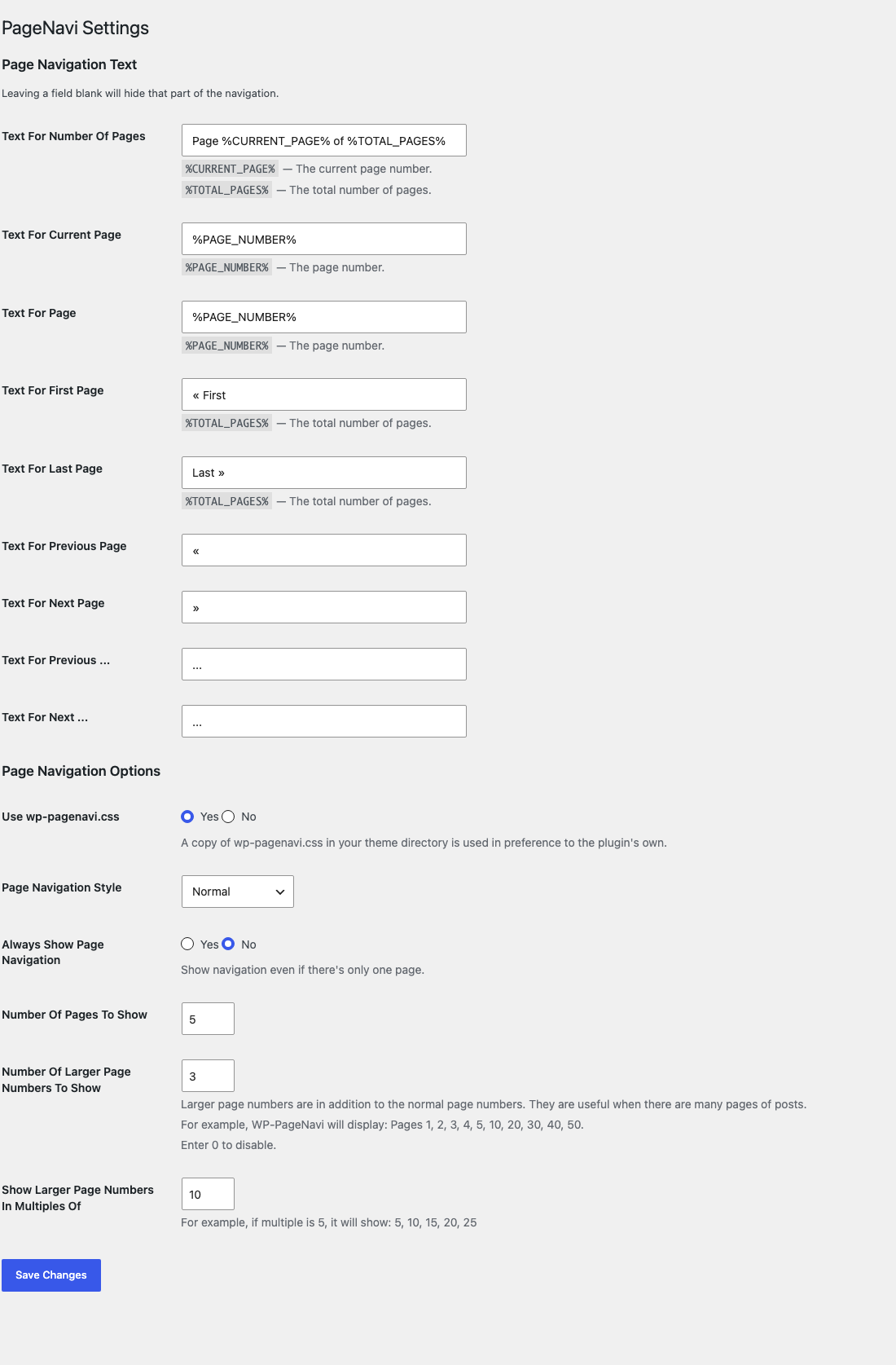
Go to WP-Admin -> Settings -> PageNavi for configuration.
Changing the CSS
If you need to configure the CSS style of WP-PageNavi, you can copy the css/wp-pagenavi.css file from the plugin directory into your theme’s directory as wp-pagenavi.css and make your modifications there. This way, you won’t lose your changes when you update the plugin.
The stylesheet sets no font and no text colour, so it inherits both from your theme, and its two border colours are CSS custom properties. A small change needs no copy of the file at all:
.wp-pagenavi {
    --wp-pagenavi-border-color: #d0d0d0;
    --wp-pagenavi-border-color-current: rebeccapurple;
}
Alternatively, you can set “Use wp-pagenavi.css” to No on the settings page and add the styles to your theme’s style.css file directly.
Changing Class Names
There are filters that can be used to change the default class names that are assigned to page navigation elements.
Filters
wp_pagenavi_class_pageswp_pagenavi_class_firstwp_pagenavi_class_previouspostslinkwp_pagenavi_class_extendwp_pagenavi_class_smallerwp_pagenavi_class_pagewp_pagenavi_class_currentwp_pagenavi_class_largerwp_pagenavi_class_nextpostslinkwp_pagenavi_class_last
Filter Usage
// Simple Usage - 1 callback per filter
add_filter('wp_pagenavi_class_previouspostslink', 'theme_pagination_previouspostslink_class');
add_filter('wp_pagenavi_class_nextpostslink', 'theme_pagination_nextpostslink_class');
add_filter('wp_pagenavi_class_page', 'theme_pagination_page_class');

function theme_pagination_previouspostslink_class($class_name) {
  return 'pagination__control-link pagination__control-link--previous';
}

function theme_pagination_nextpostslink_class($class_name) {
  return 'pagination__control-link pagination__control-link--next';
}

function theme_pagination_page_class($class_name) {
  return 'pagination__current-page';
}


// More Concise Usage - 1 callback for all filters
add_filter('wp_pagenavi_class_previouspostslink', 'theme_pagination_class');
add_filter('wp_pagenavi_class_nextpostslink', 'theme_pagination_class');
add_filter('wp_pagenavi_class_page', 'theme_pagination_class');

function theme_pagination_class($class_name) {
  switch($class_name) {
    case 'previouspostslink':
      $class_name = 'pagination__control-link pagination__control-link--previous';
      break;
    case 'nextpostslink':
      $class_name = 'pagination__control-link pagination__control-link--next';
      break;
    case 'page':
      $class_name = 'pagination__current'
      break;
  }
  return $class_name;
}
- Install and activate the plugin.
- In your theme, replace the calls to
next_posts_link()andprevious_posts_link()withwp_pagenavi(). Usage below shows what that looks like in a stock theme. - Go to
WP-Admin -> Settings -> PageNavito change the wording and the number of page links.

You’re using query_posts() wrong. See The Right Way To use query_posts()
Yes; read this tutorial
If you are running a multi-language plugin, you will probably want to ignore the strings in the options page.
You can do that like so:
<?php wp_pagenavi( array( 'options' => WP_PageNavi_Options::defaults() ) ); ?>
Before 3.0.0 this was written as PageNavi_Core::$options->get_defaults(). That property was backed by the bundled SCB framework, which 3.0.0 removes, so the old form no longer works and must be updated.
Yes. The navigation text settings accept the inline SVG elements as well as everything wp_kses_post() allows, so an icon typed into the settings screen survives the save. That allow-list is the wp_pagenavi_allowed_html filter if you need to widen or narrow it.
Changelog
3.0.1
- CHANGED: The settings migration now runs early on every request instead of only when wp-admin is loaded, so a site whose dashboard is never opened still picks up its settings after an update
- FIXED: Network-activating the plugin upgraded only the site the click happened on. Every other site on the network kept serving its front end with the default settings — its real, pre-3.0.0 settings sat unread until somebody opened that site’s wp-admin, which also means nothing was lost and any site that looked wrong has already healed itself. Activation now walks every site on the network
3.0.0
- BREAKING: WP-PageNavi now requires WordPress 6.8 and PHP 8.2. A site running anything older will not be offered the update
- BREAKING: The settings are stored in
wp_pagenavi_optionsinstead ofpagenavi_options. The old row is copied over and removed automatically - BREAKING: The settings screen has moved from
options-general.php?page=pagenavitooptions-general.php?page=wp-pagenavi - BREAKING:
pagenavi-css.cssis nowcss/wp-pagenavi.css, and a copy in your theme directory must be renamed towp-pagenavi.cssto keep overriding it - BREAKING: Every class is now prefixed.
PageNavi_Options,PageNavi_CallandPageNavi_CoreareWP_PageNavi_Options,WP_PageNavi_CallandWP_PageNavi_Core, andPageNavi_Adminis nowWP_PageNavi_Settings - BREAKING:
PageNavi_Core::$optionshas been removed. UseWP_PageNavi_Options::defaults()andWP_PageNavi_Options::get()instead. See the FAQ - BREAKING:
PageNavi_Options_Pagehas been removed and replaced byWP_PageNavi_Settings - BREAKING: Dropping the SCB Framework also removes the global functions and
scb*classes it defined, since they were loaded into WordPress by whichever plugin bundled it. If your theme or another plugin calledhtml(),html_link(),set_post_field(),scb_init(),scb_register_table(),scb_install_table(),scb_uninstall_table(),scb_admin_notice(),scb_get_query_flags(),scb_list_fold()orscb_list_group_by(), it must now provide them itself. Note that another installed plugin may still be supplying them, so the breakage will only appear once nothing else on the site bundles SCB - NEW: Removed the bundled WP SCB Framework. The plugin now runs entirely on WordPress core APIs and has no dependencies
- NEW: The settings page is built with the WordPress Settings API
- NEW: Restructured into
includes/following the Plugin Handbook layout - NEW: A
wp_pagenavi_capabilityfilter over the capability the settings screen requires - NEW: A
wp_pagenavi_versionrow holding the plugin and schema version markers, so a future upgrade has something to compare against - CHANGED: The stylesheet’s two colours are CSS custom properties with fallbacks rather than hardcoded hexes, and it now carries a dark colour scheme
- CHANGED: The stylesheet uses no physical CSS properties, so one file serves left-to-right and right-to-left sites alike
- FIXED: An inline SVG arrow no longer deletes the entire previous/next link.
wp_kses_post()removes an SVG rather than cleaning it, which left the link text empty, and a link with empty text is dropped altogether. The navigation text is now filtered againstwp_kses_post()‘s list plus the inline SVG elements, exposed as thewp_pagenavi_allowed_htmlfilter. Reported by Cal at toolshed (#73) - FIXED: Multisite uninstall no longer stops at the hundredth site, so a large network has its options removed everywhere. Reported by Cal at toolshed (#73)
- FIXED: The navigation aria-labels now match the strings WordPress core defines, so they are translated in every locale core supports. Reported by Cal at toolshed (#73)
- FIXED: An array submitted where a text setting belongs no longer raises a PHP 8 notice, and option keys the plugin does not define are no longer stored. Reported by Cal at toolshed (#73)
- FIXED: Page links are escaped with
esc_url()instead ofesc_attr() - FIXED: Page numbers derived from a
WP_User_Queryare cast to integers, so the current page is marked correctly - FIXED: The stylesheet version now tracks the plugin version instead of being pinned to 2.70
- FIXED: The label on each Yes/No setting pointed at an element that did not exist, so clicking it did nothing
- NOTE: No hook and no template tag is renamed. The ten
wp_pagenavi_class_*filters, thewp_pagenavifilter,wp_pagenavi()andwp_pagenavi_dropdown()all keep the names they shipped with
" width="120" height="120">
Available Versions
| Version | Download | Type |
|---|---|---|
| 3.0.1 | Download | Stable |
| 3.0.0 | Download | Stable |
| 2.94.6 | Download | Stable |
| 2.94.5 | Download | Stable |
| 2.94.4 | Download | Stable |
| 2.94.3 | Download | Stable |
| 2.94.2 | Download | Stable |
| 2.94.1 | Download | Stable |
| 2.94.0 | Download | Stable |
| 2.93.4 | Download | Stable |
| 2.93.3 | Download | Stable |
| 2.93.2 | Download | Stable |
| 2.93.1 | Download | Stable |
| 2.93 | Download | Stable |
| 2.92 | Download | Stable |
| 2.91 | Download | Stable |
| 2.90 | Download | Stable |
| 2.89.1 | Download | Stable |
| 2.89 | Download | Stable |
| 2.88 | Download | Stable |
| 2.87 | Download | Stable |
| 2.86 | Download | Stable |
| 2.85 | Download | Stable |
| 2.83 | Download | Stable |
| 2.82 | Download | Stable |
| 2.81 | Download | Stable |
| 2.80 | Download | Stable |
| 2.74 | Download | Stable |
| 2.73 | Download | Stable |
| 2.72 | Download | Stable |
| 2.61 | Download | Stable |
| 2.50 | Download | Stable |
| 2.40 | Download | Stable |
| 2.31 | Download | Stable |
| 2.30 | Download | Stable |
| 2.20 | Download | Stable |
| 2.11 | Download | Stable |
| 2.10 | Download | Stable |
| 2.03 | Download | Stable |
| 2.02 | Download | Stable |
| 2.01 | Download | Stable |
| 2.00 | Download | Stable |
| 1.00 | Download | Stable |
| Development | Download | Trunk |
