
WP Last Login
Active Installs
10,000+
Last Updated
October 9, 2026
First Released
January 22, 2012
Download History (Last one month)
Contributors
WP Last Login records when each user signs in and surfaces it as a sortable column on the Users screen — so you can see who’s active, identify dormant accounts, and confirm that real people are coming back.
Features
- Sortable “Last Login” column on the Users screen, including the network admin user list on multisite.
- Hover any date to reveal the exact login time.
- Captures logins via the standard
wp_loginaction, so it works with any login flow that triggers it — including the Two Factor plugin, WooCommerce, BuddyBoss, and most social-login plugins. - Users without a recorded login show a neutral em-dash (—) — never a misleading “never” — and still sort correctly when ordered by last login.
- Lightweight: one user meta key, no settings page, no extra database tables.
- Filter hooks let you customize the date format, the placeholder shown for users without a recorded login, or hide the column from non-admin roles.
Plugin Filter Hooks
wpll_current_user_can (boolean)
Whether the column is supposed to be shown.
Default: true
wpll_date_format (string)
The date format string for the date output.
wpll_no_login_output (string, int)
The markup displayed for users without a recorded login, and the user’s ID.
Default: an em-dash with an explanatory tooltip
- Download WP Last Login.
- Unzip the folder into the
/wp-content/plugins/directory. - Activate the plugin through the ‘Plugins’ menu in WordPress.
Screenshot Gallery
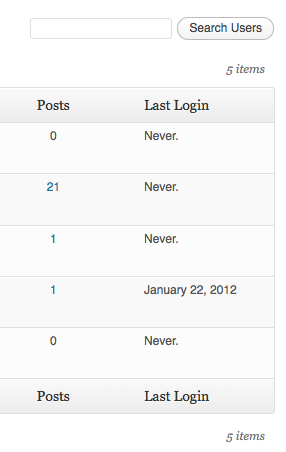
The plugin records a login when a user signs in after it’s been activated. WordPress doesn’t store historical login data, so existing accounts will start populating their “Last Login” the next time each user logs in. Hovering the dash shows a tooltip explaining the same.
The date follows your site’s general date format (Settings General); the exact time appears on hover. To override the date format, use the wpll_date_format filter:
add_filter( 'wpll_date_format', function() {
    return 'Y-m-d H:i';
} );
Filter wpll_no_login_output. It receives the default placeholder markup and the user ID, and whatever you return is printed as-is, so escape any custom output:
add_filter( 'wpll_no_login_output', function( $output, $user_id ) {
    return esc_html__( '(No logins since October 9, 2026)', 'my-textdomain' );
}, 10, 2 );
Filter wpll_current_user_can and return a capability check. Login tracking still happens — only column visibility is gated:
add_filter( 'wpll_current_user_can', function() {
    return current_user_can( 'manage_options' );
} );
Yes. The plugin hooks into WordPress’s standard wp_login action, so any login method that triggers it is captured. The Two Factor plugin (which interrupts wp_login) is supported via a dedicated hook.
Deactivating leaves stored login timestamps intact, so reactivating preserves history. Uninstalling (deleting the plugin entirely) removes all of the plugin’s user meta.
Changelog
9
- Added the
wpll_no_login_outputfilter to customize what is displayed for users without a recorded login. See https://wordpress.org/support/topic/feature-request-filter-the-for-users-without-login-data/
8
- Fixed users with no recorded login being dropped from the list when sorting by Last Login.
- Removed the activation routine that seeded a default value for every existing user, which could time out on sites with large user bases. Sorting no longer depends on it. Props @fwielstra.
- Replaced the “Never.” placeholder with a neutral em-dash and an explanatory tooltip.
- Raised the minimum PHP version to 8.1. PHP 7.4 and 8.0 reached end of life and no longer receive security updates.
- Tested up to WordPress 7.1.
7
- Added compatibility with Two Factor plugin. Props @bkno.
- Improved date display to display login time on hover.
6
- Revamped file structure to remove unnecessary files.
- Fixed a bug where login dates were overwritten on plugin reactivation. Props @richardbuff.
5
- Improved uninstall routine (no longer queries all users).
- Updated utility class.
- Tested with WordPress 6.1.
4
- Improved date display to account for the timezone of the site. Props @knutsp.
3
- Fixed a bug where users who haven’t logged in disappear from user lists when ordering by last login. See https://wordpress.org/support/topic/new-users-dont-get-the-meta-field/
2
- Maintenance release.
- Updated code to adhere to WordPress Coding Standards.
- Tested with WordPress 5.0.
1.4.0
- Fixed a long standing bug, where sorting users by last login didn’t work.
- Tested with WordPress 4.3.
1.3.0
- Maintenance release.
- Tested with WordPress 4.0.
1.2.1
- Reverts changes to wp_login() as the second argument seems not to be set at all times.
1.2.0
- Users are now sortable by last login!
- Updated utility class.
- Added Danish translation. Props thomasclausen.
1.1.2
- Fixed a bug where content of other custom columns were not displayed.
1.1.1
- Updated utility class.
1.1.0
- Made the display of the column filterable.
- Widened the column a bit to accommodate for large date strings.
1.0
- Initial Release.
Available Versions
| Version | Download | Type |
|---|---|---|
| 0 | Download | Stable |
| 1 | Download | Stable |
| 2 | Download | Stable |
| 3 | Download | Stable |
| 4 | Download | Stable |
| 5 | Download | Stable |
| 6 | Download | Stable |
| 7 | Download | Stable |
| 1.4.0 | Download | Stable |
| 1.3.0 | Download | Stable |
| 1.2.1 | Download | Stable |
| 1.2.0 | Download | Stable |
| 1.1.2 | Download | Stable |
| 1.1.1 | Download | Stable |
| 1.1.0 | Download | Stable |
| 1.0 | Download | Stable |
| Development | Download | Trunk |
