
WP BackItUp Community Edition
Active Installs
6,000+
Last Updated
January 25, 2026
First Released
December 6, 2012
Download History (Last one month)
Contributors
With the WPBackItUp Backup Plugin you’re protected against hackers, malware, host outages, and even your own mistakes. WPBackItUp creates a backup of every setting, post, comment, revision, plugin, theme, media file and upload with just a single click.
WPBackItUp generates a compressed backup of your entire website no matter how large a site you have. Your backup can be quickly and easily downloaded right from your WordPress dashboard.
The WPBackItUp backup plugin has been available to the WordPress community since 2012 and is used to back up more than 30,000 websites every day. It’s one of the most widely tested, reliable, and highly rated backup plugins available! And with our long history, you can feel confident that we are going to be around for many years to come.
The Simplest Way to Safeguard Your WordPress Site!
Simply install WPBackItUp and within minutes you will have a complete backup of your entire site.
- No complex configuration to deal with
- No advanced knowledge of WordPress required
- No FTP needed
- No cPanel required
- No MySQL knowledge necessary
- Not even any PHPMyAdmin involved
Just a few clicks and you’ll have a complete backup that safeguards all of your valuable content.
Here are just a few of our incredible features.
Community Edition Features (free)
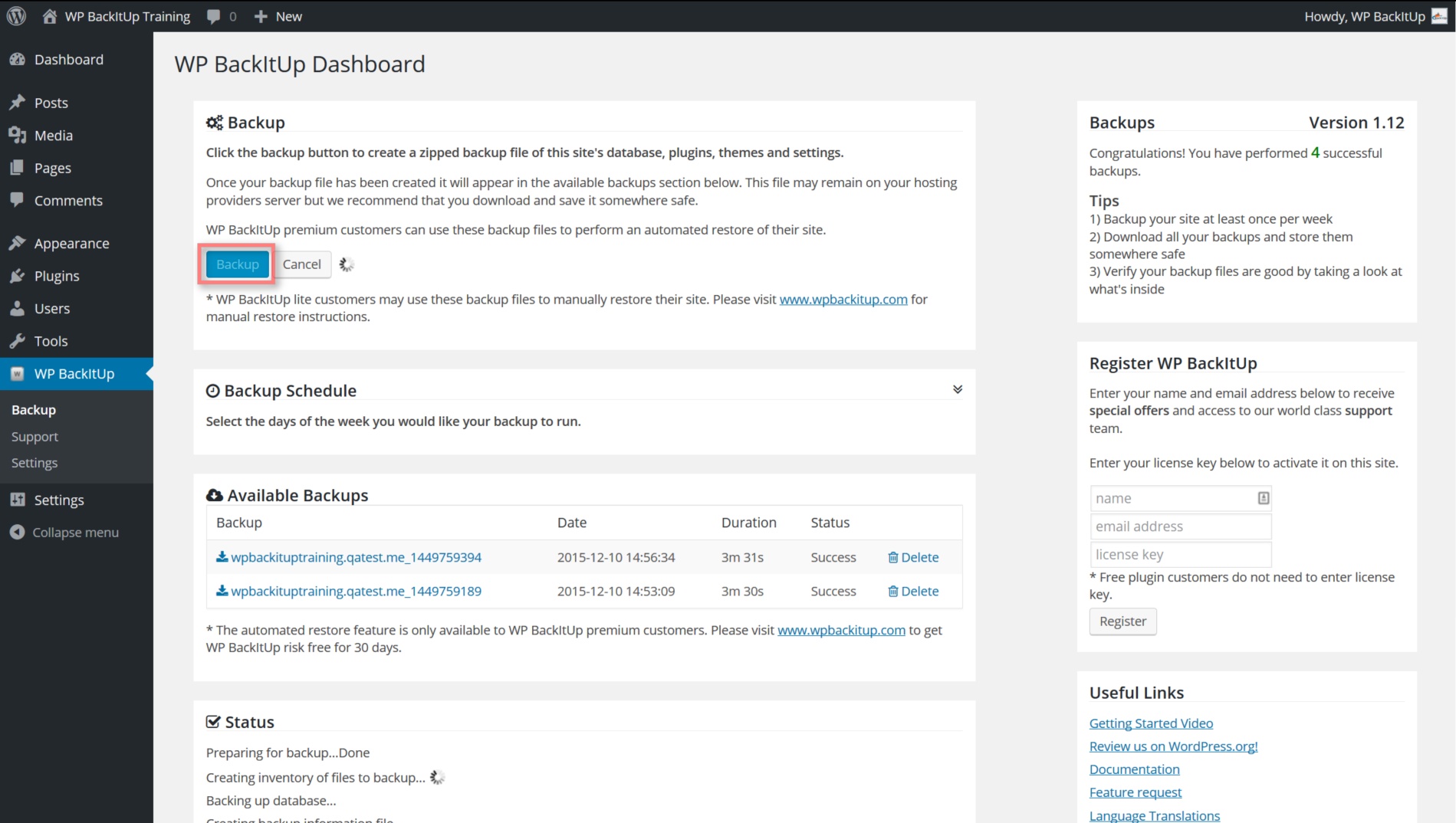
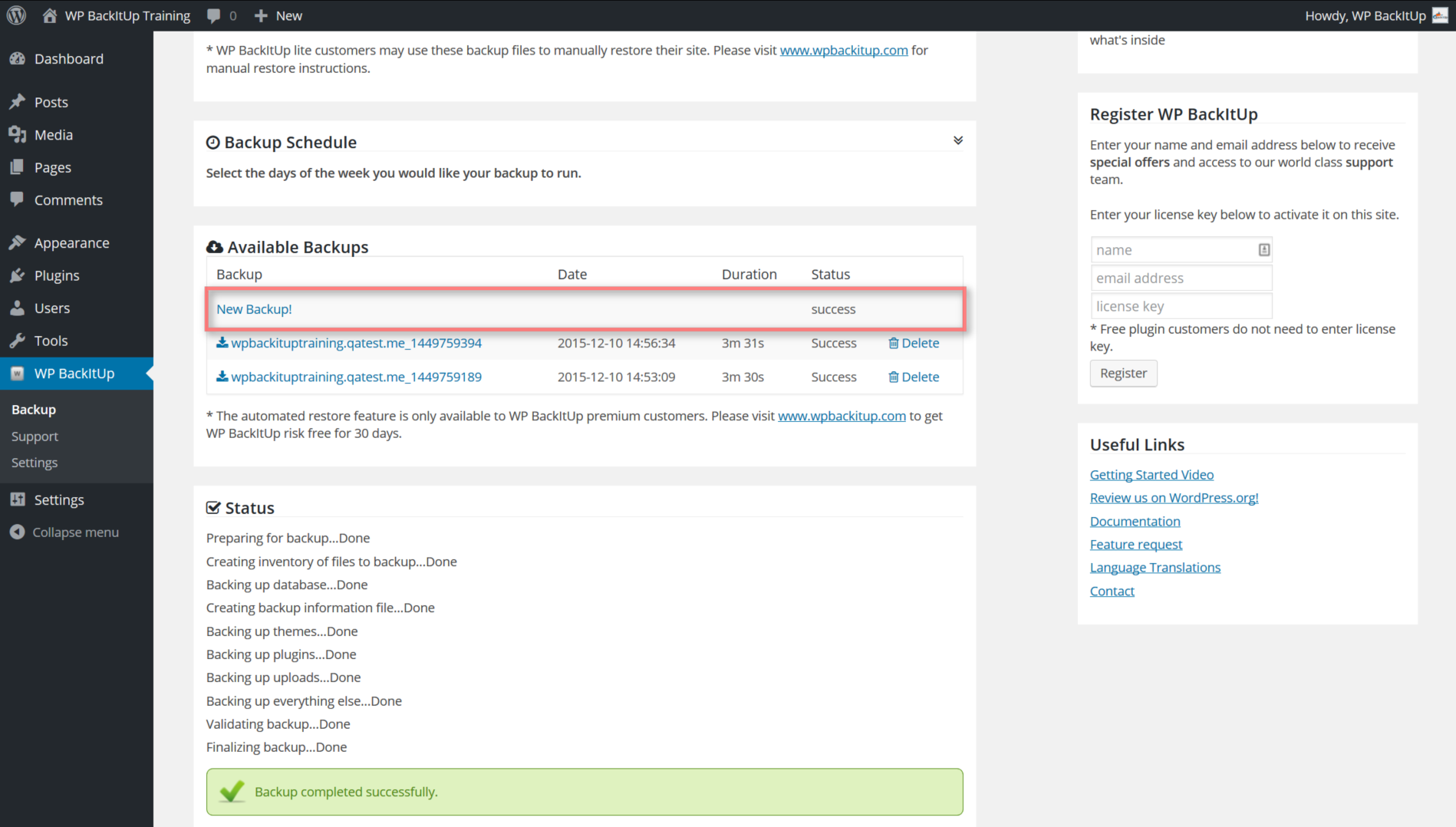
- Easy to use, just one click and your backup is complete
- Easy to setup because there is no setup required
- Simple & easy to understand – not just for techies
- Fast backup of your entire site
- Unlimited backups so backup as much as you want
- Large sites supported – lot’s of content, no problem
- Download your backup – no matter how large your site we have you covered
- Backup cancellation – cancel your backup at any time
- Customize what you want to backup
- Status notifications sent to you by email after every backup
- Works in low memory & shared hosting environments
- Works on all WordPress platforms (Linux, Windows and even Azure)
- Complete backup, includes database, plugins, themes, uploads, media files, everything
- Compressed backup (zip format) to save disk space
- Customized backup retention so you only keep the backups you want
- Tested and supported on WordPress 3.8 and above
- Professional support so if you need us we are available
Premium Features (paid)
- One click restore right from your WordPress dashboard
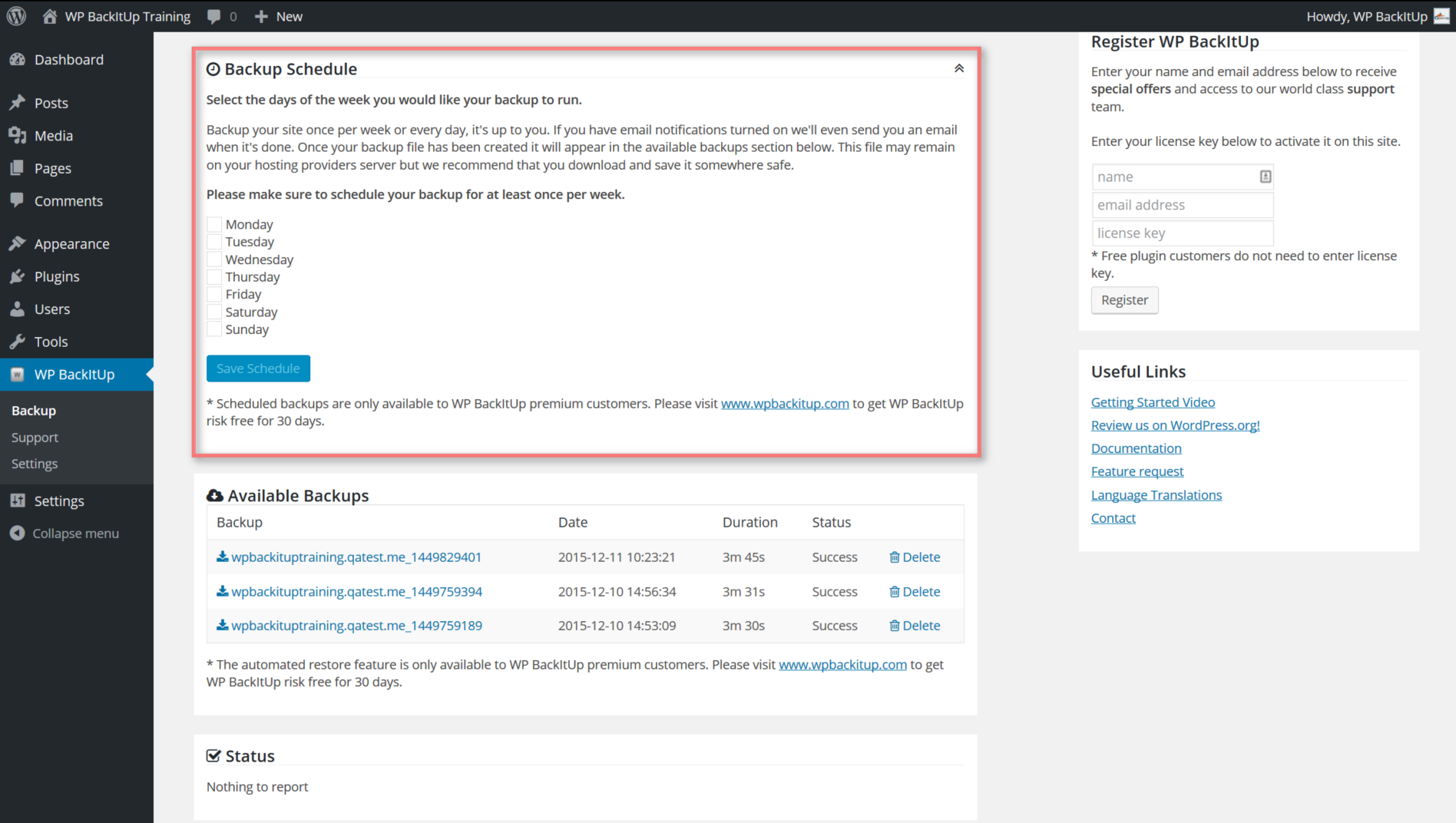
- Automated backup schedule allows your backup to run whenever you want
- Backup jobs run in background mode so you can keep working while your backup is running
- Import your backup right from your dashboard, no matter how large
- Single file backup makes moving your backups to another host easy
- Restore your backup to a different version of WordPress
- Migrate your site to different host, domain or table prefix
- Clone your site for development, staging or testing
- Priority support gets you right to the front of the line
- Save your backups to DropBox with WPBackItUp Safe
Don’t Risk Losing Your Website
Does the thought of losing your website keep you up at night? All that time, effort and money you’ve invested could be gone in an instant.
WordPress is an incredible product but there are many things that can go wrong. You could get hacked, your hosting company could go out of business, you could install a bad plugin or theme, the list is endless, and without a good backup, you could lose everything.
If this isn’t something that keeps you up at night, then it really should be. It was keeping us up at night so we decided to do something about it. In 2012 we created the WPBackItUp backup plugin and made it freely available to the WordPress community.
Since 2012 we have added many incredible features and have even created a premium version of our backup plugin, but our fundamental goal has remained the same. We want to make creating a WordPress backup as simple, effective and complete as possible. We don’t want anything to prevent you from regularly creating a backup of your WordPress site.
We offer the Community Edition of our backup plugin for free so that you will BackItUp and sleep better at night.
Community Edition Support
We offer free support via the WordPress support forum but before posting a question please make sure you are running the current version of WPBackItUp. We frequently add features and fix issues so please make sure your version is up to date before posting an issue. We also ask that you review our online documentation and FAQ’s which are available on the WPBackItUp Support Portal before posting your questions.
Restoring Your Site
Restoring your site can be very stressful and often times quite complex so we offer a few options to our Community Edition customers.
If you are a do it yourself kind of person then we provide detailed instructions on the WPBackItUp Support Portal. Here we walk you through the process to restore your database manually.
We also provide step by step instructions for manually restoring plugins, themes and media files.
But if you aren’t someone that wants to do it yourself, then check out our Premium Backup Plugin. With WPBackItUp premium you will have access to our one-click restore which takes care of all the hard work for you.
Premium Plugin
WPBackItUp Premium provides a number of additional features not included in the Community Edition. You can purchase a No-Risk WPBackItUp Premium License anytime from the WPBackItUp site.
One Click Restore:
WPBackItUp premium allows you to restore your backup from the WordPress dashboard with just a single click.
Automated Backups:
WPBackItUp premium allows you to schedule your backup to run whenever you need them to.
Priority Support:
WPBackItUp is supported by a team of professional. If you are using WPBackItUp to safeguard your business website then priority support is available to our premium customers. Please see www.wpbackitup.com for details.
Automatically Restore/Clone/Duplicate/Migrate your Website:
Need to restore, clone, duplicate or migrate your website? We make that easy too!
The premium version of the WPBackItUp backup plugin allows you to restore your website from backup with a single click. All you do is select the backup you want to restore and click restore, right from your WordPress dashboard. It’s that easy, and your site is back up and running in minutes.
More questions?
Please review our FAQ’s or ask them in the support forum.
Languages
WPBackItUp has been translated into the following languages:
- Deutsch
- Español
- Français
- Italiano
- Tagalog
- Russian
- বাংলা (Bengali)
Want to help us translate into your language?
Installing WPBackItUp is easy and straightforward.
- Search for ‘WPBackItUp’ in the WordPress.org plugin directory and click install. Or, upload the files to your wp-content/wp-backitup/ folder.
- Activate the plugin.
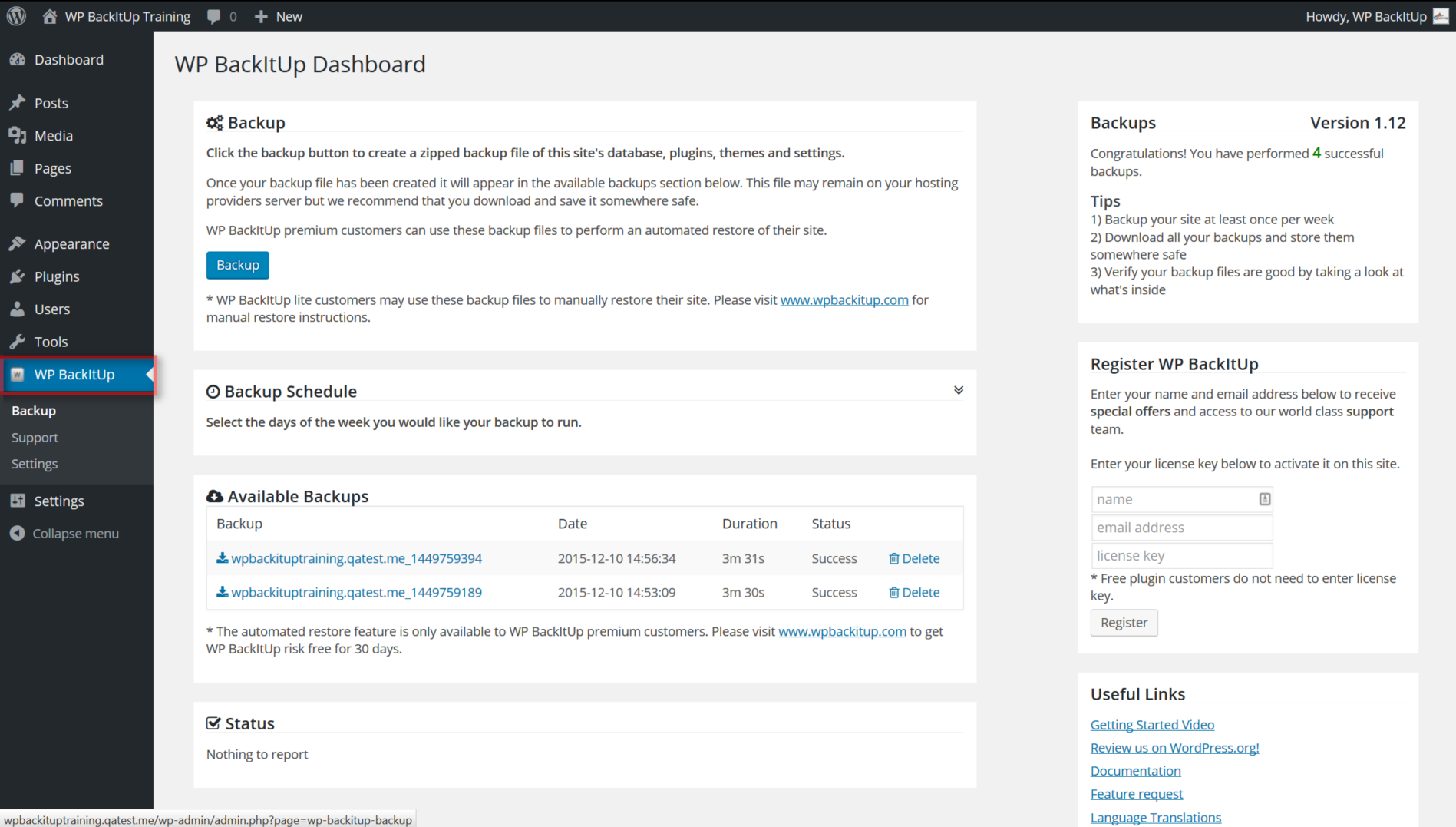
- A new menu named ‘WPBackItUp’ will be added to the left side navigation of your WordPress dashboard.
- Click ‘WPBackItUp’ to access the backup interface.
You can find more detailed instructions in our online documentation
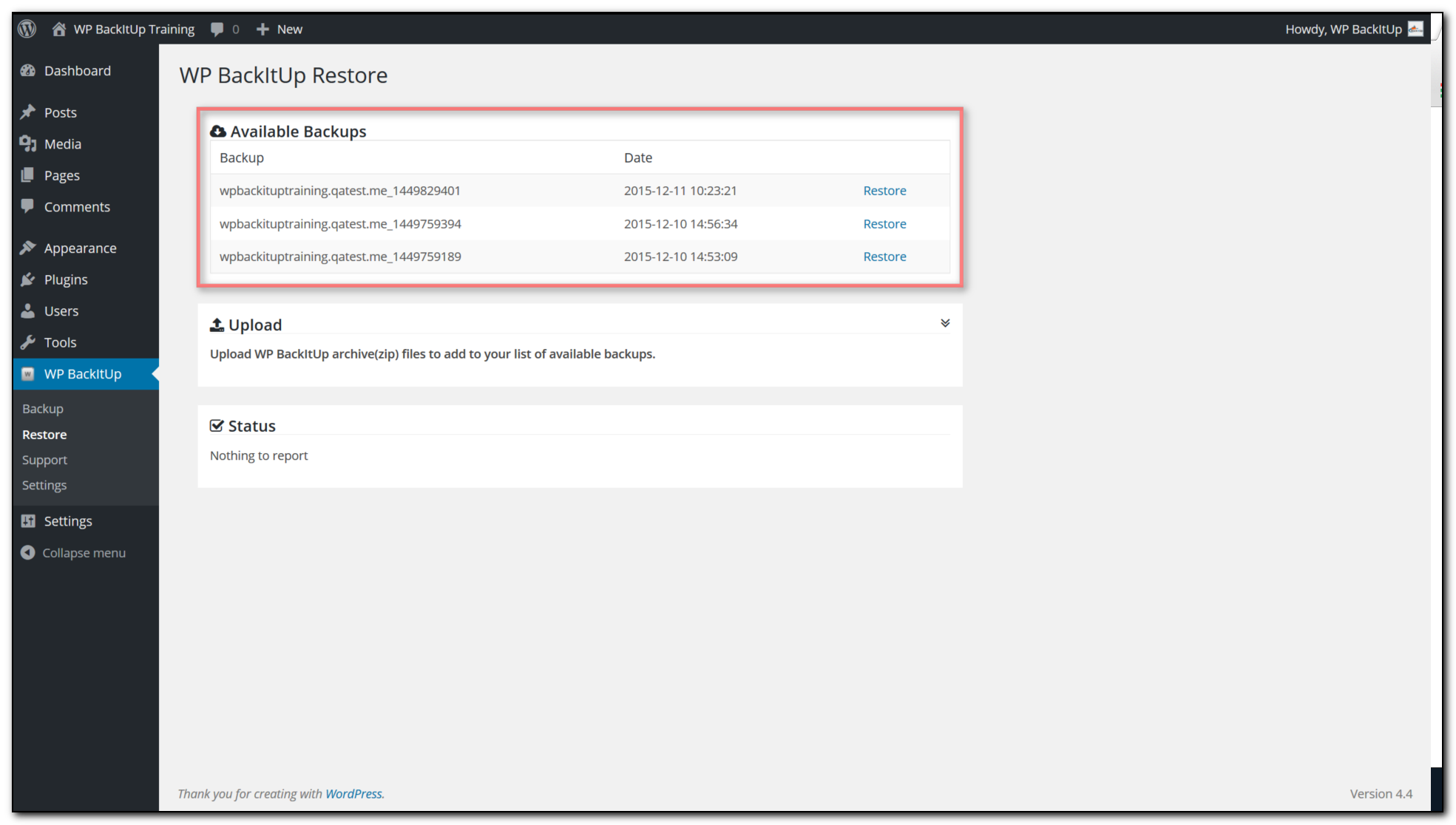
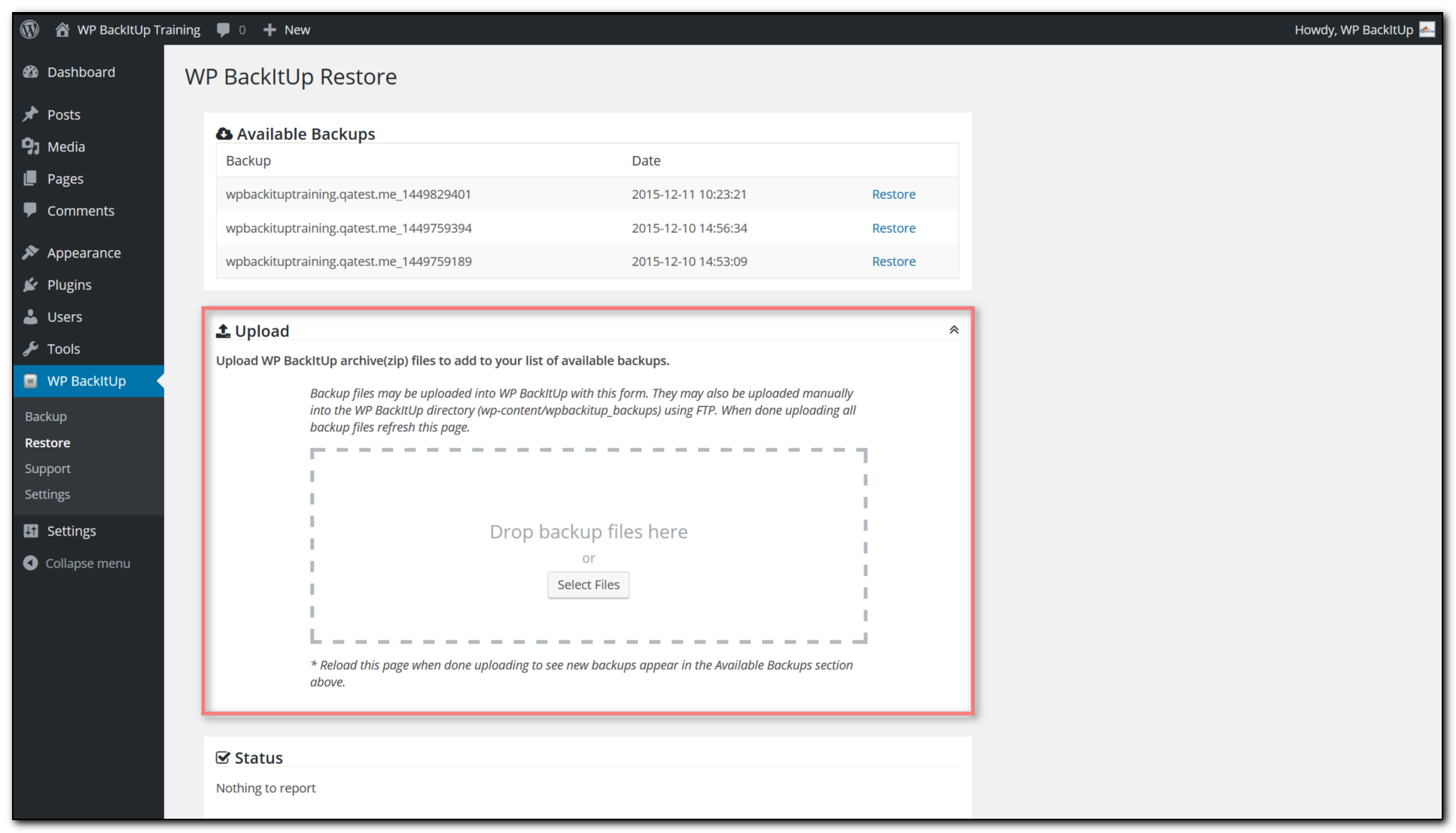
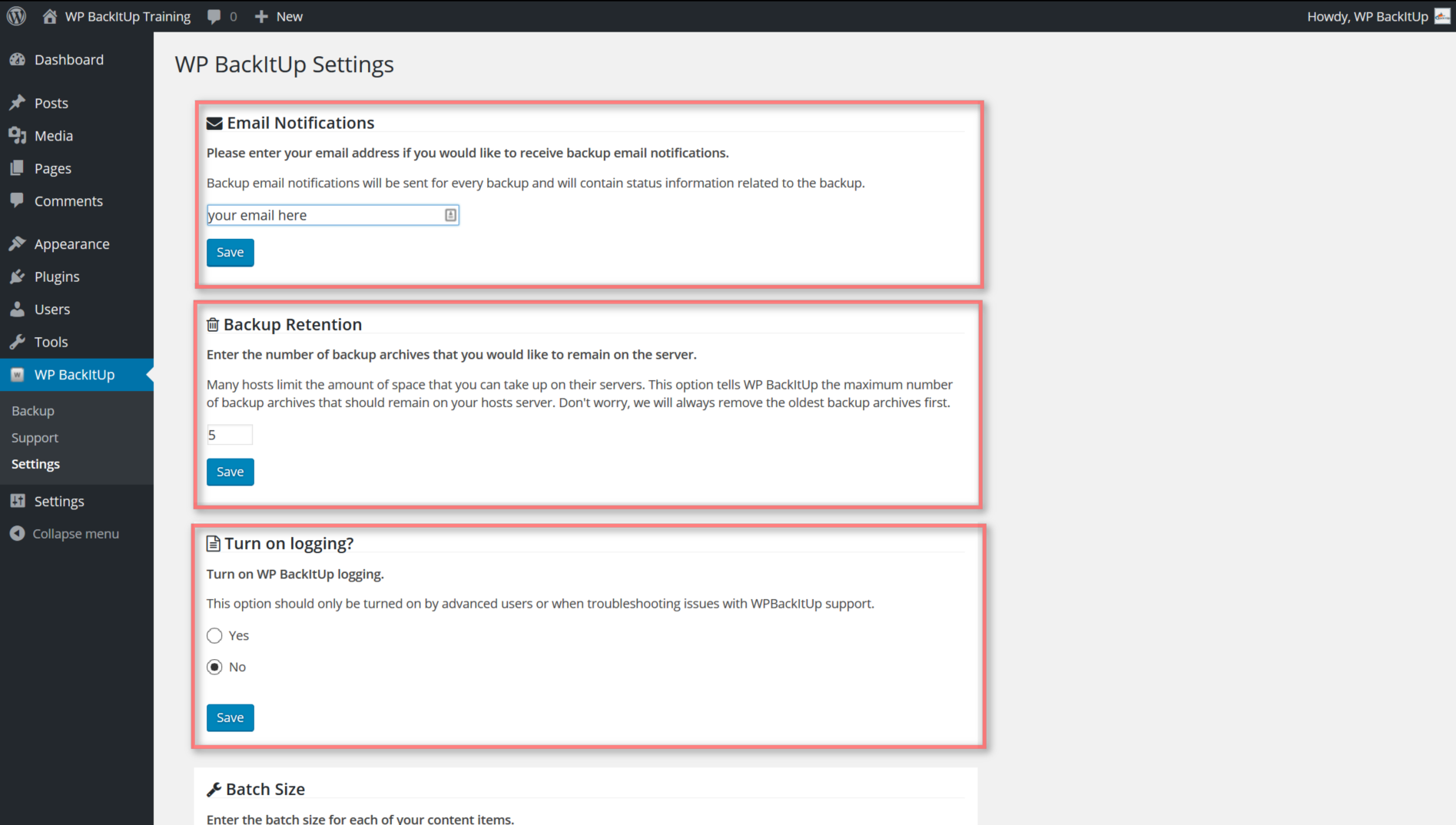
Yes, we have provided WPBackItUp free to the WordPress community since 2012. We do this because we don’t want there to be any reason you aren’t backing up your WordPress site, it’s that important.
The free version is made possible by our generous premium customers. Please use WPBackItUp free for as long as needed but if you are able, consider supporting our community by becoming a premium customer. See www.wpbackitup.com/premium for details.
Sure! The backup archive generated by WPBackItUp contains everything you need to restore your WordPress site. We even created a guide to help you. Please see our online documentation for details.
Yes, the premium version of WPBackItUp provides a one-click restore option. If you can click a button then you can restore your site. Please see www.wpbackitup.com for pricing info and our no-risk offer.
WPBackItUp is really fast. Unless your site is extremely large(many gigabytes) it should only take a few minutes for your backup to complete.
If your back up has been running for longer than 15 minutes then there may be an issue. Before contacting support please close your browser and try the backup again. If it continues happening, contact support.
Yes, WPBackItUp has been around since 2012 and has over 100,000 installs all over the world. WPBackItUp can be used safely and easily on most hosts.
Yes. WPBackItUp works on both Windows and Linux hosts. WPBackItUp even works with WordPress sites hosted on Windows Azure.
Not yet but this feature will be available in an upcoming version of WPBackItUp. We listen to requests so if this is an important feature to you then please let us know by submitting a feature request.
Yes, but this feature is only available with the premium version of WPBackItUp. Please see www.wpbackitup.com for pricing info and our no-risk offer.
WPBackItUp works on the current release of WordPress and is updated to function with all new releases.
This is a tough one. In many cases, a backup created by WPBackItUp can be used to restore to a different version of WordPress but this is not recommended. It is very important that you keep all your WordPress versions the same but if you find yourself in this situation. Please contact support before attempting this on your own.
Yes, WPBackItUp supports multisite but at this time we can only backup and restore entire networks.
Yes, it does. Your entire database will be exported into a set of SQL files and saved in the backup archive created by WPBackItUp. This file is used by WPBackItUp premium to restore your site and may be also be used for manual restores.
Please see www.wpbackitup.com for information about WPBackItUp premium or for manual-restore instructions
Yes, the database export contains everything related to the database.
Yes. WPBackItUp is used by many professional designers & developers just this way. Once you have your WordPress site setup the way you want, just BackItUp and use that backup archive as a starting point for all your new sites.
Yes, WPBackItUp is just like any other WordPress plugin. You must install it on any site that you wish to perform a backup or restore.
WPBackItUp creates a backup of everything. This includes plugins, plugin settings, themes, theme settings, pages, posts, users, uploads, everything.
WPBackItUp supports very large sites. We have a number of customers with extremely large sites that use WPBackItUp regularly.
Yes. We continually improve WPBackItUp and test it with every new version of WordPress.
Yes, please make sure you are always running the current version of WPBackItUp.
General support questions should be posted to the WordPress support forums. If you are WPBackItUp premium customer then support requests may be submitted the portal support.wpbackitup.com
Our online documentation and full list of FAQs can be found at support.wpbackitup.com
Changelog
2.10
*Release Date – January 25, 2026
- SECURITY: Fixed broken access control vulnerability in admin action dispatcher – Added authentication and authorization checks to prevent unauthenticated users from triggering admin actions
- FEATURE : Event Logging System – Tracks plugin updates, theme updates, WordPress core updates, content changes, security events, and settings changes
- FEATURE : New “Event Logging” settings tab with enable/disable toggle
- FEATURE : Event Statistics Dashboard – View event counts by type (updates applied, content changes, security events, settings changes, pending updates)
- FEATURE : Critical plugin detection – High priority alerts when security plugins (Wordfence, Sucuri, etc.) are updated
- FEATURE : Critical settings monitoring – Alerts when important WordPress options are changed
- FEATURE : Build Versioning System – Each build now displays version info with timestamp and git commit hash in admin footer, helping developers identify exactly which code is deployed
- UPDATE : Database schema updated to support event tracking (v5)
- UPDATE : New WP-Cron jobs for event aggregation and cleanup
- UPDATE : Events automatically cleaned up after 7 days for optimal performance
- UPDATE : Deduplication prevents redundant event logging
- UPDATE : Stats display optimized – queries skipped when event logging is disabled
- UPDATE : Added filter hook for Premium Edition integration in build versioning system
- FIX : Fixed logger error when passing arrays to logging methods – arrays now automatically converted to JSON
- FIX : Fixed Event Statistics display – Settings Changes now included so totals match sum of categories
2.00
*Release Date – August 16, 2025
- UPDATE : Security Updates
- UPDATE : Major update to address technical debt in plugin
1.50
*Release Date – March 15, 2024
- UPDATE : Updates to add randomized log file suffix
- UPDATE : Updates to log file collection
- UPDATE : Misc minor fixes
1.45
*Release Date – December 23, 2023
- UPDATE : Updates to support WordPress 6.4 Enhancements
- UPDATE: Escaped reserved ‘offset’ keyword to fix the mariadb version > 10.6 conflict
- UPDATE: php deprecated function fix
1.43
*Release Date – August 12, 2022
- UPDATE : Updates to support WordPress 6.0 Enhancements
1.42
*Release Date – March 24, 2022
- UPDATE : Updates to support WordPress 5.9 Enhancements
1.41
*Release Date – September 06, 2021
- UPDATE : Updates to support WordPress 5.8 Enhancements
1.40
*Release Date – December 10, 2020
- FIX : Updated tested up to settings
1.39
*Release Date – December 10, 2020
- UPDATE : Updates to support WordPress 5.6 Enhancements
- FIX : Review reminder does not close so removed
1.38
*Release Date – June 2, 2020
- UPDATE : Updates to support WordPress 5.4
1.37
*Release Date – November 19, 2019
- UPDATE : Updates to support WordPress 5.3
1.35
*Release Date – May 14, 2019
- FIX : Theme & Plugin Language files were not being included in backup
1.34
*Release Date – May 8, 2019
- UPDATE : Updates to support WordPress 5.2
1.33
*Release Date – April 16, 2019
- UPDATE : Add license activation to bypass api gateway on failure
1.32
*Release Date – March 4, 2019
- UPDATE : Tested up to WP 5.1
- UPDATE : Added secure prefix to backup folder name to increase security
- UPDATE : Minor updates to backup engine
1.31
*Release Date – November 6, 2018
- UPDATE : Update tested up to version 5.0
- UPDATE : Add option to install beta releases
- UPDATE : Update fonts to use latest font awesome(5.4.2)
- UPDATE : Update license activation logging to better identify response codes in error
- UPDATE : Update to include debug, info, error logs when sending to support
1.30
Release Date – October 18, 2018
- UPDATE : Move scheduler UI components into premium plugin
- UPDATE : Update Notices for Thanksgiving
- UPDATE : Add Sync Flag to get enabled providers
- FIX : Fix API missing day property with premium scheduler
- FIX : Fix SQL close message error on destructor
1.29
Release Date – August 29, 2018
- UPDATE : Update Admin Notices and add Labor Day Promo
1.28
Release Date – August 13, 2018
- FIX : Correct additional issue with php 7.0 array initialization in API
1.27
Release Date – August 10, 2018
- FIX : Correct php 7.0 issue with array initialization in API
1.26
Release Date – August 9, 2018
- UPDATE : Update to check scheduler job frequency
- UPDATE : Update UI to show new cancel button
- UPDATE : Add support for advanced scheduler
1.25
Release Date – July 19, 2018
- Fix : Fix plugin update to product id
1.24
Release Date – July 19, 2018
- UPDATE: Remove Independence Day Promo
- UPDATE: Updates to core to support LITE version of plugin
- Fix : Fix JS error when WPBackItUp-Safe not installed
1.23
Release Date – July 2, 2018
- UPDATE: Add Independence Day Promo
- Fix : Miscellaneous fixes
1.22
Release Date – June 29, 2018
- NEW: Add WPBackItUp Toolbar
- UPDATE: Fix alignment on header in dashboard
1.21
Release Date – June 5, 2018
- UPDATE: Update available backup list to show last 10 backups
- UPDATE: Update backup notification email to use domain instead of blog name
- UPDATE: Add settings class & add site id to ut
- UPDATE: Migrate premium code to separate repo
1.20
Release Date – June 1, 2018
- FIX: Fix broken links on support tab for multi-site
- UPDATE: Minor updates to ut actions
1.19
Release Date – May 25, 2018
- UPDATE: Minor updates to ut actions
1.18
Release Date – May 22, 2018
- UPDATE: Minor updates to UI scripts
1.17
Release Date – May 19, 2018
- UPDATE: Fix issue with ut-API
1.16
Release Date – May 18, 2018
- UPDATE: Updates for WordPress version 4.9.6
- UPDATE: Updates to usage tracking
1.15.7
Release Date – May 4, 2018
- UPDATE: Updates to get_open_items_by_group_last_day to include items that are queued and open
- UPDATE: Updates to fire WPBackItUp Safe Log Push Event
1.15.6
Release Date – March 1, 2018
- FIX: Fix array initialization issue for php 7.1 in task and job meta setters
- UPDATE: Updates to remove api log messages
1.15.5
Release Date – February, 9, 2018
- UPDATE: Updates to support WPBackItUp Safe Beta Launch
- UPDATE: Updates to WordPress 4.9.4
1.15.4
Release Date – January 3, 2018
- FIX : Fix security issue with delete log
- UPDATE: Admin notice updates
- UPDATE: Enhancements to support WPBackItUp Safe cloud storage
1.15.3
Release Date – November 16, 2017
- FIX: Fix minor issue with admin notice
1.15.1
Release Date – November 15, 2017
- UPDATE: Enhancements to support WordPress Version 4.9
- UPDATE: Enhancements to support WPBackItUp Safe
- UPDATE: Added logging to track infinite loop in plugin validation
1.15
Release Date – September 29, 2017
- UPDATE: Enhancements to settings user interface
- UPDATE: Enhancements to backup engine to support Cloud Storage
- UPDATE: Extend maximum zip file size to 2GB
1.14.7
Release Date – July 19, 2017
- FIX: Fix issues with CSS filter on PHP 5.2
1.14.6
Release Date – July 15, 2017
- FIX: Fix issues with cleanup processor causing jobs fail
- FIX: Fix CSS causing UI issues for certain themes
1.14.5
Release Date – June 8, 2017
- UPDATE: Updates to support WordPress 4.8 release
- UPDATE: Enhancements to cleanup processor and job engine
- UPDATE: Enhancements to Review notices
- UPDATE: Add Russian & Arabic translations
- UPDATE: Minor UI improvements to admin menu
- FIX: Fix minor issue with logger
1.14.4
Release Date – April 6,2017
- FIX: Fix for backup upload error
1.14.3
Release Date – March 16,2017
- UPDATE: Added new admin notice class
- UPDATE: Added new logging class
- UPDATE: Add support for extremely large databases(500+ SQL files)
1.14.2
Release Date – March 7, 2017
- FIX: Correct issue with undefined index on admin notices
1.14.1
Release Date – February 16, 2017
- UPDATE: Updated languages Translations
1.14
Release Date – February 2, 2017
- UPDATE: Split Premium + Community Edition Code Base
- UPDATE: Issue 173: Added method mysql_escape_mimic to the sql class
- UPDATE: Fix compatibility issue with less php5.5
1.13.6
Release Date – December 22, 2016
- FEATURE : Add Download logs option to support page.
- UPDATE : Display review button after 2 successful backup or restore
- FIX : Database table filter value reset when any other “Save” button hits
- FIX : Fix issue notification message not being removed on license update
- FIX : Add backupset file to import processor
1.13.5
Release Date – November 23, 2016
- FIX : Fix issue with purge when support zips missing
- FIX : Fix data issue with default date 1970-01-01 for mySQl 5.7 strict mode
1.13.4
Release Date – November 17, 2016
- UPDATE : Add plugin updater
- UPDATE : Update translations
- UPDATE : Add success check icon to the downloadable row
- FEATURE : Add setting to cleanup supporting zip files
- UPDATE : Set upload_path & upload_url_path to empty on restore
- UPDATE : Minor updates to background processing engine
- FIX : Fix schema issue with default date 0000 for mySQl 5.7 strict mode
- FIX : Fix data issue with default date 0000 for mySQl 5.7 strict mode
1.13.3
Release Date – October 14, 2016
- FIX : Remove reference to phar file causing issues with some customers
1.13.2
Release Date – October 13, 2016
- UPDATE : Updates to plugin to make responsive
- UPDATE : Add about page
- UPDATE : Updates to support page to used tab interface
- UPDATE : Add task timeout setting
1.13.1
Release Date – September 19, 2016
- NEW FEATURE : Add max zip size option to settings page
- NEW FEATURE : Add multiple email addresses and enhanced interface
- UPDATE : Add filter for files with invalid names
- UPDATE : Add encryption to backup – turned off in general release
- UPDATE : Remove 500 SQL file limitation from backup
- UPDATE : Add support for tables that don’t contain table prefix.
- UPDATE : Use Amazon API gateway for license activation. Fallback to direct on error.
- FIX : Fix issue with table prefix in column name
- FIX : Fix manifest generation issue for php 5.2
- FIX : Add function exists check on mb_regex_encoding
- FIX : Fix form body issue with activation
- FIX : Fix issue with missing table prefix on restore
- FIX : Fix issue with user update in snapshot tables
1.13
Release Date – August 14, 2016
- UPDATE : WordPress 4.6 support
- UPDATE : Minify style sheets and javascript files
- NEW FEATURE : Restore to different table prefix
- NEW FEATURE : Add backup notes so that users can annotate backups
- NEW FEATURE : Add database(db) file to backup which contains complete database export in single SQL file.
1.12.5
Release Date – June 25, 2016
- FIX : Correct issue with backup tasks not running for customers requiring login on all pages
- FIX : Correct wp_remote_get issue with backup task runner
1.12.4
Release Date – June 14, 2016
- UPDATE : Migrate database export to use wpdb query utility
- UPDATE : add SQLi detection and error logging
- UPDATE : Minor job updates to support wpbackitup-safe
- UPDATE : Enhancements to scheduling engine
- UPDATE : Add new background processing engine to minimize WPCron Dependency
- UPDATE : Move options table restore to last pass to minimize migration issues
- UPDATE : Significant performance improvements to scheduled backups
- FIX : Fix issue with single file backup set settings and manifest
1.12.3
Release Date – April 18, 2016
- FIX : Fix issue with license activation
1.12.2
Release Date – March 10, 2016
- NEW FEATURE : Add Single backup file feature
- NEW FEATURE : Add import uploaded backup files
- UPDATE : Update job duration formatting to include hours for large sites and long jobs
- UPDATE : Add backup type to available backups grid.
- UPDATE : Change database export to only use one method after successful export of first table
- UPDATE : Add WPBackItUp about page
- UPDATE : Add WPBackItUp logo to notification email
- UPDATE : Allow no uploads on restore
- UPDATE : Refresh backup list on successful backup without page
- UPDATE : Add review plugin button and logo to backup view
- UPDATE : Add site migration link to useful links
- UPDATE : Add background color enhancement to new backups
- UPDATE : Add setting for single file backup set
- UPDATE : Update product name to WPBackItUp
- FIX : Invalid error message on delete backup
1.12.1
Release Date – December 17, 2015
- NEW FEATURE : Add scan and import feature to files dropped in wpbackitup root backup folder
- UPDATE : Add error notice on license activation error
- UPDATE : Updated job control table to increase job_name column to accommodate large site names
- UPDATE : Add check on file inventory for valid folder
- FIX : Update job names to sanitize file name, removing special characters and accents
- FIX : Move extension load to initialization so that all dependencies are loaded first
- FIX : Update database upgrade routines and use initialization hook
1.12
Release Date – December 10, 2015
- NEW FEATURE : Add Remove Data on Uninstall option to setting
- NEW FEATURE : Add filter your Files option to settings.
- NEW FEATURE : Add batch size to database export and add setting
- NEW FEATURE : Manifest File Enhancements – Add zip size to manifest during backup
- NEW FEATURE : Manifest File Enhancements – Check zip size on restore
- NEW FEATURE : Add database table filters
- UPDATE : Change available backups list to use retention settings
- UPDATE : Change text domain to support WordPress Language Packs
- UPDATE : Change MySql NOW to PHP date to support older versions of MySql
- UPDATE : Change backup name to WordPress site name
- UPDATE : Turn on logging for all restores, bypass user setting
- UPDATE : Add UI notification on save settings
- UPDATE : Add wp-congig.php file to main backup file for reference
- UPDATE : Add download and delete icons to available backups
- UPDATE : Add split database backup into multiple files based on user settings
- UPDATE : Add restore to support multiple database files
- UPDATE : Major updates to backup & restore engine
- UPDATE : Add allow no uploads on validation
- UPDATE : Fix issue with generating warnings on file sort
- FIX : Add backwards compatibility on zip file validation
- Fix : Default table size to 0 on inventory
- FIX : Fix issue with global filters for other backup plugins
- FIX : Add check on exec function disabled
- FIX : Add check on zip file size
- Fix : Remove job table from filter.
- Fix : Update db batch size setting to 10,000
- Fix : Add logging on zip close
1.11.1
Release Date – October 4, 2015
- UPDATE : Change text domain to support WordPress Language Packs
1.11.0
Release Date – September 15, 2015
- FIX : Add default collation value for WordPress version <= 3.4
- FIX : Add try catch & set_time_limit(0) to manual database export
- FEATURE : WPBackItUp now officially supports WordPress multisite – WPBackItUp will now only be available on network admin site.
- UPDATE : Add translation link to useful links widget
- UPDATE : Added php & MySQL version info to log email
- UPDATE : Add new job class – jobs will now be stored in the database instead of file system
- FEATURE : New availability grid – displays backup duration and active jobs
- UPDATE : Updates to support WordPress 4.3.1
- UPDATE : Enhancements to cleanup processes
- FEATURE : New Languages Added: Bengali, French, German, Italian, Spanish, Tagalog, Russian
- FEATURE : Add notification bar to top of WPBackItUp dashboard.
- UPDATE : Use filter iterator for file inventory to improve performance
- UPDATE : Add ajax call to fetch next message in stack on dismiss
- UPDATE : Add additional filters to folder ignore list
- UPDATE : Add wildcard search for to folder ignore list
- UPDATE : Free resources on manual database export to reduce memory footprint
- UPDATE : Add additional error handling and logging to manual database export
- UPDATE : Add connection check on manual export
- Fix : Cleanup was not purging all job control records properly
- Fix : Correct job locking(flock) warning message
- Fix : Fix issue with multi-site form post
- Fix : Update multi-site database export to backup all tables in database
- UPDATE : Add expiration information to email notifications
- Fix : Update uninstall to remove job table
1.10.9
Release Date – August 14, 2015
- NEW : New Feature – Cancel backup
- NEW : New Feature – Batch Size settings for plugins, themes, uploads
- UPDATE: Add additional logging to data access methods.
- UPDATE: Add base localization
- UPDATE: Add new static logging class
- UPDATE: Add logging to verify timeout error
- UPDATE: Change backup file validation to be performed in multiple steps
- UPDATE: Update backup to no longer use using .tmp extensions
- UPDATE: Add new logging to track file sizes and capture zip file status before close
- UPDATE: Add permission checking to files being added to zip
- UPDATE: Check archive state on close and file count check
- UPDATE: Additional logging to detect error on archive creation
- UPDATE: Add filter for plugin wp-backitup on backup
- UPDATE: Separate validation into smaller batches to support large WordPress sites
- UPDATE: Add check for safe mode and ini_set instead of set_time_limit.
- FIX : Fix to hide cancel button on backup error
- FIX : Fix get_portonly() method
1.10.8
- UPDATE: Add database size logging
- UPDATE: Add WordPress and WPBackItUp version info to support email
- UPDATE: Add logging to verify work files exist
- FIX: Add fix to handle special characters in file names
- FIX: Add fix to handle datediff for php versions <=5.3
- FIX: Add fix to version compare utility method
- FIX: Add fix to recursive directory iterator for php versions < 5.3
- FIX: Ignore backwpup folders during backup
- FIX: Fix missing database port issue
- FIX: Add logging and clearstatcache to backup files
- FIX: Remove use of GLOB_BRACE
1.10.7
- UPDATE: Add multi-site support for database backup
- UPDATE: Add WordPress 4.2 support
- UPDATE: Enhance backup file validation
- UPDATE: Add job table to better handle large backup jobs
- UPDATE: Add logging additional logging to database export.
- UPDATE: Add logging for is_file to make sure filtering properly.
- UPDATE: Add logging to backup view to list all files contained in root backup folder.
- UPDATE: Add logging to plugin meta update
- FIX: Modify manual db export to write flush file buffer more frequently.
- FIX: Change backup to use default batch size.
- FIX: Correct job check error when no jobs available to purge.
1.10.6
- FEATURE:Add job data to cleanup routine
- FIX: Add wp-cron task on schedule check to fix issue with scheduled backups not running.
- FIX: Write response file before status update.
- UPDATE: Cancel all scheduled jobs on plugin activation & deactivation.
- UPDATE: Add additional logging to job scheduler.
- UPDATE: Add additional logging to manifest creation.
- UPDATE: Add additional logging to add files to backup.
1.10.5
- UPDATE: Change support request to forward to new support email address.
- UPDATE: Leave copy of log in logs folder so when included when support logs are sent
- UPDATE: Add additional logging on site info backup & DB export
1.10.4
- Updates: Make registration section easier to use and add more status information
- Updates: Add backups section with tips and backup count
- Fix: Restore – fix to static folder property reference
1.10.3
- Update: Add ticket id to support view.
- Fix: Add UTF Encoding on file names being backed up and restored
- Fix: Multiple new backup success messages after backup
- Fix: Add wp_slash function to support WordPress versions 3.6 and lower
1.10.2
- Update: Display backup file set name instead of date
- Fix: Backup plugins error when no files on last folder
- Fix: Extend activation request timeout
- Fix: Correct issue with restore version checking
- Fix: Correct issue with restore current user capabilities
- Fix: Correct sorting and display of available backups
- Fix: Correct issues with files named using German character set
- Fix: Correct issues with file downloads
1.10.1
- Update: Display backup set name in available backup lists.
- Update: Remove backup retention limitations for WPBackItUp lite.
- Fix: Downloads for large files was running into buffer errors when other plugins turn on output buffers incorrectly. Added logic to flush and turn off buffering for all WPBackItUp downloads.
- Fix: Backup lists were not being ordered properly under available backups.
- Fix: Backup cleanup routines were not purging backups in correct order.
1.10.0
- New Feature: Add support request to plugin
- New Feature: Add large backup support
- New Feature: Add drag and drop uploads
- New Feature: Split backup into separate archives(database,plugins,themes,uploads)
- New Feature: Add download popup to allow user to selectively download backup archives
- Updates: Security Enhancements
- Updates: Miscellaneous User Experience Improvements
- Updates: Significant Performance Improvements
1.9.2
- New Features: Added WordPress 4.0.1 support
- New Features: Major Security Enhancements
- New Features: Added log attachment to backup notification email
- Update: Moved zip threshold to constant.
- Update: Added additional logging to archive process
1.9.1
- New Features: Long running backups are now supported.
- Update: Extensive Performance improvements
- Update: User experience improvements to backup.
- Update: Extensive updates to error handling and messaging
- Update: Enhancements to backup email notification.
- Update: Logging enhancements.
- Update: Automated cleanup uses file retention limits for all logs.
- Update: Security enhancements to prevent unwanted access to backup, restore and log folders.
- Fix: IFrame css definition changed to use wp-backitup namespace.
1.9
- New Features: Scheduled backups are now available.
- New Feature: Allow only a single backup to be run at a time.
- New feature: Automated cleanup feature will perform work file and log cleanup once per day.
- Update: User experience improvements to backup.
- Update: Logging enhancements.
- Fix: Add support for windows MySql database exports. Windows backups always worked but did not take advantage of MySql export tools like other platforms.
1.8
- Updates: WordPress 4.0 support
- Feature: Add support for large database restore.
- Feature: Add database checkpoint recovery for database restore failures
- Feature: Add restore logging on all restores
- Fix: Correct bug on restore when table prefix doesn’t match.
1.7.5.1
- This is a minor release with some small UI fixes.
- Feature: Add lite registration
- Fix: correct license expiration month
- Fix: added namespace prefix to all ajax actions
1.7.5
- Feature: Add exclusion of non-WPBackItUp backups to increase performance
- Fix: correct date issue for php 5.2 users
- Fix: correct issue with backup log listing in backup view
- Fix: correct issue with delete file when no log exists
1.7.4
- Fix to backup folder create & checks
- Security Enhancements
- Add logging to file-system create folder
1.7.3
- Fix 1.7.2 deployment issue
1.7.2
- User Interface improvements
- Add backup and restore folder check
- Add log viewer
- Add utm enhancements
1.7.1
- Fix to log file cleanup error
1.7.0
- Security enhancements
- Major user interface improvements
- Improvements to upload functionality
- Add Feature: Backup Email Notifications
- Add Feature: Backup Retention
- Bug fix: Create Backup & Restore folders on activation
- Updates to license activation
1.6.7
- WordPress 3.9.1 support
- Unicode fix to support utf8 content
1.6.6
- WordPress 3.9 support
1.6.5
- Correct issue with subversion tags
1.6.4
- Correct issue with subversion tags
1.6.3
- Fixed issue with svn
1.6.2
- Fixed issue with version 1.6.1 update.
1.6.1
- This release is mostly cosmetic changes and minor fixes to v1.6.0
- Corrected path issue occurring on unix platform
- Updated backup zip to remove blanks in file name
- Changed backup suffix to backup instead of export
- Corrected backup.sql export file size check
- Fix license check for restore option
- Update usage tracking default to off
- Correct issue with manual data export that contain non-ascii characters
- Add Date Time stamp on SQL restore export
1.6.0
- Significant performance improvements.
- Many improvements to user interface.
- Support for multiple backups.
- Added interface for large file uploads via FTP.
- Added restore point and database recovery when fatal errors are encountered.
- Added configurable debug logging.
- Added logging option to options page.
1.5.4
Enabled plugin to work with version 3.8
1.5.3
Enabled plugin to work with version 3.7.1
1.5.2
Modified admin interface.
1.5.1
Removed redundant code.
1.5.0
Changed DB Export and import method to work on all hosting.
1.4.2
Changed DB backup method to work on shared hosting.
1.4.1
Setup alert if DB is 0 bytes.
1.4.0
Fixed status reporting for backup/restore process and built-in localization.
1.3.0
Recommended upgrade: Amalgamated lite and pro versions of the plugin.
1.2.2
Major updates to improve plugin performance and stability.
1.2.1
Minor updates to plugin functionality.
1.2.0
Brought versioning inline with WPBackItUp Lite. Fixed incorrect message on restore interface. Fixed restoration access.
1.1.0
Backup from mysqldump, restore from mysql command line, restore functionality from uploaded files, file size limit check according to server before uploads, setInterval termination after operation, status update as the task completes using XML.
1.0.9
Introduced mysqldump for backup and shell exec for copy/delete operations.
1.0.8
Added ability to restore from server.
1.0.7
Improved auto-update facility and plugin stability.
1.0.6
Fixed critical issues the auto-upgrade access.
1.0.5
Fixed critical issues the auto-upgrade access.
1.0.4
Fixed issues with the restoration access.
1.0.3
Fixed the auto-update engine and license key activation system.
1.0.2
Minor bugs patched for auto-update engine.
1.0.1
WPBackItUp integrated with licensing and auto-update engine.
1.0.0
Initial version of the plugin released.
" width="120" height="120">
Available Versions
| Version | Download | Type |
|---|---|---|
| 2.1.0 | Download | Stable |
| 2.0.0 | Download | Stable |
| 1.50.0 | Download | Stable |
| 1.45.0 | Download | Stable |
| 1.43.0 | Download | Stable |
| 1.42.0 | Download | Stable |
| 1.41.0 | Download | Stable |
| 1.40.0 | Download | Stable |
| 1.39.0 | Download | Stable |
| 1.38.0 | Download | Stable |
| 1.37.0 | Download | Stable |
| 1.36.0 | Download | Stable |
| 1.35.0 | Download | Stable |
| 1.34.0 | Download | Stable |
| 1.33.0 | Download | Stable |
| 1.32.0 | Download | Stable |
| 1.31.0 | Download | Stable |
| 1.30.0 | Download | Stable |
| 1.29.0 | Download | Stable |
| 1.28.0 | Download | Stable |
| 1.27.0 | Download | Stable |
| 1.26.0 | Download | Stable |
| 1.25.0 | Download | Stable |
| 1.24.0 | Download | Stable |
| 1.23.0 | Download | Stable |
| 1.22.0 | Download | Stable |
| 1.21.0 | Download | Stable |
| 1.20.0 | Download | Stable |
| 1.19.0 | Download | Stable |
| 1.18 | Download | Stable |
| 1.17.0 | Download | Stable |
| 1.16.0 | Download | Stable |
| 1.15.7 | Download | Stable |
| 1.15.6 | Download | Stable |
| 1.15.5 | Download | Stable |
| 1.15.4 | Download | Stable |
| 1.15.3 | Download | Stable |
| 1.15.2 | Download | Stable |
| 1.15.1 | Download | Stable |
| 1.15 | Download | Stable |
| 1.14.7 | Download | Stable |
| 1.14.6 | Download | Stable |
| 1.14.5 | Download | Stable |
| 1.14.4 | Download | Stable |
| 1.14.3 | Download | Stable |
| 1.14.2 | Download | Stable |
| 1.14.1 | Download | Stable |
| 1.14.0 | Download | Stable |
| 1.13.6 | Download | Stable |
| 1.13.5 | Download | Stable |
| 1.13.3 | Download | Stable |
| 1.13.2 | Download | Stable |
| 1.13.1 | Download | Stable |
| 1.13 | Download | Stable |
| 1.12.5 | Download | Stable |
| 1.12.4 | Download | Stable |
| 1.12.3 | Download | Stable |
| 1.12.2 | Download | Stable |
| 1.12.1 | Download | Stable |
| 1.12 | Download | Stable |
| 1.11.1 | Download | Stable |
| 1.11.0 | Download | Stable |
| 1.10.9 | Download | Stable |
| 1.10.8 | Download | Stable |
| 1.10.7 | Download | Stable |
| 1.10.6 | Download | Stable |
| 1.10.5 | Download | Stable |
| 1.10.4 | Download | Stable |
| 1.10.3 | Download | Stable |
| 1.10.2 | Download | Stable |
| 1.10.1 | Download | Stable |
| 1.10.0 | Download | Stable |
| 1.9.2 | Download | Stable |
| 1.9.1 | Download | Stable |
| 1.9 | Download | Stable |
| 1.8 | Download | Stable |
| 1.7.5.1 | Download | Stable |
| 1.7.5 | Download | Stable |
| 1.7.4 | Download | Stable |
| 1.7.3 | Download | Stable |
| 1.7.2 | Download | Stable |
| 1.7.1 | Download | Stable |
| 1.7.0 | Download | Stable |
| 1.6.7 | Download | Stable |
| 1.6.6 | Download | Stable |
| 1.6.5 | Download | Stable |
| 1.6.4 | Download | Stable |
| 1.6.3 | Download | Stable |
| 1.6.2 | Download | Stable |
| 1.6.0 | Download | Stable |
| 1.5.5 | Download | Stable |
| 1.5.4 | Download | Stable |
| 1.5.3 | Download | Stable |
| 1.5.2 | Download | Stable |
| 1.5.1 | Download | Stable |
| 1.5.0 | Download | Stable |
| 1.4.2 | Download | Stable |
| 1.4.1 | Download | Stable |
| 1.4.0 | Download | Stable |
| 1.3.0 | Download | Stable |
| 1.2.2 | Download | Stable |
| 1.2.1 | Download | Stable |
| 1.2.0 | Download | Stable |
| 1.1.6 | Download | Stable |
| 1.1.4 | Download | Stable |
| 1.1.2 | Download | Stable |
| 1.1.1 | Download | Stable |
| 1.1.0 | Download | Stable |
| 1.0.9 | Download | Stable |
| 1.0.8 | Download | Stable |
| 1.0.7 | Download | Stable |
| 1.0.6 | Download | Stable |
| Development | Download | Trunk |
