
WP-API JSON Feed
Active Installs
70+
Last Updated
August 15, 2026
First Released
May 22, 2017
Download History (Last one month)
Contributors
Implements JSON feeds following the official JSON feed specification by using the WordPress REST API. By default, only a JSON feed for regular posts is added. This can be easily customized to also provide JSON feeds for e.g. certain custom post types.
- Adds JSON feeds following the official version 1.1 spec.
- Adds a JSON feed for posts to the REST API by default (e.g. at
/wp-json/feed/v1/posts). - Allows adding JSON feeds for other post types by using a
show_json_feedargument when registering the post type. - Places a link tag to the current feed inside the HTML head tag.
- Maintains backward compatibility with the previous JSON feed version 1 spec.
- Contains extensive filters to modify the feed responses as necessary.
- Upload the entire
wp-api-json-feedfolder to the/wp-content/plugins/directory or download it through the WordPress backend. - Activate the plugin through the ‘Plugins’ menu in WordPress.
Administration
Once the plugin is activated, it will work out of the box and provide a JSON feed for posts. If you want to provide JSON feeds for further post types, you need to specify an additional argument show_json_feed when registering the post type, and set it to a boolean true. You may also specify a json_feed_base argument being a string identifier that should be used in the feed URL. If no string identifier is provided, the post type slug will be used.
Screenshot Gallery
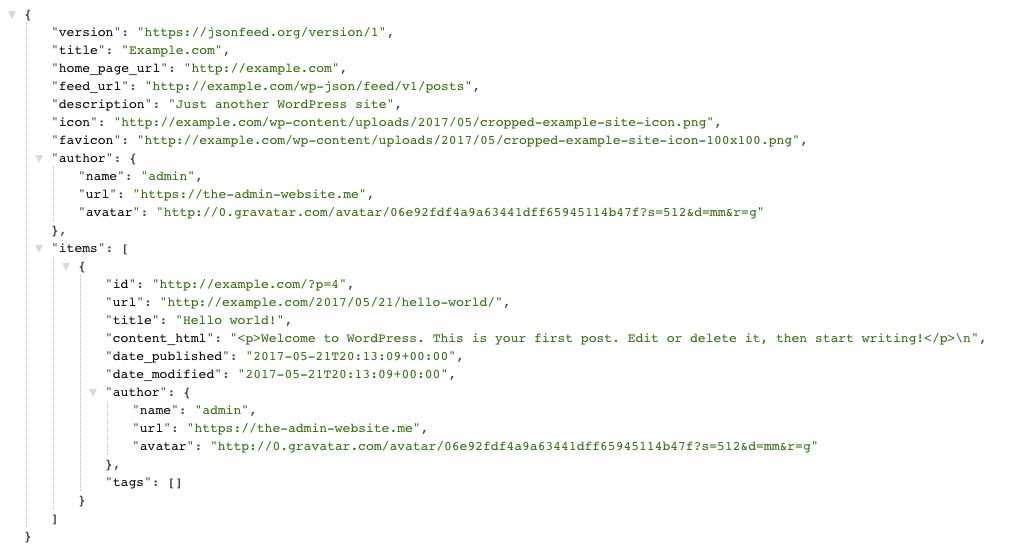
To provide a JSON feed for your custom post type, you need to specify an additional argument show_json_feed when registering the post type, and set it to a boolean true. You may optionally specify a json_feed_base argument being a string identifier that should be used in the feed URL. If no string identifier is provided, the post type slug will be used.
Here is an example, supporting a JSON feed for a custom post type “article” and setting its feed base to “articles” so that the feed will appear at {restURL}/feed/v1/articles.
<?php

add_filter(
    'register_post_type_args',
    function ( $args, $post_type ) {
        if ( 'article' === $post_type ) {
            $args['show_json_feed'] = true;
            $args['json_feed_base'] = 'articles';
        }
        return $args;
    },
    10,
    2
);
Since the JSON feed schema is always future compatible, by default the plugin preserves backward compatibility with older JSON feed readers by maintaining deprecated fields such as author. You can skip this backward compatibility behavior by using the wp_api_json_feed_skip_backward_compatibility filter and returning true.
For regular support requests, please use the wordpress.org support forums. If you have a technical issue with the plugin where you already have more insight on how to fix it, you can also open an issue on GitHub instead.
If you have ideas to improve the plugin or to solve a bug, feel free to raise an issue or submit a pull request in the GitHub repository for the plugin. Please stick to the contributing guidelines.
You can also contribute to the plugin by translating it. Simply visit translate.wordpress.org to get started.
Changelog
= 1.1.1=
* Enhanced: Update dependencies to latest versions, modernize repository setup, use PNPM for JS management.
1.1.0
- Added: Add support for the JSON feed 1.1 spec.
- Added: Introduce filter
wp_api_json_feed_skip_backward_compatibilityto optionally skip JSON feed fields included for backward compatibility with JSON feed 1.0 spec. - Enhanced: Include a
<link>tag for the most relevant JSON feed based on the current content, in addition to the general posts JSON feed. - Enhanced: Include a
user_commentfield in the JSON feeds. - Tweaked: Bump the minimum required WordPress and PHP versions.
- Tweaked: Use modern test infrastructure including revised PHPUnit tests, and GitHub Actions to ensure long-term stability.
- Fixed: Remove unnecessary call to
load_plugin_textdomain().
1.0.0
- First stable version
