
WP All Import – Drag & Drop Import for CSV, XML, Excel & Google Sheets
Active Installs
100,000+
Last Updated
March 4, 2026
First Released
July 24, 2012
Download History (Last one month)
Contributors
WP All Import – Simple & Powerful XML, CSV, Google Sheets, and Excel Importer Plugin
“It’s a wonderful plugin that does so much, so well that it’s hard to list all of the features. But I’ll tell you this, I was able to import the content of a pair of websites running the ModX CMS into a WordPress install in less than 30 minutes. No joke!”
Alex Vasquez – DigiSavvy Co-Founder & WordCamp Los Angeles Organizer
WP All Import has a four-step import process and an intuitive drag-and-drop interface that makes complicated import tasks simple and fast.
There are no special requirements that the elements in your file must be laid out in a certain way. WP All Import can import any XML, CSV, Excel spreadsheet, or Google Sheets file into WordPress.
WP All Import can be used for everything from migrating content from a legacy CMS to WordPress to building a store with affiliate datafeed to displaying live stock quotes or sports scores to building a real estate portal.
Check out our documentation and video tutorials to make the most of WP All Import.
WP All Import integrates with our companion plugin, WP All Export. You can export posts, WooCommerce products, orders, users, or anything else with WP All Export. Then you can edit the WordPress data with Microsoft Excel, Numbers, or maybe something else, and re-import to the same site or migrate the data to another site with WP All Import.
For technical support from the developers, please consider purchasing WP All Import Pro.
WP All Import Pro Version
WP All Import Pro is a paid upgrade that includes premium support and adds the following features:
-
Import data to Custom Fields – used by many themes, especially those using Custom Post Types – to store data associated with the posts.
-
Import images to the post media gallery – WP All Import can download images from URLs in an XML or CSV file and put them in the media gallery.
-
Import files from a URL – Download and import CSV, XML, or Excel WordPress data files from external websites, even if they are password-protected with HTTP authentication.
-
Cron Job/Recurring Imports from external URLs – WP All Import Pro can periodically check a file for updates, and add, edit, and delete the imported posts accordingly.
-
Execution of Custom PHP Functions on data, i.e., use something like [my_function({xpath/to/a/field[1]})] in your template, to pass the value of {xpath/to/a/field[1]} to my_function and display whatever it returns.
-
Guaranteed technical support via e-mail.
Upgrade to the Pro edition of WP All Import.
Need to import XML and CSV to WooCommerce? Check out our WooCommerce add-on.
WordPress CSV Imports
Read on to learn more about the CSV importer functionality of WP All Import. Importing CSVs with WP All Import is exactly the same as importing XML files because internally, WP All Import actually converts your CSV file to an XML file on the fly. You can use the same XPath filtering options and all the same features you have when importing XML files.
CSV imports, including those exported from Excel and Google Sheets, don’t require your file to have a specific structure. Your CSV file can use any column names/headings. You can map the columns in your CSV file to the appropriate places in WordPress during the import process.
When importing CSV files, your CSV should have UTF-8 encoding if you are having trouble importing special characters.
In step 2 of a CSV import, you can specify an alternative delimiter if you aren’t using a comma. WP All Import can import CSVs that are pipe-delimited, # delimited, or delimited/separated by any other character.
For CSV import tutorials and example files, visit our documentation. Please keep in mind CSV imports with WP All Import are just like XML imports – you have all the same functionality, and the process is exactly the same. Any of our tutorial videos that apply to XML files also apply to importing CSV files, so if you see a tutorial with us importing an XML file, know that you can follow the exact same steps for a CSV import.
WordPress Excel Import / Google Sheets Import
Don’t want to convert your Excel or Google Sheets data to CSV? WP All Import also works as a Google Sheets and Excel importer for WordPress. Simply upload your Excel file as you would for CSV and WP All Import will automatically detect the columns in your file.
For Google Sheets, use the ‘Download a file’ option and paste your sheet’s public URL to import data to WordPress.
Add-Ons
A number of premium add-ons are available to add functionality to the importer and make XML, CSV, Google Sheets, and Excel import tasks to complex plugins simple.
- Advanced Custom Fields Add-On – ACF XML & CSV importer
- WooCommerce Add-On – XML & CSV importer for all WooCommerce product types
- User Import Add-On – XML & CSV importer for users, including user_meta
- Link Cloak Add-On – Auto-create redirects for links present during an XML or CSV import
Learn more about our add-ons at http://www.wpallimport.com/add-ons
A developer API (action hooks) is also available.
Related Plugins
Export any WordPress data to XML/CSV
Import Products from any XML or CSV to WooCommerce
Export Products to CSV/XML for WooCommerce
Custom Product Tabs for WooCommerce WP All Import Add-on
Export Orders to CSV/XML for WooCommerce
Export WordPress Users to CSV/XML
Premium Support
You can submit the support form on our website or email us at support@wpallimport.com. While we try to assist users of our free version, please note that support is not guaranteed and will depend on our capacity. For premium support, purchase WP All Import Pro.
Import To WooCommerce
Need to import Excel, XML and CSV to WooCommerce? Check out our WooCommerce add-on.
WooCommerce Excel, XML & CSV Import Pro Version
No installation instructions provided.
Screenshot Gallery
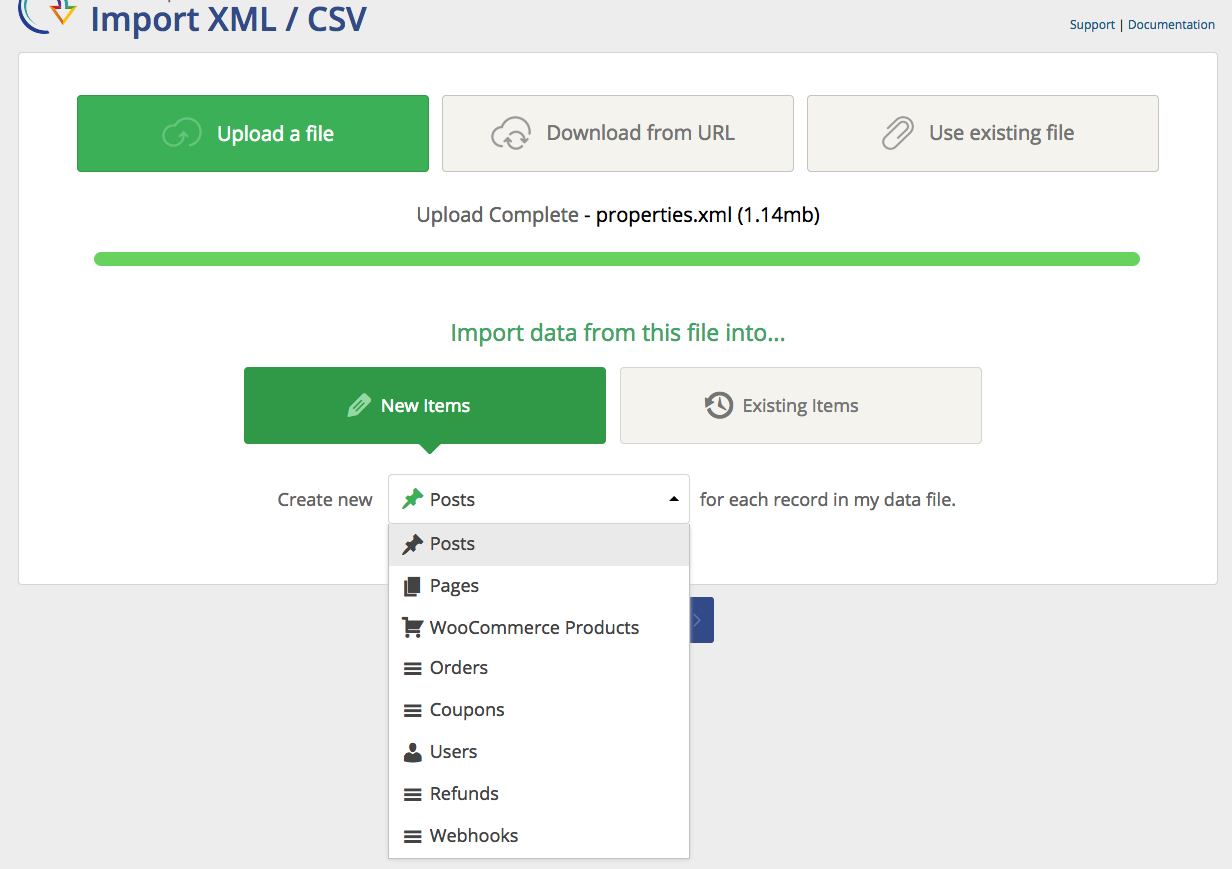
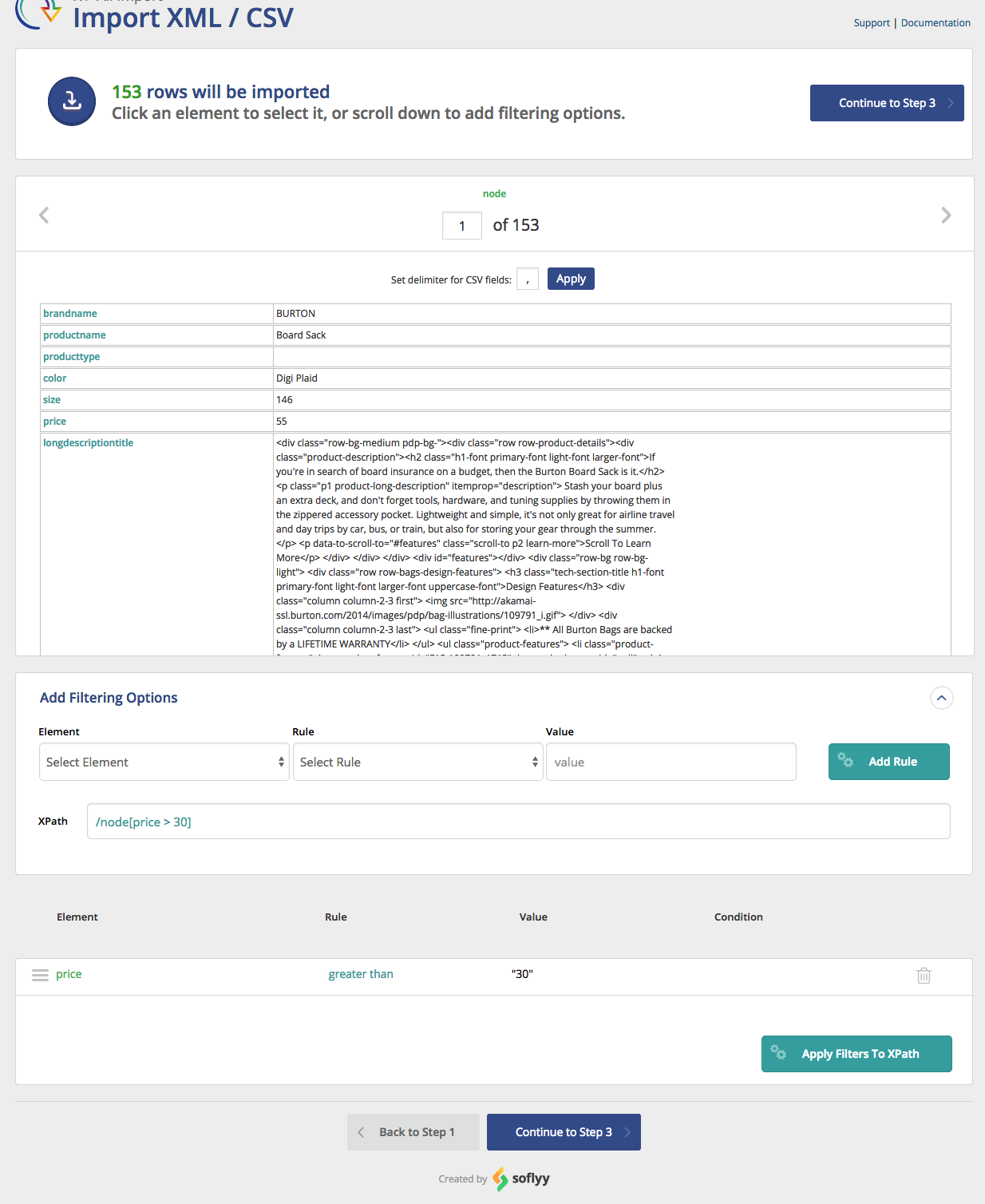
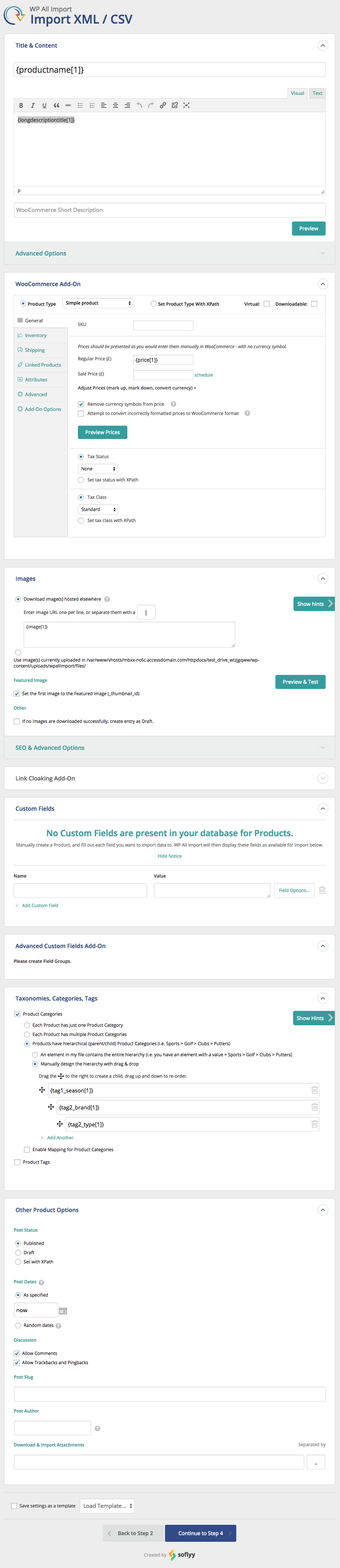
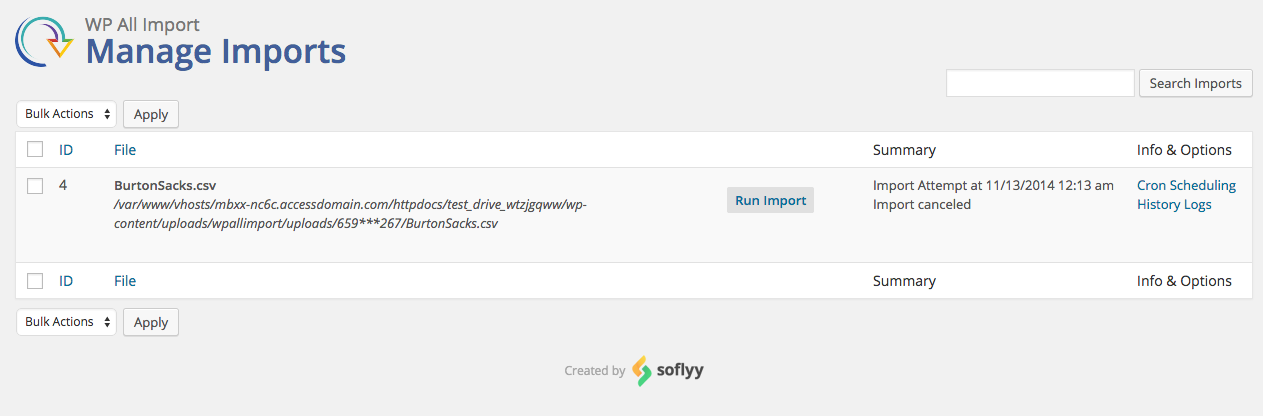
- Go to All Import › New Import.
- Upload the import file.
- Choose the import post type.
- Map the incoming data elements to the WordPress fields.
- Complete the import and verify the imported data.
Yes. You can import any standard WordPress post type, including posts, pages, categories, tags, users, comments, and images. You can also import custom data from third-party themes and plugins.
The default WordPress import tool uses a brute-force approach that often imports all or nothing. WP All Import is a lot more flexible and lets you filter, modify, and map incoming data elements so that you can import your data exactly as you want it.
Not when you use our plugins. Our Drag & Drop interface lets you map incoming data elements to any WordPress field. You can even modify the incoming data as part of the import process, so we can handle a wide variety of import layouts.
To import a CSV file into WordPress, just specify the CSV file as your import source. WP All Import will automatically recognize the file type and adjust the interface accordingly. You don’t need to do anything special to handle the CSV format.
To import XML data into WordPress, just specify the XML file as your import source. WP All Import will automatically recognize the file type and adjust the interface accordingly. You don’t need to do anything special to handle an XML file.
To import Excel data into WordPress, just specify the Excel file as your import source. WP All Import will automatically recognize the file type and adjust the interface accordingly. You don’t need to do anything special to import WordPress Excel files.
Yes. WP All Import includes an option to download a file from an external URL. You can add your WordPress data to a Google Sheet, copy its URL, and then paste the sheet’s URL into WP All Import.
To import large files into WordPress, you can use our advanced settings to split the import into manageable chunks, modify the batch processing size, and take several other steps to either speed up the import or reduce its impact on the server.
Our plugin automatically recognizes many WordPress custom plugins and themes, so just select the custom post type, and away you go. If a custom plugin stores its data in an unconventional manner, just contact our support staff for further guidance.
Yes. Our plugins come with unlimited licenses, so you can install them on all of your own websites.
We have special add-ons for all types of WooCommerce data, so you can import WooCommerce customers, orders, products, reviews, and anything else WooCommerce has to offer.
In Step 3 of the import process, under Other Post Options, change the Post Status to Draft. This ensures that all imported posts will be created as drafts.
In the Drag & Drop screen, map the incoming image elements to the appropriate fields in the Images section. The tricky part about images is that they can have many different sources, including URLs, images that are on your computer, images that are already on your server, and even images that are already in your media library. To understand how to handle each of these scenarios, see our documentation.
- Create a standard WordPress import.
- In Step 3, add the images element in the Images section.
- Check the Set the first image to the Featured Image (_thumbnail_id) option.
- Complete the import.
- Verify that the featured image(s) were correctly imported.
- Export the WordPress data that you wish to migrate.
- Download the Bundle option, which includes import instructions.
- Import the bundle file on the target site.
- WP All Import will use the bundle file to automatically configure itself.
- Run the import and review your migrated data.
- Export the WordPress data that you wish to edit.
- Edit the export file in your favorite spreadsheet app.
- Use the Import with WP All Import option to configure your import.
- Run the import.
- Review the affected data to make sure the changes were applied.
If you are using the free version of the plugin, you can obtain support through the WordPress.org community forums. If you have purchased the premium version, you can email us directly and we will respond as quickly as we can, typically in less than one business day.
Changelog
4.0.1
- security improvement: fixes CVE-2026-2830
- maintenance: update packages
4.0.0
- NOTE: inline PHP execution is disabled when both DISALLOW_FILE_EDIT and DISALLOW_FILE_MODS are set in wp-config.php
- security improvement: fixes CVE-2025-12733
- maintenance: update PhpSpreadsheet
3.9.6
- fix: hierarchical taxonomy terms are not imported correctly
- fix: JS error in some cases with certain field names
3.9.5
- improvement: upgrade svg-sanitize library
3.9.4
- security improvement: fixes CVE-2025-10001
- improvement: upgrade PhpSpreadsheet version
3.9.3
- improvement: streamlined UI for new/existing items import types
- improvement: enhanced session data handling
- improvement: enhanced Excel file processing with better error handling and automatic fallback methods
- improvement: added term slug truncation to prevent database issues with long slugs
- improvement: UI updates
3.9.2
- improvement: add partner discounts
3.9.1
- bug fix: remove defaults for TEXT db fields
3.9.0
- security improvement: migrated from PHPExcel to PHPSpreadsheet
3.8.0
- security improvement, fixes: CVE-2024-8722, CVE-2024-9664, CVE-2024-9661
3.7.9
- bug fix: compatibility with free ACF Import Add-On
3.7.8
- bug fix: fatal error when log file isn’t writable
3.7.7
- improvement: UI updates
3.7.6
- improvement: require ‘setup_network’ meta capability for access
- API: integrate Rapid Add-On class
3.7.5
- improvement: update upgrade links
- bug fix: fatal error with PHP 8.3
3.7.4
- security improvement
- API: added ‘wp_all_import_is_post_to_change_missing’ filter
3.7.3
- security improvement
- improvement: add ‘Do not create new terms’ setting on Edit Template page
- improvement: better PHP 8.2 support
- improvement: remove deprecated ‘get_page_by_title’ function calls
3.7.2
- improvement: refine various UI elements
- bug fix: PHP 8.1 warning on Step 3
3.7.1
- bug fix: unable to install on Windows environments
- improvement: increased timer accuracy on import processing page
3.7.0
- improvement: UI styling improvements
3.6.9
- security improvement
- improvement: resolve PHP 8 Deprecated notice
3.6.8
- security improvement
3.6.7
- security improvement
- improvement: changed Manage Imports page button labels to be more precise
- improvement: assign ‘Uncategorized’ term to posts imported without a category assigned
- improvement: add support for taxonomies that return objects instead of IDs
- improvement: remove commented code that could cause false positives for security scans
- bug fix: jQuery error related to ‘destroy’ method
- bug fix: rare issue that prevented content image URLs from being updated during import
- bug fix: taxonomies section drag and drop doesn’t save after rearranging fields
- bug fix: conflict with Advanced Ads plugin
- bug fix: ‘Instead of deletion, set missing records to out of stock’ still deleting products
3.6.6
- bug fix: jQuery nestedSortable compatibility with WordPress 5.9
3.6.5
- improvement: better sanitization and escaping of data in WP All Import interface
3.6.4
- improvement: better sanitization and escaping of data in WP All Import interface
- improvement: use libraries included in WordPress Core
3.6.3
- security fix
- bug fix: images not updated for existing products when using WooCommerce Import Add-On
3.6.2
- improvement: add ability to control taxonomy mapping case sensitivity via filter wpai_is_case_insensitive_taxonomy_mapping
- improvement: add ability to control uploads directory for single file/image via filters wp_all_import_single_image_uploads_dir and wp_all_import_single_attachment_uploads_dir
- improvement: add missing options on confirm import step
- bug fix
- improvement: initial PHP 8 support
- bugfix: manage_options capability check
3.6.1
- bug fix: categories were imported despite the taxonomy option being disabled
- improvement: add ability to filter csv escape symbol via wp_all_import_csv_parser_settings filter
3.6.0
- maintenance: compatibility with Elementor v3.3 JavaScript changes
3.5.9
- bug fix: call to the non existing function wp_all_import_sanitize_url
3.5.8
- bug fix: import of taxonomies hierarchy didn’t work properly
3.5.7
- improvement: git rid if deprecated join query on manage imports screen
- improvement: add is_update_post_format option
- improvement: add wp_all_import_manual_matching filter
- improvement: add wp_all_import_logger filter
- bug fix: records were removed from pmxi_posts table when activating WPAI on multisite installation
- bug fix: get rid of unused deprecated function add_contextual_help()
3.5.6
- bug fix: PMXI_Hash_Record class doesn’t exist error appears when deleting missing records
3.5.5
- improvement: get rid of deprecated setting ‘High Speed Small File Processing’
- bug fix: chromium scroll anchoring caused screen jumping effect
- bug fix: pagenum query argument caused broken link on import complete screen
3.5.4
- improvement: compatibility with WordPress 5.5
- API: added helper function wp_all_import_get_import_id()
- API: added helper function wp_all_import_get_import_post_type($import_id)
3.5.3
- bug fix: switch to CodeMirror implementation shipped in WordPress core
- bug fix: unable to double click to insert XPath in some cases
- bug fix: unable to apply pmxi_is_images_to_update filter to featured images
- bug fix: unable to match existing images when suffix is added to file name during import
3.5.2
- improvement: match existing images by filename with underscores
- API: add new action wp_all_import_before_preserve_post_data
- API: add new filter wp_all_import_specified_delimiters
- bug fix: attachment author not imported for API image imports
3.5.1
- improvement: add support for importing WebP images
- bug fix: images in content not being imported when creating new simple WooCommerce products
3.5.0
- improvement: add support for .tsv format
- API: add current XML variable to pmxi_article_data filter
- bug fix: post terms incorrect after import complete, must be recounted
- bug fix: empty attachments created when attachment import fails
- bug fix: matching posts by ID matches and imports into attachments with the same ID
3.4.9
- bug fix: import using stream reader
- bug fix: generation temporary files in system temporary folder
3.4.8
- improvement: various import speed optimizations
- bug fix: remove deprecated function calls for PHP 7.2 compatibility
- bug fix: delete db tables when mu blog deleted
- bug fix: remove BOM from import templates
- bug fix: saving CSV delimiter when changing import file
3.4.7
- improvement: skip to the first specified record when importing only part of a file
- new filter: wp_all_import_is_render_whole_xml_tree
- new filter: wp_all_import_images_uploads_dir (add-on api)
- bug fix: patch XSS exploit
- bug fix: conflict with InfiniteWP
- bug fix: update notification for Link Cloaking Add-On
- bug fix: load functions before pmxi_before_xml_import
- bug fix: do not re-count category terms when post imported as draft
- bug fix: import base64 encoded images in add-ons
- security fix – XSS exploit (Special thanks to Yuji Tounai for reporting)
3.4.6
- improvement: added timestamp to import log lines
- improvement: added support for bmp images
- improvement: added new action pmxi_before_post_import_{$addon}
- security fix: patch XSS exploit
- bug fix: import pages hierarchy
- bug fix: error in pclzip.lib.php with php 7.1
- bug fix: import taxonomies hierarchy
- bug fix: json to xml convertation
- bug fix: removed SWFUpload
- security fix – XSS exploit (Special thanks to Mardan Muhidin for reporting)
3.4.5
- improvement: custom fields delection
- improvement: new action wp_all_import_post_skipped
- improvement: updated history page title
- improvement: optimize large imports deletion
- improvement: added import friendly name to confirm screen
- improvement: sql query optimization on manage imports screen
- bug fix: generation image filename
- bug fix: wp_all_import_specified_records filter
3.4.4
- bug fix: import template not worked when downloaded via Import Settings
- bug fix: updating user login
- bug fix: import images with encoded quotes
- improvement: added hungarian translation
3.4.3
- improvement: new filter ‘wp_all_import_phpexcel_delimiter’
- improvement: new filter ‘wp_all_import_is_trim_parsed_data’
- improvement: added new filter ‘wp_all_import_skip_x_csv_rows’
- improvement: added csv delimiter setting to import options screen
- bug fix: import duplicate tags
3.4.2
- bug fix: conflict with the event calendar plugin
- bug fix: import images for newly created products
3.4.1
- improvement: Stop parsing data which is not going to be updated
- improvement: added new filter wp_all_import_phpexcel_object to modify excel data before import
- bug fix: search for images ending with underscores in media
- bug fix: import hierarchical posts/pages
- bug fix: import cpt page templates
3.4.0
- improvement: compatibility with PHP 7.x
3.3.9
- improvement: new re-import option ‘is update post type’
- bug fix: hierarchy taxonomies preview
- bug fix: empty logs folder generation
- bug fix: ‘Keep images currently in Media Library’ option for add-ons
- bug fix: import bundles with gz files
- bug fix: custom functions for attachments
3.3.8
- improvement: ‘Force Stream Reader’ setting
- improvement: new filter ‘wp_all_import_auto_create_csv_headers’
- improvement: new filter ‘wp_all_import_is_base64_images_allowed’
- improvement: new filter ‘wp_all_import_set_post_terms’ to leave a specific category alone when a post is being updated
- bug fix: nodes navigation for xpath like /news/item
- bug fix: frozen import template screen for cyrillic XML feeds
- bug fix: conflict between taxonomies & user import
- bug fix: creating users with the same email
- bug fix: enable keep line breaks option by default
- bug fix: composer namespace conflict
- bug fix: images preview when wp is in subdirectory
- bug fix: ‘Instead of deletion, set Custom Field’ option for users import
3.3.7
- added new option ‘Use StreamReader instead of XMLReader to parse import file’ to fix issue with libxml 2.9.3
- execute ‘pmxi_article_data’ filter for all posts ( new & existing )
3.3.6
- added de_CH translation
- added support for .svg images
- added possibility for import excerpts for pages
- added new filter ‘wp_all_import_specified_records’
- added new filter ‘wp_all_import_is_post_to_delete’
- disable XMLReader stream filter for HHVM
- improve search for existing images in media gallery
3.3.5
- fixed ‘Use images currently in Media Library’ option
3.3.4
- fixed error messages on step 1 in case when server throws fatal error e.q. time limit exception
- fixed option “Delete posts that are no longer present in your file”, now it works with empty CSV files which has only one header row
- fixed custom php functions in images preview
- fixed detecting root nodes with colons in names
- added es_ES translation
- added de_DE translation
- added iterative ajax delete process ( deleting associated posts )
- added feature to download template/bundle from import settings
- added new option for importing images “Use images currently in Media Library”
- added new action ‘pmxi_missing_post’
3.3.3
- fixed duplicate matching by custom field
- fixed converting image filenames to lowercase
- fixed import html to image description
- fixed import _wp_old_slug
- added Post ID to manual record matching
- added ‘Comment status’ to ‘Choose data to update’ section
3.3.2
- fixed fatal error on saving settings
3.3.1
- fixed parsing CSV with empty lines
- fixed parsing multiple IF statements
- fixed preview in case when ‘Disable the visual editor when writing’ is enabled
- fixed conflict with WooCommerce – Store Exporter Deluxe
- added notifications for required addons
- added support for wp all export bundle
- added support for manual import bundle
- added feature ‘click to download import file’
- added validation for excerpt and images sections
- added auto-detect a broken Unique ID notification
- added import template notifications
- removed support for importing WooCommerce Orders
- changed absolute paths to relative in db
3.3.0
- added new options to taxonomies import ‘Try to match terms to existing child Product Categories’ & ‘Only assign Products to the imported Product Category, not the entire hierarchy’
- added support for Excel files ( .xls, .xlsx )
3.2.9
- load ini_set only on plugin pages
- fixed saving import template
3.2.8
- fixed Apply mapping rules before splitting via separator symbol for manual hierarchy
- fixed path equal or less than
- fixed changing unique key when moving back from confirm screen
- fixed override page template
- updated wp_all_import_is_post_to_update filter with second argument XML node as array
- added a second argument to pmxi_saved_post action ( SimpleXML object ) of current record
3.2.7
- fixed enum fields mapping rules feature
3.2.6
- Compatibility with 3rd party development: http://www.wpallimport.com/documentation/addon-dev/overview/
3.2.5
- Important security fixes – additional hardening, prevention of blind SQL injection and reflected XSS attacks
3.2.4
- critical security fix – stopping non-logged in users from accessing adminInit
3.2.3
- fixed re-count record when a file has been changed at an import setting screen
- fixed unlink attachment source when posts updated/deleted
- added a limit 10 to the existing meta values
3.2.2
- fixed database schema
- uploading large files
3.2.1
- fixed updating import settings
3.2.0
- IMPORTANT: WP All Import v4 (3.2.0) is a MAJOR update. Read this post before upgrading: http://www.wpallimport.com/2014/11/free-version-wordpress-org-update-information
- speed up the import of taxonomies/categories
- added taxonomies/categories mapping feature
- added custom fields auto-detection feature
- added custom fields mapping feature
- added images/taxonomies preview feature
- added unofficial support for more file formats – json & sql
- added new setting (secure mode) to protect your files
- better import logs
- updated design
3.1.5
- fixed pmxi_delete_post action
- fixed import menu order & post parent for pages
- fixed import log for continue import feature
- added is update author option
- fixed post formats
- fixed UTC dates on manage imports page
3.1.4
- changed support email
3.1.3
- fixed import pages
3.1.2
- added compatibility with WP 3.9
- added autodetect session mode
- updated convertation CSV to XML with XMLWriter
- fixed import *.zip files
- fixed xpath helper on step 2
- fixed showing zeros in XML tree
- fixed deleting history files
- fixed autodetect image extensions
- fixed increasing SQL query length
- allow post content to be empty on step 3
- delete deprecated settings “my csv contain html code” and “case sensitivity”
3.1.1
- Fixed compatibility with addons
- Fixed “download image” option for import products
- Fixed CSS for WP 3.8
- Fixed dismiss links
3.1.0
- Compatibility with WP 3.8
- Compatibility with WPAI WooCommerce add-on (paid) 1.2.4
- Performance Improvements
- Improved UI
- Lots of bug fixes
- New Record Matching section
- Added option to set Post Status with XPath (the value of presented XPath should be one of the following: publish, draft, trash)
- Preview navigation
3.0.4
- Fixed import categories;
- Updated UI/UX;
- Added import/export templates feature;
- Added enhanced session functionality;
- Added option to set post status with XPath;
- Added feeds encoding feature;
3.0.2
- Added support for the WooCommerce add-on
3.0
- Free edition of 3.0 pro release
2.14
- Category list delimiter bug fix
2.13
- Tons of bug fixes, updates, and additional features.
2.12
- Initial release on WordPress.org.
" width="120" height="120">
Available Versions
| Version | Download | Type |
|---|---|---|
| 4.0.1 | Download | Stable |
| 4.0.0 | Download | Stable |
| 3.9.6 | Download | Stable |
| 3.9.5 | Download | Stable |
| 3.9.4 | Download | Stable |
| 3.9.3 | Download | Stable |
| 3.9.2 | Download | Stable |
| 3.9.1 | Download | Stable |
| 3.9.0 | Download | Stable |
| 3.8.0 | Download | Stable |
| 3.7.9 | Download | Stable |
| 3.7.8 | Download | Stable |
| 3.7.7 | Download | Stable |
| 3.7.6 | Download | Stable |
| 3.7.5 | Download | Stable |
| 3.7.4 | Download | Stable |
| 3.7.4-beta-1.0 | Download | Beta |
| 3.7.3 | Download | Stable |
| 3.7.3-beta-1.0 | Download | Beta |
| 3.7.2 | Download | Stable |
| 3.7.1 | Download | Stable |
| 3.7.0 | Download | Stable |
| 3.6.9 | Download | Stable |
| 3.6.8 | Download | Stable |
| 3.6.7 | Download | Stable |
| 3.6.6 | Download | Stable |
| 3.6.5 | Download | Stable |
| 3.6.4 | Download | Stable |
| 3.6.3 | Download | Stable |
| 3.6.2 | Download | Stable |
| 3.6.1 | Download | Stable |
| 3.6.0 | Download | Stable |
| 3.5.9 | Download | Stable |
| 3.5.8 | Download | Stable |
| 3.5.7 | Download | Stable |
| 3.5.6 | Download | Stable |
| 3.5.5 | Download | Stable |
| 3.5.4 | Download | Stable |
| 3.5.3 | Download | Stable |
| 3.5.2 | Download | Stable |
| 3.5.1 | Download | Stable |
| 3.5.0 | Download | Stable |
| 3.4.9 | Download | Stable |
| 3.4.8 | Download | Stable |
| 3.4.7 | Download | Stable |
| 3.4.6 | Download | Stable |
| 3.4.5 | Download | Stable |
| 3.4.4 | Download | Stable |
| 3.4.3 | Download | Stable |
| 3.4.2 | Download | Stable |
| 3.4.1 | Download | Stable |
| 3.4.0 | Download | Stable |
| 3.3.9 | Download | Stable |
| 3.3.8 | Download | Stable |
| 3.3.7 | Download | Stable |
| 3.3.6 | Download | Stable |
| 3.3.5 | Download | Stable |
| 3.3.4 | Download | Stable |
| 3.3.3 | Download | Stable |
| 3.3.2 | Download | Stable |
| 3.3.1 | Download | Stable |
| 3.3.0 | Download | Stable |
| 3.2.9 | Download | Stable |
| 3.2.8 | Download | Stable |
| 3.2.7 | Download | Stable |
| 3.2.6 | Download | Stable |
| 3.2.5 | Download | Stable |
| 3.2.4 | Download | Stable |
| 3.2.3 | Download | Stable |
| 3.2.2 | Download | Stable |
| 3.2.1 | Download | Stable |
| 3.2.0 | Download | Stable |
| 3.1.5 | Download | Stable |
| 3.1.4 | Download | Stable |
| 3.1.3 | Download | Stable |
| 3.1.2 | Download | Stable |
| 3.1.1 | Download | Stable |
| 3.1.0 | Download | Stable |
| 3.0.4 | Download | Stable |
| 3.0.3 | Download | Stable |
| 3.0.2 | Download | Stable |
| 3.0.1 | Download | Stable |
| 3.0 | Download | Stable |
| 2.14 | Download | Stable |
| 2.13 | Download | Stable |
| 2.12 | Download | Stable |
| Development | Download | Trunk |
