
Amazon Pay for WooCommerce
Active Installs
10,000+
Last Updated
July 22, 2026
First Released
January 22, 2020
Download History (Last one month)

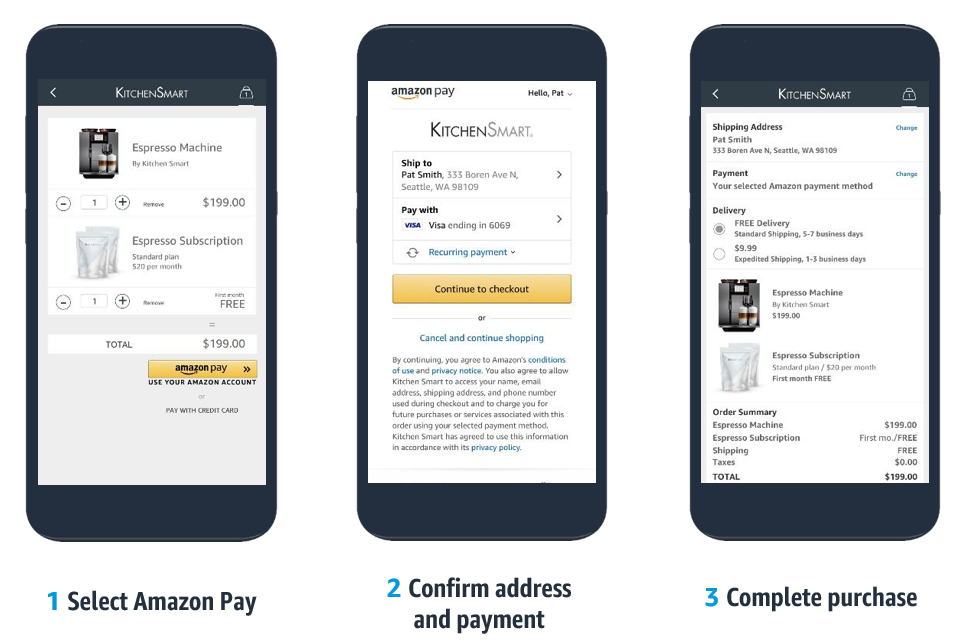
What is Amazon Pay? An end-to-end payment solution that gives hundreds of millions of active Amazon customers [1] a familiar, fast, and secure way to complete their purchase through your online store. Shoppers can use the address and payment information already stored in their Amazon account to check out – avoiding account creation or the need to re-enter their billing and shipping information. The performance is continually optimized by technology, learnings, and best practices from Amazon.
As earth’s most customer-centric company, we are continuously innovating on behalf of our customers. With 91% of Amazon Pay customers saying they would use Amazon Pay again and hundreds of millions of active Amazon customers already enabled for Amazon Pay, it can make it easier for you to deliver an improved customer experience online [2].
The benefits of using Amazon Pay
Keep customers engaged – from cart to finish
37% percent of customers abandon a site because they’re asked to create an account.[3] With Amazon Pay, there’s no need to create a new account or enter new information on your site.
Reduce chargebacks and fraudulent transactions
The Amazon brand is a proven winner of customer trust.[4] Our advanced fraud protection is the same technology used on Amazon.com
Grow your audience with co-marketing initiatives
The cost of acquiring new customers has increased by over 50% over the last five years.[5] With Amazon Pay co-marketing programs, tap into Amazon’s customer base of 200m+ global Prime customers.
Leverage the latest technology that customers love
Benefit from Amazon’s ecommerce innovations, enable features like recurring payments, let customers shop with their voice using Alexa, and much more.
Key Features
- PSD2 compliant: Built-in support for Strong Customer Authentication (SCA) as required under the Second Payment Services Directive (PSD2) in the European Economic Area (EEA).
- Multi-currency: Maintain the local currency experience across the shopping journey and help customers avoid currency conversion fees from their credit card issuer or bank.
- Recurring payment support for WooCommerce Subscriptions (separate purchase): available for USA, UK, Germany, France, Italy, Ireland, Spain, Luxembourg, Austria, Belgium, Cyprus, Netherlands, Sweden, Portugal, Hungary, Denmark and Japan.
- Automatic Decline Handling: Reduce lost sales with a consistent experience for customers to gracefully recover from a declined payment.
- Payment Protection Policy: Protection against fraud-related chargebacks[6].
- Amazon Pay A-to-z Guarantee: Increase customer confidence to complete purchase in your online store with extra assurance on the timeliness of delivery and order quality[7] .
- Delivery Notifications: Proactively alert customers on the arrival status of physical goods orders via Amazon Alexa[8].
Definitions
- [1] Represents active Amazon customer accounts, 2020.
- [2] Consumer Net Promoter Score (NPS) Surveys: Conducted by Amazon Pay in 2019 among US, UK, DE, FR, IT, and ES consumers who had used Amazon Pay in the 12 months preceding to the survey launch dates.
- [3] Data from Mobile Checkout Optimization Report, by the Baymard Institute, 2020, commissioned by Amazon Pay.
- [4] Axios Harris Poll 100, Corporate Reputation Rankings, July 2020.
- [5] Profitwell, 2020
- [6] Available for qualified physical goods purchases only.
- [7] For eligible transactions detailed on the Amazon Pay Customer Agreement.
- [8] Not available for Royal Mail in the UK.
How to enable Amazon Pay on WooCommerce
It only takes a few clicks to enable Amazon Pay on your WooCommerce storefront.
Minimum Requirements
- WordPress 5.5 or greater
- WooCommerce 4.0 or greater
Automatic installation
Automatic installation is the easiest option as WordPress handles the file transfers itself and you don’t need to leave your web browser. To do an automatic install of, log in to your WordPress dashboard, navigate to the Plugins menu and click Add New.
In the search field type “Amazon Pay for WooCommerce” and click Search Plugins. Once you’ve found our plugin you can view details about it such as the point release, rating and description. Most importantly of course, you can install it by simply clicking “Install Now”.
Manual installation
The manual installation method involves downloading our plugin and uploading it to your webserver via your favorite FTP application. The
WordPress codex contains instructions on how to do this here.
Updating
Automatic updates should work like a charm; as always though, ensure you backup your site just in case.
Screenshot Gallery
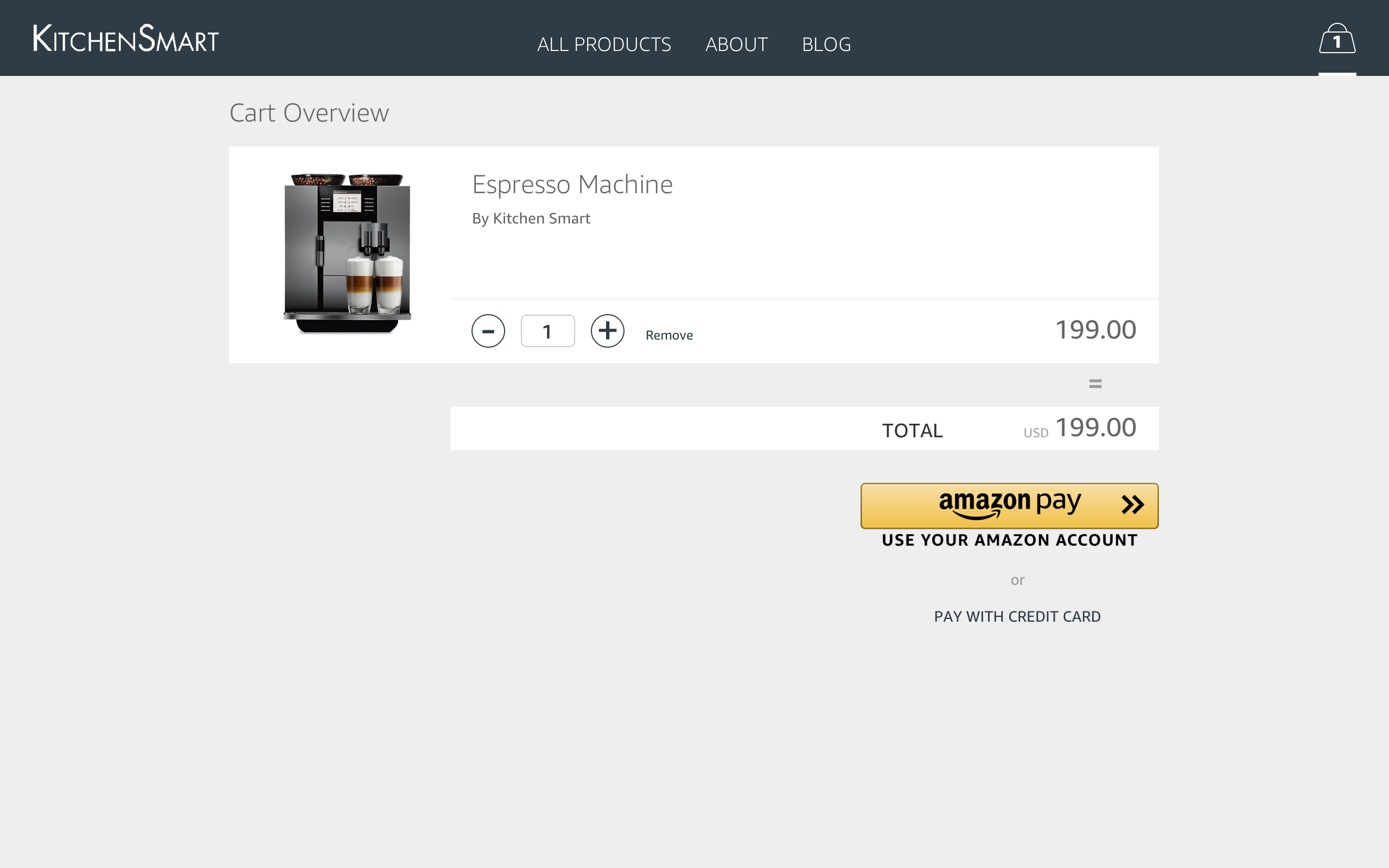
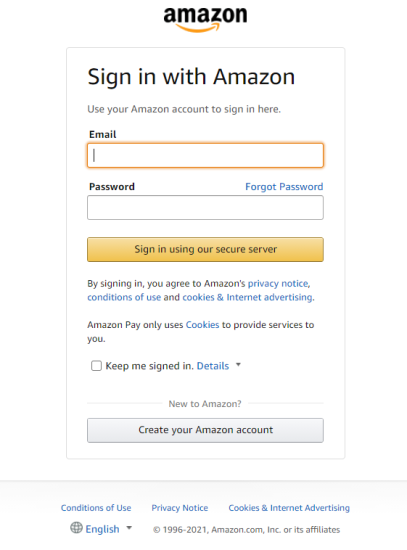
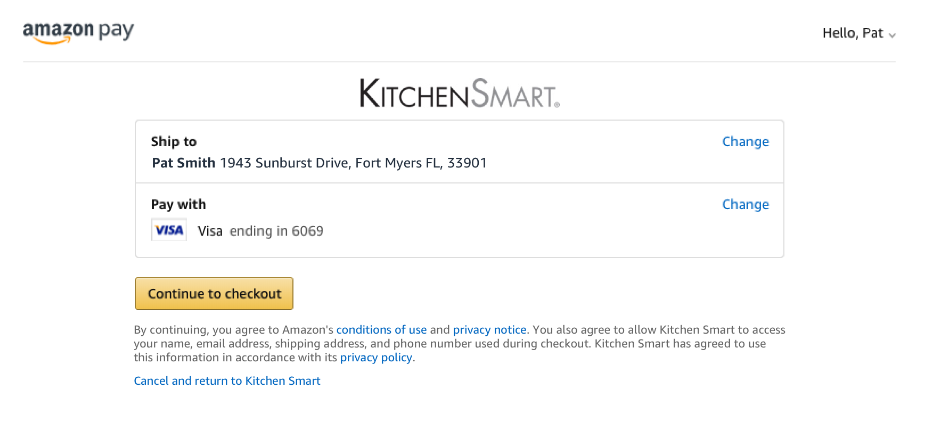
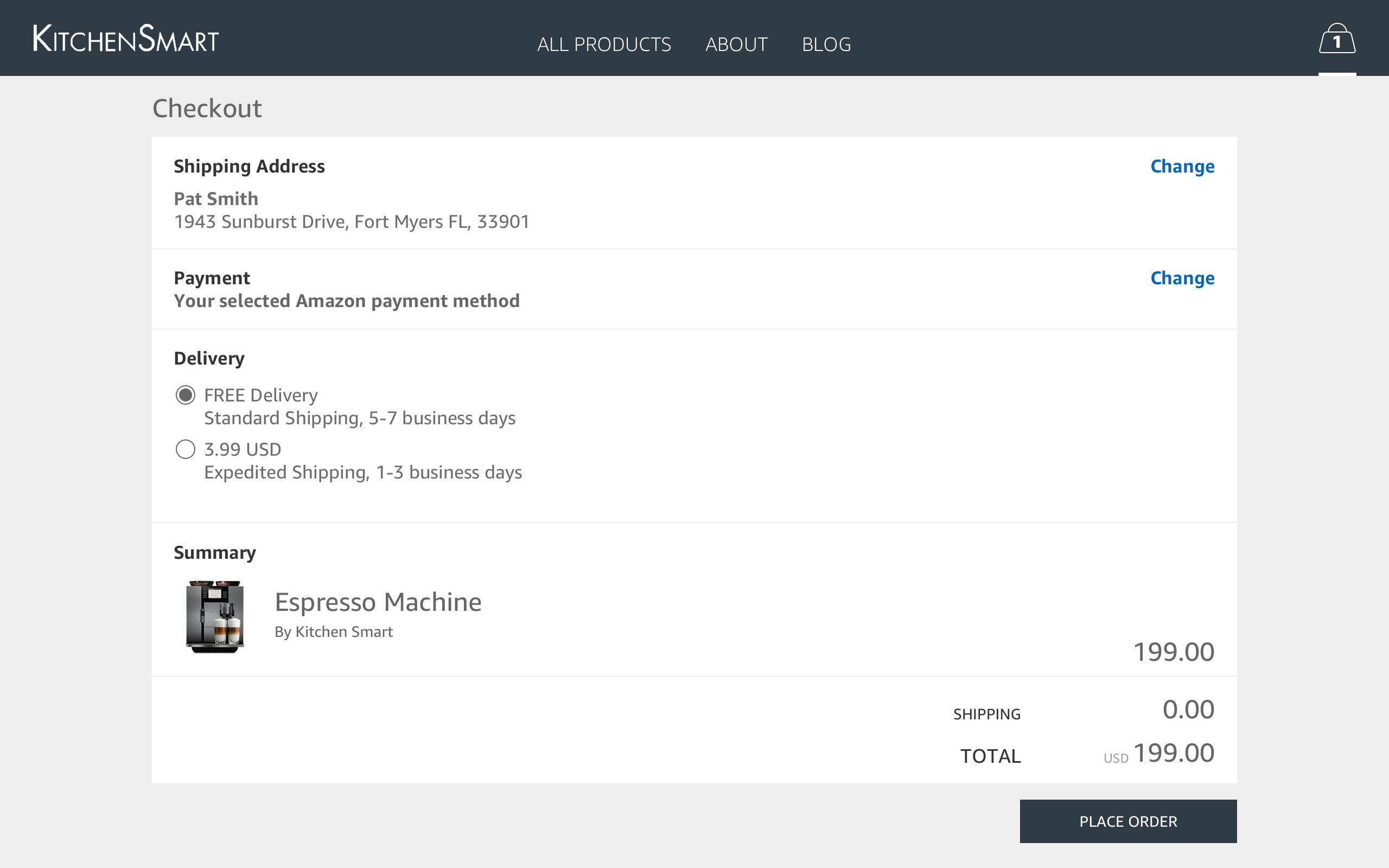
No FAQ provided.
Changelog
2.6.2 – 2026-07-22
- Fix – Fatal error in the IPN handler (v2) when the related order could not be retrieved.
- Fix – Amazon Pay incorrectly requiring the phone number for all payment methods.
- Fix – Prevent duplicate charges when paying with Amazon Pay on Classic Checkout.
- Fix – PHP warnings and errors.
- Dev – Removed pinned Composer version to address a potential security vulnerability.
- Dev – Bumped required PHP version to 7.4.
- Dev – Bumped tested up to WordPress v7.0.1.
- Dev – Bumped tested up to WooCommerce v10.8.1.
2.6.1 – 2026-01-21
- Add – Admin Order note for cancellations and payment failures.
- Fix – Amazon Pay meta box missing from Subscriptions if HPOS is enabled.
- Fix – Regression with accents in the State field.
- Fix – Prevent error if there is an error with the OpenSSL extension.
- Fix – Security update to the onboarding endpoint.
- Fix – PHP warnings.
- Dev – Bumped tested up to WordPress v6.9.
- Dev – Bumped tested up to WooCommerce v10.4.3.
2.6.0 – 2025-09-18
- Add – New setting to forcefully enable async polling for subscriptions.
- Fix – Disable async polling for subscriptions by default.
- Fix – Enforce matching of address between the checkout session and the order.
- Fix – Ask for the phone number if missing on Amazon’s account.
- Fix – Remove unnecessary redirect parameter from URL.
- Update – Amazon Pay SDK to v2.7.0.
- Dev – Bumped tested up to WooCommerce v10.1.2.
2.5.4 – 2025-04-30
- Fix – Error when using a non Standard decimal amount for a currency.
- Fix – Error when phone number was required in Checkout Blocks.
- Fix – Deprecated PHP constants and functions.
- Fix – Pull the Privacy Policy URL from WordPress settings.
- Update – Amazon Pay SDK to v2.6.7.
- Dev – Bumped tested up to WordPress v6.8.
- Dev – Bumped tested up to WooCommerce v9.7.1.
2.5.3 – 2024-09-24
- Fix – Add onboarding text and link
- Fix – Update the plugin Author on wp.org
- Fix – Set Merchant account details selector as toggle
- Fix – Adjust the feedback prompt trigger moment
- Fix – Adjust the plugin description on the WC settings page
- Fix – Check the configuration link removed from actual page
- Dev – Bumped tested up to WordPress v6.6.2.
- Dev – Bumped tested up to WooCommerce v9.3.2.
2.5.2 – 2024-07-25
- Fix – Error when using a non Standard decimal amount for a currency.
- Fix – chargeAmount.Amount is invalid when changing currency after selecting other shipping address.
- Fix – Hide the -OR- on Minicart when selecting “Enable hide button mode”.
- Fix – Change Payment Method for a Subscription Paid with another Payment Method.
- Fix – Express Checkout on Product page not getting the values of the variations created by WooCommerce Product Add-Ons and Gravity Forms Product Add-ons
2.5.1 – 2023-10-30
s
- Add – New Amazon Pay Platform related Headers.
- Add – Extendable Multi-currency compatibility.
2.5.0 – 2023-07-20
- Add – Plugin review Prompt.
- Fix – Amazon Pay button is displayed on Product pages even when product is Out Of Stock.
- Fix – WooCommerce Blocks compatibility.
- Fix – Limit gateway’s frontend settings for blocks
- Update – PHP 8 compatibility fixes.
- Update – Update WP and WC tested up to.
2.4.1 – 2023-02-15
- Fix – Identify if the provided order id refers to an actual order completed through Amazon Pay.
2.4.0 – 2023-01-26
- Update – Bumped required WordPress and WooCommerce versions.
- Fix – Address street missing in billing address (Germany addresses).
- Fix – Activate alexa delivery notifications request format.
- Fix – Allowed currencies population is not taking into account status of compatible multi currency plugin.
- Fix – Cancelled authorizations should mark order as “Pending payment”.
- Fix – Compatibility with WooCommerce HPOS (custom order tables).
- Fix – Fatal error when merchant was not migrated to V2 keys.
2.3.0 – 2022-10-11
- Add – Adds estimatedOrderAmount attribute to Amazon Pay button.
- Add – Adds support for Amazon Pay on Cart and Checkout Blocks of WooCommerce Blocks.
- Add – Adds the estimated order amount in every place available by the plugin.
- Fix – If the currency changes while in the FrontEnd the Gateway will alter its availability based on its settings.
- Fix – Warning shouldn’t appear on Single product regarding the ‘subscriptions_enabled’ not being set.
2.2.4 – 2022-08-12
- Fix – Infinite Loop causing Memory Exhaustion.
2.2.3 – 2022-08-12
- Fix – Pick the proper currency when it gets changed by and external multi-currency plugins.
- Fix – Addressed possible fatal errors on widgets page and order pay endpoint.
- Fix – Addressed possible fatal errors when Amazon credentials partially provided.
2.2.2 – 2022-06-17
- Fix – Require phone number only when purchasing physical products.
2.2.1 – 2022-06-13
- Fix – Addresses incorrect gateway availability logic.
2.2.0 – 2022-05-30
- Add – Make Amazon Pay available as a traditional gateway option.
- Add – Support Alexa Delivery notifications.
- Add – Support Amazon Pay “Classic” on the checkout block of WooCommerce blocks.
- Fix – Render Amazon Pay buttons even if they are not visible.
- Fix – Prevents a JavaScript fatal when rendering Amazon Pay button.
- Fix – Make Amazon Pay available for supported currencies only.
- Dev – Bumped tested up to WordPress v6.0.
2.1.3 – 2022-04-11
- Fix – Amazon Pay shouldn’t be available when not supported currency selected.
- Dev – Bumped tested up to WordPress 5.9.
2.1.2 – 2022-03-17
- Fix – Payment fails when site name is longer than 50 characters.
- Fix – Payment fails when recurring payment frequency is passed as an integer.
- Fix – Order changes status to ‘Failed’ during payment processing.
- Fix – Error opening subscriptions details due to internal errors.
- Fix – Multiple pay buttons showing on shipping method change (thank you gyopiazza).
- Fix – Additional way of identifying order id on return.
2.1.1 – 2022-02-03
- Fix – Honoring WooCommerce’s setting for decimals when formatting numbers.
- Fix – Formatting numbers won’t separate thousands by ‘,’.
2.1.0 – 2022-01-10
- Update – Disable option “Hide standard checkout button on cart page” when other payment gateway are activated.
- Fix – Enable subscription amount change support.
- Fix – Accept states without letters mark variations on shipping restriction.
- Fix – Render cart button on update shipping method.
- Add – Process orders created in V1 with V2 handlers.
- Fix – Interference when subscriptions payment method changes to other payment method.
- Fix – Force Decimals to 2 on amounts sent to API to prevent errors on api calls.
- Fix – Save Amazon Reference Id on order _transaction_id order meta field on payment process.
- Update – Hide the API V1 keys on setting when the V2 onboarding is done.
- Fix – Disabling “Hide standard checkout button on cart page” option hides the gateway on the new installations.
- Update – Translation and comments fixes (thank you geist-ahnen, shoheitanaka).
2.0.3 – 2021-06-15
- Fix – Issues with state level handling of shipping zones.
- Fix – Issue that attempted to initialize the plugin in the REST API, throwing a fatal error.
- Fix – Issue with subscriptions and checkout session validation, which forced customers to login again.
- Add – Logging when users are asked to log in again, to debug other potential issues with this validation.
2.0.2 – 2021-05-26
- Fix – Issue that caused secret key from pre v2 to be lost after migrating to v2.
- Add – Allow recovery of v1 secret key if lost during migration to v2.
2.0.1 – 2021-05-14
- Update – WP tested up to 5.7.
- Update – WC tested up to 5.3.
- Fix – Properly compose url for order action buttons.
2.0.0 – 2021-05-11
- Upgrade to use the latest Amazon Pay frontend technology and backend API. Functionalities in parity with the previous version.
1.13.1 – 2021-02-25
- Fix – Avoid hiding default shipping fields at checkout.
1.13.0 – 2021-02-18
- Update – WP tested up to 5.6.
- Update – WC tested up to 5.0.
- Fix – Fatal checkout error when changing subscription’s payment method if user is logged out of Amazon account.
- Fix – Checkout error when address book state does not match WooCommerce state data.
- Fix – Multi-currency compatibility is not detected when Price Based on Country and WMPL is active.
- Fix – PHP error when the currencies_supported option is not set.
- Fix – Add InheritShippingAddress to AuthorizeOnBillingAgreement. InheritShippingAddress = True when orders are shipping physical products.
- Fix – Missing order ID in session.
- Fix – Normalize and refactor URL handling when checkout page url is not set.
1.12.2 – 2020-05-05
- Fix – Fatal checkout error when submitting orders that do not need shipping.
1.12.1 – 2020-05-04
- Update – WC tested up to 4.1.
1.12.0 – 2020-04-20
- Add – Automatic key exchange on setup for GB and EU regions.
- Add – Handling for manual encrypted key exchange.
- Add – Pending transactions processed automatically even if the IPN isn’t received.
- Add – Additional server-side logging for SCA transactions.
- Update – WC tested up to 4.0.
- Update – WP tested up to 5.4.
- Fix – Transaction timeout handling.
- Fix – Orders are created without billing information.
- Fix – Xero invoice exporting on order creation.
- Fix – Users are created with empty address fields.
1.11.1 – 2020-02-13
- Fix – Properly encode URL string
1.11.0 – 2020-01-21
- Add – Strong Customer Authentication (SCA) support for subscriptions (billing agreements).
- Add – Support for custom checkout fields.
- Add – Optimal login option to “Login with Amazon” feature.
- Update – Attach WooCommerce and Amazon Pay plugin version as transaction meta data.
- Update – Enable gateway by default and show a warning that it’s live.
1.10.3 – 2019-11-18
- Update – WC tested up to 3.8.
- Update – WP tested up to 5.3.
1.10.2 – 2019-08-08
- Update – WC tested up to 3.7.
1.10.1 – 2019-06-11
- Fix – Payment options not working when Amazon Pay v1.10.0 is active
- Fix – Checkout broken when Login with Amazon app is disabled
1.10.0 – 2019-06-03
- Add – Strong Customer Authentication (SCA) support for United Kingdom, Euro Region merchants
1.9.1 – 2019-04-17
- Tweak – WC tested up to 3.6.
1.9.0 – 2019-02-11
- Update – Allow transactions of more than $1000 via async/IPN.
- Update – Upgrade merchant onboarding and registration experience.
- Update – Allow to capture payments in multiple currencies.
- Fix – Avoid using float css property so the cart button is always wrapped by the parent div.
1.8.5 – 2018-10-17
- Update – WC tested up to 3.5.
1.8.4 – 2018-05-17
- Update – WC tested up to version.
- Update – Privacy policy notification.
- Update – Export/erasure hooks added.
- Fix – Missing most of the address information.
1.8.3 – 2018-05-09
- Add – Hook to show/hide amazon address widget “woocommerce_amazon_show_address_widget” (bool), hidden by default.
- Add – New setting field to Enable/Disable Subscriptions support.
- Fix – Compatibility fixes with Advanced Ordernumbers plugin.
- Tweak – Allow Subscription details to be changed for Subscriptions paid through Amazon.
1.8.2 – 2017-03-12
- Tweak – Change refund_type string for IPNs when a payment refund is received for subscriptions.
1.8.1 – 2017-12-15
- Update – WC tested up to version.
1.8.0 – 2017-11-29
- Tweak – Added IPN handlers to handle notifications from Amazon. Currently only add the notification as order notes.
- Tweak – Handle order refund when IPN for payment refund is received.
- Tweak – Added admin notices for conditions that may cause an issue: 1) WooCommerce Germanized is active with disallow cancellation option enabled 2) Shop currency doesn’t match with payment region.
- Fix – Remove restriction of subscriptions on EU region. Amazon has reached general availability for the recurring payments product. No white listing needed anymore in any region.
- Fix – Hide customizable button settings if login with Amazon app is disabled.
- Fix – Check city if state is missing from address widget. Please note that StateOrRegion, known as state in WooCommerce, is not mandatory in Amazon address. If the fallback is failed, the workaround would be from shipping zone to target the country.
- Fix – Handles buyer canceled scenario via IPN.
1.7.3 – 2017-07-06
- Tweak – Change Payment mark after Amazon re-brand.
- Tweak – Add setting link in plugin action links.
- Fix – Issue in PHP 7.1 might throw an error when trying to checkout.
- Fix – Added proper handler for
AmazonRejected. It won’t render the widgets and redirect to cart immediately. - Fix – Removed explicit limit check when authorizing billing agreement. Order will be failed when attempting to authorize such payment and subscription still inactive until the order is paid.
- Fix – Suppress coupon notice/form when the transaction is declined with reason code
InvalidPaymentMethod. - Fix – PHP Notice: id was called incorrectly when attempting to pay Subscription product.
1.7.2 – 2017-06-27
- Add – New Woo plugin header, for WooCommerce 3.1 compatibility.
1.7.1 – 2017-05-01
- Fix – Issue where address is not being passed in new order email.
- Fix – Issue where billing and shipping information from Amazon were not saved when login app is not enabled.
- Fix – Make address widget read-only when authorization is declined with reason code
InvalidPaymentMethod.
1.7.0 – 2017-04-04
- Fix – Update for WooCommerce 3.0 compatibility.
- Fix – Issue where subscription renewal order could not find billing agreement ID.
- Tweak – Compability with WPML.
- Fix – issue where disabled guest checkout with generated username and password blocked checkout.
- Tweak – Updated strings “Amazon Pay” as the brand name.
- Fix – Improper handling of declined authorization.
" width="120" height="120">
Available Versions
| Version | Download | Type |
|---|---|---|
| 2.6.2 | Download | Stable |
| 2.6.1 | Download | Stable |
| 2.6.0 | Download | Stable |
| 2.5.4 | Download | Stable |
| 2.5.3 | Download | Stable |
| 2.5.2 | Download | Stable |
| 2.5.1 | Download | Stable |
| 2.5.0 | Download | Stable |
| 2.4.1 | Download | Stable |
| 2.4.0 | Download | Stable |
| 2.3.0 | Download | Stable |
| 2.2.4 | Download | Stable |
| 2.2.3 | Download | Stable |
| 2.2.2 | Download | Stable |
| 2.2.1 | Download | Stable |
| 2.2.0 | Download | Stable |
| 2.1.3 | Download | Stable |
| 2.1.2 | Download | Stable |
| 2.1.1 | Download | Stable |
| 2.1.0 | Download | Stable |
| 2.0.3 | Download | Stable |
| 2.0.2 | Download | Stable |
| 2.0.1 | Download | Stable |
| 2.0.0 | Download | Stable |
| 1.13.1 | Download | Stable |
| 1.13.0 | Download | Stable |
| 1.12.2 | Download | Stable |
| 1.12.1 | Download | Stable |
| 1.12.0 | Download | Stable |
| 1.11.1 | Download | Stable |
| 1.11.0 | Download | Stable |
| Development | Download | Trunk |
