Quick View For WooCommerce
Active Installs
1,000+
Last Updated
September 15, 2026
First Released
July 21, 2016
Download History (Last one month)
Contributors
Quick View For WooCommerce (Woo Quick View) allows users to get a quick look of products without opening the product page.Customers can navigate from one product to another using next and previous product button.
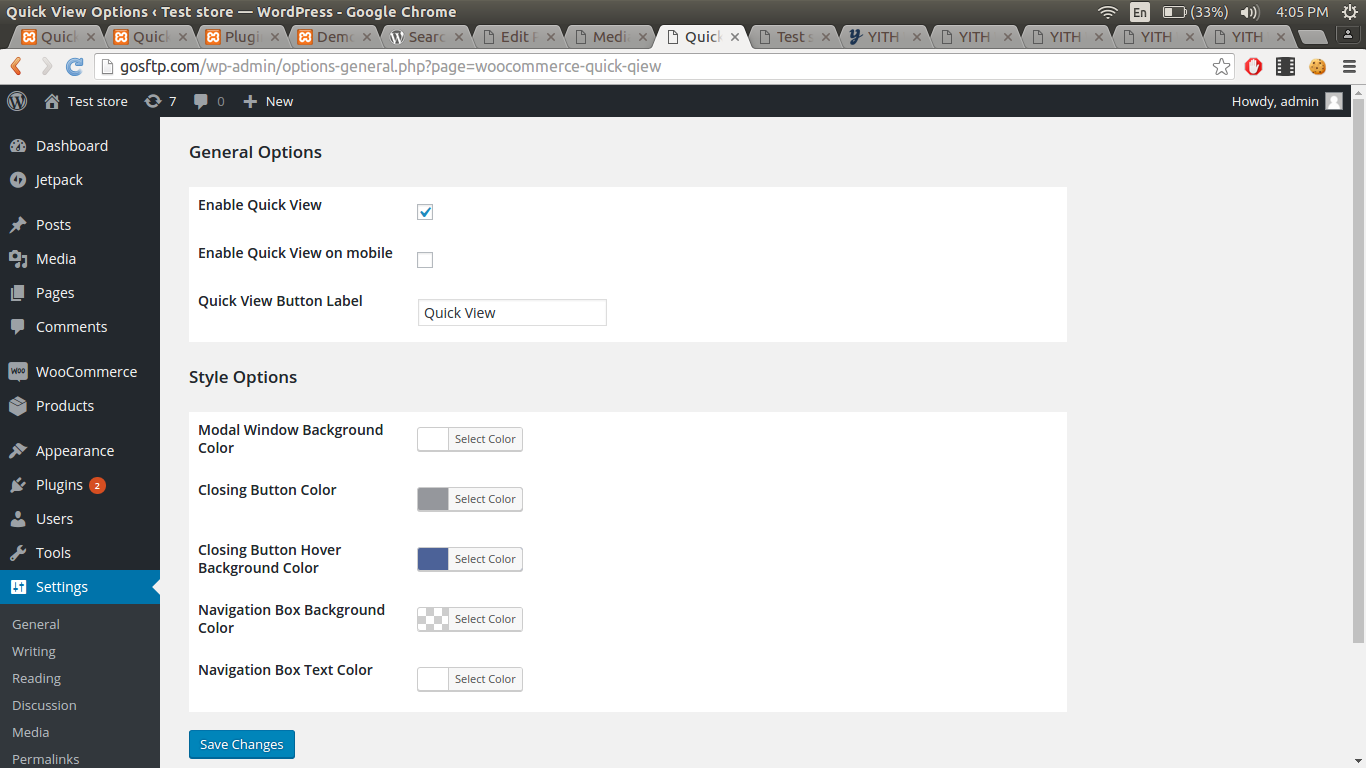
Go to Settings > Quick View.
Demo : https://woo.ciphercoin.com/
Features of Quick View For WooCommerce
- Add a button in product loop to open a modal window with the product summary using ajax
- Product image , title, price, quantity and add to cart button will be shown on popup.
- Disable “Quick View” on mobile.
- Set a label for the “Quick view” button.
- Easy to use
- Developer friendly & easy to customize
- Customize style of modal
Other WooCommerce Plugin
WooCommerce Abandoned Cart Recovery
Support : http://www.ciphercoin.com/contact/
- Download and extract plugin files to a wp-content/plugin directory.
- Activate the plugin through the WordPress admin interface.
- Done !
Screenshot Gallery
No FAQ provided.
Changelog
No changelog available.
" width="120" height="120">
