
Simple Client Dashboard
Active Installs
2,000+
Last Updated
September 3, 2026
First Released
April 6, 2013
Download History (Last one month)
Contributors
Simple Client Dashboard offers a new “Admin” user role, which fits perfectly between the default WordPress roles for Administrator and Editor access. This allows clients and Webmasters to manage their website content without you having to worry about critical settings or information being removed or adjusted.
- Preserve your hard work
- Avoid unexpected messes and troubleshooting sessions
- One-click access restriction
Incorporate Into Your Clients Site with Ease
Getting started with Simple Client Dashboard is a breeze — unlike other full user-role solutions that eat up your time, this one won’t have you scratching your head or testing endlessly. Simply install this on your client’s site right from the get-go and it’s smooth sailing from there.
There’s little to no setup required, just install Simple Client Dashboard, and you’ll instantly have access to the new “Admin” user role. If you’d like to adjust the “Admin” role, the free plugin offers a clean and tidy interface so that you can make adjustments. And, Simple Client Dashboard Pro, lets you further customize permissions for more advanced third party plugins.
Give Clients and Webmasters The Access They Need
Restrict access to only the features and functions they need to manage their site – without breaking it! Restrict their capabilities and permissions just enough to make sure no unexpected problems arise as they begin working on their website.
Simple and Clean “Admin” Role Editing Interface
The Simple Client Dashboard offers a clean and straightforward editing interface for the new “Admin” role. Effortlessly make updates to the permissions and abilities that your clients have on their websites with a few clicks.
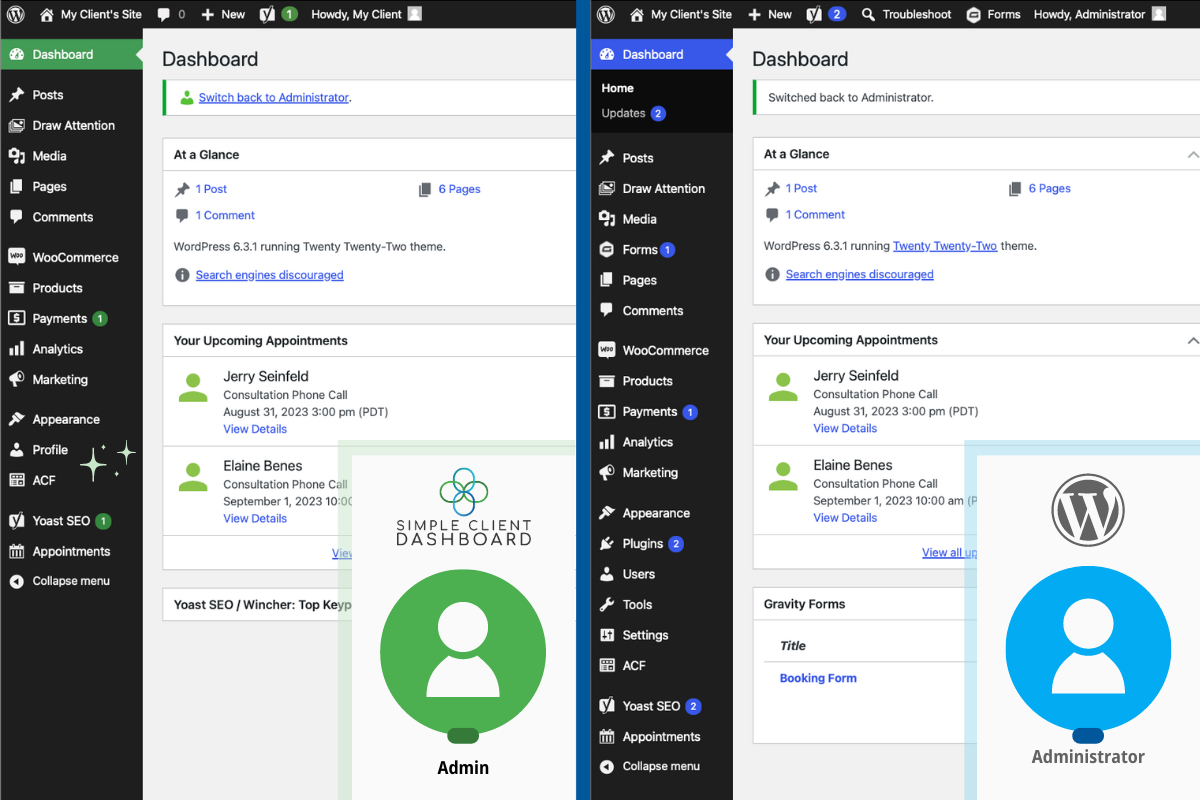
Simple Client Dashboard creates a new user role named “Admin” which is similar to the default “Administrator” role, but with the following changes:
Hides Non-essential and Troublesome WordPress Dashboard Items
- Hide the WordPress Settings menu
- Hide the WordPress Plugins menu
- Hide the WordPress Tools menu
- Hide the WordPress Users menu
- Hide the WordPress Appearance > Editor tab
- Disable the theme installation button
- Disable theme-switching buttons
- Disable the WordPress Core Updates button
(More options in Simple Client Dashboard Pro)
Simple Client Dashboard PRO also provides Third Party Plugin Constraints
Upgrade to Simple Client Dashboard Pro to get even more control over how the Admin role can interact with popular third party plugins.
Other user role solutions expect you to enter raw code names for permissions or are limited to capabilities that WordPress exposes by default. While Simple Client Dashboard takes it a step further by custom coding beyond standard WordPress permissions.
- Advanced Custom Fields – Hide ACF menu and settings, including definitions, rules, and fields.
- Custom Post Types – Restrict ability to create Custom Post Types.
- Contact Form 7 – Restrict the ability to create new forms, delete forms, and edit forms but allow the Admin role to view submissions.
- Draw Attention – Restrict ability to add Draw Attention images.
- Easy Digital Downloads – Allow the Admin role to manage products, manage customer payments, manage reports & sales data, and/or manage settings
- Five Star Business Profile and Scheme – Hide business profile settings.
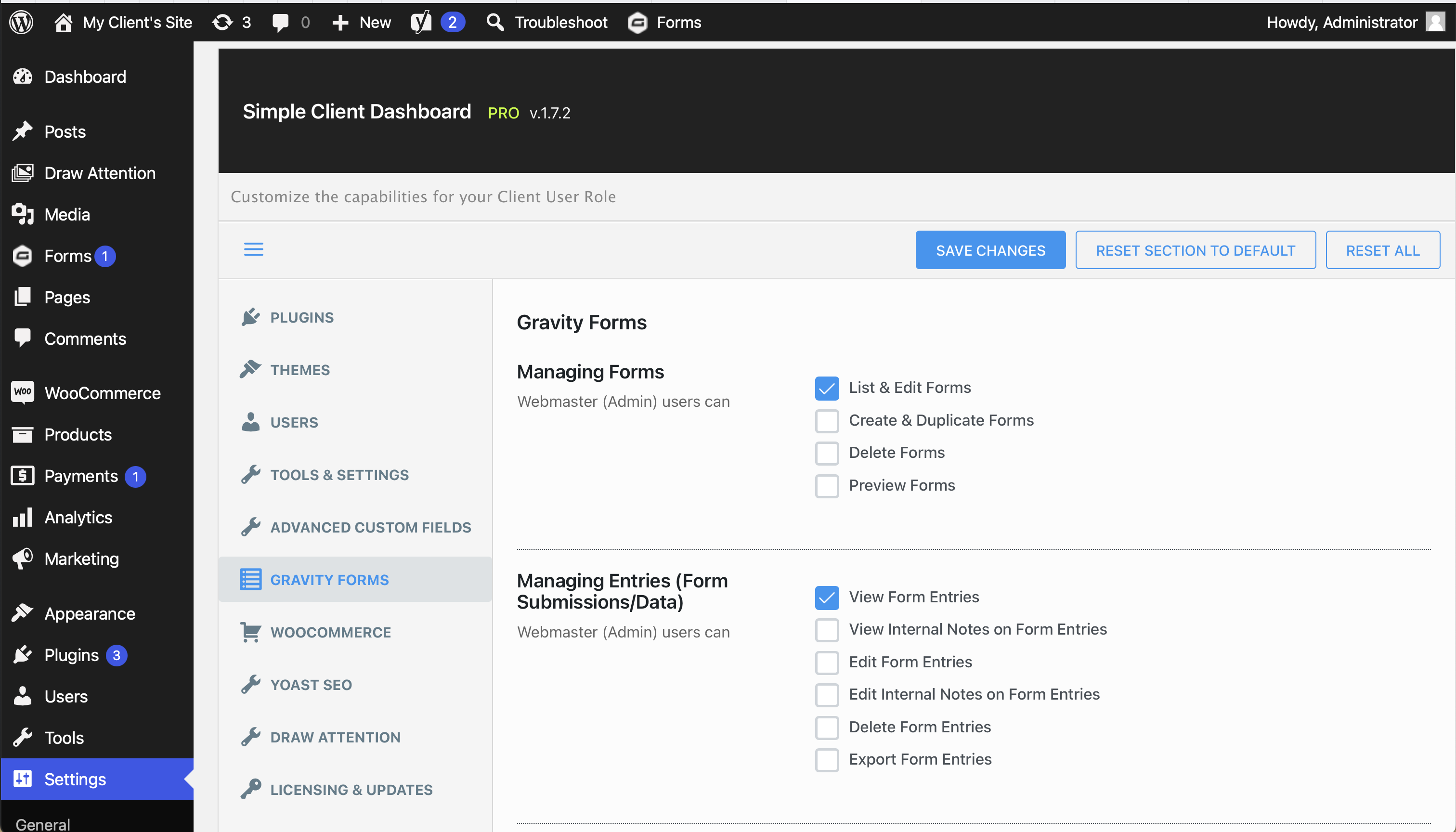
- Gravity Forms – Restrict the ability to create new forms, delete forms, and preview forms. Only allow the Admin role to edit forms and view submissions.
- iThemes Security – Hide iThemes security menus and settings.
- Jetpack – Hide the Jetpack stats.
- LearnDash – Restrict permissions to edit courses, assignments, groups and the group leader.
- Ninja Forms – Restrict the ability to import and export forms, manage settings or extensions, and view the system status. Only allow the Admin role to edit forms and view submissions.
- Redirection – Remove permission to manage URL redirection settings.
- Revolution Slider – Restrict access to the Revolution Slider menu.
- Simple Custom CSS – Hide option to add CSS.
- SiteGround Optimizer – Hide the Optimizer settings menu.
- Sucuri Scanner – Hide security scan information.
- TablePress – Hide the TablePress Options screen. Only allow the Admin role to show, edit, import, and export TablePress content.
- The Events Calendar – Restrict the Admin role’s ability to manage and delete events, venues, and organizers.
- WooCommerce – Hide the settings. Only allow the Admin role to edit & view products, coupons, or orders, allow the Admin role to view reports.
- Wordfence – Hide the Wordfence Dashboard Widget
- WordPress Plugins – Restrict ability to install, activate, update, edit, and delete plugins.
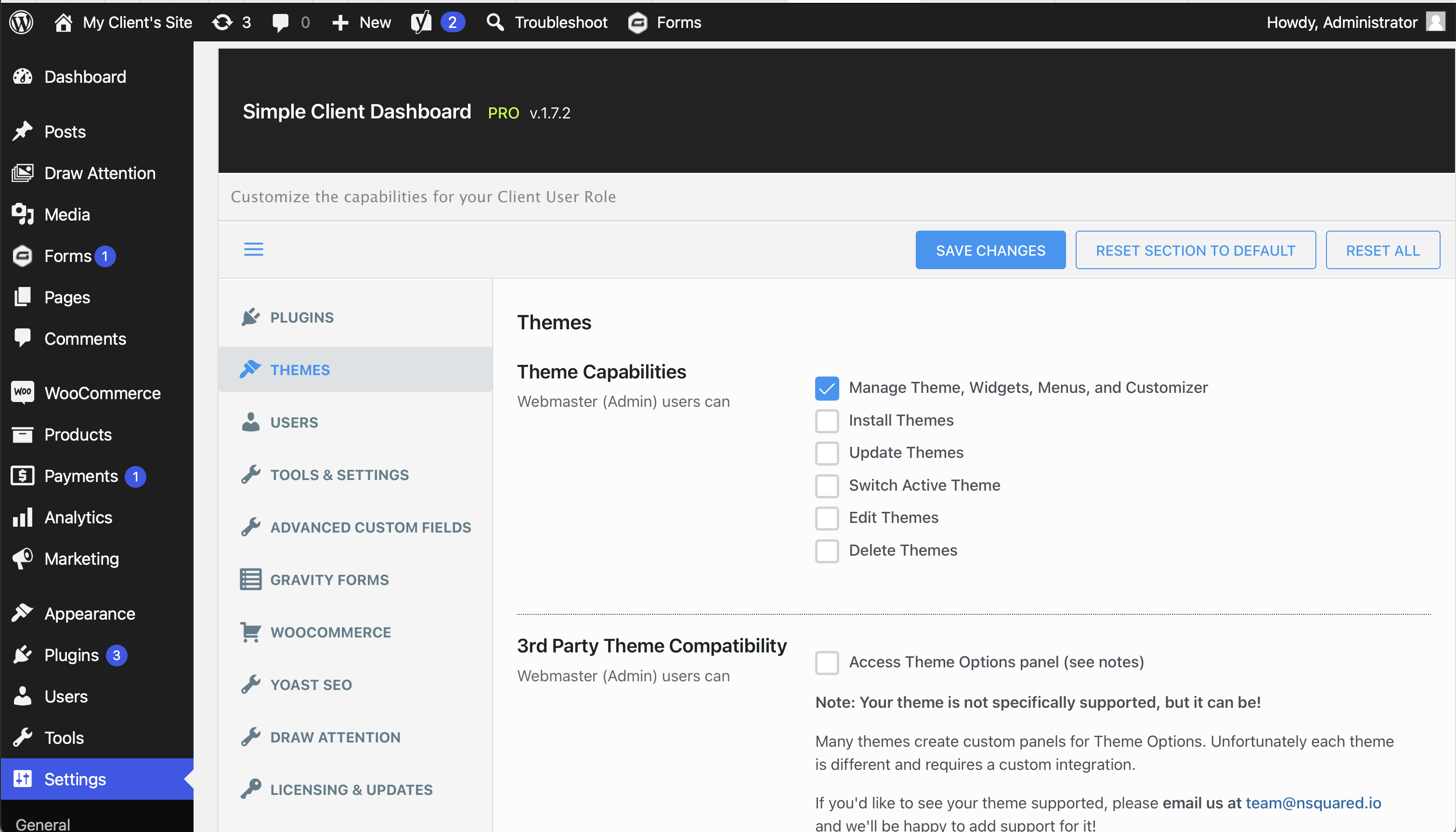
- WordPress Themes – Restrict ability to install, update, switch, edit, or delete themes. Only allow the Admin role to edit theme options such as widgets, menus, and the Customizer.
- WP All Import – Remove ability to use WP All Import Settings Menu.
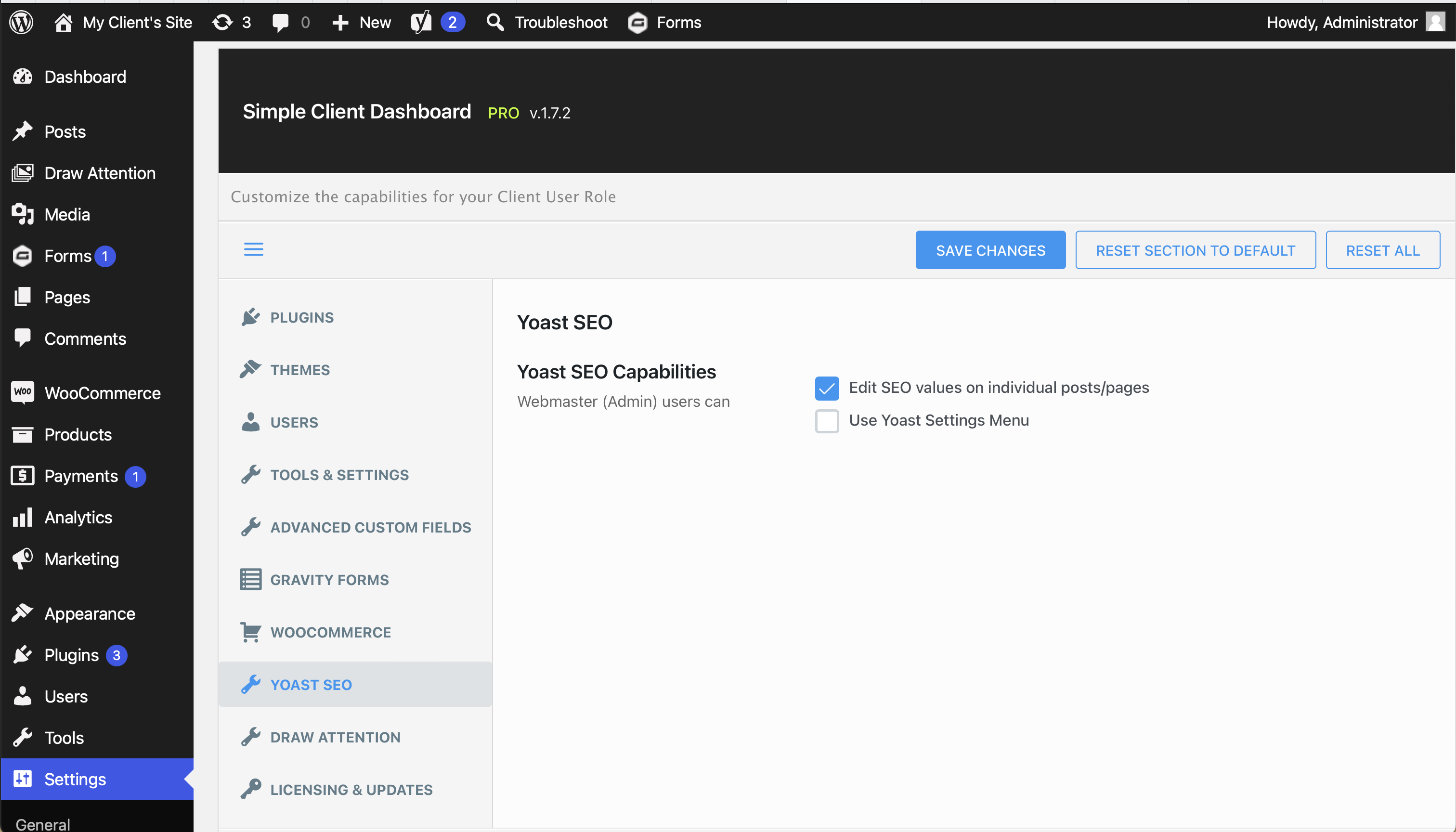
- Yoast SEO – Hide Yoast SEO settings menu and hide the SEO meta box when editing pages/posts.
2.1.7.1
- New: Added support for Jetpack Stats
2.1.7.0
- New: Added GoPricing Plugin Support
- New: Added Revolution Slider Plugin Support
- New: Added Boss Theme Support
- New: Added Canvas Theme Support
- New: Added Genesis Theme Support
2.1.6.1
- Fixed: members_get_capabilities() conflict with Members plugin
- Fixed: CF7 issues with update
- Improved: EDD capabilities
2.1.6.0
- New: Added Ninja Forms Plugin Support
- New: Added LearnDash Plugin Support
- New: Added Envato Toolkit Plugin Support
- New: Added CPTUI Plugin Support
- New: Added Wordfence Plugin Support
- New: Added Google Analytics Plugin by Yoast Support
- New: Added Divi Theme Support
- New: Added NativeChurch Theme Support
- Update: Improved Portuguese Language Support
- Fixed: Contact Form 7 Support
2.1.5.0
- New: Added Settings link in plugins list
- New: Added Easy Digital Downloads Module
- New: Added iThemes Exchange Module
- New: Added WooCommerce Module
- New: Added Event Espresso Module
- New: Added Events Calendar Module
- New: Added WP All Import Module
- New: Added Siteground SuperCacher Module
- New: Theme support for Avian theme
- New: Theme support for Cardinal theme
- New: Theme support for Ken theme
- New: Theme support for Total theme
- Update: Improved Gravity Forms Module
- Update: Improved i18n
- New: Serbian Language Support
- New: Portuguese Language Support (PT & BR)
- Fix: multisite activation bug with _blogs() function
- Fix: Improve Yoast SEO module
- Fix: Fatal error with CF7 module
- Fix: config array error on Multisite
- Fix: removed Administrator from editable roles
2.1.3.1
- Improved: Show Yoast metabox when editing pages (still hide settings) by default
2.1.3.0
- New: Hide Users menu (often requested, and really the webmaster user couldn’t do much in this screen anyway)
- New: Add support for ACF5 (hide Custom Fields Menu compatible with new version)
- New: Add support for Contact Form 7
- New: Add support for iThemes Security
2.1.2.1
- New: Add support for TablePress [https://wordpress.org/plugins/tablepress/]
2.1.2.0
- Multisite bugfix: Prevent webmaster from removing users from individual sites
- Multisite bugfix: Stop removing Settings & Tools from network administrator
2.1.1.1
- New: Now hides non-essential dashboard items
- Fixed: Fixes a conflict with Mizzo theme (thanks djesch)
2.1.1.0
- New: Add support for Sucuri Scanner [https://wordpress.org/plugins/sucuri-scanner/]
- New: Add support for Advanced Custom Fields [https://wordpress.org/plugins/advanced-custom-fields/]
- New: Remove tools menu – so webmaster users can’t import/export/migrate/find&replace
2.1.0.9
- New: Add support for Ultimate Branding [http://premium.wpmudev.org/project/ultimate-branding/]
2.1.0.8
- Improved: Add Gravity Forms edit_forms capability as an option (only allows entry viewing by default) via filter:
add_filter( ‘td-webmaster-user-roleoption_cap_gravityforms_edit_forms’, __return_true );
2.1.0.7
- New: Remove settings menu from wp-admin
2.1.0.5
- New: Remove capability to delete users
2.1.0.4
- New: Add “editor” cap for role so plugins checking for “editor” explicitly work
2.1.0.3
- New: Remove capabiilty to add, edit, promote users
- New: Remove capability to update core
2.1.0.2
- Initial Release
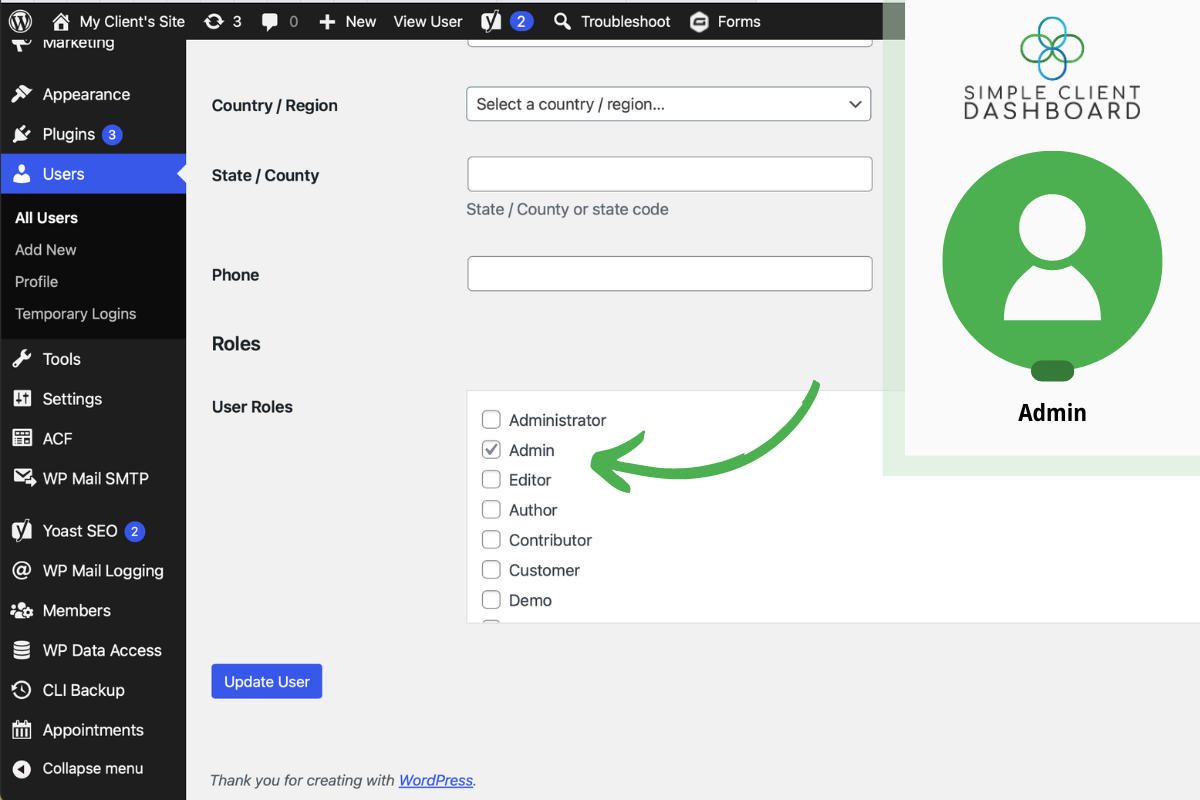
Install and activate the plugin on your site. Simple Client Dashboard is built with a carefully chosen set of permissions intended for most clients and webmasters. After activation go to your client’s WordPress user profile and switch them to the new “Admin” role. If you’d like to adjust the permissions, head over to the WordPress Settings > Simple Client Dashboard editor. This will open our interface for editing the settings of the Admin role. We also have a Pro version that offers advanced customization for the Admin role including support for popular third party plugins.
Screenshot Gallery

Yes, although this approach takes quite a bit of setup that you have to do on every customer’s website. Simple Client Dashboard offers a swift one-click solution so you can switch all your clients over quickly and easily incorporate it into your new client workflow. And in addition, most of these plugins are limited to user capabilities, while Simple Client Dashboard also provides additional capabilities and permissions that aren’t exposed by WordPress by default.
Probably not; they should still be able to perform most of the tasks they’re interested in, like adding content and managing most website functionality. They would also see their User Role set to “Admin”, which in our experience, satisfies even the most controlling clients. We suggest adding something in your project maintenance contracts that suggests that your agency is set as the “Super-Admin,” and that would be the only ones who can make dramatic or fundamental changes to their sites, such as changing themes and installing plugins.
To contact our support team, submit your message through our WordPress support forum. Or, you can also submit your message through our website’s Contact page.
If you find a plugin or theme you would like to see included in Simple Client Dashboard,reach out to us! We’d love to hear your insights. We plan to support more themes and plugins over time. And we count every request and keep tabs on which permissions we need to prioritize and what integrations are important to our customers.
Changelog
No changelog available.
" width="120" height="120">
Available Versions
| Version | Download | Type |
|---|---|---|
| 2.1.7.27 | Download | Stable |
| 2.1.7.26 | Download | Stable |
| 2.1.7.25 | Download | Stable |
| 2.1.7.24 | Download | Stable |
| 2.1.7.23 | Download | Stable |
| 2.1.7.22 | Download | Stable |
| 2.1.7.21 | Download | Stable |
| 2.1.7.20 | Download | Stable |
| 2.1.7.18 | Download | Stable |
| 2.1.7.17 | Download | Stable |
| 2.1.7.16 | Download | Stable |
| 2.1.7.11 | Download | Stable |
| 2.1.7.10 | Download | Stable |
| 2.1.7.8 | Download | Stable |
| 2.1.7.7 | Download | Stable |
| Development | Download | Trunk |
