
VigIA – AI Visibility, Analytics & Control
Active Installs
2,000+
Last Updated
October 8, 2026
First Released
January 2, 2026
Download History (Last one month)
VigIA (Spanish for “lookout” or “watchman”, incorporating “IA” – Spanish for “AI”) is a complete AI visibility toolkit for WordPress. Monitor 60+ AI crawlers, control access to your content, and optimize how AI systems discover and understand your site.
What does VigIA do?
- Scores your AI visibility with a 100-point analyzer covering 20 checks across 5 categories
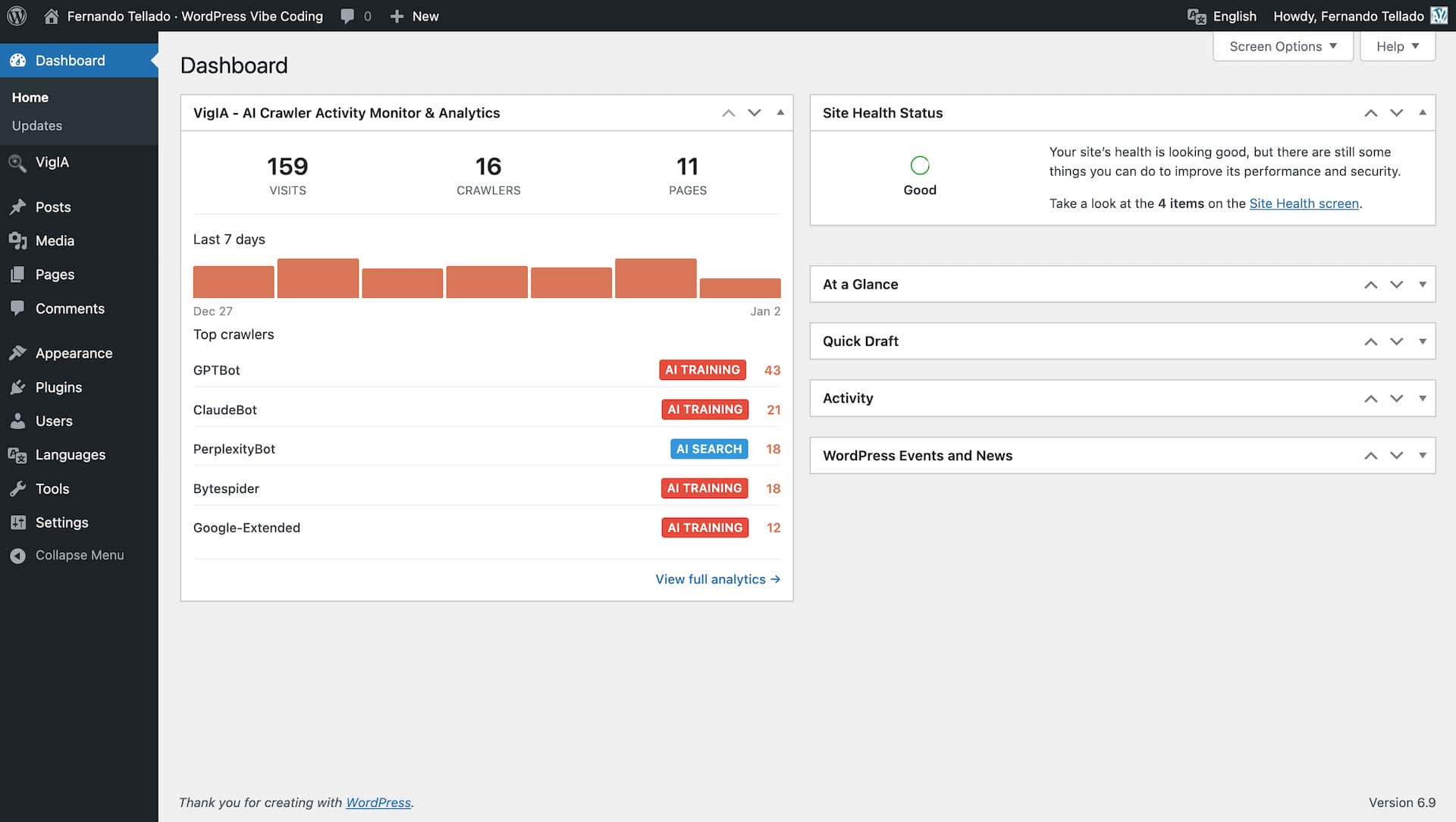
- Tracks AI crawlers visiting your site (GPTBot, ClaudeBot, PerplexityBot, and 60+ others)
- Provides detailed analytics with advanced filters, server-side pagination, and exportable reports with metadata banner
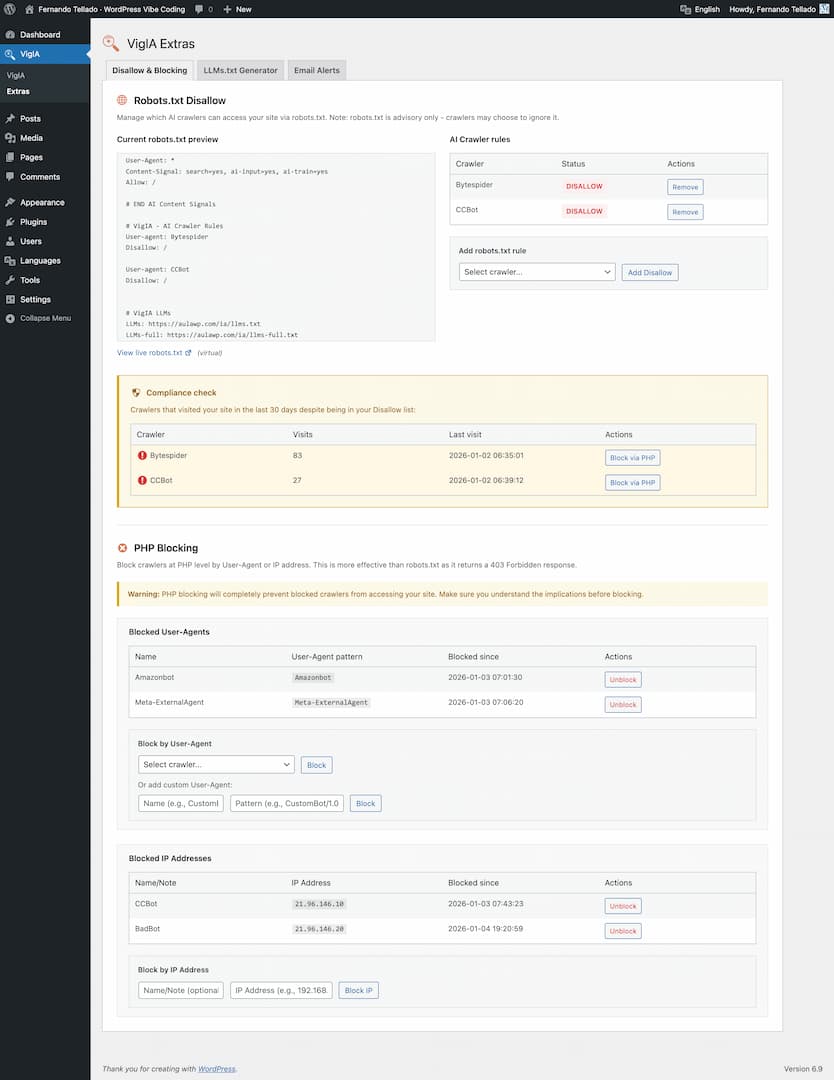
- Blocks unwanted crawlers via PHP (403 response)
- Manages robots.txt rules for AI crawlers with compliance monitoring
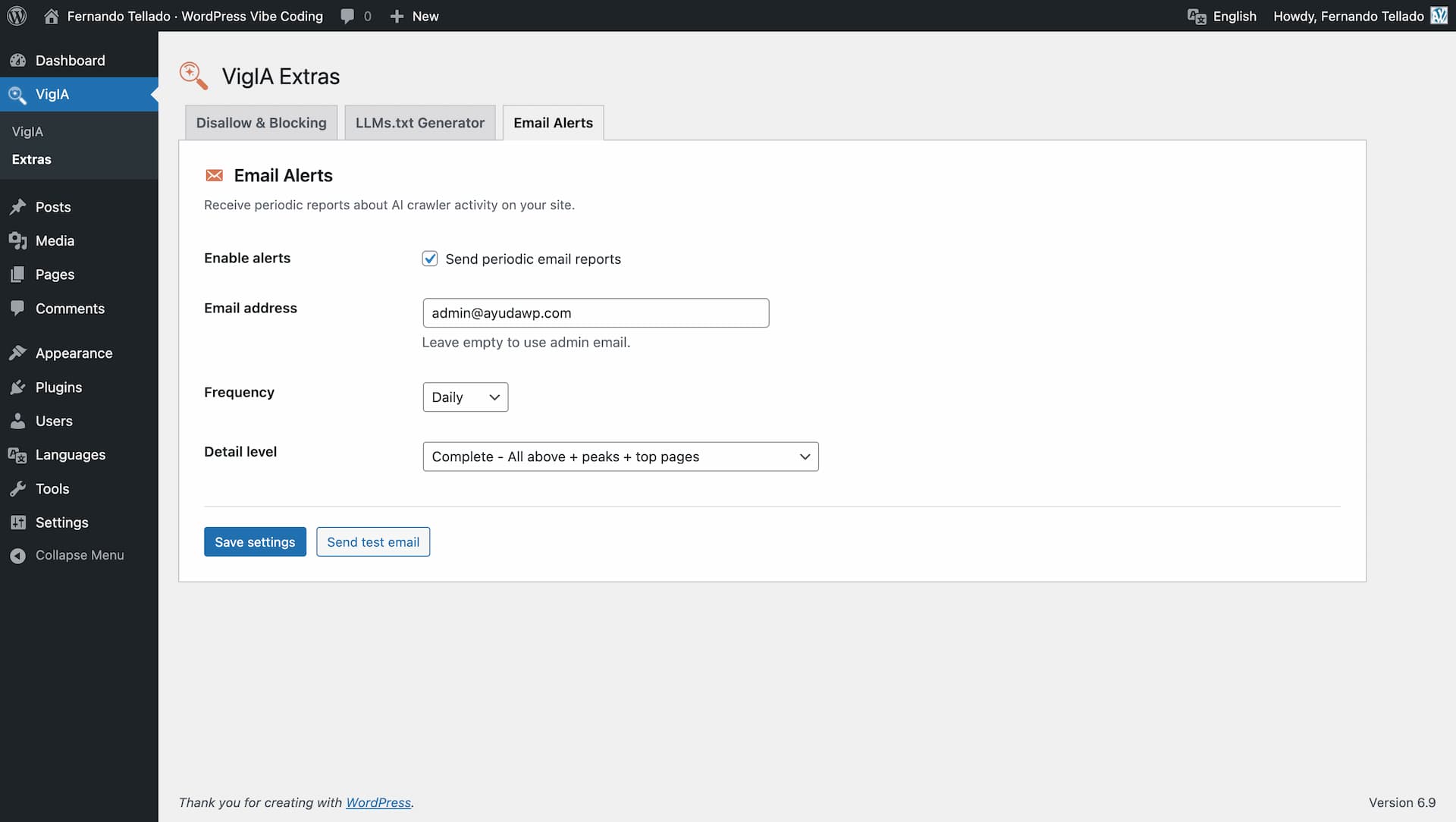
- Sends email alerts about crawler activity (daily, weekly, or monthly)
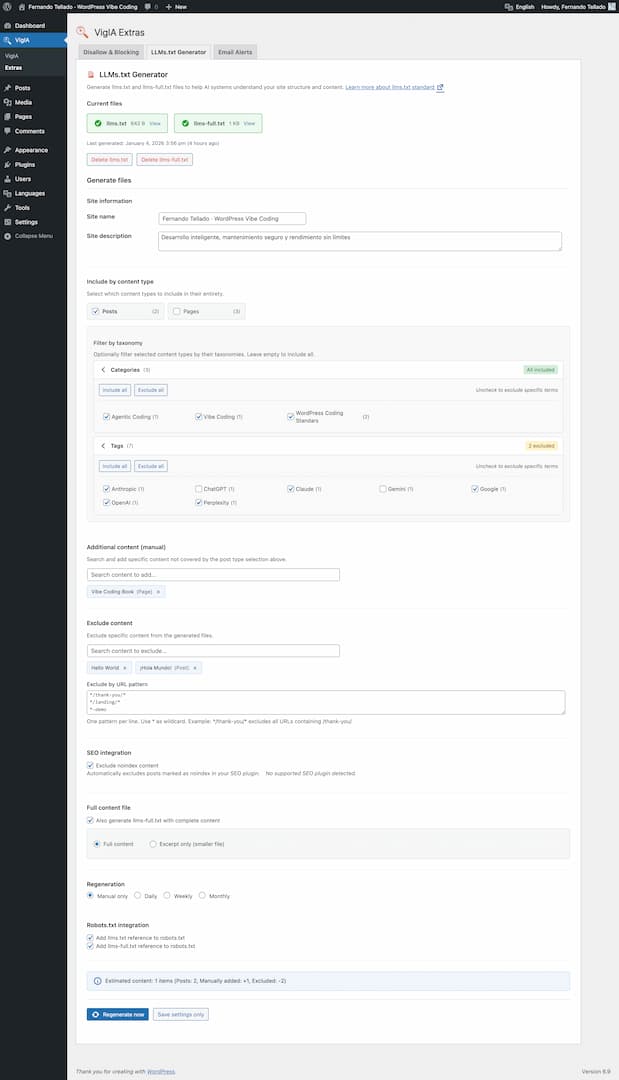
- Generates llms.txt files to help AI systems understand your site
- Serves markdown endpoints for posts, pages, taxonomy archives (categories, tags, WooCommerce product categories, custom taxonomies) and WooCommerce products with schema-like data
- Generates JSON-LD structured data with Site Identity and AI Discovery signals
- Exposes abilities for AI agents and automation tools (WordPress 6.9+)
Key Features
AI Visibility Analyzer
* 100-point scoring system with letter grades (A+ to F)
* 20 individual checks across 5 categories
* Access & AI Discovery (37 pts): robots.txt, AI bot directives, Content Signals, llms.txt, sitemap, RSS feed
* Structured Data & Semantic Context (25 pts): JSON-LD schemas, Open Graph, Twitter Cards, meta description, canonical URL
* Content Structure & Readability (20 pts): heading hierarchy, semantic HTML5, image alt text, content/HTML ratio
* AI Interaction & Distribution (8 pts): markdown delivery, AI share buttons
* Access Performance (10 pts): TTFB measurement
* Smart recommendations with direct links to VigIA features and plugin suggestions
* Analyze any page on your site with URL autocomplete selector
* Results cached for 24 hours with manual re-analyze option
Analytics Dashboard
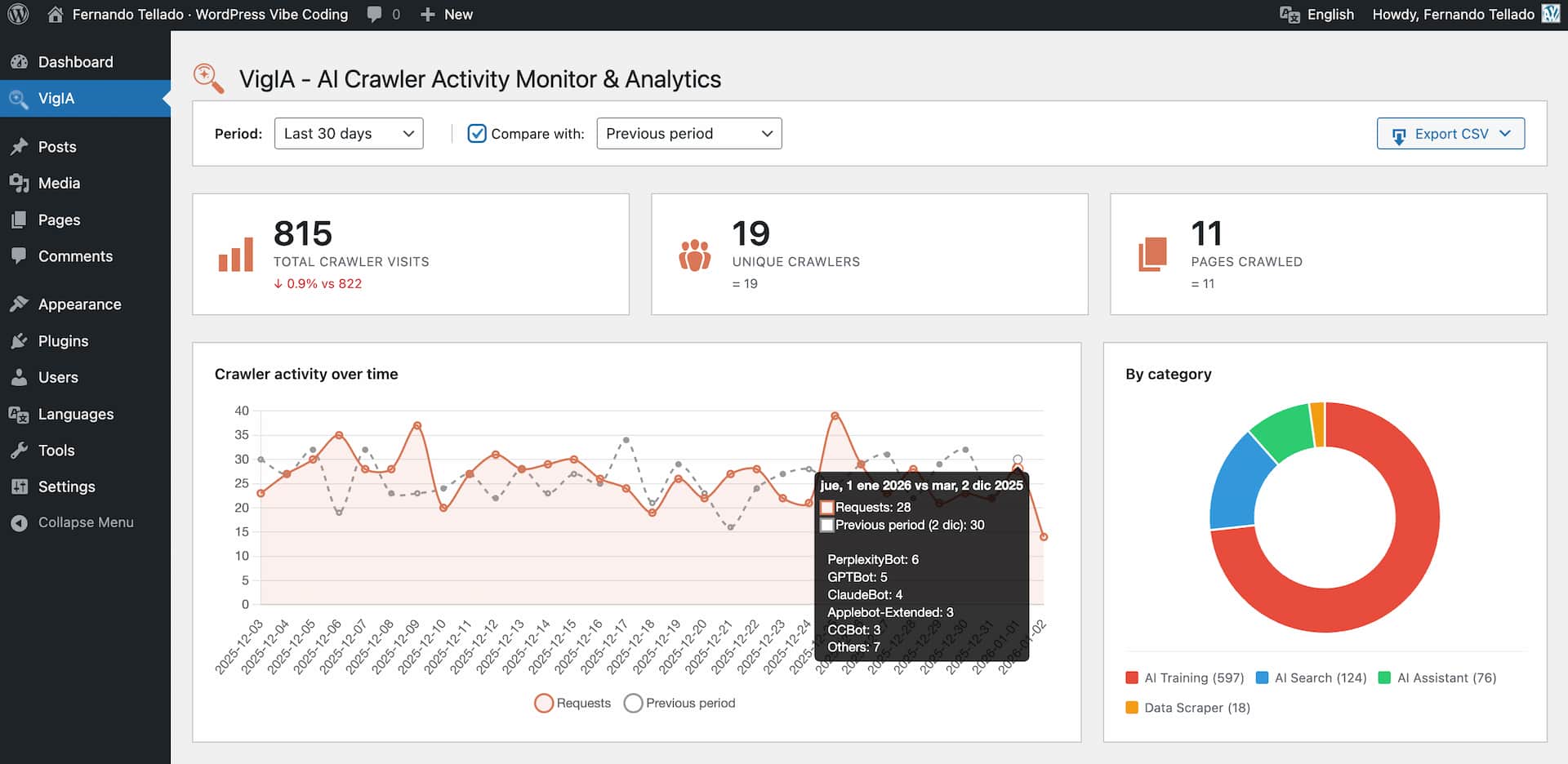
* Total visits, unique crawlers, and pages crawled statistics
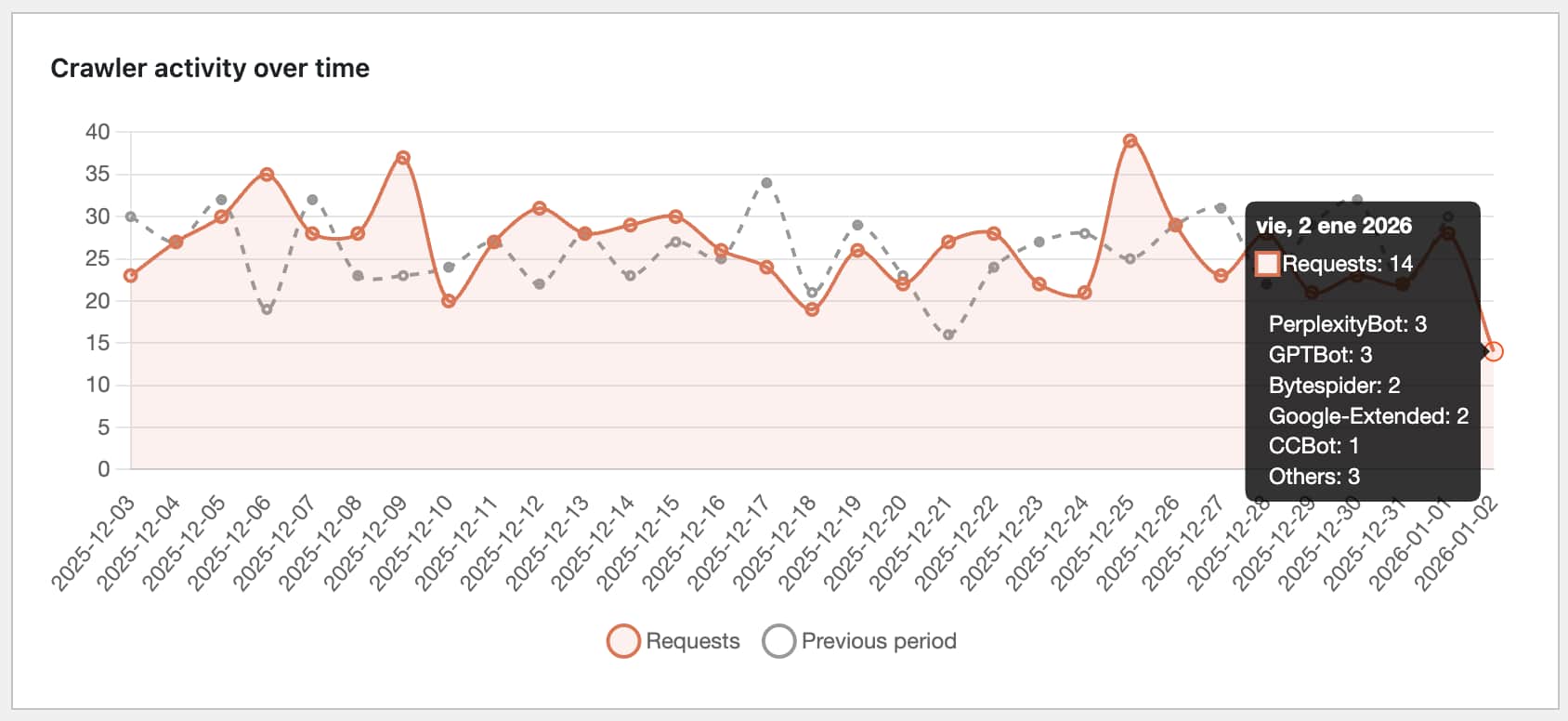
* Timeline chart with daily breakdown
* Category distribution (AI Training, AI Search, AI Assistant, Data Scraper)
* Top crawlers and most crawled pages tables with paginated navigation
* Share Buttons & AI-powered Summaries integration: see share button clicks per page
* Recent activity log with content type and HTTP status columns (color coded by status family)
* Advanced filters: multi-select crawler picker, content type, HTTP status code, and configurable date range
* Server-side pagination with four-button pager (first, previous, next, last) — operates over the full database, not just the latest 500 rows
* Period comparison functionality
* CSV export with a metadata banner (site name, site URL, export type, date range, export timestamp, applied filters)
* “Export filtered CSV” button that downloads exactly what the active filters return, with vigia-filtered-YYYY-MM-DD.csv filename
* Content type detection distinguishes Home, Post, Page, Product, custom CPTs, Category archive, Tag archive, Date/Author archive, Feed, Sitemap, REST API, File, Admin / login attempts (/wp-admin, /wp-login.php), WordPress system (admin-ajax, xmlrpc, wp-cron, wp-comments-post), 404 Not found, and Other
Crawler Blocking
* Block crawlers via PHP with 403 Forbidden response
* Quick block dropdown in analytics dashboard
* Manage blocks from Extras page
* Works on any server (Apache, Nginx, LiteSpeed, etc.)
Robots.txt Management
* Add Disallow rules for AI crawlers
* Visual preview of your robots.txt
* Compliance monitoring: see which crawlers ignore your rules
* One-click blocking for non-compliant crawlers
* Works with both physical and virtual robots.txt
Email Alerts
* Daily, weekly, or monthly reports
* Three detail levels: Minimal, Normal, Complete
* Non-compliant crawler warnings
* Activity comparison with previous period
Markdown for Agents
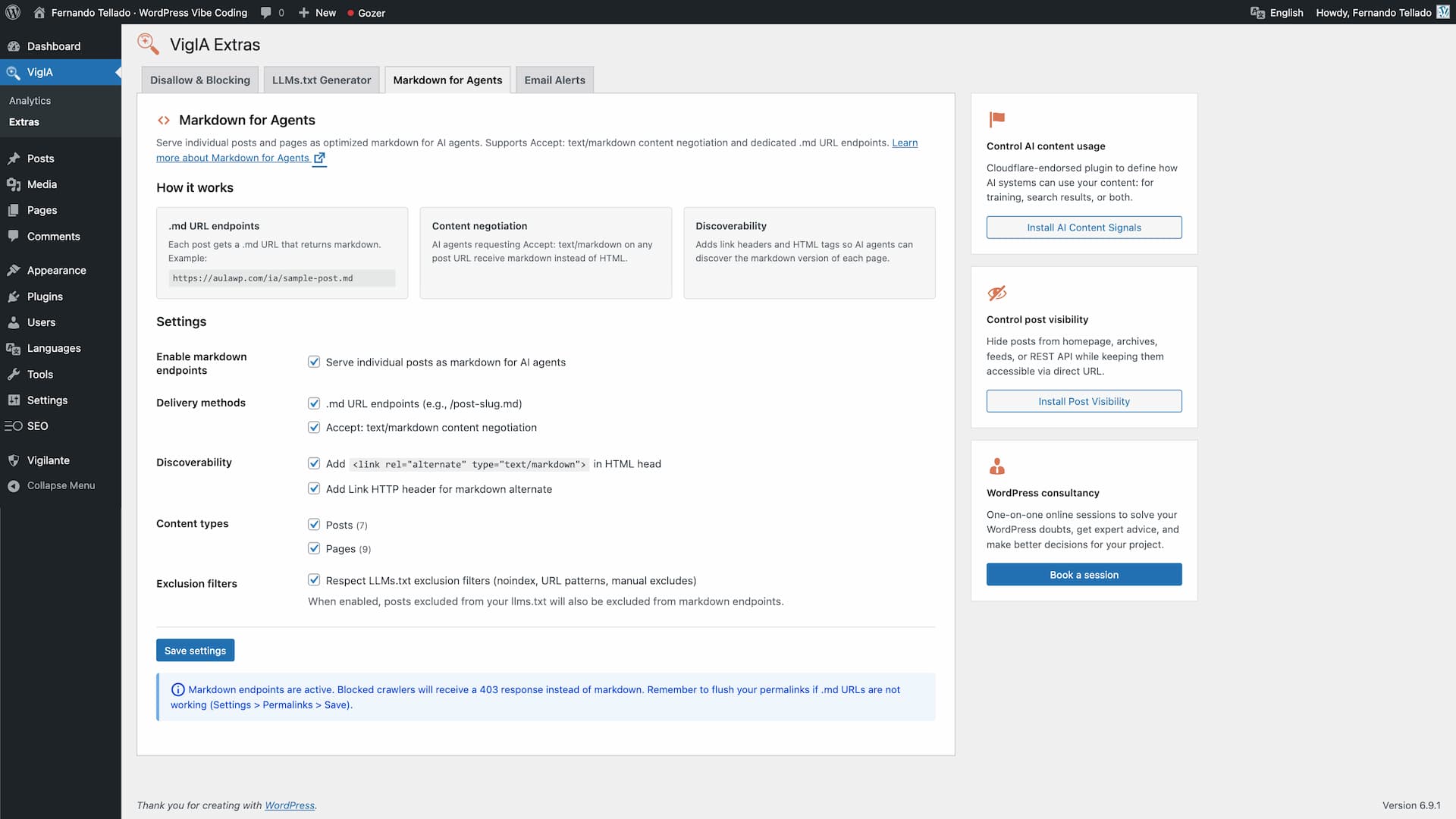
* Serve posts, pages and any public post type as optimized markdown for AI agents
* Serve taxonomy archive pages (categories, tags, WooCommerce product categories, custom taxonomies) as markdown — disabled by default, opt in per taxonomy
* Dedicated .md URL endpoints (e.g., /your-post.md, /category/news.md, /product-category/electronics.md)
* Accept: text/markdown content negotiation on posts and taxonomy archive pages
* Discoverability via Link HTTP headers and <link rel="alternate" type="text/markdown"> HTML tags
* YAML frontmatter for posts: title, date, modified, author, image, categories, tags, post type, lang
* YAML frontmatter for taxonomy terms: title, description, url, type, taxonomy, parent, count, image (term meta), lang
* WooCommerce product frontmatter adds schema-like fields: sku, product_type, price, regular_price, sale_price, currency, availability, stock_quantity, rating, rating_count, review_count
* Taxonomy term body includes the term description (rendered through the_content), the list of direct child terms in hierarchical taxonomies, and an excerpt of the latest posts/products assigned to the term
* Product listings inside product_cat archives include an inline summary with formatted price, “was X” on sale items, star rating and out-of-stock flag
* Respects blocking rules (blocked crawlers get 403) and LLMs.txt exclusion filters
* Per-term noindex detection from Yoast SEO, Rank Math, All in One SEO and SEOPress
* Analytics integration: tracks markdown requests per crawler
* X-Markdown-Tokens response header
* Filters: vigia_markdown_post_eligible, vigia_markdown_term_eligible, vigia_markdown_term_posts_limit
* Follows the Cloudflare Markdown for Agents standard
LLMs.txt Generator
* Select content by post type with one click
* Filter by taxonomies (categories, tags, custom)
* Manual include/exclude with AJAX search
* Exclude by URL patterns (wildcards supported)
* SEO plugin integration (auto-exclude noindex content)
* Auto-regeneration (daily, weekly, monthly)
* Robots.txt integration (add llms.txt and llms-full.txt references)
* Generate llms.txt and llms-full.txt files
* Physical files at the site root, or served by WordPress when the root is not writable
* On multisite, every site gets its own files, mapped domains included
* Full content or excerpt mode
* Compatible with Yoast SEO, Rank Math, All in One SEO, SEOPress, The SEO Framework, and Native SEO NoIndexer
JSON-LD Structured Data
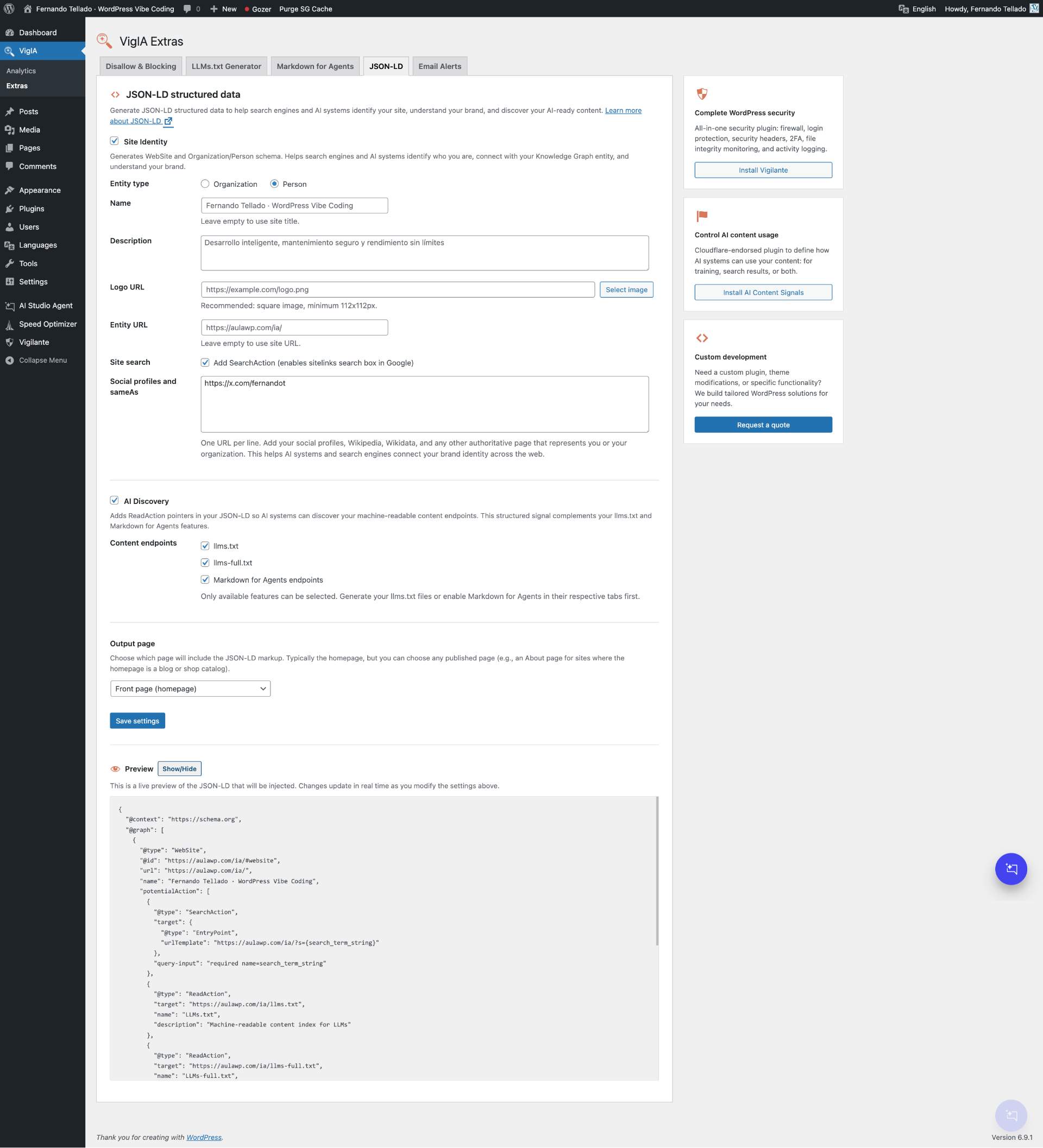
* Generate WebSite and Organization/Person schema for site identity
* AI Discovery: ReadAction pointers to llms.txt, llms-full.txt, and Markdown for Agents endpoints
* Social profiles and sameAs links for brand identity across the web
* SearchAction for Google sitelinks search box
* Media library integration for logo selection
* SEO plugin conflict detection (Yoast, Rank Math, AIOSEO, SEOPress, The SEO Framework)
* Choose output page (front page or any published page)
* Live JSON-LD preview with real-time updates
* Smart integration with LLMs.txt and Markdown for Agents features
Supported AI Crawlers
VigIA monitors 60+ AI crawlers including:
- OpenAI: GPTBot, OAI-SearchBot, OAI-AdsBot, ChatGPT-User
- Anthropic: ClaudeBot, Claude-SearchBot, Claude-User, Claude-Code
- Google: Google-Extended, GoogleOther, Gemini-Deep-Research, Google-NotebookLM
- Perplexity: PerplexityBot, Perplexity-User
- Meta: Meta-ExternalAgent, FacebookBot, Meta-WebIndexer
- Amazon: Amazonbot, Amzn-SearchBot, bedrockbot
- Mistral: MistralAI-User, MistralAI-Index
- Microsoft: BingBot
- ByteDance: Bytespider
- Apple: Applebot-Extended
- And many more…
Privacy Focused
VigIA stores visitor data locally in your WordPress database. No data is sent to external servers.
Abilities API
VigIA is one of the first WordPress plugins to implement the Abilities API introduced in WordPress 6.9. This API allows AI agents, automation tools, and external systems to discover and interact with VigIA’s functionality in a standardized, secure way.
What are Abilities?
Abilities are self-contained units of functionality that VigIA exposes through WordPress’s central registry. Each ability has defined inputs, outputs, and permissions, making it easy for automation tools to understand and use them.
Available Abilities
VigIA registers the following abilities:
Analytics
vigia/get-crawler-stats– Get statistics about AI crawler visits (total visits, unique crawlers, pages crawled)vigia/get-top-crawlers– Get a ranked list of most active AI crawlersvigia/get-top-pages– Get the most crawled pages on your site
Blocking
vigia/get-blocked-items– List all blocked crawlers and IP addressesvigia/block-crawler– Block a crawler by User-Agent patternvigia/unblock-crawler– Remove an existing block
Robots.txt
vigia/get-robots-rules– Get current AI crawler rules in robots.txtvigia/add-robots-disallow– Add a Disallow directive for a crawlervigia/remove-robots-rule– Remove a robots.txt rule
Use Cases
- Automated monitoring: AI agents can query crawler statistics and alert you to anomalies
- Reactive blocking: Automation tools can block crawlers that repeatedly ignore robots.txt
- External dashboards: Aggregate data from multiple WordPress sites with VigIA installed
- WP-CLI integration: Future command-line access through the Abilities API
- n8n / Make workflows: Build custom automation flows using VigIA’s abilities
Requirements
The Abilities API ships with WordPress 6.9 and later. On older WordPress versions, VigIA works normally but abilities and MCP are not available.
MCP Server (Model Context Protocol)
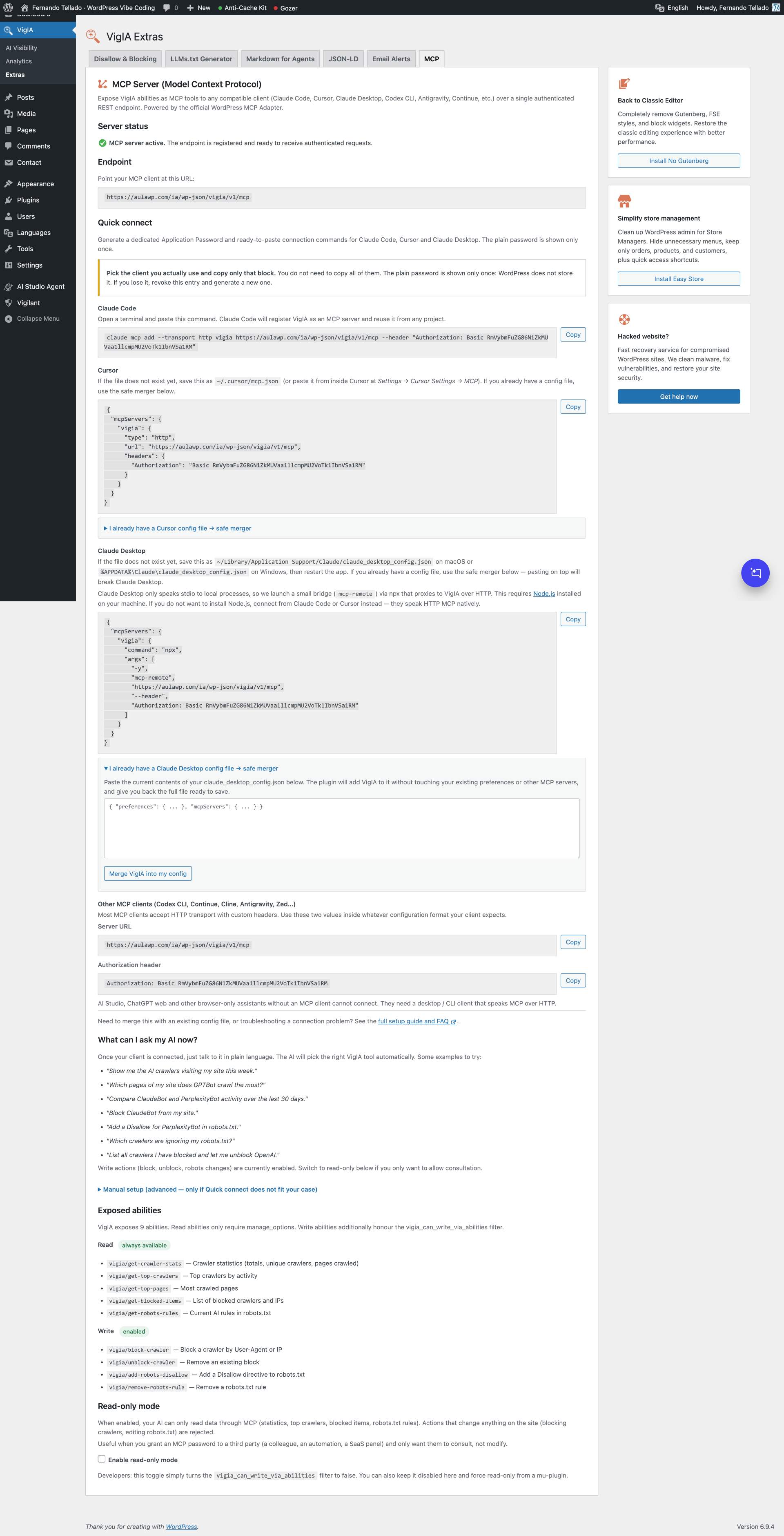
VigIA exposes its 9 abilities as native MCP tools to any MCP-compatible client (Claude Code, Cursor, Claude Desktop, Codex CLI, Antigravity, Continue, Cline, Zed and similar) through the official MCP Adapter plugin. The server is off by default: turn it on in VigIA > Extras > MCP, where VigIA also offers to install MCP Adapter if the site does not have it.
Requirements
- WordPress 6.9 or later (provides the Abilities API)
- The free MCP Adapter plugin. A site where another plugin already runs the adapter works too, and the MCP tab says which copy is in use
Quick connect (recommended)
Open VigIA > Extras > MCP, enable the MCP server and click “Generate password and connection commands”. The plugin creates a dedicated Application Password named VigIA MCP and renders ready-to-paste commands for Claude Code, Cursor, Claude Desktop and a generic block (URL + Authorization header) for any other MCP client.
The plain password is shown only once. If you lose it, revoke the entry from the same panel and generate a new one.
Endpoint
https://your-site.example/wp-json/vigia/v1/mcp
The endpoint uses HTTP Basic auth with the WordPress Application Password. The user must have the manage_options capability.
Connecting Claude Code
Quick Connect builds the full command for you. The shape is:
claude mcp add --transport http vigia-your-site-example https://your-site.example/wp-json/vigia/v1/mcp --header "Authorization: Basic BASE64_OF_USER_AND_APP_PASSWORD"
Quick Connect names the server after the site (vigia-your-site-example), so the same client can hold several sites with VigIA.
Claude Code merges the new entry into its config file automatically — no risk of breaking other servers.
Connecting Cursor
Save the JSON block from Quick Connect as ~/.cursor/mcp.json. You can also reach this file from inside Cursor at Settings Cursor Settings MCP.
If the file already exists with other content, see the FAQ.
Claude Desktop and other clients
Claude Desktop does not speak HTTP MCP, so it needs a small bridge and a config file of its own. Any other client (Codex CLI, Continue, Cline, Antigravity, Zed, or your own) takes the two raw values Quick Connect exposes: the server URL and the Authorization header. Both cases are covered in the FAQ, together with how to merge VigIA into a config file that already exists without losing what is in it.
Read-only mode
If you only want your AI to consult VigIA (not change anything), enable “Read-only mode” in the MCP tab. While on, write actions (block, unblock, robots changes) return a permission denied error. Read actions (statistics, top crawlers, blocked items, robots rules) keep working.
The toggle stores a vigia_mcp_read_only option that hooks into the vigia_can_write_via_abilities filter. Developers can still force read-only from a mu-plugin:
add_filter( 'vigia_can_write_via_abilities', '__return_false' );
The mu-plugin filter at the default priority takes precedence over the toggle.
Who can reach the endpoint
The endpoint requires the capability to manage options, the same one every tool behind it already asked for. The vigia_mcp_transport_capability filter can lower that bar; each tool keeps its own permission check.
After connecting
Restart your MCP client after adding the server so it picks up the new tools. Then try a few prompts to confirm everything is wired up:
- “Show me VigIA crawler stats for the last 7 days.”
- “List the top 5 most crawled pages on this site.”
- “Add a robots.txt Disallow rule for TestBot and then list the current AI crawler rules.”
The third example exercises a read + write + read round-trip, which is the most complete sanity check.
Support
Need private support or custom development?
Do you need one-on-one help, priority troubleshooting, or a custom feature, integration, or tweak built specifically for your site? I offer private support and custom development. Just contact me and tell me what you need.
Need help or have suggestions?
Love the plugin? Please leave us a 5-star review and help spread the word!
About AyudaWP
We are specialists in WordPress security, SEO, AI and performance optimization plugins. We create tools that solve real problems for WordPress site owners while maintaining the highest coding standards and accessibility requirements.
- Upload the plugin files to
/wp-content/plugins/vigia/or install through the WordPress plugins screen - Activate the plugin through the ‘Plugins’ screen in WordPress
- Navigate to VigIA > AI Score to check your AI Visibility Score
- View crawler analytics in VigIA > Analytics
- Configure blocking rules, llms.txt, markdown, and JSON-LD in VigIA > Extras
Screenshot Gallery
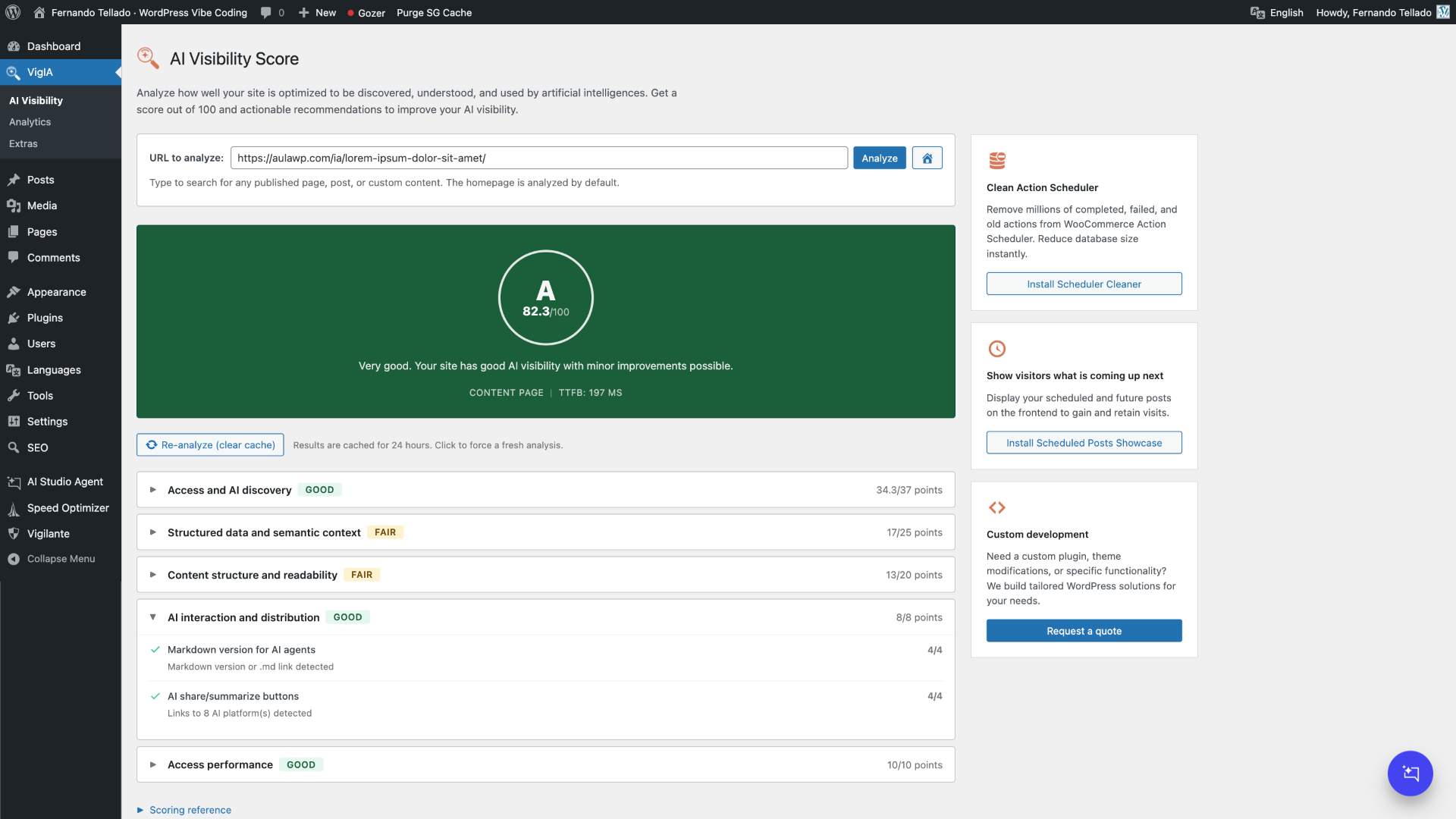


The AI Visibility Score is a 100-point rating system that measures how well your site is prepared for AI crawlers and AI-powered search. It checks 20 signals across 5 categories: access and discovery, structured data, content structure, AI interaction, and performance. You get a letter grade (A+ to F) and specific recommendations to improve.
No. VigIA adds minimal overhead by checking the User-Agent string on each request. The check is very fast and only writes to the database when an AI crawler is detected.
Robots.txt is advisory – crawlers should respect it but may choose to ignore it. PHP blocking returns a 403 Forbidden response, effectively preventing access regardless of whether the crawler respects robots.txt.
Blocking AI training crawlers (like GPTBot or ClaudeBot) will not affect traditional search engine rankings. However, blocking AI search crawlers might affect how your content appears in AI-powered search results.
Markdown for Agents is a standard for serving web content as clean markdown to AI agents. Instead of processing full HTML, agents receive lightweight markdown with structured metadata. VigIA supports both dedicated .md URLs and Accept: text/markdown content negotiation. Enable it in VigIA > Extras > Markdown for Agents.
This feature also covers taxonomy archives (categories, tags, WooCommerce product categories, custom taxonomies) and WooCommerce products. Term archives include the term description, the list of child terms in hierarchical taxonomies and an excerpt of the latest entries; product .md endpoints embed schema-like data (price, sale price, SKU, stock status, rating) directly in the YAML frontmatter.
VigIA classifies each crawler hit into one of these buckets, indexed in the database so filters and CSV exports are instant: Home (the / path), Post, Page, Product, any other public custom post type, Category archive, Tag archive, Date/Author archive, Feed, Sitemap, REST API, File (PDFs, images, downloads), Admin/login attempt (/wp-admin, wp-login.php — useful to spot bots probing the admin), WordPress system (admin-ajax, xmlrpc, wp-cron, wp-comments-post), 404 Not found, and Other.
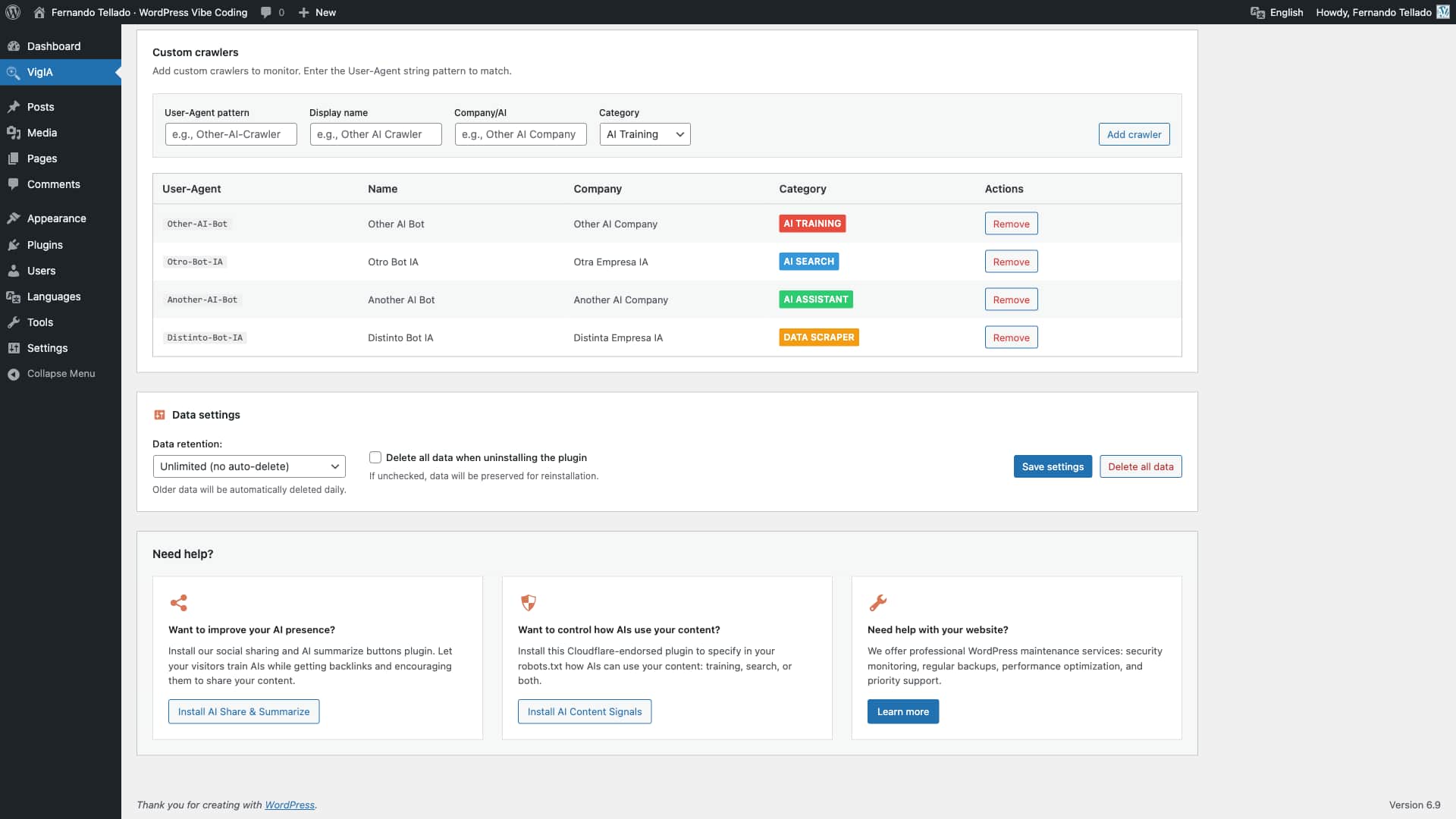
Yes! In the main analytics page, scroll down to “Custom crawlers” and add your own User-Agent patterns to track.
All data is stored in your WordPress database in a custom table (wp_vigia_visits). No data leaves your server.
The llms.txt file is a standard for helping AI systems understand your website’s content and structure. It provides a machine-readable overview of your site that AI can use to better represent your content. Learn more at llmstxt.org.
Yes. On a network each site keeps its llms.txt and llms-full.txt in its own uploads folder and WordPress serves them at that site’s address, be it a subdomain, a subdirectory or a mapped domain. Generate them from VigIA > Extras > LLMs on each site. If the main site already has physical files at the network root, set its Delivery to Served by WordPress first: the web server answers a file in that folder on every domain of the network, ahead of each site’s own.
On a single site the files are physical files at the site root unless you choose Served by WordPress under Delivery, which is the option to pick when that folder is not writable.
VigIA supports automatic noindex detection from: Yoast SEO, Rank Math, All in One SEO, SEOPress, The SEO Framework, and Native SEO NoIndexer.
The Abilities API is a new feature in WordPress 6.9 that allows plugins to expose their functionality in a standardized way. This enables AI agents, automation tools, and external systems to discover and use plugin features programmatically. VigIA implements 9 abilities for analytics, blocking, and robots.txt management.
Yes: the free MCP Adapter plugin, the official bridge between WordPress and MCP clients.
- The MCP server is off by default. Turn it on in VigIA > Extras > MCP.
- The same tab offers to install MCP Adapter when it is missing.
- The rest of VigIA works without it.
Save the JSON block from Quick Connect as claude_desktop_config.json in your user Library (this is not the system Library at the root of the disk):
- macOS:
~/Library/Application Support/Claude/claude_desktop_config.json - Windows:
%APPDATA%\Claude\claude_desktop_config.json - Linux:
~/.config/Claude/claude_desktop_config.json
On macOS, the easiest way to reach the folder is to open Finder, press ⌘ Shift G, paste ~/Library/Application Support/Claude/ and hit Enter. On Windows, press Win+R and run %APPDATA%\Claude.
Important: Claude Desktop only speaks stdio to local processes, so the snippet does not connect directly to VigIA over HTTP. Instead it launches a small bridge package (mcp-remote) via npx that proxies the connection. This means you need Node.js installed on the machine. The first run downloads mcp-remote automatically; subsequent runs use the npm cache.
If you do not want to install Node.js, connect from Claude Code or Cursor instead — both speak HTTP MCP natively and do not need a bridge.
Restart Claude Desktop after saving the file. If the app boots with default preferences, the JSON is malformed — review the file or restore your backup. If Claude Desktop says the entry is “not a valid MCP server configuration”, npx is not in its PATH; check that Node.js is installed and accessible to GUI apps.
If the file already exists with other content, see the next question.
If your claude_desktop_config.json or ~/.cursor/mcp.json already exists, do not paste the full Quick Connect block on top of it. Pasting on top discards everything else (preferences, other MCP servers) and the app will start with defaults.
Always make a backup of the file first. Then open it with any text editor that preserves JSON.
There are two scenarios.
Scenario 1 — the file has content but no mcpServers block yet.
This is common when you have used Claude Desktop before but never configured MCP servers. The file might look like this:
{
  "preferences": {
    "menuBarEnabled": false,
    "...": "..."
  }
}
Add mcpServers as a sibling property of preferences, separated by a comma. The result should be:
{
  "preferences": {
    "menuBarEnabled": false,
    "...": "..."
  },
  "mcpServers": {
    "vigia-your-site-example": {
      "command": "npx",
      "args": [
        "-y",
        "mcp-remote",
        "https://your-site.example/wp-json/vigia/v1/mcp",
        "--header",
        "Authorization: Basic BASE64_OF_USER_AND_APP_PASSWORD"
      ]
    }
  }
}
The order of preferences and mcpServers is not important, but the comma between them is required. Forgetting the comma makes the JSON invalid and Claude Desktop will start with default preferences.
Scenario 2 — the file already has mcpServers with other servers.
Add the VigIA entry inside the existing mcpServers object, separated from other entries by a comma:
"mcpServers": {
  "other-server": {
    "...": "..."
  },
  "vigia-your-site-example": {
    "command": "npx",
    "args": [
      "-y",
      "mcp-remote",
      "https://your-site.example/wp-json/vigia/v1/mcp",
      "--header",
      "Authorization: Basic BASE64_OF_USER_AND_APP_PASSWORD"
    ]
  }
}
For Cursor the entry is different — Cursor speaks HTTP MCP natively, so its block uses type, url and headers directly inside the server entry instead of the bridge command. The Quick Connect panel renders the right format for each client.
Most MCP clients accept HTTP transport with a custom Authorization header. The Quick Connect panel exposes the two raw values you need — the server URL and the Authorization header — so you can drop them into whatever configuration format your client expects.
Browser-only assistants without an MCP client (AI Studio, ChatGPT web) cannot connect. They need a desktop or CLI client that speaks MCP over HTTP.
JSON-LD (JavaScript Object Notation for Linked Data) is structured data that helps search engines and AI systems understand your site identity and content. VigIA generates two types of JSON-LD: Site Identity (WebSite + Organization/Person schema with social profiles) and AI Discovery (ReadAction pointers to your llms.txt and Markdown for Agents endpoints). This makes your AI-ready content discoverable through structured signals. Enable it in VigIA > Extras > JSON-LD.
Changelog
2.8.0
The MCP server is now off by default and runs on the free MCP Adapter plugin, which VigIA no longer bundles, so the package is half the size. Where an AI client was already connected it stays on, and VigIA tells you if MCP Adapter has to be installed.
- New: The MCP server has a switch, in VigIA > Extras > MCP, and it is off by default. Until now its endpoint was registered on every site running WordPress 6.9 or later, whether or not anybody had connected an AI client. Turn it on only if you use it.
- New: The MCP tab says which MCP Adapter the server runs on, with its version, and offers to install or activate the MCP Adapter plugin when the site does not have it. Its status now reports whether the endpoint is really registered, not whether the adapter could be loaded.
- Improved: VigIA no longer bundles the MCP Adapter. The server runs on the official MCP Adapter plugin, free on WordPress.org, which is how its authors now ask plugins to use it, or on the copy that another active plugin already runs. The package goes from 293 files to 35 and its zip from 747 KB to 389 KB.
- Improved: On update, a site where an AI client had been connected (one with the
VigIA MCPApplication Password) keeps the server on. If no MCP Adapter is running there, a notice on the dashboard says so, and the server is back as soon as the MCP Adapter plugin is installed and active. On every other site the server is switched off. - Improved: VigIA no longer starts the adapter itself, so the adapter’s own default server (
/wp-json/mcp/mcp-adapter-default-server) is only there when the MCP Adapter plugin or another plugin starts it. - Improved: Quick Connect names the MCP server after the site (for example
vigia-example-com) instead of a fixedvigia, so several sites with VigIA can be connected from the same client. Connections already set up keep working: the name only lives in the client. - Improved: The MCP tab points to the Authorization header test of Site Health for the client that answers 401.
- Fix: The safe merger wrote every site as
vigia, so merging a second site into a Cursor or Claude Desktop config replaced the first one. Each site now goes in under its own name, and an oldvigiaentry is only replaced when it points at this same site. - Fix: Saving the JSON-LD settings, or running the AI Visibility analysis, ended in a fatal error on PHP 8 when a URL field arrived as a list instead of a text. Only an administrator could cause it, on their own request.
- Fix: Deleting the plugin with its data left the MCP read-only setting and the stored version number in the database.
For older changelog entries, please check the changelog.txt file
Available Versions
| Version | Download | Type |
|---|---|---|
| 2.8.0 | Download | Stable |
| 2.7.0 | Download | Stable |
| 2.6.8 | Download | Stable |
| 2.6.7 | Download | Stable |
| 2.6.6 | Download | Stable |
| 2.6.5 | Download | Stable |
| 2.6.4 | Download | Stable |
| 2.6.3 | Download | Stable |
| 2.6.2 | Download | Stable |
| 2.6.1 | Download | Stable |
| 2.6.0 | Download | Stable |
| 2.5.0 | Download | Stable |
| 2.4.5 | Download | Stable |
| 2.4.4 | Download | Stable |
| 2.4.3 | Download | Stable |
| 2.4.2 | Download | Stable |
| 2.4.1 | Download | Stable |
| 2.4.0 | Download | Stable |
| 2.3.0 | Download | Stable |
| 2.2.0 | Download | Stable |
| 2.1.0 | Download | Stable |
| 2.0.3 | Download | Stable |
| 2.0.2 | Download | Stable |
| 2.0.1 | Download | Stable |
| 2.0.0 | Download | Stable |
| 1.12.1 | Download | Stable |
| 1.12.0 | Download | Stable |
| 1.11.0 | Download | Stable |
| 1.10.2 | Download | Stable |
| 1.10.1 | Download | Stable |
| 1.10.0 | Download | Stable |
| 1.9.5 | Download | Stable |
| 1.9.4 | Download | Stable |
| 1.9.3 | Download | Stable |
| 1.9.2 | Download | Stable |
| 1.9.1 | Download | Stable |
| 1.9.0 | Download | Stable |
| 1.8.1 | Download | Stable |
| 1.8.0 | Download | Stable |
| 1.7.1 | Download | Stable |
| 1.7.0 | Download | Stable |
| 1.6.1 | Download | Stable |
| 1.6.0 | Download | Stable |
| 1.5.0 | Download | Stable |
| 1.4.1 | Download | Stable |
| 1.4.0 | Download | Stable |
| 1.3.0 | Download | Stable |
| 1.2.9 | Download | Stable |
| 1.2.8 | Download | Stable |
| 1.2.7 | Download | Stable |
| 1.2.6 | Download | Stable |
| 1.2.5 | Download | Stable |
| 1.2.4 | Download | Stable |
| 1.2.3 | Download | Stable |
| 1.2.2 | Download | Stable |
| 1.2.1 | Download | Stable |
| 1.2.0 | Download | Stable |
| 1.1.1 | Download | Stable |
| 1.1.0 | Download | Stable |
| 1.0.0 | Download | Stable |
| Development | Download | Trunk |
