
Vexalyn LLM MD
Active Installs
0+
Last Updated
October 20, 2026
First Released
May 16, 2026
Download History (Last one month)
Contributors
Vexalyn LLM MD automatically generates and serves Markdown versions of your WordPress posts and pages, optimized for consumption by Large Language Models (LLMs) such as ChatGPT, Claude, and others.
Whether you want to make your content more accessible to AI tools, build RAG (Retrieval-Augmented Generation) pipelines, or simply expose your content in a clean machine-readable format, this plugin provides a seamless solution directly within WordPress.
Features:
- Auto-generates Markdown on post save for selected post types
- Serves Markdown via a clean URL endpoint (
/article.md) appended to any post URL - Also serves Markdown via the
Accept: text/markdownHTTP header for programmatic access - Bulk generation of Markdown for all existing posts at once, via the admin panel or WP-CLI, globally or per post type
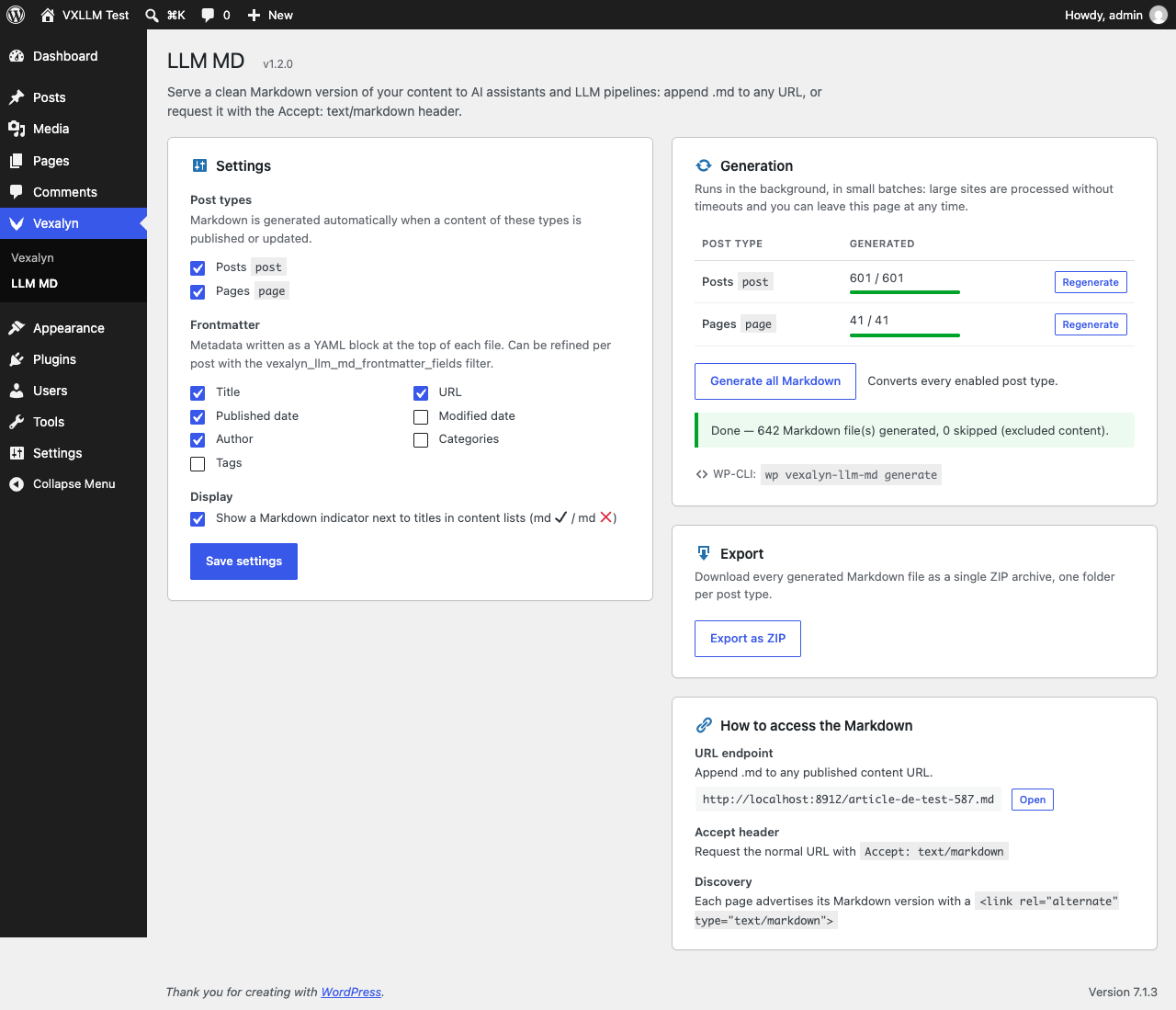
- Bulk generation runs in the background in small batches with a live progress bar: no timeout on large sites, and you can leave the page while it continues
- Export all generated Markdown files as a single ZIP archive
- Optional YAML frontmatter (title, URL, dates, author, categories, tags) at the top of each file, configurable globally and per post via the
vexalyn_llm_md_frontmatter_fieldsfilter - Password-protected posts are automatically excluded from Markdown generation and serving
- Markdown is always rendered as a logged-out visitor sees the page, so content reserved to members is never exposed
- Per-content “Exclude from Markdown” checkbox and “Delete generated Markdown” button on the post edit screen, for post types enabled in the admin panel
- Dedicated admin panel located under Vexalyn > LLM MD in the WordPress dashboard
- Upload the
vexalyn-llm-mdfolder to the/wp-content/plugins/directory, or install the plugin directly through the WordPress plugin screen. - Activate the plugin through the Plugins screen in WordPress.
- Navigate to Vexalyn > LLM MD in the WordPress admin menu to configure the plugin settings.
- Select the post types for which Markdown should be automatically generated on save.
- Optionally, use the bulk generation tool to generate Markdown for all existing posts.
Screenshot Gallery

Simply append .md to any post URL. For example, if your post URL is https://example.com/my-article/, the Markdown version will be available at https://example.com/my-article.md.
Yes. You can send an HTTP request with the Accept: text/markdown header to any post URL, and the plugin will return the Markdown content instead of the standard HTML page.
The plugin supports any public post type registered in WordPress. You can configure which post types trigger automatic Markdown generation from the admin panel under Vexalyn > LLM MD.
Go to Vexalyn > LLM MD in the admin menu and click “Generate all Markdown”, or the “Regenerate” button next to a single post type in the Generation section. The generation runs in the background, in small batches, with a progress bar: it works on large sites without hitting PHP or server timeouts, and you can leave the page at any time — WP-Cron keeps processing and the progress is restored when you come back. A “Cancel” button stops it (already generated files are kept).
Background processing relies on WP-Cron. If your host blocks loopback requests or WP-Cron is disabled without a system cron replacement, keep the settings page open (it drives the generation itself), run wp vexalyn-llm-md run to finish the current generation from the command line, or wp vexalyn-llm-md generate to regenerate everything.
No. Markdown is rendered exactly as a logged-out visitor would see the page, whoever triggers the generation. Content hidden from visitors by a membership, paywall or “logged-in only” shortcode or block is therefore never exposed through the .md endpoint.
If rendering a content fails (PHP error, memory or time limit), the background generation retries it on its own, then skips it and lists its ID once the generation is complete. The rest of the site is still generated.
No. The plugin registers its .md rewrite rule on activation and checks on admin page loads that the rule is still present, re-saving the permalink structure automatically if it was lost (plugin updated, rules regenerated by another plugin…). The .md endpoint requires a permalink structure other than “Plain”; the settings page shows a warning otherwise.
Yes. The admin panel includes an export feature that packages all generated Markdown files into a single ZIP archive for download.
No. Markdown is generated once, when a post is saved (or by the background bulk generation), and stored for later serving. Serving a .md file only reads that stored copy, with no impact on regular page load performance.
Yes. Run wp vexalyn-llm-md generate to (re)generate Markdown for every post type configured under Vexalyn > LLM MD (excluded and password-protected content is skipped automatically), wp vexalyn-llm-md generate --post_type=post,page to target specific post types, or wp vexalyn-llm-md generate --id=42 to regenerate a single post. wp vexalyn-llm-md status shows the state of a background generation started from the admin page, and wp vexalyn-llm-md run drives it to completion from the terminal.
They are automatically skipped: no Markdown is generated or cached for them, and the .md endpoint / Accept: text/markdown header return a 404 even if a cached copy previously existed.
Yes. Under Vexalyn > LLM MD, tick the fields (title, URL, published/modified date, author, categories, tags) to include as a YAML frontmatter block at the top of each file. For per-post control, hook into the vexalyn_llm_md_frontmatter_fields filter, which receives the computed fields array and the WP_Post object.
Yes. On the edit screen of any post type enabled under Vexalyn > LLM MD, a “LLM MD” box in the sidebar lets you tick “Exclude this content from Markdown generation (.md)”. Excluded content is never cached or served, even if the post type is otherwise enabled.
On the edit screen, the same “LLM MD” box shows a “Delete generated Markdown” button whenever a cached file exists for that content. It removes the cached Markdown immediately (the .md endpoint returns 404 right away) without excluding the content — it will be regenerated normally on the next save, unless you also tick the exclude checkbox.
Changelog
1.2.0
- Security: Markdown is now always rendered as a logged-out visitor. Previously, content hidden from visitors by shortcodes or blocks (membership, paywall, “logged-in only”) was rendered in full when an administrator saved a post or ran a bulk generation, and was then served publicly through the
.mdendpoint. Regenerate your Markdown after updating if your site restricts content this way. - Security hardening:
.mdresponses now sendX-Content-Type-Options: nosniff. - SEO:
.mdresponses now sendX-Robots-Tag: noindex, so search engines do not index the Markdown copies as duplicate content. - Background generation: a content whose rendering fails (PHP error, exception, memory or time limit) is retried on its own, then skipped and reported with its ID, instead of blocking the whole generation.
- Bulk generation (“Generate all Markdown” and per-type “Regenerate”) now runs in the background: contents are converted in small time-boxed batches driven by the settings page (AJAX) and by WP-Cron, with a live progress bar, a “Cancel” button, and automatic resume when the page is reopened. Large sites no longer hit PHP, proxy or browser timeouts, and leaving the page does not interrupt the generation.
- Fixed the “Regenerate” buttons: they now start the background job instead of a synchronous request, and refreshing the page no longer re-submits the last action (settings and actions follow the post/redirect/get pattern).
- Permalinks: the
.mdrewrite rule is verified on admin page loads and restored automatically if missing, so no manual “Save permalinks” is needed after activation or update. If another plugin keeps removing the rule, the restore is attempted at most once per hour and the settings page shows a warning. A warning is also shown when the permalink structure is “Plain”. - Redesigned settings page: settings, generation (per-type counters with progress), export and endpoint documentation in dedicated cards, with proper WordPress admin styling and responsive layout.
- Fixed the
<link rel="alternate" type="text/markdown">tag, which pointed to the HTML permalink instead of the.mdURL. - The post edit box now shows a direct “View generated Markdown” link when a file exists.
- Autosaves no longer trigger a Markdown regeneration.
- New filters:
vexalyn_llm_md_batch_size(posts per batch, default 20),vexalyn_llm_md_step_budget(seconds per step, default 10),vexalyn_llm_md_cron_max_seconds(max seconds per WP-Cron run, default 120). - WP-CLI:
generateshows a progress bar and lists the posts that could not be converted; newstatusandruncommands for the background job. - Confirmed compatibility with WordPress 7.1.
1.1.0
- Added a “Delete generated Markdown” button in the post edit screen’s LLM MD box, shown whenever a cached file exists, to remove a mistakenly generated
.mdwithout excluding the content from future generation. - Added a “Regenerate” button per post type in the Stats section, to refresh Markdown for a single content type instead of running the full bulk generation.
- Added a per-content “Exclude this content from Markdown generation” checkbox on the post edit screen, shown only for post types enabled under Vexalyn > LLM MD.
- Security: password-protected posts are no longer cached or served as Markdown (endpoint and
Acceptheader now return 404, and existing cache is purged on save). - Added optional YAML frontmatter (title, URL, dates, author, categories, tags), configurable per field in the admin panel, with a
vexalyn_llm_md_frontmatter_fieldsfilter for per-post overrides. - WP-CLI: added
--id=<id>to regenerate a single post, with an explanatory error if it’s skipped (not published, password-protected, excluded, or type not enabled). Bulk generation (all types or--post_type) already skips excluded and password-protected content. - Added
wp vexalyn-llm-md generateWP-CLI command for bulk (re)generation without the admin bulk button’s timeout risk. - Confirmed compatibility with WordPress 7.0.2 (no code change required).
1.0.0
- Initial release.
- Auto-generation of Markdown on post save for selected post types.
- Markdown served via
.mdURL endpoint. - Markdown served via
Accept: text/markdownHTTP header. - Bulk generation of Markdown for all posts.
- ZIP export of all generated Markdown files.
- Admin panel under Vexalyn > LLM MD.
