Theme YAML – Use YAML instead JSON for your theme.json settings and styles
Active Installs
10+
Last Updated
September 22, 2023
First Released
March 17, 2022
Download History (Last one month)
Contributors
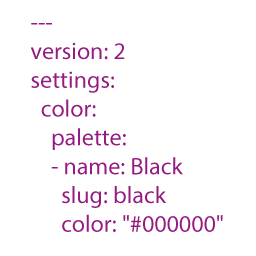
Theme Yaml converts your theme.yaml file into theme.json so that you can configure your theme with YAML. It has the benefit of being able to add comments and is more concise than JSON. The generated theme.json is left as a one liner by default, so that you can see it is generated. This however can be changed through the ‘theme_yaml_json_pretty_print’ filter.
The plugin automatically looks for a theme.yaml file in the active theme’s root folder when a page is loaded. If found, it will check its last modified time and store the value in the database. If there are new modifications, the plugin parses theme.yaml, converts it to JSON, and writes it to the theme.json file.
If the active theme is a child, it will also automatically run through this process for its parent.
Configuration
Add a theme.yaml file with your theme settings in your theme’s root directory. If you already have an existing theme.json file, you can convert it to the YAML format using an online tool. I personally use https://www.json2yaml.com/. The plugin will then convert the theme.yaml file into JSON and save it to the theme.json file.
- Upload
theme-yamlto the/wp-content/plugins/directory - Activate the plugin through the ‘Plugins’ menu in WordPress
The plugin automatically looks for a theme.yaml file in the active theme’s root folder when a page is loaded. If found, it will check its last modified time and store the value in the database. If there are new modifications, the plugin parses theme.yaml, converts it to JSON, and writes it to the theme.json file.
If the active theme is a child, it will also automatically run through this process for its parent and the child.
I left the generated theme.json file intentionally a one liner, so everybody can see it is generated. But if you would like to change this you can use the following filter to make the JSON file more readable:
`
function pretty_print_json() {
return true;
}
add_filter(‘theme_yaml_json_pretty_print’, ‘pretty_print_json’);
`
Changelog
1.3.0
Updated composer packages
1.2.0
Added backup for theme.json
1.1.1
Fixed readme formatting
1.1.0
Changed settings to output the theme.json file in a more readable way. Also added a filter to change the JSON encoding flags. Kindly suggested by Justin Tadlock in his review of this plugin here: https://wptavern .com/new-plugin-for-writing-wordpress-theme-json-files-via-yaml
1.0.0
- Initial Release of the plugin
