
Swipe n Buy for WooCommerce – Tinder-Style Product Swiping Experience
Active Installs
100+
Last Updated
March 30, 2026
First Released
May 16, 2024
Download History (Last one month)
Contributors
Tinder Like swiping on shopping. Swipe to next, previous, add to cart, checkout etc.
Features
- Add products to the cart and wishlist effortlessly with a single swipe.
- Swipe through all products seamlessly, one by one.
- Easily create a custom landing page with just a click.
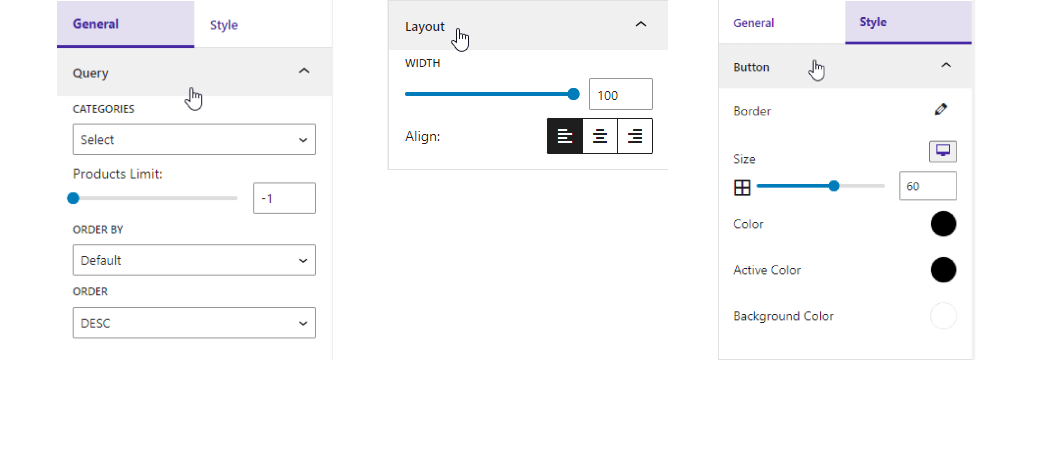
- Filter products by specific categories for a refined shopping experience.
- Sort products by Order and Order by to find exactly what you need.
- Customize layout width and alignment to match your website’s design seamlessly.
- Personalize button color, size, and background color for a unique touch.
How to use
- First, install the Swipe n Buy plugin.
- After installation, you’ll find a sidebar menu in the dashboard called “Swipe n Buy”.
- You can adjust plugin settings from the settings option.
-
Enjoy!
-
For installation help click on Installation Tab
Feedback
- Liked that plugin? Hate it? Want a new feature? Send me some feedback
⭐ Check out the Parent Plugin of this plugin-
🔥 b Blocks – Best gutenberg blocks collections for WordPress.
⭐ Check out our other WordPress Plugins-
🔥 Html5 Audio Player – Best audio player plugin for WordPress.
🔥 Html5 Video Player – Best video player plugin for WordPress.
🔥 PDF Poster – A fully-featured PDF Viewer Plugin for WordPress.
🔥 StreamCast – A fully-featured Radio Player Plugin for WordPress.
🔥 3D Viewer – Display interactive 3D models on the webs.
Download & Upload:
- Download the Swipe n buy plugin (.zip file)
- In your admin area, go to the Plugins menu and click on Add New
- Click on Upload Plugin and choose the
swipe-n-buy.zipfile and click on Install Now - Activate the plugin and Enjoy!
Manually:
- Download and upload the Swipe n buy plugin to the
/wp-content/plugins/directory - Activate the plugin through the Plugins menu in WordPress


Yes, Swipe n Buy is a free Gutenberg block plugin.
Yes, the Swipe n Buy plugin is designed to exclusively showcase WooCommerce products.
Yes, the WooCommerce plugin must be activated for Swipe n Buy to function properly.
Yes, it will work with any standard WordPress theme.
Yes, you can change plugin settings from the plugin edit options.
You can post your questions on the support forum here
Changelog
1.0.4 – 18 Dec, 2024
- Redirect swipe n buy settings page
1.0.3 – 10 Nov, 2024
- Variable work grid layout
1.0.2 – 24 June, 2024
- Can set new layout according to device.
1.0.1 – 22 May,2024
- New feature block convert this plugin
1.0.0
- Initial Release
" width="120" height="120">
