
SureMail – SMTP and Email Logs Plugin with Amazon SES, Postmark, and Other Providers
Active Installs
200,000+
Last Updated
May 1, 2026
First Released
January 22, 2025
Download History (Last one month)
Contributors
100% Free SMTP Plugin with Premium Features — Connect Amazon SES, Postmark, View Detailed Email Logs and More
★★★★★
At SureMail, we understand how crucial it is for your emails to reach your audience—whether it’s a transactional email, a newsletter, or an important notification. That’s why we’ve built SureMail with a strong focus on eliminating email delivery failures and providing a reliable solution for WordPress users.
Our mission is to empower you to send WordPress emails with confidence, knowing they will always be delivered.
Key features of SureMail include:
- Fail-Proof Email Delivery: Automatically retries failed emails and uses fallback SMTP providers to ensure that your emails are always delivered.
- Seamless SMTP Setup: Simple, easy-to-use interface for configuring your SMTP settings.
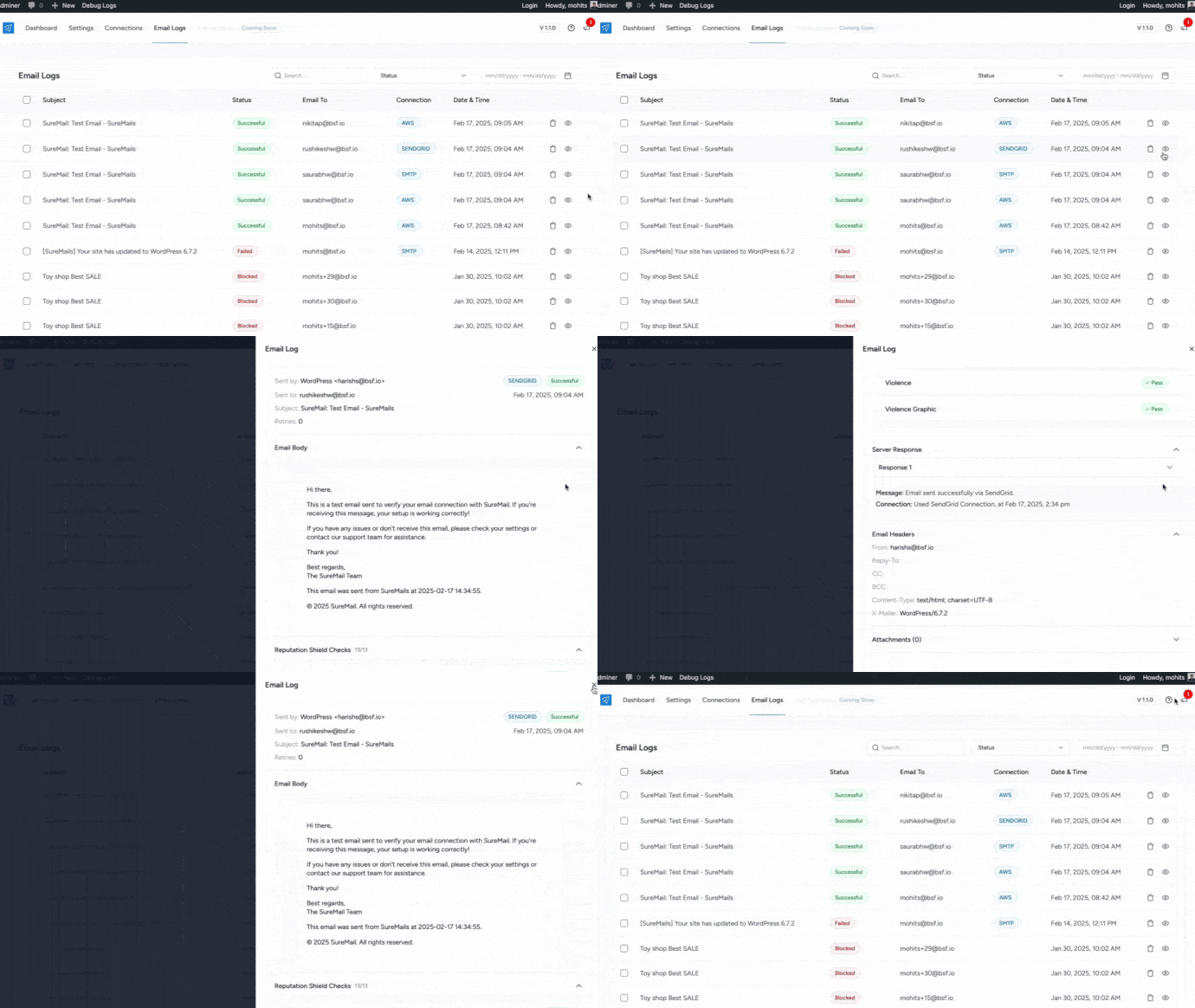
- Email Logging: Comprehensive logging lets you monitor email delivery status, and resend emails whenever needed, ensuring nothing is missed.
- Multiple SMTP Providers: Supports a variety of SMTP providers, allowing you to rely on backup connections in case the primary fails, guaranteeing continuous email delivery.
- Email Delivery Optimization: Increase your chances of successful delivery with authenticated SMTP servers that reduce the risk of emails being flagged as spam.
- Advanced Security: Built-in encryption and authentication protect your emails and data.
- Real-Time Analytics & Reporting: Gain insights into your email performance and delivery rates to ensure everything is working smoothly.
SureMail is built to ensure your WordPress emails are delivered—every time, without fail. Whether you need one-off emails or regular newsletters, you can trust SureMail to handle all your email delivery needs with reliability and ease.
Why Is SureMail Free?
SureMail is completely free because we believe that fail-proof email delivery should be available to everyone in the WordPress community. Our goal is to provide a powerful and reliable solution without any barriers to entry.
As part of Brainstorm Force, a company with a strong foundation in building quality WordPress products, we want to give back to the community. SureMail is our way of supporting WordPress users by offering a reliable email solution at no cost.
We have a solid business model, and offering SureMail for free is just one of the many ways we aim to contribute to the WordPress ecosystem.
How Does SureMail Work?
SureMail ensures fail-proof email delivery for your WordPress site by seamlessly integrating SMTP connections into your email sending process. By reconfiguring the wp_mail() function, SureMail routes outgoing emails through the most reliable SMTP servers. This allows for easy setup and robust email delivery.
With SureMail, emails are sent using your chosen SMTP provider’s API, bypassing potential issues like blocked SMTP ports or poor email deliverability. Whether you’re using your hosting provider’s SMTP service or a third-party provider, SureMail ensures your emails always reach their destination.
SureMail supports multiple SMTP providers:
- Amazon SES
- SendGrid
- Mailgun
- Mailjet
- Google Workspace / Gmail
- MailerSend
- Postmark
- SparkPost
- Elastic Email
- Brevo
- SMTP2GO
- Netcore
- Other SMTP
Plus, you can customize the “From Name” and “From Email” for each SMTP connection, ensuring consistent and professional branding across all your communications.
SureMail Features
SureMail is the ultimate WordPress SMTP plugin designed to ensure fail-proof email delivery with speed, reliability, and flexibility. Whether you’re managing a small blog or a large business, SureMail provides the tools you need to send emails without worry.
- Multiple SMTP Connections: Set up multiple SMTP providers for reliable and redundant email delivery.
- Fallback Email Connections: If one SMTP connection fails, SureMail automatically switches to another for uninterrupted email delivery.
- Auto-Retry Mechanism: Automatically retries failed email deliveries after a set period, ensuring emails are sent successfully.
- Email Logging: Keep track of all sent emails, view their delivery status, and easily resend if needed.
- Email Failure Notifications: Get notified about email delivery failures via SureTriggers integration, with support for a variety of channels beyond Telegram, Slack, and Discord.
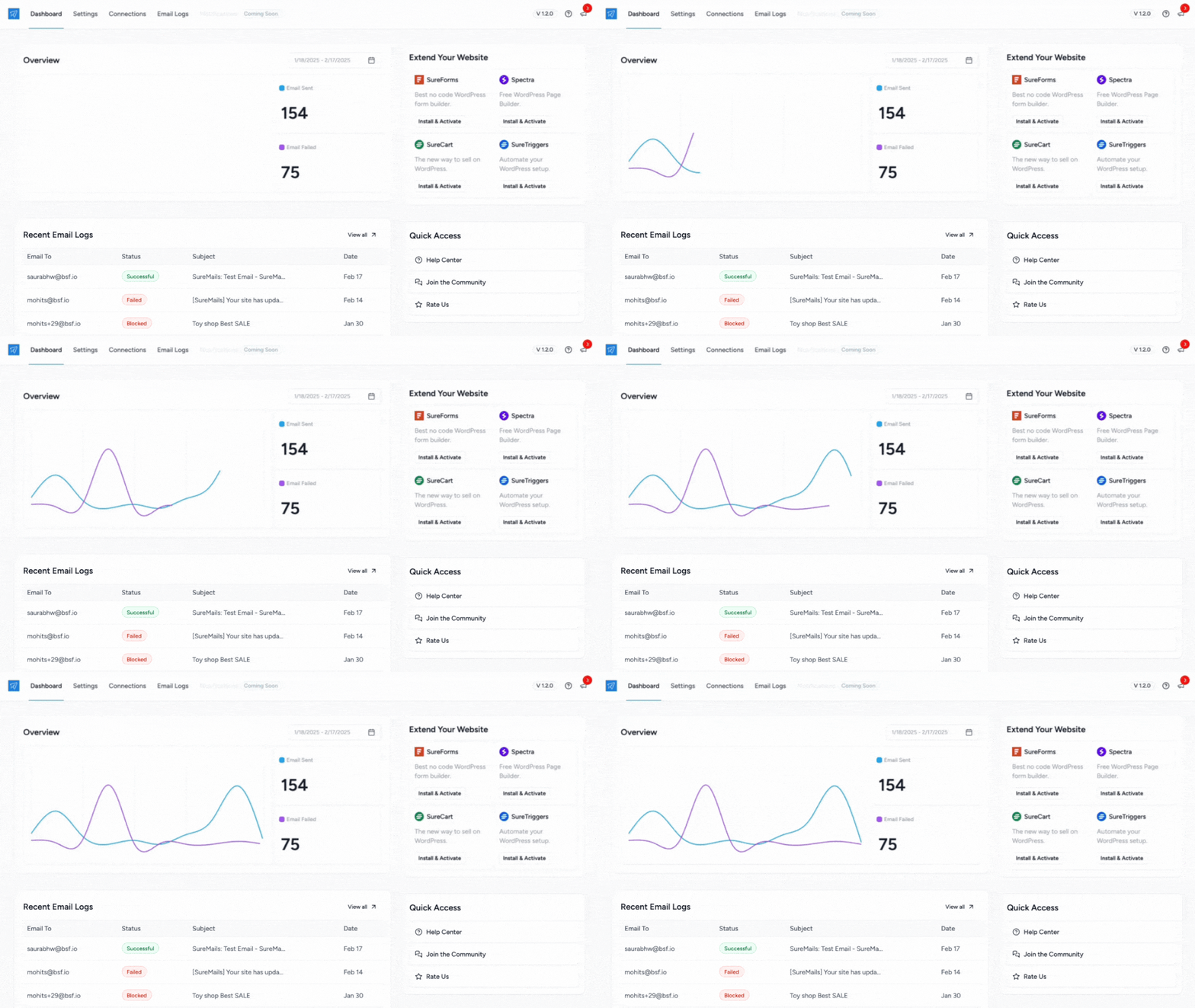
- Detailed Email Analytics: Gain insights into your email performance with comprehensive reporting on delivery rates and failures.
- Super Fast and Easy-to-Use Interface: SureMail is built for simplicity, with a sleek, intuitive interface that makes managing emails easy.
- Support for Popular SMTP Providers: Easily integrate with top email services like Amazon SES, SendGrid, Mailgun, Gmail, and more.
Best of all, SureMail is completely free, ensuring high-quality, fail-proof email delivery for all WordPress users, with no hidden costs.
Multiple SMTP Connections
SureMail allows you to configure multiple SMTP connections with the same From Email and From Name, ensuring your emails are sent through the most reliable channels. If your primary provider faces issues, SureMail can seamlessly switch to an alternate connection, maintaining the continuity of your email flow. This redundancy means you don’t have to worry about downtime or failed deliveries, keeping your communications running smoothly at all times.
Multiple Fallback Email Connections
With SureMail, you’re never limited to a single SMTP connection. If your primary email provider fails, SureMail automatically switches to your fallback connections one after another, ensuring your emails still reach their destination. This fail-safe feature guarantees reliable email delivery, even in situations where the first connection fails, keeping your business communication uninterrupted.
Auto-Retry Mechanism
SureMail includes a built-in auto-retry mechanism that ensures emails are resent in case of failure. If an email fails to send through your primary SMTP connection and its fallbacks, SureMail will retry sending the email after a set period, giving your delivery another chance. This increases your chances of successful delivery without requiring you to manually intervene, reducing email failures and improving reliability.
Detailed Email Logging
SureMail provides detailed email logging, so you can easily monitor the status of every email you send. View detailed logs to track delivery statuses, troubleshoot any issues, and keep a record of every sent email. If necessary, you can quickly resend emails to recipients with just a few clicks, ensuring that important communications are never missed.
Email Failure Notifications
Stay informed with SureMail’s integration with SureTriggers, allowing you to customize your email failure notifications. Unlike other plugins that limit notifications to just a few channels, SureMail allows you to send alerts wherever you need—whether that’s email, Slack, SMS, or another channel—ensuring you’re always in the loop when emails fail to deliver.
Detailed Email Analytics
Gain insights into your email sending performance with SureMail’s detailed email analytics. Track delivery rates, failures, retries, and more, all from one easy-to-use dashboard. This data helps you identify patterns, optimize your sending practices, and ensure that your email deliverability is always at its best.
Super Fast and Easy-to-Use Interface
SureMail is built with simplicity and speed in mind. It’s super-fast, user-friendly interface makes setting up and managing your SMTP connections and email settings a breeze. Whether you’re a beginner or an experienced user, SureMail’ intuitive design ensures that you can quickly configure and manage your email system without any technical hassles.
Support for Popular SMTP Providers
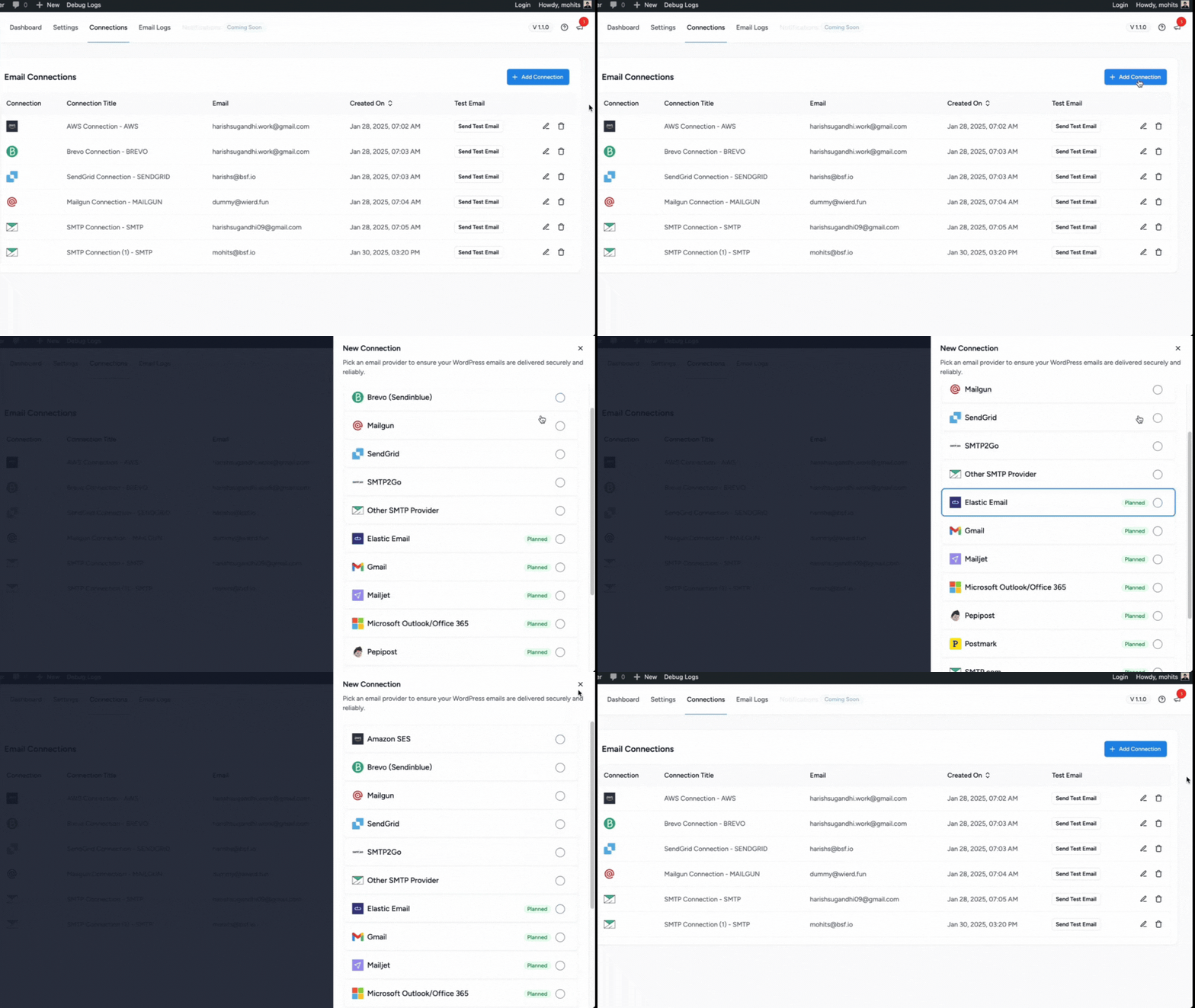
SureMail supports a wide range of popular SMTP providers, giving you the flexibility to choose the service that works best for you. Whether you’re using Amazon SES, SendGrid, Mailgun, or Gmail, SureMail ensures smooth integration with these services, providing you with a powerful, fail-proof email delivery system. Choose from the best providers to suit your needs and ensure reliable email sending every time.
Completely Free
SureMail is completely free, ensuring you can benefit from all these powerful features without any hidden costs. Whether you’re running a small blog or a large business, you’ll have access to top-tier email delivery solutions that ensure your emails are always delivered reliably—without breaking the bank.
Who Can Benefit from SureMail?
SureMail caters to a wide range of WordPress users, as email functionality is crucial for nearly all websites. Our target audience includes:
- Website Owners: SureMail is designed for individuals and businesses who manage their own WordPress websites. It provides an intuitive interface that allows website owners to set up and manage email delivery without requiring deep technical knowledge.
- eCommerce Businesses: Online stores rely heavily on transactional emails for order confirmations, shipping updates, and customer communications. SureMail ensures these critical emails reach customers’ inboxes reliably.
- Bloggers and Content Creators: For those who rely on email newsletters and updates to engage their audience, SureMail offers the reliability and features needed to maintain consistent communication.
- Agencies and Freelancers: Web design and development agencies can benefit from SureMail’s ability to streamline email management across multiple client sites.
- Marketing Professionals: SureMail’s detailed analytics and logging features make it valuable for marketers who need insights into email performance and deliverability rates.
- Non-Profit Organizations: NGOs and nonprofits that rely on email for donor communications and campaign updates can benefit from SureMail’s reliable delivery.
- Educational Institutions: Schools and universities using WordPress can use SureMail to ensure important communications reach students, faculty, and staff.
- Small to Medium-sized Businesses: SMBs looking for a robust email solution without the complexity of enterprise-level systems will find SureMail meets their needs effectively.
SureMail aims to provide a comprehensive email solution that meets the needs of this diverse audience, from novice users to experienced WordPress professionals, and ensures reliable email delivery across various use cases and industries.
Some of the WordPress Plugins SureMail Supports
SureMail is compatible with all plugins that send out emails, including:
- WooCommerce
- SureForms
- Contact Form 7
- Gravity Forms
- WPForms
- Fluent Forms
- WS Form
- MailPoet
- Easy Digital Downloads
- LearnDash
- FluentCRM
- Easy Digital Downloads
- LifterLMS
- MemberPress
- SureMembers
- CartFlows
- And many more
Some of the WordPress Themes SureMail Supports
SureMail works with any theme, including:
- Astra
- Spectra One
- Blocksy
- Bricks Builder
- Flatsome
- GeneratePress
- Hestia
- Kadence
- Neve
- And many more
Branding Guideline
SureMail® is a registered trademark. Please use the following format when mentioning SureMail anywhere:
- SureMail [correct]
- Sure Mails [incorrect]
- Suremail [incorrect]
- Suremails [incorrect]
- Sure mails [incorrect]
- Sure Mail [incorrect]
CONNECT WITH OUR TEAM AND COMMUNITY
Join our Facebook group community: Learn the tricks and techniques that other SureMail users are using to grow their business. Also, get exciting insider information on upcoming feature releases.
- Upload the SureMail folder to the /wp-content/plugins/ directory
- Activate the SureMail plugin through the ‘Plugins’ menu in WordPress
Screenshot Gallery
Yes! SureMail is 100% free and open-source. It’s our way of giving back to the WordPress community, offering a reliable solution for email delivery without any cost. We believe in helping WordPress users succeed with effortless, fail-proof email delivery.
SureMail ensures fail-proof email delivery by allowing you to set up multiple SMTP connections and fallback providers. If your primary SMTP provider fails, the plugin will automatically switch to secondary connections one after another. Plus, it retries failed emails after a set time, ensuring that your emails have multiple chances to be delivered.
Yes! SureMail is built to scale, allowing you to handle large volumes of email without compromising on reliability. With multiple SMTP connections and fallback mechanisms, it ensures your emails get delivered even when traffic or email volume spikes.
Absolutely not! SureMail is built with ease and performance in mind. Its architecture and clean code keep it lightweight and fast. Therefore, it will not affect your website speed and performance in any way.
You only need to have the latest version of WordPress on your website, to begin with. SureMail is basically a plugin like any other WordPress plugin. Therefore, the latest WordPress installation along with a theme is enough to begin with.
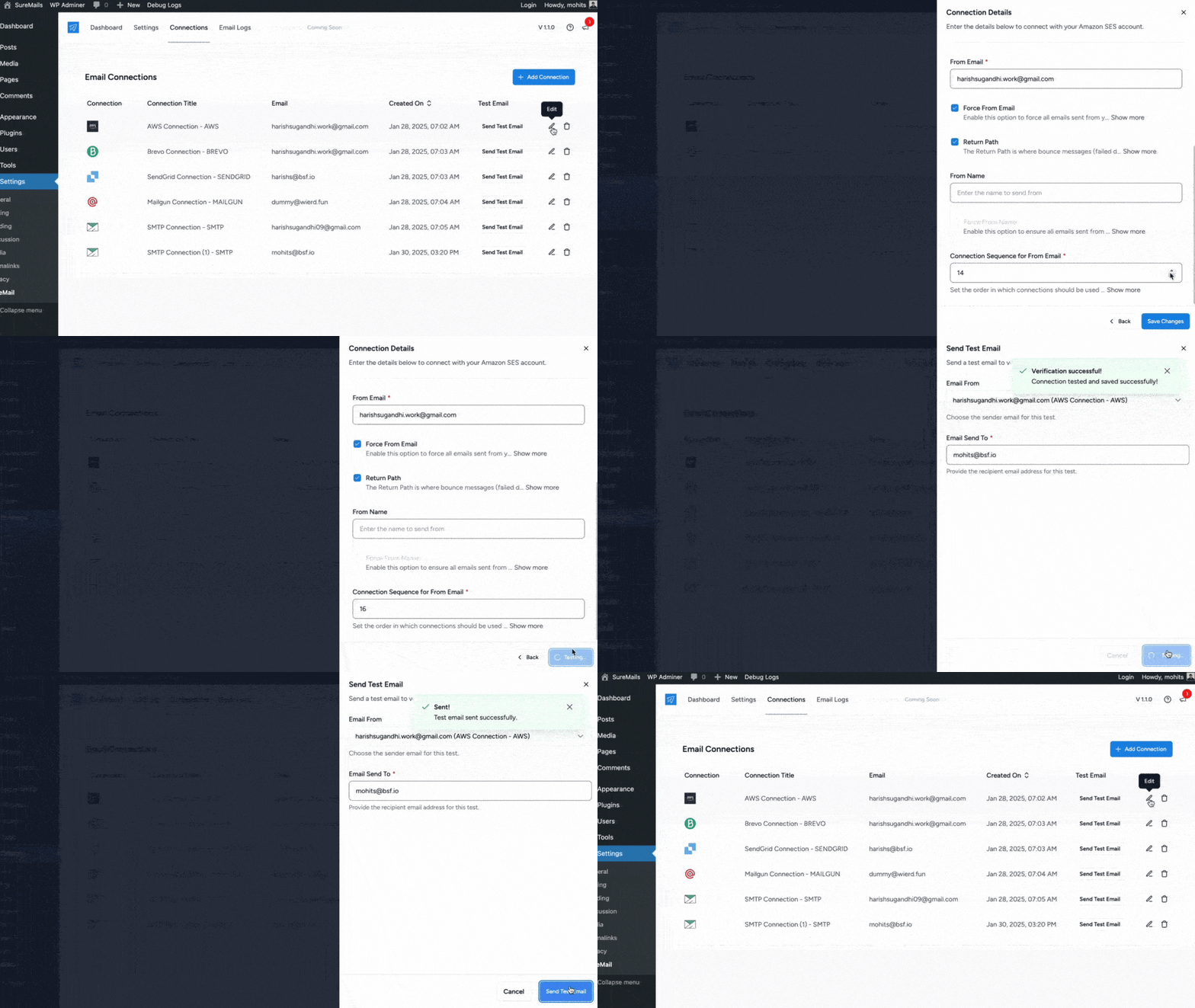
Configuring SureMail is easy. Simply install the plugin on your WordPress site, then navigate to the Connections page where you can input your SMTP provider credentials. SureMail supports multiple SMTP providers, so you can choose the one that works best for you. You can also configure fallback connections and email failure notifications for a more reliable setup.
Yes! SureMail includes comprehensive email logging features. You can track every email sent through your WordPress site, view its delivery status, and even resend emails directly from the plugin’s dashboard.
SureMail integrates with SureTriggers to give you email failure notifications. When an email fails to send, you can set up SureTriggers to notify you via your preferred platform, such as email, SMS, or any other communication tool you use.
Absolutely! SureMail is designed to work seamlessly with most WordPress themes and plugins. It integrates effortlessly into your WordPress environment without affecting your website’s performance.
SureMail comes with a built-in email testing feature. You can send a test email to verify your SMTP settings before sending out important communications. This ensures that your configuration is correct and your emails will be delivered reliably.
Yes, SureMail uses secure encryption methods like TLS/SSL to protect your email data. This ensures that your communications remain safe and private throughout the entire email delivery process.
We take plugin security extremely seriously. If you discover a security vulnerability, please report it in a safe and responsible manner.
You can report the issue through our Bug Bounty Program.
Changelog
v1.9.5 – 01-May-2026
– Fix: Dashboard rendered blank on sites with a strict Content Security Policy after updating to v1.9.4.
– Fix: Dashboard line chart rendered as an empty area after updating to v1.9.4.
v1.9.4 – 22-April-2026
– New: WordPress Abilities APIs introduced.
– Improvement: Coding standards and code quality improvements.
– Improvement: Internal libraries updated to the latest versions with improved stability.
v1.9.3 – 27-February-2026
– Fix: Attachment storing – Fixed an where duplicate attachments were stored in database.
– Improvement: Emailit connection – Updated Emailit V1 API to V2 and added support for the new API features.
v1.9.2 – 21-January-2026
– Improvement: Added a setting to choose where the SureMail menu appears in the WordPress admin.
v1.9.1 – 26-November-2025
– Fix: Addressed a security bug. Props to Wordfence for reporting it responsibly.
v1.9.0 04-November-2025
– New: Zoho Mail email service provider added.
– Improvement: Improved Weekly Email Summary format with more intuitive design.
– Improvement: Other SMTP Connection – Improved Other SMTP provider to support have ‘username’ and ‘password’ fields optional.
– Improvement: Added SureMail settings in WP admin menu for better accessibility.
v1.8.1 – 1-August-2025
– Fix: AWS – Gmail – PHPMail Connection : Fixed an issue with plain text content type.
v1.8.0 – 24-July-2025
– New: Added Emailit email service provider.
– New: Introduced a “Weekly Email Summary” feature to send a weekly email statistics report.
– Fix: Postmark Connection: Fixed an issue with sender and recipient name handling.
v1.7.1 – 13-June-2025
– Improvements: Improved the UI for a better user experience.
v1.7.0 – 09-June-2025
– New: Introduced an Onboarding process to help users get started quickly.
– Fix: Elastic Email Connection: Improved the reply-to handling logic.
– Improvement: Improved the initial connection admin notice so that once dismissed, it stays hidden for 15 days.
v1.6.1 – 25-April-2025
– Fix: PHP Mail Connection : Updated the authentication function.
v1.6.0 – 23-April-2025
– New: Introduced a ‘Notifications’ feature to send notifications using OttoKit.
– New: Added the MailerSend service provider.
– Improvement: Improved the fallback connection for the ‘from_email’ in the default connection.
– Fix: Gmail Connection: Updated the Google API Client API to support PHP version 7.4.
v1.5.0 – 08-April-2025
– New: Introduced a “Resend” feature for re-sending emails.
– New: Implemented attachment storage for enhanced email handling.
– New: Added “Email Simulation” feature for simulating email sending.
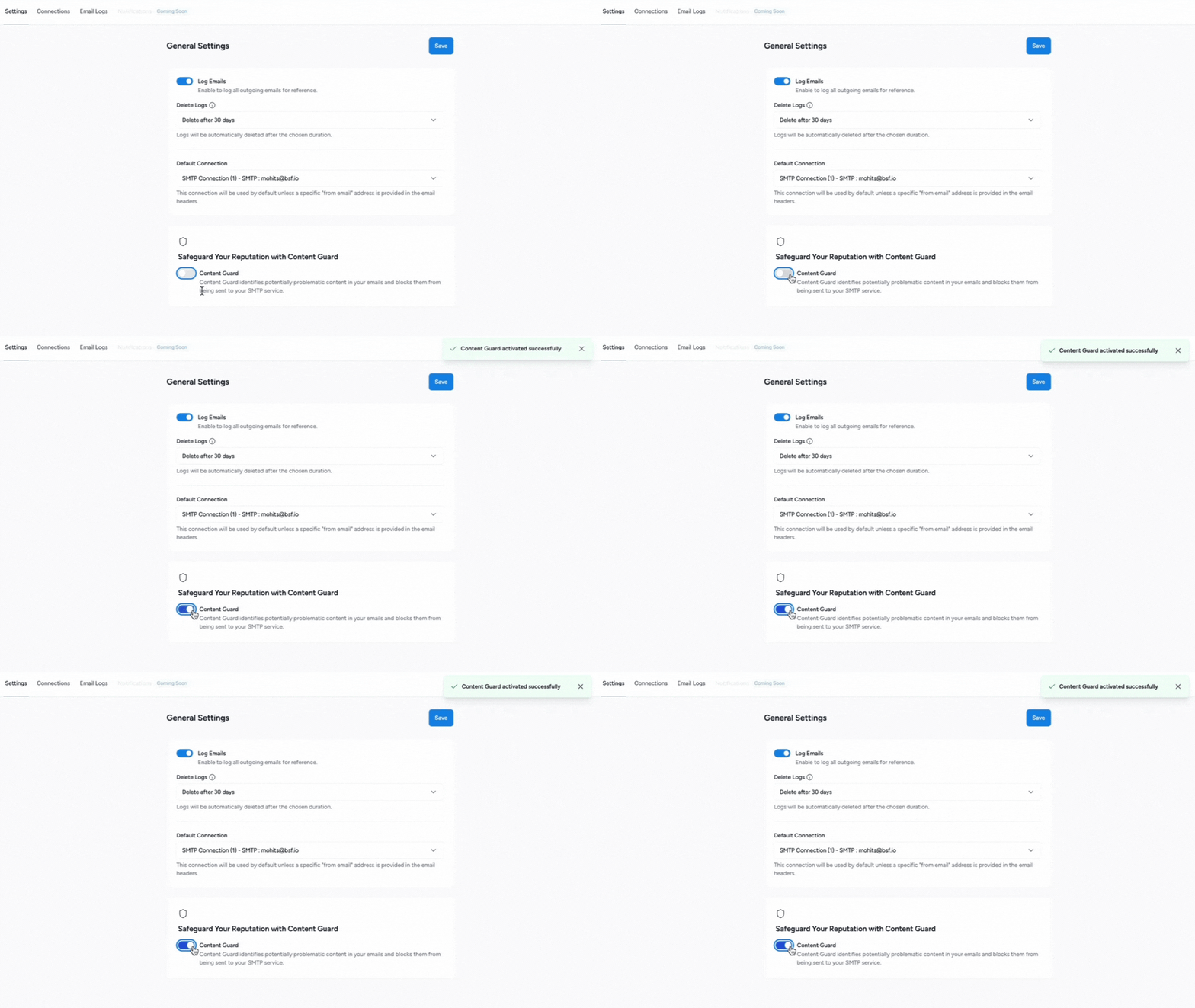
– Fix: Fixed an issue regarding Reputation Shield logging twice in the database.
v1.4.2 – 28-March-2025
– Fix: Gmail Provider – Fixed an issue where a duplicate connection for the Gmail provider was being added when the connection expired.
– Fix: Gmail Provider – Fixed an issue where some users faced an access denied error while sending emails.
v1.4.1 – 25-March-2025
– Fix: Fixed a PHP error with Gmail connections when using PHP versions lower than 8.1.
v1.4.0 – 25-March-2025
– New: Added Netcore email service provider.
– New: Added Gmail email service provider.
– Fix: Fixed issue where the i18n translations were not working.
– Fix: Fixed AWS subdomain verification issue.
v1.3.0 – 27-February-2025
– New: Added the PHP Mail service provider.
– Improvement: Secured connection credentials with encryption.
– Fix: Corrected the timezone date display issue.
v1.2.0 – 18-February-2025
– New: Added Mailjet email service provider.
– New: Added Elastic Email service provider.
– New: Added Postmark service provider.
– New: Added SparkPost service provider.
v1.1.0 – 12-February-2025
– New: Added SMTP2GO email service provider.
v1.0.1 – 11-February-2025
– Fix: Updated all input fields for email providers to use type=”password” for improved security and obfuscation.
– Fix: The SureMail Settings Configuration admin notice is now visible only to users with the required capability.
v1.0.0 – 04-February-2025
– Initial release
" width="120" height="120">
Available Versions
| Version | Download | Type |
|---|---|---|
| 1.9.5 | Download | Stable |
| 1.9.4 | Download | Stable |
| 1.9.3 | Download | Stable |
| 1.9.2 | Download | Stable |
| 1.9.1 | Download | Stable |
| 1.9.0 | Download | Stable |
| 1.8.2 | Download | Stable |
| 1.8.1 | Download | Stable |
| 1.8.0 | Download | Stable |
| 1.7.2 | Download | Stable |
| 1.7.1 | Download | Stable |
| 1.7.0 | Download | Stable |
| 1.6.2 | Download | Stable |
| 1.6.1 | Download | Stable |
| 1.6.0 | Download | Stable |
| 1.5.0 | Download | Stable |
| 1.4.2 | Download | Stable |
| 1.4.1 | Download | Stable |
| 1.4.0 | Download | Stable |
| 1.3.0 | Download | Stable |
| 1.2.0 | Download | Stable |
| 1.1.0 | Download | Stable |
| 1.0.1 | Download | Stable |
| 1.0.0 | Download | Stable |
| 0.0.6 | Download | Stable |
| 0.0.5 | Download | Stable |
| 0.0.4 | Download | Stable |
| Development | Download | Trunk |
