
SureContact – Newsletters, Email Marketing, Automation, Revenue Tracking & CRM
Active Installs
800+
Last Updated
April 8, 2026
First Released
January 6, 2026
Download History (Last one month)
Contributors
Newsletters, Email Marketing, Automation and CRM for WordPress
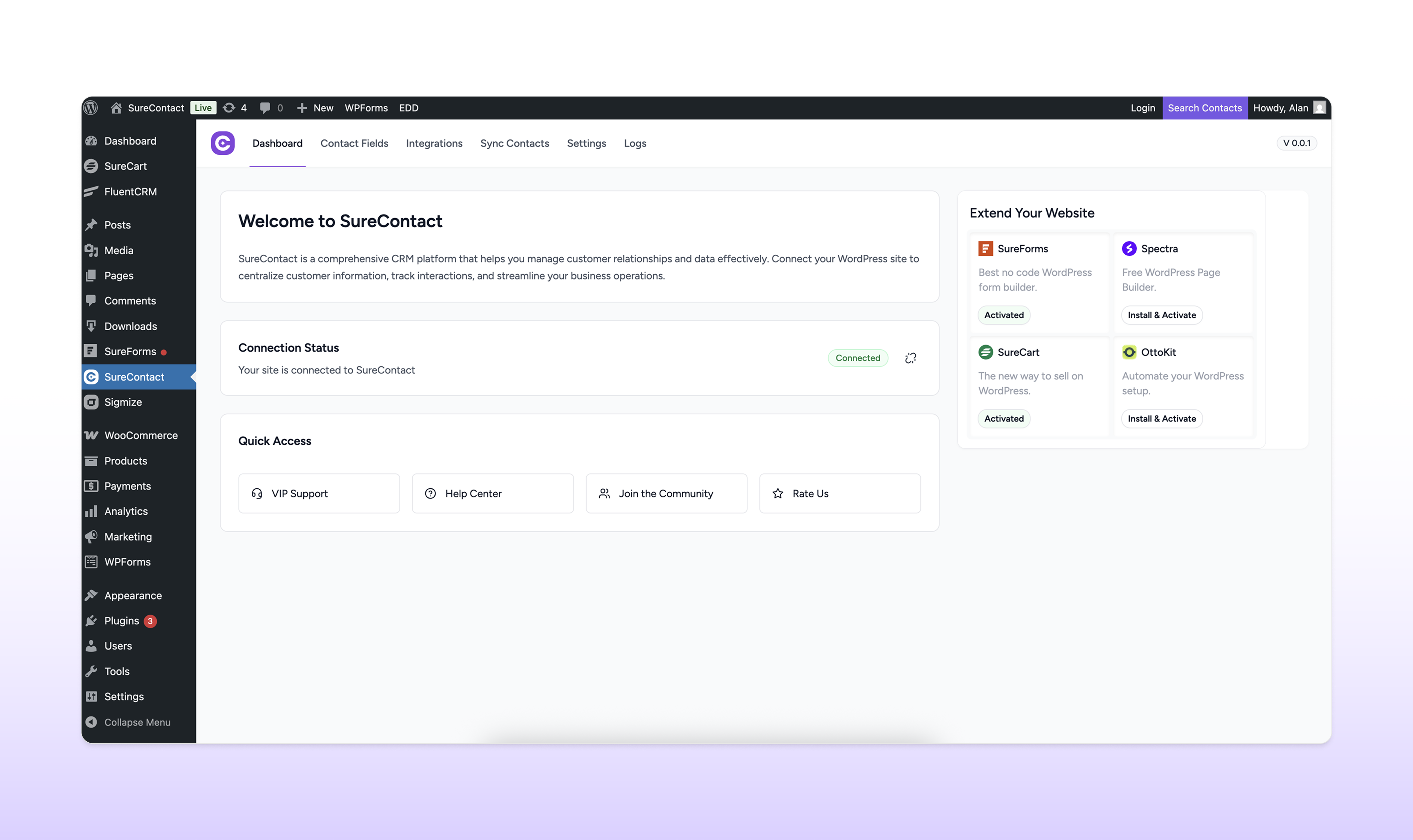
SureContact is a cloud-based email marketing and CRM platform built specifically for WordPress.
It lets you send newsletters, run email automations, manage contacts and track ecommerce revenue from one dashboard, without slowing down your site.
Instead of relying on expensive external tools or overloading your WordPress hosting, SureContact keeps execution in the cloud while staying deeply connected to WordPress.
With SureContact, you can:
- Manage all contacts and customers in one place
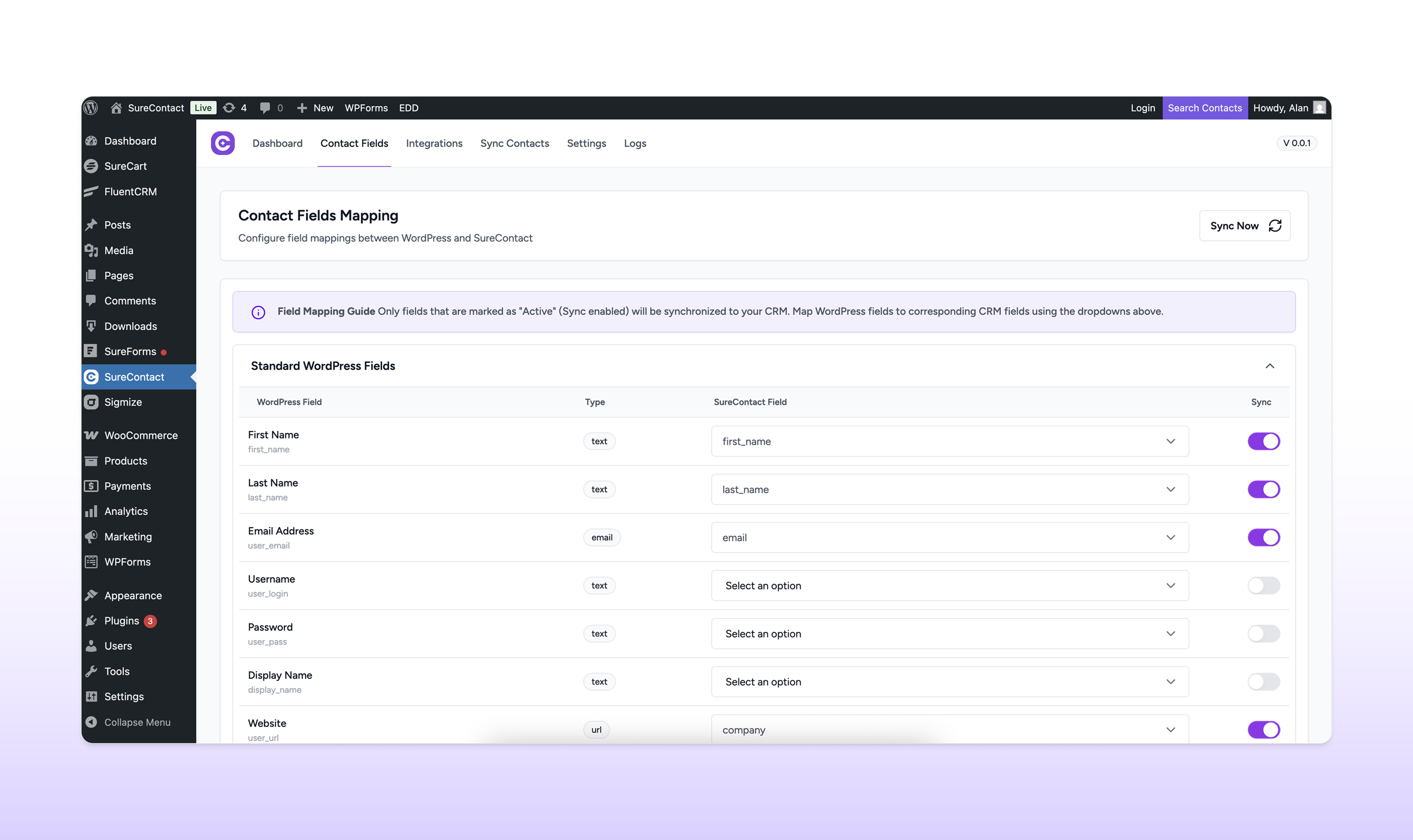
- Automatically sync data from WooCommerce, SureCart and forms
- Send newsletters and automated emails reliably via your own SMTP
- Track revenue generated from campaigns and automations
- Run everything without adding load to your WordPress site
You get the simplicity of WordPress with the power and reliability of a modern email marketing platform.
That’s what SureContact is built for.
How SureContact Works
SureContact brings email marketing and customer management together without affecting your site speed or adding load to your hosting.
- Install and activate SureContact
- Connect your site to your SureContact account
- Turn on live sync and migrate contacts
- Add your SMTP details
- Send your first campaign or automation and watch revenue and engagement update in real time
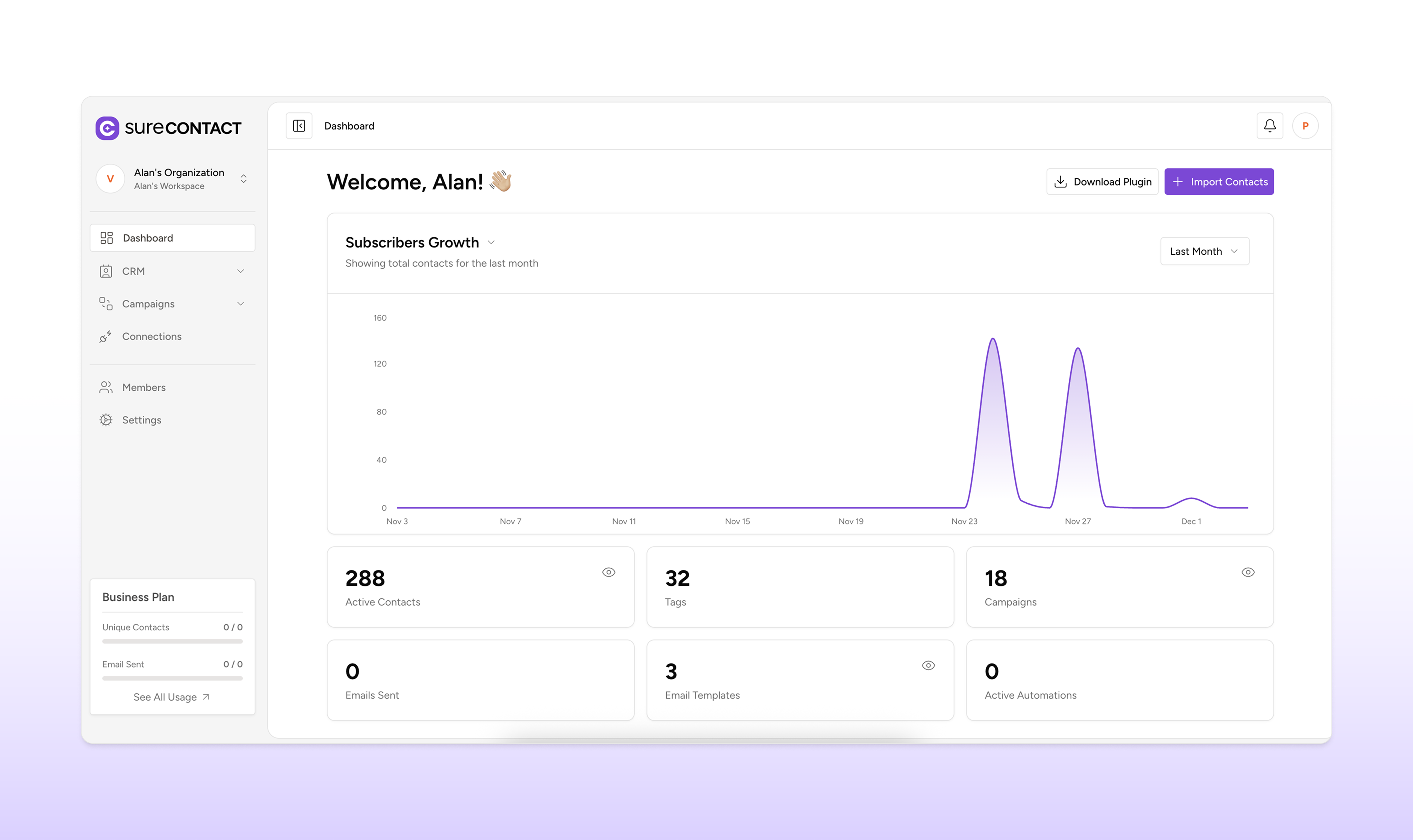
One Dashboard for Contacts, Campaigns and Revenue
Instead of switching between tools, you can clearly see how contacts, emails and sales connect, making it easier to focus on what actually drives revenue.
From SureContact, you can:
- View all customers and subscribers in a single dashboard
- Automatically sync contacts from WooCommerce, SureCart and Easy Digital Downloads
- Send email campaigns to your full list or specific segments
- Build automated follow-up sequences for new customers or to recover abandoned carts
- Segment contacts by purchases, form submissions, email opens and tags
- Track revenue tied to each campaign and automation
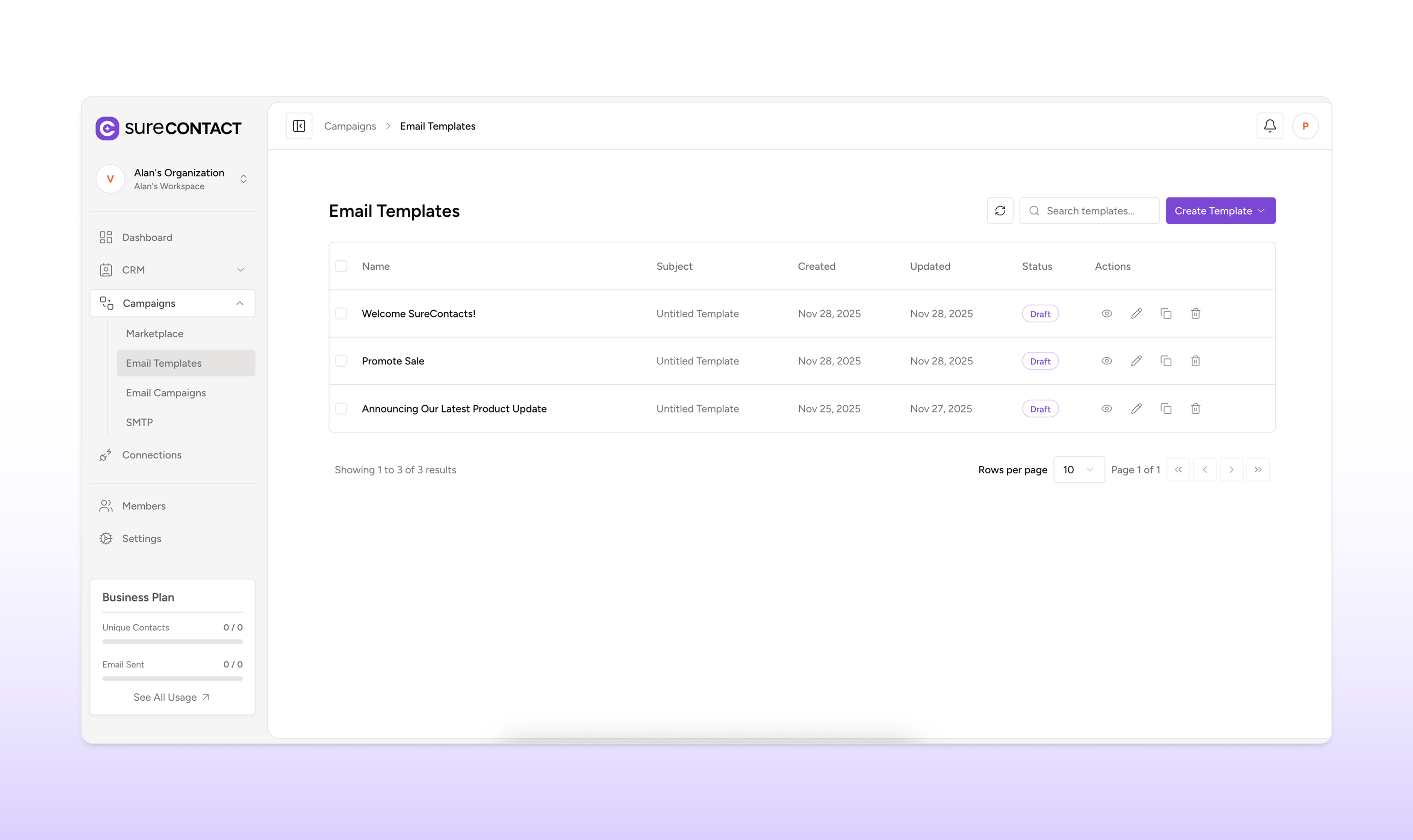
- Use readymade or AI-generated templates for newsletters and launches
- Manage multiple brands or client accounts from one workspace
- Invite team members to collaborate on campaigns
- Monitor real-time analytics and email performance
- Export your contact list anytime
Everything runs in the cloud, so there is no extra load on your WordPress site.
Email Campaigns, Send When You’re Ready
Send as many campaigns as you need. No limits. No throttling.
- Schedule newsletters, promotions and announcements from one calendar
- Segment contacts by purchase history, behavior, or custom tags before sending
- Turn winning campaigns into reusable templates
- Use a drag and drop editor that’s intuitive and fast
Build Email Automations Without Worrying About Breaks
Set up simple automations for new customers, abandoned cart users and repeat buyers without leaving WordPress.
- Send welcome emails the moment someone signs up or makes a purchase
- Build post-purchase sequences for reviews or product recommendations
- Tag contacts based on email opens and website behavior
- Send timed emails that respond to customer actions
- Use the AI-powered email creator to generate follow-ups in seconds
SMTP and Email Sending, You Control Everything
Send emails through the SMTP providers you already trust. No per-send charges. No surprise fees.
- Connect SendGrid, AWS SES, Mailgun, Gmail, or any SMTP service
- Use different SMTP providers for different brands or clients
- Own your sender reputation instead of relying on managed platforms
- Control sending volume, which can help improve inbox placement
- Avoid external platforms controlling your email delivery
This is a major advantage over managed SMTP solutions that increase costs as your email volume grows.
A CRM That Cares About Your WordPress Stack
Automatically sync customers and orders without extra plugins or manual work.
Built-In Integrations
Commerce and Subscriptions
- SureCart, transactions and subscription status
- WooCommerce, auto-sync every order and customer
- Easy Digital Downloads, purchases and product data
Forms and Lead Capture
- SureForms
- WPForms
- Contact Form 7
- Gravity Forms
- Elementor Forms
- Fluent Forms
Community and Membership
- FluentCRM
- SureMembers
- SureDash
- Presto Player
SureContact Is Perfect For
Store Owners and Ecommerce Teams
Increase repeat orders with welcome emails, cart recovery, and post-purchase follow-ups tied directly to WooCommerce. More revenue and less manual work.
Creators and Newsletter Writers
Turn subscribers into paying customers using campaigns based on signup intent and purchase history. Get automation, not just broadcasts.
Agencies and Multi-Site Managers
Manage multiple client sites from one login. View all contacts, campaigns, and revenue in one workspace.
Course Creators and Membership Site Owners
Keep students engaged with sequences that match their progress, whether they are new, active, or at risk of dropping out.
Solopreneurs and Small Businesses
Keep all customer conversations and follow-ups in one place. Simple, focused and easy to use.
Built by Brainstorm Force
SureContact is built by the creators of:
- Astra, trusted by over 5 million WordPress sites
- Spectra, modern block-based website builder
- SureCart, fast-growing ecommerce platform
- ZipWP, AI website builder for WordPress
- OttoKit, WordPress automation platform
- CartFlows, WooCommerce sales funnel builder
- Sigmize, A/B testing and optimization
We understand how creators, agencies and ecommerce businesses actually work and use all that knowledge to build SureContact.
Connect with our team and community
Have questions or need help? We are with you every step of the way.
- Email: support@surecontact.com
- Facebook: https://www.facebook.com/surecontact
- Community: https://www.facebook.com/groups/298572782389153
- YouTube: https://www.youtube.com/@SureContact
- Website: https://surecontact.com/
- Pricing page: https://surecontact.com/pricing
- App: https://app.surecontact.com/
External Service Connection / Security
SureContact connects your WordPress site with our SaaS securely. When a user initiates a connection, they are redirected to the SaaS login page. Upon clicking Connect, the SaaS generates a short-lived, single-use token which is sent back to WordPress via a redirect. WordPress then verifies the token server-to-server before storing the access token and user data for future API calls. Tokens are time-limited (1–5 minutes), single-use, and encrypted in transit using HTTPS. This ensures secure authentication, prevents token reuse, and protects user data. No actions are taken by WordPress until token verification succeeds. The access token will be used to sync contact data from various sources including WordPress users, e-commerce platforms (SureCart, WooCommerce, Easy Digital Downloads), and form submissions (SureForms, WPForms, Contact Form 7) to your SureContact workspace. All privacy and data handling comply with WordPress.org Plugin Guidelines.
Privacy Policy
This plugin connects to the SureContact service to sync contact data. See our Privacy Policy
Automatic Installation (Recommended)
1. Log in to your WordPress admin dashboard
2. Navigate to Plugins > Add New
3. Search for “SureContact”
4. Click “Install Now” and then “Activate”
5. Click “Get Started Now” to connect your SureContact workspace
6. Complete the authentication process
7. Enable the integrations you want to use (e-commerce, forms, etc.)
Manual Installation
1. Download the SureContact plugin
2. Upload the plugin files to /wp-content/plugins/surecontact/
3. Activate the plugin through the ‘Plugins’ menu in WordPress
4. Navigate to SureContact in your admin menu
5. Click “Get Started Now” to connect your WordPress site to SureContact
6. Complete the authentication process to link your workspace
7. Configure your integration settings
After Installation
Once connected, SureContact will automatically start capturing contact data from your enabled sources. You can manage your contacts, view interaction history, and analyze customer behavior from your SureContact Dashboard
Screenshot Gallery
Yes. SureContact doesn’t charge based on the number of emails you send. You can send unlimited newsletters and automated emails.
Yes. SureContact offers a free-forever plan with all core features, up to 250 contacts and 500/month email sends.
No. Because campaigns, automations and syncing run in the cloud, your site performance remains unaffected.
Yes. SureContact connects to SMTP providers such as SendGrid, AWS SES, Mailgun, Gmail, or any standard SMTP service. This gives you full control over email delivery.
Yes. SureContact allows you to manage multiple brands or client accounts from a single workspace, making it suitable for agencies and consultants. However, we recommend setting up dedicated workspaces for each site.
You can access the SureContact knowledge base, post in the WordPress plugin support forum, or contact the support team directly.
We take plugin security extremely seriously. If you discover a security vulnerability, please report it in a safe and responsible manner.
You can report the issue through our Bug Bounty Program. We collaborate with Patchstack to provide opportunities for researchers to report vulnerabilities. The Patchstack team will help validate, triage, and handle any reported security issues.
Changelog
1.4.1 – 8th April 2026
- New: Added price-level tagging support to SureCart integration.
- Fix: Create contact on page visit if not exists in SureContact.
- Fix: Resolved fatal errors from array values in field formatter.
1.4.0 – 30th March 2026
- New: Added RTL (Right-to-Left) support for the admin UI.
- New: Added i18n support with 5 language translations.
- New: Added WordPress page and post visit tracking.
- New: Added JetFormBuilder integration for form submission syncing.
- New: Added WooCommerce Product Category as a new item type.
- Improvement: Added SureMembers Access Group ID field and improved integration architecture.
- Improvement: Added CartFlows Pre-Checkout Offer and Optin Step support.
- Improvement: Improved logs, queue manager, translations, and general UI.
- Fix: Resolved OAuth authentication failure with caching plugins.
- Fix: Skip failed payments, track retried orders, and exclude pending orders in SureCart and WooCommerce integrations.
1.3.1 – 10th March 2026
- New: Added WordPress Abilities API support for AI-powered interactions.
- Improvement: General codebase optimizations and stability improvements.
1.3.0 – 3rd March 2026
- New: Added “Convert Pro” Integration
- Improvement: Enhanced dashboard experience with additional onboarding resources.
- Improvement: Fixed an issue where selected lists were not displayed when no tags were available in the Edit Rule section.
1.2.0 – 20th February 2026
- New: Added bulk sync support for WooCommerce orders, EDD orders, and SureCart orders.
- New: SureMembers 2 compatibility.
- New: WordPress user role-based list and tag assignment with sync support.
- Improvement: Opened the Rule Engine hooks for third-party integrations.
- Improvement: Updated the integrations table to show disabled plugins that were previously used.
- Improvement: Bulk sync refactored with support for multiple sync types and batch size optimization.
- Improvement: Workspace switching no longer affects previously synced WordPress data.
- Improvement: Filter lists with dynamic list removal.
- Improvement: Removed WordPress delete user method that incorrectly deleted contacts.
1.1.0 – 5th February 2026
- New: Added “CartFlows” Integration
- Improvement: “Elementor” Integration – Added support for Elementor forms inside Elementor popups
- Improvement: Added synchronize buttons to all list, tag and custom field dropdowns
1.0.0 – 30th January 2026
- New: LatePoint integration for appointment and booking data sync
- New: Create lists, tags, and custom fields directly from the field mapping dropdown
- New: Timezone and Language contact fields support
- Enhancement: SureCart subscription tracking and multi-item order support
- Enhancement: WordPress contact email update support and role-based list and tag assignment during user sync
- Enhancement: Presto Player remove list and tags support
0.0.5 – 21st January 2026
- Enhancement: Improved bulk sync for WooCommerce, WordPress, and FluentCRM
0.0.4 – 20th January 2026
- New: Workspace-specific integration support to persist integration data on connection disconnect
- New: Auto-sync lists, tags, and custom fields on connection
- Enhancement: Improved bulk sync for WooCommerce, WordPress, and FluentCRM
- UI/UX: Added list and tags search options on dropdowns
0.0.3 – 13th January 2026
- New: Added Presto Player integration
- Enhancement: Added enhancements in existing integrations
- UI/UX: Refined user interface elements for a smoother experience
0.0.2
- WordPress user integration (registration and profile updates)
- SureCart integration (purchases and subscriptions)
- WooCommerce integration (orders and customer data)
- SureForms integration (form submissions)
- SureMembers integration
- SureDash integration
- Easy Digital Downloads integration (transactions)
- FluentCRM integration (subscriber data)
- WPForms integration (contact form data)
- Contact Form 7 integration (form entries)
- Gravity Forms integration (form entries)
- Elementor Forms integration (form entries)
0.0.1
- Initial WordPress release
" width="120" height="120">
