
SMK Sidebar Generator
Active Installs
10,000+
Last Updated
February 17, 2026
First Released
January 4, 2014
Download History (Last one month)
Contributors
SMK Sidebar Generator is a powerful yet easy-to-use WordPress plugin that lets you create unlimited custom sidebars and conditionally display them anywhere on your website – without writing a single line of code.
Whether you need different sidebars for your blog, shop, landing pages, or specific posts, this plugin gives you complete control over your widget areas.
Why Choose SMK Sidebar Generator?
- 100% Free – All features included, no premium version upsells
- No Coding Required – Create and manage sidebars entirely from the WordPress admin
- Lightweight – Clean code that won’t slow down your site
- Works With Any Theme – Sidebars automatically inherit your theme’s styling
- Actively Maintained – Regular updates and WordPress compatibility
Key Features
Unlimited Sidebars
Create as many sidebars as you need. Perfect for blogs, business sites, WooCommerce stores, or any WordPress website.
Replace Theme Sidebars
Seamlessly replace your theme’s default sidebars with custom ones. No theme file editing required.
Conditional Display
Show different sidebars based on:
- Specific pages
- Specific posts
- Custom post types
- Post type archives
- Taxonomy archives
Drag and Drop Management
Reorder your sidebars with an intuitive drag-and-drop interface. Easily organize and prioritize your widget areas.
Responsive Admin Interface
Modern, clean admin UI that works great on any device – desktop, tablet, or mobile.
Shortcode Support
Display any sidebar anywhere using a simple shortcode: [smk_sidebar id="your-sidebar-id"]
Developer Friendly
Use PHP functions in your theme templates:
<?php
// Display sidebar by ID
if ( function_exists( 'smk_sidebar' ) ) {
    smk_sidebar( 'your-sidebar-id' );
}

// Or use WordPress native function
dynamic_sidebar( 'your-sidebar-id' );

// Get all registered sidebars
$sidebars = smk_get_all_sidebars();
?>
Perfect For
- Bloggers – Different sidebars for categories, tags, or specific posts
- Business Sites – Unique widget areas for services, about, contact pages
- WooCommerce Stores – Shop-specific sidebars separate from blog sidebars
- Membership Sites – Conditional sidebars for different content areas
- Developers – Template functions and shortcodes for theme integration
Support and Documentation
- GitHub Repository – Report bugs and contribute
- Support Forum – Get help from the community
Automatic Installation (Recommended)
- Go to Plugins > Add New in your WordPress admin
- Search for “SMK Sidebar Generator”
- Click Install Now, then Activate
- Navigate to Appearance > SMK Sidebars to create your first sidebar
Manual Installation
- Download the plugin ZIP file
- Go to Plugins > Add New > Upload Plugin
- Upload the ZIP file and click Install Now
- Activate the plugin
- Navigate to Appearance > SMK Sidebars to start creating sidebars
Using FTP
- Download and extract the plugin ZIP file
- Upload the
smk-sidebar-generatorfolder to/wp-content/plugins/ - Activate through the Plugins menu in WordPress
- Configure at Appearance > SMK Sidebars
Screenshot Gallery
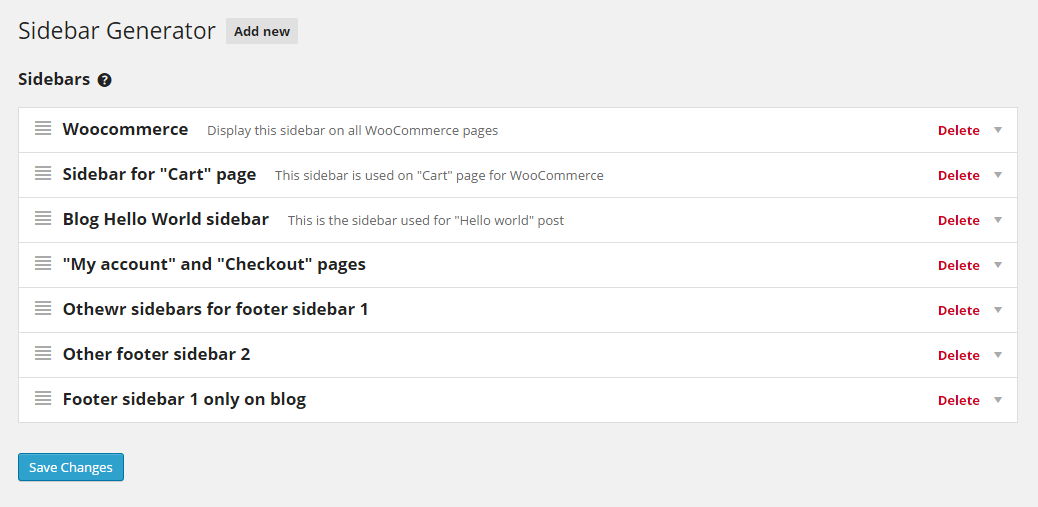


- Go to Appearance > SMK Sidebars in your WordPress admin
- Click the “Add New Sidebar” button
- Enter a name and optional description
- Save your changes
- Go to Appearance > Widgets to add widgets to your new sidebar
- Create or edit a sidebar in Appearance > SMK Sidebars
- Select which theme sidebar to replace in the “Sidebars to replace” dropdown
- Check “Enable conditions”
- Click “Add condition” and select the page(s) where you want this sidebar to appear
- Save changes
Yes! Use the shortcode [smk_sidebar id="your-sidebar-id"] in any text widget or shortcode module. You can find each sidebar’s shortcode displayed in its settings panel.
No. SMK Sidebar Generator is lightweight and only loads its assets on the admin pages where needed. On the frontend, it simply filters which sidebar to display with minimal overhead.
Yes! The plugin works with any properly coded WordPress theme. Your generated sidebars will automatically inherit your theme’s sidebar styling.
Yes, use either method in your theme template files:
<?php smk_sidebar( 'your-sidebar-id' ); ?>
Or the native WordPress function:
<?php dynamic_sidebar( 'your-sidebar-id' ); ?>
The sidebar ID is displayed in each sidebar’s settings panel, along with the shortcode. You can also use smk_get_all_sidebars() to get an array of all sidebar IDs and names.
Yes! When adding conditions, select the post type archive or use taxonomy conditions to target specific categories, tags, or custom taxonomies.
Yes! You can create shop-specific sidebars and use conditions to display them only on WooCommerce pages like the shop, product pages, cart, or checkout.
Yes! The plugin is translation-ready. You can contribute translations on translate.wordpress.org or create your own using the included POT file.
Please use the GitHub Issues page for bug reports and feature requests.
Changelog
3.6.0
- Fixed: Shortcode now properly returns content instead of echoing
- Security: Added proper escaping to prevent XSS vulnerabilities
- Fixed: Undefined variable warning in HTML class helper
- Fixed: Removed deprecated extract() function from shortcode
- Compatibility: Tested with WordPress 6.9.1
- New: Complete admin UI redesign with modern CSS (Flexbox, Grid, CSS Variables)
- New: Responsive layout for mobile and tablet devices
- New: Accessible form labels with proper for/id attributes
- Improved: Sidebar list with better spacing, hover states, and empty state messages
- Improved: Condition rows layout with inline drag handle
- Fixed: Sidebar deletion not saving properly
- Fixed: Accordion padding conflicts with WordPress admin styles
- Dev: Updated GitHub Actions to v4, improved deploy.sh error handling
- Dev: Moved tagy config to package.json, removed tagy.js
3.5.2
- Compatibility with WordPress 6.4
3.5.0
- PHP 8+ Compatibility
- Various code improvements
3.4.3
- Bug fix: Individual taxonomy conditional fix
3.4.2
- Bug fix: WP 5.7 compatibility
3.4.0
- Fix: Incorrect conditional replacement
- Compatibility with WordPress 5.5
3.1
- Added localization support
- Added shortcode with ID to each sidebar
3.0
- Complete rewrite from scratch
- New conditional sidebar system for pages, posts, and custom post types
- Sidebars now inherit theme styling automatically
- Modular code architecture for custom condition extensions
2.3.2
- UI fix: Correct info display when new sidebar is created
2.3.1
- Fixed shortcode ID issue
- Added “How to use?” documentation tab
2.3
- Added import/export functions
- Improved shortcode to work with any sidebar ID
2.2
- Added sidebar removal confirmation
- Bug fixes for sidebar creation
2.1
- Added
smk_get_all_sidebars()helper function
2.0
- Initial release
" width="120" height="120">
