
Simple Custom Post Order
Active Installs
300,000+
Last Updated
October 19, 2026
First Released
July 24, 2013
Download History (Last one month)
Contributors
Simple Custom Post Order is the easiest way to manually sort your WordPress content using drag-and-drop functionality. Whether you’re managing blog posts, portfolio items, WooCommerce products, team members, testimonials, or any custom post type, this plugin gives you complete control over your content order.
Why Choose Simple Custom Post Order?
- Quick Setup – Tick the post types and taxonomies to sort under Settings > SCPOrder, then drag
- Drag & Drop Interface – Intuitive sorting directly in your admin post lists
- Universal Compatibility – Works with any post type and taxonomy
- Lightweight & Fast – No bloat, minimal impact on site performance
- Modern & Dependency-Free – Vanilla JavaScript drag-and-drop (no jQuery UI) with touch and full keyboard support
- Reliable Saving – Robust AJAX saving that works behind reverse proxies, custom ports, and HTTPS setups
- Developer Friendly – Action and filter hooks for customization
Key Features
Sort Any Content Type
- Posts – Reorder your blog posts in any sequence you prefer
- Pages – Organize pages beyond alphabetical or date order
- Custom Post Types – Perfect for portfolios, team members, testimonials, products, events, FAQs, services, and more
- WooCommerce Products – Manually sort products in your shop
- Taxonomies – Reorder categories, tags, and custom taxonomies
Intuitive Admin Interface
- Smooth drag-and-drop sorting directly in the WordPress post list table
- Touch-friendly — press, hold, and drag to reorder on phones and tablets
- Fully keyboard accessible — tab to a row, then use Space and the arrow keys to reorder, with screen-reader announcements
- Clear save feedback — a “Saving… / Order saved” status appears as you sort
- Drag handle — a grip icon appears on hover (on by default; can be turned off), and rows stay draggable from anywhere
- Page trees — dragging a parent page carries its child pages with it, and keyboard moves stay among a page’s siblings
- Optional “Order” column — type an exact position, handy for moving an item to another page of a long list
- Choose whether newly created items go to the top (default) or the bottom of the order
- Choose which user roles may reorder
- Changes saved automatically via AJAX – no page refresh needed, with a Retry button if a save fails
- Conflicting edits are rejected with a recovery message; the Modern engine offers a Reload list button
- The Modern engine warns before leaving with pending or failed saves
- Works seamlessly with the default WordPress admin experience
Smart Query Integration
- Automatically applies the custom order to queries for enabled post types that don’t ask for a specific order
- Respects an explicit sort such as
orderby => title(see the FAQ for the oneget_posts()exception) - Does not interfere with search results (maintains relevance sorting)
- Previous/next post links follow the custom order
- Compatible with
get_posts(),WP_Query, and standard loops - Opt out per query with
'scpo_ignore_custom_order' => true
Reset & Restore
- One-click reset to restore default ordering
- Reset individual post types without affecting others
- Useful when you need to start fresh with your content organization
Perfect For
- Bloggers – Feature important posts at the top of your blog
- Business Websites – Showcase key services or team members first
- Portfolio Sites – Display your best work in a specific order
- Online Stores – Highlight featured or seasonal products
- Membership Sites – Organize course content or resources
- News Sites – Pin important stories or announcements
- Event Websites – Arrange events in your preferred sequence
- Documentation Sites – Structure help articles logically
Use Cases
Portfolio Management
Arrange your portfolio items to showcase your best work first, group similar projects together, or create a visual narrative of your creative journey.
Team Page Organization
Display team members by hierarchy, department, or seniority rather than by when they were added to the system.
Product Highlighting
Feature seasonal items, bestsellers, or new arrivals at the top of your WooCommerce shop without relying solely on sorting by date or price.
Content Curation
Create curated reading lists by manually ordering posts in the exact sequence you want readers to discover them.
FAQ Organization
Sort frequently asked questions by importance or topic, ensuring the most relevant questions appear first.
Testimonial Display
Show your most compelling testimonials first to maximize their impact on potential customers.
Developer Features
Action Hooks
scp_update_menu_order– Fires after post order is updated, by drag-and-drop or the Order column (no arguments)scp_update_menu_order_tags– Fires after taxonomy term order is updated (no arguments)
Filter Hooks
scpo_post_types_args– Modify which post types appear in settingsscpo_use_sortablejs– Force the drag engine in code (overrides the setting); returntruefor the modern SortableJS engine orfalsefor the classic jQuery UI sorterscpo_capability– Change the capability required to reorder (defaultedit_posts)scpo_reverse_adjacent_posts– Returntrueto swap the direction of previous/next post linksscpo_cache_flush_group_threshold– Number of changed rows (default 500) above which cached order values are cleared in bulk instead of one by one
Example — let only editors and administrators reorder:
add_filter( 'scpo_capability', function () { return 'edit_others_posts'; } );
Drag & Drop Engine
Choose between the modern, dependency-free SortableJS engine (default) and the classic jQuery UI sorter under Settings > SCPOrder. The classic engine remains fully supported as a fallback.
Advanced View Mode
Enable the advanced view in settings to see all registered post types, including those normally hidden from the admin menu.
Supported Post Types
Simple Custom Post Order works with:
- WordPress Posts
- WordPress Pages
- WooCommerce Products
- Easy Digital Downloads Products
- Portfolio items (Jetpack, custom)
- Team member post types
- Testimonial post types
- Event post types (The Events Calendar, etc.)
- FAQ post types
- Any custom post type with
show_uienabled that appears in the admin menu (turn on Advanced View in Settings to list the rest)
Supported Taxonomies
- Categories
- Tags
- WooCommerce Product Categories
- WooCommerce Product Tags
- Custom taxonomies with
show_uienabled
How It Works
- Install & Activate – Install the plugin from WordPress.org or upload manually
- Configure – Go to Settings > SCPOrder and select which post types and taxonomies to enable (nothing is sorted until you do)
- Reorder – Visit any enabled post type list and drag items to reorder
- Done – Your custom order is automatically applied across your site
The plugin uses WordPress’s native menu_order field for posts and pages, and adds a term_order column for taxonomy terms. This approach ensures compatibility and data persistence.
Performance Optimized
- Targeted cache invalidation (only clears cache for modified items)
- Batched database writes that only touch rows whose order actually changed
- Scripts loaded only on relevant admin pages
- No front-end performance impact
Security First
- All database queries use prepared statements
- AJAX requests protected with nonce verification
- Capability checks ensure only authorized users can reorder
- Input sanitization on all user data
Additional Information
Support
For support questions, please use the WordPress.org support forum.
Bug Reports
Report bugs on our GitHub repository.
Contributing
Contributions are welcome! Please submit pull requests to our GitHub repository.
Credits
This plugin is made with love by the team at Colorlib.
Database Requirement
From 2.8.10, safe reordering requires InnoDB for the posts table and, when taxonomy sorting is enabled, the terms table. If a table uses another engine, ask your hosting provider to migrate it after taking a backup. The plugin reports unsupported storage and does not convert tables automatically. Since 2.8.11 the error only appears when the database positively reports a non-transactional engine such as MyISAM; if your host does not reveal the engine, saving proceeds normally.
Automatic Installation
- Log in to your WordPress admin panel
- Go to Plugins > Add New
- Search for “Simple Custom Post Order”
- Click “Install Now” and then “Activate”
- Go to Settings > SCPOrder to configure
Manual Installation
- Download the plugin ZIP file
- Log in to your WordPress admin panel
- Go to Plugins > Add New > Upload Plugin
- Choose the downloaded ZIP file and click “Install Now”
- Activate the plugin
- Go to Settings > SCPOrder to configure
Configuration
- Navigate to Settings > SCPOrder
- Check the boxes next to post types you want to enable sorting for
- Check the boxes next to taxonomies you want to enable sorting for
- Click “Save Changes”
- Visit any enabled post type list to start reordering with drag-and-drop
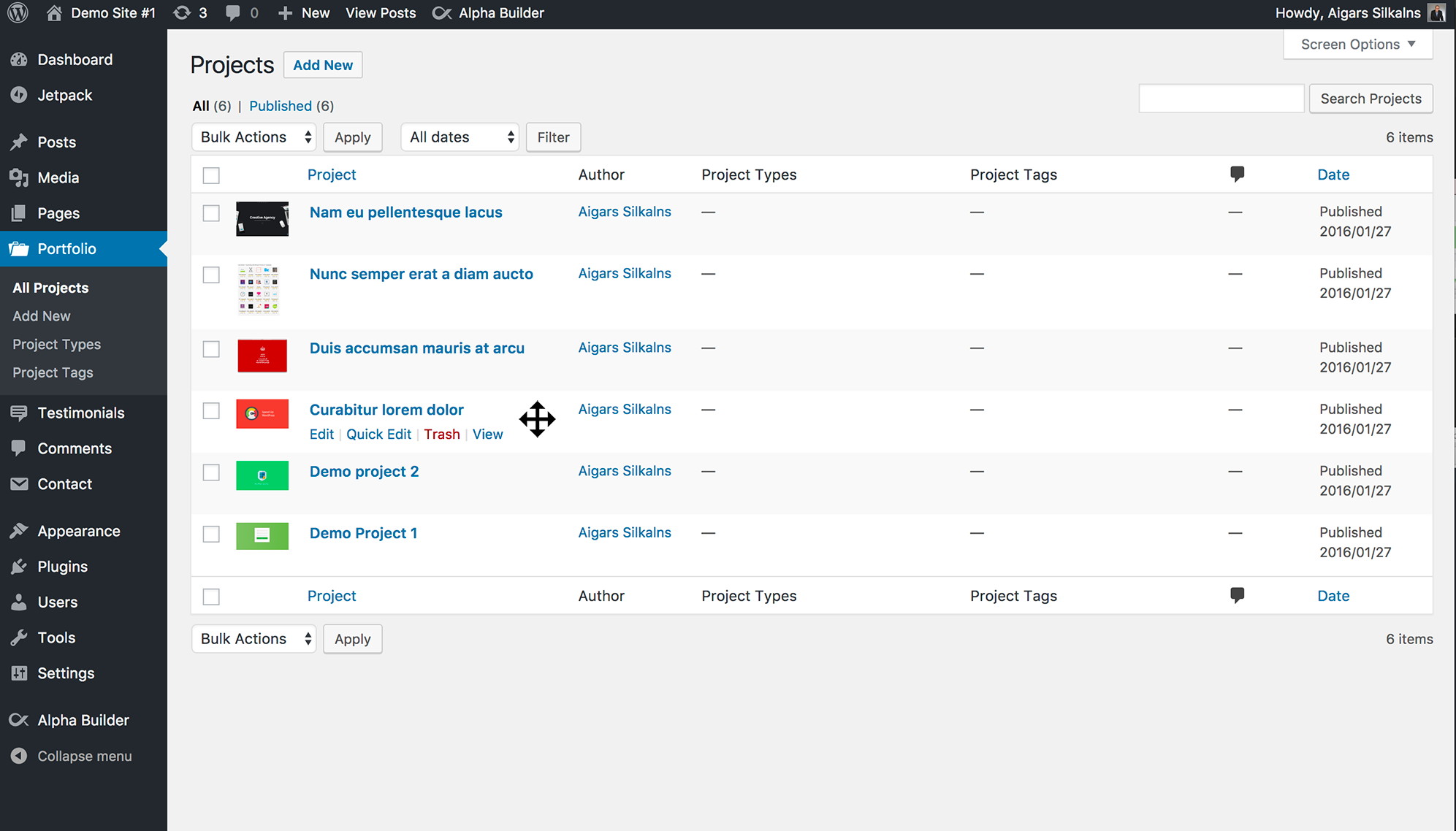
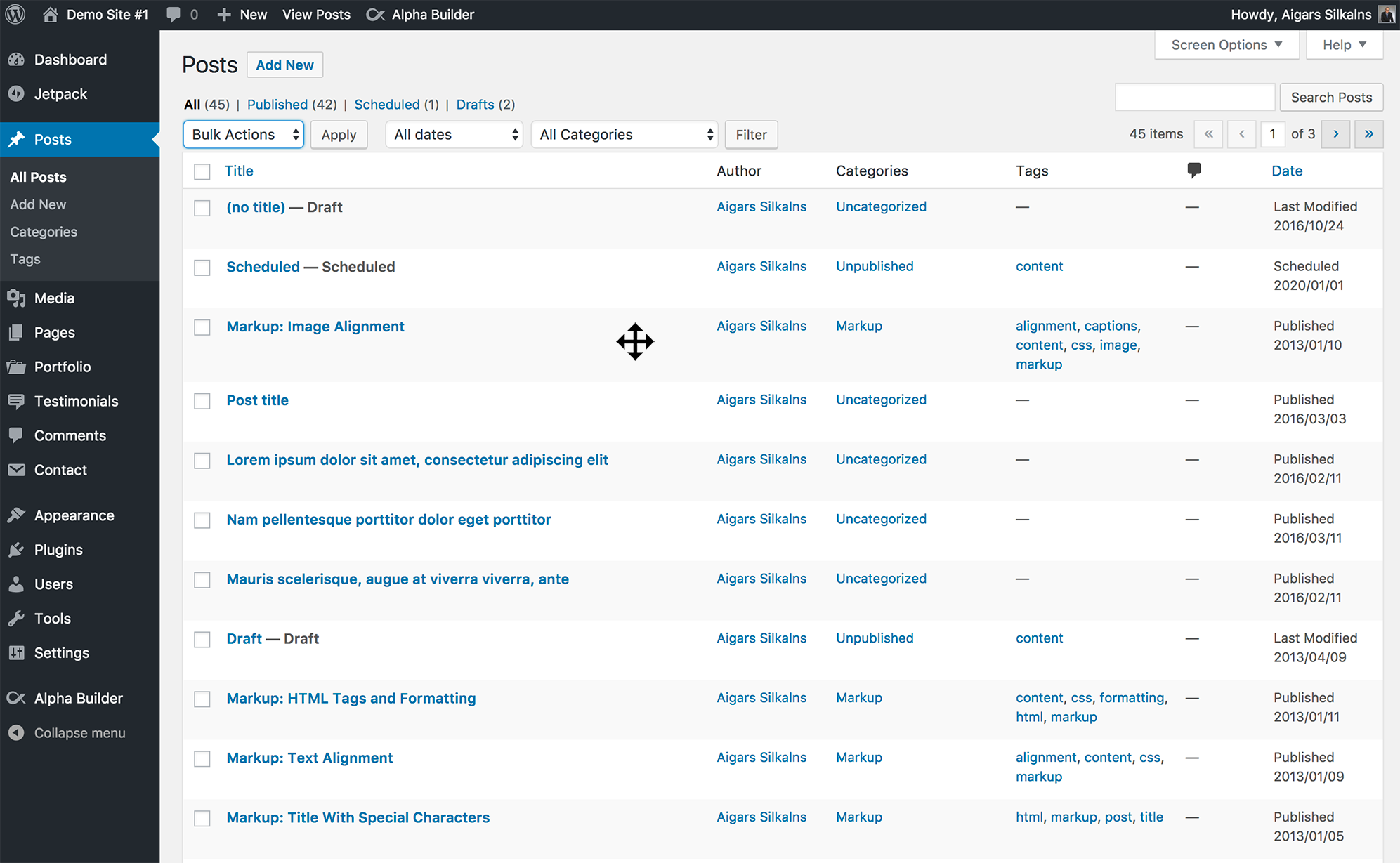
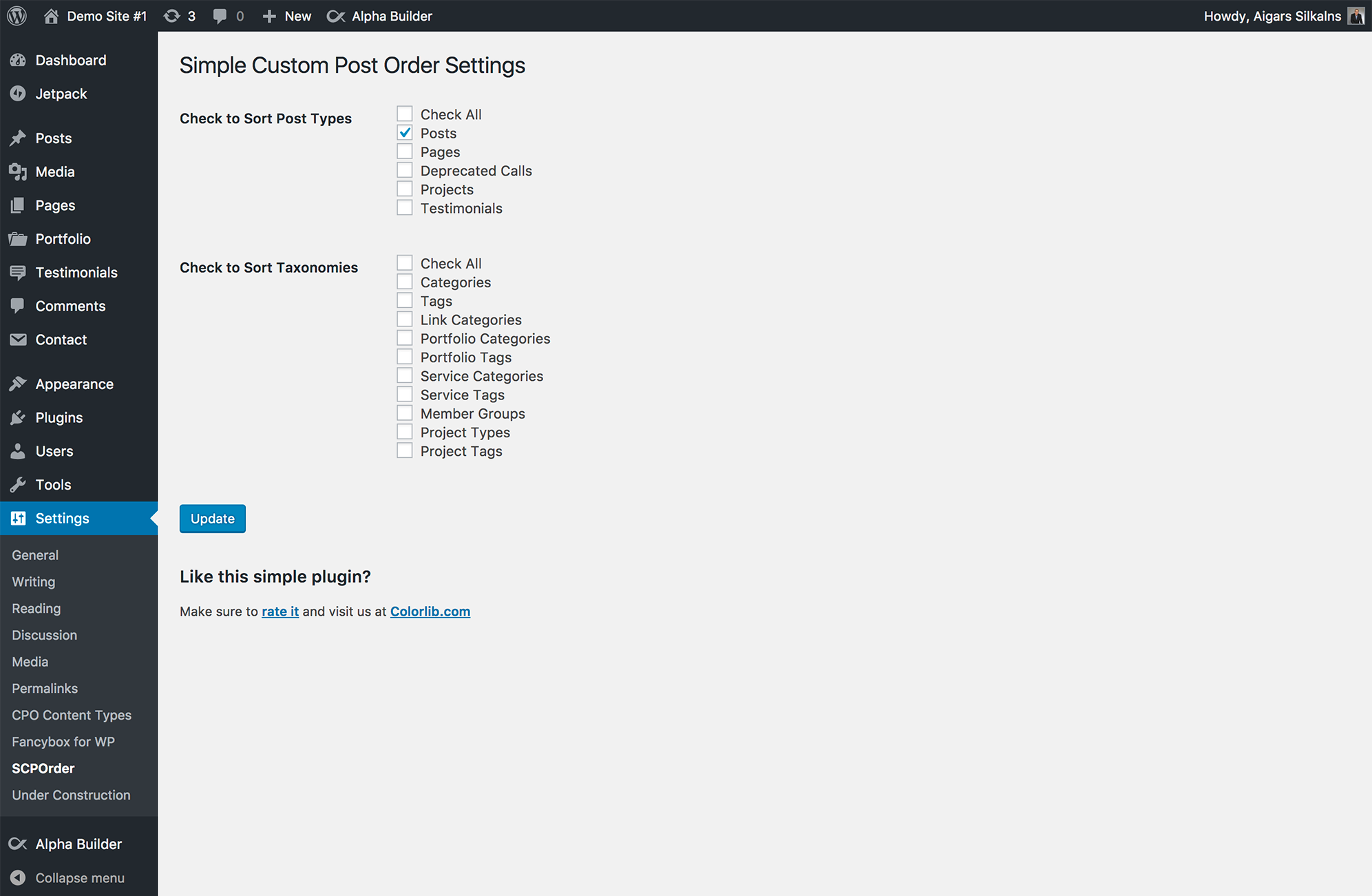
Yes! Simple Custom Post Order works with any custom post type that has show_ui enabled. This includes post types from popular plugins like WooCommerce, Easy Digital Downloads, Jetpack, and any custom post types you’ve created.
Yes, the custom order is automatically applied to all front-end queries for enabled post types. Your posts, pages, and custom content will display in your chosen order throughout your site.
Yes, as long as the page builder uses standard WordPress queries, your custom order will be respected. Most major page builders are compatible.
Yes. Go to Settings > SCPOrder and use the “Reset Post Order” section at the bottom of the page. Select the post types you want to reset and click “Reset Order”.
Be aware that this sets the order number of every item of those types back to 0 — including values typed into Page Attributes > Order and WooCommerce’s own product order — and turns sorting off for those types. It cannot be undone. Taxonomies cannot be reset from here.
No, the plugin automatically preserves WordPress’s relevance-based sorting for search results. Your search functionality will work exactly as expected.
Yes, you can use Simple Custom Post Order to manually sort WooCommerce products, product categories, and product tags.
No, the plugin is highly optimized. It only loads scripts on relevant admin pages and uses efficient database queries. There is no impact on front-end performance.
Yes. Modern and Classic drags send the list’s original order, and numeric moves send the item’s original value. If these are stale, the plugin rejects the save and asks you to reload before reordering again. Older integrations that omit these fields retain their legacy behavior. See the recovery details below.
Yes, Simple Custom Post Order is compatible with WordPress multisite installations. Each site can have its own ordering configuration.
Simply go to the post list for any enabled post type (Posts, Pages, Products, etc.), click and hold on a row, then drag it to the desired position. The new order is saved automatically.
Yes. On phones and tablets, press and hold a row for a moment, then drag it to reorder. Normal taps and vertical scrolling continue to work as expected.
Yes. Tab to a row’s drag handle, press Space (or Enter) to pick it up, use the Up/Down arrow keys (or Home/End) to move it, then press Space to drop or Escape to cancel. Each step is announced for screen-reader users.
Yes. Go to Settings > SCPOrder and set the “Drag & Drop Engine” to “Classic”. Developers can also force it in code with the scpo_use_sortablejs filter (return false for the classic engine). The modern engine is the default and recommended for most sites.
Yes. As of 2.7.0 the save request is always sent same-origin, which fixes silent save failures behind reverse proxies, load balancers, non-standard ports, and HTTP/HTTPS or domain mismatches. Expired security tokens now also refresh and retry automatically.
New drag requests include the order displayed before the move. If another request changed that order, the save is rejected and the Modern engine offers “Reload list”. Numeric moves also check the item’s original order value. Requests from older integrations without these fields retain their legacy behavior.
Drag and numeric order saves use InnoDB transactions: a failure in one batch rolls back the operation’s earlier batches. Existing transactions are preserved with savepoints. The relevant posts or terms table must use InnoDB; the plugin reports unsupported storage and never converts tables automatically. An interrupted connection during commit can leave the outcome uncertain, so reload before retrying. Reset Order remains a separate operation; these transaction guarantees do not cover its settings update.
The Modern engine warns before leaving while an order is unsaved. Once saving succeeds, the warning is removed.
Yes. With WP_Query, a query for an enabled post type that sets its own orderby (for example 'orderby' => 'title', 'order' => 'DESC') keeps it. A query without an orderby gets the custom order.
get_posts() is different: it fills in `orderby => date, order => DESC` before the plugin sees the query, so the plugin can't tell what you actually asked for. It gives the default date sort the custom order and, for compatibility, turns a descending sort ascending — except on the date columns `post_date`, `modified` and `post_modified`. So to get the newest items first with `get_posts()`, use `'orderby' => 'post_date'`; for any other descending sort, use `WP_Query`.
To bypass this plugin’s automatic post ordering for one query, pass 'scpo_ignore_custom_order' => true. This works with both WP_Query and get_posts(), including descending title or date sorts:
$posts = get_posts( [
    'post_type' => 'post',
    'orderby' => 'title',
    'order' => 'DESC',
    'scpo_ignore_custom_order' => true,
] );
The opt-out leaves the query’s ordering arguments untouched; it does not change saved order values or other queries. Omit it to retain the existing automatic ordering behavior.
For taxonomy terms, get_terms() and similar calls get the custom order for the usual sorts (name, slug, ID, WooCommerce’s category order). Sorts that mean something else are respected: count, include, slug__in, name__in, parent, term_taxonomy_id, meta values and none. Clicking a column heading in the admin always wins.
WordPress’s own previous/next functions already follow the custom order for every enabled post type, pages included. Many themes only print those links on blog posts, though. In a block theme, add the Previous Post and Next Post blocks to the relevant template (Appearance > Editor > Templates). In a classic theme, call the_post_navigation() in the template, or add the links under every page’s content from your child theme’s functions.php:
add_filter( 'the_content', function ( $content ) {
    if ( ! is_page() || ! in_the_loop() || ! is_main_query() ) {
        return $content;
    }
    return $content . get_the_post_navigation();
} );
For pages, the links follow the order shown under Pages > All Pages: each parent, then its children. Use the scpo_reverse_adjacent_posts filter if “previous” and “next” come out the wrong way round for you.
Drag-and-drop works within the page you are looking at. To move an item further, turn on the “Order column” option in Settings > SCPOrder and type the position you want into the item’s Order box. The Order column is not available for hierarchical types such as Pages.
Those views are sorted by something other than your custom order (last modified date, search relevance), so dragging there would scramble it. Reorder from the “All” view instead. The same applies after clicking a column heading to sort by it.
Dragging a parent page moves its child pages with it. With the keyboard, a page moves among its own siblings only. Reordering never changes a page’s parent — use Quick Edit or the page editor for that.
Deactivating leaves everything in place, so reactivating restores your order. Deleting the plugin removes its settings and the term_order column it added for taxonomy ordering, so term order is lost. Post and page order values (menu_order) are WordPress’s own and are left as they are.
Changelog
2.8.11 – 2026-10-19
Bug fixes
- Fixed “Safe reordering requires an InnoDB database table” blocking every reorder on sites whose tables are InnoDB. 2.8.10 treated an unanswered storage-engine lookup as “not InnoDB”; the plugin now also asks via
SHOW TABLE STATUSand only refuses when the database positively reports a non-transactional engine such as MyISAM. - Fixed drags in hierarchical taxonomies (Categories, product categories, …) being refused with “The order changed in another window or request” even after reloading. Hierarchical taxonomies are now numbered in the tree order the list shows, as pages have been since 2.8.9, and a term added with the quick-add form is placed under its parent straight away. Sibling order is unchanged; the first visit to the list after upgrading may renumber terms once. Props @huubl.
2.8.10 – 2026-10-12
Safer saves and recovery
- Fixed failed order reads and writes reporting success. Drag and numeric saves now roll back all batches when a database write fails, preserving a caller’s existing transaction with savepoints.
- Added stale-order checks for Modern and Classic drags and the Order column. Conflicting edits are rejected instead of overwriting the order; the Modern engine offers a Reload list button. Retrying an already-saved drag remains safe.
- Added a Modern-engine warning before leaving with pending or failed saves. The warning clears after saving succeeds, and newly added rows refresh the saved list baseline.
- Improved server error messages and retry handling. The Order column now treats unsuccessful HTTP responses as failures, and Classic drags are disabled while saving.
- Fixed failed resets disabling sorting despite database errors; a settings failure after a reset is now reported separately.
Developers and compatibility
- Added the
scpo_ignore_custom_orderquery argument forWP_Queryandget_posts()to bypass automatic post ordering without changing saved values or existing defaults. - Safe reordering now requires InnoDB for the relevant posts/terms tables. Unsupported storage returns an explanatory error; no automatic table conversion occurs.
- Added failure-injection tests, real database transaction tests, browser recovery checks, PHP compatibility CI, and a local install/test runner with verified restoration of ordering and settings.
- Updated translation strings and release validation. WordPress 6.2+ and PHP 7.4+ remain required; no paid service or subscription is needed.
2.8.9 – 2026-09-29
Bug fixes
- Fixed dragging on the Drafts, Pending or search-results view of a list scrambling your order. Those views are sorted by date or relevance, and a drag saved every row on the screen in that order. Drag-and-drop is now only offered on views that show your custom order.
- Fixed
wp_get_recent_posts()— used by many “recent posts” widgets and blocks — returning the oldest posts of a sorted post type. A descending sort on a date column is now respected byget_posts()too. - Fixed the Tags admin list showing the wrong tags on each page once there were more than fit on one page, so dragging reordered the wrong set of tags.
- Fixed tag clouds and the editor’s “most used tags” showing arbitrary tags:
orderby => count(and other meaningful term orders such asinclude,slug__inand meta values) is now respected. WooCommerce product categories keep following your custom order. - Fixed dragging on page 2 or later of a long page tree moving pages you never touched onto another page of the list. Pages are now numbered in the order the tree is shown, so a save only ever affects the rows on screen.
- Fixed keyboard reordering in page and category trees: a page now moves past whole sibling branches, never lands inside another branch or above its own parent, and Escape puts everything back exactly as it was. Dragging with the mouse no longer picks up rows that are not really its children.
- Fixed previous/next links skipping a post that shares an order number with the current one (for example a copy made by a duplicate-post plugin).
- Fixed searches and extra queries on search results pages being forced into the custom order, and a “called incorrectly” notice for
is_search()when queries ran before the main one. - Fixed a save with Quick Edit open sending the edited post twice, which misplaced it. On the Classic engine an open Bulk Edit row made the whole save fail silently.
- Fixed drag-and-drop reporting a failure when another plugin printed a notice into the reply (the Order column already coped with this since 2.8.6).
- Fixed enabling Pages reshuffling pages that share a Page Attributes order value: ties are now settled alphabetically, as WordPress showed them.
- Fixed saving the settings — or resetting one post type — renumbering every other sorted type.
- Fixed Reset Order turning the drag handle off on older installs, leaving stale numbers behind on sites with a persistent object cache, and accepting post types the form does not offer.
- Fixed taxonomies registered with capital letters not staying enabled after saving the settings.
- Fixed term order not updating in
get_the_terms()(used by most themes to list a post’s categories and tags) on sites with a persistent object cache. - Fixed network super admins being locked out of reordering when “Who can reorder” is restricted to certain roles.
- Fixed long page trees being cut off when saved (PHP’s
max_input_varslimit). - Fixed the site-wide setup notice being shown to, and dismissable by, users who cannot change the plugin’s settings; it also no longer shows once only taxonomies are enabled.
- Fixed the Reset Order button and the setup notice’s dismiss button failing when the admin is reached through a proxy, another port or http/https mismatch.
- The
term_ordercolumn is now only recorded as installed once it really exists. If the database refused to add it, term queries keep working unsorted instead of failing.
Improvements
- A failed save now keeps its message on screen with a Retry button, and requests time out after 20 seconds instead of hanging.
- The Order column updates its numbers after a drag, no longer sends the same position twice, and rejects positions such as 0 or 2.5 instead of silently misreading them.
- Keyboard users hear how to use the drag handle before grabbing a row, and are told when a row cannot move any further.
- Right-to-left languages, Windows High Contrast mode and the admin colour scheme are now supported by the drag handle and save message; the drag animation respects “reduce motion”.
- Typing in the Order box or other fields inside a row no longer starts a drag.
- Much faster on large sites: typing a position in the Order column and saving a drag now use a few batched queries that only touch rows whose number changes, and tidying up the order after new posts are published no longer flushes the entire object cache.
- Uninstalling on multisite now handles large networks, and no longer removes a
term_ordercolumn that another plugin created. - The plugin header now declares “Requires at least: 6.2”, so WordPress enforces the minimum version.
2.8.8 – 2026-08-26
Bug fixes
- Fixed the plugin overwriting an order your site already had. Ticking a post type in Settings re-sorted it from scratch — pages alphabetically, everything else newest-first — throwing away the order already stored against your content. For pages that is WordPress’s own Page Attributes Order field, so a hand-built page order was lost; it also discarded the order left behind by another sorting plugin you had removed. This happened on every settings save, not just the first time. Existing order is now kept, and the alphabetical/newest-first fallback only applies where there is genuinely no order to preserve. Reported by @martinsauter and diagnosed by @jamieburchell.
- Fixed two items sharing the same order number coming out in a different order depending on whether you had just saved the settings screen or simply opened the list. Both now settle the tie the same way.
- Fixed dragging a parent page leaving its child pages behind until the page was refreshed. The saved order was always correct — children were re-nested under their parent as soon as the list reloaded — but the screen looked wrong in the meantime. Children now move with their parent as you drag. Reported by @jamieburchell.
Note: full parent/child ordering (keeping a drag within its own level) is still to come.
2.8.7 – 2026-08-26
Bug fixes
- Fixed drag-and-drop appearing to do nothing when two or more items shared the same order number. The reorder saved successfully but the items never moved, and because they stayed tied, which one came first was a toss-up on the front end. Reported by @literayz.
- Fixed duplicate order numbers never getting cleaned up. The plugin’s tidy-up step checked the count, highest and lowest number, so a list with a duplicate and a matching gap (1, 2, 2, 4, 5) looked correct and was skipped every time. Duplicates are now detected and renumbered.
- Fixed items in a custom status (added by editorial-workflow and similar plugins) being left out of ordering. They still appeared in the list and could still be dragged, but were skipped when the plugin numbered everything else — which is a common way duplicate numbers appeared in the first place. Ordering now covers every status shown in the list’s “All” view. On a site without such plugins nothing changes.
- Fixed leftover settings after uninstalling. Three options survived removal and were silently restored if the plugin was installed again later. Everything the plugin creates is now removed. Reported by @jamieburchell.
- Fixed the plugin’s review notice never being displayed, due to the way it was hooked into WordPress. Also spotted by @jamieburchell.
Housekeeping
- Marked compatible with WordPress 7.1. The previous release’s compatibility line was edited directly in the published 2.8.6 files rather than shipped as an update, which made security scanners such as Wordfence report the plugin as a Modified Plugin File on sites that had already installed 2.8.6. Nothing was wrong with those sites — the only difference was that single line — and updating to 2.8.7 clears the warning. Reported by @timwakeling-1.
- The review notice no longer loads jQuery, no longer appears on every site at once after this update (sites that already dismissed it stay dismissed), and no longer risks garbled text in translated languages.
2.8.6 – 2026-07-27
Bug fixes
- Fixed “Couldn’t update the order — please try again” when typing a position into the Order column. The column had no recovery for an expired security token, so leaving a post list open for a while (or running a security plugin that shortens token lifetime) made every save fail until the page was reloaded by hand. It now quietly fetches a fresh token and retries, the same way drag-and-drop already did. Reported by @nlarenas.
- Fixed the Order column reporting a failure when the order had actually been saved. If another plugin printed a stray notice or warning before the response, the reply could not be read and the save looked like it had failed. Such output is now tolerated.
- Fixed the Order column giving up on a brief network hiccup — it now retries once before reporting a problem.
- The Order column no longer shows an editable box on items you are not allowed to reorder. The box is only offered where the save can actually succeed; elsewhere the position is shown as plain text. This mainly affects custom post types registered with their own capabilities, where the box previously appeared for everyone but every save was rejected.
Improvements
- The Order column now reports why a save failed — an expired session, a permissions problem, an item that can’t be ordered, or a connection problem — instead of showing the same generic message for all of them.
2.8.5 – 2026-07-27
Bug fixes
- Fixed stale and duplicated order numbers on sites running a persistent object cache (Redis, Memcached, etc.). Creating a post and tidying up the order both wrote straight to the database without telling WordPress to refresh its cached copies, so admin lists kept showing the old numbers until the cache was flushed by hand. Every order write now clears the cache for the rows it touched. Reported by @raveendrawpc (#154).
- Fixed taxonomy terms coming back in the wrong order on the front end from that same cause. Unlike posts, term order is applied in PHP using each term’s stored order value — and that value comes from the cache, so a stale entry produced genuinely wrong ordering, not just wrong-looking numbers in the admin.
- Fixed reordering terms clearing the wrong cache entries on sites where a term’s ID and its internal taxonomy ID have drifted apart (common on older or heavily migrated sites).
- Fixed the order not being tidied up in one edge case where the numbering looked correct but started below 1.
Performance
- Publishing is now much faster on large sites. With “New items” set to Top (the default), creating a single post rewrote the order value of every other post of that type — thousands of rows on a big site, on every publish. New items are now placed with a single-row update. Where they land is unchanged.
- Enabling a post type or taxonomy in Settings now numbers the existing items in one batched query instead of one query per item.
2.8.4 – 2026-07-14
Performance
- Fixed very slow WordPress admin on sites with many posts. The plugin’s order-normalization routine (
refresh()) ran on every admin page — Dashboard, Plugins, Tools, Settings — even those that never display a sortable list. On large sites it re-numbered thousands of rows one query at a time, adding thousands of database queries and several seconds of load time to unrelated screens (one report measured ~9.5s and 14,000+ queries on the Plugins page with ~3,000 posts). It now runs only on the post/taxonomy list screens where the manual order is actually shown, and renumbers rows in a single batched query instead of one-per-row. No change to how ordering behaves. Reported by @crossy.
2.8.3 – 2026-07-01
Security
- Hardened the drag-and-drop reorder AJAX endpoints with per-object permission checks. Previously any signed-in user who could reach the reorder actions (by default anyone able to edit posts) could submit arbitrary post or term IDs and change their stored order — including posts, pages, or terms they are not allowed to edit. Each submitted item is now verified to belong to an enabled sortable type and to be editable by the current user before its order is changed. Impact was limited to ordering only (no content was exposed or edited). Reported by the WordPress.org Plugin Review Team’s automated scan.
Bug fixes
- Fixed the manual post order being ignored on the admin Posts list after using the “All dates” or category dropdown filters. Those filters submit an empty search field, which WordPress counts as a search, and the plugin was skipping its custom order for any search. The manual order now applies while filtering; genuine searches are still left untouched. Props @r-a-y (#153).
2.8.2 – 2026-06-26
Bug fixes
- Fixed newly created posts and items landing at the bottom of the manual order on sites upgraded from before 2.8.0 — which made the latest post appear at the bottom of admin lists instead of the top. The 2.8.0 “new-item placement” feature shipped defaulting to bottom, which silently reversed the long-standing behavior (new items went to the top). The default is now top again. If you prefer new items at the bottom, choose it under Settings SCPOrder Advanced Options “New items”. Sites that already selected bottom keep their choice. Reported by @ffusion and @deisedesign.
2.8.1 – 2026-06-22
Improvements
- Added a
scpo_reverse_adjacent_postsfilter to reverse the direction of the previous/next post navigation links for manually-ordered posts and custom post types. The 2.7.2 fix (#146) made “previous” the item before the current one in the arranged order and “next” the item after — correct for sequential content, but the opposite of what sites built around WordPress’s native chronological convention expect. Returntruefrom the filter to restore the pre-2.7.2 direction without editing your theme’s template tags. Reported by @sarahmelyne.
2.8.0 – 2026-06-17
New features
- Choose where new items are placed — a setting to add newly created posts/pages/items to the bottom or top of the manual order (the default was changed to top in 2.8.2). Props @mplusb (#45).
- Optional “Order” number column — turn on an editable position column on enabled (non-hierarchical) post-type lists to type an item’s exact order, including jumping it across paginated pages. Hidden by default and toggleable via Screen Options. (Hierarchical types like Pages are handled separately in a future release.) Props @mplusb (#76, #89, #136).
- Role-based reordering — restrict drag-and-drop reordering to specific roles in Settings > SCPOrder, with a new
scpo_capabilityfilter for developers. Props @mplusb (#95, #133).
2.7.3 – 2026-06-04
Bug fixes
- Fixed Quick Edit and Bulk Edit fields (text inputs, dropdowns) not responding to a left mouse click on post/page list screens when the Modern (SortableJS) sorting engine was active. The drag engine was excluding those inline-edit rows from sorting but still suppressing the browser’s default click behaviour on them; native field interaction is now preserved. Right-click was unaffected, and the Classic engine was never affected. Reported by @stilografico and @tedmw.
2.7.2 – 2026-06-03
Bug fixes
- Fixed previous/next post navigation links pointing to the wrong adjacent post (often reversed) for manually-ordered posts and custom post types. The adjacent-post queries now walk
menu_ordercorrectly and account for the date/ID tiebreaker WordPress adds to the query. Props @beatricelucaci (#146).
2.7.1 – 2026-06-02
Bug fixes
- Fixed post order being scrambled on MariaDB / MySQL 8 when
menu_orderis re-normalized after gaps appear (e.g. after deleting an item). The gap-compacting step relied on a MySQL user-variable ranking whose evaluation order is undefined on those databases; re-numbering is now done deterministically in PHP. Props @alexgw and @sebastiencyr (#147 / #119). - Term queries that request a specific order with
orderby=includeare now respected instead of being overridden by the custom term order. Props @glebkema (#67 / #66).
Improvements
- Custom term ordering now applies when any queried taxonomy is sortable (previously only the first taxonomy in a multi-taxonomy query was checked) and keeps the caller’s
orderbyas a fallback tiebreaker. Props @goaround (#104).
2.7.0 – 2026-06-02
Modern Drag-and-Drop Engine (SortableJS)
- Reordering now uses a fast, dependency-free vanilla JavaScript engine (no jQuery UI)
- Smoother drag animation and a cleaner floating row while sorting
- Touch support — press, hold, and drag to reorder on phones and tablets
- Full keyboard accessibility — tab to a row, press Space to grab, arrow keys (and Home/End) to move, Space to drop, Escape to cancel
- Screen-reader announcements for every grab, move, and drop via an ARIA live region
- Visible save feedback — a “Saving… / Order saved” status appears as you reorder
Reliability
- Fixed reordering silently failing to save in some environments — the AJAX request is now always same-origin (root-relative), so saving works correctly behind reverse proxies, load balancers, non-standard ports, and HTTP/HTTPS or domain mismatches
- Expired security nonce now refreshes automatically and retries the save, so long-open edit screens (or sites with a shortened nonce lifetime) keep saving without a reload
- Rapid successive drags are coalesced into a single request (the final order always wins), with an automatic retry on transient network errors
New Settings (Settings > SCPOrder)
- Drag & Drop Engine — choose “Modern” (SortableJS, default) or “Classic” (the legacy jQuery UI sorter)
- Drag handle — show a grip icon on row hover; shown by default, can be turned off, and never affects accessibility (keyboard users can always reveal it)
Accessibility
- Respects the
prefers-reduced-motionsetting - Proper ARIA labels, roles, and focus handling on the drag handle
Performance & Build
- Ships minified admin assets; unminified sources load automatically when
SCRIPT_DEBUGis enabled - Removed unused/dead JavaScript
Developer
- New filter
scpo_use_sortablejs— force the drag engine on/off in code (overrides the setting) - The classic jQuery UI Sortable path remains available as an opt-out fallback
- Fully backward compatible — existing settings, hooks (
scp_update_menu_order,scp_update_menu_order_tags,scpo_post_types_args), the global$scporder, and thescporder_optionsstructure are unchanged (two optional keys added:engine,show_handle)
2.6.1 – 2026-06-01
Compatibility
- Tested and confirmed compatible with WordPress 7.0
- Updated “Tested up to” version to WordPress 7.0
- Verified PHP 8.3 and 8.4 compatibility (no deprecated APIs in use)
- Maintenance release — no functional changes
2.6.0 – 2026-01-09
Settings Page Overhaul
- Complete rewrite using WordPress Settings API for native admin experience
- Replaced custom toggle switches with standard WordPress checkboxes
- Removed 100+ lines of custom CSS – now uses native WordPress admin styles
- Improved accessibility with proper ARIA roles and screen reader text
- Settings now integrate seamlessly with WordPress core admin UI
- Added “Settings” link to plugin action links on the Plugins page
Security Enhancements
- Fixed potential SQL injection vulnerabilities with prepared statements
- Added proper output escaping (XSS prevention) throughout the plugin
- Improved input sanitization for all user data
- Added nonce escaping in JavaScript contexts
Performance Improvements
- Replaced blanket cache flushing with targeted cache invalidation
- Only affected posts/terms have their cache cleared after reordering
- Reduced unnecessary database operations
PHP 8.4 Compatibility
- Added type declarations to all class methods
- Fixed null safety issues for PHP 8.1+
- Added explicit property declarations
- Minimum PHP version now 7.4
Code Quality
- Converted to modern PHP syntax (short arrays, spaceship operator)
- Replaced loose comparisons with strict comparisons
- Removed legacy French comments and TODO markers
- Fixed code formatting issues
- Improved AJAX responses with proper JSON structure
Bug Fixes
- Fixed potential fatal error when
get_current_screen()returns null - Fixed reset order JavaScript to handle JSON responses correctly
- Fixed TypeError when plugin options are not yet set (fresh installs)
2.5.11 – 2025-06-23
- Deactivated custom sort order on search results pages
2.5.10 – 2024-12-04
- Fix Notice: _load_textdomain_just_in_time
2.5.9 – 2024-11-29
- Allow editors to change posts order
2.5.8 – 2024-10-10
- Security update
2.5.7 – 2023-09-20
- Security update fixing multiple issues
- Code cleanup for better performance
2.5.6 – 2021-05-27
- Changed: Revert to 2.5.4
2.5.5 – 2021-05-11
- Changed: Code cleaning
- Changed: Allow custom orderby in Block Preview
2.5.4 – 2021-03-05
- Changed: Improved performance
2.5.3
- Modified deprecated jQuery functions
2.5.2
- Modified deprecated jQuery function for WordPress 5.5 compatibility
- Fixed an issue where posts would be in reverse order after resetting
2.5.1
- Improved fix for post list table width when sorting is enabled
- Fixed admin AJAX overriding queries
2.5.0
- Fixed post list table width when sorting is enabled
- Review dismiss fix
2.4.9
- Fixed “Post order not saving”
2.4.8
- Added ability to reset order for post types
2.4.7
- Fixed undefined index when ordering terms
- Added filter for post types args shown in settings page
- Added extra option for advanced view of post types
2.4.6
- Removed dashboard news widget
2.4.5
- Added action hooks for update_menu_order_tags and update_menu_order
- Fixed issue with sorting
- Fixed edit page layout when no items found
2.4.4
- Fixed slow JavaScript in admin
- Fixed database error
2.4.3
- Minor UI update with toggles
2.4.2
- Fixed potential bug with other plugins
- Fixed table breaking on reordering when Yoast SEO installed
2.4.1
- Fixed translations
2.4.0
- Optimized database queries
2.3.9
- Added button to dismiss admin notice
2.3.8
- Fixed white screen issue
2.3.7
- Fixed white screen issue
2.3.6
- Bug fixes
2.3.5
- Bug fixes
2.3.4
- Removed deprecated function “screen_icon”
2.3.2
- Minor documentation and readme tweaks
2.3
- Fixed major bug on taxonomy and post order
2.2
- Fixed bug: Custom query order/orderby parameters now take precedence
- Improved parameter handling
- Removed taxonomy sort (re-added in later versions)
2.1
- Prevent breaking autocomplete
2.0
- Fixed undefined notice error in WordPress 3.7.1
- Taxonomy activate checkbox removed
1.5
- Bug fixes
- Added taxonomy sort
- Added taxonomy sort option in settings
1.0
- Initial release
Available Versions
| Version | Download | Type |
|---|---|---|
| 2.8.11 | Download | Stable |
| 2.8.10 | Download | Stable |
| 2.8.9 | Download | Stable |
| 2.8.8 | Download | Stable |
| 2.8.7 | Download | Stable |
| 2.8.6 | Download | Stable |
| 2.8.5 | Download | Stable |
| 2.8.4 | Download | Stable |
| 2.8.3 | Download | Stable |
| 2.8.2 | Download | Stable |
| 2.8.1 | Download | Stable |
| 2.8.0 | Download | Stable |
| 2.7.3 | Download | Stable |
| 2.7.2 | Download | Stable |
| 2.7.1 | Download | Stable |
| 2.7.0 | Download | Stable |
| 2.6.1 | Download | Stable |
| 2.6.0 | Download | Stable |
| 2.5.11 | Download | Stable |
| 2.5.10 | Download | Stable |
| 2.5.9 | Download | Stable |
| 2.5.8 | Download | Stable |
| 2.5.7 | Download | Stable |
| 2.5.6 | Download | Stable |
| 2.5.5 | Download | Stable |
| 2.5.4 | Download | Stable |
| 2.5.3 | Download | Stable |
| 2.5.2 | Download | Stable |
| 2.5.1 | Download | Stable |
| 2.5.0 | Download | Stable |
| 2.4.9 | Download | Stable |
| 2.4.8 | Download | Stable |
| 2.4.7 | Download | Stable |
| 2.4.6 | Download | Stable |
| 2.4.5 | Download | Stable |
| 2.4.4 | Download | Stable |
| 2.4.3 | Download | Stable |
| 2.4.2 | Download | Stable |
| 2.4.1 | Download | Stable |
| 2.4.0 | Download | Stable |
| 2.3.9 | Download | Stable |
| 2.3.8 | Download | Stable |
| 2.3.7 | Download | Stable |
| 2.3.6 | Download | Stable |
| 2.3.5 | Download | Stable |
| 2.3.4 | Download | Stable |
| 2.3.3 | Download | Stable |
| 2.2 | Download | Stable |
| 2.1 | Download | Stable |
| 2.0 | Download | Stable |
| 1.5 | Download | Stable |
| 1.0 | Download | Stable |
| Development | Download | Trunk |
