
RW Elephant Rental Inventory
Active Installs
70+
Last Updated
September 15, 2026
First Released
September 12, 2018
Download History (Last one month)
Contributors
The RW Elephant Rental Inventory Plugin enables rental businesses to seamlessly display their collection on their own websites. Easily show your customers your Rental Items with the images, descriptions, tags, and all of the other important details you’ve included in your RW Elephant account.
Important Information
Notes:
* We always recommend creating a restorable backup of your website, theme and all other website resources before installing the RW Elephant Rental Inventory Plugin. To find out more about creating backups for your WordPress website you can refer to the WordPress documentation at – https://codex.wordpress.org/WordPress_Backups.
* Please uninstall and delete v1.5.1 prior to installing and activating the new v2.0 plugin. Before you do this, please refer to the previous point on creating a restorable backup of your website. Testing v2.0 of the plugin on a separate Staging or Development environment is highly recommended, and we strongly advise against testing a new plugin on your Live website.
* The “Inventory Gallery” can only be setup to display on a subpage, and unfortunately cannot be used on the homepage/front-page of the WordPress site.
* Users of the BoldGrid Plugin will be unfortunately be unable to use the Customized Templates functionality of the Plugin to make advanced customisations. This is unfortunately due to differences in how both Plugins make use of WordPress page templates. The plugin is however compatible for standard use.
Since this is an improved v2.0 of our original plugin and includes major changes, it is unfortunately incompatible with previous versions.
The plugin has been optimized for use with WordPress themes that include page-templates for displaying “Full-width” pages (pages that use the full width of the screen and generally don’t have a sidebar).
The plugin will need to generate two pages within WordPress to function:
- A page to display the “Inventory Gallery” (must be a WordPress subpage, and cannot be the site homepage/front-page).
- A page to display the “Wishlist”.
You can create both pages manually within the WordPress “Pages” menu before installing the plugin and call them anything of your choice, or allow the plugin to generate them automatically for you during the installation process (automatically generated pages will be named “Gallery” and “Wishlist”).
Installing the Plugin
Note: You need an RW Elephant ID and API key to use this plugin.
You can find the new plugin by searching for “RW Elephant” directly from the WordPress Plugin Dashboard. Click on “Install Now” to start the installation process.
Alternatively you can download the plugin directly from the WordPress Plugin directory at https://wordpress.org/plugins/rw-elephant-rental-inventory/ and follow the WordPress guidance for manually installing a plugin.
When the plugin has finished installing, you can click on the “Activate” button to begin the setup process.
Further Documentation


You can find our Installation Walkthrough and Basic Configuration Documentation here.
The RW Elephant Rental Inventory plugin also allows for more advanced customization of the gallery using our Template Engine. For more information and code references, please refer to the Customizing Templates Documentation here.
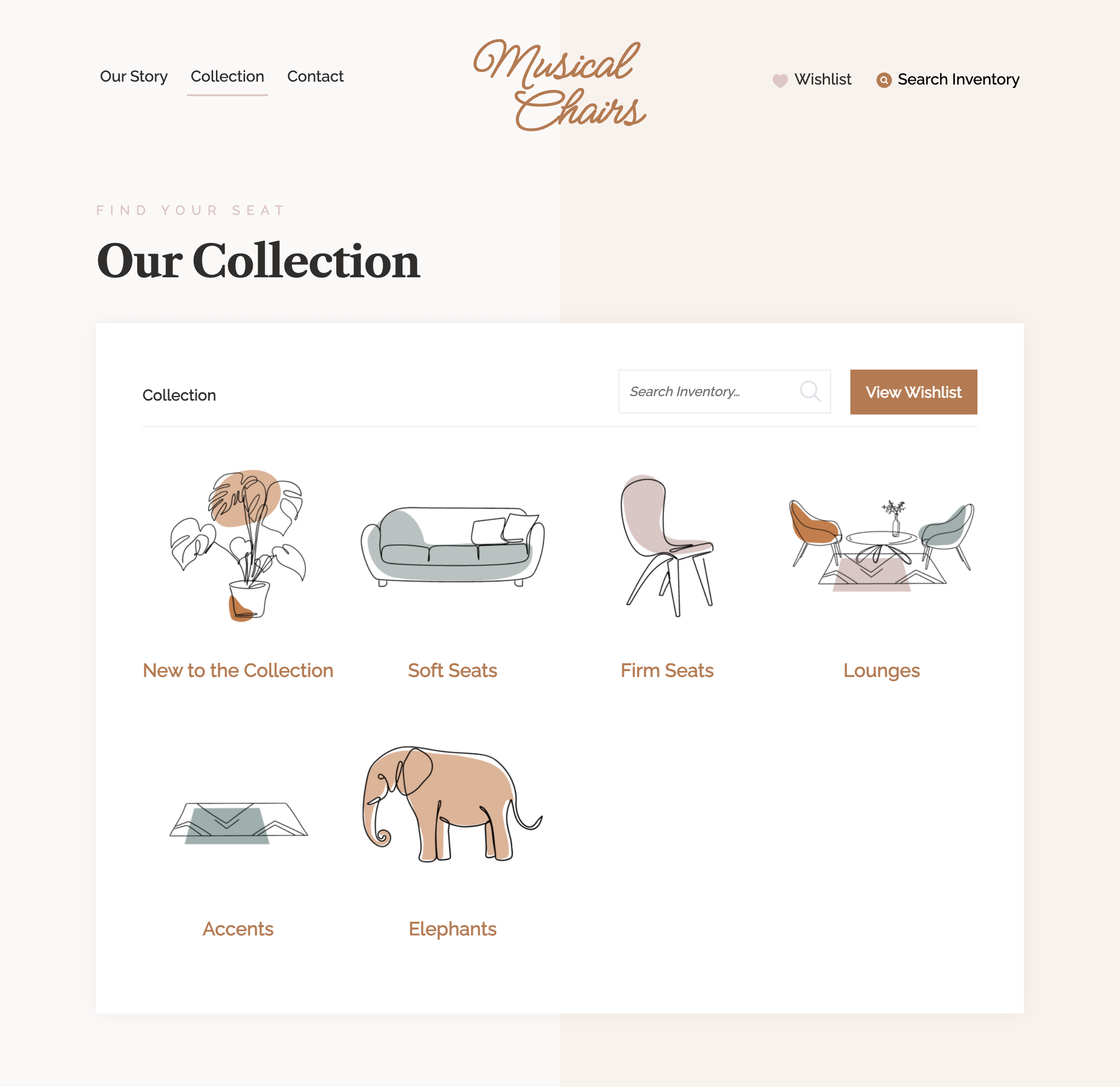
Yes! We’ve created the imaginary boutique event rental company Musical Chairs to demonstrate how you can connect the RW Elephant application directly to your WordPress website. Explore the Musical Chairs Gallery, create a Wishlist, and imagine how this plugin can change your rental business for the better.
Yep! The Plugin is an optional feature for our Pachyderm & Herd Leader users. Check out more about our plans and pricing here.
You can reach our friendly Client Success team at help@rwelephant.com.
Changelog
2.4.2
- Add Option for user to switch between Fractional or Decimal Item dimensions.
2.4.1
- General fixes and improvements.
2.4.0
- Lightbox Video
- Other general security updates and fixes.
2.3.13
- All Item images switched to ImageKit.
- Fixes missing Wishlist Max Value error Message.
2.3.12
Fixes issue with page generation during setup/installation.
2.3.11
- Fixes issue with missing select input for Item Variations.
2.3.10
- Fixes for Gallery and Wishlist Block Additional Classes.
2.3.9
- Add Item Variations feature.
- Assign Gallery and Wishlist via WP Blocks.
2.3.8
- Wishlist Submit form fixes.
- Compatibility Improvements.
2.3.7
- PHP & WordPress Compatibility Improvements.
- Wishlist Quantity Fix.
2.3.6
- Minor Fixes and Improvements
- WordPress 6.5 Compatibility.
2.3.5
- Remove Payment Feature.
- Add SEO Category Descriptions.
2.3.4
- Fix for WooCommerce Compatibility.
- Fix for Add to Wishlist One/All quantity value.
- Fixes Wishlist JS script localization.
- Other bugfixes.
2.3.3
- WordPress 6.4 Compatibility.
2.3.2
- WordPress 6.4 Compatibility fixes.
- Fix for Add to Wishlist One/All quantity value.
2.3.1
- Add “Add One/All, items to Wishlist” setting.
2.3.0
- Fix issue with Add to Wishlist using the Related Items list within a Kit item.
2.2.26
- Fix issue with Breadcrumb link url encoding on Category Views.
2.2.25
- Fix issue with Thumbnail default size setting.
2.2.24
- Fix issue with meta description on Category views.
- Fix bug with Wishlist button.
2.2.23
- General bug fixes.
2.2.22
- Fixes for Category Thumbnails.
- Fixes for Video.
- Other general bug fixes.
2.2.21
- Added OpenGraph for Items.
- Added Structured Data for items.
2.2.20
- Minor fixes.
2.2.19
- Added Sitemaps for Types & Items.
- Canonical urls for Types & Items match page urls.
- Custom Wishlist submit message feature.
- Currency symbol option.
- Change Item thumbnail image size.
2.2.18
- Added “Add to Wishlist from Listings Views” Icon feature.
- Added “Second Image on Hover” for Listing items.
2.2.17
- Fixed bug with Wishlist cookie quantities.
2.2.16
- Resolved conflicts with Themes/Plugins in Gallery JS.
2.2.15
- Fixed bug with Stripe checkout.
2.2.14
- Fixed bug with Caching Toggle.
- Other general bug fixes.
2.2.13
- Brand assets update.
- Compatibility testing.
2.2.12
- Removed ability to type date (must use datepicker).
- Updated Brand assets.
2.2.11
- Improved page title and description text.
- Added “alt” text for gallery images.
- Other general SEO fixes and improvements.
2.2.10
- Improvements and styling fixes.
2.2.9
- Added E-Signatures functionality and layout improvements to Payment pages.
- Revisited Bug with Payment page Invoice date.
- Improvements to Pinterest button.
- Styling fixes and updates.
2.2.8
- Fixed a bug with Payment page Event Date.
2.2.7
- Fixed a bug with Item Pages throwing silent 404.
2.2.6
- Re-added missing styles for Pikaday Date selector Input.
- Installation change (exclude site Front Page and Blog Page from Gallery/Wishlist dropdowns).
2.2.5
- Fixed Bug with Item Titles that contain Numbers.
2.2.4
- Fixed Bug with Replacement Category Thumbnails.
2.2.3
- URL structure for Items now include the item name/title for improved SEO compatibility (changed from “/item/180133” to “/item/swift-little-wooden-elephant-180133” format).
- Enhancements to Item & Category thumbnail images.
- Wishlist form “Event Date” input format (DD-MM-YYYY), date selector enhanced.
2.2.2
- Updating placeholder image for Items that don’t have images.
2.2.1
- Added new filters for better customization of single item-data.
- Updates to Wishlist submission form (form validation improvements, easier to incorporate ReCAPTCHA).
- Improved Wishlist submission form errors.
2.2.0
- Fixes bugs with caching and templating engine.
2.1.0
- This is the first stable release of the new v2 RW Elephant Rental Inventory Plugin.
2.0.0
- This is the Beta test release of the RW Elephant Rental Inventory Plugin.
Available Versions
| Version | Download | Type |
|---|---|---|
| 2.4.2 | Download | Stable |
| 2.4.1 | Download | Stable |
| 2.4.0 | Download | Stable |
| 2.3.13 | Download | Stable |
| 2.3.12 | Download | Stable |
| 2.3.11 | Download | Stable |
| 2.3.10 | Download | Stable |
| 2.3.9 | Download | Stable |
| 2.3.8 | Download | Stable |
| 2.3.7 | Download | Stable |
| 2.3.6 | Download | Stable |
| 2.3.5 | Download | Stable |
| 2.3.4 | Download | Stable |
| 2.3.3 | Download | Stable |
| 2.3.2 | Download | Stable |
| 2.3.1 | Download | Stable |
| 2.3.0 | Download | Stable |
| 2.2.27 | Download | Stable |
| 2.2.26 | Download | Stable |
| 2.2.25 | Download | Stable |
| 2.2.24 | Download | Stable |
| 2.2.23 | Download | Stable |
| 2.2.22 | Download | Stable |
| 2.2.21 | Download | Stable |
| 2.2.20 | Download | Stable |
| 2.2.19 | Download | Stable |
| 2.2.18 | Download | Stable |
| 2.2.16 | Download | Stable |
| 2.2.15 | Download | Stable |
| 2.2.14 | Download | Stable |
| 2.2.13 | Download | Stable |
| 2.2.12 | Download | Stable |
| 2.2.11 | Download | Stable |
| 2.2.10 | Download | Stable |
| 2.2.9 | Download | Stable |
| 2.2.8 | Download | Stable |
| 2.2.7 | Download | Stable |
| 2.2.6 | Download | Stable |
| 2.2.5 | Download | Stable |
| 2.2.4 | Download | Stable |
| 2.2.3 | Download | Stable |
| 2.2.2 | Download | Stable |
| 2.2.1 | Download | Stable |
| 2.2.0 | Download | Stable |
| 2.1.2 | Download | Stable |
| 2.1.1 | Download | Stable |
| 2.1.0 | Download | Stable |
| Development | Download | Trunk |
