
RioVizual — Table Blocks for Comparison, Pricing and Pros & Cons
Active Installs
1,000+
Last Updated
June 28, 2026
First Released
May 23, 2023
Download History (Last one month)
Contributors
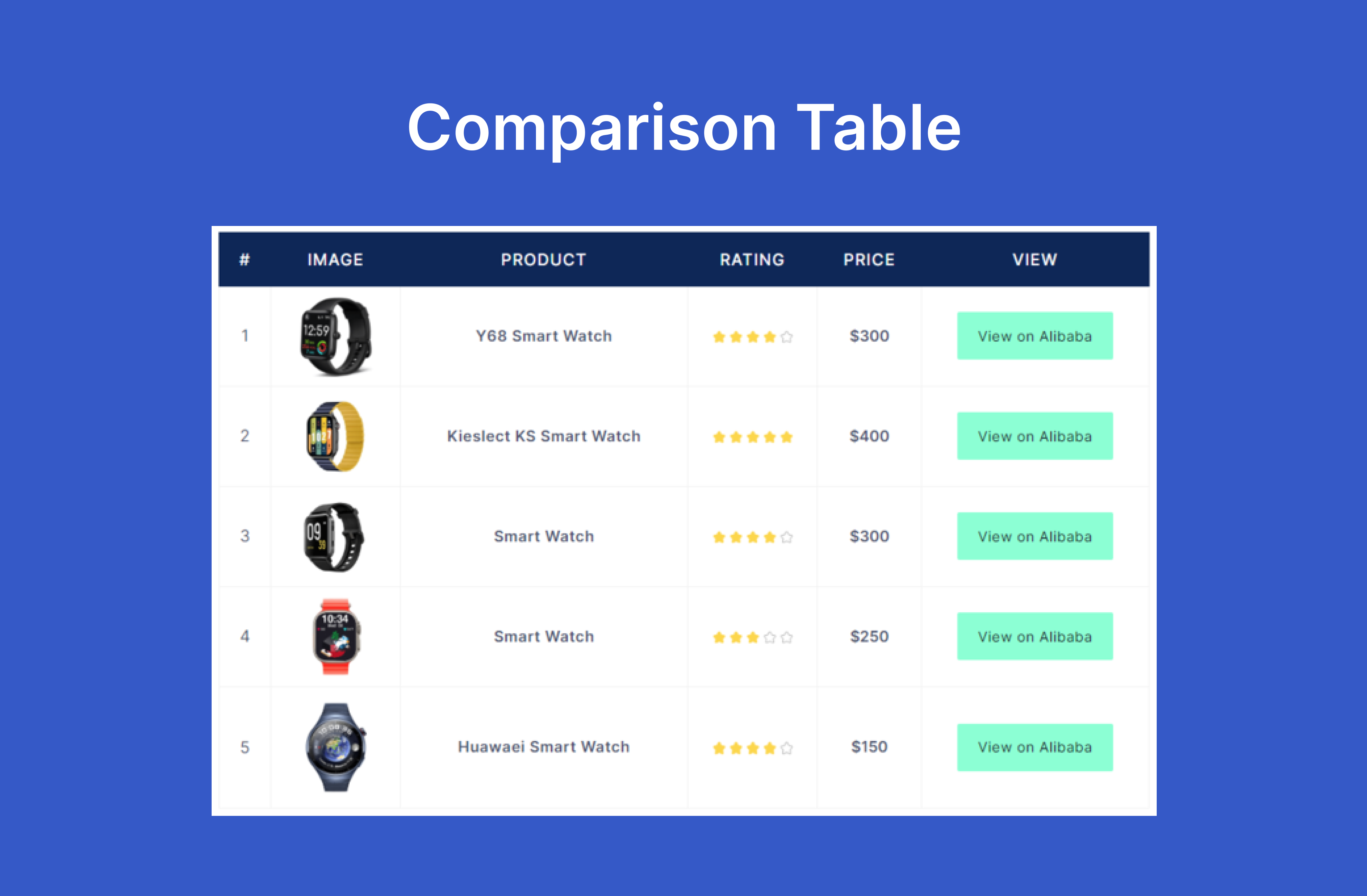
RioVizual is the all-in-one Gutenberg table plugin designed for creating comparison tables, pricing tables, and pros & cons boxes directly in the block editor.
It allows you to drag and drop elements to build customizable, responsive & SEO-friendly tables with multiple columns and rows. With advanced styling and formatting options, RioVizual helps enhance user engagement and boost conversion.
Get Pro | View Table Builder Demo | View Pricing Table Demo | View Pros & Cons Demo | Read Documentation
RioVizual Blocks (More Coming Soon!)
RioVizual includes the following highly customizable Gutenberg blocks:
-
Table Builder Block: Create fully customizable and responsive tables with drag-and-drop functionality in the Gutenberg editor. (Learn More)
-
Pricing Table Block: Easily compare pricing plans for your products or services with customizable pricing tables. (Learn More)
-
Pros & Cons Block: Highlight the benefits and drawbacks of products or services with attractive pros and cons tables. (Learn More)
With RioVizual, you can also access a library of pre-designed table templates, streamlining the process of creating stunning comparison tables, pricing tables, and pros & cons boxes in the Gutenberg block editor.
Why You Should Use RioVizual?
Easy Drag-and-Drop Interface: Create comparison tables, pricing tables, and pros & cons boxes in minutes with Gutenberg.
No Coding Skills Needed: Build professional, customizable tables without any coding knowledge.
Extensive Template Library: Choose from 50+ pre-designed templates for quick table creation.
Fully Responsive Design: Ensure tables look great on all devices, from desktop to mobile.
Advanced Customization Options: Customize fonts, colors, borders, and more to match your website’s design.
Optimized for Performance and SEO: Built with clean, optimized code and structured data support.
RioVizual Table Builder Block Includes
-
Drag-and-drop table builder specifically for the Gutenberg block editor.
-
12 versatile table elements (text, image, button, list, icon, shortcode, media & text, icon list, icon button, dual button, star rating, divider) to create dynamic tables in WordPress. (More elements coming soon!)
-
29 pre-designed table templates to jumpstart your table creation process.
-
Right-click options for adding, deleting, copying, cutting, pasting, duplicating, and moving elements.
-
Comprehensive cell manipulation: insert, delete, copy, cut, paste, and more for rows and columns.
-
Design flexibility: style cells and elements individually or in groups.
-
Dynamic cell type adjustment: switch between body, header, or footer cells with ease.
-
Fully responsive design: make tables adapt to different screen sizes automatically.
-
Improved mobile viewing: make tables scrollable or stackable for smaller screens.
-
Customizable cell width: set fixed or flexible widths for all cells.
-
Freeze options: lock the first row or column for better navigation.
-
Cell merging and splitting: merge multiple cells into one or split them back while preserving content.
-
HTML tag customization: switch cell tags between “td” and “th.”
-
Multi-cell selection: use Ctrl to select multiple cells or Shift for selecting a range.
-
Extensive border settings: choose from different border types (solid, dotted, dashed, double, groove, ridge, inset, outset) for each cell.
RioVizual Pricing Table Block Includes
-
25 pre-designed pricing table templates for quick deployment.
-
Responsive column controls for adaptable and mobile-friendly layouts.
-
Flexible row and column management: easily add, delete, or duplicate rows and columns.
-
7 core elements: title, price, features, star rating, divider, media and call-to-action button for compelling pricing tables.
-
Ribbon settings with two preset design options for highlighting offers.
-
Equal column height adjustment to ensure a uniform look.
-
Right-click functionality for quick manipulation of elements (add, delete, copy, cut, paste, duplicate, move).
-
Multi-cell selection for bulk operations.
-
Automatic mobile responsiveness for flawless performance on any device.
-
Custom styling options: personalize each element with global or custom design settings.
-
Pricing Toggle
-
Icon support, Tooltip, Badge with features element
-
Original price, Price Suffix support, Dynamic Price Slider with pricing element
-
Media(img/icon) support with title element.
-
Icon support with button element.
-
Background image support for column.
-
Featured column support.
-
3 more style for ribbon.
RioVizual Pros & Cons Block Includes
-
13 pre-designed templates to easily create pros and cons boxes.
-
Built-in Pros and Cons Schema support to enhance SEO.
-
Icon customization for a personalized look.
-
Customization for box, title, and body.
-
Flexible styling: customize the box, title, and body to match your design.
-
Mobile support: optimized for vertical boxes on small screens.
-
Header and Body Item Icon Placement
-
Title Separator for header
-
Flexible Header Positioning
-
Enable Stripe on Body Items
-
Advanced Border Styles with 8 Stunning Design Pattern
-
Extra Design Flexibility in Style Options
Creating Tables in the Gutenberg Block Editor Has Never Been Easier
Creating tables like comparison tables, pricing tables, and pros & cons tables with a WordPress table plugin has never been easier. With RioVizual, it only takes 4 simple steps:
- Step 1 – Add a RioVizual Block
To insert a table into a WordPress post or page, simply add the desired RioVizual block from the Gutenberg block editor.
- Step 2 – Provide Table Contents
Choose to create a table from scratch or use one of the pre-made layouts by entering your table contents.
- Step 3 – Customize Your Table
Customize the table’s columns, colors, fonts, and other settings to match your design preferences. Make adjustments as needed to create a table that perfectly suits your needs.
- Step 4 – Publish Your Table
Once you’re satisfied with the table’s design, click “Publish” or “Update” to make it live on your post or page.
Helpful Resources
- How to Create a Comparison Table in WordPress Gutenberg Block Editor?
- How to Create a Pricing Table in WordPress Gutenberg Block Editor?
- How to Create a Pros & Cons Table in WordPress Gutenberg Block Editor?
Love RioVizual?
- Rate Us on WordPress
- Join RioVizual Users Community
- Visit RioVizual Website
- Follow RioVizual on Facebook
Installing the RioVizual plugin is quick and easy. Follow these steps:
- Install the plugin using one of these options:
- From the WordPress Admin Panel: Go to Plugins -> Add New, search for “RioVizual,” and click the Install button.
- Manually via WordPress Admin Panel: Download the ZIP file from the WordPress plugins repository. Go to Plugins -> Add New -> Upload Plugin, select the downloaded ZIP file, and upload it.
- Manually via FTP: Download the ZIP file, extract it, and upload the extracted folder to the /wp-content/plugins/ directory of your WordPress installation using an FTP client.
- Once installed, activate the plugin through the Plugins menu in WordPress.
- You’re all set! Begin creating tables with RioVizual in the Gutenberg block editor.


RioVizual is suitable for bloggers, eCommerce store owners, niche site creators, affiliate marketers, business owners, or any WordPress website owner. If you aim to increase conversions, RioVizual is the WordPress table plugin you need.
You only need the latest version of WordPress installed on your website. RioVizual is an addon for the default WordPress block editor, so a standard WordPress setup with an active theme is all you need.
Absolutely not! RioVizual’s code is optimized for maximum performance. Using RioVizual won’t slow down your website; it might even improve performance by consolidating the functions of multiple plugins into one.
Yes, RioVizual is designed to be fully compatible with most WordPress themes and plugins. However, if you experience any conflicts, please contact our support team, and we’ll help resolve the issue.
Yes! RioVizual offers various formatting options, including font size, background color, and border styles.
You can add unlimited columns and rows to your table.
Absolutely! All tables created with RioVizual are fully responsive, ensuring they look great on all devices, from desktops to mobile phones.
Yes, RioVizual supports Pros and Cons Schema, providing structured data to search engines to improve your website’s visibility, CTR, and SEO ranking.
RioVizual offers extensive customization options, including color schemes, fonts, border styles, and more, so you can easily match your tables to your website’s design.
Not at this time, but this feature is planned for a future release.
We are currently working on adding data table and product table features to RioVizual. These features will be released soon.
Yes, RioVizual fully supports RTL languages, making it a great choice for multilingual websites.
We welcome feedback! To report a bug or request a new feature, please contact us at support@riovizual.com.
You can update RioVizual directly from your WordPress admin panel by going to Dashboard -> Updates. Alternatively, you can download the latest version from the WordPress plugin repository.
Yes, we provide detailed documentation and tutorials on our RioVizual website to help you make the most of the plugin.
Currently, RioVizual does not support direct migration from other plugins, but this feature is on our roadmap for future updates.
Feel free to email us at support@riovizual.com, and we’ll be happy to assist you.
Changelog
3.0.2 – 28 June 2026
- Security: Hardened REST endpoints, bulk actions, and CSS output
- Fixed: Minor bugs
3.0.1 – 23 May 2026
- Added: Support for WordPress Version 7
3.0.0 – 05 January 2026
- Introduced: Breadcrumb Navigation in Table Builder Block and Pricing Table Block
- Introduced: Show / Hide component popup in Style Tabs for all elements
- Introduced: Link/Unlink Style Settings in Pros and Cons Block for Quick and Easy Design Access
- Added: Move Column Left/Right Settings in Pricing Table Block
- Added: Global Style panel access button in block control bar and top of inspector panel for table builder and pricing table
- Added: New Initial Design template in Pros and Cons Block
- Added: Table Settings Button in Pros and Cons Block
- Added: Icon Rotation Setting
- Added: Button Size Control Settings
- Added: Spacing Support for Price in Pricing Table Block
- Improved: Settings Panel appearance in inspector panel on user click event
- Improved: Separate Global Style Settings Panel
- Improved: New UI for some Settings Components
- Improved: Bring essential settings on elements general tab for quick design
- Improved: Reset Button appearance only with table selection
- Improved: Bring Row selection panel with each column for quick access in Pricing Table Block
- Improved: New Column Control settings in Pricing Table Block
- Improved: Dashboard UI
- Removed: Global Style Tab from each elements style tab panel
- Removed: delete and add options from block editor control bar in table builer and pricing table block
- Removed: Column and Row add/delete options from block editor table settings context menu
- Removed: Some design settings component from some elements custom style tab panel to bring them upfront
- Removed: Quick delete icon from column and row selection in table builder
- Removed: Outline tab, search option, duplicate, delete, export table options from Dashboard Table Create Panel
- Fixed: Equal Column Height issues on frontend
- Fixed: Minor bugs in style setting
2.3.4 – 17 December 2025
- Improved: Security and PHP coding standards (PHPCS compliance)
- Improved: Prefixed all classes, functions, and variables to prevent conflicts
- Improved: Proper escaping of output and dynamic handling of URLs, paths, and plugin version
- Fixed: Minor bugs and performance issues
2.3.3 – 09 December 2025
- Added: Support for WordPress 6.9
2.3.2 – 10 August 2025
- Fixed: Plugin conflict with Riovizual and other third-party plugins.
- Fixed: CSS styling issues in various third-party page builder editors.
2.3.1 – 23 June 2025
- Added: Copy, Cut, and Paste Options for Elements in the Pricing Table.
- Added: Sizing and Alignment Controls in Inspector > Style > Table for the Pricing Table.
- Added: Alignment Controls in Inspector > Style > Table/Layout for both Table Builder and Pros & Cons Blocks.
- Removed: Alignment Support from the Block Control Panel for Table Builder and Pros & Cons Blocks (now available in the Inspector Panel).
- Fixed: Error when Pasting an Element after Deleting a Copied or Cut Element in Table Builder.
- Fixed: Style Issues that were not Working Correctly in Certain Situations.
2.3.0 – 04 June 2025
- Introduced: Builder Support – Elementor, Divi, Bricks, Oxygen, Beaver Builder.
- Added: Support for custom Widgets, Elements, Modules, and Shortcodes to work seamlessly with page builders.
- Added: Enable Title option in Inspector > General > Header in Pros and Cons.
- Improved: Inspector Settings Visibility option with responsive control.
- Improved: * Improved: Updated the settings labels in the Inspector Controls for the Pros and Cons.
- Improved: Renamed ‘Vertical Box on Mobile’ to ‘Layout Type’ and added responsive support for selecting layout types in Pros and Cons.
- Fixed: Blocks Settings not working in some Situation in Pros and Cons.
- Fixed: Equal column height was not being calculated correctly in certain situations in Pricing Table.
2.2.1 – 27 April 2025
- Added: .pot file for Language Support.
- Improved: UI of Demo Import Section
- Improved: Inspector Control Main Tab Design.
- Moved: ‘Reset Styles’ option to Advanced -> Reset Styles.
- Removed: Device State Manager from Inspector Control, Added to Inspector Control Main Tab.
2.2.0 – 19 April 2025
- Introduced: Plugin Dashboard.
- Added: Full Compatibility with the Latest Version of WordPress 6.8
- Added: Element Insert Option from Cell Selection Button in Table Builder and Pricing Table.
- Improved: Right Click Popup Setting.
- Improved: Show/Hide Row and Column Selector Settings depend on Select Row/Column Icon in Pricing Table.
- Improved: Table Placeholder Text when Creating a Table.
- Improved: Font Awesome Icon Search option.
- Fixed: Google Font Enqueue issue in Frontend.
- Fixed: Block Transform Issue when Convert Block Default Table to Table Builder.
- Removed: Element Duplicate option from Block Control, Only Available in Element Right Click Popup.
- Removed: Help Note from Style Tab in Table Builder.
2.1.7 – 5 March 2025
- Added: Link Color, Padding and Border Support for Features Element in Pricing Table.
- Improved:
Add New ColumnSettings in Pricing Table. - Fixed: Style Generation Issues in Hover State.
2.1.6 – 20 February 2025
- Added: Hide Caption settings in Table Builder.
- Improved: Body Items Vertical Alignment in Pros and Cons.
- Fixed:
Backspaceissue with empty list in List Element in Table Builder. - Fixed: Text Decoration in Font style issue of Table Caption in Table Builder.
2.1.5 – 06 February 2025
- Improved: List Element behavior when Copying and Pasting List items, with added support for
EnterandBackspacein Table Builder. - Fixed: Custom Cell Style issue in Table Builder.
- Fixed: Body items alignment issue when icons are hidden in Pros and Cons.
2.1.4 – 31 December 2024
- Fixed: Icon reset options in Pros and Cons.
- Fixed: Display blockControl settings conditionally to fixed index issue in Pros and Cons.
2.1.3 – 14 November 2024
- Added: Full Compatibility with the Latest Version of WordPress 6.7
2.1.2 – 11 November 2024
- Added: URL Settings with Image Element.
- Added: Minus (-) value for
letter-spacingProperty in Typography Settings. - Fixed: Image Alignment Issue in some Certain Situation.
2.1.1 – 07 October 2024
- Added: Pattern Support.
- Fixed: URL issues in Frontend.
- Fixed: Font Size issue in Table Typography Style.
- Fixed: Box Shadow issue in Table Caption.
- Fixed: Body Items Move (up/down) issue in Pros and Cons.
- Fixed: Hide Units from ‘Columns in a Row’ of Column Settings in Pricing Table.
2.1.0 – 15 September 2024
- Introduced: Pricing Table Block.
- Improved: Box Shadow Component Settings.
- Improved: Changed Inspector Control Settings Divider Border Solid to Dashes.
2.0.11 – 25 July 2024
- Added: Full Compatibility with the Latest Version of WordPress 6.6
- Fixed: Call Google Font APIs in IFrame.
- Fixed: Stripe Table issue when Transform a Table.
- Removed: Support of Create new List when
EnterKey Press from List Element.
2.0.10 – 06 June 2024
- Fixed: JS Error while saving the post.
2.0.9 – 20 May 2024
- Improved: Show Style Reset Icon when Value Change, Previously Show on Hover.
2.0.8 – 25 April 2024
- Fixed: Deprecated issue of Preview Device Type with WordPress 6.5
- Fixed: Popover z-index issue.
2.0.7 – 08 April 2024
- Added: Sticky Row and Column Custom Color in Table Builder.
- Removed: Duplicate Fonts from Font List.
2.0.6 – 02 April 2024
- Changed:
DeleteIcon of Selected Row/Column Selector. - Improved: Reduce Text Input Field Height in Inspector > General.
- Fixed: Fatal Error and Warning, when updating Font.
- Fixed: Active Button Z-index issue in Font Settings.
- Fixed: Selected Cells/Elements State, when devices changes: desktop to Mobile and vice-versa.
2.0.5 – 14 March 2024
- Added: Full Compatibility with the Latest Version of WordPress 6.5
- Fixed: Cell click Issue, after merge cells.
- Fixed: Double Element Insert Issue, after Insert Cells and Paste element into Cells.
2.0.4 – 03 March 2024
- Added: Added Cell Selector to select Cell or Open Right click Cell Menu.
- Improved: Row/Column Selector Right Click Menu Open.
- Improved: Default Cells width when scroll on PC and Equal Cells Width is active.
- Improved:
CellTab Panel Label inStyleTab depend on Selected Cells. - Fixed: Sticky Style Default Color Bug in Responsive Mode.
- Fixed: Text color Issue from Table Builder when
Text ElementContent Taghas changed.
2.0.3 – 08 February 2024
- Improved: Placeholder in Shortcode Element of Table Builder.
- Improved: Column Selector Right Click Menu Text of Table Builder.
- Improved: Some Style Component Title Text of Pros and Cons.
- Fixed: Fixed a Console Error Related to a Missing Scripts.
2.0.2 – 21 January 2024
- Improved: Default Cells Width when
scroll on Mobileis Enable of Table Builder. - Improved: Default Table Width when
Vertical Box on Mobileis Disable of Pros & Cons. - Fixed: Sticky Top Row Console Issue of Table Builder.
- Fixed: Image Overlap Issue for Mobile Devices of Table Builder.
- Removed: Default Table Background Color from Table Builder.
- Removed: Default Table Background Color from Pros and Cons.
- Removed: Default Width of Box from Pros and Cons.
2.0.1 – 08 January 2024
- Introduced: Feedback Survey Form.
- Added:
Enterkey Support for New Line in List Element of Table Builder. - Added: Placeholder in List Element of Table Builder.
- Added: Resolution Support with Image Element of Table Builder.
- Added:
Element AlignmentOption underSizingin Text Element of Table Builder. - Added:
List AlignmentOption underSizingand Previous Alignment move toItems Stylein List Element of Table Builder. - Added: Delete Row and Column Option from Right Click Menu of Table Builder.
- Added: Added Default Width in Cells of Table Builder.
- Added: Added Default Width in Box Settings of Pros & Cons.
- Added: Added Default Padding with Body List Items in Box Settings of Pros & Cons.
- Improved: Settings Label in
Table Settingsof Table Builder. - Improved:
Convert First Row to Headerfunctionality in Table Settings of Table Builder. - Improved:
Convert Last Row to Footerfunctionality in Table Settings of Table Builder. - Improved:
Enable Stack TableView on Small Devices of Table Builder. - Improved: Button Element
SizingandText Alignmentof Table Builder. - Improved: Button Element in General -> Content Settings UI of Table Builder.
- Improved: Icon Element in General -> Content Settings UI of Table Builder.
- Improved: Select Icon Popup in General -> Content settings UI of Table Builder.
- Improved: Cell
Horizontal Alignmentof Table Builder. - Improved: Row and Column Selector Right Click Menu Setting Flexibility of Table Builder.
- Improved: Box Shadow Component Preset Settings.
- Fixed: Icon Alignment, when Link is Active in Icon Element of Table Builder.
- Fixed: Elements Link Color Conflict issue with Table Link Color in Table Builder.
- Fixed: Caption Position issue when Responsive Table Enable.
- Removed: Depandency of Responsive Break Point in
Use Scrollbar on Large DevicesandUse Scrollbar on small Devices. - Removed:
Enable Scroll Settings, Scrollbar added automatically when boxes overflow container.
2.0.0 – 06 November 2023
- Introduced: Redesigned UI and Better UX.
- Introduced: Pros and Cons Builder.
- Introduced: Shortcode Element in Table Builder.
- Added: Full Compatibility with the Latest Version of WordPress 6.4.
- Added: Placeholder with Text Element.
- Added: Table Caption Text in General -> Content, when Caption select.
- Improved: On click action in cell.
- Improved: Insert and Delete Element Position and Select.
- Improved: Google Font Api Call when CSS Generate.
- Fixed: Table Caption Text Decoration Issue.
- Fixed: JS Console Error in Table Caption.
- Removed: Style Support of Row Selector in Table Builder.
- Removed: Style Support of Column Selector in Table Builder.
- Removed:
Clear StylesandDotOption from Style Tab for Table Elements.
1.1.2 – 13 August 2023
- Added: 1 more Pre-made Table Builder Template.
- Fixed: Gradient Picker issue with WordPress 6.3.
1.1.1 – 07 August 2023
- Added: Full Compatibility with the Latest Version of WordPress 6.3.
- Added: 2 more Pre-made Table Builder Templates.
- Improved: Some Style Issue.
- Fixed: List Style Color for Single List Element.
1.1.0 – 31 July 2023
- Introduced: Pros and Cons Block
- Added: Font in Global Table Settings
- Added: Cell Borders Type in Global Cell Settings
- Added: Padding in Image Element
- Added: List Style Color in List Element
- Improved: Revamped UI and Better UX
- Improved: Tweaks to Increase Performance
- Improved: Background Component UI
- Improved: Border Component UI
- Improved: Button Element Style UI
- Improved: Image Upload Settings with External Url in Image Element
- Removed: Cell Borders Type from Global Table Settings
- Removed: Font from Global Cell Settings
- Removed: List Style Position from List Element
- Moved: Cell Tag from Cell Settings -> Design -> Content to Advanced
1.0.6 – 12 July 2023
- Added: Premade table templates
- Added: External link option for image element
- Improved: Revamped UI and better UX
- Improved: Tweaks to increase performance
- Fixed: Link Rel issue of Button element
1.0.5 – 26 June 2023
- Added: Elements alignment
- Added: Duplicate and move options for row, column from right click popup
- Added: Duplicate option for element from right click popup
- Added: Global setting button in editor
- Improved: Added selector color on active element in editor
- Improved: Cell Tag button toggle with tooltip text
- Improved: Added dot with element list and heading when element settings value are different from default value
- Improved: Border component style type
1.0.4 – 21 June 2023
- Introduced: List element
- Introduced: Icon element
- Added: Label of rel attributes select options in Button element
- Improved: On click action to select element in cell
- Improved: Added
divas Text element default tag - Fixed: Style issue after drag-and-drop element
- Fixed: Hover color style issue of Button element
1.0.3 – 14 June 2023
- Added: HTML tag support for text element content
- Added: Text Decoration in font style settings
- Added: Button preset setting
- Improved: Font weight support for different devices
- Improved: Font size preview value for different devices
1.0.2 – 07 June 2023
- Introduced: Button element
- Improved: Style reset option for different devices
1.0.1 – 31 May 2023
- Introduced: Drag-and-drop feature with elements
- Added: Block preview image
- Improved: Border preview value for different devices
- Improved: Box shadow preview value for different devices
1.0.0 – 23 May 2023
- Initial release
Available Versions
| Version | Download | Type |
|---|---|---|
| 3.0.2 | Download | Stable |
| 3.0.1 | Download | Stable |
| 3.0.0 | Download | Stable |
| 2.3.4 | Download | Stable |
| 2.3.3 | Download | Stable |
| 2.3.2 | Download | Stable |
| 2.3.1 | Download | Stable |
| 2.3.0 | Download | Stable |
| 2.2.1 | Download | Stable |
| 2.2.0 | Download | Stable |
| 2.1.7 | Download | Stable |
| 2.1.6 | Download | Stable |
| 2.1.5 | Download | Stable |
| 2.1.4 | Download | Stable |
| 2.1.3 | Download | Stable |
| 2.1.2 | Download | Stable |
| 2.1.1 | Download | Stable |
| 2.1.0 | Download | Stable |
| 2.0.11 | Download | Stable |
| 2.0.10 | Download | Stable |
| 2.0.9 | Download | Stable |
| 2.0.8 | Download | Stable |
| 2.0.7 | Download | Stable |
| 2.0.6 | Download | Stable |
| 2.0.5 | Download | Stable |
| 2.0.4 | Download | Stable |
| 2.0.3 | Download | Stable |
| 2.0.2 | Download | Stable |
| 2.0.1 | Download | Stable |
| 2.0.0 | Download | Stable |
| 1.1.2 | Download | Stable |
| 1.1.1 | Download | Stable |
| 1.1.0 | Download | Stable |
| 1.0.6 | Download | Stable |
| 1.0.5 | Download | Stable |
| 1.0.4 | Download | Stable |
| 1.0.3 | Download | Stable |
| 1.0.2 | Download | Stable |
| 1.0.1 | Download | Stable |
| 1.0.0 | Download | Stable |
| Development | Download | Trunk |
