Redono – Returns and RMA for WooCommerce
Active Installs
0+
Last Updated
October 25, 2026
First Released
September 22, 2026
Download History (Last one month)
Contributors
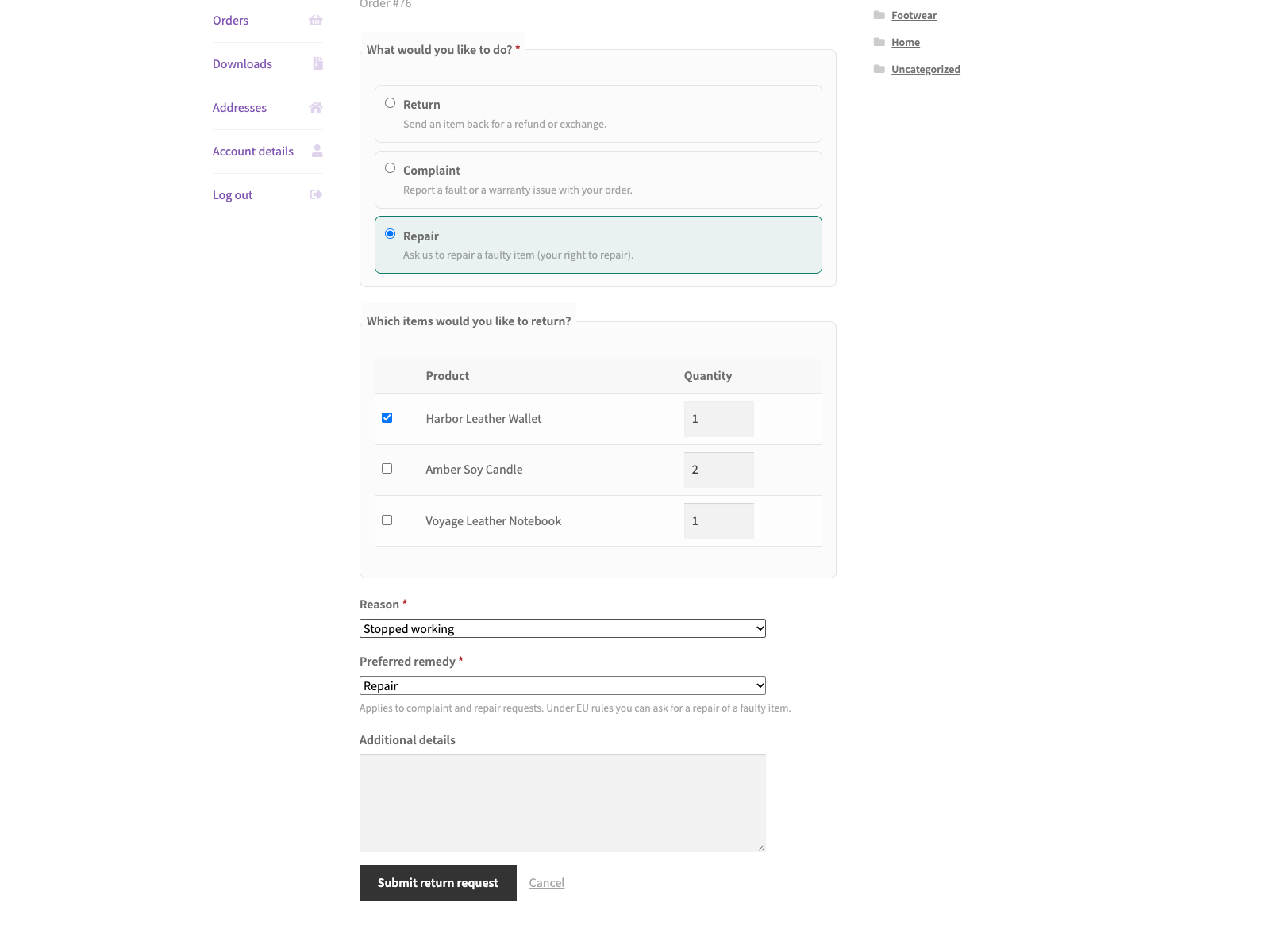
Redono gives a WooCommerce shop the after-sale half it usually lacks: a place for a customer to say something is wrong, and a place for the shop to answer. From My Account > Orders a customer opens a request on an eligible order and chooses what they actually need.
- A Return, sending an item back for a refund or an exchange.
- A Complaint, reporting a fault or a warranty issue.
- A Repair, asking you to repair a faulty item. Repair is one of the remedies the EU legal guarantee gives a consumer against the seller (Directive (EU) 2019/771, art. 13).
They pick the items and quantities, choose a reason from a list that fits the type they picked, add a note, and for a complaint or a repair state the remedy they would prefer: repair, replacement or refund. The request is stored as a private record, emailed to you, confirmed to the customer by email with its request number, and given a status the customer can follow from their own account.
Each order accepts one request of each type, so a customer who has already returned part of an order can still raise a separate complaint or repair on it later.
What you see in the admin
Every request lands under WooCommerce > Return Requests, with the order, the customer, the items, the reason, the note and the preferred remedy on one screen. You move it through requested, approved, rejected and completed, and whatever status you set is the status the customer sees. The list has a Type column and a filter, so returns, complaints and repairs can be worked through separately.
What it deliberately does not do
It does not move money. Redono records a request and tracks its status; you process any refund in the normal WooCommerce order screen, deliberately, with the record next to it.
It does not print carrier labels, book pickups or rate-shop return shipping. Those need a carrier contract, and a plugin that guesses at one is worse than no plugin.
It is not legal advice. The request types map onto EU consumer law, and the wording, the return window and the eligible statuses are yours to set.
Where the data lives
In WordPress. Each request is a private returns_rma custom post type with its own meta; the settings are two options. No account, no external service, no third-party script, and the notification and receipt emails go through your site’s own wp_mail.
Features
- Three request types per order: Return, Complaint and Repair.
- “Request a return” action on eligible orders in My Account (orders list and single order view).
- Type-aware reasons: each request type offers its own reason list, validated on the server.
- Preferred remedy (repair, replacement or refund) captured for complaint and repair requests.
- Item picker with per-item quantity, a reason dropdown and an optional note.
- Ownership-checked: an order placed with an account can be requested only by its logged-in owner.
- Guest orders: a shopper who checked out without an account finds the order by order number and billing email, is limited to 5 attempts per 15 minutes, and reaches only that one order.
- Configurable eligible order statuses, a return window in days and a separate complaint and repair window in months (24 by default, the EU legal guarantee).
- Each request is saved as a private custom post type and emailed to the store admin.
- The customer receives a receipt email with the request type, the items and the request number.
- Admin management screen with a status workflow (requested, approved, rejected, completed), a Type column and a filter by request type.
- Customer-facing status list in My Account so shoppers can track their returns.
- Accessible markup with a responsive layout; storefront styles inherit your theme’s colours, so they sit in light or dark themes without extra work.
- Translation ready (POT included) and clean uninstall.
- HPOS and cart/checkout blocks compatible.
External Services
Redono connects to no external services. It sends no data off your site and loads no third-party scripts, fonts or APIs. Each return request is stored locally in WordPress as a private returns_rma custom post type (with _returns_* post meta for the order, customer, items, reason, note and status), and the plugin’s configuration lives in the returns_settings and returns_db_version options. The admin notification email and the customer’s receipt are sent through your site’s own WordPress mail (wp_mail), so delivery uses whatever mail setup your server or SMTP plugin already provides.
Translations
Redono is fully translatable and ships the redono.pot template. Translations are delivered by WordPress.org language packs from translate.wordpress.org, which is where Polish, German and Spanish are being contributed; the package itself carries no compiled translation files.
- Upload the plugin to
/wp-content/plugins/redono, or install via Plugins > Add New. - Activate it. WooCommerce must be installed and active.
- Go to WooCommerce > Redono to choose eligible order statuses and the time windows.
- Customers can now open a return from My Account > Orders on any eligible order.
Screenshot Gallery


Yes. WooCommerce must be installed and active.
Orders in the statuses you choose under WooCommerce > Redono (Completed and
Processing by default). A Return must be filed within the return window in days
(30 by default); a Complaint or Repair within the complaint and repair window in
months (24 by default). Set either window to 0 to remove that time limit.
No. This MVP records the request and tracks its status. Process any refund in the
normal WooCommerce order screen; the return record stays in sync with the status
you set.
Each submission is emailed to the store admin and saved as a private “Return
Request” record under the WooCommerce menu in wp-admin.
Not with the same request type. Each order accepts one Return, one Complaint and
one Repair request. Once all three types have been used, the order’s detail page
and the request endpoint both show a notice instead of the form. The link in the
My Account orders list still appears; opening it leads to that same notice.
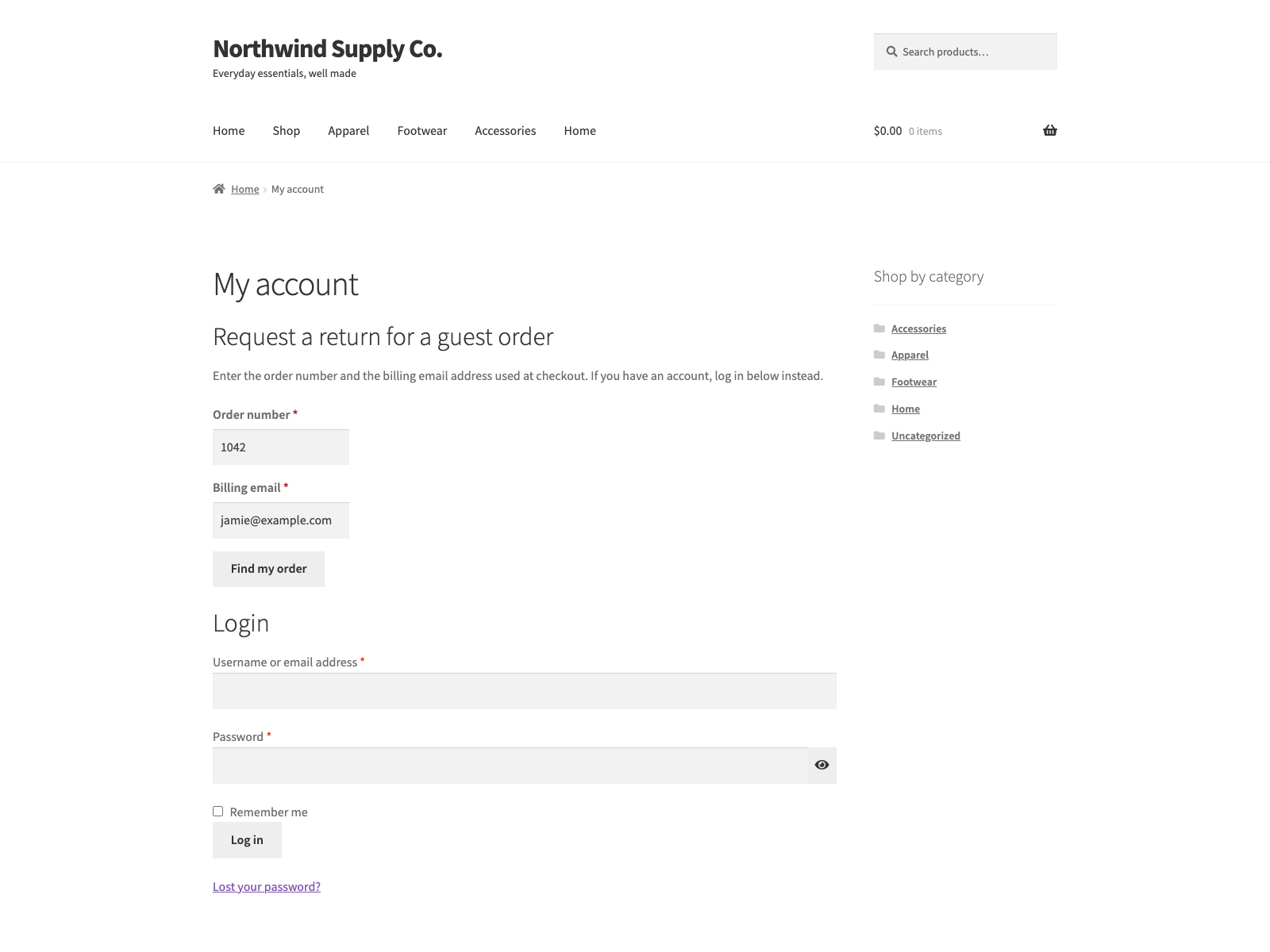
Yes. On the My Account login page a guest follows the “Ordered without an account?”
link, enters the order number and the billing email, and gets the request form for
that order. A wrong number and a wrong email give the same message, attempts are
limited to 5 per 15 minutes per IP address, and access lasts 30 minutes and covers
that one order only. Orders placed by a registered customer are reached by logging
in, never by this lookup.
Yes. On submission the billing email receives a receipt with the request type, the
items and the request number. Emails about later status changes are not part of
this plugin.
It is for the legal guarantee remedy. When an item is faulty, EU law lets a
consumer ask the seller to repair or replace it (Directive (EU) 2019/771, art. 13).
A customer can ask you to repair a faulty item and state their preferred remedy
(repair, replacement or refund). The request is recorded like any other and
tracked through the same status workflow. The separate EU right to repair rules
(Directive (EU) 2024/1799) put their obligations on manufacturers, not on the
shop, and this plugin does not implement them.
Yes. This plugin is compatible with WordPress Multisite. Network activate it or activate it on individual sites; each site keeps its own settings and data.
Changelog
1.3.2
- Corrected the legal basis of the Repair request. A customer asking the shop to repair a faulty item uses the legal guarantee remedy (Directive (EU) 2019/771, art. 13); the right to repair rules of Directive (EU) 2024/1799 bind manufacturers, so the “EU Right to Repair” wording is gone from the readme, the plugin description and the request form.
1.3.1
- The “Request a return” link no longer shows twice on the single order view in My Account with WooCommerce 10.9 or later.
1.3.0
- Complaint and repair requests have their own time window, in months, 24 by default to match the EU legal guarantee. Returns keep the window in days. The form offers only the request types whose window is still open for that order.
- Guest orders: a shopper without an account can file a request by entering the order number and billing email. The lookup does not say which of the two was wrong, allows 5 attempts per 15 minutes per IP address, never reaches an order that belongs to a registered customer, and grants 30 minutes of access to that one order only.
- The customer now gets a receipt email on submission with the request type, the items and the request number.
1.2.6
- The new-request email to the store now carries its “Manage in admin” link. It was always missing, because the link was built with the permissions of the customer who submitted the form.
- A personal-data erasure now also clears the customer as the author of their request records; it used to clear only the stored customer ID and note.
- The settings screen confirms a save with a “Settings saved” notice.
1.2.5
- The upgrade notice’s “Coming soon” and “Get notified” labels are English source strings for every language; Polish sites used to get their own Polish source text, which translators in other languages then saw untranslated.
1.2.4
- Hardening: the item and quantity lists posted by the return request form are now sanitised as integers at the moment they are read, instead of being read raw and cast later.
1.2.3
- The sidebar upgrade promo now follows the same dismissal as the banner. Dismissing the banner used to leave a full-height advert on the settings screen for good, which is not what the WordPress.org guideline on upgrade prompts means by used with moderation.
1.2.2
- The admin screen carries the new name. The rename reached the plugin header and the text domain but not the strings a shop owner actually reads: the WooCommerce submenu still said Returns, the settings heading said “Returns: RMA settings”, and the upgrade promo sold “Returns Pro”.
1.2.1
- The personal-data export and erasure query is annotated for Plugin Check. It reported the meta_query as a possible slow query; it runs only while WordPress processes a privacy request for one person, is paged, asks for post ids alone and uses two indexed meta keys, so the note explains it rather than contorting the query around a heuristic.
1.2.0
- Renamed to Redono. The WordPress.org review team asks a plugin name to lead with a distinctive, coined identifier rather than a generic descriptive word, and “Returns” is as generic as it gets. Redono is Esperanto for a giving back, which is what all three request types are. The text domain follows the new name; the settings, the stored requests and every hook are unchanged.
1.1.9
- Fixed: the PRO upgrade promo kept selling to people who had already bought the paid edition. Only the banner could be dismissed, so the sidebar promo and the locked feature cards followed a paying customer around for good. The promo now checks whether the paid edition is active and steps aside when it is.
- Fixed: arrow glyphs in the admin menu paths, and in the strings handed to translators. An arrow inside a translatable string makes the glyph every translator’s problem and changes the layout in any locale that drops it.
1.1.8
- Fixed: deleting the plugin left the per-user “dismiss” flag from the PRO notice in the database. Uninstall now removes it for every user, not just the one who dismissed it.
1.1.7
- The translation template was regenerated. It still named an older version of the plugin and pointed at source lines that had since moved, which is what translation tools read to show a string in context.
1.1.6
- Renamed to Plogins Returns – Returns and RMA for WooCommerce so the name leads with the brand rather than a generic word, which is what the WordPress.org plugin review team asks for. The plugin slug is unchanged.
1.1.5
- Fixed: the “Request a return” link appeared on the order confirmation screen, straight after checkout. WooCommerce 10.9 began rendering My Account order actions there as well; the link belongs on My Account, where the documentation puts it.
1.1.4
- Tested against WordPress 7.1. Verified by activating this build on a clean 7.1 install with WooCommerce 11.1, not by editing the header.
1.1.3
- Fixed the PRO promo on the settings screen quoting a price in PLN. PRO is priced and charged in EUR, so an admin on a Polish site was shown a zloty amount and then billed in euro, and the zloty figure was a fixed conversion that drifted from the real charge as the rate moved. The promo now shows the euro price that is actually taken.
1.1.1
- Polish, German and Spanish translations completed for the typed request strings.
- The “WooCommerce required” notice now uses the current plugin name.
1.1.0
- Typed requests: every request is now a Return, a Complaint or a Repair. Return stays the default, so existing records keep working unchanged.
- Right to Repair: the Repair type lets customers ask you to repair a faulty item and state a preferred remedy (repair, replacement or refund) for complaints and repairs.
- Type-aware reasons: each request type has its own reason list, validated on the server so a reason always matches its type.
- Each order now allows one request per type instead of one request in total, so a return no longer blocks a later complaint or repair.
- Admin: a Type column and a “filter by type” dropdown on the Return Requests list, plus the type and preferred remedy in the request details.
- The merchant notification email now states the request type and preferred remedy.
- New
returns/typesfilter and areturns/request_createdaction for extensions.
1.0.3
- Accessibility improvements to the admin and storefront markup.
- Fixed low-contrast admin headings under an OS dark-mode preference.
1.0.2
- Added bundled Polish, German and Spanish translations for the plugin interface.
1.0.1
- First stable release.
0.1.3
- Renamed to Plogins Returns for WooCommerce for a more distinctive plugin name.
0.1.2
Returns\Support\Refundshelper withreturns/order_refundaction for PRO refund automation.
0.1.1
Returns\Support\Reasonswithreturns/reasonsandreturns/reason_labelfilters for PRO analytics and extensions.
0.1.0
- Initial release: self-service return requests from My Account, item picker with reason and note, ownership checks, configurable eligibility and window, merchant email, a private return-request record and an admin status workflow.
