
Preserve Code Formatting
Active Installs
400+
Last Updated
August 15, 2025
First Released
April 14, 2005
Download History (Last one month)
Contributors
This plugin preserves formatting of code for display by preventing its modification by WordPress and other plugins while also retaining whitespace.
NOTE: This plugin does NOT handle posts containing blocks. For such posts, use the built-in code or preformatted blocks to format your code for display. However, this plugin would still be needed if you have text-based posts from before using the blocks-based editor.
NOTE: Use of the visual text editor will pose problems as it can mangle your intent in terms of code tags. I strongly suggest you not use the visual editor in conjunction with this plugin as I have taken no effort to make the two compatible.
Notes:
Basically, you can just paste code into code, pre, and/or other tags you additionally specify and this plugin will:
- Prevent WordPress from HTML-encoding text (i.e. single- and double-quotes will not become curly; “–” and “—” will not become en dash and em dash, respectively; “…” will not become a horizontal ellipsis, etc)
- Prevent most other plugins from modifying preserved code
- Prevent shortcodes from being processed
- Optionally preserve whitespace (in a variety of methods)
- Optionally preserve code added in comments
Keep these things in mind:
- ALL embedded HTML tags and HTML entities will be rendered as text to browsers, appearing exactly as you wrote them (including any
brtags). - By default this plugin filters ‘the_content’ (post content), ‘the_excerpt’ (post excerpt), and ‘get_comment_text (comment content)’.
Example:
A post containing this within code tags:
$wpdb->query("
        INSERT INTO $tablepostmeta
        (post_id,meta_key,meta_value)
        VALUES ('$post_id','link','$extended')
");
Would, with this plugin enabled, look in a browser pretty much how it does above, instead of like:
$wpdb->query(—
INSERT INTO $tablepostmeta
(post_id,meta_key,meta_value)
VALUES ('$post_id','link','$extended')
―);
Links: Plugin Homepage | Plugin Directory Page | GitHub | Author Homepage
- Whether installing or updating, whether this plugin or any other, it is always advisable to back-up your data before starting
- Install via the built-in WordPress plugin installer. Or download and unzip
preserve-code-formatting.zipinside the plugins directory for your site (typicallywp-content/plugins/) - Activate the plugin through the ‘Plugins’ admin menu in WordPress
- Go to the
Settings->Code Formattingadmin settings page (which you can also get to via the Settings link next to the plugin on the Manage Plugins page) and customize the settings. - Write a post with code contained within opening and closing
codetags. If you are using the block editor (aka Gutenberg), then this plugin is only useful for maintaining code formatting for posts written before WP 5.0 (or whenever you started creating posts with the block editor). You should be using the built-in code or preformatted blocks when including code into the block editor. Otherwise, if you are actively using the classic editor, be sure to use the HTML (aka “Text”) editor and not the “Visual” editor or you’ll encounter formatting issues.
Screenshot Gallery
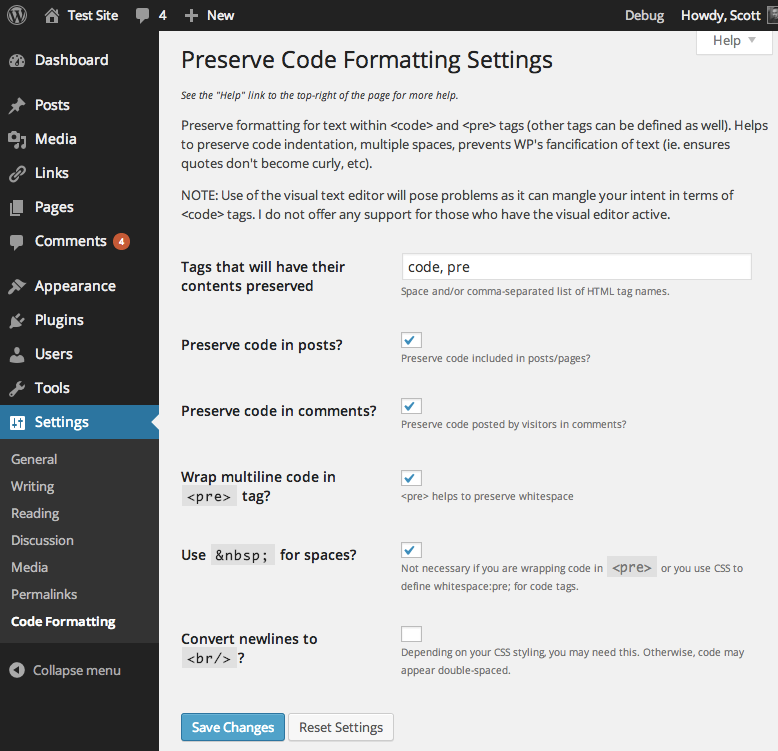
Are you using the visual editor? The visual editor has a tendency to screw up some of your intent, especially when you are attempting to include raw code. This plugin does not make any claims about working when you create posts with the visual editor enabled.
How to tell if you’re using the visual editor: you’re using what is now referred to as the Classic Editor (the editing experience in WordPress that pre-dates the block editor since WordPress 5.0). Above the post content field and to the right, there is a tab labeled “Visual” and another labeled “Text”. If you’re writing code, you want to use “Text” for such posts and not switch back to “Visual”.
Yes, shortcodes within code tags (or any tag processed by this plugin) will be output as pure text and not be processed as shortcodes by WordPress.
Yes, in the sense that it doesn’t do anything at all. The code and preformatted blocks in the block editor should preserve code formatting without the need for this plugin.
In short, the plugin will completely skip processing posts containing blocks. Use the code or preformatted blocks to format and display your code.
Only if you have older posts written in the text editor from before you began using the block editor. If so, then you would still want this plugin to be enabled so that those older posts have their code formatting preserved. This plugin being active will not interfere with posts created with blocks, all of which will be ignored by the plugin.
Asides from its intentional incompatibility with the block editor or classic visual editor, the main known issue with the plugin is its inability to properly recognize (and thus preserve) nested tags that match the tag being preserved. So within, for example, a tag, the first encountered will be treated as its closing tag even if technically that closing tag belongs to a nested ‘code’ tag, e.g. “This examplewith nested code tags</code> will be rendered as if that first/inner closing tag belonged to the first/outer ‘code’ tag.
It was a choice between either supporting the above scenario (which seems pretty rare overall) or supporting having multiple adjacent preserved tags in a post (which is much more common). A more robust solution is being pursued.
Yes. The tests are not packaged in the release .zip file or included in plugins.svn.wordpress.org, but can be found in the plugin’s GitHub repository. The tests are expecting to be run with PHPUnit 9 and you’ll likely experience errors if running them under another version.
Changelog
5.0 (2025-08-10)
Highlights:
This major release significantly improves security, performance, and compatibility. The plugin framework updates to version 070 for enhanced security and features. Block editor content is now properly excluded (the plugin was designed for text view), and compatibility extends through WordPress 6.8+ while dropping support for versions older than 5.5. Additional improvements include better error handling, enhanced documentation, and the addition of CSS classes for styling processed code blocks.
Details:
- Security and hardening:
- Hardening: Prevent regex pattern injection vulnerability
- Hardening: Prevent object injection vulnerability. Props Patchstack.
- Hardening: Prevent bypassing preprocessor by removing any explicit pseudo-tags from content
- Hardening: Prevent processing of excessively large content
- Hardening: Prevent unintended markup in translated strings before display
- Hardening: Prevent content-native usage of token string used internally to chunk data
- Performance:
- Change: Improve performance of processing tags to be preserved
- Change: Bail early if there are no tags configured to be preserved
- Change: Skip tags that have no content
- Change: Centralize regex patterns in new
get_preprocess_regex_pattern()andget_postprocess_regex_pattern() - Change: Use more efficient
preg_replace_callback()for tag extractions
- Block editor and content handling:
- New: Prevent processing of all block editor content (plugin was designed for text view, not block editor)
- Fix: Prevent unintended greediness when multiple instances of a tag are present
- UI and styling:
- New: Output class of “preserve-code-formatting” for all tags that were processed
- Change: Output example ‘code’ and ‘pre’ tags within ‘code’ tags within setting page description
- Framework and compatibility:
- Change: Update plugin framework to 070
- Change: Note compatibility through WP 6.8+
- Change: Drop compatibility with versions of WP older than 5.5
- Change: Note compatibility through PHP 8.3+
- Change: Update copyright date (2025)
- Code quality and documentation:
- New: Add FAQ entry explaining nested tag deficiency
- Change: Update
get_c2c_string()to add new strings - Change: Improve some docblock documentation
- Change: Tweak some
README.mdformatting - Change: Tweak installation instructions
- Change: Reduce number of tags defined in readme.txt
- Change: Note removal of development and testing related files from release packaging
- Change: Add missing release dates for earlier releases, as well as add an omitted release
4.0.1 (2021-04-14)
- Fix: Update plugin framework to 061 to fix a bug preventing settings from getting saved
4.0 (2021-04-03)
Highlights:
- This recommended release prevents potential conflicts with other plugins (such as SyntaxHighlighter), updates the plugin framework, and notes compatibility through WP 5.7+.
Details:
- Change: Use
{!{and}!}instead of[[and]]to prevent interpretation as shortcodes, fixing conflict with SyntaxHighlighter. Props azito122. - Change: Update plugin framework to 060
- 060:
- Rename class from
c2c_{PluginName}_Plugin_051toc2c_Plugin_060 - Move string translation handling into inheriting class making the plugin framework code plugin-agnostic
- Add abstract function
get_c2c_string()as a getter for translated strings - Replace all existing string usage with calls to
get_c2c_string()
- Add abstract function
- Handle WordPress’s deprecation of the use of the term “whitelist”
- Change: Rename
whitelist_options()toallowed_options() - Change: Use
add_allowed_options()instead of deprecatedadd_option_whitelist()for WP 5.5+ - Change: Hook
allowed_optionsfilter instead of deprecatedwhitelist_optionsfor WP 5.5+
- Change: Rename
- New: Add initial unit tests (currently just covering
is_wp_version_cmp()andget_c2c_string()) - Add
is_wp_version_cmp()as a utility to compare current WP version against a given WP version - Refactor
contextual_help()to be easier to read, and correct function docblocks - Don’t translate urlencoded donation email body text
- Add inline comments for translators to clarify purpose of placeholders
- Change PHP package name (make it singular)
- Tweak inline function description
- Note compatibility through WP 5.7+
- Update copyright date (2021)
- 051:
- Allow setting integer input value to include commas
- Use
number_format_i18n()to format integer value within input field - Update link to coffee2code.com to be HTTPS
- Update
readme_url()to refer to plugin’s readme.txt on plugins.svn.wordpress.org - Remove defunct line of code
- Change: Move translation of all parent class strings into main plugin file
- Change: Note compatibility through WP 5.7+
- Change: Update copyright date (2021)
Full changelog is available in CHANGELOG.md.
" width="120" height="120">
Available Versions
| Version | Download | Type |
|---|---|---|
| 5.0 | Download | Stable |
| 4.0.1 | Download | Stable |
| 4.0 | Download | Stable |
| 3.9.2 | Download | Stable |
| 3.9.1 | Download | Stable |
| 3.9 | Download | Stable |
| 3.8 | Download | Stable |
| 3.7 | Download | Stable |
| 3.6 | Download | Stable |
| 3.5 | Download | Stable |
| 3.2 | Download | Stable |
| 3.1 | Download | Stable |
| 3.0 | Download | Stable |
| 2.5.4 | Download | Stable |
| 2.5.3 | Download | Stable |
| 2.5.2 | Download | Stable |
| 2.5.1 | Download | Stable |
| 2.5 | Download | Stable |
| 2.0 | Download | Stable |
| Development | Download | Trunk |
