
Post SMTP – Complete Email Delivery and SMTP Solution with Email Logs, Alerts, Backup SMTP & Mobile App
Active Installs
300,000+
Last Updated
September 24, 2026
First Released
October 15, 2017
Download History (Last one month)
Contributors
👑 Go Pro | 💻Live Demo | 🔌Extensions | 📱Mobile Application
WordPress SMTP Plugin
Are you dealing with the WordPress not sending emails problem? Post SMTP helps you fix WordPress email delivery by connecting your site to a reliable SMTP or API mailer.
Post SMTP is a free WordPress SMTP plugin that helps you send WordPress emails securely and reliably through Gmail, Microsoft 365, Outlook, Amazon SES, Brevo, Mailgun, SendGrid, Postmark, Zoho Mail, and other supported email service providers.
Beyond SMTP, Post SMTP gives you the tools to monitor WordPress email delivery. Track sent and failed emails with email logs, inspect delivery errors, and get failure alerts when something goes wrong. You can also configure backup SMTP connections to keep your site’s emails moving if your primary mailer becomes unavailable.
With 20+ SMTP and API mailer options, Post SMTP works with the email service you already use. Its monitoring and notification tools help you troubleshoot delivery problems faster and keep important WordPress emails on track.
What is SMTP, and Why Do You Need It?
SMTP, short for Simple Mail Transfer Protocol, is the most widely used protocol for online email transmission. SMTP configuration with proper authentication for your WordPress site ensures that your WordPress emails do not end up in spam.
By default, WordPress sends emails using the PHP mail function, which isn’t ideal because most WordPress hosting servers don’t support PHP email.
On top of that, most email clients, such as Outlook (Office 365 / Microsoft365), Yahoo, Gmail, Brevo, Zoho, Amazon SES, Mailgun, etc., automatically block or mark spam emails that lack proper authentication.
That’s why you need to install the Post SMTP plugin on your WordPress site to configure the SMTP mailer of your choice with one-click SMTP setup for Gmail, Microsoft 365, and more.
How Does Post SMTP Work?
Post SMTP allows you to easily replace the default PHP mail function (wp_mail) of your WordPress site with the SMTP mailer of your choice, like Microsoft 365(Office 365), Brevo, Zoho, SendGrid, Mailgun SMTP, Gmail (Gmail SMTP Server), Post Mark, Amazon SES etc., which in turn improves WordPress email deliverability.
This WordPress mail SMTP plugin provides detailed email logs, email open tracking, email alerts, and a mobile app to monitor WordPress email deliverability.
Additionally, with a 3-step setup wizard you can configure any SMTP mailer (e.g., Gmail SMTP (Gmail one-click setup), Microsoft Office 365, Mailgun, Brevo, etc.) securely via API Keys in seconds without providing your SMTP account credentials.
NOTE: If you want to set up a Gmail SMTP server for WordPress, check out our detailed guide on how to configure Gmail SMTP server to send WordPress emails reliably.
Ultimately, this WordPress SMTP plugin helps you fix all your issues related to WordPress not sending emails.
⚡ Features That Make Post SMTP Stand Out
✅ Quick Setup Wizard: Easy-to-use and powerful 3-Step Setup Wizard for quick WordPress SMTP configuration with One-click SMTP setup for Gmail SMTP and Microsoft 365 SMTP.
✅ SPF, DKIM & DMARC Checks: Keep an eye on domain’s reputation with out built-in Spam Score Checker that looks at your DNS records..
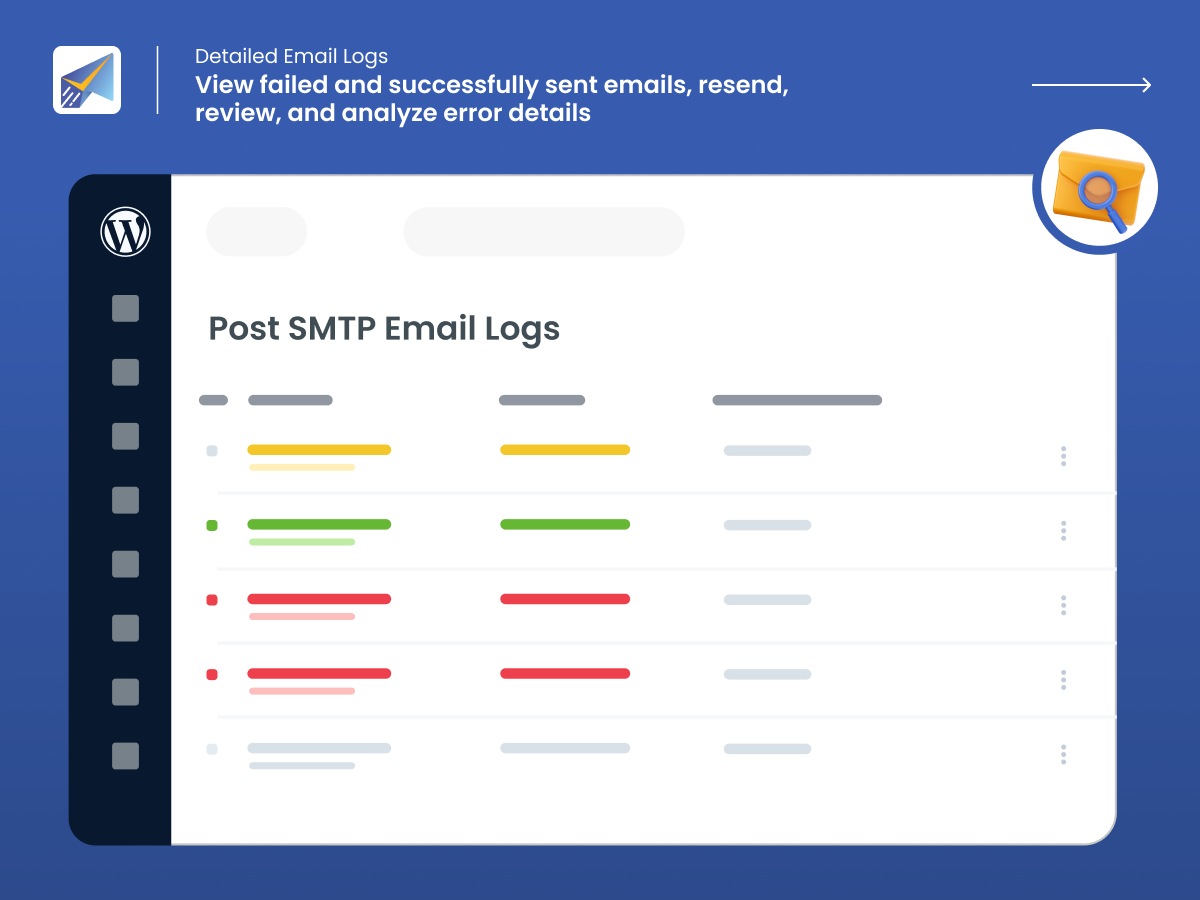
✅ Detailed Email Logs: Quickly view, filter, and check the status of all your WordPress emails and error messages with a simple click, ensuring your email logs are always up to date.
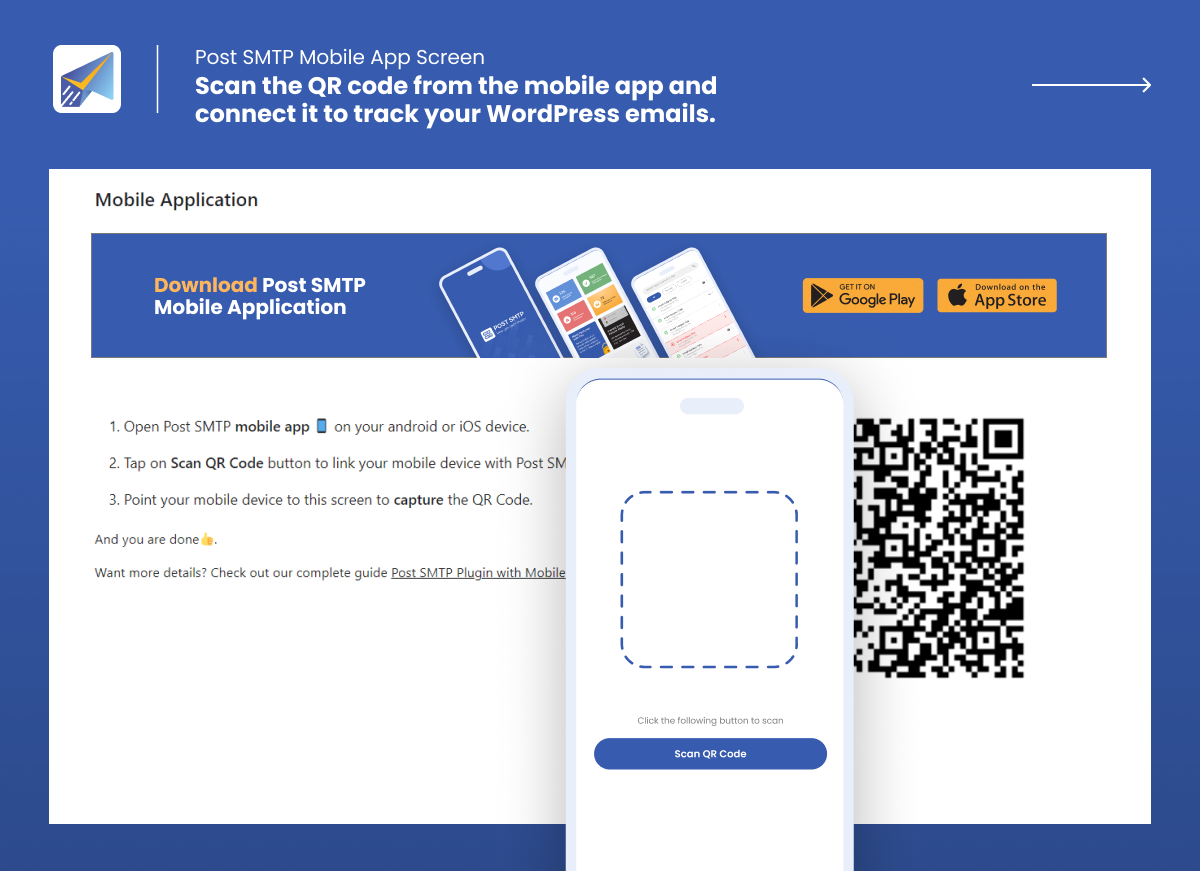
✅ Post SMTP Mobile App: Get WordPress email alerts directly on your mobile phone so you can track email deliverability on the go.
✅ Extensive Email Reporting: Get a thorough report at a glance regarding your WordPress email deliverability performance, including email open tracking and other important stats.
✅ Resend Email Attachments [PRO]: With a single click, you can resend any email attachment right through your email log screen, maintaining a seamless record in your email logs.
✅ OAuth 2.0 Support: Authenticate all major SMTP service providers’ accounts (i.e., Microsoft Office 365/Microsoft365, Brevo, Gmail SMTP (Gmail one-click setup), Amazon SES, SendGrid, Mailgun, etc.) securely using APIs.
✅ Fallback Mailing: Easily set up a backup WordPress SMTP mailer to send any transactional email in case of a failure with the main mailer.
✅ Instant Failure Notification: In case of any WordPress email delivery failure, you’ll get an instant email alert, Slack notification, SMS (via Twilio), push notification (via webhook and Chrome Extension), etc.
✅ Free Chrome Extension:Receive all your WordPress email alerts for failed email deliveries directly into your Chrome browser window.
✅ Weekly Email Summary: Get a snapshot of your WordPress email deliverability report right in your inbox every week, which reveals the total number of emails, the number of failed emails, total successful email deliveries, and your recent email logs.
✅ Unparalleled Customer Support: We offer multiple support options, including email, a WordPress forum, and even one-on-one expert assistance for WordPress SMTP Configuration and all your email delivery issues.
⚡ Post SMTP Mobile App: Get an Instant Pulse of Your WordPress Emails
✅ Keep track of Your Emails: You can monitor all the emails sent from your WordPress site and check the status of each email.
✅ Get Instant Alerts: When an email fails to deliver, you will receive an instant notification on your phone.
✅ Resend Failed Emails [PRO]: With one tap on your app, you can resend any failed email.
Preview Any Email: You can preview your emails and see how it looks.
✅ Connect Multiple Sites [PRO]: Monitor email logs and get email failure notifications (email alerts) for all your WordPress sites right from the app.
✅ Troubleshoot Errors: Quickly fix email failure issues by viewing the error details with a single tap.
SMTP Mailer Options for Post SMTP
With Post SMTP, you get many SMTP mailer options, such as:
-
SMTP.com SMTP – Newly Added
-
CloudFlare SMTP – Newly Added
-
Sweego SMTP – Newly Added
-
Mailtrap SMTP – Newly Added
-
Other SMTP (To connect any SMTP server)
You often need to install a different WordPress mail smtp plugin for each SMTP mailer setup. However, with Post SMTP, you can set up all popular SMTP providers, such as Gmail one-click setup, Microsoft Office 365, Mailgun, Amazon SES, Zoho Mail, etc.
Microsoft 365 SMTP
Millions of businesses around the world use Microsoft 365 (formerly Office 365) or Outlook for their email communications. With Post SMTP Pro, you can easily connect your existing Outlook or Microsoft 365 (formerly Office365) account with WordPress via one-click SMTP setup to improve email deliverability.
👉 For more details, check out our guide on how to set up Microsoft 365 for WordPress emails.
Amazon SES SMTP
Amazon SES (Simple Email Service) is a cloud-based email service that can send transactional and mass emails. SES is cost-effective, reliable, and scalable. Using the Post SMTP Pro, you can securely integrate your Amazon SES account with WordPress via APIs so that you can send large numbers of emails on a budget.
👉 For more details, check out our Amazon SES documentation.
Zoho Mail SMTP
Connect your Zoho mail personal or business account with WordPress via Post SMTP Pro to improve email deliverability. It has a 99.9% server uptime and offers a free option.
👉 For more details, check out our Zoho Mail documentation.
👉 To learn about all the supported SMTP mailers, check out our Complete SMTP Mailer Guide.
⚡ Added Benefits of Getting Post SMTP Pro
The Post SMTP Pro gives you an edge that makes your WordPress email management and performance reporting a breeze! With Post SMTP Pro, you get the following additional perks:
✅ Microsoft 365 One-Click: Upgrade to unlock a smooth and effortless Microsoft email setup. Just enable Microsoft 365 One-Click Setup. With a single toggle, Post SMTP automatically configures everything needed for secure and reliable Outlook / Office 365 email delivery no manual settings required, no technical steps to worry about.
✅ Google (Gmail) SMTP One-Click: Upgrade now for a worry-free Gmail SMTP integration. Activate Gmail One-Click Setup and let Post SMTP Setup Wizard handle all the API-related technicalities.
✅ Microsoft Teams Notifications: This WordPress SMTP plugin enables you to receive real-time notifications for your emails on Microsoft Teams with a simple webhook.
✅ Native SMTP Integration: You can use this WordPress SMTP plugin to securely configure 15+ SMTP service provider accounts, such as Microsoft 365 (Microsoft Office 365), Gmail SMTP, Amazon SES, Zoho Mail, Mailgun, Postmark, etc., with WordPress using APIs.
✅ Twilio (SMS) With this WordPress SMTP plugin, you can easily configure and receive all your WordPress email failure alerts through SMS by connecting your Twilio account.
✅ Secondary SMTP Connection: Using the Post SMTP Pro, you can set up multiple SMTP mailers so that for any reason, whenever an email fails to deliver, Post SMTP will automatically route that email through the secondary SMTP connection. In turn, this will improve your email delivery rate.
✅ Weekly Email Health Report: As a Post SMTP Pro member, you get a weekly email report that reveals all your deliverability statistics at a glance, such as the total number of emails sent from your WordPress site, the number of failed emails, the total number of successful email deliveries, and the complete email logs report so you can identify any issues right away without login into your WordPress.
✅ Email Open Tracking: Are you curious about which of your emails get opened? With Post SMTP Pro, you can easily view email open tracking right on your email log screen, which greatly enhances your ability to analyze the performance of your WordPress emails.
✅ Auto Resend Failed Emails: With Post SMTP Pro, you can effortlessly increase your WordPress email delivery success rate by simply specifying the number of resubmission attempts after the first failed submission.
✅ Email Batching and Quota Scheduling: Avoid any spam detection and daily email limit exceeding issues with the Post SMTP email batching and quota scheduling feature. As a pro user, you can easily specify the duration and number of emails per batch and choose how often to send the emails (hourly, daily, weekly, or monthly) for optimal email delivery.
✅ Priority Support: We offer exceptional customer support to all the Post SMTP Pro users. You can access our team of WordPress experts on one-on-one email support 24/7 for any WordPress email-related issue. Also, we offer WordPress SMTP Configuration service on demand.
🆕 MainWP Post SMTP Extension – NEW
Manage WordPress SMTP Configuration Across All Your Sites From A Single Dashboard
With MainWP Post SMTP Extension, you can:
- Set up and sync your SMTP settings for all your sites with one click.
- Ensure email deliverability with backup SMTP connections.
- Receive instant email failure alerts via email webhook, Slack, SMS, and Microsoft Teams.
- Track and resend your WordPress emails with a dedicated mobile app
- Access detailed email logs of all your sites in one place
MainWP Post SMTP Extension is the ultimate solution for WordPress email management. Get it today and enjoy the benefits of easy and efficient WP SMTP management.🙃
⛑ Need Help? Get Expert Assistance on Demand!!!
With our Expert Assistance, you can get help with email deliverability and SMTP plugin configuration for Gmail, Microsoft Office 365, and any SMTP setup for WordPress.
All you need is to click here, fill out the form, sit back, and relax while our WordPress expert sets up your SMTP configuration. Also, you can request us to configure all your DNS records for proper email authentication.
In short, our Expert Assistance is your one-stop destination for all your WordPress email delivery issues.
Compatibility and Support
-
Contact Form 7
-
Woocommerce
-
New User Approve
-
Password Protected
-
Elementor Forms
-
Gravity Forms
-
Login Designer
-
Visual Forms Builder
-
Mailster Newsletter plugin
-
SendPress Newsletters
-
WP HTML Mail
-
Email Templates
.. and every other plugin that uses the WordPress API wp_mail to send mail!
Try Our Other Awesome WordPress Plugins
-
Gutena Forms – Create modern, responsive contact forms directly in the Gutenberg block editor. Add advanced fields, protect against spam with reCAPTCHA and Cloudflare Turnstile, manage form entries, and more.
-
Password Protected – Secure your WordPress site, posts, pages, and categories with simple password protection.
-
WP EasyPay – Accept Square payments and donations easily on your WordPress site.
-
WC Shop Sync – Add Square payments and sync WooCommerce products, customers, and orders with your Square POS.
-
Advanced File Manager – Easily manage and organize your WordPress files directly from the dashboard.
-
CF7 Apps – Add honeypot, hCaptcha, and database entries to Contact Form 7. New extensions are continuously added.
-
myCred – Add gamification, rewards, ranks, badges, and points management systems to your WordPress website.
-
New User Approve – Control user registrations by manually approving or denying new signups.
-
Bookify – Your go-to online bookings and appointment scheduling plugin for WordPress.
-
All In One Login – Secure your WordPress login page, change the wp-login.php URL, and add social logins like Google, Facebook, Microsoft, LINE, and more.
-
WPExperts WooCommerce Store – Explore premium WooCommerce plugins and professional solutions by WPExperts.
Requirements
- WordPress v6.2 and above is recommended
- PHP v7.1 and above is recommended.
- Memory should be at least 800KiB per processing at idle.
- Ensure your email service provider allows SMTP connection through 3rd party applications, if not you can have it enabled.(Other SMTP)
- For reliable email deliverability, valid credentials are required.
No installation instructions provided.
Screenshot Gallery
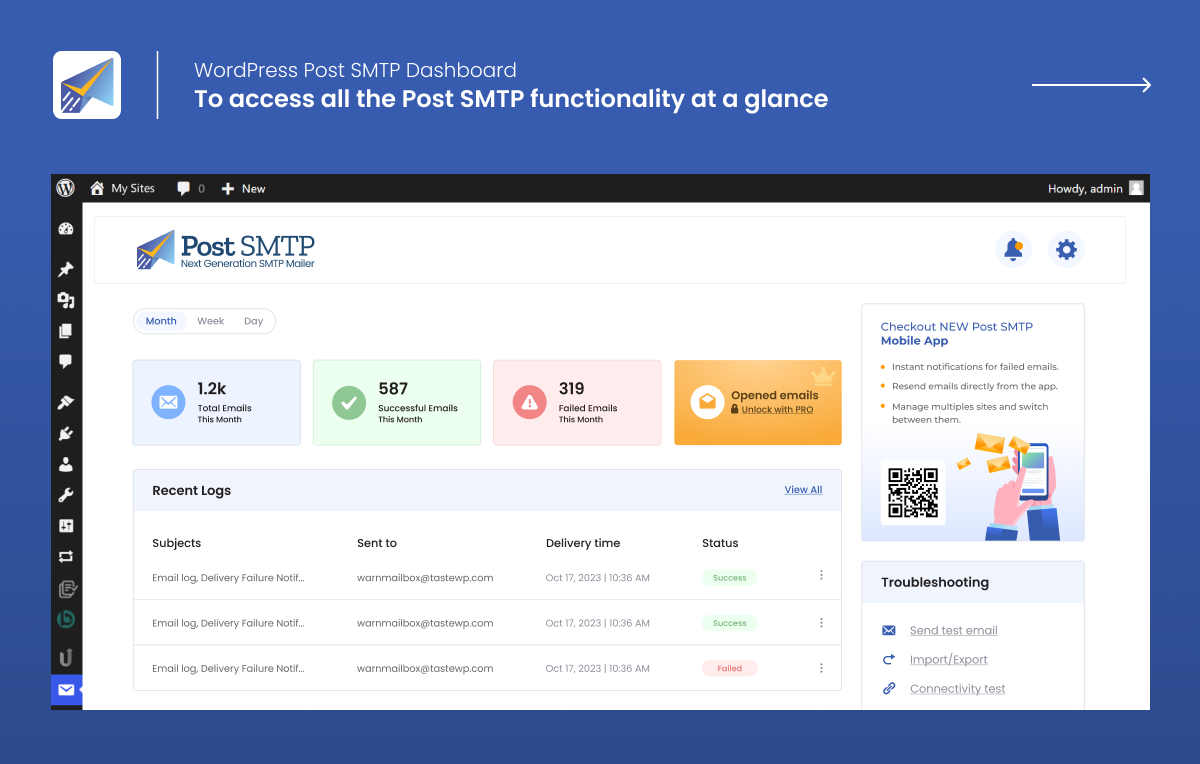
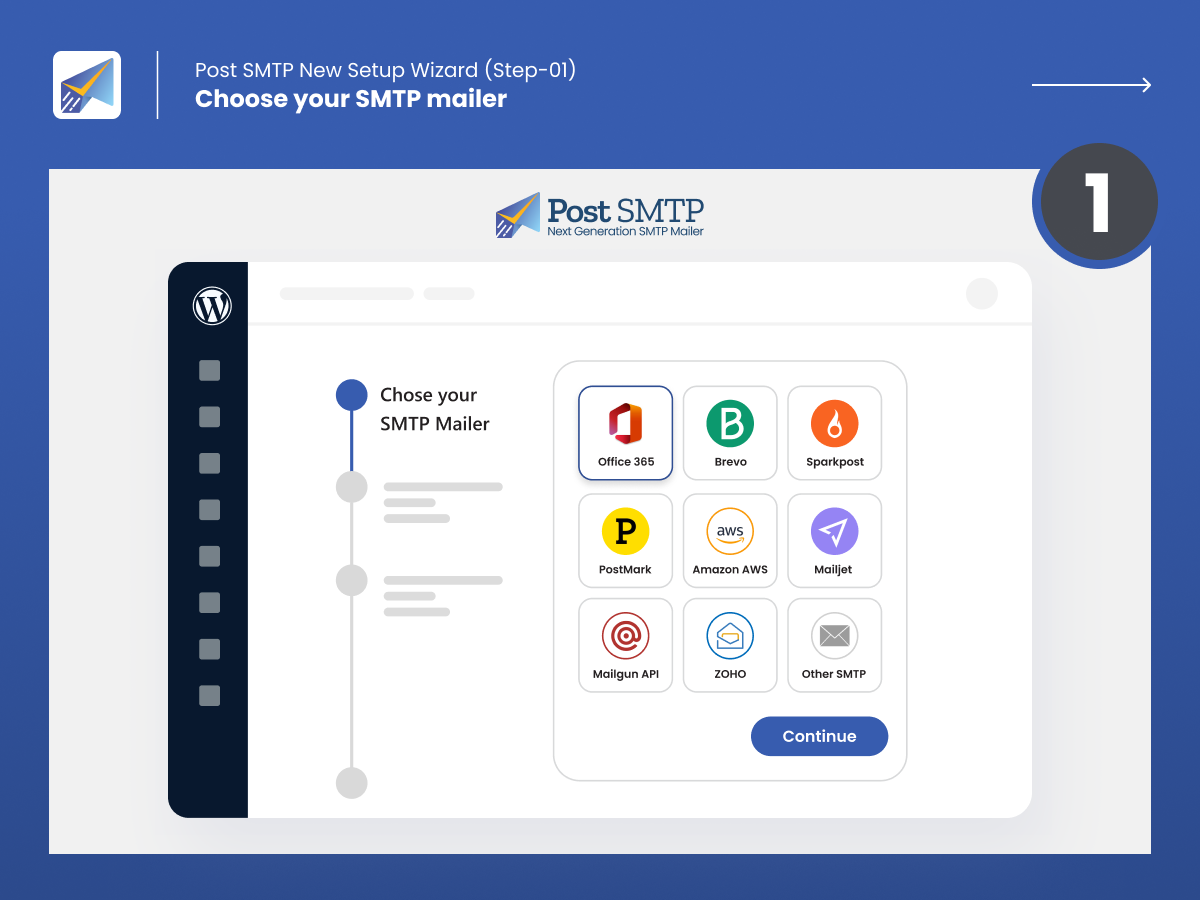
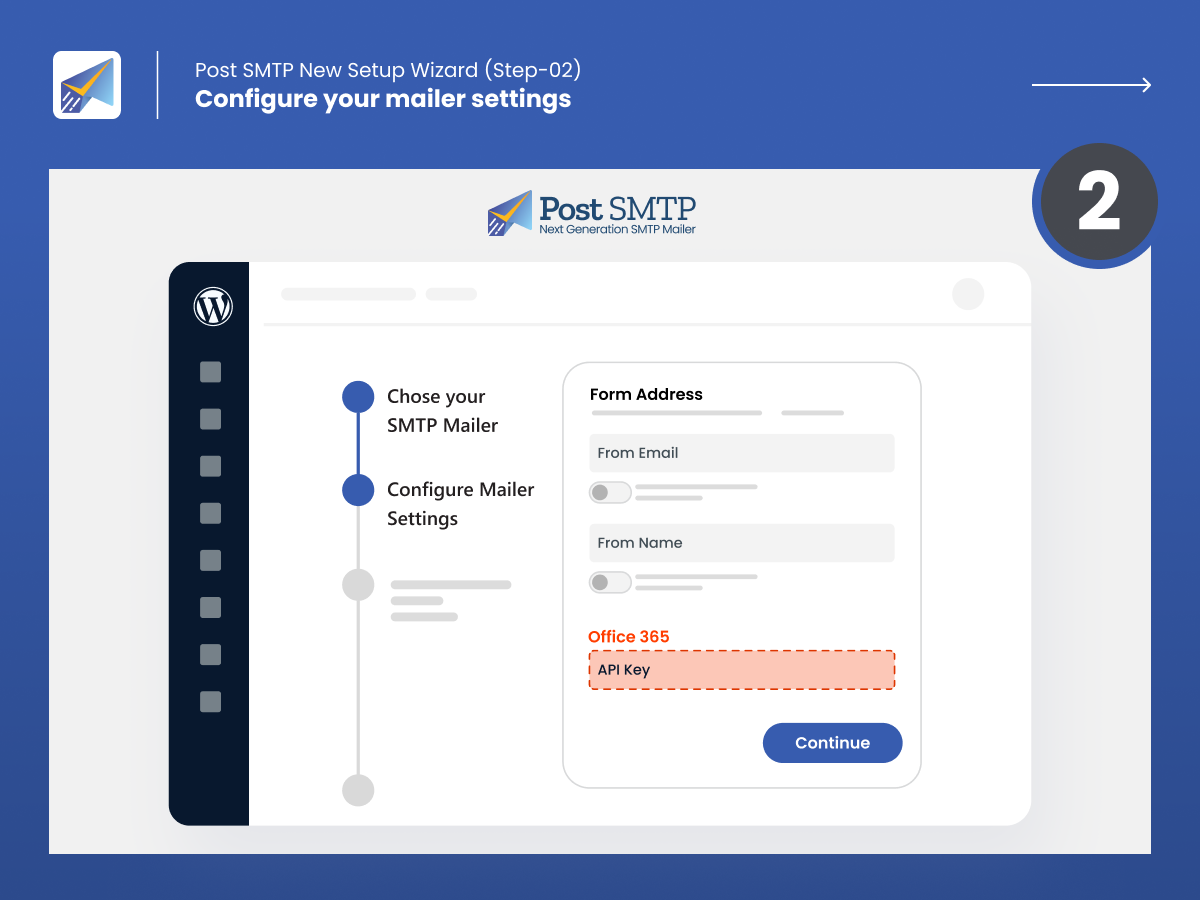
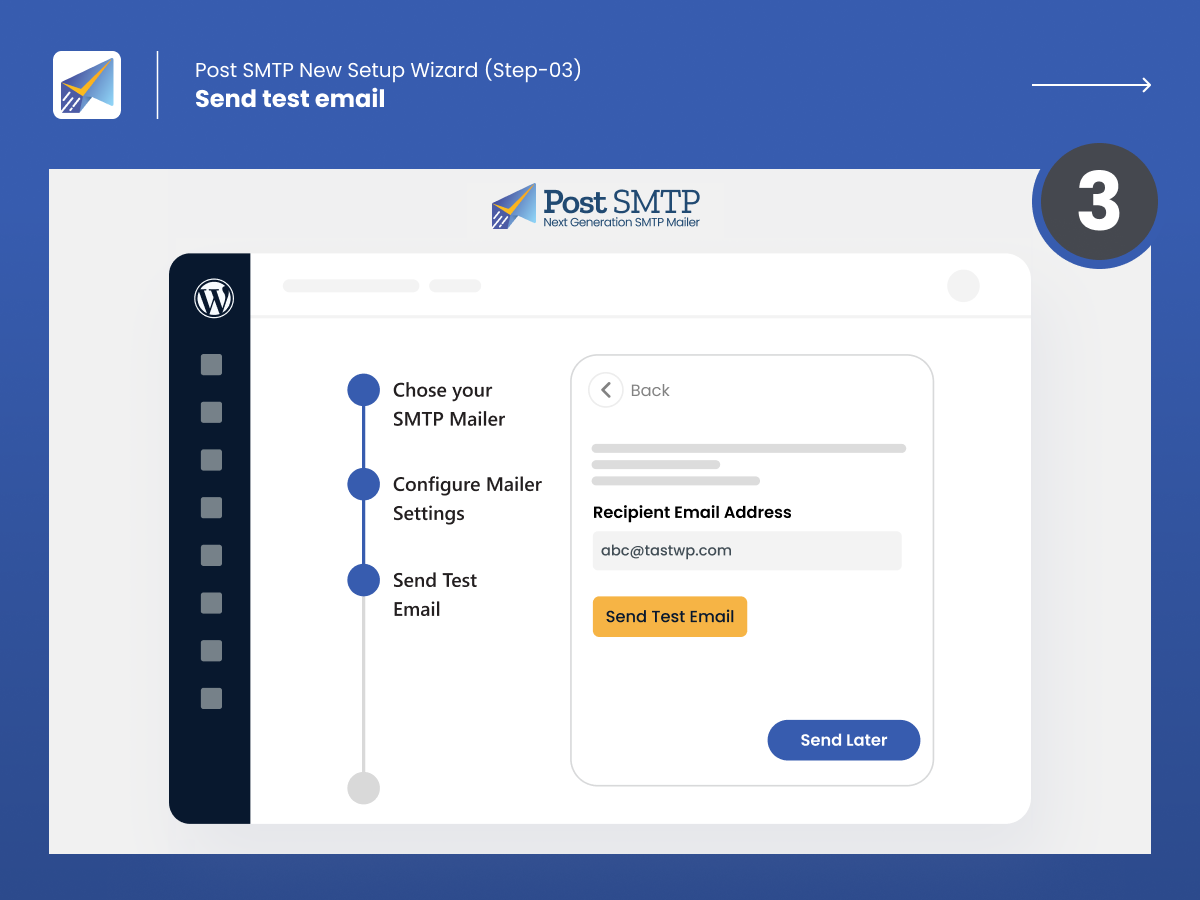

WordPress uses the PHP mail() function by default, which may not provide reliable email delivery. Post SMTP routes your WordPress emails through a trusted SMTP or API mailer such as Gmail, Microsoft 365, Amazon SES, Brevo, SendGrid, Mailgun, Postmark, etc. This can help fix failed or missing WordPress emails and improve email delivery.
Post SMTP connects your WordPress site to a dedicated SMTP or API mailer instead of relying on your web server’s default email function. It also provides email logs, delivery error details, backup connections, failure alerts, and even a dedicated mobile app to help you monitor and troubleshoot WordPress email delivery.
Yes. Post SMTP supports Gmail and Google Workspace. You can connect your account using Google’s supported authentication method, such as OAuth 2.0, and send WordPress emails through your Gmail or Google Workspace account. Post SMTP also offers Gmail One-Click Setup.
Yes. Post SMTP supports Microsoft 365 and Outlook. You can connect your account using Microsoft’s supported authentication method, such as an Application (Client) ID and Client Secret, or use Post SMTP’s Microsoft One-Click Setup to connect your account and send WordPress emails through Microsoft 365.
Yes. Post SMTP works with WooCommerce and can deliver transactional emails generated by your store, including order notifications, customer emails, password resets, and other WordPress emails.
Yes. Post SMTP works with Contact Form 7 and other WordPress form plugins. Once you configure a supported SMTP or API mailer, Contact Form 7 emails can use that connection instead of your site’s default email function.
Yes. Post SMTP includes email logging tools that let you review WordPress email activity and troubleshoot failed messages. Depending on your Post SMTP plan and configuration, you can access additional email log features such as ‘Set email logs retention period’.
Post SMTP provides tools to troubleshoot failed emails, and supported Pro features let you resend failed messages from the email logs. Check the current Pro feature list for the latest availability.
Yes. Post SMTP supports backup or fallback connections that can help keep your WordPress emails moving when your primary mailer fails. You can configure an additional mailer as a backup connection to improve email reliability.
Yes. Post SMTP can notify you when WordPress email delivery fails. It supports multiple notification options, including email, Slack, SMS via Twilio, mobile app, push notifications through webhooks and the Chrome Extension, and other supported notification channels. These alerts help you spot email delivery problems quickly and act before they affect your users.
Yes. Post SMTP offers a free version that provides SMTP and supported mailer connections for WordPress email delivery. Post SMTP Pro adds premium SMTP Mailers with One-Click Setup, advanced features for email logs, monitoring, reporting, alerts, email open tracking, and other advanced email-management needs.
Post SMTP Pro offers premium mailer options, One-Click Setup for Gmail SMTP and Microsoft 365 SMTP, and advanced email delivery and monitoring capabilities to the free plugin. Depending on the current Pro release, features can include advanced email logs, email quota scheduling, additional monitoring (email open tracking) and reporting tools, enhanced notifications, email resending, and other premium functionality.
Post SMTP supports 20+ SMTP and API mailer options, including Gmail, Google Workspace, Microsoft 365, Outlook, Amazon SES, Brevo, Zoho Mail, Postmark, Mailgun, SendGrid, SMTP.com, Cloudflare Email Service, and other supported providers. Available mailers can change as Post SMTP adds or updates integrations.
You can migrate to Post SMTP by installing the plugin, selecting your email provider, and configuring the required SMTP or API connection. After setup, send a test email and check the email logs to confirm delivery. If you are migrating from another SMTP plugin, review your existing mailer settings and credentials before switching.
A modern replacement for traditional password-based authentication. Post supports the OAuth 2.0 implementations of all three major e-mail providers: Gmail, Office365, Brevo, Mailgun, Hotmail and Yahoo Mail.
Post requests a limited access OAuth 2.0 token (valet key) to access the APIs (enter the house) and perform a specific service (handle Gmail SMTP, stay out of Google Docs) with no need for you to surrender your username and password credentials (master house key).
Once access is granted, Post commandeers the WordPress wp_mail() function to provide an incredibly stable mail sub-system.
There are many reasons why OAuth 2.0 is better than any password-based mechanism:
- Post will never ask for your password, so your password can’t be stolen
- If you change your password regularly, you will never have to update Post’s configuration
- You have tighter control over the data Post has access to. For Google users, it can never access your Calendar or Docs or YouTube; for Yahoo users, it can never access your Flickr
- If your WordPress site gets hacked, you can revoke Post’s email access without impacting any other application or website that has access to your account
NEVER give out your Gmail, Microsoft or Yahoo password to a 3rd-party or 3rd-party program that you don’t fully trust.
Yes! With the Post SMTP Plugin, you can configure any SMTP mailer account, including Brevo, Mailgun, and SendGrid on your WordPress site. Check out our detailed SMTP configuration documentation for all major SMTP service providers.
To use OAuth, your website needs its own Client ID. The Client ID is used to control authentication and authorization and is tied to the specific URL of your website. If you manage several websites, you will need a different Client ID for each one.
- Go to Microsoft account Developer Center and select ‘Create application’.
- In the ‘Application name’ field, enter ‘Post SMTP’. Select ‘I accept.’
- Select ‘API Settings’ from under ‘Settings’.
- In ‘Redirect URL’, enter the redirect URI given by Post (either from the wizard or from the manual configuration page). Select Save.
- Select ‘App Settings’ from under ‘Settings’.
- Enter the Client ID and Client Secret displayed here into the Post’s settings page.
- Go to Yahoo Developer Network and select ‘Create an App’.
- In the ‘Application Name’ field, enter ‘Post SMTP’. For ‘Application Type’, choose ‘Web Application’.
- In ‘Home Page URL’, enter the ‘Home Page URL’ given by Post.
- In ‘Callback Domain’, enter the ‘Callback Domain’ given by Post.
- Under ‘API Permissions’, choose ‘Mail.’ Under ‘Mail’ choose ‘Read/Write’
- Click ‘Create App’
- Enter the Client ID and Client Secret displayed here into the Post’s settings page.
-
If you have a Google Account from the Google Developer’s Console, use the Delete button under the Client ID.
-
If you have a Microsoft Live account, from the Microsoft account Developer Center, select the Application and choose Delete Application.
-
If you have a Yahoo Account, from the Yahoo Developer Network My Apps, select the Application and choose Delete App.
You can report security bugs through the Patchstack Vulnerability Disclosure Program. The Patchstack team helps validate, triage, and handle any security vulnerabilities. Report a security vulnerability.
Changelog
4.0.2 – Sep 24, 2026
- Security – Resolved Stored DOM-Based Cross-Site Scripting (XSS) vulnerability in failed email logs on WordPress Multisite.
- Fix – Resolved fatal error during All-In-One Security (AIOS) unlock email requests.
- Fix – Prevented redundant wp_posts database queries on AJAX requests to improve performance.
- Fix – Resolved infinite and duplicate email log generation during mailer and fallback failures.
- Fix – Corrected email tracking status assignment between primary and fallback mailer logs.
- Fix – Fixed issue where attachments were missing from fallback mailer logs.
- Fix – Prevented duplicate failed email log entries from being created on email failures.
- Fix – Fixed button alignment and cut-off issues in the Bulk Resend popup modal.
- Fix – Fixed numeric metric alignment and spacing in the Email Reporting section.
4.0.1 – Aug 25, 2026
- Rolled back from 4.0.0-beta.1
3.10.0 – Aug 24, 2026
- NEW – Added SMTP.com as an email service provider.
- NEW – Added CloudFlare as an email service provider.
- IMPROVEMENT – Updated Sweego API.
- IMPROVEMENT – Verified compatibility with WordPress v 7.1.
- FIX – Resolved issue where newsletter emails were rendered incorrectly via Microsoft 365 API.
- FIX – Fixed critical error when sending Wordfence Admin Authentication emails.
- FIX – Resolved PHP 8.3 depreciation warnings.
- FIX – Fixed fatal error occurring on the configuration page for version 3.7.0.
- FIX – Fixed issue where the Resend feature sent raw HTML instead of rendered emails.
- FIX – Corrected delivery time in logs to match WordPress timezone settings.
- FIX – Added missing angle brackets in Message-ID header to prevent Google Workspace bounces.
- FIX – Resolved issue where Reply-to settings were not being honored.
- FIX – Fixed Cyrillic domain support issues.
- FIX – Addressed various PHP warnings and minor UI/UX improvements.
3.9.5 – June 24, 2026
- TWEAK – Updated dashboard banners and removed the Extensions screen from the plugin menu.
3.9.4 – June 03, 2026
- FIX – Resolved failed builds reported by Plugintests.com
- FIX – Addressed PHP deprecation notices related to using null as an array offset
- FIX – Fixed compatibility issues with the Google Site Kit plugin
- FIX – Resolved Elastic Email API errors causing
Code: 400, Message: Bad Requestdue to missing required parameters - FIX – Addressed PHP 8 deprecation warnings for improved compatibility
- FIX – Resolved a fatal error occurring when accessing
Post SMTP → Settings - FIX – Improved compatibility with WordPress 7.0 & resolve issues of 3.9.2 version
3.9.3 – May 24, 2026
- TWEAK – Rolled back to version 3.9.1 due to socket-related errors.
3.9.2 – May 22, 2026
- TWEAK – Added WordPress 7.0 compatibility.
- FIX – Addressed PHP deprecation notices related to using null as an array offset.
- FIX – Fixed compatibility issues with the Google Site Kit plugin.
3.9.1 – April 01, 2026
- TWEAK – Updated Emailit API to v2.
- FIX – Added Header support in Maileroo.
- FIX – Resolved qrstr class conflict.
- FIX – Emailit API status handling (status code 201 was incorrectly marked as failed instead of pending/successful).
- FIX – Resolved fatal error: Class “HTMLPurifier_Config” not found.
- FIX – Fixed SMTP2GO false positive response.
3.9.0 – Mar 17, 2026
- TWEAK – Updated the Setup Wizard UI for Mailers and improved related content.
- FIX – Resolved REST error: rest_cookie_invalid_nonce (Cookie check failed – 403).
- FIX – Added support for the pre_wp_mail function for custom implementations via functions.php.
- FIX – Corrected an issue where submitted notification URLs were passed through esc_url, which escaped HTML entities (such as &) intended only for display.
- FIX – Resolved an issue where the Post SMTP email logger did not display all recipients.
- FIX – Fixed missing line breaks in the mail log content.
- FIX – Resolved the Initial Setup Wizard issue that allowed incorrect email acceptance on the wizard screen.
- FIX – Addressed missing authorization for Authenticated (Subscriber+) Office 365 OAuth configuration overwrite.
3.8.0 – Jan 20, 2026
- NEW – Added Sweego as an email service provider.
- NEW – Introduced the “Send Test Notification” feature for Post SMTP failure alerts.
- TWEAK – Added a hide option for wp_mail conflict notice.
- FIX – PHPMailer with “Log Only” mode was sending emails.
- FIX – Corrected improper call to the function _load_textdomain_just_in_time.
- FIX – Fixed redirection issue that incorrectly navigated users to the Post SMTP settings page.
3.7.0 – Dec 24, 2025
- NEW – Added Mailtrap.io as an email service provider.
- FIX – The PHPMailerException already exist.
- FIX – Call to undefined method QRcode.
- FIX – Emailit API Emails were going without From name
3.6.3 – Dec 17, 2025
- FIX – Escape email content.
3.6.2 – Nov 24, 2025
- IMPROVEMENT – Added PHP 8+ compatibility.
- FIX – Added authorization checks related to OAuth token updates for authenticated users.
3.6.1 – Oct 29, 2025
- IMPROVEMENT: Removed GIF from the plugin to enhance performance and reduce load time.
- IMPROVEMENT: Increased the request timeout for email sending to improve reliability and prevent timeouts.
- FIX: Resolved a missing authorization vulnerability.
- FIX: Addressed a WordPress error triggered when accessing the plugin settings page due to conflict with another theme/ plugin.
3.6.0 – Oct 14, 2025
- NEW – Added Maileroo as an email service provider.
- TWEAK – Enhanced Setup Wizard content for better user guidance.
- TWEAK – Added a “Notify” button on the WordPress dashboard.
- IMPROVEMENT – Updated multiple recipient view in email logs for better clarity.
- FIX – Resolved undefined property issue in Post SMTP report after update.
- FIX – Fixed “Limit Exceeded” error during Email DNS test.
- FIX – Corrected failed message entries in logs.
- FIX – Resolved issue with “Save Password” reappearing unexpectedly.
- FIX – Fixed changelog display issue in Post SMTP.
- FIX – Addressed PHPMailer BCC and CC handling issues.
- FIX – Fixed host impersonation domain name issue.
- FIX – Removed unnecessary console logs from the admin dashboard.
3.5.0 – Sept 17, 2025
- NEW – Added Emailit email service providers.
- TWEAK – Wizard Send Test Email disble button till the email is being sent.
- TWEAK – Limited the scope of Gmail.
- IMPROVEMENT – PHP 8+ compatibility added.
- IMPROVEMENT – Dashboard widget UI improvement.
- FIX – Fallback mailer was not working.
- FIX – SendGrid attachments were not working in some cases.
- FIX – Resending emails to multiple recipients was not working in some cases.
- FIX – PHP warning was appearing in some cases.
- FIX – PHP error was appearing in some cases Uncaught Error: Call to a member function getFromEmailAddress().
3.4.2 – Sept 01, 2025
- Enhancement – Improved AJAX call security.
- Improvement – PHP 8+ version compatibility.
3.4.1 – Aug 20, 2025
- TWEAK – Updated Plugin URI in header
3.4.0 – Aug 18, 2025
- NEW – Added Resend email service providers.
- UPDATED: Feedback SDK to the latest version.
- TWEAK – Removed irrelevant notices from Post SMTP Wizard.
- FIX – BCC/ CC fails with Sparkpost.
- FIX – reply-to was not working with Gravit Forms notifications with SMTP2GO.
3.3.0 – June 11, 2025
- NEW – WP Dashboard Widget
- NEW – Diagnostic Report Send Form
- NEW – Mailersend Mailer Integration
- FIX – Added Validation In Domain Checker DNS, SPF, DMARC
- FIX – LOCO Translate Issue
- FIX – Email Summary Improvement
- FIX – Vulnerability Fix.
3.2.0 – May 19, 2025
- New – Introducing Email Tester to test your email deliverability.
- Fix – Removed id duplication in the Wizard.
3.1.4 – Apr 08, 2025
- FIX – To column in email logs was empty in some cases.
3.1.3 – Mar 03, 2025
- Enhancement: Email logs security enhancement.
3.1.2 – Feb 24, 2025
- Enhancement: Email logs security enhancement.
3.1.1 – Feb 11, 2025
- Fix: Raw HTML was sent when resending emails from the log section.
- Fix: AJAX error with some Form plugins.
3.1.0 – Feb 10, 2025
- New: Added SendGrid EU support.
- Optimization: Improved email reporting.
- Fix: Translation warning was appearing in some cases.
- Fix: Security enhancement.
- Fix: Prevent From Name was not working, if Prevent From Email was not enabled.
- Fix: Send Test was not appearing in Log Only mode.
3.0.2 – Jan 27, 2025
- Updated: Feedback SDK to the latest version.
3.0.1 – Jan 14, 2025
- Fix: Fixed the UI conflict.
- Fix: Fixed MySQL warning.
- Fix: Translation warning fixed.
3.0.0 – Jan 07, 2025
- New: Introduced all New Post SMTP Dashboard for users’ ease.
- New: Introduced new SMTP socket SMTP2GO.
- New: Introduced new Send Mail user interface.
- New: Introduced Webhook, so you can add Webhook URL to get notified when an email is failed.
2.9.14 – December 18, 2024
- Tweak – WordPress 6.7 Transalation compatibility added.
2.9.13 – December 10, 2024
- Fix – Users were unable to regenerate Mobile App QR code in admin view.
- Tweak – WordPress 6.7 Transalation compatibility added.
2.9.12 – December 02, 2024
- Enhancement – Regenerate QR Code Mobile Applicaion security enhancement in admin view reported by Patchstack.
2.9.11 – November 21, 2024
- Updated: Feedback SDK to the latest version.
- Tweak: Failed email notification typo fixed.
2.9.10 – November 19, 2024
- Email logs search security enhancement in admin view reported by Patchstack
2.9.9 – October 01, 2024
- Tweak: Typo fixes.
- Tweak: Improved user interface in wizard.
- Fix: PHP deprecated warning on 8.x.
- Fix: Emails count was not accurate in Weekly email in some cases.
2.9.8 – August 21, 2024
- New: Added SendGrid EU support.
- New: Added pre_wp_mail filter.
- Tweak: Sometimes Post SMTP was not detecting Post SMTP Pro.
- Updated: Feedback SDK to the latest version.
- Fix – Mailjet – Reply-To email was not working properly.
2.9.7 – July 01, 2024
- Fix: Logs filter was not working in Post SMTP Mobile Application
2.9.6 2024-06-27
- Tweak – Some strings were not translatable.
- Fix – Compatibility added for old PHP Versions.
- Fix – Notice: Only variables should be passed by reference.
2.9.5 – 2024-06-25
- Added: New Successful, Failed, and All email filter on email logs.
- Added: Option to print email.
- Updated: The user interface of settings tabs
2.9.4 – 2024-05-29
- Security Improvement: Sanitized SQL queries suggested by Wordfence team.
2.9.3 – 2024-05-22
- IMPROVEMENT – Email health report settings and template UI
- FIX – Remove false email delivery count from the WordPress dashboard.
2.9.2 – 2024-05-13
- NEW – Added new filter post_smtp_postmark_content for developers ease.
- UPDATED – Google Client SDK to latest version.
- IMPROVEMENT – Site URL was missing in Post SMTP Chrome Extension.
2.9.1 – 2024-04-22
- Bug Fix: error appearing “syntax error, unexpected ‘)'”.
2.9.0 – 2024-04-16
- New – Added email health report
- New – Added new socket/ email service SendPulse
- Fix – AJAX call was being interrupted by register_setting when specific plugins were activated.
2.8.13 – 2024-03-26
- FIXED: Reverted last fix as it was conflicting in some cases.
2.8.12 – 2024-03-26
- FIXED: AJAX call was being interrupted by register_setting when specific plugins were activated.
2.8.11 – 2024-01-19
- Added link to the new POST SMTP app for iOS released.
2.8.10 – 2024-01-18
- Security Improvement: Added check to automatically remove any connected device with incomplete information.
2.8.9 – 2024-01-11
- Added compatibility for InstaWP
2.8.8 – 2024-01-01
- Improvement: Added sanitization and escape functions in POST SMTP Mobile App QR code scanning window.
2.8.7 – 2023-12-20
- Improvement – added sanitization where missing to improve security
- Improvement – added nonce where missing to improve security
2.8.6 – 2023-12-07
- Improvement – Changed banner placement for NEW mobile app for POST SMTP to improve UX.
- Improvement – Tweaked dashboard UI for better usability.
2.8.5 – 2023-11-23
- Fix: In some cases, there was an issue disconnecting mobile application.
2.8.4 – 2023-11-20
- Fix: From name and emails, prevention settings were not being saved correctly in some cases in the new wizard.
- Fix: In some sockets, the API keys getting saved were encoded in multiple layers.
2.8.3 – 2023-11-17
- Fix – Getting error when saving settings in some scenarios.
- Improvement – Optimized QR code scanning module for Post SMTP mobile app to avoid any scanning delays
2.8.2 – 2023-11-14
- Improvement – PHP < 7.3 compatibility added.
2.8.1 – 2023-11-13
- Fix – Other SMTP option in the wizard was not saving the settings correctly.
2.8.0 – 2023-11-13
- NEW – Introducing a NEW 3-step wizard to speed up the initial setup.
- NEW – Added documentation within the wizard to ease out the setup
- NEW – Added new socket/email service for Mailjet
- NEW – Added support for default socket within wizard (you can use this option in case you want to use the logs functionality only)
- Fix – Updated the error string as reported by @interaptivre
2.7.2 – 2023-11-01
- Improvement – Mobile App banner improvement.
2.7.1 – 2023-11-01
- NEW – Show Mobile App Notice on Post SMTP dashboard
- Improvement – Improved SQL query to meet latest security standards
- Improvement – Added patch to avoid script execution in log content.
2.7.0 – 2023-10-26
- NEW – Added support for POST SMTP app. Visit documentation for more information
- Fix – Raw HTML was sent when using ElasticEmail service.
- Fix – Raw HTML was sent when resending emails from the log section.
2.6.2 – 2023-10-19
- Tested up to WordPress v6.3.2
2.6.1 – 2023-10-03
- Fix: Removed broken link from test email.
- Improvement: Improved SQL query to meet latest security standards.
- Improvement: Replaced sanitize_text_field() with intval() as suggested by WP Scan team.
2.6.0 – 2023-09-12
NEW
- Elastic mail socket added
- When resetting the plugin settings, the user can check to preserve logs from getting removed
- MainWP integration added. How-to instructions will be available publicly soon.
FIX
- When using PHPMailer, the failed email log was not creating
IMPROVEMENT
- Now, users can skip the banner from the dashboard.
2.5.9.4 – 2023-08-29
- API endpoint “SendinBlue” has been updated to “Brevo”
2.5.9.3 – 2023-08-17
- Minor Tweaks
2.5.9.2 – 2023-08-16
- Compatible & Tested up to WordPress v6.3
2.5.9.1
NEW
- Added option to refresh recent logs in the dashboard without loading the page.
- Added new hooks in the code to make the functionality extendable.
2.5.9 – 2023-07-18
IMPROVEMENTS
- Improved email log popup content
FIX
- Reverted support for HTML view in email content popup with proper checks to avoid CSS conflicts.
NEW
- Added new filter post_smtp_before_view_log to extend log section view.
2.5.8 – 2023-07-11
IMPROVEMENTS
- Added function to escape backend email content popup HTML.
- Added Failed/success labels for better visibility.
- Displayed error message on hover and in the popup to simplify the interface and UX in the log section.
- Updated Feedback SDK to the latest version
FIXES
- Fix: Pagination was getting reset on resending emails.
2.5.7 – 2023-06-21
IMPROVEMENTS
- Enhance code quality and strengthen security measures.
2.5.6 – 2023-06-08
FIXES
- Critical error was being thrown when reseting the plugin.
2.5.5 – 2023-05-29
FIXES
- Some of logs were overriding log page CSS.
IMPROVEMENTS
- Added title on log status for better user experience.
- Translation string improvement.
2.5.4 – 2023-05-24
FIXES
- Logs were not created in some cases.
2.5.3 2023-05-16
FIXES
- Fixed E_WARNING appearing on activation in some cases.
2.5.2 – 2023-05-12
FIXES
- Fixed the issue where users were getting stuck in the initial migration stage.
IMPROVEMENTS
- On completing the migration process, limit the notice to the logs section only to delete old logs.
- Added an option to disable migration notifications for seven days on clicking the cross icon on notice.
- Added a new feature that allows users to revert a migration. This way, they can retry the migration process or switch back to the old logs interface if required.
- Added an option to skip the migration process for those who do not wish to transfer their old logs and want to switch to the new interface.
- Added permission check before creating/writing error log during migration.
2.5.1 – 2023-05-10
NEW
- Added a link to learn more about migration.
- Added a condition to initiate the migration and logging only if the new custom table exists.
IMPROVEMENTS
- Improved database migration process to handle potential failures.
2.5.0 – 2023-05-09
NEW
- Introducing a new log section that is both lightweight and optimized, capable of accommodating millions of entries.
- Added a migration wizard to help move existing logs to new custom tables from the old version.
2.4.9 – 2023-04-27
FIXES
- Uncaught Error: Cannot use object of type WP_Error as array
- Fixed deprecation notice for PHP Version > 8.0
IMPROVEMENTS
- Added condition for notice on how to fix broken emails
2.4.8 – 2023-04-17
Bug Fix
- Fixed deprecated functions on Php 8.x
2.4.7 – 2023-04-10
Improvements
- Updated feedback SDK to latest version
- Added PHP 8.1 compatibility
2.4.6 – 2023-03-27
Bug Fixes
- Added new option in the settings to fix broken emails.
2.4.5 – 2023-03-14
Bug Fixes
- Reverted the fix to support minor PHP versions, impacting some other PHP versions.
- NEW Filter post_smtp_incompatible_php added to fix the compatibility of minor PHP versions.
2.4.4 – 2023-03-08
Bug Fixes
- Resolved an issue where warnings were generated due to an array to string conversion.
- Fixed a problem where CC and BCC recipients were not properly added when using SendInBlue.
- Addressed an issue where multiple recipients using SendInBlue were receiving emails individually instead of as a group.
- Fixed an email formatting issue that occurred in certain PHP versions.
- Corrected an issue where the friendly name feature was not functioning properly with SendInBlue.
2.4.3 – 2023-02-27
Bug Fixes
- Fix – Code 400 error appearing in some cases for SendGrid with cc headers
2.4.2 – 2023-02-24
Bug Fixes
- Email header request issue fixed for MailGun
- Email attachment issue is fixed in SendGrid
2.4.1 – 2023-02-22
Bug Fixes
- Fixed parse error on Php 7.2
2.4 – 2023-02-21
Improvements
- Replaced Mandrill SDK with Endpoints
- Replaced SendGrid SDK with Endpoints
2.3.2 – 2023-01-06
Bug Fixes
- Fixed error related to Reply-To appearing in some cases.
2.3.1 – 2023-01-05
Bug Fixes
- Fixed issues appearing in PostmanLogFields.php
- Emails were getting broken in some cases
2.3 – 2023-01-03
Bug Fixes
- PHP errors appear in ajax requests in some cases.
- Fixed comma breaking the From name in the log section
- Reply-to Header not being added in some instances (Reported by @pierrehooker)
Improvements
- Updated sender header as per RFC-2822
- Added PHP 8 Compatibility
- Updated Google API SDK
- Replaced MailGun SDK with endpoints
- Replaced SendInBlue SDK with Endpoints
2.2.3 – 2022-12-27
FIX
- Bug Fix – Support menu was disappearing in some cases
2.2.2 – 2022-12-19
FIX
- SendGrid was missing on wizard
- PHP Warnings
2.2.1 – 2022-12-13
FIX
- Email template HTML was broken
2.2 – 2022-12-08
- NEW
- Added New Socket/ Email Service Postmark
- Added New Socket/ Email Service SparkPost
- IMPROVEMENTS
- SSRF Prevention
- SQL Warning Removed
- MailGun SDK Updated to Latest Version
- Compatibility with BackupBuddy added
- FIXES
- Multisite Plugin Update
- Additional Headers were not saved properly in some cases
- Import Button was not working in some cases
2.1.10 – 2022-10-10
- FIXES
- Avoid redirection to wizard on activation
- Issue in resend emails
- Made backend setting fields visible
- IMPROVEMENTS
- Email host message
- Sendgrid message id to prevent spam emails
2.1.9 – 2022-09-9
- FIX
- User Compatibility Fix
- Unauthorized error on wizard
2.1.8 – 2022-09-5
- FIX
- Php warnings
2.1.7 – 2022-08-30
- FIX
- Server side request forgery
2.1.6 – 2022-08-29
- FIX
- Server side request forgery
2.1.5 – 2022-08-25
- FIX
- Updated email header to prevent email from being SPAM
2.1.4 – 2022-08-18
- NEW
- Redirect the user to the setup wizard on activating the Plugin
- Added action hook, “post_smtp_before_reset_plugin” to add an event before resetting plugin
- Added action hook, “post_smtp_after_reset_plugin” to add an event after resetting plugin
-
Added notice to Grant Access after getting done with the wizard step to improve the UX
-
FIXES
- Tweaks for PHP Version 8+ compatibility
- Freemius Language FIX
- Security Fix to avoid XSS from admin settings
- Mailster support updated for the latest version (thanks to @evrpress)
- Typo fix: defualt to default (thanks to @jsilvermist)
- Updated email header to prevent email from being SPAM
2.1.3- 2022-07-1
- FIX
- PHP Version Compatibility.
2.1.2- 2022-06-30
- NEW
- Integrated SDK for Feedback and support.
-
Added “Start wizard” button in setup notification to optimize UX for the end-user.
-
Improved
Removed unused code -
FIX
Less secure App Banner appearing in non-appropriate cases
2.1.1.1 – 2022-06-15
- FIX
- Sendinblue email header
2.1.1 – 2022-06-09
- FIX
- PHP Version Compatibility.
2.1 – 2022-06-09
- NEW
- All New UI
- Sendinblue API Integration
2.0.27 – 2022-05-19
Add notice about Google Less Secure App.
2.0.26 – 2022-04-22
- Bug Fixes
-
Email header was broken in some cases.
-
Improvements
- Minor UI improvement.
llcHostname added in ZendMail.
2.0.25 – 2022-04-06
- Bug Fixes
- WP 5.9 Compatibility Ballon UI issue.
- Uncaught Error: Class PostmanAdminController not found.
-
Ajax error appearing due to Google API depreciated function.
-
Improvements
- Code Optimization.
- MIME version added to test mails to prevent emails from spam.
- NEW Filter
postman_test_email_argsadded to modify test email arguments. - NEW Action
wp_mail_succeededadded to exectue on every success email delivery.
2.0.24 – 2022-02-13
- Update: THE FUTURE OF Post SMTP – https://postmansmtp.com/the-future-of-post-smtp/
2.0.23 – 2021-04-22
- Fixed:
WP_Scripts::localize called incorrectlymessage.
2.0.22 – 2021-02-14
- Update: Chrome extension URL change
- Fixed: Double save when extension save to option
2.0.21 – 2021-02-11
- Fixed: Security issue – nonce validation.
- Fixed: Class PostmanViewController not found
- New: New wp-config.php constant to disable the email logger =
POST_SMTP_CORE_MAIL_LOG.
2.0.20 – 2021-01-19
- Fixed: All reported office 365 issues.
- New: Add link to Amazon SES Extension
2.0.19 – 2021-01-19
- Fixed: All reported office 365 issues.
- New: Add link to Amazon SES Extension
2.0.18 – 2021-01-17
- New: Plugin Extensions
2.0.16 – 2020-12-13
- Update: General Info
2.0.15 – 2020-08-12
- Fixed: WordPress 5.5 compatibility (stable)
2.0.14 – 2020-08-11
- Removed: WordPress 5.5 compatibility (bug)
2.0.13 – 2020-08-11
- Fixed: WordPress 5.5 compatibility
- Fixed: Email log filtering
- Fixed: Pushover notifications
- New: Suggest solution for email delivery errors
2.0.12 – 2020-05-18
- Updated: Readme file info
2.0.11 – 2020-02-25
- Fixed: Slack notifications
2.0.10 – 2020-01-21
- Fixed: HTML content type
- Fixed: Sendgrid crash when has duplicates recipients (bypass, Sendgrid issue).
- Fixed: Few OAuth undefined notifications
- Fixed: Duplicate Emails – When you have notify and confirm (Ninja forms, etc..)
- Fixed: Logs wp_error convert
2.0.9 – 2020-01-13
- Fixed: Notify on error bug – crash site
- Fixed: From header
2.0.8 – 2020-01-12
- Updated: Reply-To header bug
2.0.7 – 2020-01-12
- Updated: Improve PHPMailer method.
- Updated: Bug fixes.
2.0.6 – 2019-10-08
- Updated: Bug fixes.
2.0.5 – 2019-09-26
- New: You can now export logs to CSV.
- Updated: Few notifications errors, and minor improvements.
2.0.4 – 2019-08-27
- Updated: More security.
2.0.3 – 2019-08-21
- Fixed: A few security issues.
2.0.2 – 2019-05-19
- Fixed: Sendgrid code fix.
- Fixed: Default method (nothing configured) will use the default mail on the server and not SMTP.
2.0.1 – 2019-05-15
- New: Mailer Type – Added an option to send without overwrite the ‘wp_mail’ function, better compability to WordPress delivery. hopefully will be the default in the future.
- Updated: Sendgrid API was upgraded and rewritten to the new version.
- Fixed: Message-Id header was missing on SMTP
- Fixed: Email logger optimization – better query for large amount of records.
- Fixed: The localization was fixed to match translate.wordpress.org translation system ( Thanks to Niels de Blaauw from Level-Level ).
- Fixed: Code and optimization ( Thanks to Niels de Blaauw from Level-Level ).
1.9.8 – 2019-02-18
- New: a new from field to the fallback – Can’t trust the username as “from” value (email address).
1.9.7 – 2019-02-17
- New: Fallback Feature – Configure a backup SMTP when emails are failing.
- New: WordPress Multisite compability – with global settings.
- New: Email Log capability – give other user cheking the logs.
- Fixed: compatibility with mailster plugin
- Fixed: Mandrill exception bug – Thanks to Niels de Blaauw from Level-Level
1.9.6 – 2019-01-29
- Added support for our new chrome notification extension.
- few fixes
1.9.5 – 2018-10-02
- Added support for Mailgun Europe region.
- Replace “buggy” mime_content_type php function
1.9.4 – 2018-08-03
The most stupid idea ever remove (auto security select)
1.9.3 – 2018-07-26
Removed auto configure for port 25 (can be TLS)
1.9.2 – 2018-07-23
Removed deprecated functions from 7.2 + comment unready feature
1.9.1 – 2018-07-22
Syntx stupid mistake
1.9.0 – 2018-07-22
- Better support for secure delivery
- Support for constants auth (inside wp-config), check the detailes our Blog
- Automatic encryption select base on the port input – 25, 465, 587, 2525
1.8.9 – 2018-04-24
- Sendgrid bug
1.8.8 – 2018-04-24
- file added to svn – contactform7
1.8.6 – 2018-04-24
- Fix lockfile erros
- Contact form 7 integration
- PHP 5.6 requirement
1.8.5 – 2018-04-19
- Remove Beta Woocommerce integration
- Better check for WPML less then version 3.9
1.8.4 – 2018-04-18
- New: Multiple notification options to failed emails
- Upgrade: The Gmail code was upgraded and code change to support large attachments
- Add: Fix release lock file error
- Change: “Not configured…” message is now dismissible
1.8.3 – 2018-03-21
- Fix: SendGrid API Call Structure (The previous try didn’t work)
1.8.2 – 2018-03-21
- Fix: SendGrid API Call Structure
1.8.1 – 2018-03-20
- New: Sendgrid API & Client Version 6
- New: Add email log ‘send to’ column
- Fix: fallback emails on hosting require the ‘-f’ parameter
- Fix: Using hostname insted of an IP
- Fix: Remove mailgun test folder ( virustotal issue )
- Fix: Additional bugs collected from support tickets.
- Added: added filters to from_name and from_email filters (local connection)
- change hostname extrect logic
1.8 – 2017-12-24
- New: Mailgun API integration
- New: New filter controls
- New: WPML conflict fix
- Fix: Minor old bugs
1.7.10 – 2017-11-21
- Fixed: bug while detecting transcript error
1.7.9 – 2017-11-20
- Fixed: misspled false
- Fixed: feedback form
- Fixed: Some localization strings
- Removed: deprecated function
- New: Option to input emails when resend email
- Added: explain message on email log filter
1.7.8 – 2017-11-17
- Menu Items grouping
- Fixed: IP detection error in some web hosts
- Fixed: Link open in new page attribute = _blank
- Fixed: Replace deprecated PHP 7 functions.
- Updated: Validator TLD’s list
- Added: Email log date and search filter.
- Added: Alert on sending error (Fallback to local mail)
- Added: Email body preview (not raw)
1.7.7 – 2017-10-17
- Fixed: Error sending files with sendgrid
- Fixed: Wrong attachments format in Mandrill
- Fixed: Wrong Sender Header in Mandrill
1.7.6 – 2017-10-17
- Missing sendgrid files
- Fixed: Localization slug
1.7.5 – 2017-10-07
- Fixed: security issue (XSS)
- Fixed: Small bug with Google API
1.7.2 – 2015-11-08
" width="120" height="120">
Available Versions
| Version | Download | Type |
|---|---|---|
| 4.0.2 | Download | Stable |
| 4.0.1 | Download | Stable |
| 4.0.0-beta.1 | Download | Beta |
| 3.9.5 | Download | Stable |
| 3.9.4 | Download | Stable |
| 3.9.3 | Download | Stable |
| 3.9.2 | Download | Stable |
| 3.9.1 | Download | Stable |
| 3.9.0 | Download | Stable |
| 3.8.0 | Download | Stable |
| 3.7.0 | Download | Stable |
| 3.6.3 | Download | Stable |
| 3.6.2 | Download | Stable |
| 3.6.1 | Download | Stable |
| 3.6.0 | Download | Stable |
| 3.5.0 | Download | Stable |
| 3.4.2 | Download | Stable |
| 3.4.1 | Download | Stable |
| 3.4.0 | Download | Stable |
| 3.3.0 | Download | Stable |
| 3.2.0 | Download | Stable |
| 3.1.4 | Download | Stable |
| 3.1.3 | Download | Stable |
| 3.1.2 | Download | Stable |
| 3.1.1 | Download | Stable |
| 3.1.0 | Download | Stable |
| 3.0.2 | Download | Stable |
| 3.0.2-beta.1 | Download | Beta |
| 3.0.1 | Download | Stable |
| 3.0.1-beta.1 | Download | Beta |
| 3.0.0 | Download | Stable |
| 3.0.0-rc.1 | Download | Beta |
| 3.0.0-beta.1 | Download | Beta |
| 2.9.14 | Download | Stable |
| 2.9.13 | Download | Stable |
| 2.9.12 | Download | Stable |
| 2.9.11 | Download | Stable |
| 2.9.10 | Download | Stable |
| 2.9.9 | Download | Stable |
| 2.9.8 | Download | Stable |
| 2.9.7 | Download | Stable |
| 2.9.6 | Download | Stable |
| 2.9.5 | Download | Stable |
| 2.9.4 | Download | Stable |
| 2.9.3 | Download | Stable |
| 2.9.2 | Download | Stable |
| 2.9.1 | Download | Stable |
| 2.9.0 | Download | Stable |
| 2.8.12 | Download | Stable |
| 2.8.11 | Download | Stable |
| 2.8.10 | Download | Stable |
| 2.8.9 | Download | Stable |
| 2.8.8 | Download | Stable |
| 2.8.7 | Download | Stable |
| 2.8.6 | Download | Stable |
| 2.8.5 | Download | Stable |
| 2.8.4 | Download | Stable |
| 2.8.3 | Download | Stable |
| 2.8.2 | Download | Stable |
| 2.8.1 | Download | Stable |
| 2.8.0 | Download | Stable |
| 2.8.0-beta.1 | Download | Beta |
| 2.7.3 | Download | Stable |
| 2.7.2 | Download | Stable |
| 2.7.1 | Download | Stable |
| 2.7.0 | Download | Stable |
| 2.6.2 | Download | Stable |
| 2.6.1 | Download | Stable |
| 2.6.0 | Download | Stable |
| 2.5.9.4 | Download | Stable |
| 2.5.9.3 | Download | Stable |
| 2.5.9.2 | Download | Stable |
| 2.5.9.1 | Download | Stable |
| 2.5.9.1-beta.1 | Download | Beta |
| 2.5.9 | Download | Stable |
| 2.5.9-beta.1 | Download | Beta |
| 2.5.8 | Download | Stable |
| 2.5.8-beta.1 | Download | Beta |
| 2.5.7 | Download | Stable |
| 2.5.6 | Download | Stable |
| 2.5.5 | Download | Stable |
| 2.5.4 | Download | Stable |
| 2.5.3 | Download | Stable |
| 2.5.2 | Download | Stable |
| 2.5.1 | Download | Stable |
| 2.5.0 | Download | Stable |
| 2.5-rc.4 | Download | Beta |
| 2.5-rc.3 | Download | Beta |
| 2.5-rc.2 | Download | Beta |
| 2.5-rc.1 | Download | Beta |
| 2.5-beta.1 | Download | Beta |
| 2.4.9 | Download | Stable |
| 2.4.8 | Download | Stable |
| 2.4.7 | Download | Stable |
| 2.4.6 | Download | Stable |
| 2.4.5 | Download | Stable |
| 2.4.4 | Download | Stable |
| 2.4.4-Beta.2 | Download | Stable |
| 2.4.4-Beta.1 | Download | Stable |
| 2.4.3 | Download | Stable |
| 2.4.2 | Download | Stable |
| 2.4.2-beta.2 | Download | Beta |
| 2.4.2-beta.1 | Download | Beta |
| 2.4.1 | Download | Stable |
| 2.4 | Download | Stable |
| 2.4-beta.1 | Download | Beta |
| 2.3.2 | Download | Stable |
| 2.3.2-beta.1 | Download | Beta |
| 2.3.1 | Download | Stable |
| 2.3 | Download | Stable |
| 2.2.3 | Download | Stable |
| 2.2.2 | Download | Stable |
| 2.2.1 | Download | Stable |
| 2.2 | Download | Stable |
| 2.2-beta.2 | Download | Beta |
| 2.2-beta.1 | Download | Beta |
| 2.1.10 | Download | Stable |
| 2.1.9 | Download | Stable |
| 2.1.8 | Download | Stable |
| 2.1.8-beta.1 | Download | Beta |
| 2.1.7 | Download | Stable |
| 2.1.6 | Download | Stable |
| 2.1.5 | Download | Stable |
| 2.1.4 | Download | Stable |
| 2.1.4-rc.2 | Download | Beta |
| 2.1.4-rc.1 | Download | Beta |
| 2.1.4-beta.1 | Download | Beta |
| 2.1.3 | Download | Stable |
| 2.1.2 | Download | Stable |
| 2.1.2-rc.2 | Download | Beta |
| 2.1.2-rc.1 | Download | Beta |
| 2.1.2-beta.1 | Download | Beta |
| 2.1.1.1 | Download | Stable |
| 2.1.1 | Download | Stable |
| 2.1 | Download | Stable |
| 2.1-beta.1 | Download | Beta |
| 2.0.27 | Download | Stable |
| 2.0.26 | Download | Stable |
| 2.0.25 | Download | Stable |
| 2.0.25-beta.1 | Download | Beta |
| 2.0.24 | Download | Stable |
| 2.0.23 | Download | Stable |
| 2.0.22 | Download | Stable |
| 2.0.21 | Download | Stable |
| 2.0.20 | Download | Stable |
| 2.0.19 | Download | Stable |
| 2.0.18 | Download | Stable |
| 2.0.17 | Download | Stable |
| 2.0.16 | Download | Stable |
| 2.0.15 | Download | Stable |
| 2.0.14 | Download | Stable |
| 2.0.13 | Download | Stable |
| 2.0.12 | Download | Stable |
| 2.0.11 | Download | Stable |
| 2.0.10 | Download | Stable |
| 2.0.9 | Download | Stable |
| 2.0.8 | Download | Stable |
| 2.0.7 | Download | Stable |
| 2.0.6 | Download | Stable |
| 2.0.5 | Download | Stable |
| 2.0.4 | Download | Stable |
| 2.0.3 | Download | Stable |
| 2.0.2 | Download | Stable |
| 2.0.1 | Download | Stable |
| 2.0 | Download | Stable |
| 1.9.8 | Download | Stable |
| 1.9.7 | Download | Stable |
| 1.9.6 | Download | Stable |
| 1.9.5 | Download | Stable |
| 1.9.4 | Download | Stable |
| 1.9.3 | Download | Stable |
| 1.9.2 | Download | Stable |
| 1.9.1 | Download | Stable |
| 1.9.0 | Download | Stable |
| 1.8.9 | Download | Stable |
| 1.8.8 | Download | Stable |
| 1.8.7 | Download | Stable |
| 1.8.6 | Download | Stable |
| 1.8.5 | Download | Stable |
| Development | Download | Trunk |
