
Polaroid on the Fly
Active Installs
10+
Last Updated
June 20, 2009
First Released
September 19, 2007
Download History (Last one month)
Contributors
Creates polaroids of images on the fly for thumbnails in posts. Support for lightbox included. Built on modified Polaroid-o-nizer v0.7.2 sources.
I wanted to mimic the Polaroid look that you can achieve with Google Picasa to add thumbnails to my posts. I found a plugin titled WP-Polaroidonizer that did what I wanted to some extent but it didn’t have the right feel to it.
The other problem I have with Polaroid-o-nizer and WP-Polaroidonizer is the lack of security. When I mention lack of security there is by default no way to restrict external sites and users from generating Polaroid pictures using your installation of Polaroid-o-nizer.
The goal of this plugin was to use rel= style html img tags to transform a simple URL into a Lightbox URL in which there is a thumbnail image in your post which is linked to an image that can be loaded using Lightbox or any of the Lightbox clones/alternatives.
Requirements
- PHP GD Module
- Lightbox – Not really a requirement but a recommendation if you want to have a nice ajax/javascript image overlay on your page.
Upgrade
- Deactivate the plugin through the ‘Plugins’ menu in WordPress
- Delete the previous
polaroid-on-the-flyfolder from the/wp-content/plugins/directory - Upload the new
polaroid-on-the-flyfolder to the/wp-content/plugins/directory - Activate the plugin through the ‘Plugins’ menu in WordPress
Usage
-
Create an image link in your post in the following format:
-
Be sure to include
rel="polaroid"as this activates the plugin. - If
alt="Picture[album]"is included the portion listed here as Picture will be displayed as the image title in Lightbox and the portion listed as[album]will group multiple pictures into an album called album. The alt tag is not required and if used the[album]portion is not required. Read the Lightbox usage for more details on Titles and albums. - Be sure to place each html img tag on a separate line.
- This plugin supports the following image formats: jpg, png, gif
NOTE:
Do not use the visual editor for doing the above use the code editor.
To Do
- Add features for x and y offset
- Add features for rotation angle
- Add additional error reporting for the offset and angle
- Add functionality to options page to generate a URL for placement elsewhere on the site.
- Add functionality to cache the polaroid images.
- Upload the
polaroid-on-the-flyfolder to the/wp-content/plugins/directory - Activate the plugin through the ‘Plugins’ menu in WordPress
NOTE: See “Other Notes” for Upgrade and Usage Instructions as well as other pertinent topics.
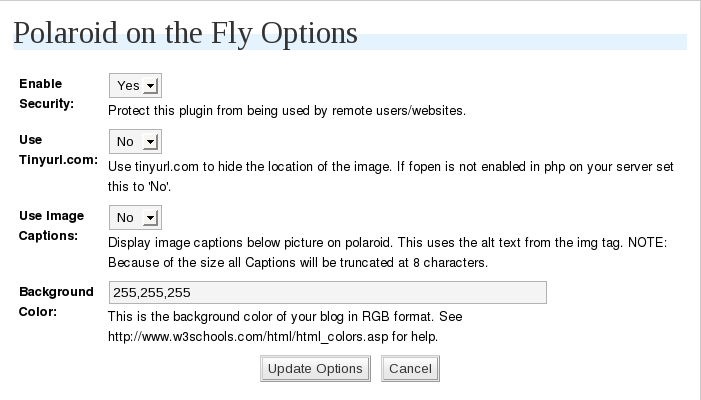


What Do The Error Messages Mean:
Source image resolution below min (200x200px)
The image referenced in the image tag has a resolution less than 200×200 pixels.
Source image resolution above max (2000x2000px)
The image referenced in the image tag has a resolution greater than 2000×2000 pixels.
Source URL Incorrect of does not Exist
The URL of the image referenced in the image tag does not exist.
Background color is invalid use RGB only
The background color specified on the options page is not a valid 24 bit RGB color. When written, RGB values in 24 bits per pixel (bpp), also known as Truecolor, are commonly specified using three integers between 0 and 255, each representing red, green and blue intensities, in that order. For example:
* white is 255,255,255
* black is 0,0,0
* red is 255,0,0
* green is 0,255,0
* blue is 0,0,255
Source image unknown file type (jpg,gif,png only)
You should never see this message. The regex used to find the img tag with rel=”polaroid” will only select img tags including jpg,gif and png. I figured hey why not create a useless image it may come in handy some day.
PHP GD Module Not Found. Polaroid on the Fly will not work. See http://us.php.net/gd for installation information.
You need to have the PHP GD Module Installed. This plugin requires the GD module to make the polaroid image. This plugin will not function without this module.
PHP GD Module Found. However, it does not include support for GIF. You will not be able to use a GIF for the source image. See http://us.php.net/gd for more information.
You have the PHP GD Module installed but the GD version does not support GIF images. This plugin will still work but you will not be able to use a GIF for the source image.
Changelog
0.7 (2008-07-31):
- Updated for compatibility with WordPress 2.6 (wp-content and wp-config.php changes)
- Changes to gen-polaroid.php to accommodate Ubuntu PHP GD Packages
- Updated path to the font ttf file in gen-polaroid.php
- Output image now in png format instead of jpg
0.6 (2008-01-23):
- Added ability to opt in to using Lightbox.
- Added option to select how the image will open. (ie. new window, self)
- Added option to specify the hright and width of the thumbnail
- Added option to reset all options to their defaults
- Updated descriptions on the Options page.
0.5 (2007-10-24):
- Added error reporting. Errors will be displayed as a replacement to the image in the post.
- Added images for use when displaying the above errors
- Added error reporting for GD Module. Errors will be displayed on the options page.
- Added functionality to opt in to using encoded URLs
- Fixed case sensitvity in regex used to match the img tag (now case insensitive)
- Removed large amounts of uneeded code in the Polaroid-o-nizer script
- Converted all files to UNIX format
0.4 (2007-10-03):
- Added options page (Options->Polaroid on the Fly)
- Added functionality to opt in to security restrictions
- Added functionality to not require the use of tinyurl.com and fopen
- Added functionality to display the photo caption using the alt text
- Added support to change the background color from the options page
- Removed requirement for .htaccess
- Renamed the Polaroid-o-nizer files
- Changed references to Polaroid-o-nizer files
0.3 (2007-09-18):
- Initial Public Release
" width="120" height="120">
