
Web Accessibility (formally known as Ally) – WCAG Scanning, Guided Fixes, Usability Widget
Active Installs
500,000+
Last Updated
July 7, 2026
First Released
October 29, 2015
Download History (Last one month)
Contributors
Web Accessibility (formally known as Ally) is a free, powerful, and user-friendly plugin that helps WordPress creators build more accessible websites with ease.
It simplifies accessibility with three essential tools:
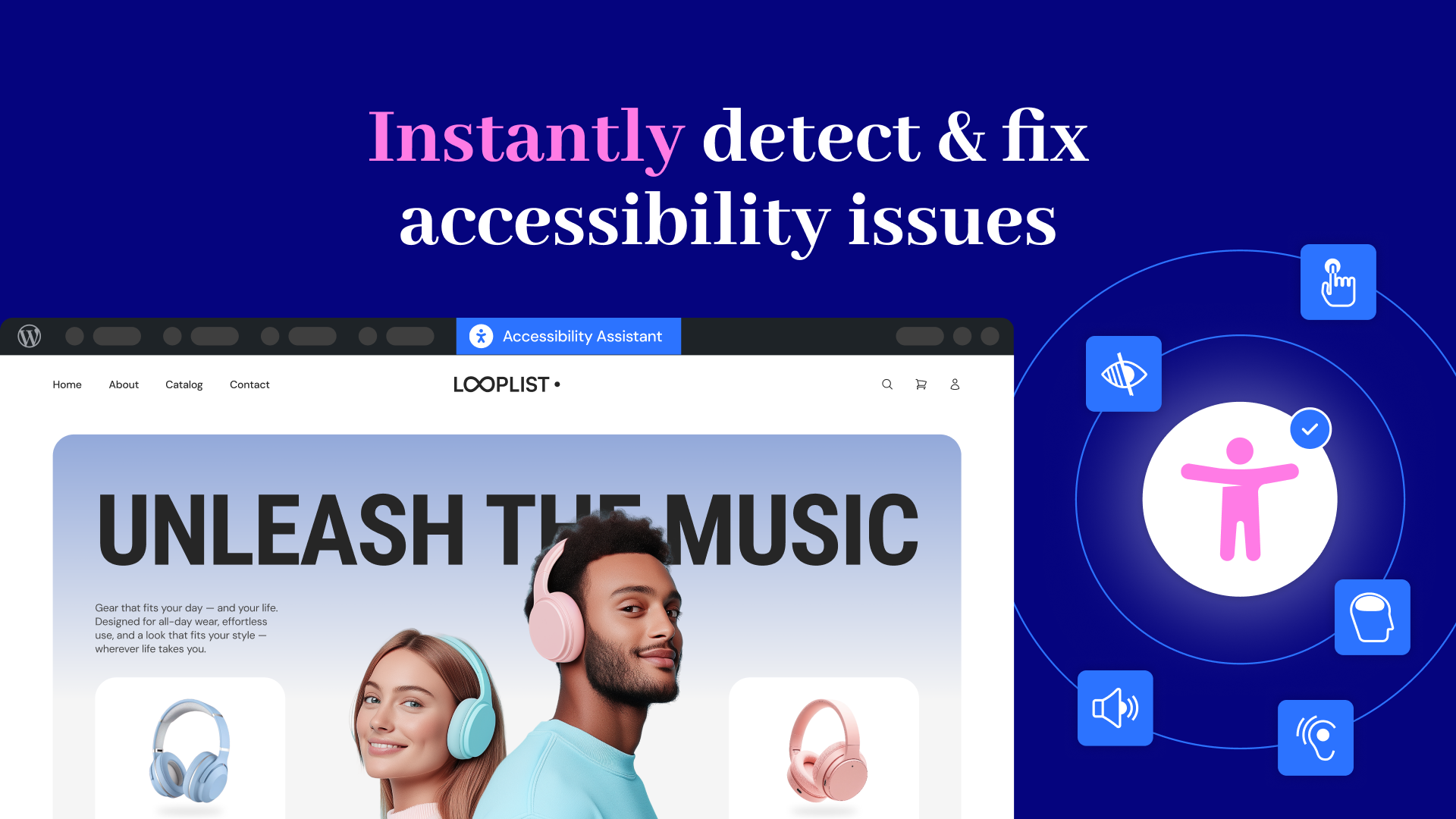
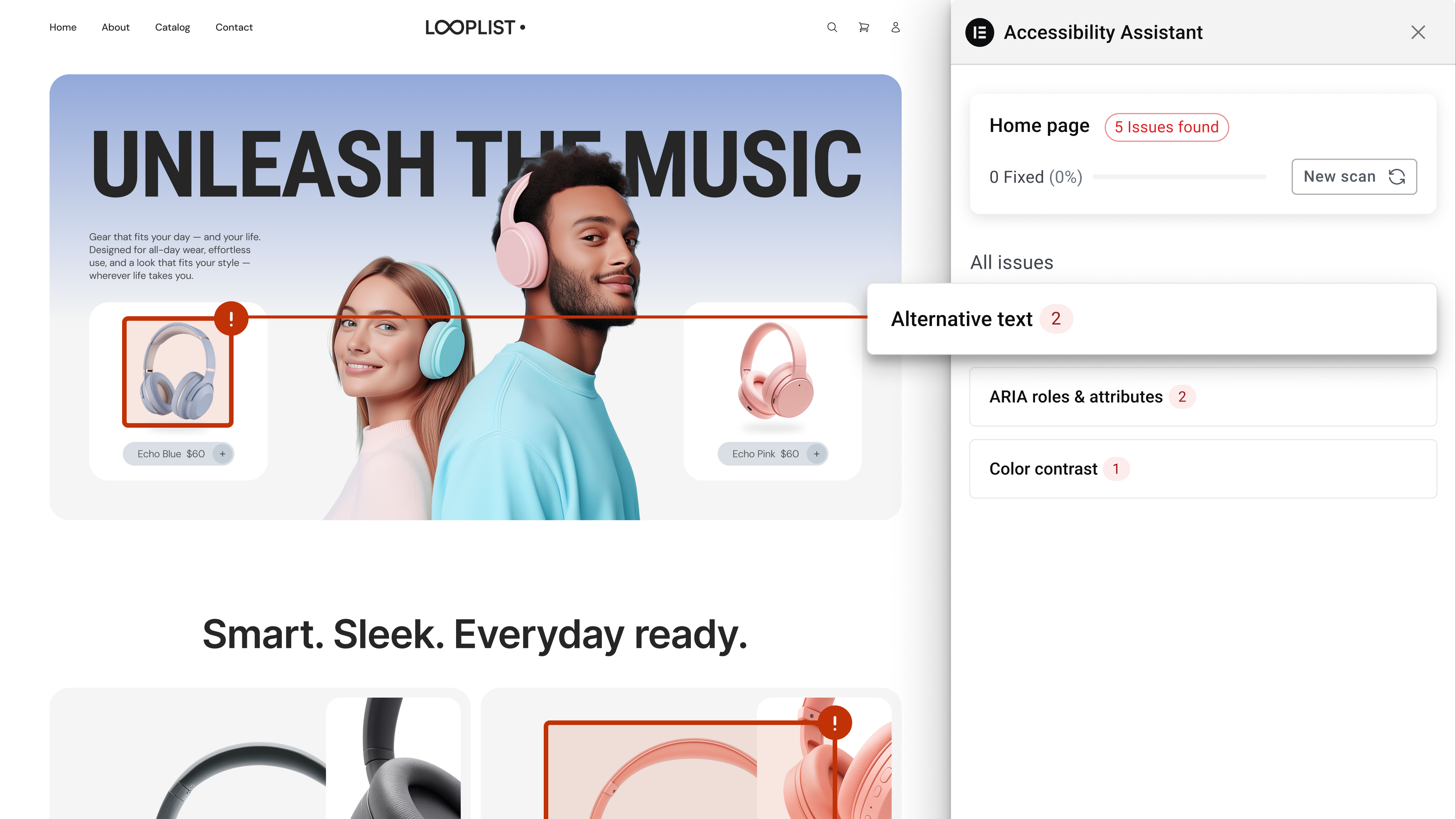
- Accessibility Assistant – Scan your pages, detect accessibility violations, and follow guided steps to fix them. Make manual adjustments or apply AI-powered suggestions, and track your progress.
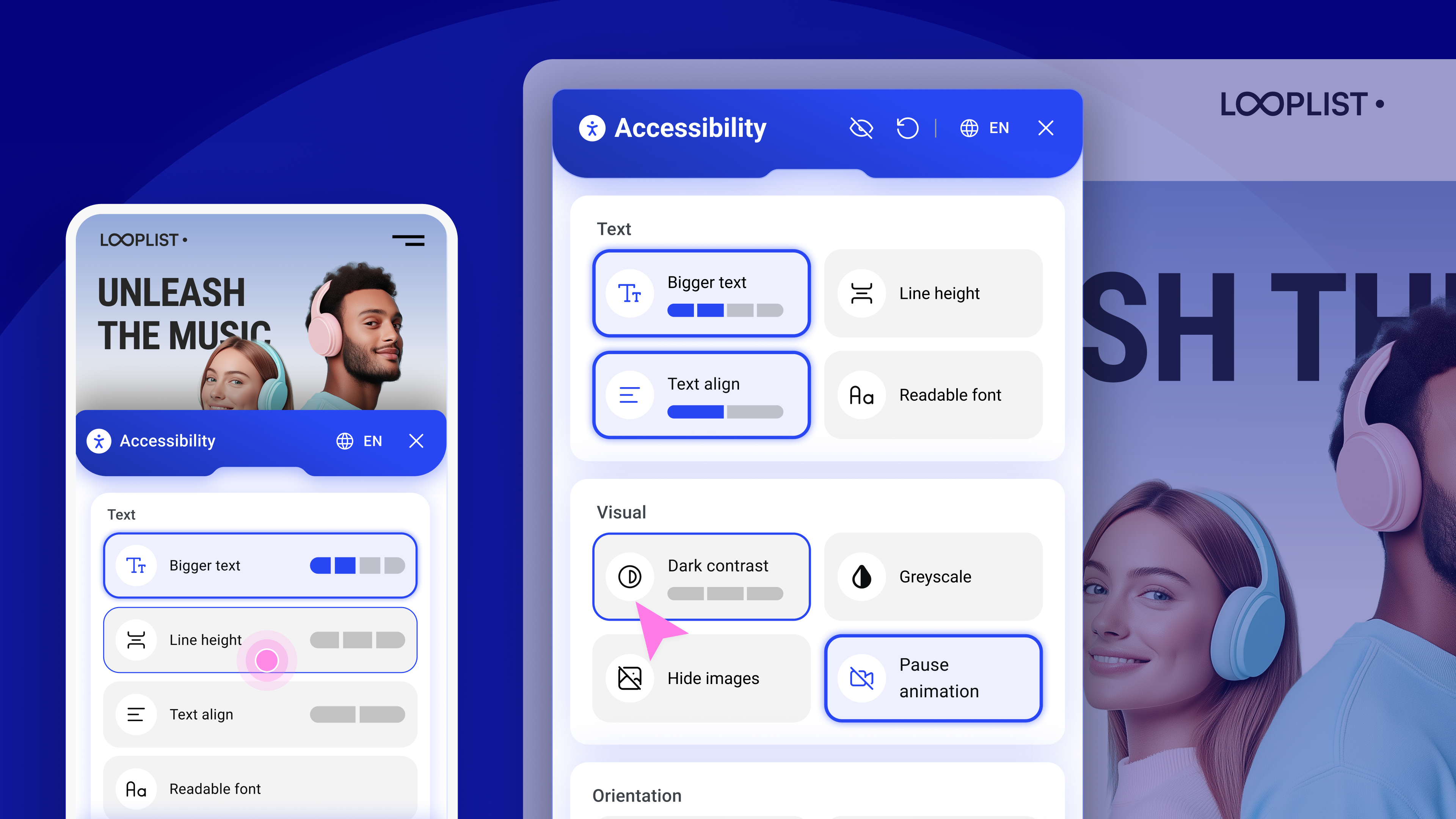
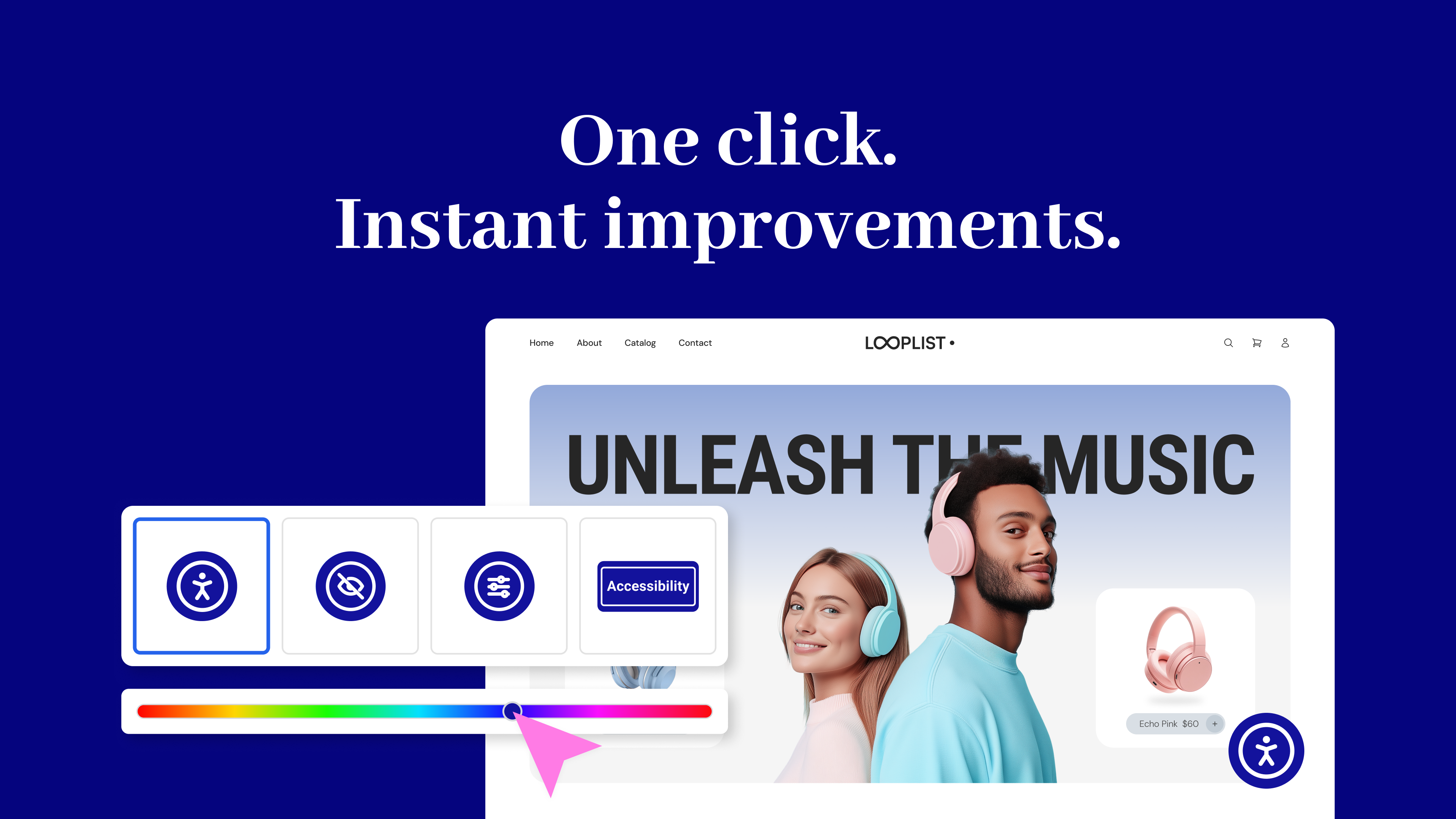
- Usability widget – Let visitors personalize their browsing experience with a floating accessibility menu. Features include font resizing, color contrast, image hiding, animation pausing, language selection, screen reader support, and more.
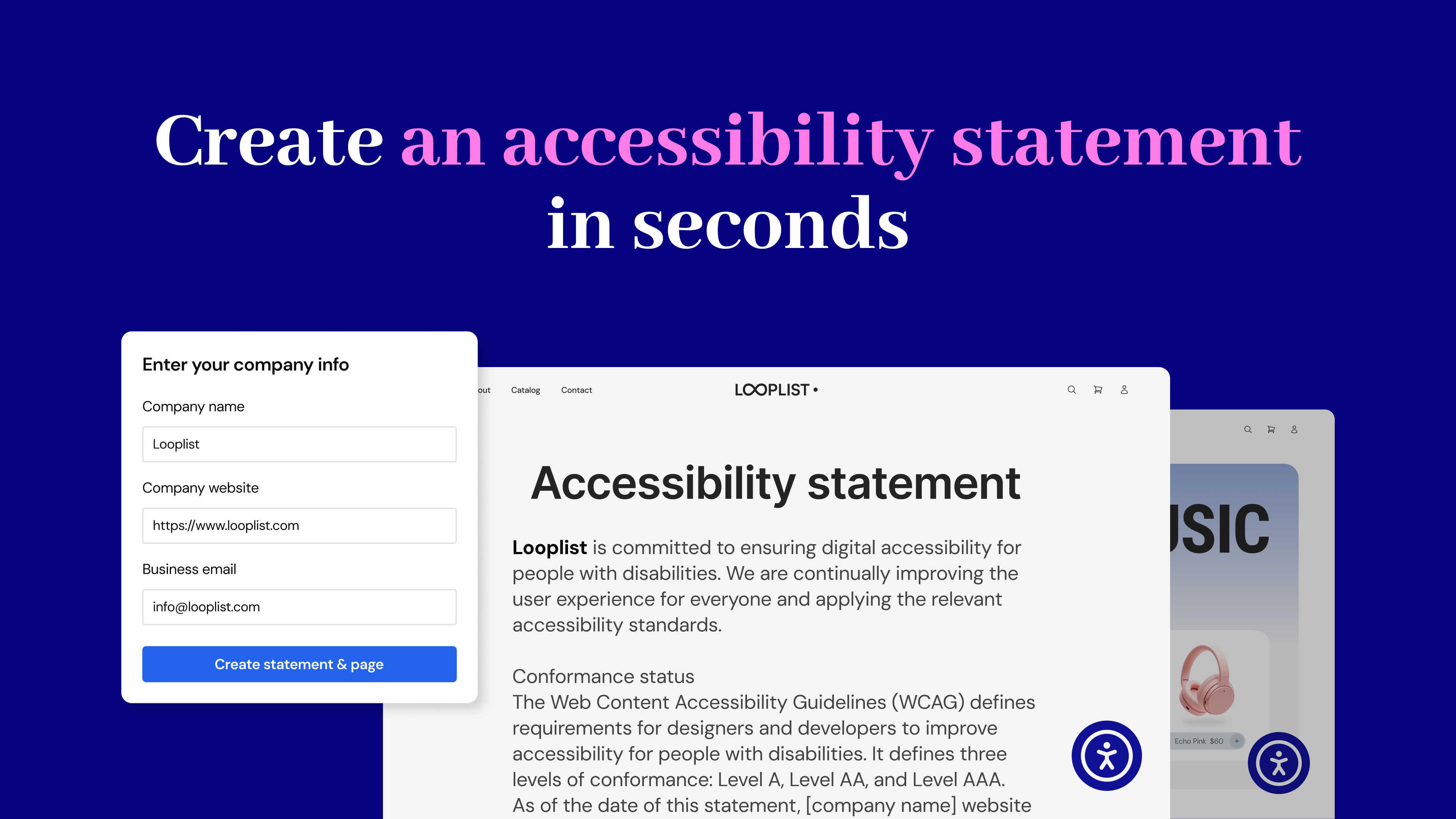
- Accessibility statement generator – Create a fully customized accessibility statement and publish it automatically on your site, helping meet WCAG and legal requirements.
No expertise required – Just activate, configure, and start making your site more inclusive today. Built by Elementor and designed for every WordPress site.
Why does web accessibility matter?
- Who Needs It? Every website owner, for businesses, creators, and agencies.
- Who is Responsible? Website owners are legally and ethically responsible for accessibility. The web creator who designs and builds the site must implement and adjust accessibility features to ensure compliance with WCAG guidelines and provide an inclusive experience for all users.
- Why Now? Rising legal requirements (WCAG, EAA) and better user experience.
- Why Should You Care? An accessible website isn’t just ethical; it’s good business. By prioritizing inclusivity, you improve user experience for everyone, boost your search engine rankings, and attract a wider audience.
It’s the Law
As accessibility standards continue to evolve and become mandatory, it’s important to start making website adjustments to comply with fast-approaching global regulations. Among its other capabilities, this plugin lets you instantly generate your website’s Accessibility Statement, which is now mandatory in most locales.
The Web Accessibility plugin is not a substitute for a thorough accessibility audit and is NOT intended to completely make your website legally compliant. However, with it, you’re one step closer to making your website inclusive to more visitors, including those with visual, auditory, or cognitive challenges.
Ensuring that your website complies with all applicable accessibility requirements is your responsibility. We recommend working with qualified accessibility professionals to help achieve full compliance.
Key Features & Benefits
Accessibility Assistant
- Scan any URL on demand to detect accessibility gaps
- Launch directly from WordPress or Elementor
- Step-by-step guidance to fix issues
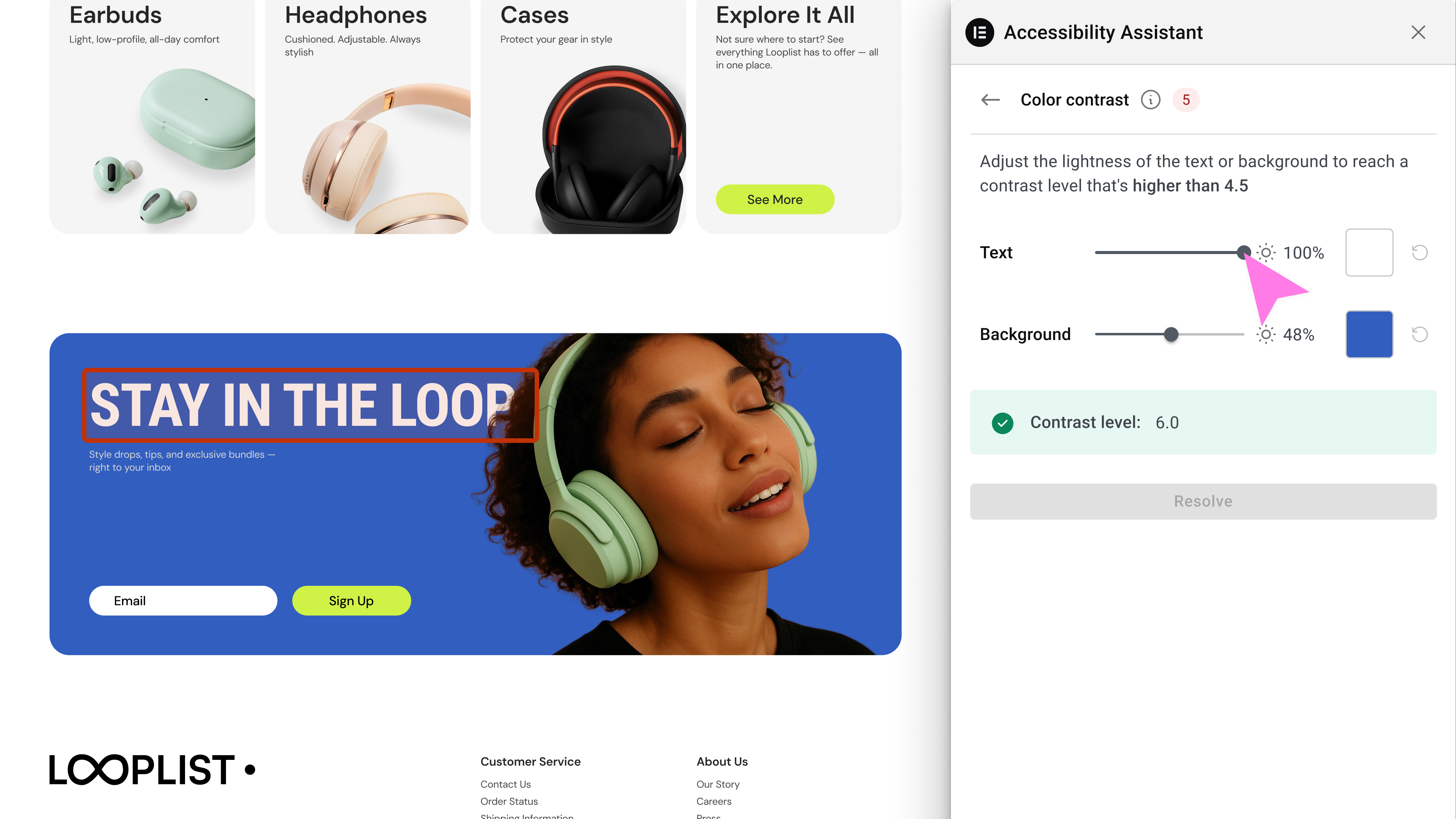
- AI-powered remediation suggestions
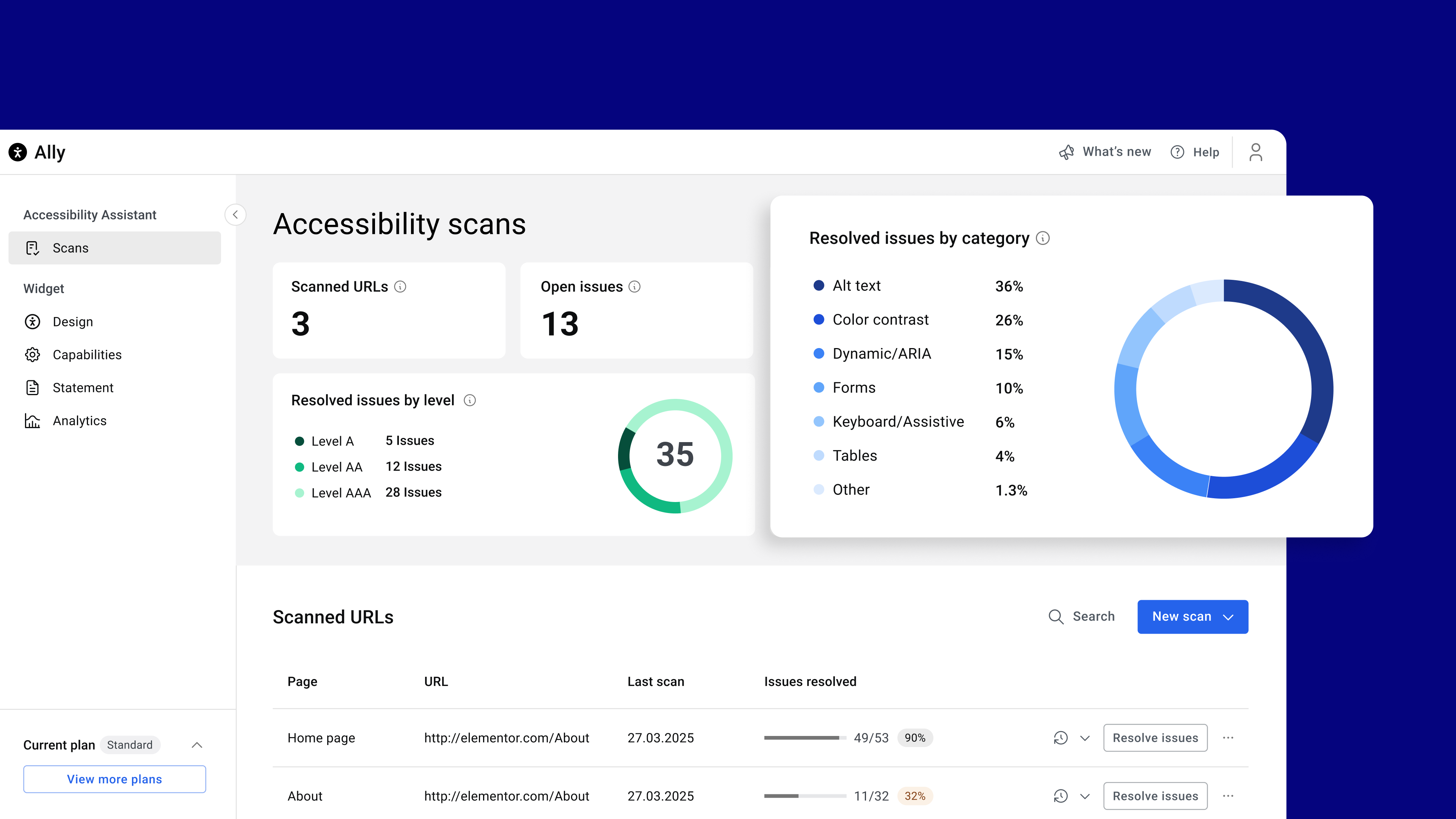
- Progress tracking via a visual dashboard
- No accessibility expertise required
How It Works
Accessibility Assistant scans individual URLs for accessibility violations, categorizes them by type and severity, and provides actionable insights. You can apply manual fixes manually or use AI suggestions while tracking your progress over time. Accessibility Assistant helps you:
- Detect missing alternative text
- Label dynamic content & ARIA landmarks
- Validate forms & flag input errors
- Ensure keyboard & assistive tech compatibility
- Identify accessibility violations in tables
- Repair incorrect page structure & navigation
- Flag color contrast & visual style violations (coming soon)
- And detect 180+ other common accessibility violations based on WCAG 2.1 AA
Accessibility Statement Generator
- Auto-generate a complete accessibility statement
- Customize and publish to a dedicated page
- Link it using the widget
Usability Widget
- Offer visitors a customizable menu with features like:
- Contrast Modes (high, dark, light, negative)
- Font resizing & readable font toggle
- Pause animations & hide images
- Line height & text alignment options
- Keyboard navigation enhancements
- Underlined links & reading guide
- Skip to content / sitemap viewer
- Language selector
- Skip to Main Content
- Restore defaults & widget toggle
Premium widget features are also available within paid plans, including:
- Screen reader compatibility improvements
- White labeling (remove Elementor branding)
- Language selector directly in the widget
- Usage analytics to gain actionable insights from visitor interactions
Widget customization options for web creators
Tailor the widget’s look and behavior with options like:
- Show/hide widget icon on mobile or desktop
- Select icon type and size
- Choose colors for icon, header, and text
- Define icon position (corner selection)
- Add/edit sitemap URL
- Enable/disable features per device or user role
Get Started Today
Create a better user experience for all with Web Accessibility
Need help? Visit our help center or contact Support.
This plugin requires a connection to an active Elementor account to identify the user and provide the purchased service. This connection is initiated manually by the user via the plugin’s settings panel. Learn more about our terms and conditions. This plugin uses a 3rd party service operated by Elementor.
More accessibility features are on the way, so stay tuned!
Related Plugins
- Email Deliverability: Manage transactional emails with ease. High deliverability, detailed logs and statistics, and no SMTP plugins needed.
- Image Optimizer: Compress and optimize your images, giving you leaner, faster websites. Automatically optimize any new image you upload or run a bulk optimization process for existing uploads.
Automatic Installation
- Install using the WordPress built-in Plugin installer > Add New
- Activate the plugin through the ‘Plugins’ menu in WordPress
- Go to the plugin page (under Dashboard > Accessibility)
- Enjoy!
Manual Installation
- Extract the zip file and just drop the contents in the
wp-content/plugins/directory of your WordPress installation - Activate the plugin through the ‘Plugins’ menu in WordPress
- Go to the plugin page (under Dashboard > Accessibility)
- Enjoy!
Web Accessibility is an accessibility plugin for WordPress websites. It helps web creators build more inclusive websites using a customizable widget, on-demand accessibility scans, AI-powered issue remediation, and a centralized dashboard to track progress.
Web Accessibility is ideal for freelancers, agencies, and DIY website owners who want to improve accessibility and align with WCAG standards
Yes, Web Accessibility is GDPR compliant. To meet your privacy obligations, you must list Elementor as a sub-processor in your privacy notice. Our Data Processing Agreement (DPA) outlines all privacy-related requirements.
No automated tool can promise full accessibility. Web Accessibility helps you detect and fix the most common violations, but achieving full compliance requires human testing and judgment. Think of Web Accessibility as a powerful assistant-not a complete substitute for manual review.
An accessibility statement is a public declaration of your commitment to inclusive digital experiences. Web Accessibility helps you easily generate and publish one as a dedicated page on your website.
An Elementor account lets you manage your Web Accessibility settings, track usage, and unlock advanced features like the Assistant and AI fixes.
Yes. You can personalize the widget’s icon, colors, size, position, and which features are shown on mobile or desktop.
Yes. Visitors can choose to temporarily dismiss the widget for a session, 24 hours, or one week.
Yes, it automatically adjusts to your site’s language settings.
The Accessibility Assistant is a tool that scans individual URLs for accessibility violations, organizes them into categories, and guides you to fix them manually or with AI suggestions
Yes. You can rescan a URL as often as needed. Results update each time based on the current version of your content.
These are smart suggestions generated by Web Accessibility to help you resolve issues more efficiently-like automatically suggesting alternative text for images. AI fixes are available only on paid plans and use credits.
You can report security bugs through the Patchstack Vulnerability Disclosure Program. The Patchstack team help validate, triage and handle any security vulnerabilities. Report a security vulnerability.
Changelog
4.1.3 – 2026-06-29
- Tweak: Widget button custom position alignment
- Tweak: Ally AI fixes improvments
- Tweak: Assets renaming
- Fix: Accessibility in deactivation modal
- Fix: WordPress Dahsboard stats not updating
4.1.2 – 2026-06-01
- Tweak: Improved admin screens in RTL view
- Tweak: Reduce bundle size for faster loading
- Tweak: Improved Internal caching purge
- Tweak: Added support for setups where
home_urlis different thansite_url
4.1.1 – 2026-03-31
- Tweak: Improved WPML support
- Tweak: WordPress 7.0 design compatibility
4.1.0 – 2026-02-23
- New: Added bulk remediation flow to generate AI alt text or mark multiple images as decorative
- Tweak: Added the ability to disable the accessibility widget to prevent it from loading on your site
- Tweak: Security enhancement to prevent potential SQL injection
- Tweak: Security enhancement to remove unsecure composer package
- Fix: Display WordPress admin notices inside the settings page
- Fix: Resolved conflict in Beaver Builder by preventing remediation runner from executing during page builder sessions
4.0.3 – 2026-01-28
- Tweak: Security enhancements for access control
4.0.2 – 2026-01-28
- Tweak: Added a dashboard widget to trigger scans and view results
- Fix: Resolved layout issues on the settings page for RTL websites
- Fix: Resolved widget trigger functionality when users are logged out
- Fix: Missing styles warning when reviews popup is displayed
4.0.1 – 2026-01-20
- Fix: Fix ally widget action to toggle open/close state.
- Fix: PHP error in Ally legacy product
4.0.0 – 2026-01-20
- Tweak: Moved the plugin entry point under a unified Elementor menu
- Tweak: Redesigned the plugin settings interface for a unified look and feel
- Tweak: Added support for “Elementor One”
- Fix: Improved accessibility by correcting the tabindex value
- Fix: Added automatic cache synchronization to ensure content updates remain consistent across the site
- Fix: Corrected the direct upgrade link to include the specific subscription ID
3.9.1 – 2025-12-08
- New: Added the Walkthrough video to assist during Ally onboarding.
- Tweak: Updated the tooltip for Site-Wide Fixes for better clarity.
- Tweak: Made the Ally widget footer more prominent.
- Fix: Resolved an issue where the quota-limit indication did not appear correctly.
- Fix: Fixed a blink issue that occurred when triggering a scan from the admin.
3.9.0 – 2025-11-11
- New: You can now apply fixes across all scanned pages in one click for repeating elements such as headers, footers, and more.
- New: Added the ability to manage global Alt Text and Color Contrast remediations.
- Tweak: Improved the Reviews component experience.
- Fix: Resolved a bug causing the Search page in the Dashboard not to load properly.
- Fix: Corrected an error message that appeared improperly when the quota limit was reached.
- Fix: Fixed a compatibility issue with the Divi plugin.
3.8.1 – 2025-10-15
- Tweak: Code refactor
3.8.0 – 2025-09-29
- New: Headings Remediation Management – Review and correct heading hierarchy with a guided flow
- Tweak: Improved AI remediation results with added context for clearer responses
- Fix: Disabled remediation action not working
- Fix: Quota number displayed incorrectly for Standard plan
3.7.0 – 2025-09-02
- New: Redesigned Accessibility Widget – Clearer structure, Wider accessible buttons, and Improved mobile view
- New: Intro banner for users who connected Ally
- New: Reviews & CSAT flow to gather user feedback
- Tweak: Added cache clearing option in Assistant panel and WordPress Admin Bar
- Tweak: Enhanced color contrast evaluation to fix issues with gradient/video backgrounds
- Fix: found issue count wrong in edge cases
3.6.0 – 2025-08-02
- New: Smart color contrast remediation flow in the accessibility assistant
- Tweak: Updated scan dashboard to show open issues and issue breakdown by category
- Tweak: Tooltip on analytics tab encouraging tracking activation
- Tweak: Improve accessibility column in WP admin for better user experience
- Fix: Added WPML compatibility
- Fix: WooCommerce AJAX conflict
3.5.2 – 2025-07-28
- Tweak: Improved performance by enqueuing Assistant only when logged in
- Fix: Admin post columns offset warning
3.5.1 – 2025-07-23
- Tweak: Admin panel UI updates
- Tweak: Assistant UI updates
- Tweak: Ensure case sensitive attributes in remediations
- Fix: Assistant accessibility issues
- Fix: Custom Icon issue in edge cases
- Fix: Critical Error on plugin conflict
3.5.0 – 2025-07-08
- New: Introducing URL Scanner – find 180+ issues instantly (WCAG 2.1 AA)
- New: Introducing Remediation Engine – get in-context guided, AI-powered accessibility fixes
- New: Introducing Overview Dashboard – track scans and accessibility progress in real-time
- New: Introducing Auto-Fix – fix common issues with one click: alt text, forms, keyboard nav, and tables
- Tweak: New admin UI design
3.4.0 – 2025-06-04
- New: Added widget languages selector
- Tweak: Load widget’s font locally for better compliance
- Fix: Estonian language translation
- Fix: Admin UI unused frame
3.3.0 – 2025-05-14
- New: Custom Icon support for the Ally widget
- New: Custom Link Gutenberg block to trigger Ally widget
- New: Elementor Dynamic Tags to trigger Ally widget
- New: Added “What’s new” section in the admin panel
- Tweak: Improved accessibility statement page selector
- Fix: Notice on loading translations too early
3.2.0 – 2025-04-20
- New: Added border radius controls for the new icon widget
- Tweak: Added Hungarian translations to the new widget
- Fix: Improved German translations in the new widget
- Fix: Enhanced sanitization in the legacy widget to prevent potential security issues
3.1.0 2025-03-25
- New: Screen Reader – Improved accessibility with screen reader compatibility.
- New: Widget Usage Analytics – Track and analyze widget usage effectively.
- New: “My Account” Link – Easily access your account with a new direct link.
- New: Plan Quota Display – Admin panel now shows plan quotas.
- New: White Label capabilities
- Tweak: Various text and UI improvements.
- Tweak: The last settings tab is now remembered when navigating.
- Tweak: Sticky “Save Settings” Button
- Fix: Settings Screen Display Issue – Resolved UI inconsistencies.
- Fix: URL Mismatch Flow .
- Fix: Force referer header in widget script tag
3.0.3 2025-03-17
- New: Added an option to manage URL change
- New: Added Danish language support to widget
- New: Added compatibility with popular caching plugins: WP Rocket, W3 Total Cache, and LiteSpeed Cache
- Tweak: Improved connect flow
- Tweak: Admin panel UI widget preview improvements
- Tweak: Improved Admin panel UI accessibility
- Fix: PHP notice on legacy admin pages in PHP 8.2+
3.0.2 2025-02-25
- New: Added an option to revert to the legacy widget
- Fix: Media library not loading in some sites
- Fix: Auto upgrade for old versions with just customizer settings
3.0.1 2025-02-20
- Fix: Fixed favicon missing on some sites
3.0.0 2025-02-18
- Introducing Ally Web Accessibility! One Click Accessibility is now Ally Web Accessibility! Discover the new experience: Learn More.
- New: Brand-New Interface – Redesigned for seamless touch-screen and mobile support.
- New: Revamped Infrastructure – Overhauled backend to support new and future capabilities.
- New: Page Structure Overview – Navigate your page’s structure for better accessibility.
- New: Image Hiding Option – Hides all images on the page to reduce distractions and make the page more readable.
- New: Pause animations option – Stops animations running on the page option, helping users focus on content.
- New: Reading Mask option- helps users focus on specific text, reducing distractions and improving readability.
- New: Accessibility Statement Generator – Easily generate an accessibility statement page for your site or link an existing one.
- New: Auto translations of the widget according to the page language
2.1.0 – 2022-12-18
- New: Added custom element ID for “Skip Content” link (#35), (#36)
- Tweak: Added title for all SVG icons (#30)
- Tweak: Add
role="button"to the toggle (#57) - Tweak: Changed the default icon to “One Click”
- Fix: Remove extra quote (Topic)
- Fix: High Contrast and Negative Contrast still appear after disabled from the settings (#39)
- Fix: Added compatibility with Twenty Twenty theme
2.0.3 – 2018-05-28
- Fix: Toolbar settings panel empty in non-English sites
- Fix: Avoid showing Help & Feedback links if not defined (#27)
2.0.2 – 2018-05-03
- Fix! – Added default settings for toolbar title
- Fix! – Print CSS rules before code to fix responsive issues
- Fix! – Added visibility CSS to fix dependency issues
2.0.1 – 2018-05-02
- Fix! – Increased icon size in the toolbar
- Tweak! – Restored
sr-onlyclass for smooth update
2.0.0 – 2018-05-01
- Tweak! – Renamed plugin to One Click Accessibility
- Tweak! – Added an option to select an toolbar icon
- Tweak! – Split Settings Panel to Settings and Toolbar
- Tweak! – Removed FontAwesome dependency
- Tweak! – Removed Bootstrap dependency
- Tweak! – Removed Pojo Framework dependency
1.1.6 – 2017-10-26
- Fix! – Border with RGBA is hidden in high contrast mode
1.1.5 – 2016-03-09
- Tweak! – Fix minor style issue
1.1.4 – 2016-02-23
- Fixed! – tabindex on custom links issue
1.1.3 – 2016-02-21
- Tweak! – Resolve the focus issues by another way
1.1.2 – 2016-02-10
- Fixed! – Triggering blur after focus to avoid auto-focus by browser on tab reactivated
1.1.1 – 2016-02-08
- Tweak! – Added more hebrew strings translate
- Tested up to WordPress v4.4
1.1.0 – 2016-02-07
- New! – Remember toolbar options
1.0.3 – 2016-01-27
- Fixed! – Issue with sidebar in Resize text
- Tweak! – Added more string fields for WPML/Polylang plugins
1.0.2 – 2015-12-08
- Tweak! – Fixed hebrew translate
1.0.1 – 2015-11-17
- New! – Added distance from top toolbar, in Desktop/Mobile devices
- Fixed! – Skip to content in Chrome
1.0.0 – 2015-10-29
- Initial Public Release!
" width="120" height="120">
Available Versions
| Version | Download | Type |
|---|---|---|
| 4.1.3 | Download | Stable |
| 4.1.2 | Download | Stable |
| 4.1.1 | Download | Stable |
| 4.1.0 | Download | Stable |
| 4.0.3 | Download | Stable |
| 4.0.2 | Download | Stable |
| 4.0.1 | Download | Stable |
| 4.0.0 | Download | Stable |
| 3.9.1 | Download | Stable |
| 3.9.0 | Download | Stable |
| 3.8.1 | Download | Stable |
| 3.8.0 | Download | Stable |
| 3.7.0 | Download | Stable |
| 3.6.0 | Download | Stable |
| 3.5.2 | Download | Stable |
| 3.5.1 | Download | Stable |
| 3.5.0 | Download | Stable |
| 3.4.0 | Download | Stable |
| 3.3.0 | Download | Stable |
| 3.2.0 | Download | Stable |
| 3.1.0 | Download | Stable |
| 3.0.3 | Download | Stable |
| 3.0.2 | Download | Stable |
| 3.0.1 | Download | Stable |
| 3.0.0 | Download | Stable |
| 2.1.0 | Download | Stable |
| 2.0.3 | Download | Stable |
| 2.0.2 | Download | Stable |
| 2.0.1 | Download | Stable |
| 2.0.0 | Download | Stable |
| 1.1.6 | Download | Stable |
| 1.1.5 | Download | Stable |
| 1.1.4 | Download | Stable |
| 1.1.3 | Download | Stable |
| 1.1.2 | Download | Stable |
| 1.1.1 | Download | Stable |
| 1.1.0 | Download | Stable |
| 1.0.3 | Download | Stable |
| 1.0.2 | Download | Stable |
| 1.0.1 | Download | Stable |
| 1.0.0 | Download | Stable |
| Development | Download | Trunk |
