
Pods – Custom Content Types and Fields
Active Installs
100,000+
Last Updated
August 31, 2026
First Released
October 8, 2008
Download History (Last one month)
Manage all your custom content needs in one location with the Pods Framework.
- Create content types including Custom Post Types, Custom Taxonomies, and our special Advanced Content Types (ACTs get their own custom tables)
- Extend and customize content types including Posts, Pages, Categories, Tags, Users, and Media with one easy click
- Create custom settings pages easily within seconds
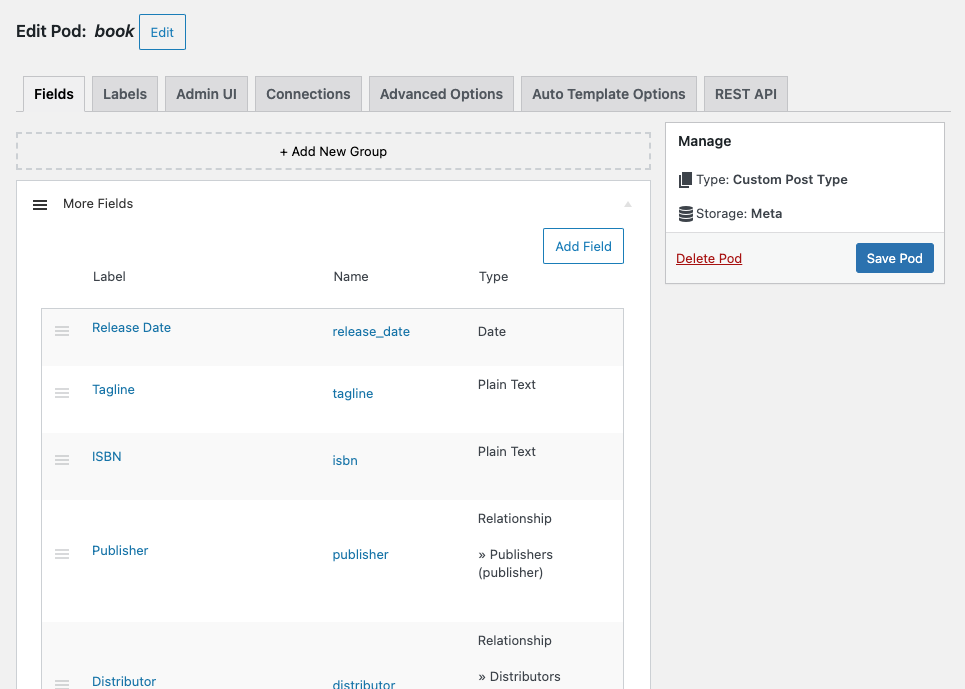
- Add custom fields to any content type
- Conditionally show fields based on the value of other fields with Conditional Logic
- Group your fields however you’d like into their own sections and add additional headings to help organize
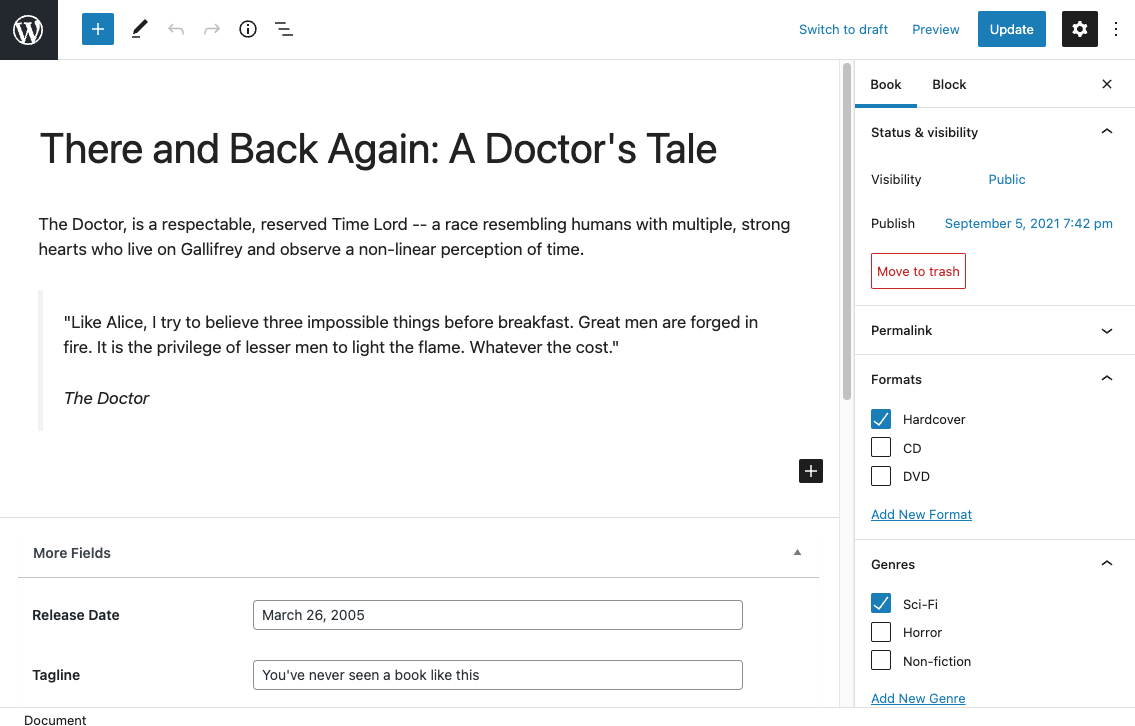
- Show your fields anywhere using our blocks, shortcodes, widgets, or the non-coder Pods Template approach along with our automatic theme integration
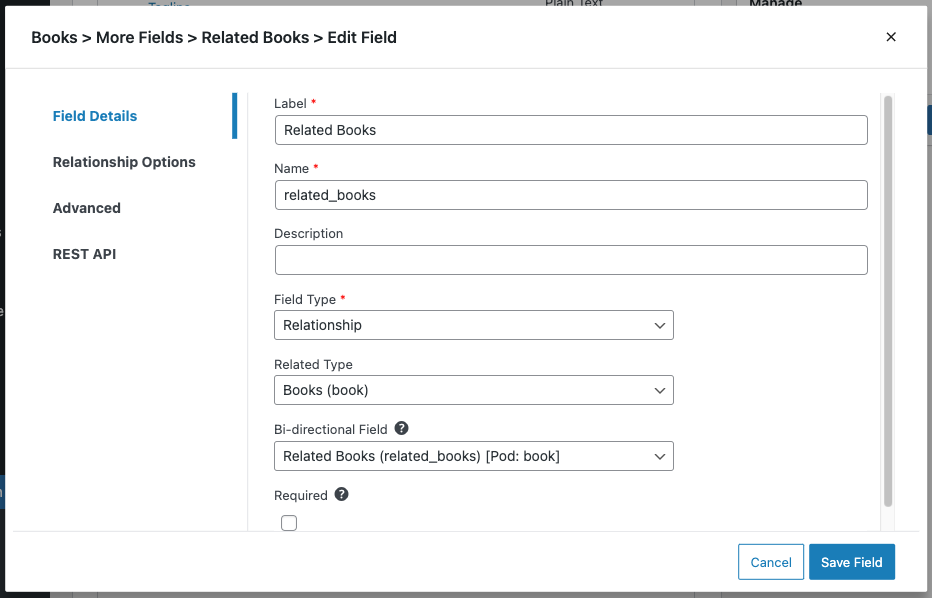
- Create connections between any of your content with relationship fields to keep your content organized
Let Pods help you grow your development and site building skills so that you can manage content beyond the standard WordPress Posts & Pages.
Want to check it out? Give Pods a test drive with our new One-click Demo.
Check out our Documentation, Support Forums, and our Live Community Slack Chat for assistance building your dream project with Pods.
Introduction
Content types that evolve with your needs
Create any type of content that you want — small or large — we’ve got you covered. Every content type created with Pods gets all the love it needs to grow up big and strong. You’ll get an easy-to-use interface that lets you manage field groups, custom fields, and how your content type will look or function.
Create new content types
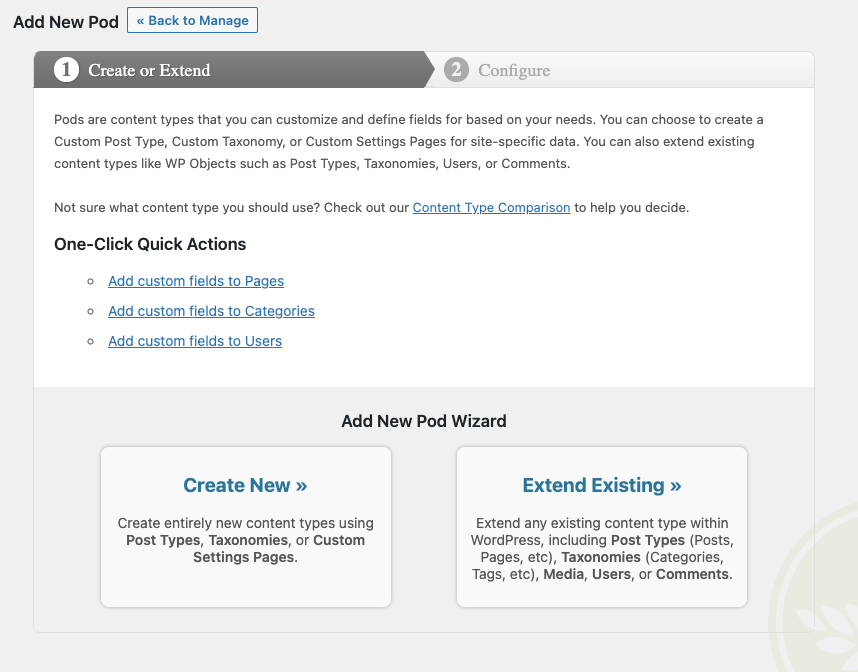
With Pods, you can create entirely new content types and settings pages.
Every Field Type, FREE
If you choose to use Pods for your custom fields, you’ll get every field type you need, free of charge. Pods works great alongside other custom field plugins like Advanced Custom Fields too.
We have an extensive collection of over 25 different input types to choose from on 20+ different field types for any content structure. Each field type comes with their own additional options to help you customize content entry and display.
You can also control visibility by role/capability and other advanced options.
- Repeatable Fields: Turn almost any field into a repeatable field with multiple values
- Text: Plain Text, Website, Phone, Email, Password
- Paragraph: Plain Paragraph Text, WYSIWYG (Visual Editor), Code (Syntax Highlighting)
- Date / Time: Date and Time, Date, Time
- Number: Plain Number, Currency (30+ international currencies)
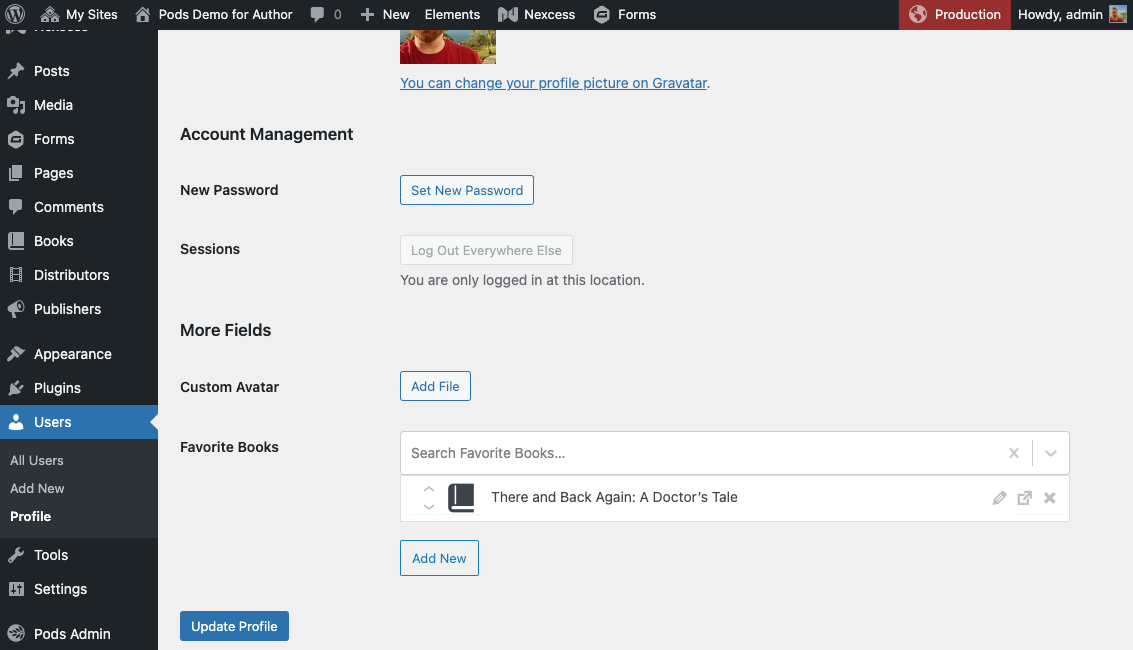
- Relationships / Media: File / Image / Video (Media library and basic upload options available), Avatar (for extended Users), oEmbed, Relationship (Dropdown, Multi Select, Autocomplete, Checkboxes, Radio Buttons, and List View available)
- Checkbox (Yes / No)
- Color Picker
- Layout Fields: Heading text, HTML content
Relationships to rule the world with
The power is in your hands with our comprehensive support to relate your content to anything.
- Custom defined lists of text options
- Relate to any Post Type or Taxonomy posts / terms
- Relate to any User profile
- Relate to User Roles or Capabilities
- Relate to any Comment
And many other relationships are also available including:
- Image Sizes
- Navigation Menus
- Relate to content within any Database Table
- Countries (predefined)
- US States (predefined)
- Canadian Provinces (predefined)
- Calendar – Days of Week (predefined)
- Calendar – Months of Year (predefined)
- And many more!
Optional Components to do even more
You can enable some of our included components to extend your WordPress site even further:
- Types-only Mode – On our Pods Settings page, you can choose to disable creating custom fields for a performance boost if you only want to use Pods for content types or you plan on using it alongside of other custom field plugins
- Pods Templates – Use our template engine to create templates that can be handed off to clients for care-free management
- Markdown Syntax – Parses Markdown Syntax for Paragraph Text / WYSIWYG fields
- Advanced Relationships – Add even more relationship objects including Database Tables, Multisite Networks, Multisite Sites, Themes, Page Templates (in the theme), Sidebars, Post Type Objects, and Taxonomy Objects
- Table Storage – Enable table-based database storage for custom fields on Post Types, Media, Users, and Comments
- Roles and Capabilities – Create or edit Roles for your site and customize what they have access to
- Advanced Content Types – Create entirely custom content types that have their own database table, and they will exist outside the normal WordPress context avoiding meta database tables
- Pods Pages – Create custom pages that function off of your site’s URL path with wildcard support and choose the Page Template in the theme to use — most useful paired with Advanced Content Types
Plugins that integrate with Pods
- Advanced Views Lite – Lets you build templates (views) and queries (cards) so that you can manage your content rendering with less code. (Disclaimer: We have an affiliate link to them to help support our project)
- Bricks Builder
- Codepress Admin Columns using premium Admin Columns Pro Pods integration
- Conductor
- Elementor Pro
- Polylang has direct integration in Pods itself
- Timber
- WPGraphQL has direct integration in Pods itself
- WPML has direct integration in Pods itself
- YARPP has direct integration in Pods itself
Themes that integrate with Pods
- Genesis (StudioPress) has direct integration in Pods itself
Extend Pods with Free Add-Ons
- Pods Beaver Themer Add-On – Integrates Pods with Beaver Themer
- Pods Gravity Forms Add-On – Integrates Pods with Gravity Forms
- Pods Alternative Cache Add-On – Speed up Pods on servers with limited object caching capabilities
- Pods SEO Add-On – Integrates Pods Advanced Content Types with Yoast SEO
- Pods AJAX Views Add-On – Adds new functions you can use to output template parts that load via AJAX after other page elements
Extend Pods with Free Third-party Add-Ons
- Paid Memberships Pro – Pods Add On – Integrates Pods with Paid Memberships Pro to extend PMPro objects with custom fields added by Pods
- Panda Pods Repeater Field Add-On – Lets you add groups of fields that repeat and are stored in their own custom database table (Advanced setup required)
Pods Pro by SKCDEV Premium Add-Ons
- List Tables Add-On – A new block and shortcode to list/filter content from Pods in a table format
- Page Builder Toolkit Add-On – Integrates Pods with Beaver Builder, Beaver Themer, Conditional Blocks Pro, Divi Theme, Elementor, GenerateBlocks, Oxygen Builder, and Stackable Blocks (premium)
- Advanced Relationships Storage Add-On – Advanced options for relationship storage
- TablePress Integration Add-On – Integrates Pods with TablePress
- Advanced Permalinks Add-On – Advanced permalink structures and taxonomy landing pages
How can I translate Pods into my own language?
Many thanks go out to the fine folks who have helped us translate the Pods plugin into many other languages.
Join us in further translating the Pods interface on the official Translating WordPress dashboard
We are also available through our Live Community Slack Chat to help our translators get started and to support them on the process.
Are you looking to translate your Pods and Fields themselves? You’ll want to enable the “Translate Pods” component from Pods Admin > Components.
Contributors
Pods really wouldn’t be where it is without all the contributions from our donors and code/support contributors.
- Unpack the entire contents of this plugin zip file into your
wp-content/plugins/folder locally - Upload to your site
- Navigate to
wp-admin/plugins.phpon your site (your WP Admin plugin page) - Activate this plugin
OR you can just install it with WordPress by going to Plugins >> Add New >> and type this plugin’s name
Screenshot Gallery

Our primary Support is handled through our Support Forums. For the fastest support, you can contact us on our Live Community Slack Chat in the #support channel. We do not staff our Slack channel 24/7, but we do check any questions that come through daily and reply to any unanswered questions.
We do have a community of Pods users and developers that hang out on Slack, so you’re sure to get an answer quickly. We answer our Forum questions once a week with follow-up during the week as we’re prioritizing resources towards restructuring and improving our documentation.
If you’ve encountered a bug or have an idea for a new feature, we kindly request you to create an Issue on our GitHub Repository at https://github.com/pods-framework/pods/issues/new. Please be very specific about what steps you did to create the issue you’re having and include any screenshots or other configuration parameters to help us recreate or isolate the issue.
Most likely the answer is yes. We don’t require any special CSS or display attributes to use Pods with your theme, so you should have little to no difficulty showing your content in your theme. If you encounter any issues, contact your theme developer and ask them about their support for the standard WordPress theming functions and how to use WordPress Template Hierarchy with their theme.
Changelog
3.3.9.2 – August 31st, 2026
This is a major security hardening release covering multiple areas of the plugin. We recommend updating as soon as possible.
Additional releases with these security fixes have been backported to each major version of Pods from Pods 2.7 and above to make it easy to update.
- Security: Restricted display callbacks to an explicit allow list of safe functions, with optional customized additions requiring a dedicated prefix. Added detection and admin notices when disallowed display callbacks are used on a site. (Jakub Herman, @sc0ttkclark)
- Security: Refactored form nonce handling to harden against submission misuse. (Jakub Herman, @sc0ttkclark)
- Security: Hardened shortcode and block logic against output and query misuse. (Wordfence PRISM – Wordfence, @sc0ttkclark)
- Security: Fixed post_status handling in the last security release so it only applies to user-provided inputs (not Pods internal logic). (@sc0ttkclark)
- Security: Added anonymous form post handling back that had unintentionally been disabled in the last security release. (@sc0ttkclark)
3.3.9.1 – August 14th, 2026
This is a major security hardening release covering multiple areas of the plugin. We recommend updating as soon as possible.
Additional releases with these security fixes have been backported to each major version of Pods from Pods 2.8 and above.
- Security: Further restrictions on error handling and fallbacks. (Nhien Pham @nhienit – GalaxyOne, @thevietronin – GalaxyOne, @sc0ttkclark)
- Security: General hardening improvements to how data queries are built and validated. (HaoNH @haoit, @onebitious, @sc0ttkclark)
- Security: Additional restrictions on how certain values are processed when displayed. (@sc0ttkclark)
- Security: Improved safety when handling previously stored data. (@sc0ttkclark)
- Security: Removed a legacy request-handling path that is no longer needed. (HaoNH @haoit, @sc0ttkclark)
- Security: Tightened access requirements for certain background requests. (HaoNH @haoit, @sc0ttkclark)
- Security: Improved consistency and enforcement of access and validation checks. (Youness HFA from AGBS Pentest Team @YounesHfa, HaoNH @haoit, @onebitious, @sc0ttkclark)
- Security: Hardening improvements to file and media handling. (@sc0ttkclark)
- Security: Additional safeguards for file and template handling. (@sc0ttkclark)
- Security: Improved handling of displayed content. (@sc0ttkclark)
- Security: Added extra verification for admin forms and actions. (@sc0ttkclark)
- Security: Additional validation for imported content. (@sc0ttkclark)
- Security: Improved handling of content based on user permissions. (@sc0ttkclark)
- Security: Updated bundled third-party JavaScript dependencies. (@sc0ttkclark)
- Security: Added a filter to optionally restrict access to the REST API documentation endpoint, which remains public by default. (@sc0ttkclark)
- Security: Additional automated test coverage for the changes in this release. (@sc0ttkclark)
3.3.9 – May 20th, 2026
- Security: Resolve a XSS vulnerability in the Pods UI forms in the admin area. Props to Bonds through Patchstack for responsibly reporting this. (@sc0ttkclark)
3.3.8 – March 19th, 2026
- Feature: Reuse the same UI that Repeatable Fields use for the Relationship fields using “List View” list items. The UI is now consistent and Pods 3.4 will include the same UI treatment for the File fields. (@sc0ttkclark)
- Fixed: Resolve issue with reordering repeatable fields and prevent rendering incorrectly when typing in the field which causes focus to be lost. #7498 #7499 (@pdclark, @sc0ttkclark)
- Fixed: Resolve problems with reordering Relationship fields using “List View” list items. (@sc0ttkclark)
- Fixed: Resolve issue with Migrate PHP component not placing magic tags on the correct separate new line of the file header. (@sc0ttkclark)
- Fixed: Prevent conflicts with ACF/SCF when ACF compatibility functions are enabled.
3.3.7 – February 25th, 2026
- Fixed: Resolve issues using
WP_Filesystemto check session paths before starting a session. (@sc0ttkclark) - Fixed: Prevent deprecated notices with non-strings being passed to
strpos. (@sc0ttkclark)
3.3.6 – February 25th, 2026
- Fixed: Resolve a fatal error with
WP_Filesystemusage. (@sc0ttkclark)
3.3.5 – February 24th, 2026
- Minimum Requirements Notice: Pods 3.4 coming in 2026 will require new minimum versions of WordPress 6.8+, PHP 8.0+, and MySQL 5.7+
- Feature: Added support for showing fields as “Read Only” in forms when a user does not have edit access to them while allowing admins to continue editing them. You can find this under the Edit Field modal in Advanced > Visibility > UI Access. (@sc0ttkclark)
- Enhancement: When detecting malformed shortcodes broken by
<or>characters within thewhereclause, Pods now shows a helpful notice with workaround instructions instead of just breaking. #7451 #7482 (@sc0ttkclark) - Enhancement: New replacements within Pods shortcodes clauses for replacing
__LESS_THAN__,__LESS_THAN_OR_EQUAL__,__GREATER_THAN__, and__GREATER_THAN_OR_EQUAL__with their corresponding<,<=,>, and>=characters to work around broken WP shortcodes. This is also available in the[if]Pods template shortcodecompareattribute. #7451 #7482 (@sc0ttkclark) - Enhancement: New option for conditional logic that will allow saving conditional field values even when the field is hidden. #7475 #7484 (@faisalahammad, @sc0ttkclark)
- Enhancement: New setting at Pods Settings > Performance that allows you to “Limit autocomplete search results in Relationship fields” to specify larger numbers if needed. #7454 (@sc0ttkclark)
- Enhancement: PodsUI > Implement
pods_ui_after_headinghook for additional UI customizations. (@sc0ttkclark) - Enhancement: PodsUI > Move restricted() checks before callbacks to prevent additional unnecessary calls when user doesn’t have access. (@sc0ttkclark)
- Enhancement: Add
pods_v_boolthat usespods_is_truthyto enforce boolean values on variables from various sources. (@sc0ttkclark) - Enhancement: Add Manage link to the Navigate section of the Pods content admin forms. (@sc0ttkclark)
- Enhancement: Underlying code support for multiple condition checks for Conditional Logic. (@sc0ttkclark)
- Tweak: Remove trim from
pods_is_truthyandpods_is_falseyfunctions. (@sc0ttkclark) - Tweak: In the Edit Field modal, under the Advanced > Visibility section — the Restrict Access and UI Access are now separate checkbox groups. (@sc0ttkclark)
- Tweak: Pods now follows WP Admin Theme color schemes more closely using dynamic CSS color references to the scheme colors. (@sc0ttkclark)
- Fixed: Shortcode unit test issue resolved. #7472 #7473 (@devlamconstructie, @sc0ttkclark)
- Fixed: Loading a form with WYSIWYG React Quill used as Repeatable fields now loads without breaking the editor. #7465 #7487 (@faisalahammad, @sc0ttkclark)
- Fixed: Resolved reordering of values for Repeatable Date/Time, Currency, and Number fields. #7471 #7486 (@faisalahammad, @sc0ttkclark)
- Fixed: Resolve sync associated taxonomy with relationship issues when not using bidirectional relationship field. #7477 #7485 (@faisalahammad, @sc0ttkclark)
- Fixed: Resolved reordering of values in List View relationship fields. (@sc0ttkclark)
- Fixed: Allow empty values in email fields when field is not required. #7476 #7483 (@faisalahammad, @sc0ttkclark)
- Fixed: esc_html_e usage when not used for translating in PodsUI. #7462 (@DAnn2012)
- Fixed: The default storage type for Settings is set to
optionwhen creating as it should have been. (@sc0ttkclark) - Fixed: When using repeatable fields on a Pod that uses Table-based storage, a notice now shows explaining that it’s not an available feature. (@sc0ttkclark)
- Fixed: Better support when values are sent as WP_Error and now show appropriate errors in save_pod_item validation handling. (@sc0ttkclark)
- Fixed: Resolve heredoc issue with Migrate PHP component. (@sc0ttkclark)
- Fixed: WordPress 7.0 compatibility issues fixed. (@sc0ttkclark)
- Fixed: Conditional logic now works properly for Boolean Group sub fields (used in Edit Field modal and other Pods Admin areas). (@sc0ttkclark)
- Extensive cleanup to resolve important WP Plugin Checker results, PHPCS, and PHPStan issues across the codebase. (@sc0ttkclark)
- Extensive testing upgrades to PHPUnit 10+ and wp-browser 4. (@sc0ttkclark, @lucetume)
- New hourly verification of the Pods PLC DID and FAIR metadata. (@johnbillion)
3.3.4 – September 24th, 2025
- Feature: Official support for DID
did:plc:e3rm6t7cspgpzaf47kn3nnslfor optional installation via DID using the FAIR plugin. (@sc0ttkclark) - Fix: Prevent duplicates in
Pods::field()andPods::display()for simple relationships. (@sc0ttkclark)
3.3.3 – September 4th, 2025
- Tweak: Support referencing ID for
PodsMeta::groups_get(). (@sc0ttkclark) - Tweak: Update edit capability used for settings Pods so it can be displayed on the edit pod screen correctly. (@sc0ttkclark)
- Fixed: Resolve issues with TinyMCE and Quill editors not loading when used as repeatable fields or conditional logic. #7448 #7438 #7430 (@multisme, @altermulti, @sc0ttkclark, @ztackett11)
- Fixed: Resolve PHP fatal errors for undefined constant
\Pods\Whatsit\Store::PLACEHOLDERin some edge case circumstances. #7445 (@sc0ttkclark, @Hue-SPetrovic) - Fixed: Resolve PHP 8.4 deprecation warnings with DI52 usage. #7448 (@sc0ttkclark, @doehry)
- Fixed: Resolve warnings when using
--argswith WP-CLI commands. #7452 (@sc0ttkclark, @KhaledSakr) - Fixed: Resolve handling of decimals when auto-formatting to prevent removing zero number values and expand decimal handling for more cases. Improve logic matching (except dashes) for PHP vs JS. (@sc0ttkclark)
- Fixed: Resolve field assigment issue in
pods_config_merge_data()to reference the correct field. (@sc0ttkclark)
3.3.2 – July 8th, 2025
- Tweak: Updated Swagger docs for Pods REST API endpoints. (@sc0ttkclark)
- Tweak:
pods_error()handles anyExceptionobject including those extending the baseExceptionclass. This allows for more refined error handling in Pods code. (@sc0ttkclark) - Tweak: PodsAPI now allows for passing in Pods related objects to be passed into various save/load methods without breaking those objects. (@sc0ttkclark)
- Tweak: Allow setting new group when duplicating a field. (@sc0ttkclark)
- Tweak: Added Jest testing coverage for more areas of the DFV code and updated to support the React Testing Library. #7427 (@sc0ttkclark)
- Fixed: Block Editor saves no longer trigger full saves when an autosave is sent and Pods form validation passes. (@sc0ttkclark)
- Fixed: Ensure Pods cache flushes when changing settings to prevent issues with Pods Blocks configs not showing fields conditionally linked to those settings. #7429 (@sc0ttkclark)
- Fixed: When duplicating a pod, group, or field it will now add a space between the label and the copy number. (@sc0ttkclark)
- Fixed: Typos corrected across the codebase. #7434 (@szepeviktor, @sc0ttkclark)
- Fixed: PHP deprecated warnings resolved in Pods REST API and DI52 usage. #7401 #7437 (@BrookeDot, @sc0ttkclark)
- Fixed: Saving Pods settings will now properly flush the Pods cache to ensure that the new settings are applied immediately to all areas that may be cached based on those settings. (@sc0ttkclark)
- Fixed: Added a “doing it wrong” notice and debug log line for when a non-string gets sent to
Pods::do_magic_tags()to prevent PHP warnings. (@sc0ttkclark) - Fixed: Better caching around the
pods_can_use_dynamic_feature_sql_clauses()setting usage to prevent additional DB calls. (@sc0ttkclark) - Fixed: Resolve issues when saving featured image based on the first value of a file field so it only saves files with the image type. #7433 (@sc0ttkclark)
- Fixed: Add support for
Value_Fieldinpods_config_for_field()to ensure bidirectional relationships work as expected for saving on both sides. #7435 (@sc0ttkclark) - Fixed: Prevent erroneous
?and#characters in website formatting. (@sc0ttkclark)
3.3.1 – May 2nd, 2025
- Fixed: Resolve issue with
get_block_wrapper_attributes()usage. (@sc0ttkclark)
3.3 – May 1st, 2025
- New minimum WP version required: WordPress 6.3+ (previously: WP 6.0+)
- Removed: PHP support for Pod Templates and Pod Pages has been officially removed from Pods. This feature was deprecated in Pods 2.3. We recommend you follow the newer more secure way: https://docs.pods.io/displaying-pods/pod-page-template-hierarchy-for-themes/ and https://docs.pods.io/displaying-pods/pod-template-hierarchy-for-themes/ and a snippet if you absolutely still need PHP support for now https://gist.github.com/sc0ttkclark/35a15e6f93622c45f12d671184fb1315 (@sc0ttkclark)
- Feature: Form validation for the Block Editor now prevents saving a post if there are required fields and shows the appropriate error message. #7343 #7369 (@JoryHogeveen, @sc0ttkclark)
- Feature: Upgraded Pods Blocks to the WP Blocks API version 3 to support more features like block wrapper attributes and the iframe editor. (@sc0ttkclark)
- Feature: Added support for WYSIWYG field type when using the TinyMCE editor to allow Delayed initialization and not showing the editor until clicking. This is optional and can be enabled per field. (@sc0ttkclark)
- Feature: Added support for WYSIWYG field type when using the TinyMCE editor to refresh the editor if you encounter compatibility issues with other plugins on load. (@sc0ttkclark)
- Tweak: Allow forcing
pods_serial_comma()to use exactly what is sent instead of relying on the field config itself. (@sc0ttkclark) - Tweak: Remove Pods Pro WPGraphQL deactivation message to support future features there. The core functionality of that was merged into Pods 2.9 but new work is still being done in the add-on. (@sc0ttkclark)
- Tweak: Pods Forms now wrap
div/pform output types within a newdiv.pods-form-fieldsetwrapper element. The table form output type has the new classpods-form-fieldsetadded to it too. (@sc0ttkclark) - Fixed: Prevent doing it wrong notices in WP from unintentionally loading translatable strings too early. (@sc0ttkclark)
- Fixed: Improved PHP compatibility with strlen() usage. #7394 (@lbonomo, @sc0ttkclark)
- Fixed: More PHP 8.x compatibility fixes for
PodsUI. (@sc0ttkclark) - Fixed: Docs link for Date / Time field type now points to the correct URL. #7405 (@BrookeDot)
- Fixed: Remove unnecessary duplicate IDs in the fetching within
Pods::field(). (@sc0ttkclark) - Fixed: Name check handling when duplicating pod now works as expected and prevents weirdly named duplicate pod names. (@sc0ttkclark)
- Tooling: Generate build provenance attestation during deployment for .org zip. #7419 (@johnbillion)
Our GitHub has the full list of all prior releases and changelogs for Pods: https://github.com/pods-framework/pods/releases
" width="120" height="120">
Available Versions
| Version | Download | Type |
|---|---|---|
| 3.3.9.2 | Download | Stable |
| 3.3.9.1 | Download | Stable |
| 3.3.9 | Download | Stable |
| 3.3.8 | Download | Stable |
| 3.3.7 | Download | Stable |
| 3.3.6 | Download | Stable |
| 3.3.5 | Download | Stable |
| 3.3.4 | Download | Stable |
| 3.3.3 | Download | Stable |
| 3.3.2 | Download | Stable |
| 3.3.1 | Download | Stable |
| 3.3.0 | Download | Stable |
| 3.2.8.4 | Download | Stable |
| 3.2.8.3 | Download | Stable |
| 3.1.4.3 | Download | Stable |
| 3.1.4.2 | Download | Stable |
| 3.0.10.5 | Download | Stable |
| 3.0.10.4 | Download | Stable |
| 2.9.19.5 | Download | Stable |
| 2.9.19.4 | Download | Stable |
| 2.8.23.5 | Download | Stable |
| 2.8.23.4 | Download | Stable |
| 2.7.31.4 | Download | Stable |
| 2.7.31.3 | Download | Stable |
| 1.14.8 | Download | Stable |
| Development | Download | Trunk |
