
Shortlist – Wishlist for WooCommerce
Active Installs
0+
Last Updated
October 23, 2026
First Released
September 3, 2026
Download History (Last one month)
Contributors
Shortlist adds an “Add to wishlist” button to your WooCommerce shop loop and product pages. Shoppers save products, favourites and save-for-later items, then come back from a “Wishlist” tab in My Account, a page of their own, or anywhere you drop the [shortlist] shortcode.
Guests can save products before they log in. A guest list lives in a cookie; the next time that visitor signs in, their saved items move onto their account, so nothing is lost at the login step. Logged-in customers’ lists are stored in a custom database table keyed to their user id.
The plugin is written for stores that care about front-end weight and accessibility:
- The front-end script is vanilla JavaScript with no jQuery dependency. It is deferred and loaded in the footer.
- The toggle button reserves its space, so switching between the add and remove states does not reflow the page (no CLS).
- The toggle is a real
<button>witharia-pressed. When a product appears more than once on a page, every button for it updates together after a save, and the change is announced to screen readers through a polite live region. - Saving and removing happen over admin-ajax with no page reload.
On variable products the button follows the selected variation, so a customer saves the exact size or colour they chose rather than the parent product. Until they pick options the button stays disabled, with a hint you can word yourself.
The source lives on GitHub at github.com/wppoland/plogins-shortlist, that’s the place for bug reports and patches.
Documentation and links
- Documentation: plogins.com/plogins-shortlist/docs/
- Plugin page: plogins.com/plogins-shortlist/
- Source code: github.com/wppoland/plogins-shortlist
- Bug reports and feature requests: github.com/wppoland/plogins-shortlist/issues
Where the button and list can appear
- The single product page, below the add-to-cart area.
- Product cards in the shop, category and tag loops.
- Product cards in block-theme Product Collection grids (for example a homepage grid in Twenty Twenty-Five), next to each card’s add-to-cart button.
- A header counter, via the
[shortlist_count]shortcode: a heart link to the wishlist with a live count badge. In a block theme, put it in the header with the Shortcode block. - A “Wishlist” tab in WooCommerce My Account, optionally showing a saved-item count like “Wishlist (3)”.
- A dedicated page you pick or create from the settings screen.
- Any post or page, via the
[shortlist]shortcode. - The block editor, via the Shortlist Wishlist block (server-rendered, so the editor preview matches the front end).
- The Elementor editor, via the Wishlist widget (same list as the shortcode; loads only when Elementor is active).
Each placement is a separate switch on the settings screen.
Settings
The Shortlist menu in wp-admin opens to shop managers (it uses the manage_woocommerce capability), not only administrators. From there you can:
- Turn the wishlist on or off, and decide whether guests may use it.
- Choose where the button shows up: single product, shop loop, My Account, and a dedicated page.
- Show or hide the saved-item count on the My Account menu.
- Remove a product from the wishlist when the shopper adds it to the cart (off by default).
- Set the add and remove button labels, and the variation hint.
- Shape the list itself: heading, intro and empty-list text, how many columns the grid uses, and which details (image, name, price, add-to-cart, remove button) each saved product shows.
Every setting has a “?” next to it that opens a short explanation of what it does.
Shortlist only loads its stylesheet and script on the pages where the wishlist actually appears, so the rest of your store stays untouched.
Shortlist PRO
The free edition is a complete wishlist, with no limits. Shortlist PRO is for shops that want more than one list per shopper, and adds:
- Multiple named lists – the
[shortlist_lists]shortcode to create, switch and delete - Share links – the
[shortlist_share]shortcode for the active wishlist - Wishlist analytics – what is being saved, under Shortlist > Wishlist Analytics, with CSV export
- Price alerts –
[shortlist_price_alerts]and Shortlist > Price Alerts: email on a price drop or back in stock
With multiple lists, the free “Remove when added to cart” setting changes only the default list; named lists keep the product.
Everything in the free edition stays free and open. Shortlist PRO starts at 29 EUR per year, billed in EUR.
Compare editions and pricing: plogins.com/plogins-shortlist-pro/pricing/
External Services
Shortlist does not connect to any external service. Saving and removing items happens over your own site’s admin-ajax endpoint, and all wishlist data stays in your WordPress database: logged-in customers’ lists live in a custom shortlist_items table keyed to their user id, guest lists live in a cookie on the visitor’s own browser until they log in, and settings are stored in the shortlist_settings option. The plugin sends no email and loads no third-party fonts, scripts or trackers.
Translations
Plogins Shortlist is fully translatable and ships the plogins-shortlist.pot template. Translations are delivered by WordPress.org language packs from translate.wordpress.org, which is where Polish, German and Spanish are being contributed; the package itself carries no compiled translation files.
- Upload the plugin to
/wp-content/plugins/shortlist, or install via Plugins > Add New. - Activate it. WooCommerce must be active.
- Visit the Shortlist menu in wp-admin to configure placement and labels.
Screenshot Gallery
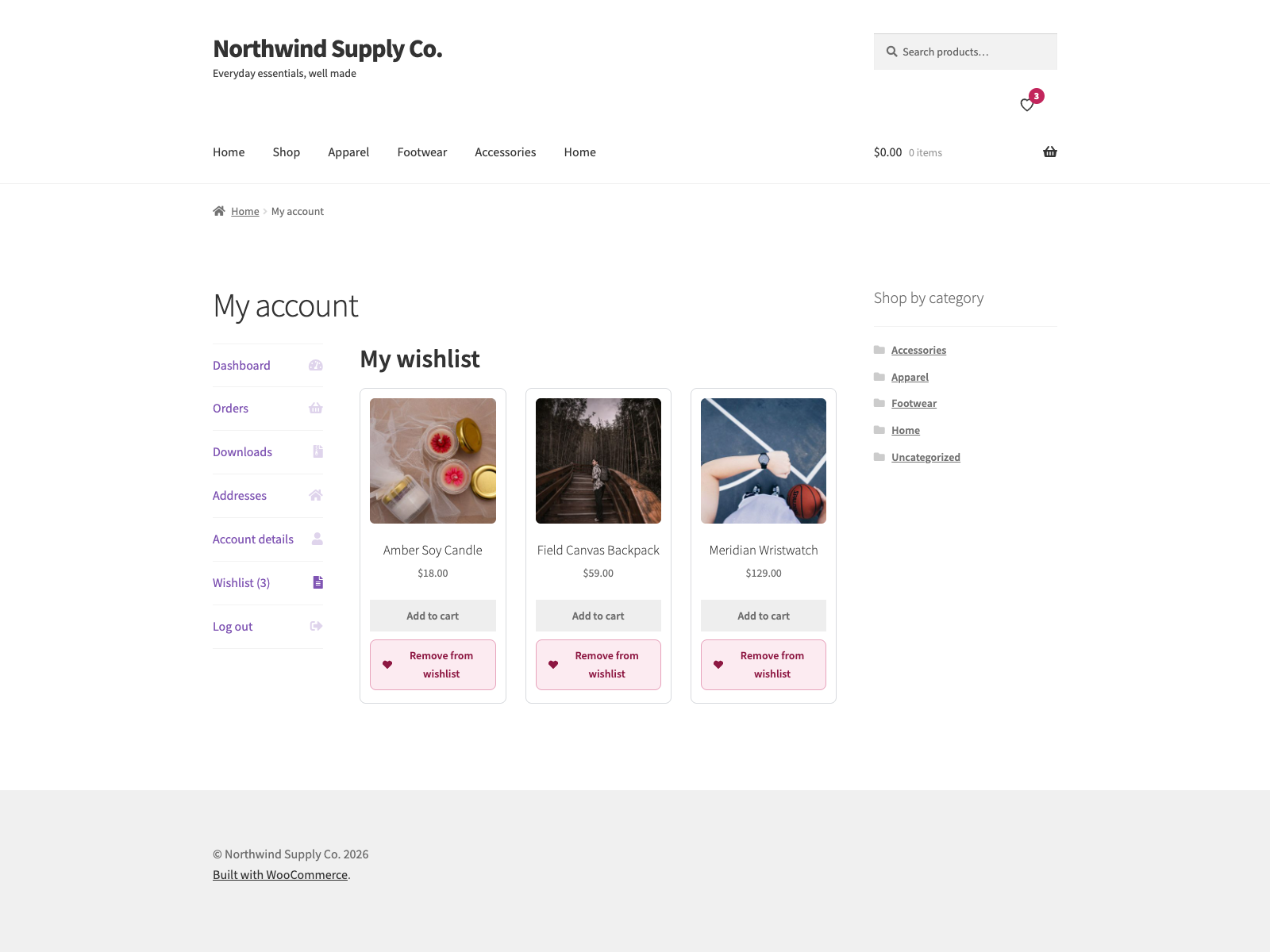
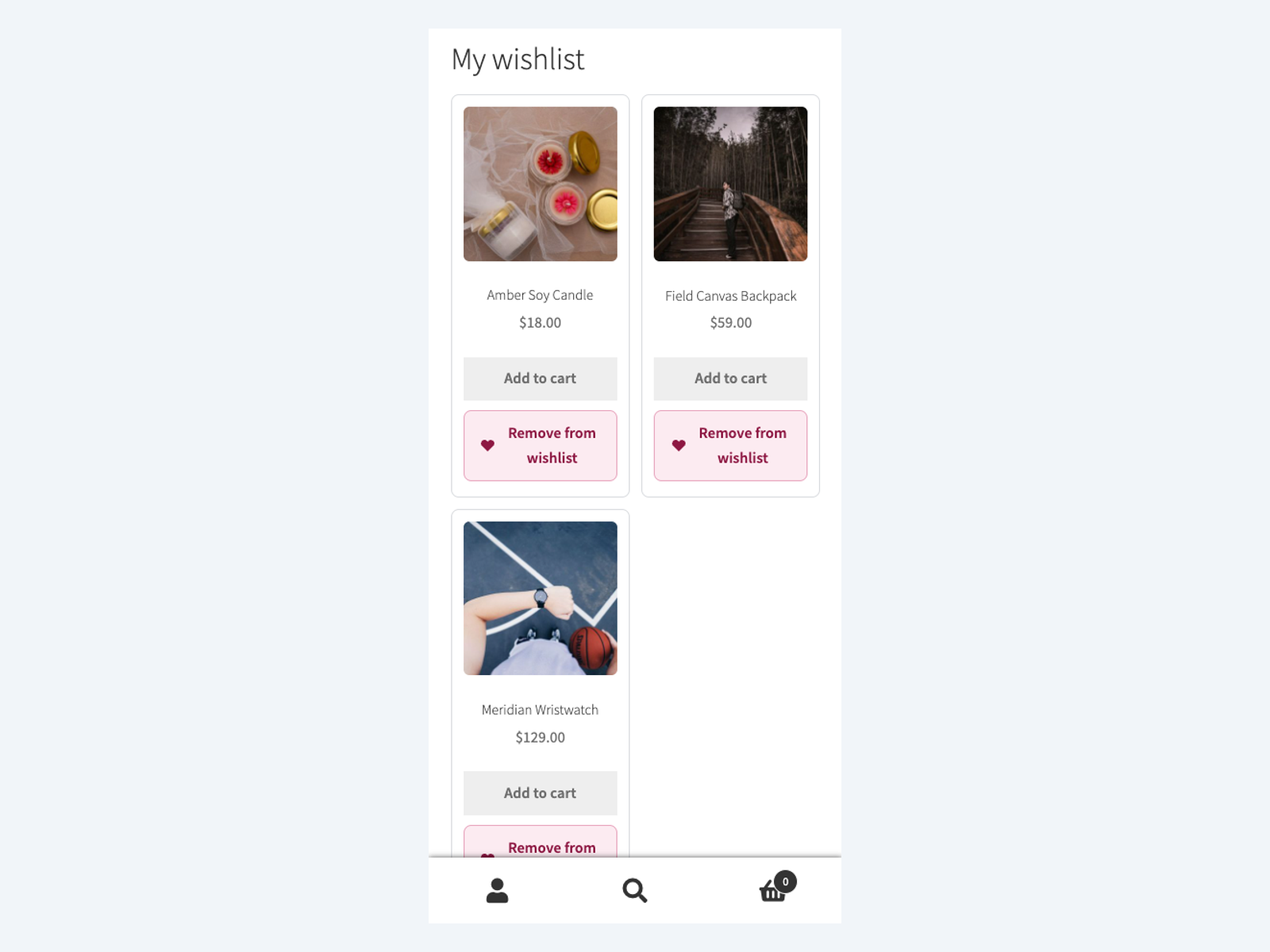
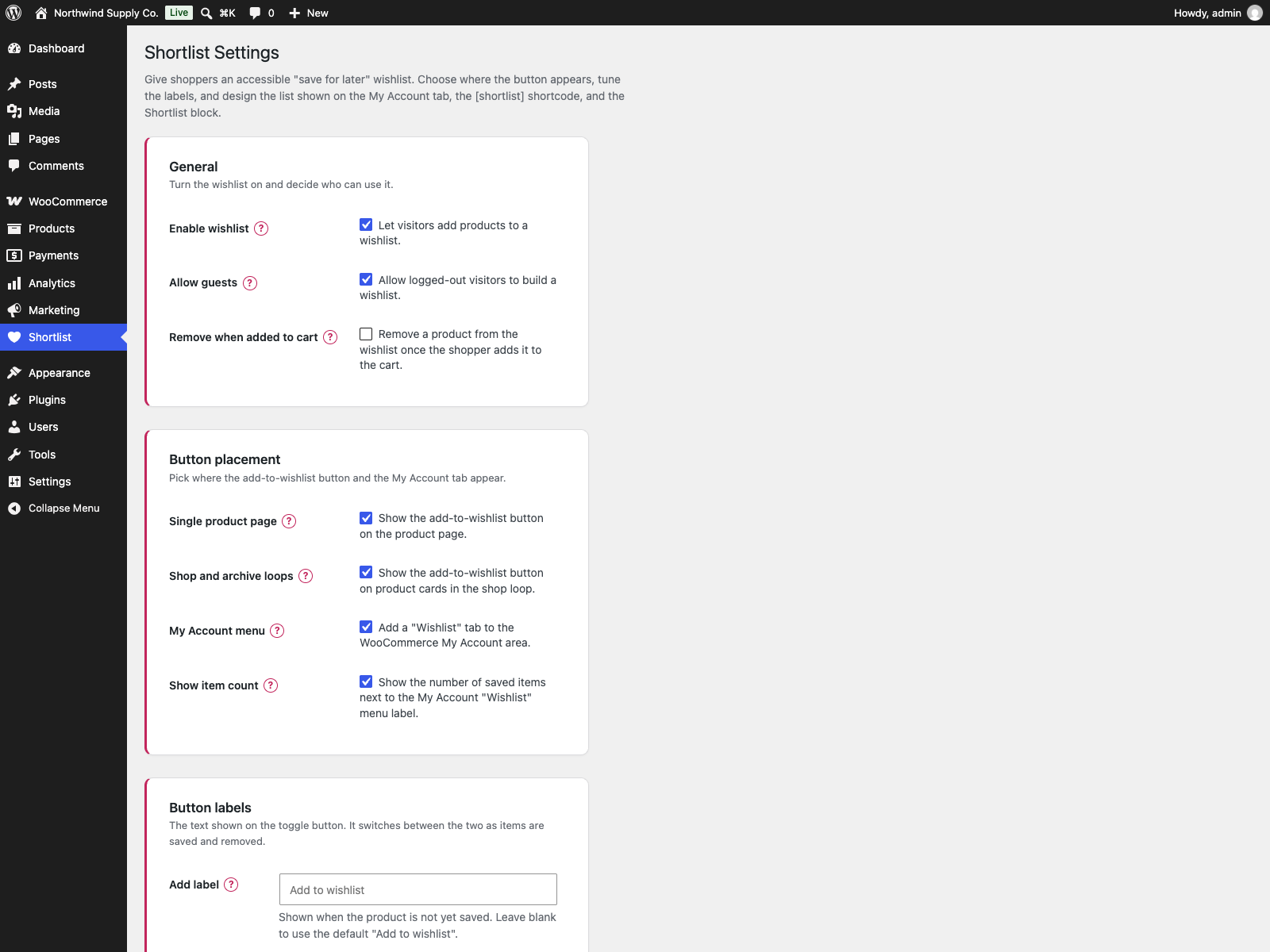
![The header wishlist counter from the <code>[shortlist_count]</code> shortcode, showing three saved products.](https://ps.w.org/plogins-shortlist/assets/screenshot-4.png?rev=3762283)
Yes. Shortlist requires an active WooCommerce installation.
Yes, if you allow it in settings. A guest’s list lives in a cookie and is merged into their account the next time they log in.
No. The plugin’s own front-end script is vanilla JavaScript with no jQuery dependency.
Use the [shortlist] shortcode, or rely on the “Wishlist” tab added to the WooCommerce My Account area.
Yes. On variable products the wishlist button follows the selected variation, so the saved item can include the chosen size or colour.
Add the [shortlist_count] shortcode to your header: in a block theme, edit the Header template part and insert a Shortcode block. It prints a heart link to your wishlist page (or the My Account wishlist tab) with a badge showing how many items are saved. Screen readers hear “Wishlist, 3 items”. The number is fetched by the browser after the page loads and updates as items are added or removed, so it stays correct on cached pages.
Yes. Turn on “Remove when added to cart” in the General settings. When a shopper adds a saved product to the cart, it leaves their wishlist, and the counter and buttons on the page update. For a variable product, the saved variation is the one removed. It is off by default.
Yes. Choose an existing page or create one from the Shortlist settings screen. The plugin can inject the [shortlist] list automatically.
Yes. The wishlist button is a real button with aria-pressed, screen-reader announcements and no layout shift when the saved state changes.
Yes. This plugin is compatible with WordPress Multisite. Network activate it or activate it on individual sites; each site keeps its own settings and data.
Changelog
1.1.0
- New:
[shortlist_count]shortcode for the header, a heart link to the wishlist with a count badge and a spoken label such as “Wishlist, 3 items”. The count is loaded in the browser and updates after every add or remove, so a cached page never shows another shopper’s number. - New: the add-to-wishlist button on block-theme Product Collection grids, next to each card’s add-to-cart button. On a block theme’s shop page, where WooCommerce also runs the classic loop hook, each product still gets one button.
- New: “Remove when added to cart” setting, off by default. A saved product leaves the wishlist when it is added to the cart, including when its quantity in the cart is raised; for a variable product the saved variation is removed.
- Fixed: on Storefront and other themes that float WooCommerce product loops, the wishlist grid squeezed every card to a narrow column and left an empty first cell.
1.0.21
- Privacy: after a customer signed in, the items they had saved as a guest kept the guest cookie’s id, and that cookie stays in the browser after logout. The next person at that browser saw the customer’s wishlist and could remove items from it. Items handed to an account now leave the guest list, and guest lookups no longer match account items.
- Fixed: a product saved both as a guest and on the account was listed twice after signing in, and counted twice in “Wishlist (n)”.
- Fixed: items saved as a guest were not moved to the account when the visitor registered, on the My Account form or at checkout, because that sign-in never fires wp_login.
- Fixed: the Shortlist Wishlist block could not be added in the block editor. Its script loaded before the editor’s own scripts and stopped with an error, so the block never registered.
- Fixed: a page built with the Elementor Wishlist widget got the list without its stylesheet and script, so it was unstyled and its remove buttons did nothing.
- Fixed: switching the wishlist off left the [shortlist] shortcode, the block and the My Account wishlist URL still printing the list.
1.0.20
- The upgrade notice’s “Coming soon” and “Get notified” labels are English source strings for every language; Polish sites used to get their own Polish source text, which translators in other languages then saw untranslated.
1.0.19
- Security (low): the wishlist accepted any product ID, including draft, pending and private products, and then showed that product’s name, price and image on the wishlist page. A visitor could read unpublished products by sending guessed IDs. Products the visitor cannot read are now refused and are no longer listed.
1.0.18
- Display name drops the “Plogins ” prefix. The slug, the text domain and every option key are unchanged, so nothing on an existing install moves.
1.0.17
- The sidebar upgrade promo now follows the same dismissal as the banner. Dismissing the banner used to leave a full-height advert on the settings screen for good, which is not what the WordPress.org guideline on upgrade prompts means by used with moderation.
1.0.16
- Fixed: the saved-item count loaded every saved product to count them. The My Account menu badge and the number returned after every add or remove asked the database for the whole list and then built a full product object per row, so a shopper with forty saved items paid forty product loads for one number, on every My Account page view. The count is now a single COUNT query and loads nothing.
1.0.15
- Changed: the listing now says a paid edition exists and what it adds. It never did, so anyone reading the WordPress.org page had no way of knowing there was one.
1.0.14
- Fixed: the PRO upgrade promo kept selling to people who had already bought the paid edition. Only the banner could be dismissed, so the sidebar promo and the locked feature cards followed a paying customer around for good. The promo now checks whether the paid edition is active and steps aside when it is.
- Fixed: arrow glyphs in the admin menu paths, and in the strings handed to translators. An arrow inside a translatable string makes the glyph every translator’s problem and changes the layout in any locale that drops it.
1.0.13
- Changed: the PRO feature cards printed an arrow glyph in menu paths where the rest of the plugin and the documentation use a plain “>”. Same navigation, one character that renders everywhere.
1.0.12
- Fixed: the wishlist rendered with no styling and dead buttons on any page other than the shop, a product, a product category, My Account or the page set as the wishlist page. The
[shortlist]shortcode and the wishlist block print the full markup anywhere, but the stylesheet and script did not follow them. They now load wherever the shortcode or the block is on the page, and nowhere else.
1.0.11
- Fixed: deleting the plugin left the per-user “dismiss” flag from the PRO notice in the database. Uninstall now removes it for every user, not just the one who dismissed it.
1.0.10
- Fixed: every customer-facing label was untranslatable. The button text, the My Account title, the empty-list message and the error strings shipped as English sentences in a config file and were written into the settings option the moment the plugin activated, so a shop running in another language showed English however complete its language pack was. The settings screen already said “leave blank to use the default”; the packaged value meant blank never happened.
- The defaults are now translated strings resolved when the label is about to be shown, never written back to the database. A label you typed yourself is still used exactly as typed.
- On update, a label left byte for byte as the English default is cleared so the translated one takes over. Anything you edited, including a hand translation, is matched exactly and kept.
1.0.9
- Translations: refreshed the bundled
plogins-shortlist.pot. It had fallen behind 1.0.8, missing six strings from the wishlist admin list and the Elementor widget and still carrying a price string that had been removed. That template is what translators work from, so those six could not be translated until now.
1.0.8
- Fixed the PRO promo on the settings screen quoting a price in PLN. PRO is priced and charged in EUR, so an admin on a Polish site was shown a zloty amount and then billed in euro, and the zloty figure was a fixed conversion that drifted from the real charge as the rate moved. The promo now shows the euro price that is actually taken.
- New: Elementor widget for the wishlist list, same output as the shortcode and block. Loads only when Elementor is active.
1.0.6
- Fixed: Save Changes on the Shortlist settings screen now saves every option again, including the whole “Wishlist list” card (heading, intro, empty-list message, columns and the show image, name, price, add-to-cart and remove toggles). Previously that button posted nothing.
- Fixed: “Create wishlist page” now only creates the page, instead of hijacking the settings save.
1.0.4
- Translations: completed Polish, German and Spanish for the PRO upgrade panel.
1.0.3
- Accessibility improvements to the admin and storefront markup.
- Fixed low-contrast admin headings under an OS dark-mode preference.
1.0.2
- Added bundled Polish, German and Spanish translations for the plugin interface.
1.0.1
- First stable release.
0.3.1
- Renamed to Plogins Shortlist for WooCommerce for a more distinctive plugin name.
0.3.0
- New: Wishlist page, pick an existing page or create one from settings; auto-inject the
[shortlist]list when the page has no shortcode yet. - New: Variation-aware saves, on variable products the button tracks the selected variation; configurable hint when no variation is chosen.
- Improved: settings screen groups wishlist page, variation hint and existing placement controls.
0.2.0
- Polish: refreshed, themeable storefront styles (heart icon, dark-mode, CLS-safe grid) and a modern, card-based settings screen with an accessible “?” help popover on every option.
- Accessibility: wishlist changes are now announced to screen readers, and the My Account count updates live without a page reload.
- Robustness: friendly empty-state with a “Browse products” link, clear failure messaging, and defensive guards against missing product data.
- New: Shortlist Wishlist block for the block editor (server-rendered, matches the
[shortlist]shortcode). - New: optional saved-item count next to the My Account “Wishlist” menu label.
- New: full control over the wishlist list, heading, intro and empty-list text, column count, and which product details (image, name, price, add-to-cart, remove button) appear.
- New: uninstall cleanup removes the wishlist table and plugin options on delete.
- i18n: added Domain Path and a
languagesdirectory for translations.
0.1.0
- Initial release: accessible AJAX wishlist for WooCommerce with guest support, a My Account tab, a shortcode, and a settings page for placement and labels.
Available Versions
| Version | Download | Type |
|---|---|---|
| 1.1.0 | Download | Stable |
| 1.0.21 | Download | Stable |
| 1.0.20 | Download | Stable |
| 1.0.18 | Download | Stable |
| 1.0.17 | Download | Stable |
| 1.0.16 | Download | Stable |
| 1.0.15 | Download | Stable |
| 1.0.13 | Download | Stable |
| 1.0.12 | Download | Stable |
| 1.0.11 | Download | Stable |
| 1.0.10 | Download | Stable |
| 1.0.9 | Download | Stable |
| 1.0.8 | Download | Stable |
| Development | Download | Trunk |
