
Reel – Product Gallery Zoom & Video for WooCommerce
Active Installs
0+
Last Updated
October 24, 2026
First Released
August 13, 2026
Download History (Last one month)
Contributors
Reel upgrades the WooCommerce single product gallery with product image zoom, an accessible gallery lightbox and a featured product video:
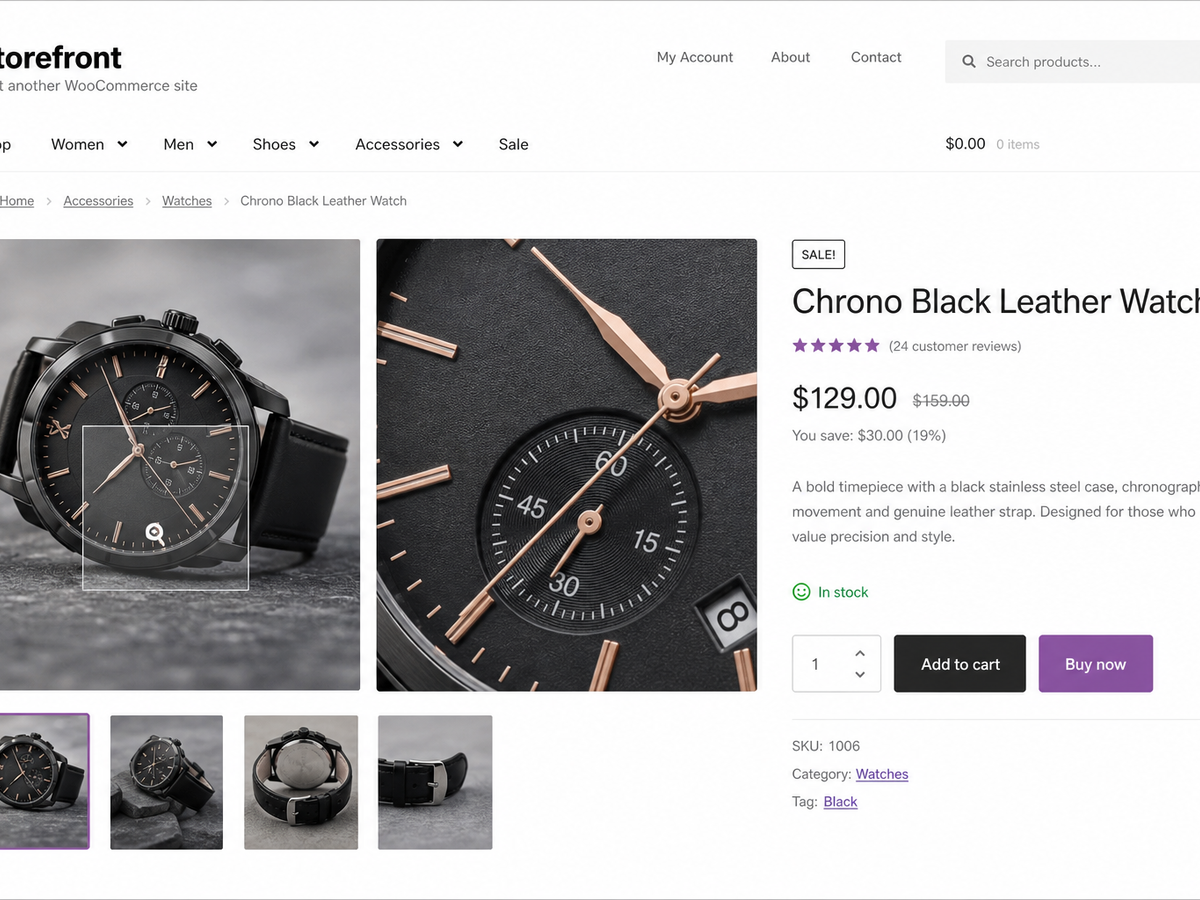
- Hover zoom. Gallery images magnify on hover at a zoom scale you set (1.0× to
3.0×). The transform is clipped to the gallery frame, so the rest of the page
stays put. On touch screens, two fingers pinch the image to zoom; a double tap
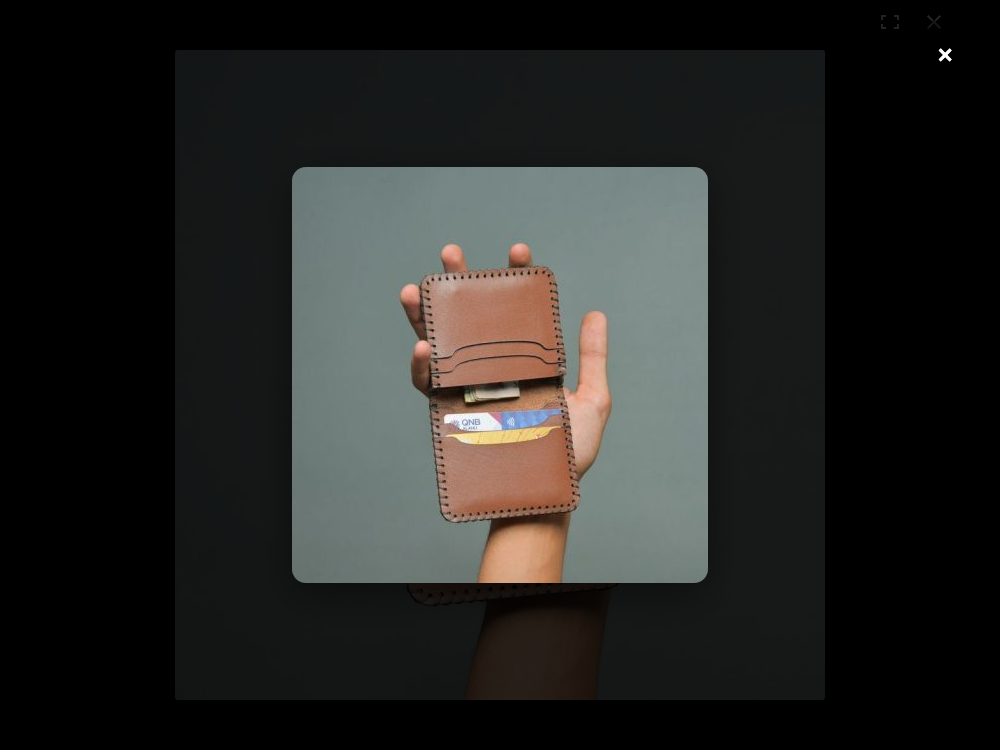
or moving to another slide puts it back, and one finger still scrolls and swipes. - Accessible lightbox. Click, or press Enter/Space, on any gallery image to
open its full-size file full screen. Arrow buttons, the Left and Right keys or a
swipe step through every gallery image, with an “Image 2 of 5” counter read out
to screen readers. Tab stays inside the lightbox so focus can’t slip behind the
overlay, Escape closes it, and focus returns to the image you opened. It’s a fixed overlay that starts hidden, so it
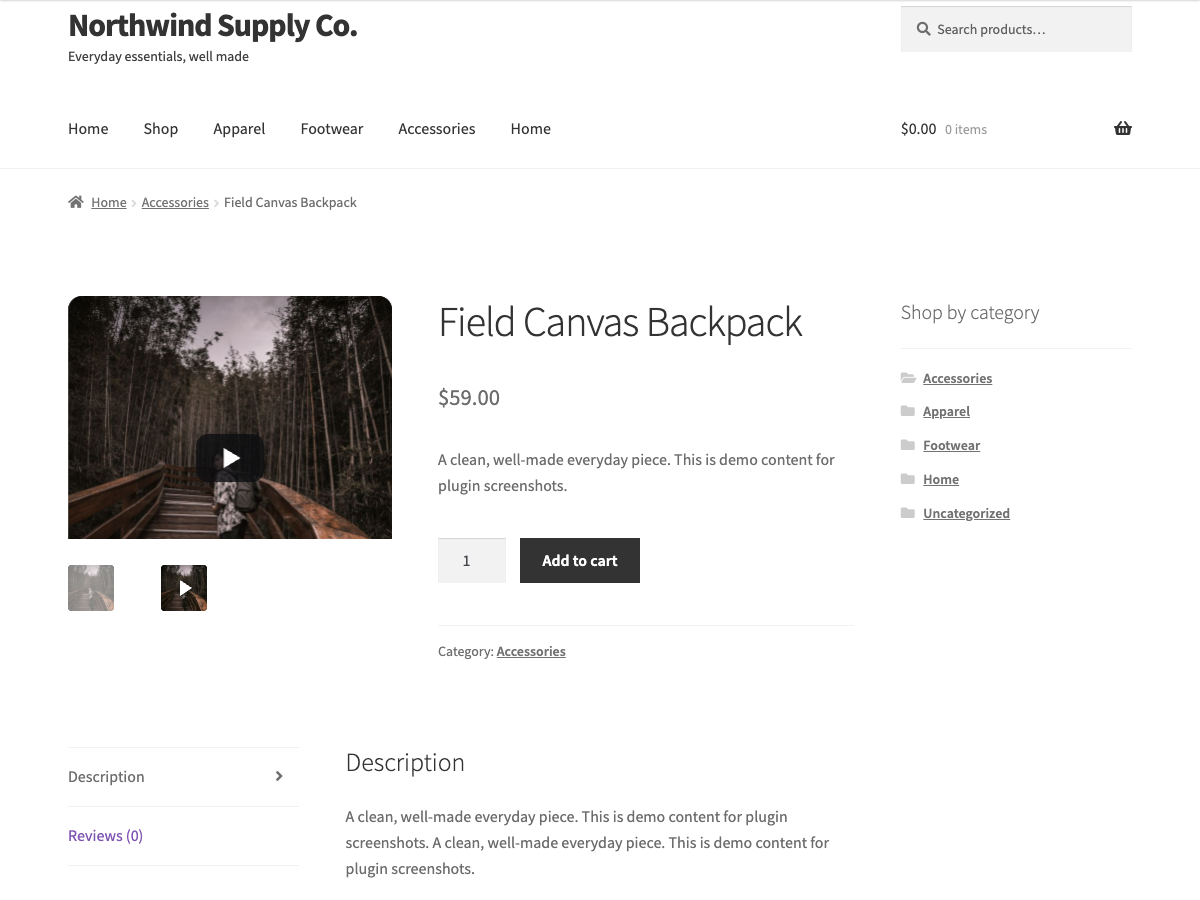
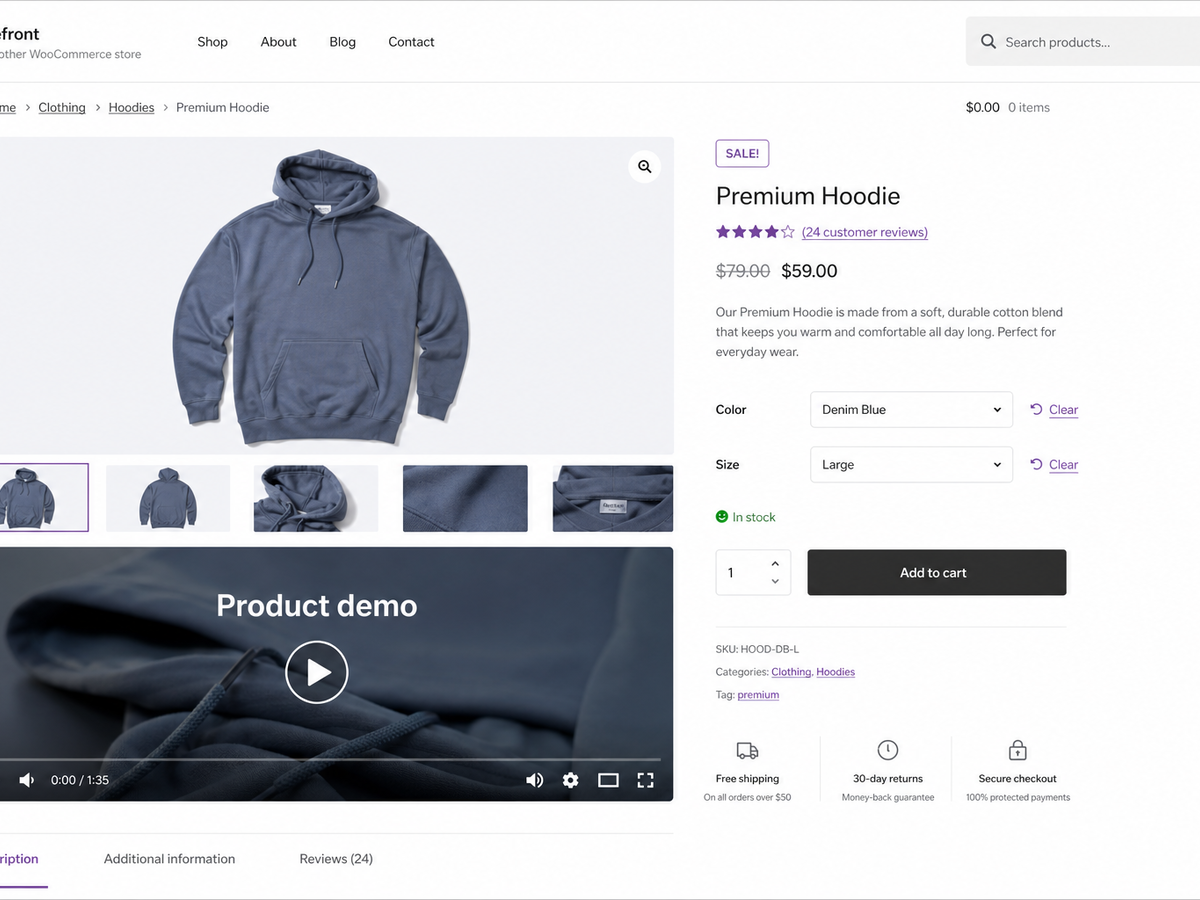
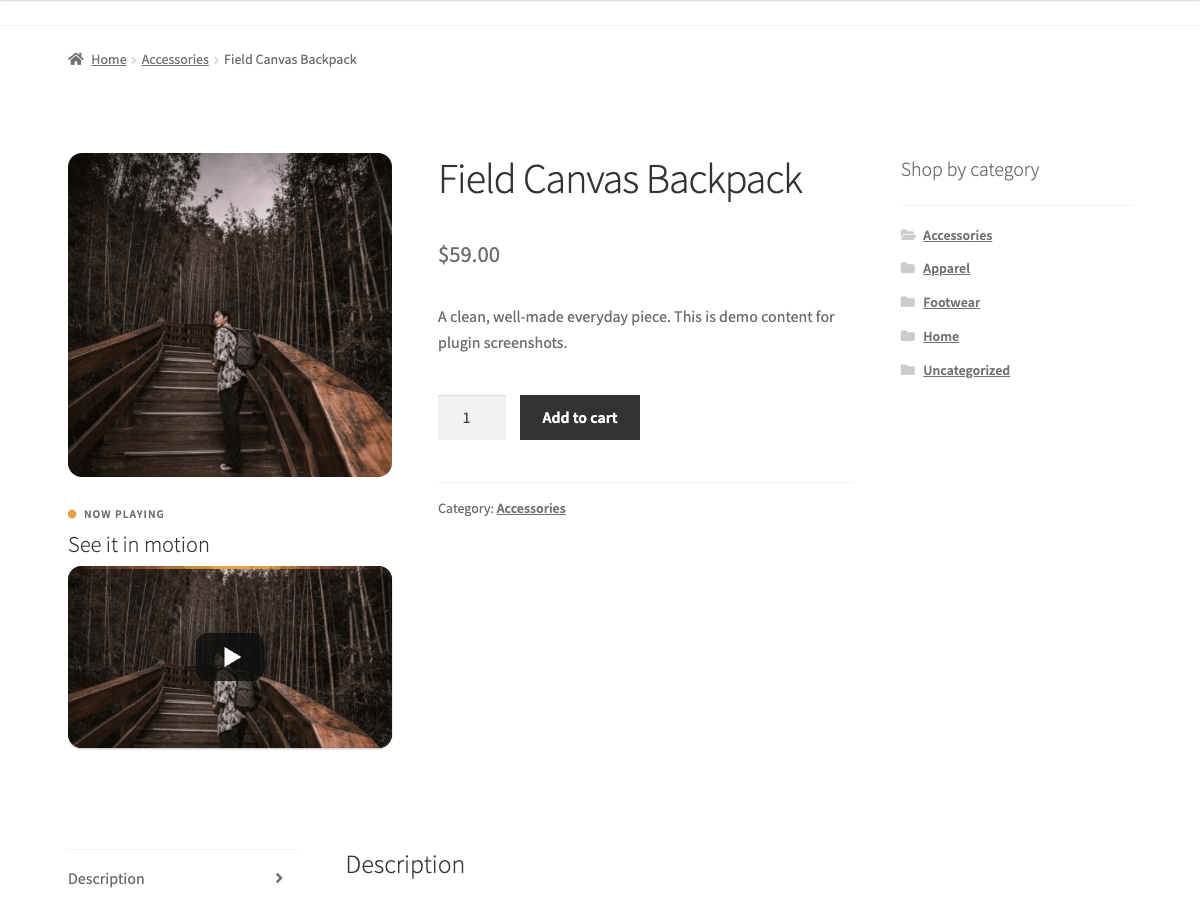
reserves no space until used. - Featured video. Show a per-product video, a self-hosted MP4/WebM file or a
YouTube/Vimeo (oEmbed) URL, after the gallery, before the product summary, or
in the gallery itself as the last slide with a play thumbnail.
The video sits in a 16:9 frame sized withaspect-ratio, so its space is held
before it loads. YouTube and Vimeo show a poster and a play button; the player
loads only when the shopper presses play, and YouTube plays from
youtube-nocookie.com.
The markup is built in PHP and progressively enhanced by vanilla JavaScript (no
jQuery), deferred and loaded in the footer: the gallery script on the single
product page, and a small click-to-play script only where a YouTube or Vimeo
video is shown.
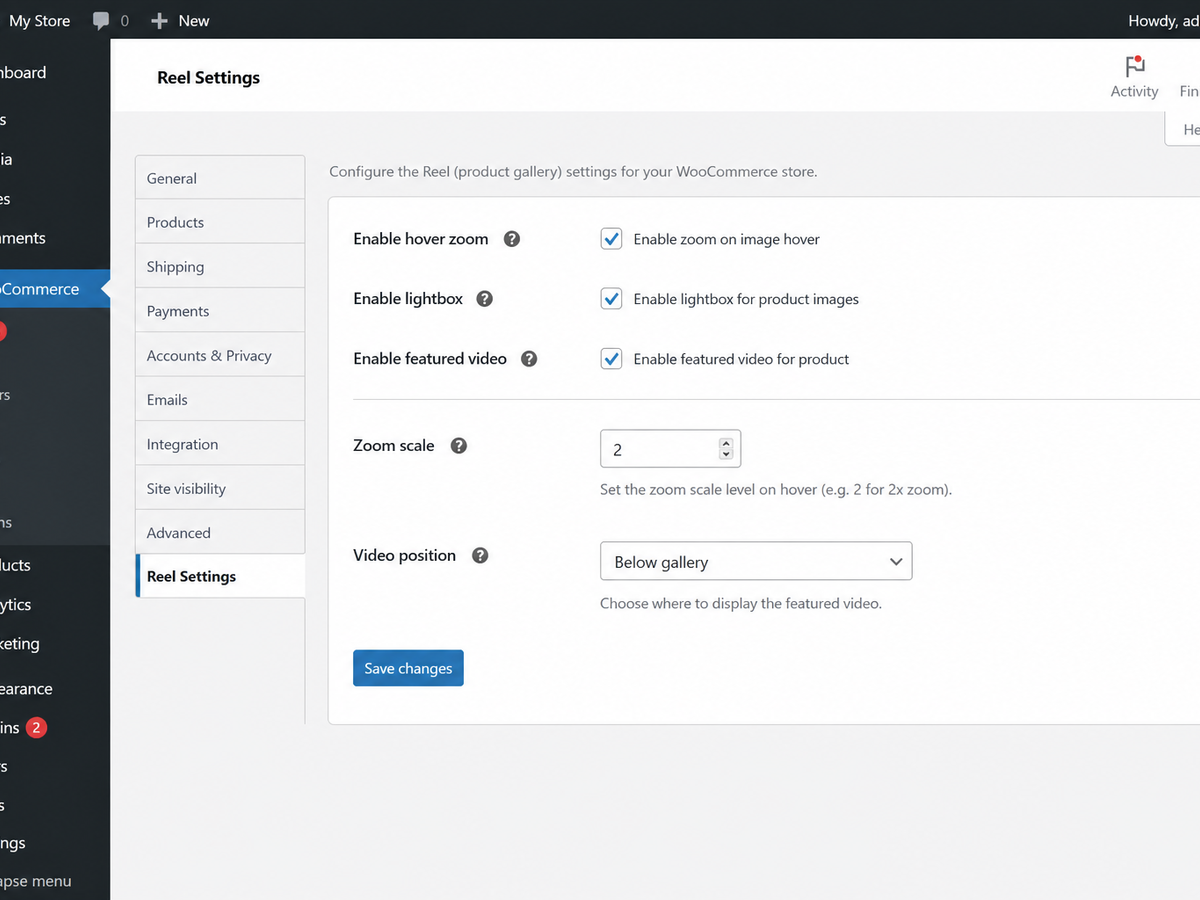
Settings live under a top-level Reel admin menu. Each of the three features
has its own on/off switch; you can also set the zoom scale and skip it on touch
devices, show an alt-text caption in the lightbox, relabel the open-image control
for screen readers, and choose the video’s position, autoplay, heading and intro
text. The per-product video URL is set on the Reel tab in the product editor,
with an optional heading for that product.
To place the video somewhere other than the gallery area, drop the [reel_video]
shortcode (it takes id and title attributes) into any product content. It
renders the current product’s video in the same 16:9 frame.
Source and issue tracker: github.com/wppoland/plogins-reel, the plugin is
developed in the open, so bug reports and pull requests are welcome there.
Documentation and links
- Documentation: plogins.com/reel/docs/
- Plugin page: plogins.com/reel/
- Source code: github.com/wppoland/plogins-reel
- Bug reports and feature requests: github.com/wppoland/plogins-reel/issues
Features
- Gallery image hover zoom with a configurable scale.
- Two-finger pinch zoom on touch screens.
- Accessible, keyboard-operable full-screen lightbox (Escape / backdrop close).
- Featured product video (self-hosted or oEmbed) with selectable position.
- Click-to-play poster for YouTube and Vimeo, so the player loads only on demand.
[reel_video]shortcode to place the video anywhere.- Optional lightbox caption from the image alt text.
- Skip hover zoom on touch devices (where hover is unreliable).
- Custom accessible label for the open-in-lightbox control.
- Default video heading and optional intro paragraph.
- Reserved-space markup throughout, so no Cumulative Layout Shift.
- No jQuery; deferred, in-footer scripts loaded only where they are needed.
- Independent on/off toggle for each feature.
- “Settings” link on the plugins list; clean uninstall removes plugin options.
- Fully translatable: ships the
plogins-reel.pottemplate, with Polish, German and Spanish delivered by the WordPress.org language pack. - HPOS and cart/checkout blocks compatible.
Plogins Reel PRO
The free edition upgrades the WooCommerce gallery: zoom, lightbox and self-hosted video. Plogins Reel PRO adds richer video and per-variation media:
- Per-variation gallery – a distinct image and video set that swaps in when the shopper selects a variation
- Video autoplay rules – control when and how product videos autoplay
Everything in the free edition stays free and open. Plogins Reel PRO starts at 19 EUR per year, priced and charged in EUR.
Compare editions and pricing: plogins.com/plogins-reel-pro/pricing/
External Services
Reel makes no API calls or analytics requests of its own; the zoom, lightbox and self-hosted video features run entirely on your site, and the only data Reel stores is the reel_settings and reel_db_version options plus each product’s _reel_video_url and _reel_video_title meta.
The one exception is when you set a product’s video URL to a YouTube, Vimeo or other oEmbed link. In that case WordPress core’s own wp_oembed_get() fetches the embed markup from that provider, sending the video URL to the provider you chose so it can return the player; Reel caches the result in a transient to avoid repeat requests. No request is made for self-hosted (MP4/WebM) videos.
YouTube and Vimeo videos start as a poster image. For YouTube the shopper’s browser loads that poster from YouTube’s image server (i.ytimg.com); for Vimeo your site fetches the thumbnail address once from Vimeo’s oEmbed endpoint and caches it for a week. The player itself, from youtube-nocookie.com or player.vimeo.com, loads only after the shopper presses play. Use of those providers is governed by their own terms and privacy policies, e.g. YouTube (https://www.youtube.com/t/terms, https://policies.google.com/privacy) and Vimeo (https://vimeo.com/terms, https://vimeo.com/privacy).
Translations
Plogins Reel is fully translatable and ships the plogins-reel.pot template. Translations are delivered by WordPress.org language packs from translate.wordpress.org, which is where Polish, German and Spanish are being contributed; the package itself carries no compiled translation files.
- Upload the plugin to
/wp-content/plugins/plogins-reel, or install via Plugins > Add New. - Activate it. WooCommerce must be active.
- Go to the Reel menu and enable the features you want.
- For a product video, open a product, go to the Reel tab in the product data panel and paste the video URL.
Screenshot Gallery
Yes. Reel is a WooCommerce product gallery plugin and runs on single product pages.
Self-hosted files (MP4, M4V, WebM, OGV) are played with WordPress’s native video
player. Any oEmbed-supported URL (YouTube, Vimeo, etc.) is embedded automatically.
YouTube and Vimeo start as a poster with a play button and load the player on
click; with autoplay switched on they embed directly.
No. Reel ships vanilla JavaScript only, deferred and loaded in the footer: the
gallery script on the single product page, and the click-to-play script where a
YouTube or Vimeo video is shown.
No. Reel enhances the existing WooCommerce product gallery with image zoom, lightbox behaviour and optional product video.
Yes. Use the [reel_video] shortcode to place the product video in custom product content.
No. The lightbox is a fixed overlay that starts hidden, the zoom transform is
clipped to the gallery frame, and the video sits in a fixed-ratio frame that
reserves its space before loading.
Yes. Shoppers can open images with Enter or Space, move between images with the arrow buttons or the Left and Right keys, close with Escape, and focus returns to the image that opened the lightbox.
Yes. This plugin is compatible with WordPress Multisite. Network activate it or activate it on individual sites; each site keeps its own settings and data.
Changelog
1.1.0
- New: video position “In the gallery”. The video becomes the last gallery slide with a play glyph on its thumbnail; picking it shows the click-to-play poster, and the player loads only on click. Autoplay does not apply in this position.
- New: the lightbox steps through all gallery images with arrow buttons, the Left and Right keys or a swipe, and announces “Image N of M”.
- Fixed: the lightbox showed the gallery-size image; it now opens the full-size file.
- Fixed: on block themes, “Before the summary” printed the video above the breadcrumbs. It now sits in the gallery column, above the images.
1.0.28
- Fixed: with the video placed after the gallery, the YouTube poster sat too low in its frame and showed a black bar at the top. It now fills the frame.
- Translation template carries the new play button labels and the plugin’s own support link.
1.0.27
- New: two-finger pinch zoom on the gallery image on touch screens. One finger still scrolls the page and swipes the slider; a double tap or a slide change resets the zoom. On with hover zoom.
- New: YouTube and Vimeo featured videos show a poster and a play button, and the player loads only when the shopper presses it. Nothing from the player is loaded for visitors who never play, YouTube plays from youtube-nocookie.com, and the poster fills the reserved 16:9 frame so nothing moves. With autoplay on, the player embeds directly as before.
1.0.26
- Security (low): the [reel_video] shortcode and the Reel featured video block showed the video and title of any product ID, including drafts, private and password-protected products. A contributor previewing a post could read them. They now show only products the visitor is allowed to see.
1.0.25
- Fixed: YouTube and Vimeo videos printed as an empty frame. The embed is an iframe, and the output filter removed it; only self-hosted files ever played.
- Fixed: on a product with gallery images, the video placed after the gallery landed inside the image slider, off to the side where nobody could reach it. It now sits under the images and thumbnails.
- Fixed: clicking a gallery image opened Reel’s lightbox and WooCommerce’s own lightbox at the same time on themes that enable WooCommerce’s gallery features, which all default themes do. With Reel’s zoom or lightbox switched on, WooCommerce’s matching feature now steps aside, and the click no longer follows the link to the image file.
- Fixed: deleting the plugin left the cached video embeds of the shortcode and block in the database.
1.0.24
- The upgrade notice’s “Coming soon” and “Get notified” labels are English source strings for every language; Polish sites used to get their own Polish source text, which translators in other languages then saw untranslated.
1.0.23
- Display name drops the “Plogins ” prefix. The slug, the text domain and every option key are unchanged, so nothing on an existing install moves.
1.0.22
- The sidebar upgrade promo now follows the same dismissal as the banner. Dismissing the banner used to leave a full-height advert on the settings screen for good, which is not what the WordPress.org guideline on upgrade prompts means by used with moderation.
1.0.21
- Fixed: the PRO upgrade promo kept selling to people who had already bought the paid edition. Only the banner could be dismissed, so the sidebar promo and the locked feature cards followed a paying customer around for good. The promo now checks whether the paid edition is active and steps aside when it is.
- Fixed: arrow glyphs in the admin menu paths, and in the strings handed to translators. An arrow inside a translatable string makes the glyph every translator’s problem and changes the layout in any locale that drops it.
1.0.20
- Changed: the PRO feature cards printed an arrow glyph in menu paths where the rest of the plugin and the documentation use a plain “>”. Same navigation, one character that renders everywhere.
1.0.19
- Fixed: deleting the plugin left the per-user “dismiss” flag from the PRO notice in the database. Uninstall now removes it for every user, not just the one who dismissed it.
1.0.18
- The translation template was regenerated. 12 strings added to the plugin since the template was last built were missing from it, so no translator could reach them in any language, and 10 strings the plugin no longer uses have been dropped. Nothing you see changes; what a translator can see does.
1.0.17
- Fixed: the plugin reported an older version number internally than the one it was released under. That number versions the stylesheets and scripts the admin screen loads, so a browser holding the previous files kept them after an update instead of fetching the corrected ones.
1.0.16
- Declared compatibility with WooCommerce 11.0.
1.0.15
- Fixed the PRO promo on the settings screen quoting a price in PLN. PRO is priced and charged in EUR, so an admin on a Polish site was shown a zloty amount and then billed in euro, and the zloty figure was a fixed conversion that drifted from the real charge as the rate moved. The promo now shows the euro price that is actually taken.
1.0.14
- Corrected the PRO pricing line. It implied a second currency was available; there is none. PRO is priced and charged in EUR.
1.0.13
- The video heading now falls back to the built-in “Product video” text, as the setting always said it would. With “Show heading” on and the default heading left empty, the video on the product page showed no heading at all; only the shortcode got this right. Set your own text in Reel > Featured video, or turn “Show heading” off if you prefer none.
- Autoplay now really plays. The video is muted whenever autoplay is on, which is the only way browsers allow it, so a video that used to sit there paused starts on its own with the sound off until the shopper turns it up.
1.0.12
- Stopped advertising a block that could not be inserted. The plugin registered
reel/featured-videoserver-side only, with no block.json and no editor script, so it never appeared in the inserter, yet the readme and the settings screen told merchants to look for it. The[reel_video]shortcode does the same job and is unchanged.
1.0.11
- The featured video can now be set from the product editor. A Reel tab on the product data panel takes a YouTube, Vimeo or direct .mp4/.webm URL and an optional heading. The rendering side always shipped here, but nothing in the free plugin could fill those fields in, so the readme asked people to edit a meta field by hand. That was a feature with its interface missing, and it is fixed by adding the interface rather than by removing the feature.
1.0.10
- The package no longer ships .po and .mo files. Translations for plugins hosted on WordPress.org come from translate.wordpress.org, which generates and delivers them per locale. The .pot template stays, since that is what translators import.
1.0.6
- Translations: completed Polish, German and Spanish for the PRO upgrade panel.
1.0.5
- Restored the distinctive display name: Plogins Reel – Product Gallery Zoom & Video for WooCommerce.
1.0.4
- Fixed low-contrast admin headings under an OS dark-mode preference.
1.0.3
- Clearer name: Plogins Reel – Product Gallery Zoom & Video for WooCommerce.
1.0.2
- Added bundled Polish, German and Spanish translations for the plugin interface.
1.0.1
- First stable release.
0.2.1
- Renamed to Plogins Reel for WooCommerce for a more distinctive plugin name.
0.2.0
- Redesigned settings screen: card layout, toggle switches, inline help tooltips and a live zoom-strength control.
- Polished storefront styling: themeable CSS custom properties, fluid sizing, dark-mode support and reduced-motion guards.
- Accessibility: named lightbox dialog, role=tooltip help, visible focus styles and full keyboard operability.
- Robustness: graceful empty/placeholder states, a no-layout-shift video skeleton and hardened event handling.
- Add
[reel_video]shortcode to place the featured video anywhere. - Add lightbox caption (from image alt text) and an option to skip hover zoom on touch devices.
- Add settings for the open-in-lightbox label, a default video heading and an optional intro paragraph.
- Add a “Settings” link on the plugins list and an uninstall routine that removes plugin options.
- Bundle a translation template (languages/reel.pot) and a Polish translation.
0.1.0
- Initial release: gallery hover zoom, accessible lightbox and featured product video.
Available Versions
| Version | Download | Type |
|---|---|---|
| 1.1.0 | Download | Stable |
| 1.0.28 | Download | Stable |
| 1.0.26 | Download | Stable |
| 1.0.25 | Download | Stable |
| 1.0.24 | Download | Stable |
| 1.0.23 | Download | Stable |
| 1.0.22 | Download | Stable |
| 1.0.21 | Download | Stable |
| 1.0.20 | Download | Stable |
| 1.0.19 | Download | Stable |
| 1.0.18 | Download | Stable |
| 1.0.17 | Download | Stable |
| 1.0.16 | Download | Stable |
| 1.0.15 | Download | Stable |
| 1.0.14 | Download | Stable |
| 1.0.13 | Download | Stable |
| 1.0.12 | Download | Stable |
| Development | Download | Trunk |
