
Panorama Block – Display 360-Degree Panoramic Views
Active Installs
700+
Last Updated
April 23, 2026
First Released
December 15, 2021
Download History (Last one month)
Panorama is a 360° panorama viewer Gutenberg Block that lets you display your panoramic images/videos on your websites within a few clicks. This Gutenberg block supports a variety of panoramic files such as .png, .jpeg, .mp4 and so on.The plugin is very easy to use and anyone can use the plugin easily without any technical knowledge.
Features
- Fully Customizable: All the options you need to arrange the showcase to your liking are available here.
How to use
- First, install the Panorama Block plugin.
- Add the Panorama Block from the block category called “Widgets” in the Gutenberg editor.
- You can change block settings from the right-side settings sidebar.
-
Enjoy!
-
For installation help click on Installation Tab.
Feedback
- Did you like this plugin? Dislike it? Have a feature request? Please share your feedback with us
⭐ Check out the Parent Plugin of this plugin-
🔥 B Blocks – Best gutenberg blocks collections for WordPress
⭐ Check out our other WordPress Plugins-
🔥 Html5 Audio Player – Best audio player plugin for WordPress.
🔥 Html5 Video Player – Best video player plugin for WordPress.
🔥 PDF Poster – A fully-featured PDF Viewer Plugin for WordPress.
🔥 Document Embedder – Best WordPress Document Embedder Plugin.
🔥 3D Viewer – Display interactive 3D models on the webs.
🔥 Advanced Post Block – Best Post Display Plugin for WordPress.
From Gutenberg Editor:
- Go to the WordPress Block/Gutenberg Editor
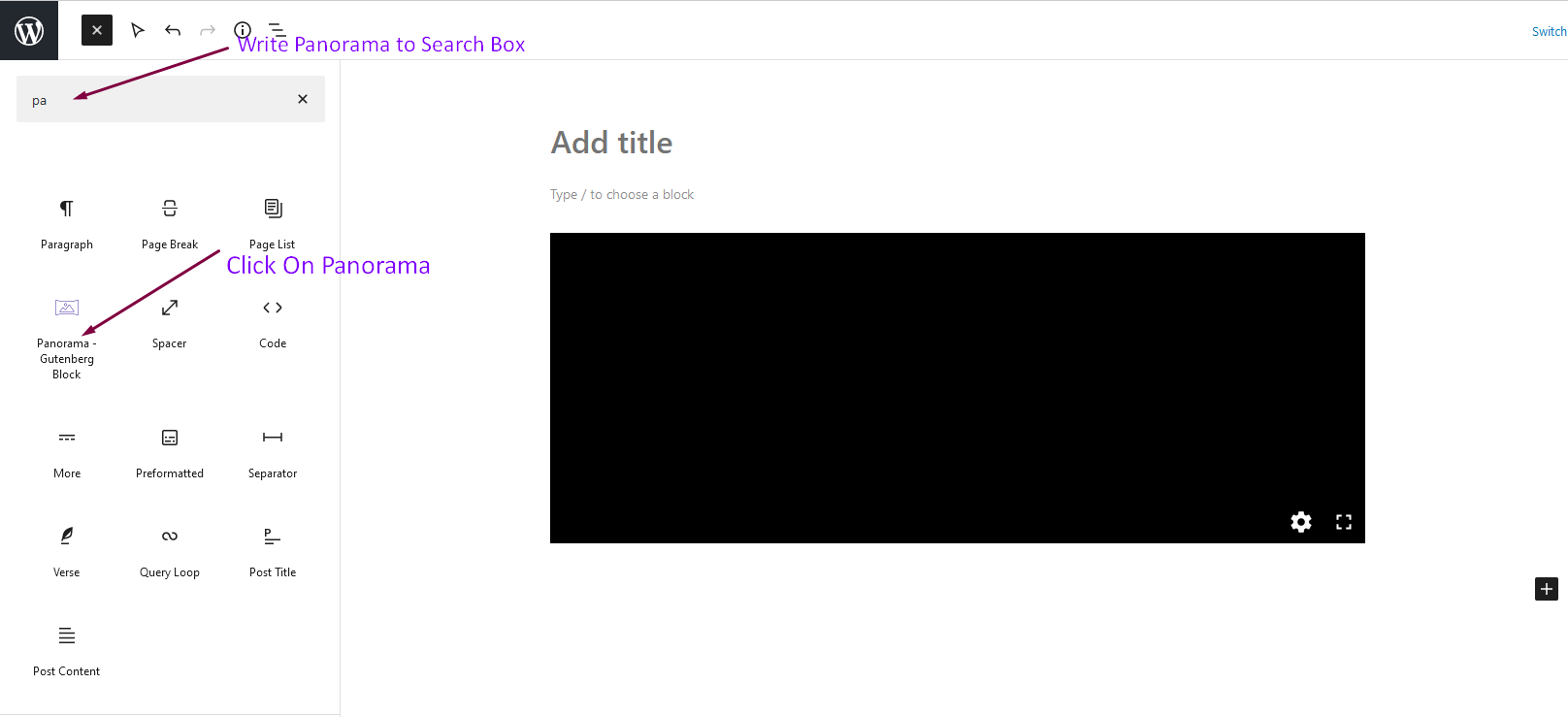
- Search For Panorama Block
- Click on the Panorama Block to add the block
Download & Upload:
- Download the Panorama Block plugin (.zip file)
- In your admin area, go to the Plugins menu and click on Add New
- Click on Upload Plugin and choose the
panorama-block.zipfile and click on Install Now - Activate the plugin and Enjoy!
Manually:
- Download and upload the Panorama Block plugin to the
/wp-content/plugins/directory - Activate the plugin through the Plugins menu in WordPress
Screenshot Gallery


Yes, Panorama Block is a free Gutenberg Block plugin.
Yes, it will work with any standard WordPress theme.
Yes, you can change block settings from the Gutenberg block editor’s right sidebar.
You can use unlimited times as you want.
You can post your questions on the support forum here.
Please report security bugs found in the source code of the Panorama Block – Lightweight 360 degree panorama viewer plugin through the Patchstack Vulnerability Disclosure Program. The Patchstack team will assist you with verification, CVE assignment, and notify the developers of this plugin.
Changelog
1.1.1 – 6 May 25
- Fix Inline Media in settings panel.
1.1.0 – 16 April 25
- Fix Autorotate speed issue and customize settings panel.
1.0.5 – 9 Mar 24
- Fix live url issue.
1.0.4
- Improve Performance
1.0.3
- Not loading assets if block is not present
1.0.2
- Fix backend select
1.0.1
- Added Screenshots
- Improve Performance.
1.0.0
- Initial Release.
" width="120" height="120">
