
Page Preview
Active Installs
10+
Last Updated
August 19, 2026
First Released
July 12, 2024
Download History (Last one month)
Contributors
Page Preview, provides a visual enhancement to your WordPress dashboard by automatically adding screenshot of your published pages directly in the post listings. This feature allows you to see a visual representation of each page without the need to individually open and review them, saving you time and simplifying your workflow.
Features 🖼️
- Automatic Screenshots: Automatically captures and updates screenshots of your pages whenever they are published or updated.
- Dashboard Integration: Integrates smoothly into your WordPress dashboard, adding screenshots to your post listings for easy visual management.
- Responsive Previews: Displays responsive screenshots that adapt to the size of your screen, ensuring a consistent viewing experience.
- Efficient Content Management: Helps you quickly identify the pages by their appearance, which is particularly useful for sites with a large number of pages or frequent updates.
- Post Type Support: Supports custom post types, enabling you to display screenshots for any public type of content on your site.
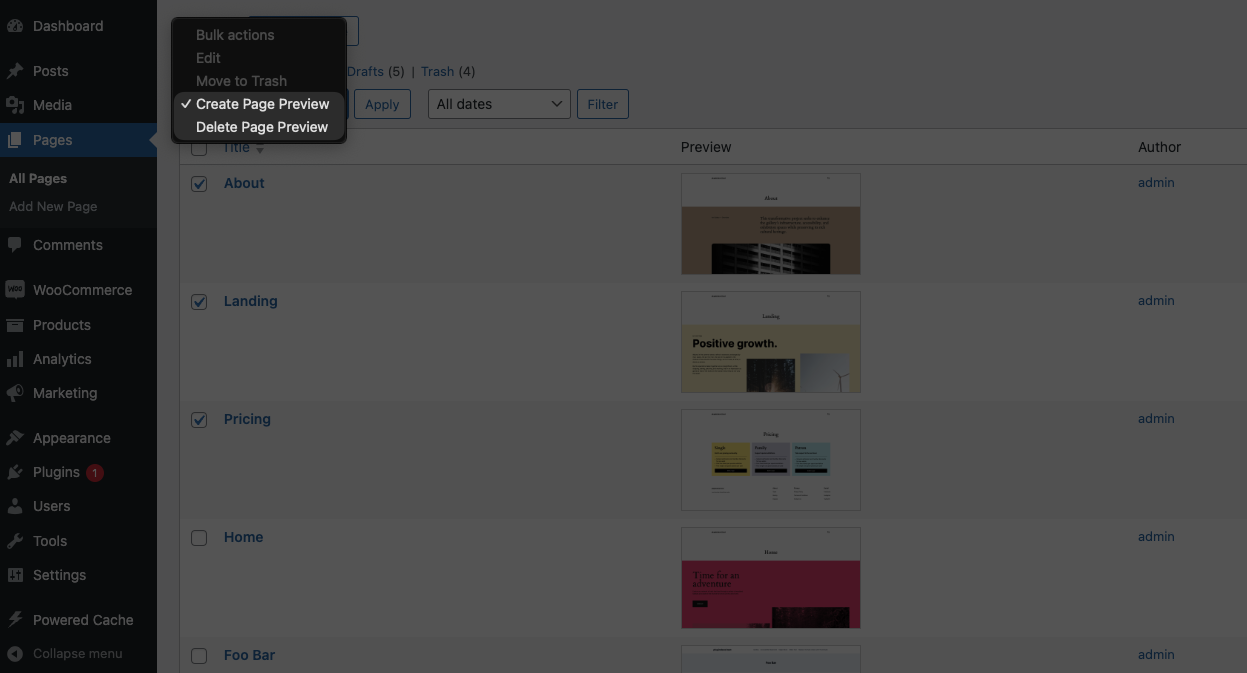
- Batch Processing: Supports batch processing from the post listing to generate or update screenshots in bulk, enhancing your productivity.
- CLI Support: Offers a CLI command feature for advanced users to manage screenshots generation via command line.
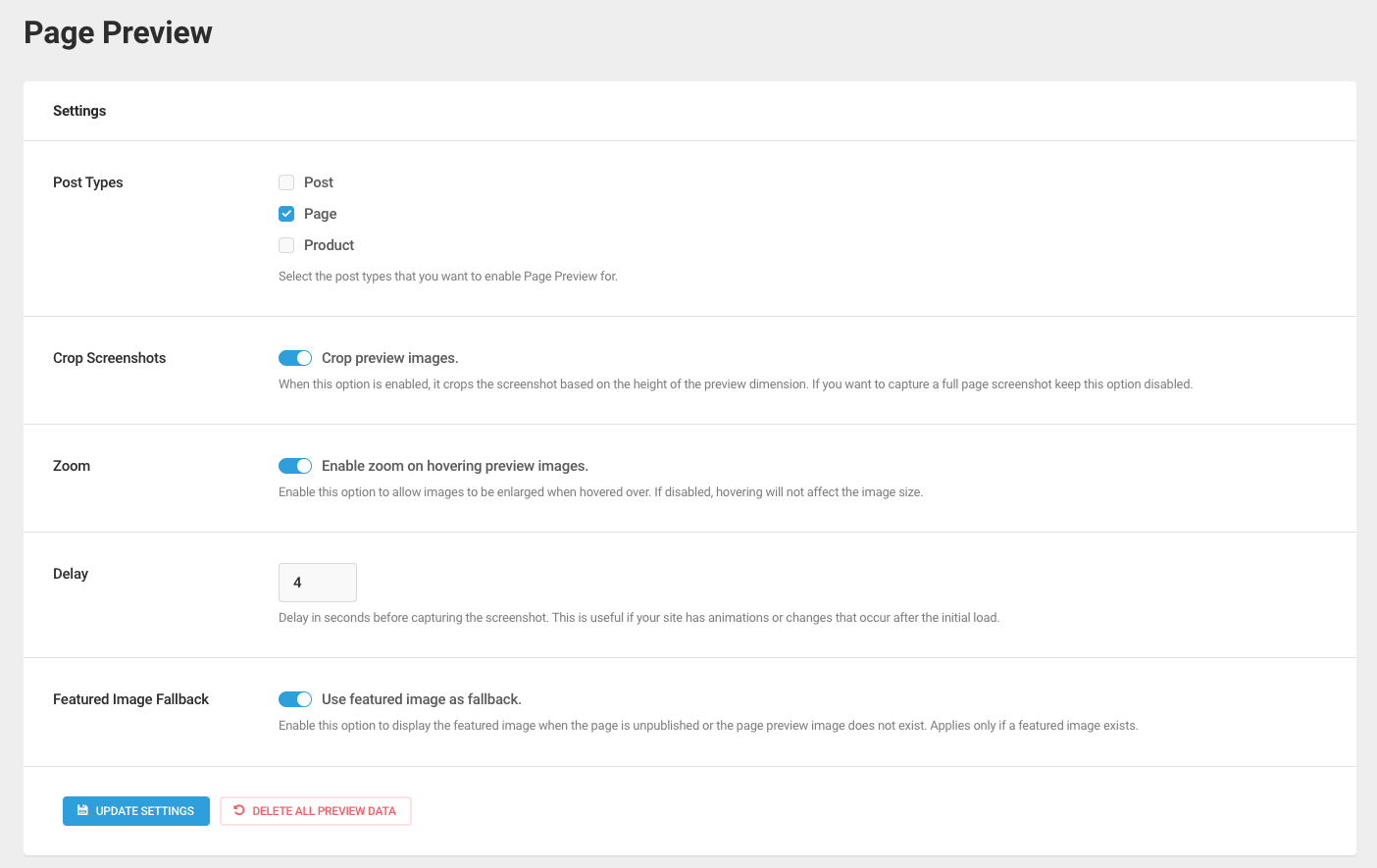
- Easy Customization: Provides a range of customization options to adjust the behavior of the screenshots according to your preferences.
- Multisite Compatibility: Fully compatible with WordPress Multisite, allowing you to manage screenshots across multiple sites from a single network.
“Page Preview” is the perfect tool for content creators, website administrators, and anyone who manages a WordPress site and values efficiency, automation, and responsive design. Install it today to streamline your site management and enhance your productivity.
Privacy Policy
This plugin makes HTTP requests to https://screenshot.handyplugins.co to generate screenshots of your pages.
Our screenshot capturing service requires the URL of the public page to generate screenshots. While we do not collect personal information directly from users, we do record IP addresses and domain names from the servers initiating the requests. This data is used exclusively for rate limiting and to prevent abuse of our service, ensuring fair usage and stability.
Contributing & Bug Report
Bug reports and pull requests are welcome on GitHub.
More from HandyPlugins
If Page Preview is helpful on your site, you may also want to explore our other WordPress plugins:
- Magic Login Pro – Easy, secure, and passwordless authentication for WordPress.
- SessionQuota Pro – Limit concurrent sessions in WordPress.
- Stream Integration Pro – Upload, sync, restore, and manage WordPress videos with Cloudflare Stream.
- Easy Text-to-Speech – Convert written content into high-quality synthesized speech for WordPress.
- Handywriter – AI-powered writing assistant for WordPress.
- PaddlePress PRO – Paddle plugin for WordPress.
- WP Accessibility Toolkit – Tools to help make your WordPress site more accessible.
- Powered Cache – Caching and optimization for WordPress to help improve PageSpeed and Core Web Vitals.
Manual Installation
- Upload the entire
/page-previewdirectory to the/wp-content/plugins/directory. - Activate Accessibility Toolkit through the ‘Plugins’ menu in WordPress.
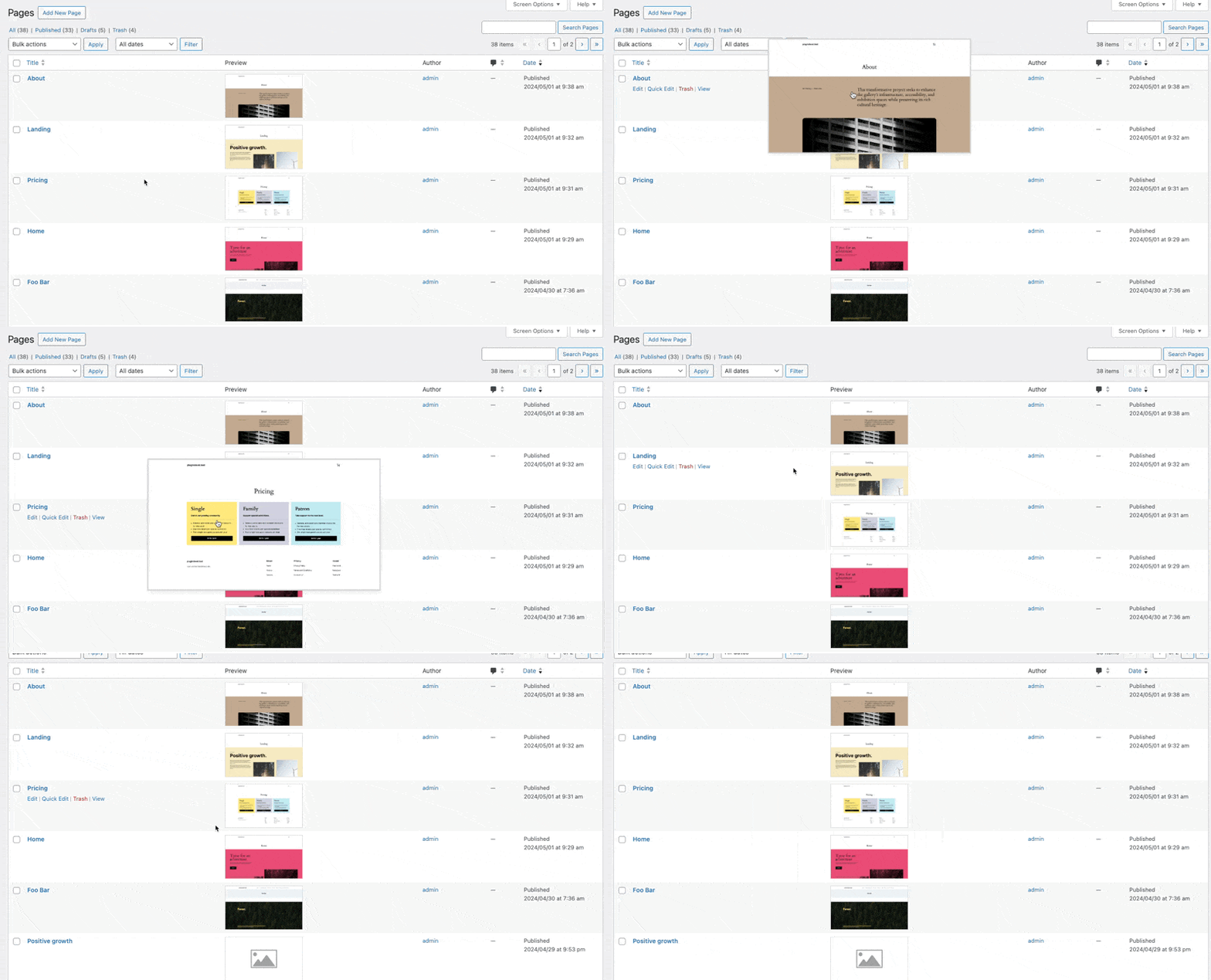

Page Preview plugin automatically generates screenshots of your published WordPress pages and displays them in the post listings on your dashboard. It captures screenshots in various dimensions to ensure they are optimized for viewing on different devices.
Yes, Page Preview supports batch processing which allows you to generate or update screenshots for multiple pages at once directly from your post listings.
Yes, the plugin includes CLI support. You can manage screenshot generation through command line, which is ideal for automated workflows or advanced WordPress management. Type wp help page-preview in your terminal to see the available commands.
Yes, the screenshots are responsive. The plugin generates screenshots in multiple dimensions and uses srcset attributes, ensuring that the previews are optimized for various screen sizes, from desktops to mobile devices.
By providing visual previews directly in your post listings, Page Preview saves you time and makes it easier to manage your content. You can quickly identify pages by their appearance, making editing and updates more efficient.
No, the Page Preview plugin is designed to perform its tasks without impacting the performance of your website. Screenshots are generated asynchronously and stored efficiently to minimize any load on your server.
Yes, the Page Preview plugin is available for free. You can download and install it from the WordPress plugin directory.
Yes, to ensure optimal performance and server stability, our service supports the generation of screenshots for up to 100 pages every 10 minutes. If you have a larger number of pages, we recommend spacing out the screenshot generation to stay within this limit.
Changelog
1.2.1 (August 19, 2026)
- Tested with WP 7.1
- Dependency updates.
1.2 (April 19, 2026)
- Fixed plugin-check errors.
- Tested with WP 7.0
- Dependency updates.
1.1 (November 20, 2025)
- Fixed plugin-check warnings.
- Extended tests coverage.
- Tested with WP 6.9
- Dependency updates.
1.0.2 (April 12, 2025)
- Tested with WP 6.8
- Dependency updates.
1.0.1 (July 15, 2024)
- [Fixed] Preview data cleanup during uninstallation.
1.0 (July 12, 2024)
- Initial release
" width="120" height="120">
