
Onionify – Onion Service for WP
Active Installs
10+
Last Updated
May 20, 2026
First Released
October 27, 2025
Download History (Last one month)
Contributors
Onionify is an independent plugin that enables WordPress websites to operate seamlessly through onion services (.onion).
This plugin is not affiliated with or endorsed by the Tor Project.
Onionify adds safe and standards-compliant integration for onion access – rewriting runtime URLs when requests arrive via .onion, preventing canonical redirects that might expose onion visitors to the clearnet, optionally adding the official Onion-Location HTTP header, and applying additional privacy-hardening measures (CSP, COEP, oEmbed and resource hints control) specifically for onion traffic.
The plugin follows WordPress.org guidelines and is designed for secure public distribution:
- No modifications to WordPress core.
- Uses WordPress filters and actions only.
- Fully compatible with multisite environments (per-site mappings and network defaults).
- Optional WP-CLI integration for advanced administration.
⚠ IMPORTANT WARNING
⚠ Warning: This plugin does not provide hosting-level anonymity or concealment of infrastructure. Onionify helps WordPress handle requests that arrive via onion service addresses, but it does not change or hide server configuration, hosting provider information, or other infrastructure-level metadata. If you require infrastructure-level protections or specialized operational procedures, consult authoritative technical documentation and qualified operational security professionals. Do not rely on this plugin for legal compliance or for anonymizing hosting details.
Features
- Detects .onion requests and safely rewrites generated WordPress URLs to the configured onion host at runtime.
- Does not modify database
homeorsiteurlvalues – all rewrites occur at runtime only. - Multisite support: per-site onion mapping (via Network Admin) and configurable Network Defaults.
- Optionally sends the Onion-Location header from the clearnet site to help browsers recognize the onion mirror.
- Optional privacy enhancements for onion visitors (CSP, COEP, X-Frame-Options, disable oEmbed, and tighten resource hints).
- Optional verification feature using a public list of known Tor exit addresses (opt-in only).
- Includes WP-CLI commands to list, map, and manage onion host configurations.
- Provides filter hooks for extensibility (including
onion_is_onion_requestandonion_verify_exit_list). - Carefully validated, defensive code compatible with PHP 7.4 – 8.x.
Quick usage (WP-CLI)
wp tor-onion list– show mapping table (multisite) or single-site status.wp tor-onion map <blog_id|0> <example.onion>– map blog_id (or 0 for single-site) to an onion host.wp tor-onion set --hardening=on|off --oembed=on|off --csp=strict|relaxed|off– quick toggles.
Settings explained (concise + clear)
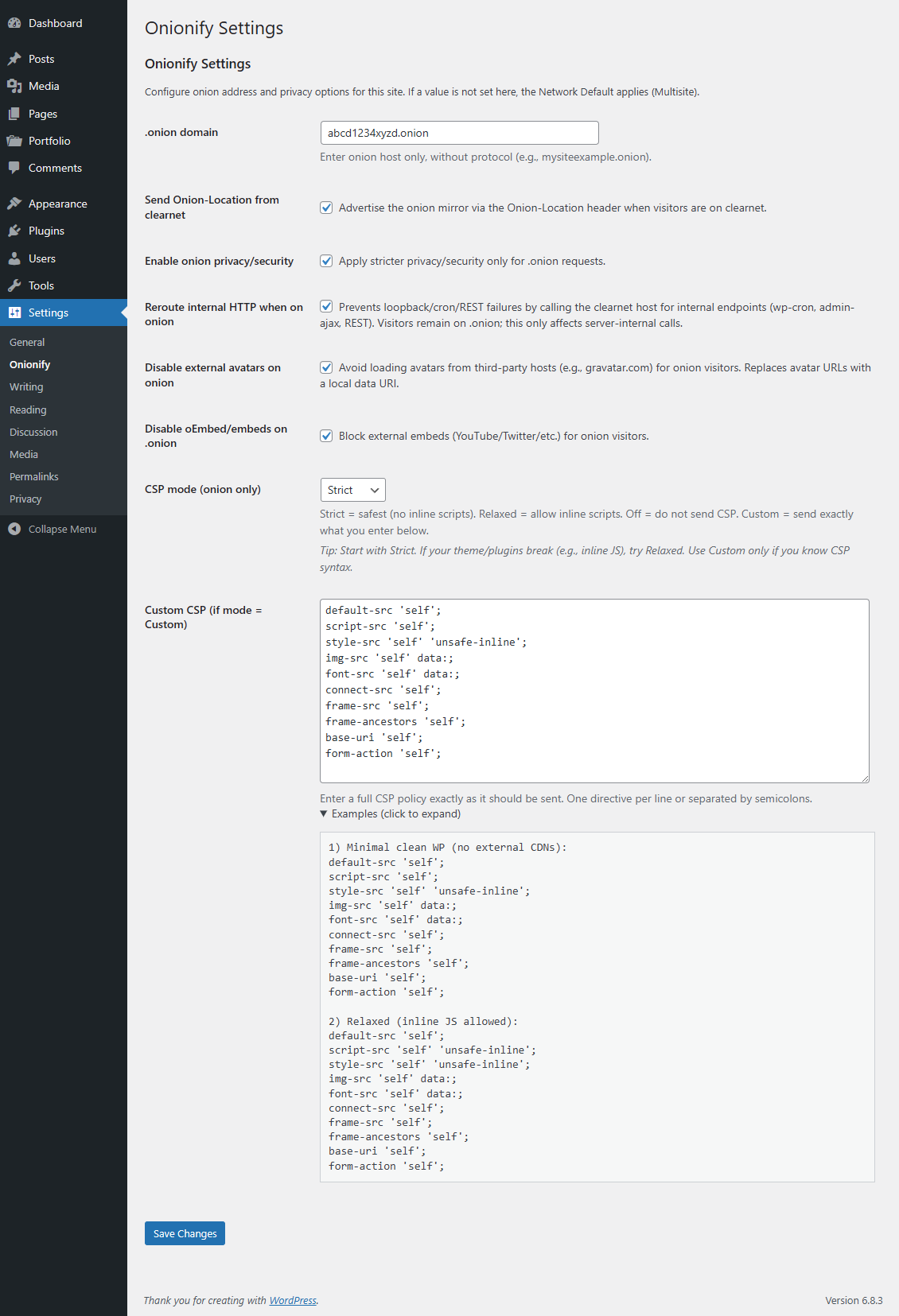
- .onion domain – Host only, no protocol. Example:
abcd1234xyz.onion. Leave empty to use Network Default (multisite). - Send Onion-Location from clearnet – When enabled, the plugin adds an
Onion-Location: http://<your-onion><path>header to requests on the clearnet site. This is useful to advertise your onion mirror to Tor Browser or other clients. - Enable onion hardening – When enabled, headers and filters designed to reduce external resource loading (and privacy leakage) are applied to requests only when served via .onion.
- Disable oEmbed/embeds on .onion – Blocks automatic fetching of oEmbed content (YouTube, Twitter, etc.) and discovery links to avoid loading third-party resources for onion visitors.
- CSP mode –
Strict,Relaxed,Off,Custom.- Strict – safest. No inline scripts. Best for privacy; may break themes/plugins that rely on inline JS.
- Relaxed – allows inline scripts/styles (
'unsafe-inline'), useful for older themes. - Off – plugin does not send a CSP header.
- Custom – plugin will send exactly the policy you place into the Custom CSP text box. Only use if you understand CSP syntax.
Custom CSP – clear guidance
- The Custom CSP field is used only when
CSP modeis set to Custom. - Enter the policy exactly as you want it sent. Examples below – copy/paste if needed:
1) Minimal secure WordPress (no external CDN):
default-src 'self';

script-src 'self';

style-src 'self' 'unsafe-inline';

img-src 'self' data:;

font-src 'self' data:;

connect-src 'self';

frame-src 'self';

frame-ancestors 'self';

base-uri 'self';

form-action 'self';
2) Relaxed (allows inline JS):
default-src 'self';

script-src 'self' 'unsafe-inline';

style-src 'self' 'unsafe-inline';

img-src 'self' data:;

font-src 'self' data:;

connect-src 'self';

frame-src 'self';
3) If you must use an external CDN – add only the exact host(s):
img-src 'self' https://cdn.example.com data:;

font-src 'self' https://cdn.example.com data:;
Tips & cautions:
– Start with Strict; if things break (admin bar, theme JS), switch to Relaxed.
– Use Custom only if you know CSP; incorrect CSP can break admin, media, or login.
– Avoid including public CDNs in onion mode where possible – best privacy practice is to host assets locally.
Multisite behavior
- Per-site mapping: Network Admin Onionify allows mapping each blog_id onion host.
- Network Defaults: Network Admin Onionify Network Defaults lets you set default values (default onion host, default CSP mode, default hardening toggles) that sites inherit unless they override locally.
- Precedence: Per-site explicit setting Network Default Plugin internal default.
Filters & constants (developer)
apply_filters('onion_is_onion_request', bool $is_tor, array $server)
Allows other plugins/themes to override detection.$serveris a copy of$_SERVER.apply_filters('onion_verify_exit_list', bool $default)
Controls whether the plugin will verify IPs against the Tor exit list. Disabled by default.define('TOS_VERIFY_TOR_EXIT', true);– alternative to enable exit-list verification inwp-config.php.onion_support_*option names used by the plugin: see Settings page. The plugin cleans up these options on uninstall.
If you do not want automatic cleanup, do not use the admin “Delete” action; deactivate only.
Privacy, security, and limitations (be explicit)
- This plugin only adjusts WordPress behavior (URL outputs, selected headers, CSP, and resource hint handling) based on how visitors access the site (clearnet vs .onion).
- It does not anonymize or conceal server infrastructure details. Information such as hosting provider IP addresses, DNS records for clearnet domains, or other infrastructure-level metadata remains unchanged. Onionify is not designed or intended to provide anonymity or infrastructure concealment.
- Enabling the optional exit-address verification feature performs external HTTP requests to a trusted public source (only when explicitly opted in). If your hosting environment restricts outbound HTTP requests, use the WP-CLI interface or
wp-config.phpconfiguration after verifying your allowed hosts. - The plugin operates with a privacy-first design: external requests are disabled by default, and its default configuration aims to reduce unnecessary third-party requests for onion visitors.
External services
This plugin can optionally fetch the official Tor exit relay list to verify requests against Tor exits.
Service: Tor Project – Exit addresses list
Endpoint: https://check.torproject.org/exit-addresses
What it is used for: When exit verification is enabled, the plugin downloads the public list of Tor exit relays to check inbound requests.
What data is sent and when: The plugin performs a normal HTTP GET request from the server to the Tor Project endpoint. No user PII is sent; the request includes a generic User-Agent header and, as with any HTTP request, the server’s IP address is visible to the Tor Project. This request happens at most once per 24 hours due to caching and only if exit verification is enabled by the site owner.
How to enable/disable: Exit verification is opt-in. It is disabled by default. It can be enabled via the plugin settings or by adding define(‘TOS_VERIFY_TOR_EXIT’, true) in wp-config.php. If your environment blocks external HTTP requests (WP_HTTP_BLOCK_EXTERNAL), the plugin will respect that unless the host is whitelisted in WP_ACCESSIBLE_HOSTS.
Provider policies: See the Tor Project privacy policy and terms on their official website.
Support
Use the WordPress.org support forum for the plugin. For commercial help or customizations contact https://infinitumform.com/.
- Upload the
onionifyfolder to the/wp-content/plugins/directory. - Activate the plugin through the ‘Plugins’ screen in WordPress.
- (Single-site) Go to Settings Onionify and enter your
.onionhost (host only, e.g.abcd1234xyz.onion) and optional hardening settings. - (Multisite) Network Admin Onionify use the Mapping page to map each site to its onion host, and optionally set Network Defaults on the Defaults submenu.
- (Optional) To verify IPs against the official Tor exit list enable verification:
- Add
define('TOS_VERIFY_TOR_EXIT', true);towp-config.php, or - Add
add_filter('onion_verify_exit_list', '__return_true');in a mu-plugin or theme functions file.
Note: verification is opt-in and cached for 24 hours. If your environment disables external HTTP calls, keep verification disabled.
- Add
Screenshot Gallery
First, you need to configure a Tor hidden service on your server. This is done outside of WordPress, by editing the Tor configuration file (usually /etc/tor/torrc) and adding lines such as:
HiddenServiceDir /var/lib/tor/hidden_service/
HiddenServicePort 80 127.0.0.1:80
After restarting the Tor service, Tor will generate a hostname file (for example /var/lib/tor/hidden_service/hostname) that contains your new .onion address.
Once you have the .onion address, open your WordPress admin panel and go to:
* Settings Onionify (single-site)
* or Network Admin Onionify (multisite)
Enter your .onion host (for example abcd1234xyz.onion) in the provided field. Onionify will automatically handle URL rewriting and privacy adjustments when visitors access your site through the onion address.
If you want browsers to automatically discover your onion mirror from the clearnet site, enable Send Onion-Location from clearnet in the plugin settings.
Note: Onionify does not create or manage the Tor hidden service itself; it only configures WordPress to correctly respond to requests coming from your .onion address.
No. The plugin does not modify hosting, DNS, or server-level routing. It simply adjusts WordPress behavior when incoming requests originate from an onion address. If you want a site that is accessible exclusively via onion services with no clearnet presence, that requires additional server and network configuration beyond this plugin.
The plugin inspects common headers (for example, CF-Connecting-IP and X-Forwarded-For) to help detect onion-origin requests behind CDNs. It also provides the onion_is_onion_request filter for integrations with other plugins. If your CDN modifies or removes headers, adjust your CDN or proxy settings so that the real client IP headers are passed through to WordPress.
If the Custom CSP is invalid or overly restrictive, some parts of your site (including the admin area) may stop functioning properly. The plugin will send exactly the CSP string you provide. Use this feature only if you understand Content Security Policy rules, and test changes on a staging or development site first.
No. The plugin returns rewritten URLs dynamically at runtime. Database values remain unchanged.
The feature is disabled by default. No action is required to keep it off. To enable it, add define('ONS_VERIFY_EXIT_ADDRESSES', true); to your wp-config.php file or use the filter add_filter('onion_verify_exit_list', '__return_true');.
Changelog
1.0.0
- Initial release: runtime URL rewrites, multisite mapping, Onion-Location support, optional hardening and WP-CLI utilities.
1.0.1
- GUI fixes
1.0.2
- Added welcome screen and refreshed documentation with GitHub contribution section.
- Improved design and activation flow.
1.0.3
- Minor updates.
" width="120" height="120">
