
Ninja Tables – Easy Data Table Builder
Active Installs
80,000+
Last Updated
May 25, 2026
First Released
October 6, 2017
Download History (Last one month)
Contributors
Website | Playlist | Templates | Demo | User Guide
Ninja Tables is a feature-rich WordPress table plugin that provides all the solutions you need to create almost any type of WordPress table within minutes—all without writing a single line of code.
You can build any table, customize it however you want, and embed it anywhere on your website with a simple shortcode. Ninja Tables can make any filterable and interactive table for any amount of data.
11 table creation options, 2 table modes – Advanced (Classic) and Simple (Basic)- Drag-and-drop, 100+ table styles, 50+ free table templates, and unlimited customization controls.
Check out the feature page.
All-in-one Table Builder Plugin in WordPress
Crafting a simple data table and customizing it to be the smartest-looking and functional table in WordPress is more or less automated with Ninja Tables. It’s the go-to table plugin for beginners and the perfect data visualization tool for pros.
Some of the tables Ninja Tables creates for you:
– Product display
– Feature comparison table
– Pricing table
– Product comparison table
– Academic tables
– Sports points or league table
– Posts table
– Employee statistics table
– Book review table
– Product specification table
– Media gallery table
– Movie review table and MORE!
Build All Kinds of Data Table
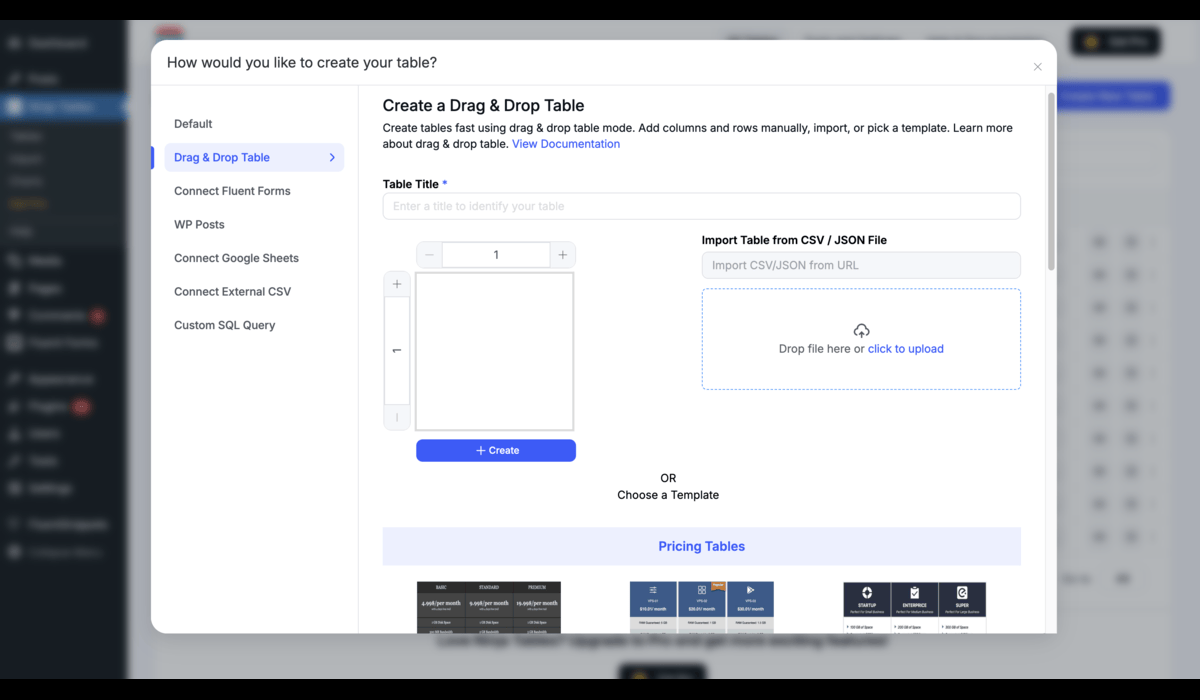
Creating tables is super easy with Ninja Tables. Pick from multiple table creation options and start building your data table.
Table Options
– Default (Manual table creation)
– Drag & Drop Table (Simple mode)
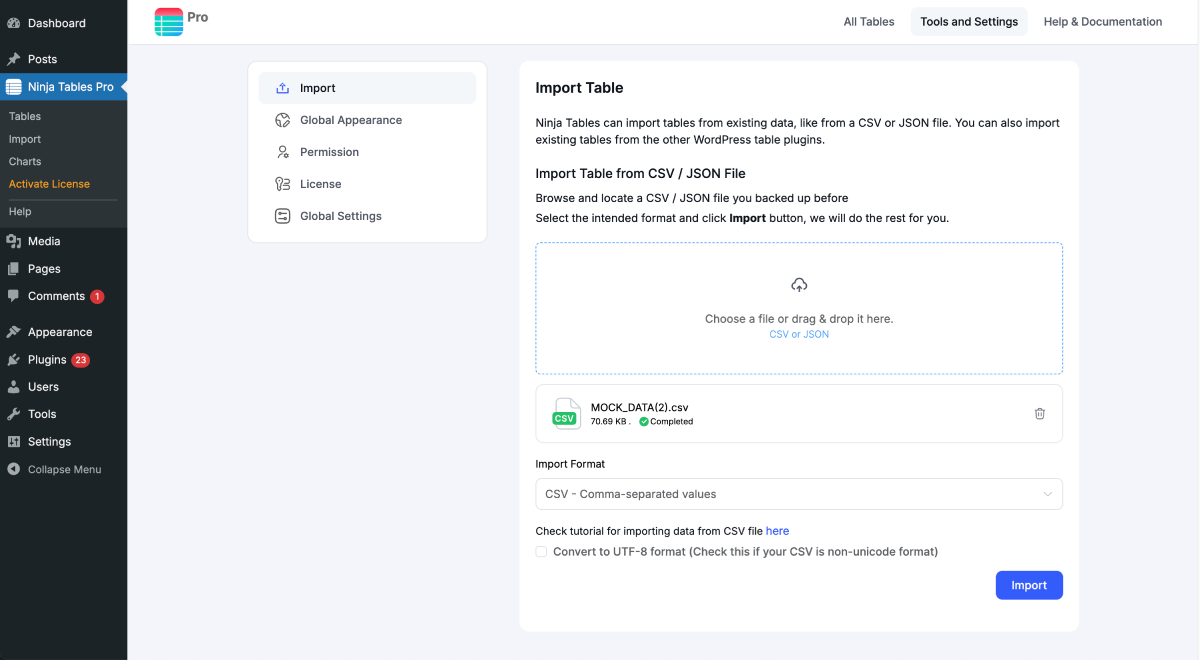
– Import Table
– Connect Fluent Forms
– WP Posts
– WooCommerce Table
– WooCommerce Reviews [NEW]
– FluentCart Table [NEW]
– Connect Google Sheets
– Connect External CSV
– Custom SQL Query
And if you want a simpler way to create tables, check out Free Table Templates.
Also, import table CSV or JSON from other sources into your Ninja Tables dashboard and customize. This feature helps you by importing tables from other table plugins like TablePress.
Ninja Tables Features
Here is a short list of features to create tables:
– Unlimited data
– Drag and drop table builder
– FluentCart tables
– Pre-made templates
– Table design customization
– Table colors
– Searchable table
– Charts and graphs
– Fluent Forms integration
– Responsive table
– Import-Export
The Premium version comes with a lot more advanced features:
– Google Sheets integration
– WooCommerce integration
– WooCommerce Reviews table
– WP Posts / Any Custom Post Type Integration
– Multimedia support
– Conditional Formatting
– Front End Table Editing
– Transform value with HTML
– Merge/split table cells (Free in Drag and Drop)
– Stackable table
– Select Field, Image/File/Lightbox, & Button/Link data type
– Custom Filter and more!
Unlimited Data
Ninja Tables lets you add an unlimited amount of data to any type of table. You can use the Advanced mode or the Simple mode, there’s no data limitation. Keep adding new data, cells, and elements to make a fully comprehensive yet concise data table.
Drag and Drop
No time to configure columns and rows? Select the Drag and Drop Table Mode and create any type of table you want. This table creation mode has multiple dynamic table cell elements like buttons, HTML, icons, texts, ribbons, progress bars, etc.
Cell data types in Ninja Tables Simple Mode (Drag and Drop)
– Text Element
– Button Element
– Icon Element
– Rating Element
– List Element
– HTML Element
– Shortcode Element
– Image Element (Pro)
– Styled List Element (Pro)
– Ribbon Element (Pro)
– Progress Bar (Pro)
– Text Icon (Pro)
Even coloring table cells is easy. This mode also has the import-export option and some built-in templates inside.
Advanced Customization
Ninja Tables lets you choose from 100+ different table styles and 3 popular CSS libraries with unlimited color schemes! Customize your tables with CSS, use Bootstrap 3 & 4, or semantic library to showcase the best version of your table.
Responsive Tables
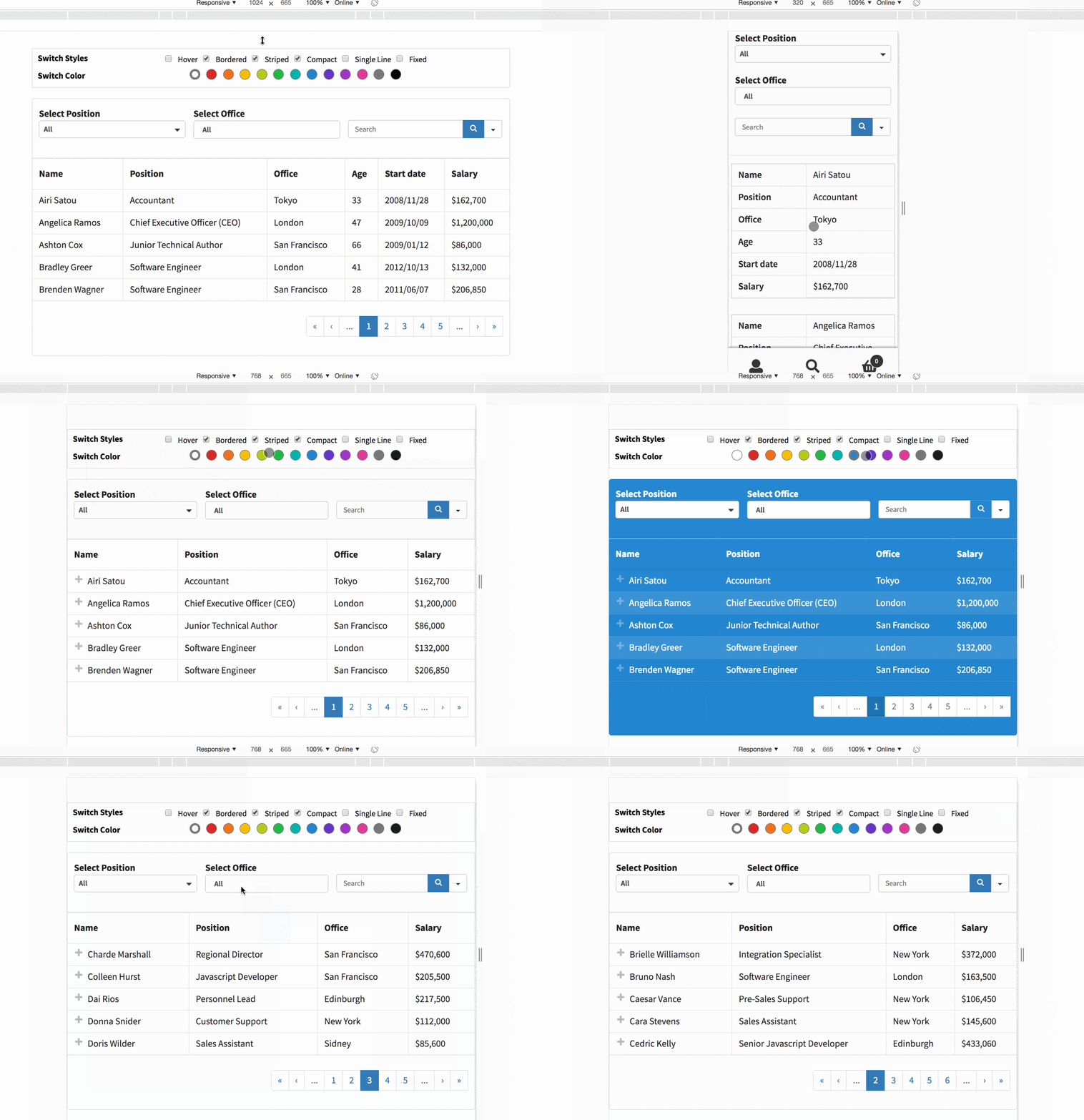
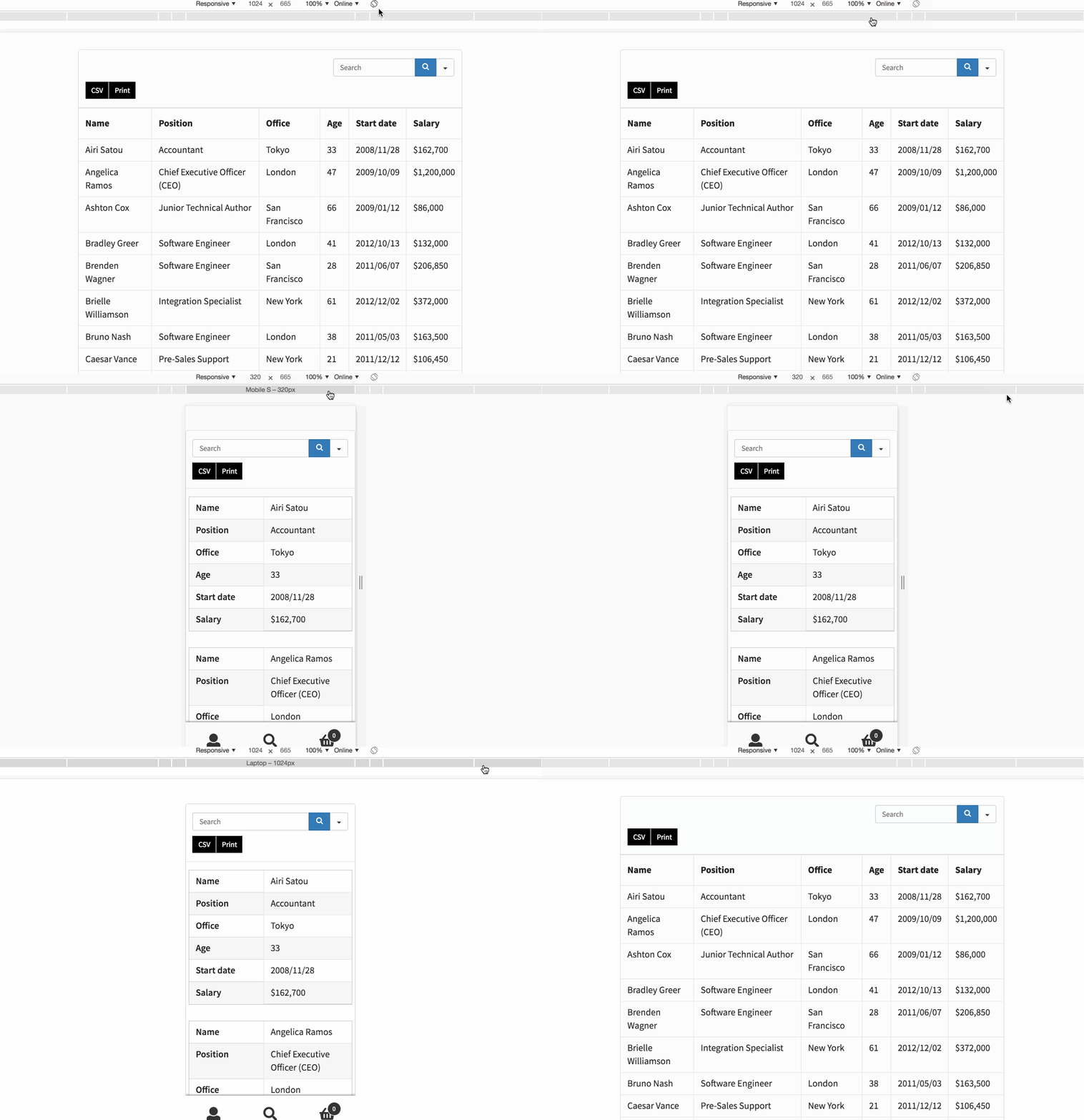
Conveniently display your tables on all devices. It comes with six distinct breakpoints, which lets you choose your required settings if needed. Hide or show any table column you decide.
If you enable “Stackable Table Configuration” the table rows will separate and stack on top of each other to create multiple tables. This feature is useful for mobile view or other small screens.
Effortlessly Configure Your Table Data
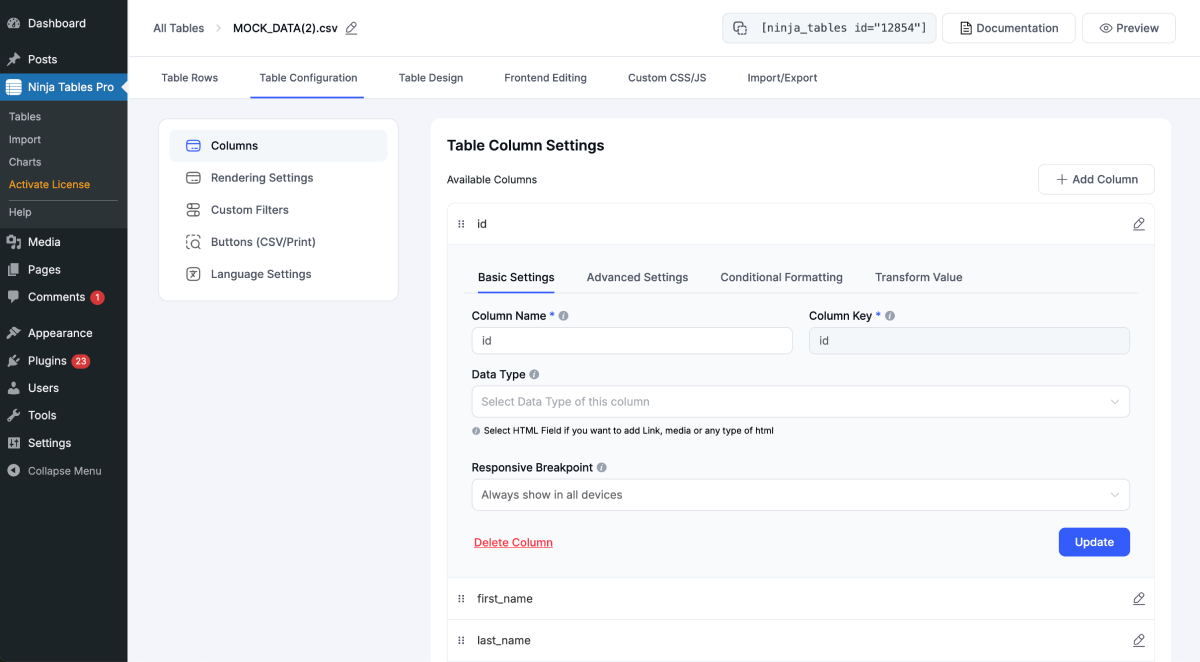
Configuring the table and columns is faster with our user-friendly column builder. You can specify the data type for each column, like a single-line text, text area, or HTML area. The data type configuration in the Advanced mode lets you create tables with dynamic data.
Dynamic data types in Ninja Tables Advanced Mode
– Single Line Text Field
– Text Area
– HTML Field
– Numeric Value
– Date Field
– Select Field
– Image/File/Lightbox
– Button/Link
Export-Import Table Data Fast
Export or import your tables using CSV & JSON file format. No need to waste time creating tables from scratch. If you have an existing table somewhere, just download the table’s CSV/JSON file and import it into another website.
This feature is available in both Advanced and Simple modes.
One-click Migration from TablePress, Data Tables Generator by Supsystic
When you have to migrate your tables from other table builder plugins, Ninja Tables allows a single-click migration.
You are one click away from migrating all your TablePress data to Ninja Tables
Free Table Templates
Ninja Tables makes sure to save your time and energy. To give you more flexibility and ease in creating tables, Ninja Tables provides 50+ customizable free table templates.
For easy and quick table creation, it’s the perfect solution.
– Pick a template
– Download the ZIP and get the JSON file
– Import the table’s JSON file to your dashboard
– Customize and embed
Fluent Forms Integration
Users of Fluent Forms and Ninja Tables have it easy. These 2 plugins integrate and make data organization and presentation a lot easier for you.
Add Fluent Forms entries to your tables effortlessly by connecting Fluent Forms with Ninja Tables. Ninja Tables is deeply integrated with Fluent Forms.
FluentCart Table [NEW]
You can integrate Ninja Tables with FluentCart and display all your products in styled and customized tables. This integration is available in both free and pro versions of Ninja Tables.
Charts and Graphs
Ninja Tables deep integration with Ninja Charts enables you to create and display dynamic charts and graphs on your website within minutes! This integration is totally free and Ninja Charts works as a standalone plugin as well.
Choose from ChartJS or Google Charts library to craft and showcase your statistics with visual appeal.
Ninja Charts offers 10+ chart types:
– Pie charts
– Bar charts
– Histograms
– Line charts
– Combo charts
and many more.
Table Colors
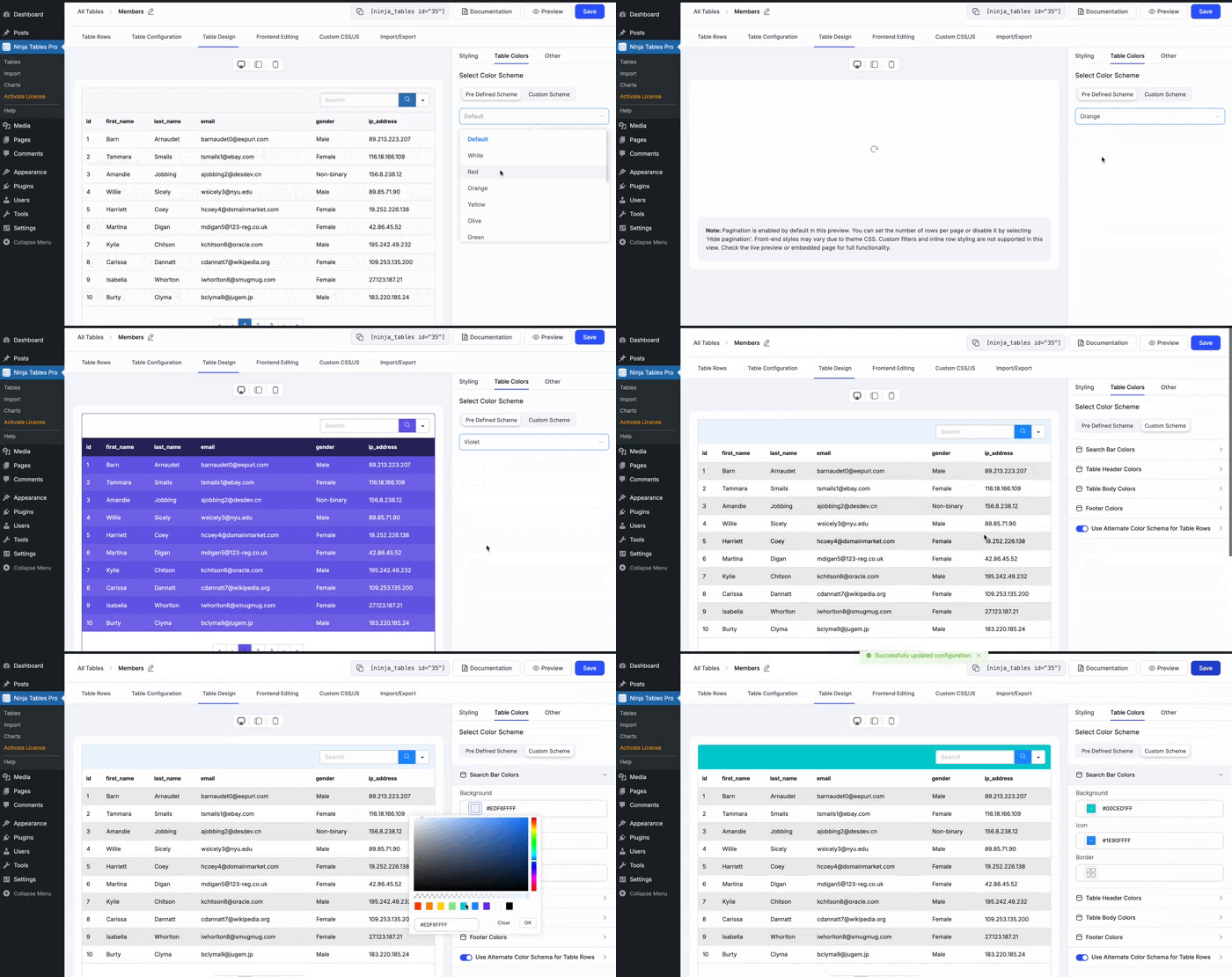
Predefined color schemes and Custom color palette – Ninja Tables Advanced Mode gives you the freedom to color customize your tables how you want. The predefined color scheme has a 10+ fixed palette and the custom colors feature lets you have fun with all the colors.
Coloring table cells in drag-and-drop mode is completely free.
Color customize your WordPress tables in Simple and Advanced modes both for better engagement and data display.
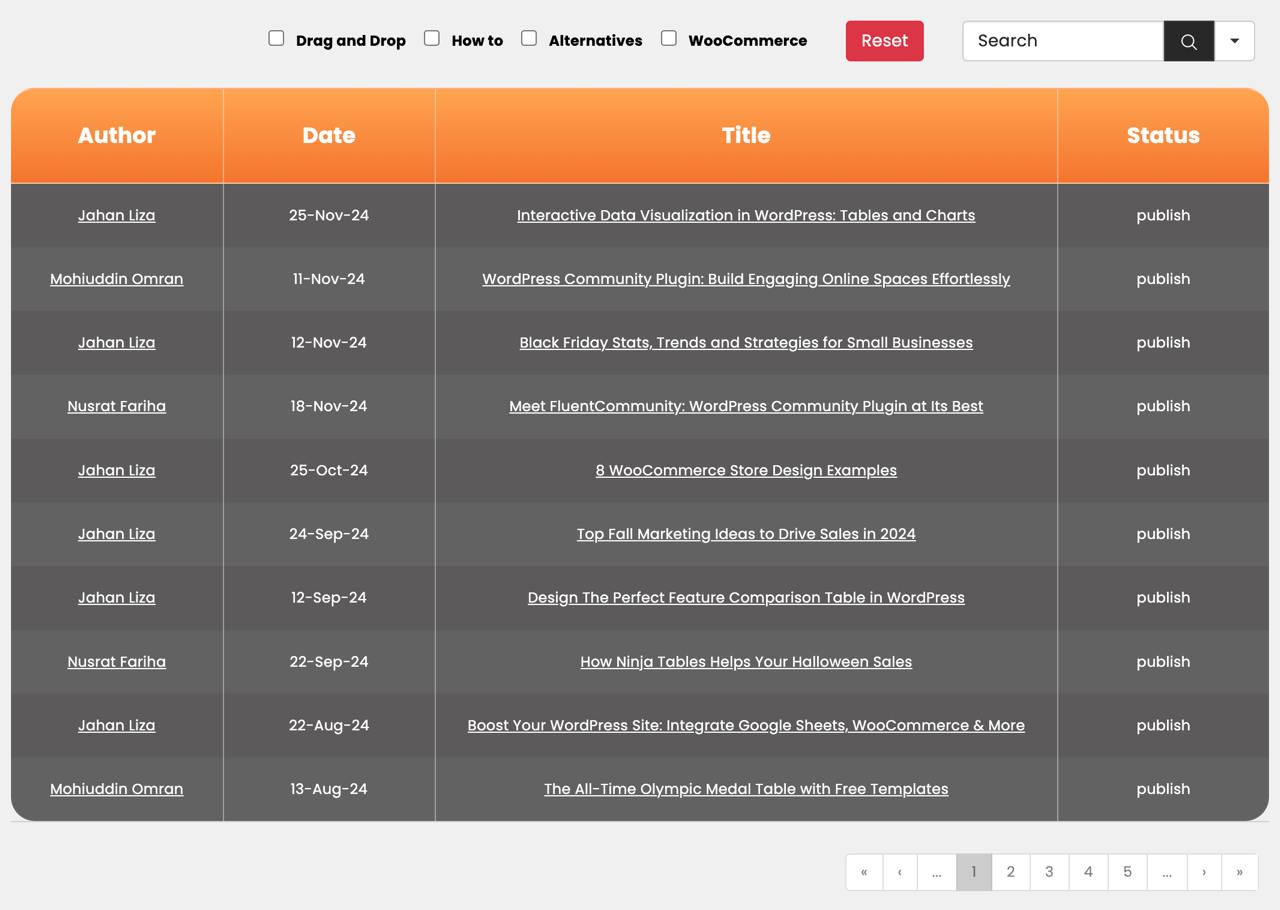
WP Posts Table
Connect your Ninja Tables Pro to WP Posts from your dashboard and display all the posts, pages, and other content in a tabular format. Such tables with data search and filters added to them can be helpful for blogging sites to find out the specific content in the front end.
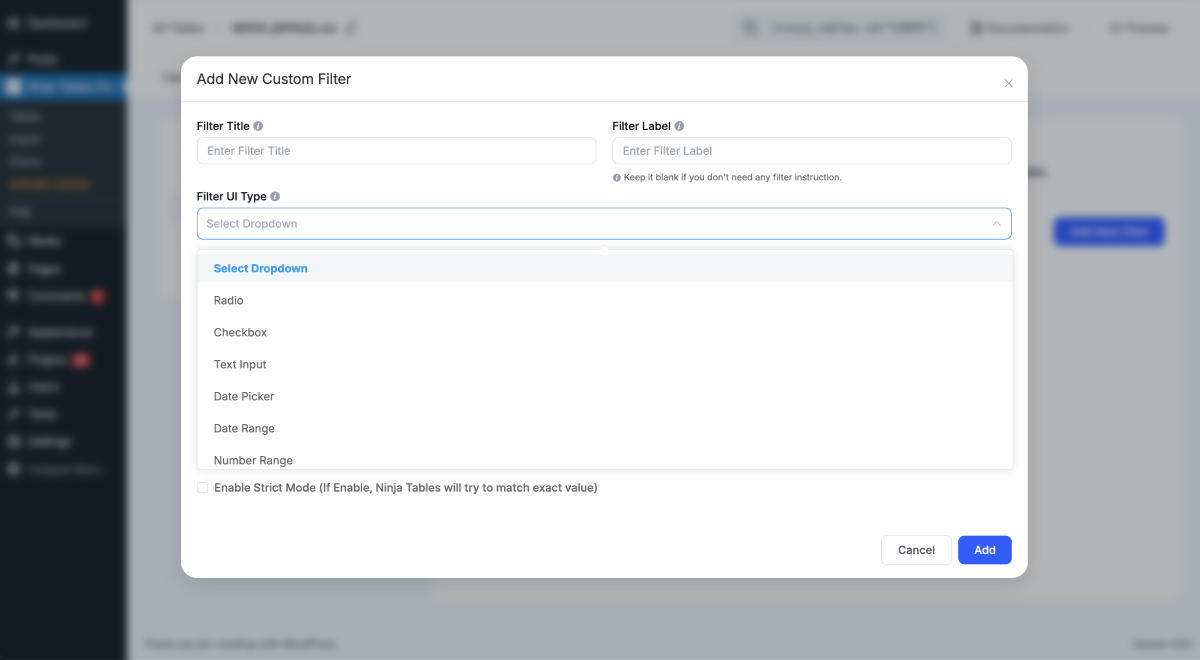
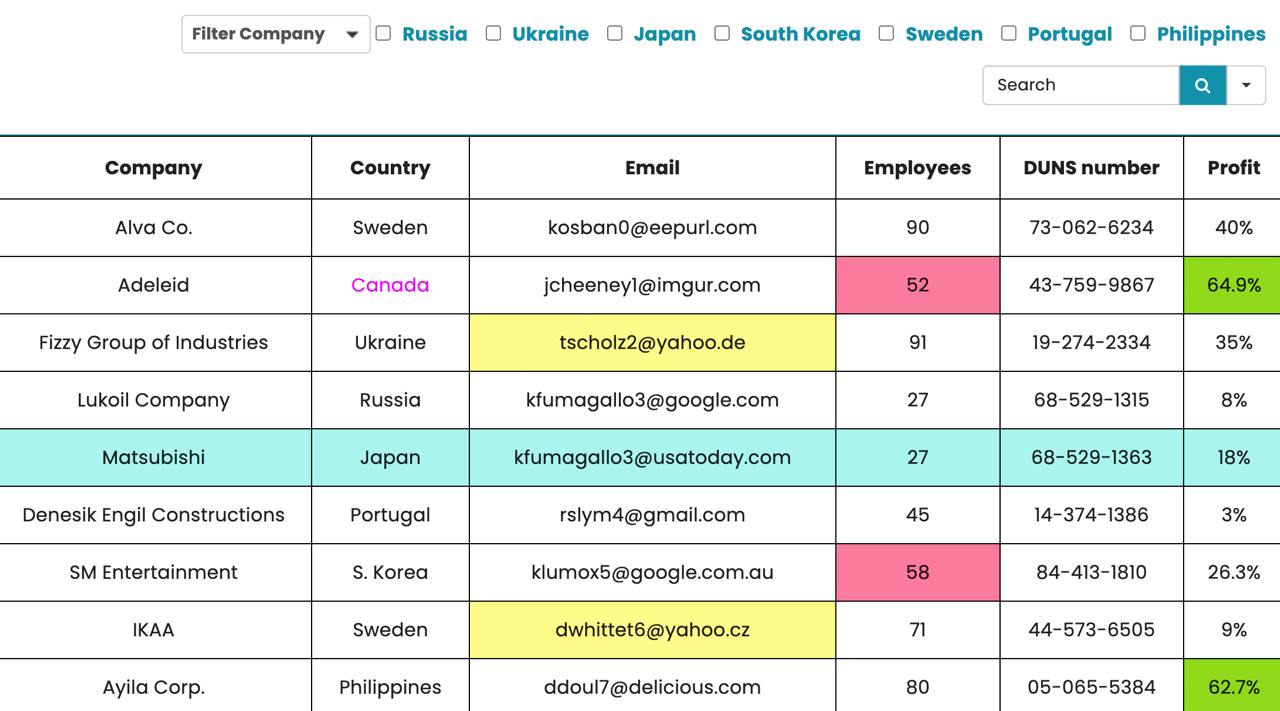
Custom Filter
Filtering the table data is no hassle with the custom filter feature in Ninja Tables Pro. Add multiple types of data filters to any table and organize your tables a little more.
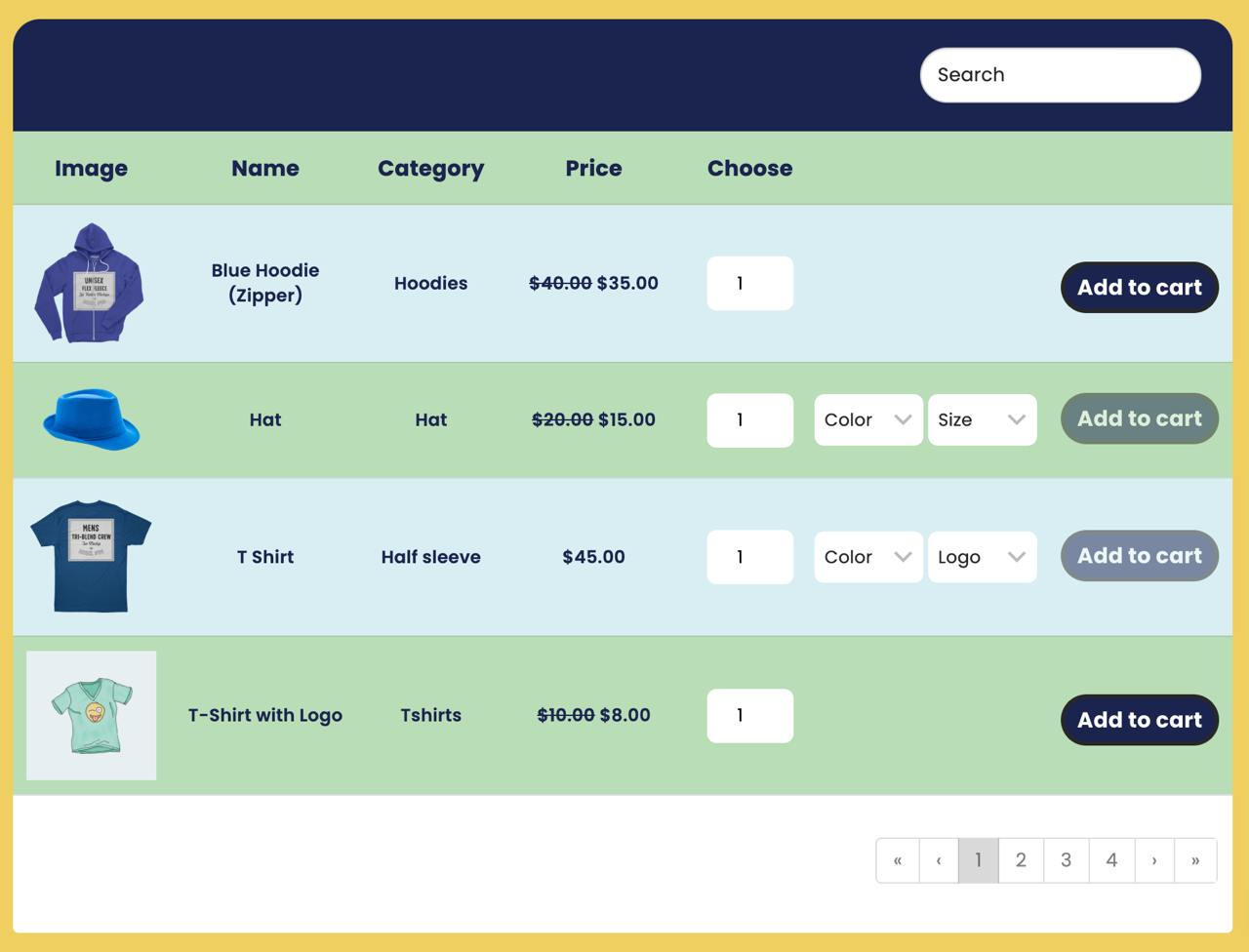
Create WooCommerce Product Tables
Get Ninja Tables Pro to present WooCommerce products in smart and customized product tables.
Woo products in a tabular display increase sales by presenting all product data in one row.
Construct Table from Google Sheets
Ninja Tables automatically syncs with Google Spreadsheets. This connection enables you to create tables using the Google Sheets data in the premium version.
Simply publish the data sheets, connect Google Sheets with Ninja Tables from the table creation menu, and paste the sheet’s link.
Conditional Formatting
Add as many conditions as you’d like and highlight or find data according to conditions like – Equal, Not equal, Contains, Does not contain, etc. You can change cell color, text color, cell content, or CSS class with respective conditions.
Advanced Shortcode
This pro feature is particularly best for developers. With a wide range of additional resources, this extended feature gives developers a comprehensive toolkit to improve their tasks and efficiency.
24/7 Support
Ninja Tables has a dedicated support team for you 24/7! Open a support ticket here and an agent will be in touch.
Master Ninja Tables
Hands-on tutorials and instructions on how to create WordPress tables easily with Ninja Tables.
– Quick table creation with free table templates
– 10+ simple ways to create tables with Ninja Tables
– Drag and Drop tables beginner’s guide
– Ninja Tables integrations for your WordPress website
– Ninja Tables WooCommerce product tables
– Advanced Ninja Tables features to simplify your life
– Ninja Tables Free vs Pro
– Dynamic data types
– Create WP posts table with Ninja Tables
The instructions in these pages and documentation will get you started with Ninja Tables quickly and easily. If you still have questions or confusion, do knock us at our socials:
– Facebook
– Twitter
– Instagram
– LinkedIn
Contribute and translate
Ninja Tables is developed and maintained by WPManageNinja, the creators of Ninja Tables, FluentCart, Fluent Forms, FluentCRM, Wp Social Ninja and More. We welcome community contributions — visit our GitHub Repository to get involved.
Help translate Ninja Tables and make it accessible worldwide at translate.wordpress.org.
Here’s a description of how to install and activate Ninja Tables and get started with it.
Install Ninja Tables using one of these methods:
Method 1
Install directly from the WordPress Admin panel: Go to Plugins -> Add New -> Search for Ninja Tables, and click the Install button.
Method 2
Download the ZIP file of Ninja Tables manually from the WordPress.org plugins repository and upload it through the Admin panel of your WordPress Dashboard: Go to Plugins -> Add New -> Upload Plugin, browse to the downloaded Zip, and upload it.
Method 3
Download the ZIP, extract it, and manually upload the extracted folder through FTP to the /wp-content/plugins/ directory of your WordPress installation.
After Installation Activate the plugin from the plugin dashboard.
To know more, browse our documentation. For blogs and facts, visit our blog page.
Yes, you can create FluentCart product tables with Ninja Tables. It’s free integration and all you need is products in FluentCart and connect your handpicked products to Ninja Tables.
Tables created by Ninja Tables are mobile responsive and look elegant on any device.
Ninja Tables is the most beginner-friendly, non-techy, and easiest WordPress table plugin available. For better understanding, we have designed our documentation and user manuals so that even novices can utilize the full potential of the table builder.
Yes! Any table you create with Ninja Tables is SEO-friendly, and all table data are visible to search engines.
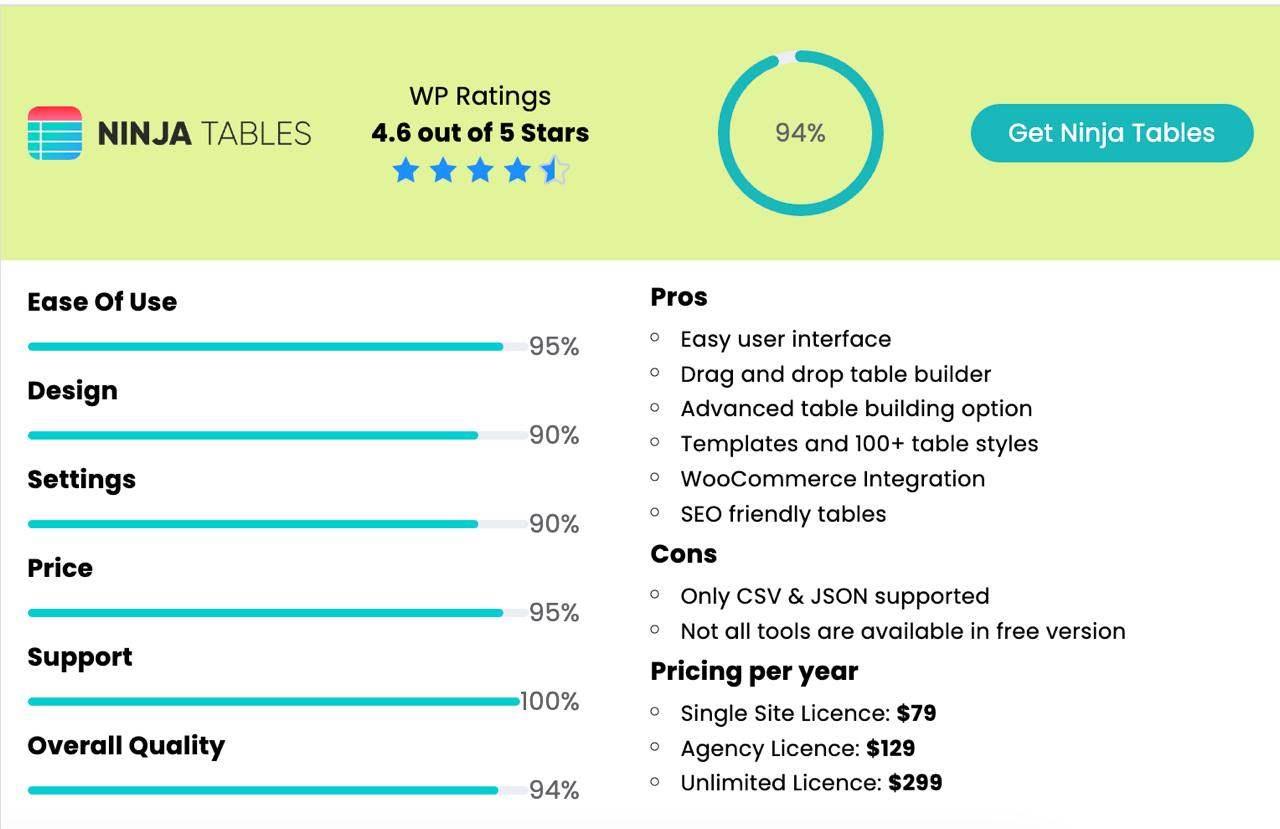
Ninja Tables has a fully functional free version available, ready for you to use, as well as a Premium version.
It is built for everyone- a newbie or an expert. The easy interface gives anyone the comfort of creating and customizing dynamic tables without coding.
Yes, you can. We have introduced a feature that helps you import tables from your existing TablePress plugin in just a few clicks!
If you use a table builder plugin besides TablePress / Data Tables Generator by Supsystic, you must export the table files in CSV/JSON format. Ninja Tables allow you to upload CSV/JSON files directly.
You can manage big tables with a huge amount of data by using Pagination to break down your tables into segments. Or enable Responsive Breakpoints to hide specific columns. You can also use the Stackable Table Configuration feature to turn rows into separate tables.
Not only that, the Search/Filter option allows you to quickly find out the exact information from your table.
Install and activate the plugin in your dashboard and go to the “Add Table” option. You can find 9 dynamic table types to create. Or you can use the free table templates to customize an already prepared table.
Yes, you can create WooCommerce product tables with Ninja Tables Pro.
You can upload Image, File, Lightbox, & iframe in the Ninja Tables columns.
Yes, the Ninja Tables Pro enables you to make front-end editing enabled tables.
Ninja Tables lets you connect Google spreadsheets to WordPress tables. Pull any data from Google Sheets into Ninja Tables Pro, customize, and embed the table.
Ninja Tables customer support team is ready to help you 24/7.
Changelog
We released several updates for Ninja Tables in the years of development. These include improvements to the existing features and some wonderful additions to help you design tables more effectively.
5.2.9 (Date: May 25, 2026)
- Fixed: Row query scoping by table_id in manual sort operations
- Fixed: Gutenberg block save now validates post type and user role
- Fixed: Content filtering for frontend table submissions
- Improved: Post-type validation on settings, FluentCart, and column-delete endpoints
- Improved: Access control for table row and post-meta operations
- Improved: HTML sanitization for frontend table submissions
- Improved: Server-side validation for editable column fields
- Improved: Authentication checks for license management endpoints
- Improved: License management restricted to network admin on multisite
- Improved: Directory listing protection across all plugin directories
- Improved: Input validation on license key submissions
5.2.8 (Date: April 16, 2026)
- Added: DataTables support for table rendering.
- Improved: Accessibility for custom filters.
5.2.7 (Date: February 04, 2026)
- Security: Improved permissions for FluentCart table creation
5.2.6 (Date: January 27, 2026)
- Added: Bulk delete for tables
- Added: Trash and restore tables
- Added: Single-row modal view
- Added: Click to copy cell Content
- Fixed: Print issues with conditional formatting
- Fixed: Print issues with responsive breakpoints
- Fixed: FluentForm payment form warnings
- Fixed: FluentCart permalink issues
- Fixed: Drag & drop color picker issue
- Security: Limited ninja_table_info & ninja_table_cell access to public posts.
5.2.5 (Date: December 17, 2025)
• Security: Improved OrderBy sanitization to prevent SQL injection.
5.2.4 (Date: November 27, 2025)
• Security: Improved REST API sanitization to prevent SQL injection.
• Improve: Stock visibility in FluentCart table
5.2.3 (Date: November 11, 2025)
• Added: Fluent Cart Product Table integration
• Added: WooCommerce Reviews table integration
• Added: WooCommerce average rating in products table
• Added: Separate progress bar & progress bar text color options
• Added: Vietnamese translation support
• Fixes: WooCommerce multiple attributes variations duplicate issue
• Fixes: WooCommerce products comparison in stackable table
• Fixes: WooCommerce table theme conflict
• Fixes: WooCommerce dynamic column post meta display issue
• Fixes: Post table conditions date filter issue
• Fixes: Image clickable issue when no link is provided in drag & drop
• Fixes: Button hover issue on drag & drop
• Fixes: Fluent forms table Optional conditions issue
• Fixes: Progress bar style issue
• Improve: Excel formula support
• Improve: Single cart button action from table
• Improve: Pagination style in WooCommerce table
• Improve: Text-domains & data escaping
• Improve: WooCommerce bulk operations
• Tested: Full plugin via Plugin Check(PCP)
5.2.2 (Date: August 01, 2025)
- Fixes: Google Sheets data data fetching issue
- Fixes: All Table list showing issue after clear search value
- Fixes: Sorting control switch visibility issue in features tab
- Fixes: Remote CSV data not updating when CSV data changes
- Fixes: Selected Cell Column Background in Drag & Drop
- Fixes: Row hover border color issue
- Fixes: Total Tables count issue from All Tables Lists,
- Fixes: List icon changing issue on list type change in drag & drop table
- Fixes: Font size change issue in drag & drop
- Fixes: Anchor tag link issue on notices
- Fixes: Multiple success notices for single action
- Fixes: Checkbox issues in Ninja Tables block
- Fixes: Cursor jumping issue in WP Editor,
- Added: WooCommerce products comparison
- Added: WooCommerce bulk add to cart feature
- Improve: Drag & drop table UI
5.2.1 (Date: July 09, 2025)
- Updated Framework Library
- Better performance for REST API
- Better Handling Database Queries
5.1.1 (Date: June 17, 2025)
- Added: Tooltip on table title column
- Fixes: Last column delete Issue
- Fixes: Drag and drop Button/link issue
- Fixes: Drag and drop CSV/JSON import issue
- Fixes: Drag and Drop Selected cell color issue
- Fixes: Merged cell elements edit issue in Drag and Drop,
- Fixes: Table design alternate row color issue,
- Fixes: Drag and drop list element edit issue,
- Fixes: Drag & drop text color box disappearing issue
- Fixes: Drag and drop rating filed issue
- Fixes: Drag & Drop responsive issue for imported JSON
- Fixes: Drag & Drop font size issue for imported JSON
- Fixes: Rating Notice Disappear Issue
- Improve: Column width in Table List
- Remove: Default ‘table title’ on Drag & Drop
5.1.0 (Date: June 2, 2025)
- Update: Redesigned ui for modern look and better experience
5.0.22 (Date: May 20, 2025)
- Added: Gutenberg block for table style
- Fixes: Rest api issue for some server
- Fixes: file_get_contents issue in Google Sheet integration
- Fixes: #colspan# and Responsive Breakpoint issue
- Fixes: Formatted sql issues
- Fixes: ACF issue for WP post table issue
- Fixes: Fixes scrolling issues on drag and drop table
- Fixes: Drag & drop responsive issue for small devices
5.0.21 (Date: April 10, 2025)
- Fixes: csv/json export issue
5.0.20 (Date: April 09, 2025)
- Fixes: file upload issue
5.0.19 (Date: April 09, 2025)
- Update: Ninja Tables Framework v2.10.41
- Update: License API endpoint
- Security: Updated Framework Library
- Added: First column sticky option
- Fixes: Hide empty items on responsive breakpoint issue
- Fixes: Order by date column issue
- Fixes: Colspan issue in frontend editing
- Fixes: Multi-select dropdown filter last item disappear issue on mobile
- Fixes: Clear all multi-select filter issue on mobile
- Fixes: Show time issue in frontend editing
- Fixes: Formatted text issue in drag & drop table
- Fixes: Duplicate td id issue in drag & drop table
5.0.18 (Date: January 20, 2025)
- Improves: Csv import for existing & new table
5.0.17 (Date: January 01, 2025)
- Fixes: Csv & google sheet import XSS issue
5.0.16 (Date: December 05, 2024)
- Fixes datetime casting issue
- Fixes breaking links issues
5.0.15 (Date: December 02, 2024)
- Update Ninja Tables Framework
- Fixes: main menu display without capability checks issue
- Fixes: table builder text input null value issue
- Fixes: manual sorting checkbox value saving issue
- Fixes: frontend editing datetime format issue
- Fixes timezone issue for php 8.2
- Fixes external CSV text/plain type issue
- Fixes css appearing after table
- Fixes backslash appearing issue in table cell
5.0.14 (Date: September 20, 2024)
- Added: Filter hook to manage public AJAX table data access via URL
- Fixes: Responsive issue on tablet in drag & drop
- Improves: Multisite creation
5.0.13 (Date: August 13, 2024)
- Fixes: Security vulnerability issue with svg upload
- Fixes: first of week for date picker
- Fixes: Woocommerce unpublished post appearing issue
- Fixes: lt, gt custom date filter issue
- Added: Chunk loading for wp post tables
- Added: Noreferrer attribute for button type column
- Added: Pickday date picker supported i18n string
5.0.12 (Date: July 12, 2024)
- Fixed: Csv import for php 8.3 & inside the table
- Fixed: Ajax table data loading issue
5.0.11 (Date: June 13, 2024)
- Added: Inline text editor for drag & drop table
- Fixed: Total row count issue on table data
- Improved: Order by column sorting
- Improved: Import table functionality
- Improved: Secure ajax request data accessing through URL
5.0.10 (Date: May 31, 2024)
- Fixed: Security vulnerability issue on import
5.0.9 (Date: May 22, 2024)
- Fixed: Style loading issue
- Improved: All table list pagination count
5.0.8 (Date: May 16, 2024)
- Removed: Empty tfoot tag
- Updated: column responsive breakpoints docs link
- Added: Nonce validation for public ajax request
- Added: Netherlands language support
- Added: Table list sorting by post-title & ID
- Improved: Template choose option for Drag & Drop table
- Improved: Help & documentation page
- Fixed: Target attribute spelling issue for drag & drop
- Fixed: Excel formula rendering for multiple table in same page
- Fixed: Color loading issue on print
- Fixed: Duplicate style loading issue
5.0.7 (Date: January 25, 2024)
- Added permission check on preview
5.0.6 (Date: January 23, 2024)
- Fixes: Fixes CSV/JSON export permission issue
- Fixes post author name display issue in the woocommerce table
- Fixes cart & checkout button text save issue
- Fixes Custom filter number_range minus sing(-) issue
- Removed href if image doesn’t have URL for drag & drop table
5.0.5 (Date: December 19, 2023)
- Fixes: European number range filter issue with the use of transform value
- Fixes: Fixes external source pdf file download issue
- Fixes: Fixes text input strict mode filter for Latin characters
- Fixes: Fixes transform value & specific row colors issue in print
- Fixes: Fixes CSV/JSON export unauthorized access issue
5.0.4 (Date: October 04, 2023)
- Fixes table colors issue
5.0.3 (Date: Sep 26, 2023)
- Adds Searchable Gutenberg block for adding tables shortcode
- Adds Php 8x support
- Fixes Vue version conflict with other plugins
- Fixes Excel formula checkbox check & uncheck issue
- Fixes Fullwidth searcher issue on mobile device
- Fixes: Table caption update issue
- Fixes CSS appearance issue in accordion
- Fixes Force downloaded third-party file from any URL
- Fixes Multi-select dropdown filter last item disappear issue on mobile
- Fixes Drag and drop tables preview and margin issue
- Improves drag & drop table progress bar percentage
- Improves drag & drop table column width increase 500 to 1000
5.0.2 (Date: June 15, 2023)
- Added a dismissible option in the admin area for all notices
- Fixes double slash issue from URL
- Fixes collapse expand issue for frontend editing in a responsive breakpoint mode
5.0.1 (Date: June 12, 2023)
- Added cross sign for delete notice
- Fixes sorting icon color issue
5.0.0 (Date: June 08, 2023)
- Added current user post option for wp post table
- Added custom CSS & js for drag & drop table
- Fixes Multi-select number range filter issue
- Fixes property box design issue for wp post table
- Fixes accessibility issue for pagination
- Fixes media button issue for many themes & plugins
- Fixes sticky header issue
- Fixes strict mode custom filter issue for checkbox, radio
- Fixes font loading issue
- Improves frontend editing input field validation
- Improves drag-and-drop table content editing
- Update plugin framework
- Update latest moment js library
4.3.5 (Date: April 20, 2023)
- Fixes CSRF issue
- Fixes XSS issue
4.3.4 (Date: February 08, 2023)
- Fixes strict mode custom filter issue
- Fixes table sorting by date & time issue
- Fixes transform value escape date decimal(.) format issue
- Fixes external SQL query update issue
- Fixes image uploading issue for some themes
- Fixes filter selects issue
- Fixes drag and drop table shortcode issue for classic editor
- Fixes pointer issue
- Added a sorting option in the admin dashboard
- Added a few strings in the translation file
4.3.3 (Date: December 22, 2022)
- Fixes chunk filter loading issue
- Added custom filter for escape 0 from google-sheets
- Added woocommerce default value selection
- Fixes gt and lt issues for fraction
- Fixes hide_default_filter issue
- Added clear all for dropdown multi-select filter
- Fixes tag, and taxonomy filters for wp-post provider
- Fixes empty row responsive breakpoints issue
- Updated docs link from WPMmanageNinja to Ninja Tables
- Fixes parse comma-separated number strict mode issue
- Fixes dropdown filter options case-sensitive Issue
- Fixes multiple number range filter issue
- Fixes print dialog closing issue
- Added Chinese simplified(zh_CN) language
- Added edit button in frontend for drag & drop table
- Added un-save data detector for drag & drop table
- Increase table container max height for drag & drop table
4.3.2 (Date: October 19, 2022)
- Fixes frontend loader notice issue
- Added phpcs
- Improves data sanitization
4.3.1 (Date: October 13, 2022)
- Fixes responsive issue for drag & drop table
- Added global importer for drag & drop table
4.3.0 (Date: October 12, 2022)
- Fixes sticky header issue
- Fixes woocommerce custom product variations issue
- Update table id integer to big integer
- Added table column highlighter
- Added responsive view by column
- Improved UI/UX
4.2.3 (Date: August 10, 2022)
- Improves NinjaTableClass.php
4.2.2 (Date: August 10, 2022)
- Fixes an error for gravity forms
- Update readme file
4.2.1 (Date: August 8, 2022)
- Fixes array_combine issue for Google Sheets
- Fixes php 8 required parameter deprecated notice
- Fixes woocommerce product stock status issue
- Fixes custom filter select gt & lt number
- Fixes frontend editing apply & add new popup issue
- Fixes file loading issue
- Added download attribute in the button
- Added filter_selects multiple values for the same filter
- Added google-csv, CSV & fluent-form chunk loader
- Added the class in responsive breakpoint
- Added FluentForm payment details
- Updated plugin docs help documentation
4.2.0 Date: June 22, 2022)
- Fixes Google translator pagination issue
- Added frontend data loader rendering setting
- Fixes a print issue
- Updated plugin docs help documentation
- Adds drag and drop table builder
4.1.14 Date: March 21, 2022)
- Fix CSS Output issues
4.1.13 Date: March 18, 2022)
- Fix Data sanitization and esc_* functions
- Support for Raw HTML in table cells
4.1.12 (Date: March 11, 2022)
- Fix Data _esc issues
- UI improvements
4.1.11 (Date: February 01, 2022)
- Adds global font style
- Fixes number range filter reset issue
- Improves frontend editing sanitization
4.1.9 (Date: January 27, 2022)
- Improves data sanitization
4.1.8 (Date: January 27, 2022)
- Adds no follow option
- Adds font customization
- Adds time format option in the date field
- Fixes Ace library issue
- Fixes CSV library issue
- Improves data sanitization
- Improves Admin UI
4.1.7 (Date: September 17, 2021)
- Added woocommerce product variations
- Fixes date & date range filter manual input date search issue
- Fixes progressive filter filter_selects
- Fixes category post filter issue
- Fixes filter shortcode for AND logical operator and phrase filter
4.1.6 (Date: Jun 28, 2021)
- Fixes CSV export & Print issue in frontend
- Fixes transform value reference shortcode
- Fixes filter table data print issue in frontend
- Fixes advance shortcode filters for filter_selects in frontend
- Fixes searcher flick issue in frontend
- Fixes large data loading table hide issue in frontend
- Fixes custom filter checkbox & select strict mode issue in frontend
- Fixes custom filter issue for special characters in frontend
- Fixes custom filter number range input value issue in the frontend
- Fixes custom filter manual data multi-select table hide issue in mobile device
- Fixes special character sorting issue
4.1.5 (Date: Feb 18, 2021)
- Fixes value transformation on the admin page.
4.1.4 (Date: Feb 16, 2021)
- Fixes AJAX data loading for public nonce issue.
4.1.3 (Date: Feb 13, 2021)
- Adds transformed value sorting & filtering.
- Improves formula support for European numbers.
- Fixes exact match filtering for multi-select.
4.1.2 (Date: Feb 08, 2021)
- Fixes calculation for European formatted numbers.
- Fixes frontend CSV export issue for accented characters.
- Fixes TablePress import order.
- Fixes elementor popup.
- Fixes WP latest jQuery update issues.
4.1.1 (Date: Nov 21, 2020)
- Fixes Google Sheets data fetching issue.
- Fixes frontend pagination issue.
- Fixes frontend data transformation issue.
4.1.0 (Date: Nov 18, 2020)
- Adds default diacritics filter support.
- Fixes for diacritics sorting.
- Fixes transform value on frontend.
- Fixes Google Sheets integration.
4.0.2 (Date: Sep 14, 2020)
- Fixes client-side value transformation module.
4.0.1 (Date: Sep 14, 2020)
- Fixes transform value bug for Excel formula.
- Fixes regular search bugs for string value.
- Fixes Semantic UI table’s footer radius style.
- Improves value transformation module.
4.0.0 (Date: Sep 12, 2020)
- Adds special characters (diacritics) search.
- Adds Ninja Charts for data visualization.
- Fixes sticky header issue.
- Fixes table design issues.
- Fixes sorting issues on export.
- Fixes preload key requests for custom fonts.
- Fixes table filter for multiple instances on a page.
- Fixes SQL table bugs.
- Fixes pagination issues.
- Fixes remote CSV title issue.
- Fixes custom filters on Firefox.
- Fixes custom filter design issues.
- Fixes multi-select issues on Firefox.
- Fixes minor bugs and improves overall performance.
3.5.12 (Date: Apr 07, 2020)
- Fixes shortcode defaults bug.
3.5.11 (Date: Mar 23, 2020)
- Adds all tables sorting.
- Adds Jetpack lazy image compatibility.
- Adds Fluent Form meta fields to display.
- Adds cart and checkout button customization.
- Adds batch insert for CSV to avoid PHP memory issues.
- Adds filters and searches to be included in the Print page.
- Adds removing image options in both the backend and frontend.
- Adds all chunk data loaded hooks for frontend (‘ninja_table_all_chunk_loaded”).
- Fixes Safari ellipsis bug.
- Fixes custom CSS duplication.
- Fixes iPhone table width bug.
- Fixes inline edit caching bug.
- Fixes frontend editing focus bug.
- Fixes Fluent Forms entry fetcher bug.
- Fixes global appearance settings bug.
- Fixes stackables for the latest jQuery.
- Fixes Fluent Form provider variable bug.
- Fixes conditional matching issues for sorting.
- Fixes Google CSV no results error, filter “ninja_tables_remote_csv_timeout”.
3.5.10 (Date: Dec 27, 2019)
- Fixes stackable tables on different devices.
- Fixes stackable tables tbody color issues.
- Fixes CSV import table bug.
3.5.9 (Date: Dec 26, 2019)
- Renders styles ahead of table load.
- Improves page speed issues.
- Adds meta query filters.
- Improves print to allow customized styles.
- Improves front-end editing.
- Fixes import & export issues.
- Fixesnon-ASCIII characters from Google Sheet issues.
- Fixes possible browser rendering issues.
- Fixes table duplicate issues.
- Fixes stackable tables to expand all issues.
- Fixes iOS rendering issues.
- Fixes custom filter loading issues.
- Fixes colored table with stackables issues.
- Fixes sticky header background issue.
3.5.8 (Date: Nov 09, 2019)
- Adds plain text export support for CSV.
- Addsnon-ASCIII characters support for label filtering.
- Adds dynamic table ID placeholder for custom CSS.
- Fixed Stackable table frontend editing bug.
- Fixed WooCommerce custom Buy Now button text.
- Fixed missing transform value rendering bug.
- Fixed sticky header bug.
- Fixed stackable table print issue.
- Fixed row span bug for paginated data.
3.5.7 (Date: Aug 28, 2019)
- All Accessibility Issues fixed so far (y)
- Filtering issue fixed for number range
- Date format bug fixed
- Spinner effect improved
- PHP warning fixed
- Added filter and improvements
- Number data type UX improved
3.5.5 (Date: June 20, 2019)
- Overall Improvement in the editing screen
- Added inline editing for select fields
- Data type issues fix
- Improved filter
- Added table edit link from frontend
3.5.2 (Date: July 13, 2019)
- Security Fixes
- Improve Table Rendering
- Added Inline editing
3.5.0 (Date: July 10, 2019)
- Shortcode issue fixed on Ajax Data Table Rendering
- WCAG AA Compatibility issue fixed
- Fix issues for non-English languages
- Fix scroll to top issue
- Fix the filtering issue
- Improvements in Backend and data rendering
3.4.5 (Date: June 01, 2019)
- Fix the issue for CSV export for the backend
- Integrity issue resolved
- Expand issue resolved for stacks table
- Remove all cache options added
- Shortcode rendering issue resolved
=3.4.3 ( Date: May 27, 2019 ) =
* Fix Shortcode rendering issue
* Added a few UI changes
3.4.0 ( Date: May 24, 2019 )
- Improved some design issues.
- Added more filters for searching the data
- Improve Multi-site support (100% support now)
- Internal code improvement
3.3.3 ( Date: April 08, 2019 )
- Fix the default filter issue.
- Fix issue for search and transform value
- Fix date rendering issue.
- Improve performance
3.3.0 ( Date: March 21, 2019 )
- Improved table config and make it hookable
- improve asset loading
- Now the table complies with WCAG 2.1 AA
- Added entry result counter
- Fix the caption for the table
- Overall performance improvement
3.2.4 ( Date: January 25, 2019 )
- Fix bug for Data sorting issues
- Improve overall performance
3.2.3 ( Date: January 19, 2019 )
- Fix bug for data export-importJSONn
- Improve Frontend Rendering
- Improve Data Sorting Issues
3.2.0 ( Date: January 16, 2019 )
- Fix Using Icon Markup in HTML Field
- Improved Table Import Export Feature
- Added Global JS error handling. Now Ninja Tables will be initialized if other plugins throw JS errors on the front end.
- Added AdvancedCSS classes for Table rows to styling.
- Improve overall Admin UI
- Added Performance improvement to load lots of data on the frontend
3.1.0 ( Date: December 24, 2018 )
- Added Stackable Table UI
- Added Default Table Configuration Option
- Fix Intro Screen
- Improve Table UI
- Improve overall Admin UI
- Editor Link bug fix for the latest version of WordPress
3.0.6 ( Date: November 28, 2018 )
- Fix WP FluentForm Integration
- Improve Other Improvements
3.0.5 ( Date: November 26, 2018 )
- Improve WP Fluent Form integration
- Fix CSV upload bug
- Date Sorting bug fix
- Fix Alignment Issue for table headers
- Internal Improvements
- Add Gutenberg Support ( Dedicated Gutenberg Table Block Added )
3.0.0 ( Date: November 19, 2018 )
- This is a major version release but it works with previous versions. Feel free to upgrade this version from any previous version
- Fix the issue for pagination and sorting settings and save the issue
- Added WP Fluent Form integration (this is a big feature).
- Add table UI bug fixes.
- Added more styling and table design options.
- We have worked over 1 month (200+ hours | 2 developers) to build this version, we hope you will enjoy the features.
2.4.1 ( Date: October 08, 2018 )
- Fix Table Search Dropdown UI issue for some theme
- Make the color picker more useful
- A few UI and UX bug fixes
- Update Nag bug fix
2.4.0 ( Date: October 05, 2018 )
- Added Multisite Compatibility
- Added FeatureCustomm Filters
- Optimize for large amounts of Data Tables
- Now you can add a column from the Table Rows Screen
- Sorting Bug fixed for undefined values
- Typo Fixed
- Estimated work hours for this release: 120 Human hours
- Estimated Coffee consumed: 103 (Thanks to Chanchal)
2.3.4 ( Date: August 11, 2018 )
- Fix the Sorting Issue
- Added Design Suggestions on the Table Design Tab
- Fix Table Demo Preview for Non-Admin Users
2.3.3 ( Date: August 09, 2018 )
- Fix bug for date-type columns
2.3.0 ( Date: August 02, 2018 )
- Fixed bug for rendering multiple tables in a single page
- Fix bug for column width and header text alignment
- Fix bug for table not rendering issue
2.2.6 ( Date: August 01, 2018 )
- It’s a big update with lots of improvement
- Added Design studio for the table to colorize tables visually. Now you can change settings and see the instance preview
*Re-arrange tablee Config Components to make things easier. - Added Duplicate Row Features ( We know you wanted this )
- You can change column configuration from the table rows tab now
- Added feature to import a table from “Ultimate Tables”
- Added feature to import a table from “Data Tables Generator by Supsystic”
- Added Permission for User Role based. You can assign a custom role now.
- Fix a few CSS bugs for table cell text wrap issues ( Thanks to our users for reporting it )
2.1.1 ( Date: April 28, 2018 )
- Fix Table sorting for HTML Elements
- Added more customization Options on Advanced Settings
- Added Select-Options for data
2.1.0 ( Date: April 24, 2018 )
- Fix Table sorting issues
- Better Table Rendering
2.0.9 (Date: 04-16-2018 )
- Added Shortcode support to table cells
- Add Support for colspan feature to the table header
- Added Custom Color Alpha
- Add a feature to make table cells a vertical center
2.0.8 (Date: 04-13-2018 )
- Added Table Styling for the header element
- Date and HTML sorting bug fix
- Added Cell-Merging Feature for Pro Version
- Added Legacy Table Support
2.0.4 (Date: 04-12-2018 )
- Date Field Support
- Iframe support on a table cell
- HTML sorting support
- Improved CSV upload
- Import From Table Press Bug Fix
2.0.3 ( Date: 04-09-2018 )
- Enhanced Support Non-Unicode Language for CSV import
- Overall improvement for admin panel UI
1.9.9 ( Date: 04-01-2018 )
*Non-Unicode language Support for import
* Table Description update fix
* Fix for TablePress Plugin
1.9.8 ( Date: 03-31-2018 )
- Edit Support for restricted column ID
1.9.7 ( Date: 03-31-2018 )
- Added RTL Support
- CSS Fix for Safari
- Table sorting bug fix
- Improved table data caching
1.9.5 ( Date: 03-21-2018 )
- Added Caching Mechanism to load the table data faster
- Make the custom table MariaDB compatible
- Added Table Data Filter by shortcode
- Fix CSV and JSON data import bug
- Remove Conflicts with Elementor
1.9.0
- Upgraded the admin panel slick.
- More add-on compatible.
- Added unlimited color schema generator with add-on.
- Added media upload with add-on in table cells.
1.8.4
- Fix conflicts with jetpack notification components
1.8.3
- Fix table sorting by column values
1.8.2
- Fix html elements loading
- Improve HTML element vuejs component
1.8.0
- Added WordPress Native HTML editor to the table.
- Added Number Type Table Column.
- Sorting table data by column.
- Number type Sorting added.
- Added Live Preview, Now users can preview the Demo
1.5.0
- Added tinymce button to insert the shortcode
1.3.0
- Added shortcode support in table cells
1.2.0
- Improve speed
- Support for WP’s latest version
1.1.3
- Improve TablePress Import
- Add Support for older WP versions
1.1.0
- Added contextual Tutorial link.
- Improve TablePress Import UX.
- Refactor how footables render in frontend js.
- Overall UX improvement.
1.0
- Init First version
" width="120" height="120">
Available Versions
| Version | Download | Type |
|---|---|---|
| 5.2.9 | Download | Stable |
| 5.2.8 | Download | Stable |
| 5.2.7 | Download | Stable |
| 5.2.6 | Download | Stable |
| 5.2.5 | Download | Stable |
| 5.2.4 | Download | Stable |
| 5.2.3 | Download | Stable |
| 5.2.2 | Download | Stable |
| 5.2.1 | Download | Stable |
| 5.1.1 | Download | Stable |
| 5.1.0 | Download | Stable |
| 5.0.23 | Download | Stable |
| 5.0.22 | Download | Stable |
| 5.0.21 | Download | Stable |
| 5.0.20 | Download | Stable |
| 5.0.19 | Download | Stable |
| 5.0.18 | Download | Stable |
| 5.0.17 | Download | Stable |
| 5.0.16 | Download | Stable |
| 5.0.15 | Download | Stable |
| 5.0.14 | Download | Stable |
| 5.0.13 | Download | Stable |
| 5.0.12 | Download | Stable |
| 5.0.11 | Download | Stable |
| 5.0.10 | Download | Stable |
| 5.0.9 | Download | Stable |
| 5.0.8 | Download | Stable |
| 5.0.7 | Download | Stable |
| 5.0.6 | Download | Stable |
| 5.0.5 | Download | Stable |
| 5.0.4 | Download | Stable |
| 5.0.3 | Download | Stable |
| 5.0.2 | Download | Stable |
| 5.0.1 | Download | Stable |
| 5.0.0 | Download | Stable |
| 4.3.5 | Download | Stable |
| 4.3.4 | Download | Stable |
| 4.3.3 | Download | Stable |
| 4.3.2 | Download | Stable |
| 4.3.1 | Download | Stable |
| 4.3.0 | Download | Stable |
| 4.2.3 | Download | Stable |
| 4.2.2 | Download | Stable |
| 4.2.1 | Download | Stable |
| 4.2.0 | Download | Stable |
| 4.1.14 | Download | Stable |
| 4.1.13 | Download | Stable |
| 4.1.12 | Download | Stable |
| 4.1.11 | Download | Stable |
| 4.1.10 | Download | Stable |
| 4.1.9 | Download | Stable |
| 4.1.8 | Download | Stable |
| 4.1.7 | Download | Stable |
| 4.1.6 | Download | Stable |
| 4.1.5 | Download | Stable |
| 4.1.4 | Download | Stable |
| 4.1.3 | Download | Stable |
| 4.1.2 | Download | Stable |
| 4.1.1 | Download | Stable |
| 4.1.0 | Download | Stable |
| 4.0.2 | Download | Stable |
| 4.0.1 | Download | Stable |
| 4.0.0 | Download | Stable |
| 3.5.12 | Download | Stable |
| 3.5.11 | Download | Stable |
| 3.5.10 | Download | Stable |
| 3.5.9 | Download | Stable |
| 3.5.8 | Download | Stable |
| 3.5.7 | Download | Stable |
| 3.5.5 | Download | Stable |
| 3.5.2 | Download | Stable |
| 3.5.0 | Download | Stable |
| 3.4.5 | Download | Stable |
| 3.4.3 | Download | Stable |
| 3.4.2 | Download | Stable |
| 3.4.1 | Download | Stable |
| 3.4.0 | Download | Stable |
| 3.3.3 | Download | Stable |
| 3.3.2 | Download | Stable |
| 3.3.0 | Download | Stable |
| 3.2.4 | Download | Stable |
| 3.2.3 | Download | Stable |
| 3.2.2 | Download | Stable |
| 3.2.1 | Download | Stable |
| 3.2.0 | Download | Stable |
| 3.1.0 | Download | Stable |
| 3.0.6 | Download | Stable |
| 3.0.5 | Download | Stable |
| 3.0.3 | Download | Stable |
| 3.0.2 | Download | Stable |
| 3.0.0 | Download | Stable |
| 2.4.1 | Download | Stable |
| 2.4.0 | Download | Stable |
| 2.3.4 | Download | Stable |
| 2.3.3 | Download | Stable |
| 2.3.2 | Download | Stable |
| 2.3.1 | Download | Stable |
| 2.3.0 | Download | Stable |
| 2.2.6 | Download | Stable |
| 2.2.5 | Download | Stable |
| 2.2.0 | Download | Stable |
| 2.1.2 | Download | Stable |
| 2.1.1 | Download | Stable |
| 2.1.0 | Download | Stable |
| 2.0.9 | Download | Stable |
| 2.0.8 | Download | Stable |
| 2.0.6 | Download | Stable |
| 2.0.5 | Download | Stable |
| 2.0.4 | Download | Stable |
| 2.0.3 | Download | Stable |
| 2.0.2 | Download | Stable |
| 2.0.1 | Download | Stable |
| 2.0.0 | Download | Stable |
| 1.9.9 | Download | Stable |
| 1.9.8 | Download | Stable |
| 1.9.7 | Download | Stable |
| 1.9.5 | Download | Stable |
| 1.9.1 | Download | Stable |
| 1.9.0 | Download | Stable |
| 1.8.4 | Download | Stable |
| 1.8.3 | Download | Stable |
| 1.8.1 | Download | Stable |
| 1.8.0 | Download | Stable |
| 1.6.0 | Download | Stable |
| 1.5.0 | Download | Stable |
| 1.4.0 | Download | Stable |
| 1.3.0 | Download | Stable |
| 1.2.0 | Download | Stable |
| 1.1.3 | Download | Stable |
| 1.1.2 | Download | Stable |
| 1.1.1 | Download | Stable |
| 1.1.0 | Download | Stable |
| 1.0.1 | Download | Stable |
| Development | Download | Trunk |
