
Nelio Forms
Active Installs
40+
Last Updated
August 18, 2026
First Released
February 25, 2022
Download History (Last one month)
Contributors
THE STANDARD WORDPRESS FORM BUILDER FOR THE BLOCK EDITOR
Use Nelio Forms to create beautiful, user friendly WordPress forms that will make you feel like a professional web developer.
WordPress drag and drop block editor makes it easy to setup and add forms to your WordPress website using Nelio Forms. Collect information, make your content interactive, and generate more conversions with Nelio Forms.
Nelio Forms can manage multiple contact forms, plus you can customize the form and the mail content flexibly with simple markup. The forms support Ajax-powered submitting.
Reasons for choosing Nelio Forms
Here’s why you should switch to Nelio Forms:
#1. 🚀 It’s awesome
Your form creation experience is our #1 priority. Nelio Forms’ editor won’t annoy you when designing awesome forms like other WordPress form plugins do. Nelio Forms uses the WordPress block editor and allows you to include and design forms directly within your content.
#2. 😎 It’s easy
We were tired of the bloated and slow form builder plugins with complex settings. That’s why we built Nelio Forms to adapt to your marketing workflow and allow you to create custom forms within minutes.
By using the standard WordPress drag & drop block editor, you can easily customize the look and feel of your forms, adding required fields that fit your needs. In addition, you can reuse your forms and include them anywhere.
#3. ℹ️ You are not alone
The desire of each customer and the problems that have arisen are the priority issues that have to be solved by our support team. That is why our team works very hard to help and satisfy the demands and wishes of all its customers. If there is a question that you would like to ask, or there is something unclear, then our support team is ready to answer each question in detail to satisfy any interest.
Installation through the WordPress Dashboard
- Login to your WordPress admin.
- Click on the plugins tab.
- Click the Add New button.
- Search for “Nelio Forms.”
- Look for our plugin, click “Install Now” and then “Activate.”
And that’s it! You can now use Nelio Forms on your site.
Created by Nelio Software
Nelio Forms is built by the Nelio team. We create high-quality WordPress plugins that help you grow your WordPress sites.
Check out some of our most popular plugins:
- Nelio A/B Testing – Conversion Optimization with A/B Tests and Heatmaps
- Nelio Content – Editorial Calendar and Social Media Promotion
- Nelio Popups – Easiest WordPress Popup Builder using the Block Editor
Screenshot Gallery


No. Nelio Forms relies on the block editor (Gutenberg) that comes with modern WordPress versions. You can’t use Nelio Forms with the classic editor or any other content editor for WordPress.
Nelio Forms is perfect for all WordPress users. Whether you’re starting your first blog, selling your product or service online, designing or developing, you’ll have the tools you need. Nelio Forms uses the standard drag and drop WordPress block builder to create your forms. If you want to create a form in WordPress using blocks, then you need to use Nelio Forms.
No. You don’t need any pre-requisite programming knowledge to build beautiful forms. You can build any simple or complex form using WordPress’ block editor.
No. Nelio Forms can be used completely for free using the version available at WordPress.org. However, if you are interested on advanced features, we plan to develop a premium version. Let us know what you need and we’ll add it in our development queue.
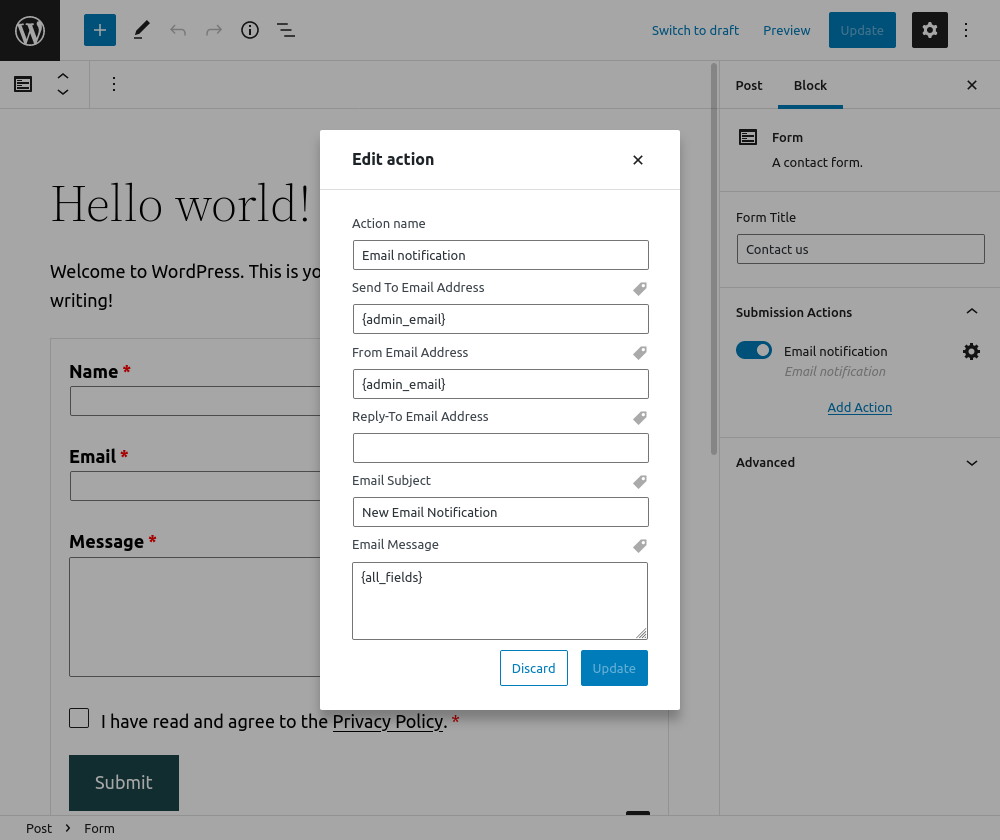
Yes. Nelio Forms use WordPress’ built-in emailing capabilities to send email notifications after successful form submissions. Every email sent from your forms can be customized, including form submission data in its content.
The free version of Nelio Forms includes the following features:
- Create and manage as many WordPress forms as you desire.
- Unlimited form submissions.
- Customizable email notifications.
- Use form fields like text, paragraph (textarea), email, and more.
- Beautifully match your theme’s design decisions.
- Regular updates.
- Dedicated support.
- Developer friendly (includes filters and actions).
We made Nelio Forms to be both easy and powerful.
Here are the contact form fields that comes with Nelio Forms:
- Text Field
- Paragraph Text (Textarea)
- Number Field
- Email Field
- Website / URL Field
- Password Field
- Telephone Field
- Checkbox
We plan to include additional fields in the upcoming releases.
Yes. Nelio Forms includes the shortcode [nelio-form id=X] where X is the ID of the form. For instance, to render the form with ID 42, use [nelio-form id=42].
Changelog
1.4.0 (August 18, 2026)
- Fix editor styles of submission actions.
- Add compatibility with WordPress 7.1.
1.3.0 (May 18, 2026)
- Fix editor styles of select blocks.
- Add compatibility with WordPress 7.0.
1.2.0 (November 25, 2025)
- New Feature. Add premium action to call a webhook upon successful form submit.
- Improvement. Adapt blocks to iframed block editor.
- Improvement. Add data validation for form metas using Zod.
- Improvement. Fix styles of submission actions’ editor.
1.1.1 (May 5, 2025)
- Fix compatibility with super admin users in multisite installations.
- Update plugin dependencies.
1.1.0 (November 5, 2024)
- Add filter
nelio_forms_email_notification_message. - Add filter
nelio_forms_email_notification_subject. - Validate compatibility with WordPress 6.7.
1.0.23 (March 23, 2023)
- Bug Fix. Allow input emails in uppercase.
1.0.22 (February 22, 2023)
- Improvement. Use proper capabilities when registering menus.
1.0.21 (September 23, 2022)
- Bug Fix. Add form capabilities properly so that users can create and edit forms.
1.0.20 (August 30, 2022)
- New Feature. Add premium action to create a cookie upon successful form submit.
- Improvement. Add opinionated styles.
- Improvement. Wrap form patterns in a component (form block only).
- Bug Fix. Tweak
ItemSelectControlcomponent to search items by title only. - Bug Fix. Modify form script to (try to) add missing field IDs and thus fix validation.
- Bug Fix. Set default field ID when creating a form in another post type.
- Bug Fix. Allow collapsing/expanding sections in form’s sidebar.
1.0.19 (July 12, 2022)
- New Feature. List of form patterns.
- Bug Fix. Allow submissions in non-published forms when in preview.
1.0.18 (June 22, 2022)
- New Feature. Add premium action to integrate with Zapier.
1.0.17 (June 16, 2022)
- New Feature. Add select field.
- New Feature. Limit length of text and textarea fields.
1.0.16 (June 9, 2022)
- Improvement. Refactor radio group and checkbox group fields to use input fields instead of
RichEditcomponents. - Improvement. Add support for Delete and Backspace keys on radio group and checkbox group fields.
- Improvement. Localize output number in number slider field.
- Improvement. Refactor checkbox submission sanitization to return a boolean value instead of a translatable string.
- Bug Fix. Fix capabilities in multisite installations.
1.0.15 (June 1, 2022)
- Bug Fix. Fix 500 server error when using custom set up with Akismet.
1.0.14 (June 1, 2022)
- New Feature. Add checkbox group field.
- New Feature. Add radio group field.
- New Feature. Add toolbar in fields to mark field as required.
- Improvement. Remove click event as trigger for field validation.
- Improvement. Remove Nelio Popups panel from sidebar when editing a form.
1.0.13 (May 25, 2022)
- New Feature. Add premium action to integrate with Mailchimp.
- Bug Fix. Fix check status in checkbox field.
1.0.12 (May 19, 2022)
- New Feature. Hide form after successful submission.
- New Feature. Change label of submit button after submission click.
- New Feature. Show custom confirmation message after successful submission.
- New Feature. Add password confirmation setting (shows two password fields and makes sure both have the same value on submit).
- Improvement. Include post type in filter
nelio_forms_post_statuses.
1.0.11 (May 13, 2022)
- Bug Fix. Keep empty attributes in self-closing field tags.
- Bug Fix. Fix bug that prevented users from creating new forms.
- Bug Fix. Fix typo in UI.
1.0.10 (May 11, 2022)
- Improvement. Define custom capabilities for forms.
- Improvement. Add new filter
nelio_forms_update_{$field_name}_meta. - Bug Fix. Save form content properly when user has specific capabilities.
1.0.9 (May 3, 2022)
- Improvement. Include field block transformations in form editor.
- Improvement. Add button to replace a form in block editor.
- Improvement. Tweak source code to fix issues reported by WordPress VIP.
- Bug Fix. Allow inserting form field blocks only inside a form block.
1.0.8 (April 26, 2022)
- New Feature. Add number slider field in forms.
- New Feature. Add datetime, date, and time fields in forms.
- New Feature. Implement client-side form validation.
- Improvement. Scroll to first field with errors after form submission fails.
1.0.7 (April 19, 2022)
- Bug Fix. Change form renderer to allow previewing a draft form.
- Bug Fix. Check Akismet status when current user is not admin.
1.0.6 (April 6, 2022)
- Bug Fix. Run front-end script correctly when loaded using
defer. - Improvement. Add hooks and types for premium features.
1.0.5 (March 28, 2022)
- New Feature. Form redirection after successful submission to the link set in the form submit button.
- Improvement. Disable translation enqueuing on scripts that don’t have
wp-i18nas a dependency. - Improvement. Add Form example preview in block inserter.
1.0.4 (March 14, 2022)
- New Feature. Akismet spam filtering integration.
- Improvement. Include home URL into allowed field types of email action.
1.0.3 (March 7, 2022)
- New Feature. Include number field in forms.
- New Feature. Introduce hidden honeypot field in all forms to block spam.
- Improvement. Render custom classname properly in form.
1.0.2 (March 1, 2022)
- Improvement. Render labels properly in tags of email notification action.
- New Feature. Allow columns in form block.
- New Feature. Introduce shortcode
[nelio-form id=X]to render forms.
1.0.1 (February 25, 2022)
- Bug Fix. Filter default actions properly to prevent WordPress from undoing an array in
get_post_metadata. - Bug Fix. Tweak
block.jsonfiles to load translations properly.
1.0.0 (February 25, 2022)
- First release.
