
Lokilo – Store Locator for WooCommerce
Active Installs
0+
Last Updated
October 23, 2026
First Released
September 23, 2026
Download History (Last one month)
Contributors
Lokilo lists your physical shops on the storefront. You enter each location once in wp-admin, name, address, city, postcode, country, phone, email, opening hours, a photo and a description, then drop the Store Locator block or the [lokilo] shortcode on any page and the directory prints.
No map, and that is the point
There is no Google Maps key to get, no API to pay for, no third-party script and nothing sent anywhere. A store locator that needs a billing account and a key with a quota is a store locator that breaks quietly the month someone forgets to pay it.
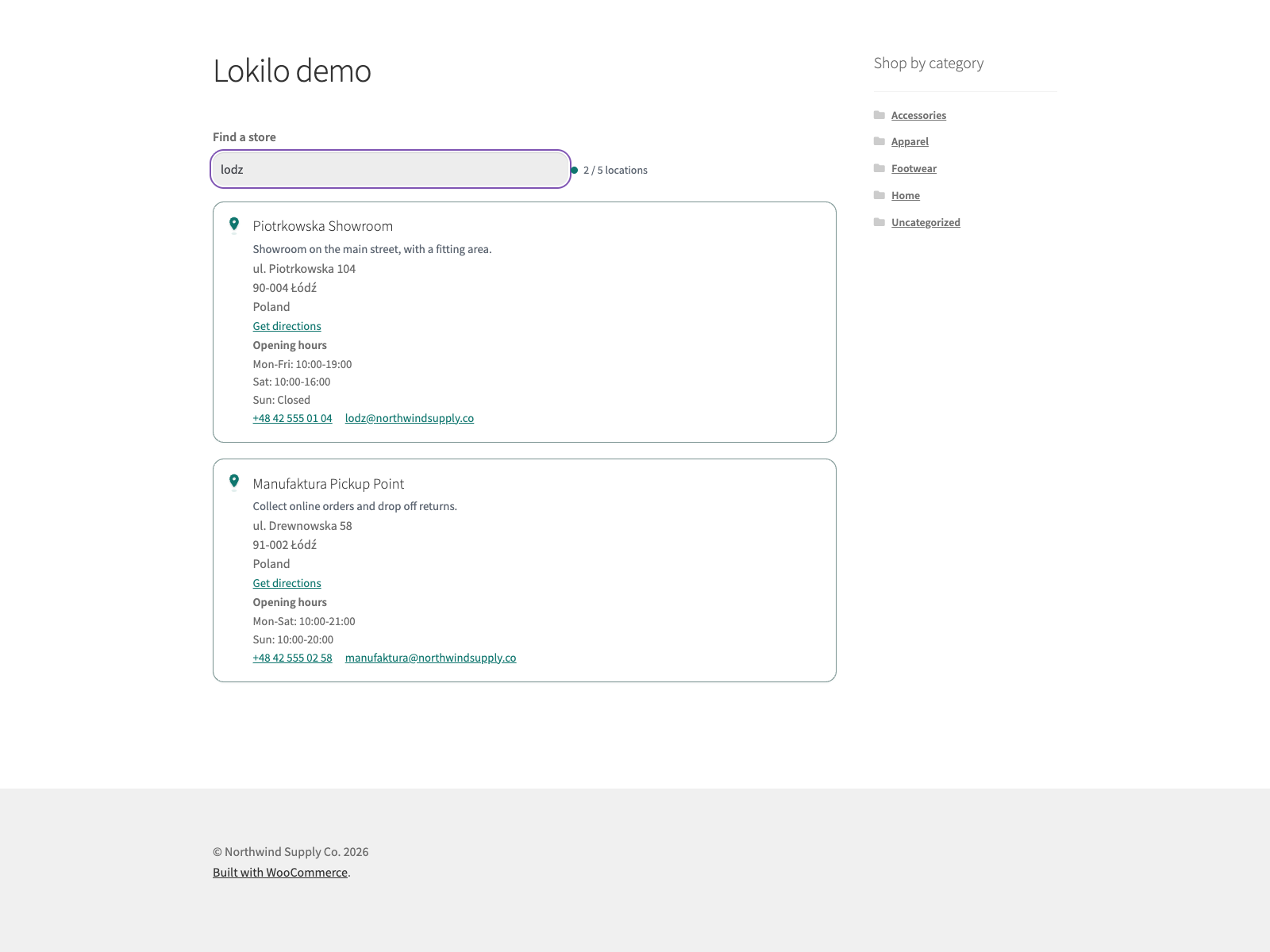
Every location is printed into the page HTML, so the directory is there with JavaScript turned off, and it is there for a search engine reading the page. When JavaScript does run, the search box filters the cards as the visitor types, over name, address, city, postcode and country, without a single request. Accents do not matter: “lodz” finds Łódź.
What you get
- Locations as their own admin screen. Store Locations sits under the WooCommerce menu, with a photo, a description and the full contact block per shop.
- A block and a shortcode. The Store Locator block and
[lokilo]render the same directory.[lokilo limit="500"]raises the 200-store default and[lokilo limit="-1"]prints every one. - Search that ignores accents. The search box filters cards over name, address, city, postcode and country as the visitor types, so “lodz” finds Łódź.
- An honest count. When the page shows fewer locations than you have, it says so above the list, and says the search box only reaches the ones shown, rather than letting a visitor conclude you have no shop in their city.
- Directions on each card with an address. A card with an address gets a Get directions link that opens OpenStreetMap in a new tab with the address filled in. It is a plain link: no key, no script, nothing loaded until the visitor clicks.
- Per-card control. Photo, description, address, opening hours, phone and email each have a toggle. The store name always shows.
- Accessible by construction. The result count goes through an ARIA live region, the search field is keyboard-operable, cards carry focus-visible outlines, and the storefront styles follow the visitor’s light or dark preference and honour prefers-reduced-motion.
- Loads nothing it does not need. The stylesheet and script are enqueued only on a page where the directory actually rendered, and the markup is written to avoid layout shift.
- Readable by an assistant. On WordPress 6.9 and newer an AI assistant in wp-admin can list your locations, look one up and read the directory settings, through the WordPress Abilities API. Reading only: it cannot add or change anything.
What it does not do
There is no map view and no geolocation of the visitor. Directions are the link described above, worked out on openstreetmap.org rather than in your page. A map of your locations (those with coordinates) is part of the Lokilo Pro add-on, which draws it on free OpenStreetMap tiles with no key.
It does not import in bulk. Locations are added one at a time in wp-admin.
External Services
Lokilo does not connect to any external service on its own. It registers no remote API, sends no HTTP request, and loads no third-party script, font, map or tile. Your store data stays on your site; the one exception is the directions link described below, and only when a visitor clicks it.
Every location is stored on your own server as a locator_store post, with its address, city, postcode, country, phone, opening hours, email and any latitude/longitude kept in that post’s meta. Settings live in the locator_settings option. Coordinates are typed in by hand on the location screen – nothing is geocoded against an outside provider. The storefront search filters cards in the visitor’s browser, so no request is made while typing, and the plugin sends no email.
OpenStreetMap directions (link only). Each store card with an address shows a Get directions link to https://www.openstreetmap.org/directions, with the store’s address in the link. Nothing is loaded from or sent to OpenStreetMap when the page is shown. Only if a visitor clicks the link does their browser open openstreetmap.org in a new tab, which receives the store address and the usual request data (IP address, browser) under the OpenStreetMap Foundation terms of use and privacy policy.
Translations
Lokilo is fully translatable and ships the lokilo.pot template. Translations are delivered by WordPress.org language packs from translate.wordpress.org, which is where Polish, German and Spanish are being contributed; the package itself carries no compiled translation files.
- Upload the plugin to
/wp-content/plugins/lokilo, or install via Plugins > Add New. - Activate it. WooCommerce must be active.
- Go to WooCommerce > Store Locations and add your stores.
- Configure WooCommerce > Lokilo (search box and visible fields).
- Add the Store Locator block, or the
[lokilo]shortcode, to any page.


Documentation and links
- Documentation: plogins.com/plogins-locator/docs/
- Plugin page: plogins.com/plogins-locator/
- Source code: github.com/wppoland/plogins-locator
- Bug reports and feature requests: github.com/wppoland/plogins-locator/issues
Does it require WooCommerce?
Yes. Lokilo registers under the WooCommerce menu and requires WooCommerce to be active.
Does it show a map?
No. Lokilo renders a searchable list of cards, not a map, so it needs no map key or external service. Each card with an address links to directions on OpenStreetMap. You can still store latitude and longitude per location for use by an add-on.
Which details can I show on each card?
The store name is always shown. You can toggle the store photo, the description, the address, opening hours, phone and email in the settings. Each one only appears on a card when that location actually has a value for it.
How does the search box work?
The directory filters location cards in the browser as the shopper types, ignoring case and accents.
Can I add stores without custom code?
Yes. Add locations under WooCommerce > Store Locations and place the Store Locator block or [lokilo] on any page.
Does this plugin work on WordPress Multisite?
Yes. This plugin is compatible with WordPress Multisite. Network activate it or activate it on individual sites; each site keeps its own settings and data.
Changelog
1.3.1
- Fix: “Get directions” routes to the store coordinates when they are set, and drops street prefixes such as “ul.” from the address otherwise, since OpenStreetMap finds nothing for them.
1.3.0
- Search ignores accents on both sides: “lodz” finds Łódź and “uberlingen” finds Überlingen, in the storefront box and in the list-stores ability.
- Each store card with an address has a Get directions link that opens OpenStreetMap in a new tab. It is a plain link with no key and no script; nothing is sent until the visitor clicks it.
- New Store Locator block. It renders the same directory as the
[lokilo]shortcode.
1.2.6
- Search now matches store names, cities and addresses with non-ASCII capitals (Łódź, Überlingen). The storefront box and the list-stores ability lower-cased only A to Z, so these stores never matched.
- The read-only abilities are now flagged read-only where the Abilities API looks for it, so they are called with GET as the API expects for read-only abilities (GET used to return 405 and only POST worked). list-stores and get-directory-settings also accept a call with no input.
- The list-stores ability searches every store before applying its limit, so a store past the first page can be found.
- The get-store ability loads only the store it was asked for.
1.2.5
- The upgrade notice’s “Coming soon” and “Get notified” labels are English source strings for every language; Polish sites used to get their own Polish source text, which translators in other languages then saw untranslated.
1.2.4
- The PRO upsell pointed at a screen called “Store Locator Import”. The paid add-on renames that screen to Lokilo Import, so the instruction named a menu entry that is not there.
1.2.3
- Fixed: the PRO promo card on the settings screen still told merchants to use
[locator], the shortcode the previous release replaced, so it was handing out an instruction that no longer works.
1.2.2
- The shortcode is now
[lokilo]. It used to be[locator], a tag generic enough that any other plugin could claim it first, and which no longer matched the plugin’s name. This is the last release in which that could change without breaking existing pages, because the plugin had not been published yet. - The WooCommerce submenu now reads Lokilo rather than Store Locator, and the places the documentation still said Locator were updated.
1.2.1
- The sidebar upgrade promo now follows the same dismissal as the banner. Dismissing the banner used to leave a full-height advert on the settings screen for good, which is not what the WordPress.org guideline on upgrade prompts means by used with moderation.
1.2.0
- Renamed to Lokilo. The WordPress.org review team asks a plugin name to lead with a distinctive, coined identifier rather than a generic descriptive word. Lokilo is Esperanto for a locating tool. The text domain follows the name; the stored locations, the settings, the [locator] shortcode and every hook are unchanged.
1.1.9
- Fixed: the directory announced how many locations it had printed, not how many the shop has. Since 1.1.8 the page renders 200 by default, so a shop with 700 locations told every visitor, and read out to every screen reader, “200 locations”. The count now reads “Showing 200 of 700 locations”, and a shop whose locations all fit on the page reads exactly as before.
- Fixed: the search box only ever looked through the locations printed on the page, and nothing said so. A visitor searching for the 500th location was told “No locations match your search” and given no reason. The page now states above the list that it is showing the first 200 of 700 and that search covers only those, and the empty result says it again.
1.1.8
- Fixed: the directory rendered every published store on the page. The shortcode ignored its attributes entirely, so there was no way to ask for fewer, and a shop with a long franchise list built every store, and a separate photo lookup per store, into one public page.
[locator]now renders 200 stores and honourslimit, includinglimit="-1"for all of them, and the store photos are primed in one pass for the whole page instead of a lookup per store.
1.1.7
- Fixed: the PRO upgrade promo kept selling to people who had already bought the paid edition. Only the banner could be dismissed, so the sidebar promo and the locked feature cards followed a paying customer around for good. The promo now checks whether the paid edition is active and steps aside when it is.
- Fixed: arrow glyphs in the admin menu paths, and in the strings handed to translators. An arrow inside a translatable string makes the glyph every translator’s problem and changes the layout in any locale that drops it.
1.1.6
- Fixed: deleting the plugin left the per-user “dismiss” flag from the PRO notice in the database. Uninstall now removes it for every user, not just the one who dismissed it.
1.1.5
- The translation template was regenerated. It still named an older version of the plugin and pointed at source lines that had since moved, which is what translation tools read to show a string in context.
1.1.4
- Renamed to Plogins Locator – Store Locator for WooCommerce so the name leads with the brand rather than a generic word, which is what the WordPress.org plugin review team asks for. The plugin slug is unchanged.
1.1.3
- Removed the “Tested up to” header from the main PHP file. It belongs in readme.txt only, where it is already declared; present in both, the header can override the readme and show a compatibility version that was never intended.
1.1.2
- Tested against WordPress 7.1. Verified by activating this build on a clean 7.1 install with WooCommerce 11.1, not by editing the header.
1.1.1
- Fixed the PRO promo on the settings screen quoting a price in PLN. PRO is priced and charged in EUR, so an admin on a Polish site was shown a zloty amount and then billed in euro, and the zloty figure was a fixed conversion that drifted from the real charge as the rate moved. The promo now shows the euro price that is actually taken.
1.1.0
- An AI assistant working in your wp-admin can now read your store locations for you, through the WordPress Abilities API (WordPress 6.9 and later). Ask it for the shop in a given city or postcode and it reads back the address, phone, email and opening hours, exactly what the storefront search box would find. It can also tell you how the directory is set up.
- Reading only. Nothing an assistant can call adds, edits or removes a location; that stays in your hands. Only users who can manage WooCommerce can use these, and on WordPress 6.8 and earlier nothing changes.
1.0.7
- The store email you type on a location now appears on its card, as a click-to-write link beside the phone number. Until now it was saved and never shown to shoppers.
- The featured image you set on a location now appears at the top of its card.
- The text you write in the location editor now appears under the store name.
- Photo, description and email each get their own switch under WooCommerce > Store Locator, alongside the address, opening hours and phone switches.
1.0.6
- Internal: the store-list search builds its meta-key list through an explicitly typed map, so static analysis can see that only strings reach the query. No change in behaviour.
1.0.4
- Translations: completed Polish, German and Spanish for the PRO upgrade panel.
1.0.3
- Fixed low-contrast admin headings under an OS dark-mode preference.
1.0.2
- Added bundled Polish, German and Spanish translations for the plugin interface.
1.0.1
- First stable release.
0.1.4
- Renamed to Plogins Locator for WooCommerce for a more distinctive plugin name.
0.1.3
- Fix: store locations no longer take over the
manage_woocommercecapability. Registering the locations post type mapped meta caps ontomanage_woocommerce, which made everymanage_woocommercecheck fail while the plugin was active, hiding the whole WooCommerce admin menu (Settings, Status, Orders) and the plugin’s own settings page.
0.1.2
- Programmatic store import via
StoreWriterwithlocator/import_store_fieldsfilter andlocator/store_importedaction.
0.1.1
- Add
locator/store_groupsfilter so add-ons can group the storefront directory by region or country.
0.1.0
- Initial release: store-location post type, [locator] shortcode, searchable list, settings.
