
La Sentinelle antispam
Active Installs
3,000+
Last Updated
October 20, 2026
First Released
July 27, 2018
Download History (Last one month)
Contributors
Feel safe knowing that your website is safe from spam. La Sentinelle will guard your WordPress website against spam in a simple and effective way.
It has antispam filters for comment forms and registration forms and can be extended to support plugins.
The default settings should catch most spambots, and there is a settingspage to set it up according to your wishes.
Current features include:
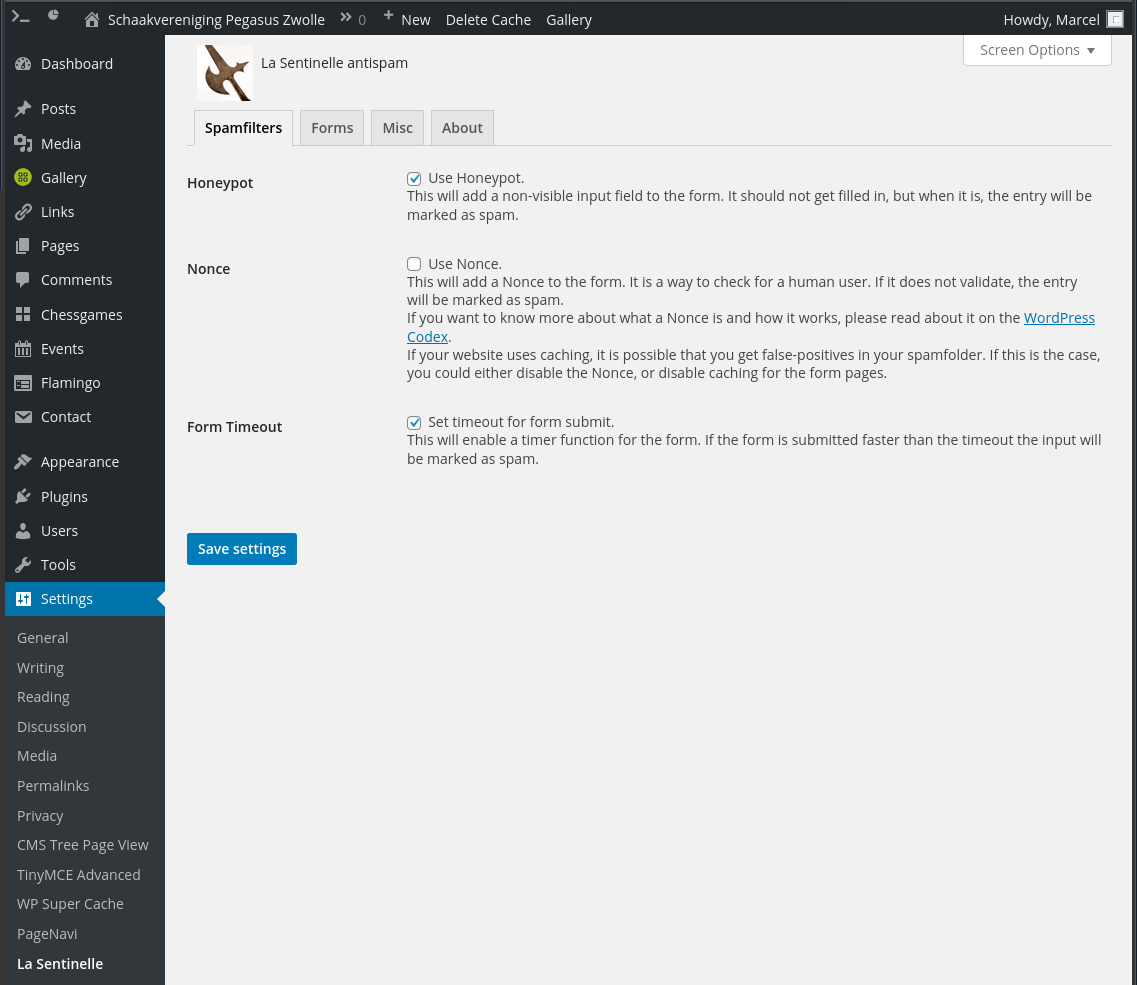
- 3 antispam features; Honeypot, Nonce, Form Timeout.
- These 3 spamfilters depend on JavaScript on the frontend.
- 1 antispam feature; Stop Forum Spam.
- Settingspage to set things up according to your wishes.
- Transparent to the visitor, no nagging with Captcha’s or other annoying things.
- By default no use of third-party services and no tracking of visitors.
- Lightweight and simple code.
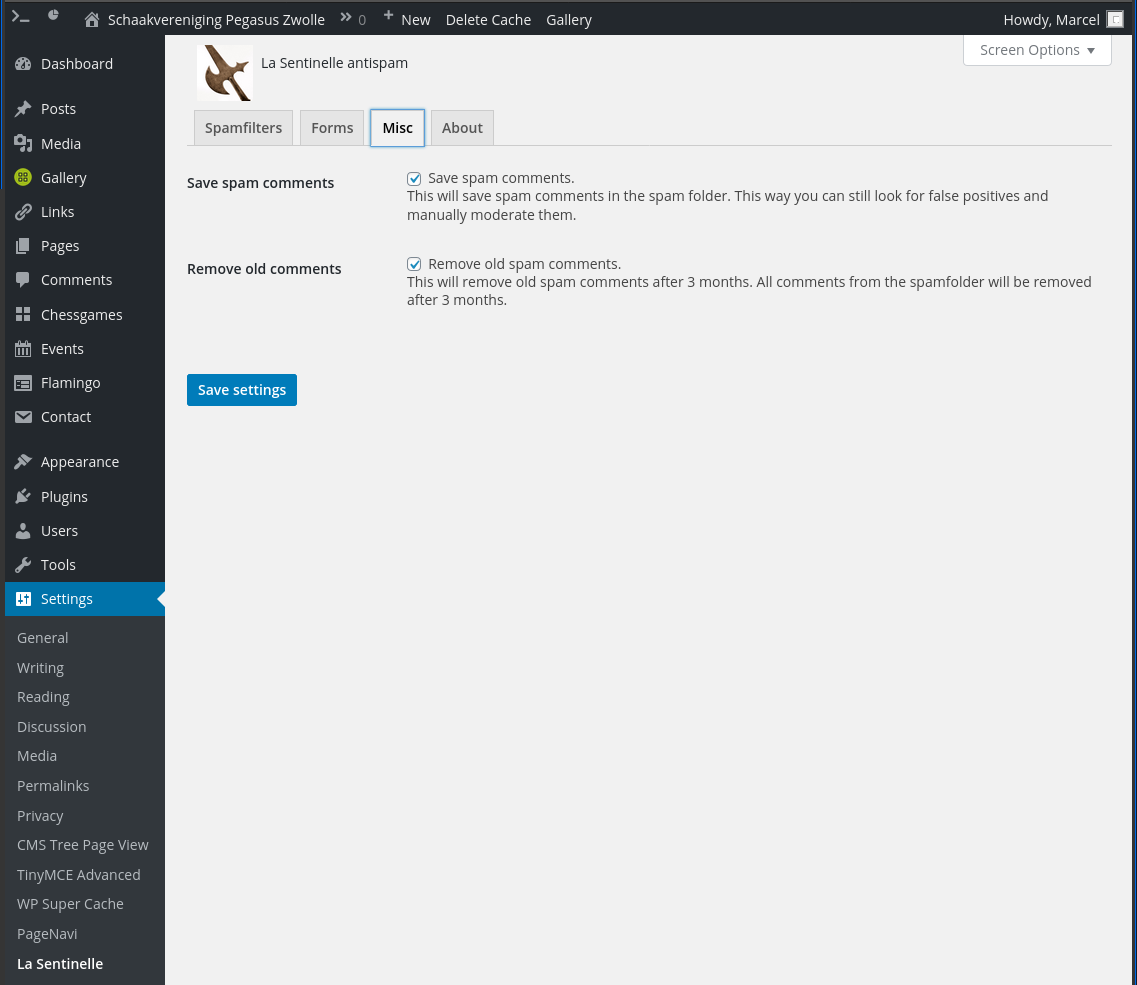
- Logging for WordPress Comments and which spamfilter marked it as spam.
- Logging for Custom forms and which spamfilter marked it as spam.
- Statistics for every form how many spam submissions were blocked.
WordPress forms that are protected:
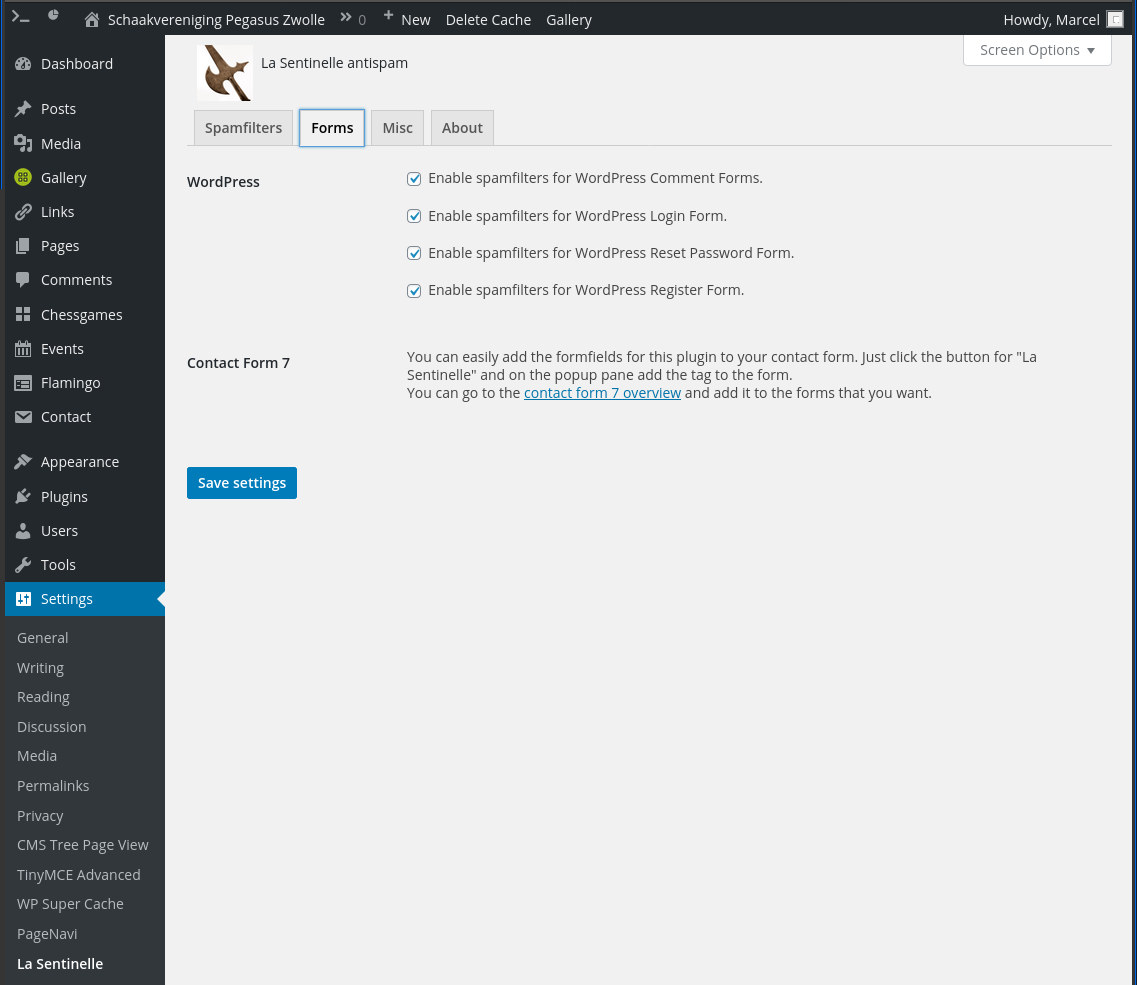
- WordPress Comments form.
- WordPress Login form.
- WordPress Register form.
- WordPress Lost Password form.
Form Plugins that are protected:
- Booking Activities (event booking).
- Caldera Forms.
- Clean Login (Login form).
- Contact Form 7.
- Easy Digital Downloads (Login form, Register form).
- Everest Forms.
- Formidable Form Builder.
- Forminator.
- Newsletter Optin Box plugin (noptin) (standalone forms).
- Ultimate Member (Login form, Register form and Lost Password form).
- WooCommerce (Login form, Lost Password form).
- WPForms Lite.
- WP Job Manager plugin (submit job form when registering is enabled).
Support
If you have a problem or a feature request, please post it on the plugin’s support forum on wordpress.org. I will do my best to respond as soon as possible.
If you send me an email, I will not reply. Please use the support forum.
Translations
Translations can be added very easily through GlotPress.
You can start translating strings there for your locale. They need to be validated though, so if there’s no validator yet, and you want to apply for being validator (PTE), please post it on the support forum.
I will make a request on make/polyglots to have you added as validator for this plugin/locale.
How to choose an antispam plugin
When you look through the WordPress Plugin Repository you will see more than a hundred antispam plugins.
Which one is the best one? Short answer, there is no “best one”. No spamfilter and no method for spamfiltering is perfect.
Slightly longer answer, you could try about twenty and choose the one that fits your needs best.
But there is also a really long answer.
There are different methods that can be used against spam, and every method has its drawbacks.
In my opinion, having a low number of false positives is more important than perfectly marking all spam, you don’t want to miss out on important people or information. Nagging the user in some way has a similar effect, the user might not even want to bother with that and just walk away.
- Third party services: Services like Akismet, OOPSpam, Stop Forum Spam and also reCAPTCHA offer third party services to check for spam. This can be very effective, but you are giving user submitted data away to these third parties and are also giving your users up for tracking them.
- Captcha’s, reCAPTCHA and Quizz Questions: You are annoying your users and probably sending some of them away. This especially counts for reCAPTCHA for visitors who have third party cookies disabled.
- Blacklists: Often running behind the facts. That goes for the way of getting users off that list, and also in getting users on that list.
- Referer check: check if the Referer header is set correctly. You can never trust it is set correctly. Modern browsers are limiting the use of Referers, though for now that is mostly for third-party domains.
- JavaScript methods: Spammers often (always?) don’t use JavaScript, they just post the form with spammy data. Drawback for this method is that statistics say that about 1 percent of users has JavaScript disabled. Also, some websites have broken JavaScript, which might make the spamfilter break as well.
- Activation email for registering users. Users only get activated after clicking a link in an activation email. You still have all the non-activated users in your site however.
You could have a bright idea about combining several methods, but then you get the drawbacks of all the methods you use.
Another complication of choosing a good plugin is that most antispam plugins don’t tell you what methods they use. The documentation doesn’t tell you, and looking at the source code just leaves you confused at the chaos that it often is.
My main motivation for writing this plugin is to offer a plugin that does spamfiltering with JavaScript methods in a simple and effective way.
The claimed 1 percent of users that has JavaScript disabled will also be tech-savy enough to enable it again for your website.
Compatibility
This plugin is compatible with ClassicPress.
Contributions
This plugin is also available in Codeberg.
Installation
- Install the plugin through the admin page “Plugins”.
- Alternatively, unpack and upload the contents of the zipfile to your ‘/wp-content/plugins/’ directory.
- Activate the plugin through the ‘Plugins’ menu in WordPress.
- That’s it.
License
The plugin itself is released under the GNU General Public License. A copy of this license can be found at the license homepage or in the la-sentinelle.php file at the top.

Spam is a social problem, while antispam solutions are technical. There is no way that a technical solution to a social problem will have a 100% perfect match ratio on spam with a 0% perfect match ratio on real messages.
It could be that you have a JavaScript error. That way the spamfilters won’t work and all messages get flagged as spam.
You could go to your form page, right click on the page, select “Inspect Element” > Console-tab. Reload the page and see if there are errors in your console.
That is unfortunate. The default spamfilters in this plugin only protect against general spambots that are targeting any form on any website.
First thing you can do is enable the ‘Stop Forum Spam’ spamfilter, that should help against most human spammers and targeted attacks, though only for default forms in WordPress Core.
If that doesn’t help, I advise to add an extra plugin in the form of OOPSpam, that should provide a good defense against human spammers and targeted attacks.
That makes this plugin less valuable. It will be more expensive to them though, which in general makes it a good thing.
Enable Registration form filtering, also enable Stop Forum Spam filter in settings.
Go to a registration form under ‘/wp-login.php?action=register’. As username, use ‘spammer’.
You should not be able to register with this username.
You can check to see the statistics under Settings > La Sentinelle > About. It should increase the counter on registration.
Changelog
4.2.0
- 2026-10-20
- Add support for Booking Activities (thanks tlloancy).
4.1.1
- 2026-08-24
- Fix for Blacklist notice in Stop Forum Spam on dashboard (thanks duf).
4.1.0
- 2026-01-20
- Remove WebGL spamfilter, it’s not reliable.
- Fix JavaScript error with Contact Form 7 refill.
4.0.4
- 2025-11-17
- Run JavaScript for ajax and webgl only if enabled.
- Set autoload explicitly for options.
4.0.3
- 2025-10-05
- Fix alert (ouch, sorry). Thanks mediaformat.
4.0.2
- 2025-07-22
- Verify Nonces correctly.
- Use sanitize_text_field for settings.
- Use plugin_dir_path instead of WP_PLUGIN_DIR.
4.0.1
- 2025-05-29
- Fix Paypal button in Forminator forms.
- Fix WebGL spamfilter with CF7 refill.
4.0.0
- 2025-05-06
- Remove jQuery dependency (thanks mediaformat).
3.1.2
- 2025-05-05
- Fix versioning warning For Contact Form 7 (thanks @grynge and @bonaldi).
3.1.1
- 2025-01-22
- Fix XSS security issue with EDD forms (thanks Peter Thaleikis).
- Hide invisible elements for screenreaders.
- Loading plugin translations should be delayed until init action.
- Use DIR instead of dirname(FILE).
3.1.0
- 2024-07-12
- Add support to Forminator (thanks delanthear).
- Add id attribute to input fields for compatibility with Forminator.
- Remove return message about ‘too fast’, not needed really.
- Simplify code for comments.
3.0.3
- 2024-03-15
- Add support to Ultimate Member for registration and lost password too.
3.0.2
- 2024-03-07
- Add support to Ultimate Member (thanks lamachinedigitale).
3.0.1
- 2024-01-02
- Add option to enable register forms in WooCommerce (thanks misterpo).
3.0.0
- 2023-12-21
- Always add spamfilter input fields to forms.
- Do not enable spamfilters for password reset by default.
- Add optional spamfilter for AJAX.
- Add experimental spamfilter for Canvas / WebGL / AJAX.
- Fixes for function ‘la_sentinelle_array_flatten()’.
- Simplify lots of code.
2.4.7
- 2023-04-27
- Fix CSS for wp-comments form (thanks Barry).
2.4.6
- 2023-04-20
- Fix CSS for wp-login.php (thanks Bonaldi).
2.4.5
- 2023-04-20
- Remove support for EDD register during checkout, it breaks unexpectedly.
- Use ‘transform:translateY(10000px)’ instead of ‘display:none’, thanks ntodo.
2.4.4
- 2023-04-03
- Fix warning in nonce check.
- Let WooCommerce comments of type ‘order_note’ pass by without an issue.
2.4.3
- 2023-03-28
- Cleanup and have Easy Digital Downloads work okay again.
- Remove ‘la_sentinelle_check_registration_form_edd_action’ function.
2.4.2
- 2023-03-17
- Disable spamfilters for Easy Digital Downloads for now, since on v3.1.1 it doesn’t work.
2.4.1
- 2023-03-09
- Add workaround for Contact Form 7 refill, when caching is used.
2.4.0
- 2023-03-02
- Also check honeypot field for missing field.
- Switch to text input with style ‘display:none’.
- Take more hints from phpcs.
2.3.0
- 2023-02-07
- Update for new widget form in Noptin.
2.2.1
- 2022-09-14
- Fix password reset on user profile admin page.
2.2.0
- 2022-09-10
- Add support for WP Job Manager plugin (submit job / register).
- Add link to log to ‘At a Glance’ dashboard widget.
2.1.2
- 2022-03-24
- Dependency for jquery should be an array.
2.1.1
- 2022-02-07
- Fix error in date query on ‘shutdown’.
2.1.0
- 2022-01-22
- Add support for WPForms Lite plugin.
- Add labels to settingspage for form plugins.
- Use ‘date()” instead of deprecated ‘strftime()’ function.
- Some updates from phpcs and wpcs.
2.0.3
- 2021-10-21
- Security fix: use
sanitize_text_field()for log page. - Update ‘uninstall.php’ with recent changes.
2.0.2
- 2021-09-13
- Add link to open all spam submissions at once to log page.
2.0.1
- 2021-09-02
- Support widget in Noptin as well.
- More compact content of spam submissions.
2.0.0
- 2021-08-31
- Save spam submissions of plugin forms.
- Add admin page to view and delete these spam submissions.
- Remove old spam submissions as well, if option is enabled.
- Add support for Newsletter Optin Box plugin (noptin).
- Fix handler for Caldera Forms.
- Some updates from phpcs and wpcs.
1.8.1
- 2021-05-19
- Remove checks from EDD purchase form when user is logged in already.
1.8.0
- 2021-05-17
- Support Easy Digital Downloads plugin again. Login form only as non-AJAX.
1.7.5
- 2021-05-03
- Fix form submission when using http on a https website or viceversa.
1.7.4
- 2021-03-10
- Only filter on $_POST requests.
- Better check on Nonce length.
1.7.3
- 2021-02-25
- Fix registering at multisite installs.
- Fix login filter for XMLRPC.
1.7.2
- 2020-12-24
- Drop support for Easy Digital Downloads, they do not allow plugins to hook into them since 2.9.24.
- Add text for Clean Login to settingspage.
1.7.1
- 2020-12-07
- Really have Stop Forum Spam disabled by default.
1.7.0
- 2020-12-07
- Add Stop Forum Spam as spamfilter (disabled by default).
- Add options for everest and sfs to uninstall.php.
1.6.0
- 2020-12-02
- Support Everest Forms plugin.
- Add container div around form fields.
- Use ‘intval()’ for all statistics.
1.5.4
- 2020-04-29
- Use ‘_n()’ instead of ‘esc_html__()’ for formatting numbers.
1.5.3
- 2020-04-14
- Run timeout function only once.
- Remove function ‘la_sentinelle_timout_clock’.
- Add uninstall.php file to uninstall options from db.
1.5.2
- 2020-02-23
- Use classes, not ids for input fields.
- Add support for Clean Login (only login form for now).
- Set Nonce by default as disabled.
- Support new wp_initialize_site action for multisite.
1.5.1
- 2019-03-09
- Rewrite error messages for Contact Form 7.
- Use esc_html functions everywhere.
1.5.0
- 2019-02-07
- Add support for Caldera Forms plugin.
- Add support for Easy Digital Downloads plugin.
- Add support for Formidable plugin.
- Remove unneeded option to enable for Contact Form 7.
- Rewrite functions for statistics.
- Only show statistics for active plugin.
1.4.1
- 2019-01-08
- Add some accessibility fixes.
- Don’t use transients for hashed field names, is faster this way.
- Add review link to admin page.
1.4.0
- 2018-12-20
- Fix register form.
- Add more statistics.
- Refactor WooCommerce hooks into WordPress hooks.
1.3.1
- 2018-12-20
- Add counter for comments blocked.
1.3.0
- 2018-12-19
- Add option to save or not save spam comments (default is save).
- Change timeout from 3s to 1s.
- Only load admin code on admin pages.
1.2.1
- 2018-11-20
- Fix admin login.
1.2.0
- 2018-11-16
- Add settings for each supported form.
- Rewrite JavaScript to support multiple forms.
- Always enqueue JavaScript.
1.1.0
- 2018-08-29
- Support WooCommerce forms (Login form, Lost Password form).
- Add log as comment_meta for comment form.
- Add ‘li’ for spam comments to dashboard widget ‘Right Now’.
- Remove ‘la_sentinelle_preprocess_comment’ function, was unused.
1.0.2
- 2018-08-22
- Add option to remove spam comments after 3 months.
1.0.1
- 2018-08-04
- Show text when no supported plugins are installed.
- Show correct message on login form for timeout.
- Change timeout from 5s to 3s.
1.0.0
- 2018-07-27
- Initial release
