
Internet Archive Wayback Machine Link Fixer
Active Installs
1,000+
Last Updated
March 12, 2026
First Released
October 17, 2025
Download History (Last one month)
Contributors
Internet Archive Wayback Machine Link Fixer is a WordPress plugin designed to combat link rot—the gradual decay of web links as pages are moved, changed, or taken down. It automatically scans your post content—on save and across existing posts—to detect outbound links. For each one, it checks the Internet Archive’s Wayback Machine for an archived version and creates a snapshot if one isn’t available.
When a linked page disappears, the plugin helps preserve your user experience by redirecting visitors to a reliable archived version. It also works proactively by archiving your own posts every time they’re updated, creating a consistent backup of your content’s history.
Protect your links, preserve your content, and automate the archiving process—all with minimal effort.
Key Features
- Automatically scans for outbound links in post content
- Checks the Wayback Machine for existing archives
- Creates new snapshots if no archive exists
- Redirects broken or missing links to archived versions
- Archives your own posts on updates
- Works on both new and existing content
- Helps maintain long-term content reliability and SEO
External Services
This plugin connects to external services provided by the Internet Archive to provide its core functionality. The following information details what data is sent, when, and why:
Internet Archive Wayback Machine API (web.archive.org)
What the service is and what it is used for:
The Internet Archive Wayback Machine is a digital archive of the World Wide Web. This plugin uses their API to check for existing archived versions of web pages, create new snapshots of pages, and verify the status of archiving jobs.
What data is sent and when:
- System Status Check: No personal data is sent. Used to verify if the Wayback Machine service is online.
- User Account Validation: When you configure an API key, your access key and secret key are sent in the Authorization header to validate your account and retrieve usage statistics (available snapshots, daily limits, etc.).
- URL Archiving: URLs from your website content are sent to create new snapshots in the Wayback Machine. This includes both external links found in your content and your own post URLs when auto-archiving is enabled.
- Snapshot Status Checks: Job IDs are sent to check the status of archiving requests.
- Existing Snapshot Lookups: URLs are sent to search for existing archived versions of web pages.
Service Terms and Privacy Policy:
- Terms of Service: https://archive.org/about/terms.php
- Privacy Policy: https://archive.org/about/privacy.php
Internet Archive Bot API (iabot-api.archive.org)
What the service is and what it is used for:
This service checks if web pages are accessible and retrieves final URLs after redirects. It’s used to determine if links are broken and need to be replaced with archived versions.
What data is sent and when:
- Link Accessibility Checks: URLs from your website content are sent to check if they are accessible and to get the final destination URL after any redirects.
- Impersonation Parameter: A technical parameter (
impersonate=1) is sent to ensure proper link checking behavior.
Service Terms and Privacy Policy:
- Terms of Service: https://archive.org/about/terms.php
- Privacy Policy: https://archive.org/about/privacy.php
Data Retention and Privacy:
The Internet Archive is a non-profit organization dedicated to preserving digital content for public access. URLs sent to these services become part of the public archive and may be accessible through the Wayback Machine interface. No personal information beyond the URLs themselves is transmitted to these services.
Developer Documentation
For developer docs and source code, see the GitHub repository: https://github.com/a8cteam51/internet-archive-wayback-machine-link-fixer
No installation instructions provided.
Screenshot Gallery
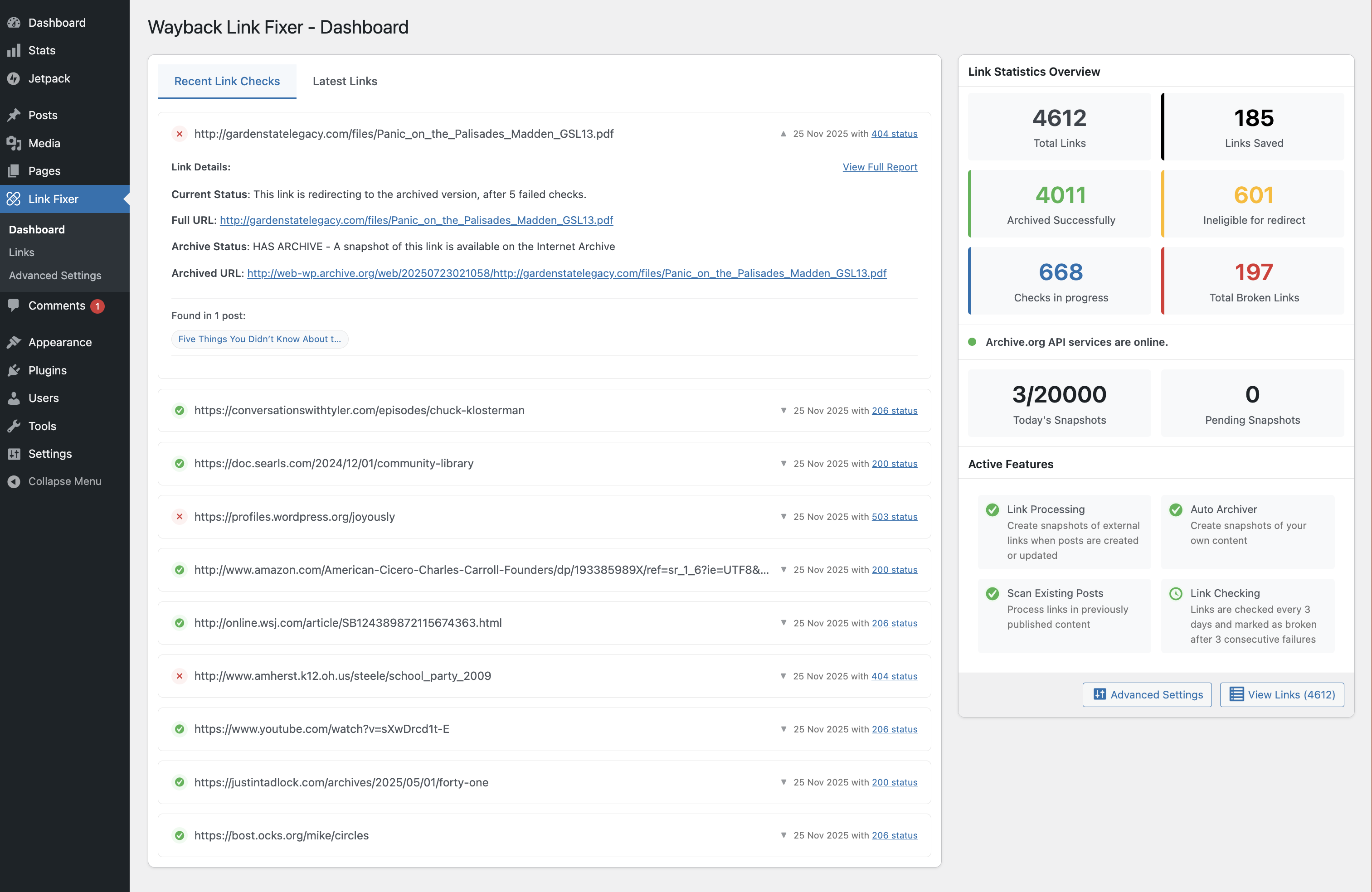
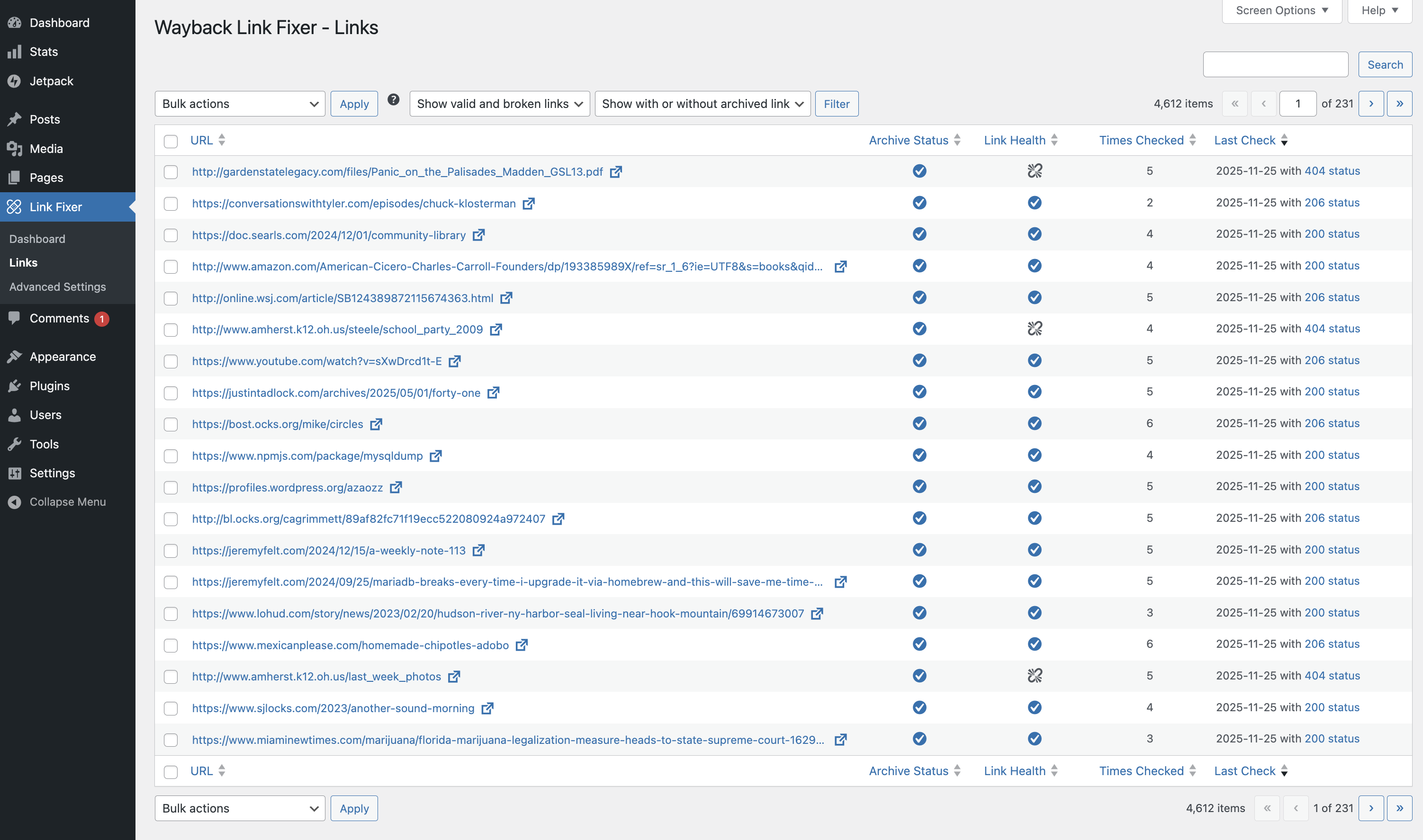
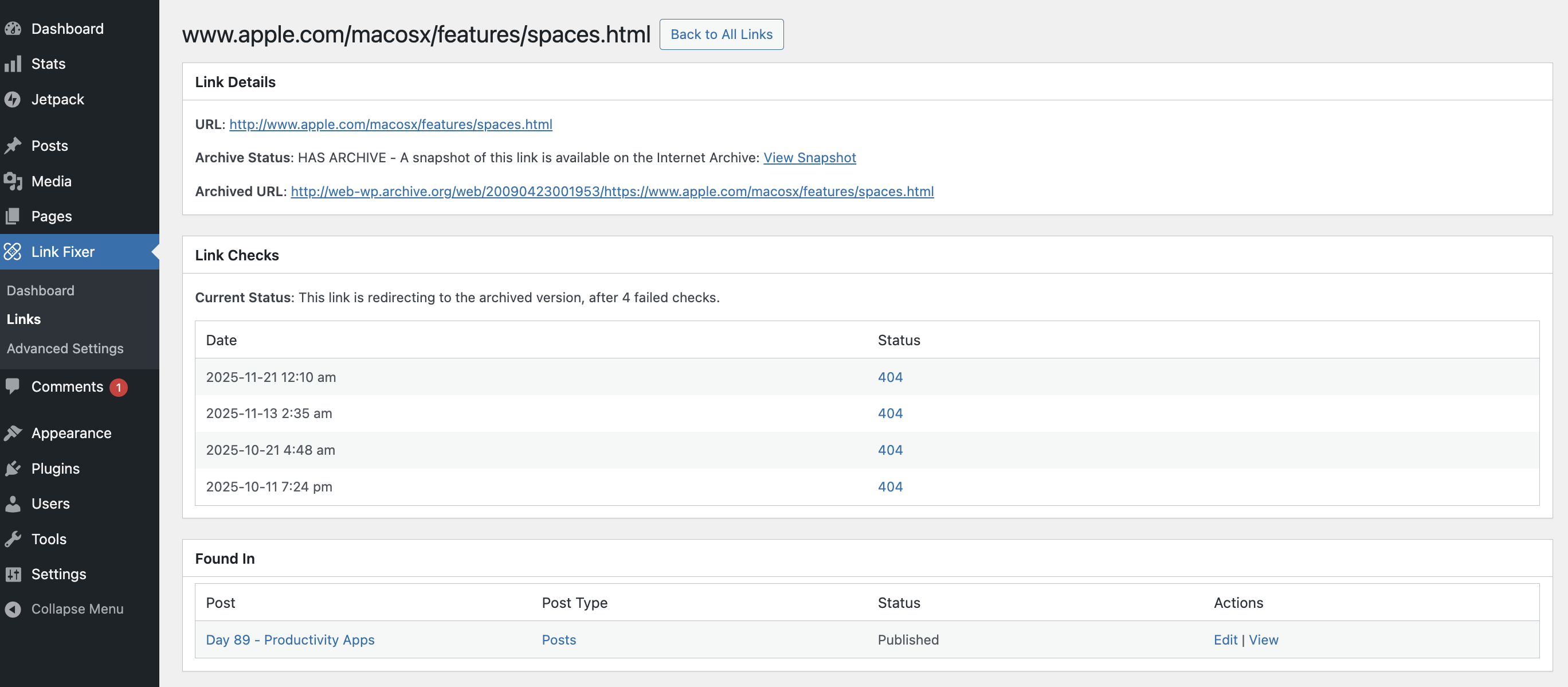
Your content is checked for any links. When it finds a link it will check if we have already handled this link before, if not, it will find or create a snapshot of the webpage on the Internet Archive.
Then if later that link’s target site goes offline, we can change the link to the archived version.
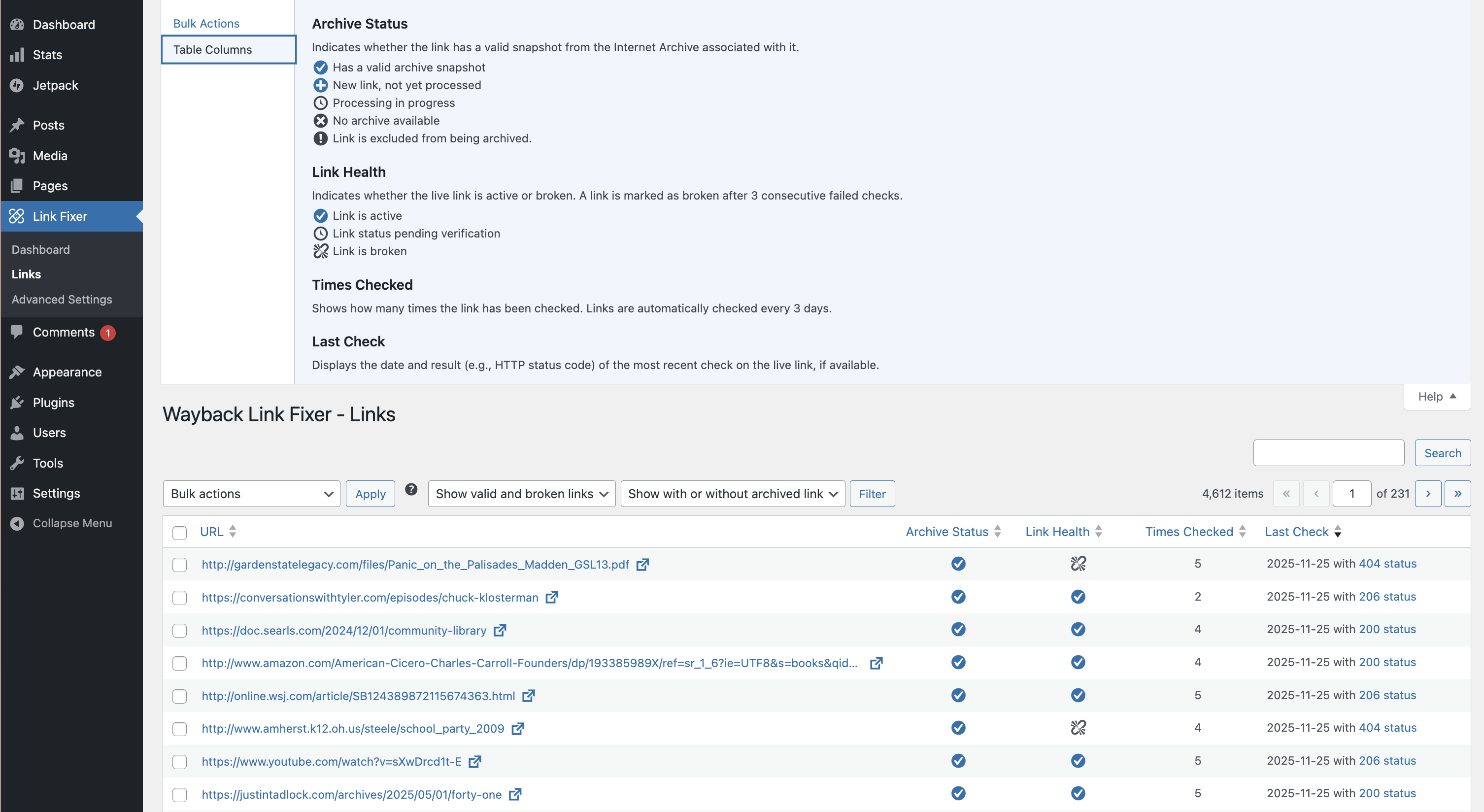
We use a similar policy as Wikipedia. We check links once per week and if we get 3 consecutive errors, we treat the link as broken, unless the target website comes back.
Sadly not, some sites do not allow the Internet Archive to archive their content.
Yes, you can enable the Auto Archiver and this will create new snapshots every time you make changes.
When we find a broken link, we update the src on the fly; this means the base content is not edited and remains as created.
This all depends on how many links there are within your content. This is all handled in the background but can take many weeks if a site has thousands of links. It is best used as a tool you setup and leave running in the background.
As this is all processed behind the scenes, in custom tables it should not add any noticeable overhead to your site.
While you don’t need one, it will greatly increase the number of snapshots you can create in a day.
If the Internet Archive services go offline, the link fixer will delay all processes by 24 hours and try again later.
Existing content is sent to the Wayback Machine in batch when the plugin is activated, then again every 30 days (by default, but can be changed). New content is sent to be archived shortly after it is published. Updates to existing content also trigger updates to be sent to the Wayback Machine.
Sadly at present, it is not fully compatible. The only way it can currently be used on multisite is to only enable it site-wide and not network-wide. We plan to resolve this in a future release.
Right now the plugin works best with the core block editor and we have some more work to do to support page builder plugins and custom fields.
Changelog
1.3.6
- Allows posts to be selected to be excluded from link fixing and/or auto archiving.
- Improves cleanup of passed attempts to create and verify snapshots
- Adds an Archive.org donation notice.
- Improves translatable strings for betting internationalisation.
1.3.5
- Minor tweak to how we log errors in snapshot creation process.
- Improvement on how link stats are generated.
- Casts all archived urls to https://, can be disabled in settings.
- Improvements to how we handle cancelled scan own post actions, to prevent flooding database with cancelled jobs.
1.3.4
- Minor UI tweaks and changes
- Default check intervals and total count of broken pages required to trigger redirection lowered.
- Onboarding process streamlined.
1.3.3
- Fixes bug where the links and scripts were loaded even if set to do nothing
- Move to custom WP prefixed URLs
- Fixes various issues with the dashboard icons and counts
- Better handling of authentication issues and notices
- Detect staging sites and prevent auto archiving from running.
- Fixes bug where a missing auto archiving database option can result in posts still be indexed.
1.3.2
- Bugfix
1.3.1
- Makes various UI and UX changes around icons, tool tips and labels.
- Also fixes a few minor bugs regarding the settings and wizard flows.
1.3.0
- Initial public release.
Note: All versions prior to 1.3.0 were not publicly released.
" width="120" height="120">
