
Instant Images – One-click Image Uploads from Unsplash, Openverse, Pixabay, Pexels, and Giphy
Active Installs
200,000+
Last Updated
April 1, 2026
First Released
November 1, 2016
Download History (Last one month)
Instantly upload photos from Unsplash, Openverse, Pixabay, Pexels, and Giphy to your website all without ever leaving WordPress!
Instant Images is the fastest way to find and upload high-quality, free stock images directly from inside WordPress.
No downloads.
No switching tabs.
No copy-paste workflow.
Just search, click, and your image is instantly added to your Media Library — properly processed and ready to use.
Whether you’re building content, designing layouts, or prototyping a client site, Instant Images keeps you in your workflow and saves you time.
Supported Image Providers
Works seamlessly with the Block Editor, Media Modal, and popular page builders.
The perfect tool for users who want to save time and frustration by uploading images directly inside their WordPress installation and for developers who want to prototype and develop using real world imagery.
Features
- Image Search – The Instant Images search let’s you quickly find and upload images for any subject in a matter of seconds!
- Image Orientation – Filter search results by landscape, portrait or square images.
- Time Saver – Quickly upload amazing stock photos without leaving the comfort of your WordPress admin.
- Theme/Plugin Developers – A great tool for developers who want to prototype and develop using real world imagery.
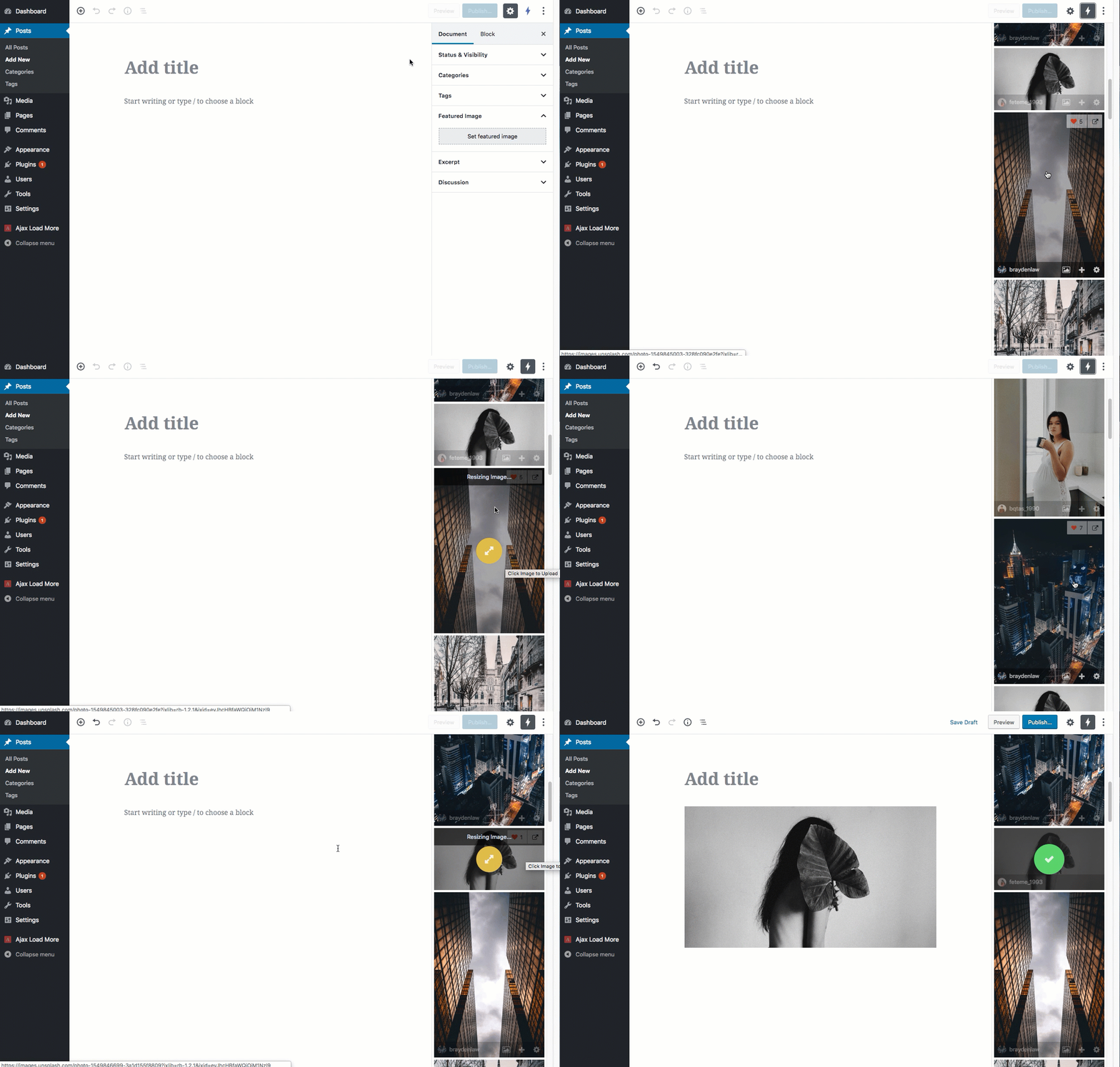
- Gutenberg – Instant Images directly integrates with Gutenberg as a plugin sidebar.
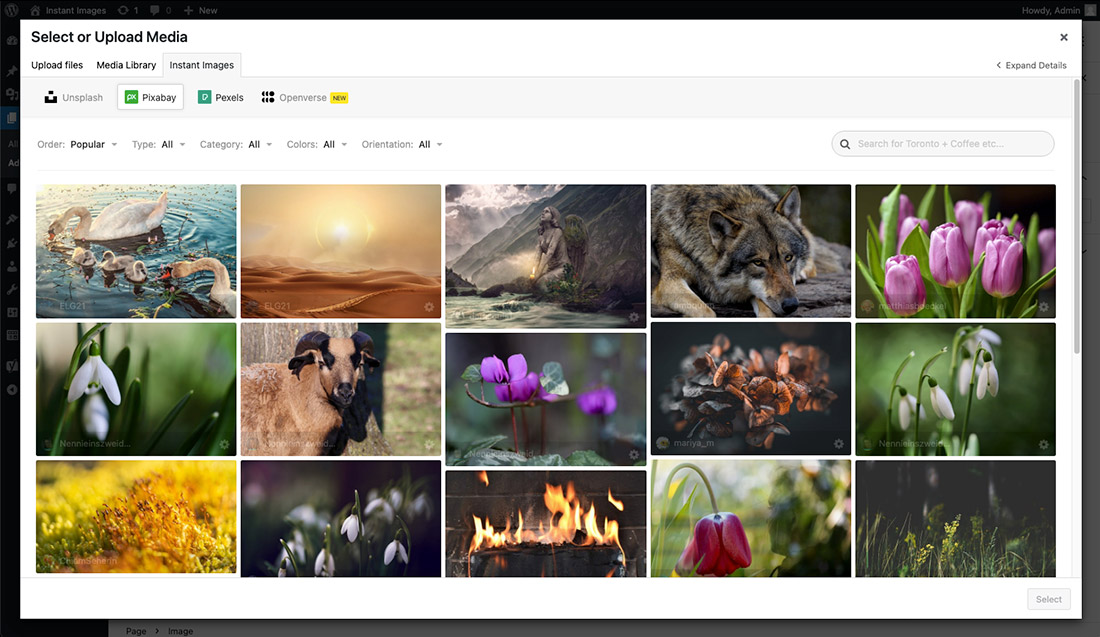
- Media Modal – Instant Images is available as a tab in the WordPress Media Modal.
- Page Builders – Instant Images integrates with page builders such as Elementor, Beaver Builder, Brizy and Divi.
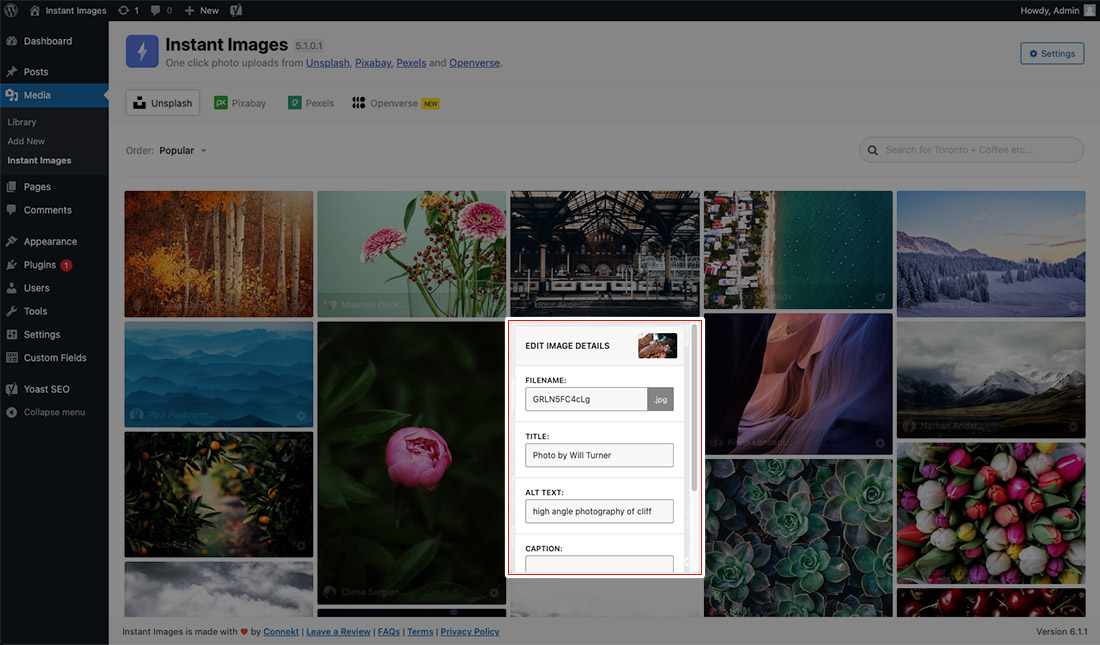
- Edit Image Metadata – Easily edit image filename, alt text and caption prior to uploading to your media library.
- Accessibility – Automatically include a relevant alt description for screen readers, visually reduced users, and SEO.
- Easy to Use – It couldn’t get much more simple, just click an image and it’s automatically uploaded to your media library for use on your site.
- No Accounts Needed – An account on any service provider is not required for use of this plugin. Just activate and you’re ready to go.
Add-ons
Instant Images: Extended
Enhance Instant Images with powerful professional features.
Includes:
– Search History & Autocomplete.
– Instant Images as a WordPress Block.
– WordPress CLI Imports.
– Batch Image Imports.
– I’m Feeling Lucky WordPress Block.
– Image Size Generator.
– Instant Featured Images
– Instagram-style image filters
– Persistent search terms across providers.
– And more…
Proxy Server
Instant Images routes all API requests to service providers (Unsplash, Pexels, Pixabay, Openverse etc.) through our custom proxy server at proxy.getinstantimages.com.
Maintaining a proxy server for Instant Images allows us to:
- Protect API keys from public exposure.
- Normalize data from multiple providers.
- Improve compatibility and reliability across plugin versions.
Please take a moment and read our Terms of Use and Privacy Policy for when using our proxy service:
How Can You Contribute?
Pull requests can be submitted via GitHub.
Website
How to install Instant Images.
Using The WordPress Dashboard
- Navigate to the ‘Add New’ in the plugins dashboard
- Search for ‘Instant Images’
- Click ‘Install Now’
- Activate the plugin on the Plugin dashboard
Uploading in WordPress Dashboard
- Navigate to the ‘Add New’ in the plugins dashboard
- Navigate to the ‘Upload’ area
- Select
instant-images.zipfrom your computer - Click ‘Install Now’
- Activate the plugin in the Plugin dashboard
Using FTP
- Download
instant-images.zip - Extract the
instant-imagesdirectory to your computer - Upload the
instant-imagesdirectory to the/wp-content/plugins/directory - Activate the plugin in the Plugin dashboard
Screenshot Gallery


All photos published on Unsplash are licensed under Creative Commons Zero which means you can copy, modify, distribute and use the photos for free, including commercial purposes, without asking permission from or providing attribution to the photographer or Unsplash/Pixabay.
Learn More
Yes! You can enter id:{photo_id} into the search box to return a single result.
e.g. id:YiUi00uqKk8
Unfortunately, there are a number of reasons why Instant Images may not work in your current hosting/server environment. Please read through the FAQ on our website to view some potential causes.
Yes, click the options (cog) icon in the bottom corner of the image to bring up an edit screen where you can modify the filename, title, alt and caption before the image is uploaded.
Yes, once clicked, the images are processed on the server then uploaded to the Media Library into the various sizes set in your theme.
No, once an image has be uploaded and resized the raw download will be removed from your server.
Yes, this plugin is required to write temporary images into an /instant-images directory within your WordPress uploads directory for image processing prior to being uploaded to the media library.
Some hosts lock down their servers and you may be required to update your php.ini or .htaccess in order to use this plugin.
No, there is no need to sign up from an Unsplash account to access the photos server via Instant Images.
No, we provide an API for you to use, however you can get your own by signing up for a free account at Pixabay.
No, we provide an API for you to use, however you can get your own by signing up for a free account at Pexels.
No, an Openverse account is not required.
No, we provide an API for you to use, however you can get your own by signing up for a free account at Giphy. When you sign up be sure to choose the “Select API” option and choose the “Giphy API” option.
Changelog
7.1.1 – April 1, 2026
- FIX: Fixed issue with Gif uploads and resizing causing gifs to not be animated.
7.1.0.1 – February 13, 2026
- HOTFIX: Added fix for potential fatal error in PHP < 8.0 due to use of null safe operator.
7.1.0 – February 12, 2026
- NEW: Added new feature to allow for disabling and reordering of the image providers.
- FIX: Fixed issue with image resize not working with Pixabay and Giphy. This is resolved by using the core WordPress image editor to resize images before upload to media library.
- UPDATE: Admin UI/UX throughout plugin.
7.0.3 – February 11, 2026
- NEW: Added new
instant_images_save_post_metafilter that allows users to disable saving Instant Images data as post meta on the attachment. By default this is enabled and saves the image provider and original image URL as post meta for each uploaded image. - UPDATE: Updated plugin version and WP compatibility.
- UPDATE: Updated all plugin dependencies and packages.
7.0.2 – June 12, 2025
- FIX: Fixed issue with
load_plugin_textdomainPHP warning. - UPDATE: Added support up to WP 6.8.
- UPDATE: Bumped required WP version to 6.0.
7.0.1 – January 4, 2025
- FIX: Fixed issue with Instant Images causing issues on Search and Filter (Plugin) pages within the WordPress admin.
7.0.0 – November 22, 2024
- NEW: Added Giphy integration!
- NEW: Added Image Size functionality to Instant Images settings.
- NEW: Added required functionality to add image size with the Extended add-on.
- FIX: Fixed potential issue with image file extensions being incorrect for png and jpeg files.
- FIX: Fixed issue with Extended add-on search history and indexing
IDsearches. - FIX: Fixed issue with new WooCommerce product screens throwing JS errors and causing the page to load as a white screen.
- UPDATE: Updated Unsplash image filters as their API was updated recently.
- UPDATE: Updated all plugin NPM dependencies and packages.
- UPDATE: Various UI and UX improvements.
6.2.3 – November 8, 2024
- HOTFIX: Removed .wp-block styles in Instant Images CSS.
6.2.1 – November 7, 2024
- NEW: Added support for new Extended add-on feature to maintain search term when switching providers.
- UPDATE: WordPress 6.7 compatibility updates.
- UPDATE: Various UI/UX updates throughout the app.
- UPDATE: Dependancy updates.
6.1.2 – April 15, 2024
- FIX: Fixed issue with Openverse search not working due to plugin error.
- UPDATE: WordPress 6.5 compatibility updates.
6.1.1 – January 25, 2024
- FIX: Various security patches.
- FIX: Fixed issue with permissions for accessing Instant Images settings.
6.1.0 – November 13, 2023
- NEW: Adding localization for all image provider filters.
- FIX: Fixed issue with CSS classname conflict with other plugins.
- FIX: Fixed issue with search results saying
0 Results foundwhen there were results. - UPDATE: Various UI/UX updates throughout the app.
6.0.1 – November 8, 2023
- FIX: Fixed issue with
admin_footer_texthook incorrectly echoing data in the WP admin. - UPDATE: Various code, UX and UI updates throughout the app.
- UPDATE: Updates
Requires at leastversion to 5.0 as plugin relies on Gutenberg editor scripts. - NEW: Added hook for modifying the image attribution text.
add_filter( 'instant_images_attribution', function() {

return __( 'This <a href="{image_url}">photo</a> is by <a href="{user_url}">{username}</a> and available for free on <a href="{provider_url}">{provider}</a>', 'framework' );

} );
6.0.0 – June 19, 2023
- NEW: Added support and functionality requirements for Instant Images: Extended add-on.
- UPDATE: Improved infinite scroll loading and animations.
- UPDATE: Improved error handling for API keys with session data.
- UPDATE: UX and UI updates throughout the app.
- UPDATE: Code cleanup and various refactoring.
- UPDATE: Various accessibility updates throughout the app.
- FIX: Fixed issue with Instant Images header CSS conflicting with GeneratePress.
5.3.1 – May 12, 2023
- UPDATE: Updated default user role to manage_options on the Instant Images settings page.
- NEW: Added new instant_images_settings_user_role hook to adjust the user role for the Instant Images settings page.
- FIX: Adding fix for error on Site Editor screen when using a FSE theme.
5.3.0 – May 8, 2023
- NEW: Added new standalone Instant Images settings page and added new settings fields.
- NEW: Added initial support for upcoming Instant Images Pro plugin.
- FIX: Fixed issue with missing
createRootfunction in WP < 6.2 that would cause Instant Images to fail to load. - UPDATE: General styling and UI updates throughout app.
5.2.1 – April 20, 2023
- UPDATE: Adds sessionStorage for storing API results in browser session to reduce proxy usage and API requests. Session data is stored for 1 hour.
- UPDATE: Cleans up Openverse sources to include WordPress, Flickr, Nasa, SpaceX and Wikimedia only.
- UPDATE: Updates security check to match on expected URLs before an upload is processed.
- FIX: Removes StockSnap from Openverse as images are being blocked on upload to the media library.
- UPDATE: Various code cleanup and tweaks.
5.2.0.2 – March 28, 2023
- HOTFIX: Fix for fatal compatibility error with Elementor Pro.
5.2.0.1 – March 20, 2023
- HOTFIX: Quick fix for potential fatal error on the frontend for Beaver Builder users. Fixed by wrapping function check in
is_admin().
5.2.0 – March 20, 2023
- NEW: Added new setting to automatically add image attribution as captions.
- NEW: Adding mime type checking based on current allowed uploads.
- UPDATE: Updated
instant_images_after_uploadhook to pass additional image data. - UPDATE: Added sizes filter to openverse search.
- UPDATE: Added Wikimedia filter to openverse sources.
- UPDATE: Code refactoring and build process updates.
5.1.0.2 – March 8, 2023
- HOTFIX: Security fix to prevent SSRF/misuse of download functionality.
5.1.0.1 – February 2, 2023
- HOTFIX: Fixed issue with mime type check not always working correctly. Reverted change for now.
- UPDATE: Pexels is using the Proxy server again after fixing the caching issues.
5.1.0 – February 2, 2023
- NEW: Added Openverse support.
- NEW: Added Description field to save data into the Post Content WP field.
- NEW: Added mime type checker to make sure the file type is allowed before uploading.
- UPDATE: Better attribution handling.
- UPDATE: Various admin UI/UX tweaks and updated.
5.0.1 – January 10, 2023
- HOTFIX: Adding a temporary hotfix to patch issues with the Pexels API and the Instant Images Proxy server.
Note: This fix is still not perfect but the integration is working again when a valid API is present.
5.0 – December 19, 2022
- NEW: All API requests to Unsplash, Pexels and Pixabay are now routed through our custom proxy server (proxy.getinstantimages.com). Read our terms of service and privacy policy for more information.
- UPDATE: Improved error handling and reporting.
- UPDATE: Removal of hard coded API Keys from plugin.
- UPDATE: Fixed issue where search filters wouldn’t reset after a new search.
4.6.3 – November 04, 2022
- UPDATE: Improved load handling of default provider.
- FIX: Security fix for issue for authenticated users.
- FIX: Fixed issue default Pexels API key.
- FIX: Fixed issue with photo attribution text and localization.
4.6.2 – June 24, 2022
- UPDATE: Updated all packages for security updates.
- FIX: Fixed issue with Unsplash API variable declaration.
4.6.1 – January 14, 2022
- NEW: Added default API keys for all API providers 🎉 . Default API keys can still be overwritten in the plugin settings shouls you want to use your own key.
- NEW: Added rate-limit checker to determine the status of the API and display an alert warning if the limit has been exceeded.
4.6.0.1 – January 3, 2022
- HOTFIX: Hotfix for accidentaly
delete_optionsfunction left in whilst testing. Sorry about that!
4.6.0 – January 2, 2022
- NEW: Added Pexels integration. This requires a valid API key.
- FIX: Fixed issue with filtering Unsplash search results by ‘all’.
- FIX: Various admin UI/UX updates and tweaks to improve the look and feel.
4.5.1 – December 27, 2021
- NEW: Added Pixabay photo filters (Type, Category, Colors and Orientation).
- NEW: Added Unsplash search filters for Color, Orientation and Order.
- NEW: Added new
instant_images_pixabay_safesearch&instant_images_unsplash_content_filterfilters that allow for modifying the flags the indicate the types of suitable images that should be returned. Get more information in our FAQ. - NEW: Added Pixabay API constant that allows for setting Pixabay API key via site constant. e.g.
define( 'INSTANT_IMAGES_PIXABAY_KEY', 'YOUR-KEY-HERE' ); - UPDATE: Revamped filtering menus and orientation options.
- UPDATE: Other UI/UX updates to make the plugin more visually appealing.
- UPDATE: Improved plugin accessibility across various sections.
4.5.0 – October 28, 2021
- NEW: 🎉 Pixabay! We’ve added support for Pixabay images. This requires a valid API key.
- NEW: Added button to auto-generate Photo attribution in image caption.
- NEW: Added uninstaller script to remove plugin settings.
- UPDATE: Updated styling and functionality of photo detail editor.
- UPDATE: Various UI/UX updates.
4.4.0.3 – July 30, 2021
- Fix: WP 5.8 issue resolved – added fix for Instant Images causing the Widget Block Editor to fail due to JS error.
- Update: Code clean up.
4.4.0.2 – June 7, 2021
- Fix: Added fix for CSS conflict causing issues in the WordPress menus section.
- Fix: Removed browser console error with regards
activeFrame.querySelector is not a functionthat could appear when creating a gallery. - Updated: Improved coding standard and overall code quality.
4.4.0.1 – May 3, 2021
- UPDATE – Updated Instant Images settings page to sanitize inputs before saving.
4.4.0 – March 26, 2021
- UPDATE – 🎉 Massive improvement to image download speeds by dynamically resizing the initial download before sending image to media library.
- Intitial testing revealed up to 4x faster download speeds than previous version of Instant Images 🤯.
- NEW – Added
instant_images_after_uploadhook that is dispatch after a successful upload allowing users to hook into the attachment and run custom functionality. - UPDATE – Upgraded Axios JS libray to
0.21.1.
4.3.5 – August 14, 2020
- FIX – Fixed issue with WP 5.5 and REST API warning messages when
WP_DEBUGistrue. - FIX – Fixed issue with undefined
$suffixvariable whenWP_DEBUGistrue.
4.3.4 – August 11, 2020
- FIX – Fixed issue with Yoast SEO meta boxes not appearing in Classic Editor.
- UPDATE – Code cleanup and some refactoring of media enqueue scripts.
4.3.3 – August 10, 2020
- NEW – Adding Instant Images tab to Media Modal windows everywhere, including page builders and taxonomy terms pages.
- NEW – Added new plugin setting to hide the Instant Images tab in the Media Modals
4.3.2 – May 28, 2020
- UPDATE – Switched REST API methods to
POSTrequests fromPUT. This will hopefully reduce issues users are having withPUTbeing disabled on their servers. - UPDATE – Added Instant Images media button back to Classic Editor post screen.
4.3.1 – April 13, 2020
- FIX – Fixed issue with Instant Images causing Yoast SEO metabox to not show correctly in the classic WordPress editor. Not really sure why, but the Instant Images JS dependencies seemed to interfere with Yoast.
- FIX – Added user privileges checks to the new Media Modal functionality.
4.3.0 – April 9, 2020
- NEW – Adding
Instant Imagestab to the WordPress Media Modal. - NEW – When images are uploaded directly to a post the current Post ID is attached to the upload as the parent post.
- NEW – Adding default alt text directly from Unsplash API.
- UPDATE – Updated image uploader API to hopefully improve stability of the upload and resize process. The new process uses core WordPress functions for the upload.
- UPDATE – Switching tab navigation from
<a/> to` for better accessibility. - FIX – Added a fix for JS error regarding
PluginSidebarregistration on non-gutenberg editor pages.
4.2.0 – December 14, 2019
- NEW – Added image orientation search filter
- FIX – Fixed issue with instant images being rendered in Gutenberg editor for users without permissions.
- UPDATE – Updated WordPress role requirement from
edit_theme_optionstoupload_files.
4.1.0 – July 23, 2019
- NEW – Added support for updating image title prior to upload.
- NEW – Added link to edit image after upload process completes.
- UPDATE – Updated functionality to trigger photo upload immediately after triggering a
Savewhen editing image metadata.
4.0.1 – April 18, 2019
- FIX – Fixed issue where Instant Images sidebar plugin would not appear in Gutenberg if removed as a pinned item.
4.0.0 – February 12, 2019
- 4.0 adds Gutenberg support. You can now access instant images directly from inside the block editor.
- NEW – Added Instant Images to Gutenberg as a Plugin Sidebar.
- NEW – Added Gutenberg featured image support.
-
NEW – Added Gutenberg Create Image Block support.
-
UPDATE – Improved a11y (accessibility) of photo listing items.
- UPDATE – Updated REST API methods to prefix function names.
- UPDATE – Various other UI/UX enhancements.
3.0 – September 21, 2017
** NEW – Instant Images has been completely re-built using React and the WordPress REST API.
2.0 – January 12, 2017
- Initial Commit
- Updating plugin from UnsplashWP to Instant Images
" width="120" height="120">
Available Versions
| Version | Download | Type |
|---|---|---|
| 7.1.1 | Download | Stable |
| 7.1.0.1 | Download | Stable |
| 7.1.0 | Download | Stable |
| 7.0.3 | Download | Stable |
| 7.0.2 | Download | Stable |
| 7.0.1 | Download | Stable |
| 7.0.0 | Download | Stable |
| 6.2.3 | Download | Stable |
| 6.2.2 | Download | Stable |
| 6.2.1 | Download | Stable |
| 6.2.0 | Download | Stable |
| 6.1.2 | Download | Stable |
| 6.1.1 | Download | Stable |
| 6.1.0 | Download | Stable |
| 6.0.1 | Download | Stable |
| 6.0.0 | Download | Stable |
| 5.3.1 | Download | Stable |
| 5.3.0 | Download | Stable |
| 5.2.1 | Download | Stable |
| 5.2.0.2 | Download | Stable |
| 5.2.0.1 | Download | Stable |
| 5.2.0 | Download | Stable |
| 5.1.0.2 | Download | Stable |
| 5.1.0.1 | Download | Stable |
| 5.1.0 | Download | Stable |
| 5.0.1 | Download | Stable |
| 5.0 | Download | Stable |
| 4.6.3 | Download | Stable |
| 4.6.2 | Download | Stable |
| 4.6.1 | Download | Stable |
| 4.6.0.1 | Download | Stable |
| 4.6.0 | Download | Stable |
| 4.5.1 | Download | Stable |
| 4.5.0 | Download | Stable |
| 4.4.0.3 | Download | Stable |
| 4.4.0.2 | Download | Stable |
| 4.4.0.1 | Download | Stable |
| 4.4.0 | Download | Stable |
| 4.3.2 | Download | Stable |
| 4.3.1 | Download | Stable |
| 4.2.0 | Download | Stable |
| 4.1.0 | Download | Stable |
| 4.0.1 | Download | Stable |
| 3.3.0 | Download | Stable |
| 3.2.1 | Download | Stable |
| 3.2 | Download | Stable |
| 3.1.1 | Download | Stable |
| 3.1 | Download | Stable |
| 3.0 | Download | Stable |
| 2.1.1 | Download | Stable |
| 2.1 | Download | Stable |
| 2.0.1 | Download | Stable |
| 2.0 | Download | Stable |
| Development | Download | Trunk |
