
Smash Balloon Social Photo Feed – Easy Social Feeds Plugin
Active Installs
1,000,000+
Last Updated
July 22, 2026
First Released
July 23, 2014
Download History (Last one month)
Contributors
As the most powerful and easiest to use Instagram plugin for WordPress, Smash Balloon Social Photo Feed helps you create, customize and embed Instagram feeds on your website in just a few clicks! Absolutely no coding needed.
Designed for both WordPress beginners and advanced users, you can use Social Photo Feed to seamlessly integrate your Instagram widgets and keep your site effortlessly updated.
Explore the Pro Version | See Pro in Action
Over 1 million users worldwide trust Social Photo Feed to easily showcase Instagram content on their websites.
Embed Your Instagram Feed in 3 Steps
Smash Balloon Instagram Feed makes it a breeze to set up your feeds on your site:
- Create your feed and choose an Instagram widget source
- Customize your feed in a few clicks
- Add your Instagram feed to your site
Check Out the Pro Version | Try the Pro Demo
Free Features
- NEW! Supports local WebP image format for faster loading times
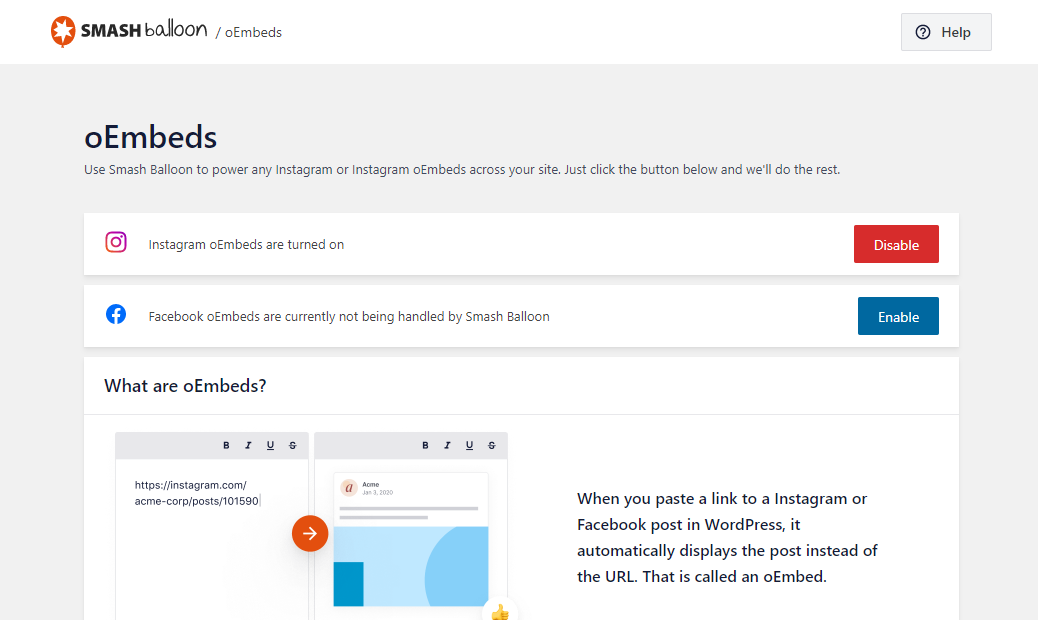
- oEmbed Support Automatically powers your Instagram oEmbeds
- Setting Up is Simple: Get started in seconds, no hassle, no fuss
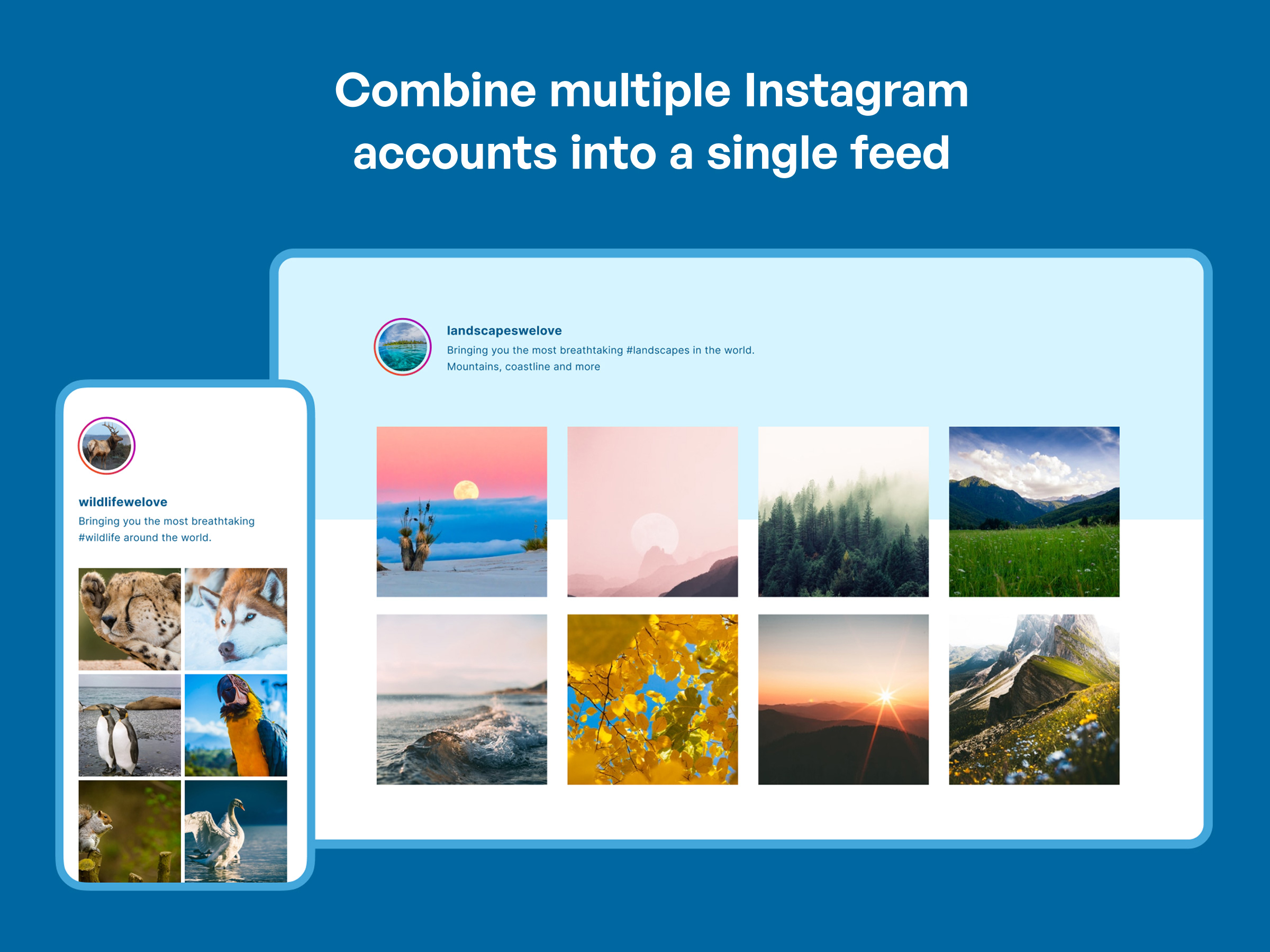
- Showcase Multiple Accounts: Display photos from various Instagram accounts in one unified feed or separate them into individual feeds
- Multiple Feeds Anywhere: Add as many feeds as you want on the same page or spread them across different pages on your site
- Responsive & Mobile-Ready: Your feeds will look stunning on any screen size, on any device and in any container width
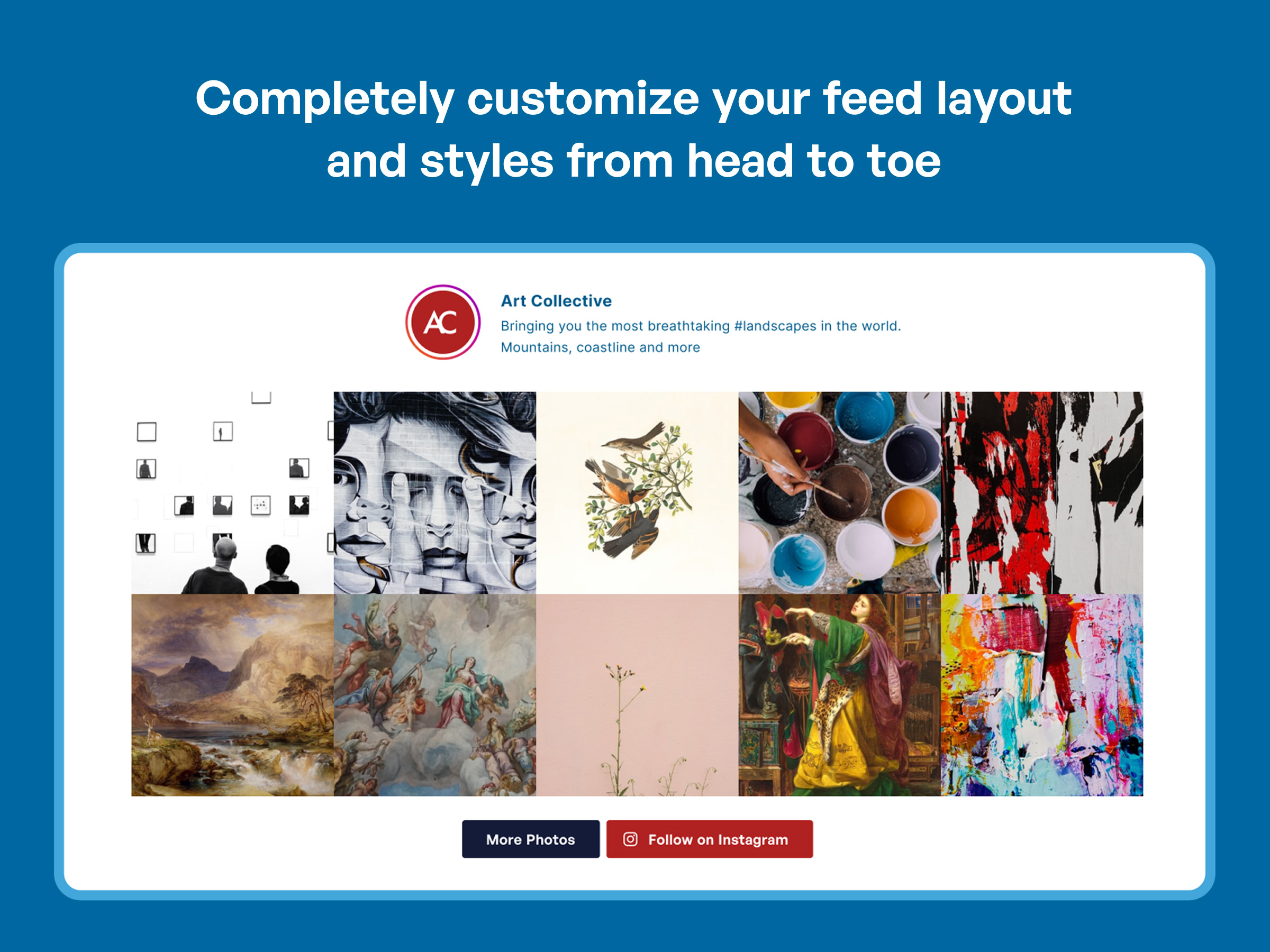
- Fully Customizable Feeds: Adjust the width, height, number of photos, number of columns, image size, background color, image spacing and more
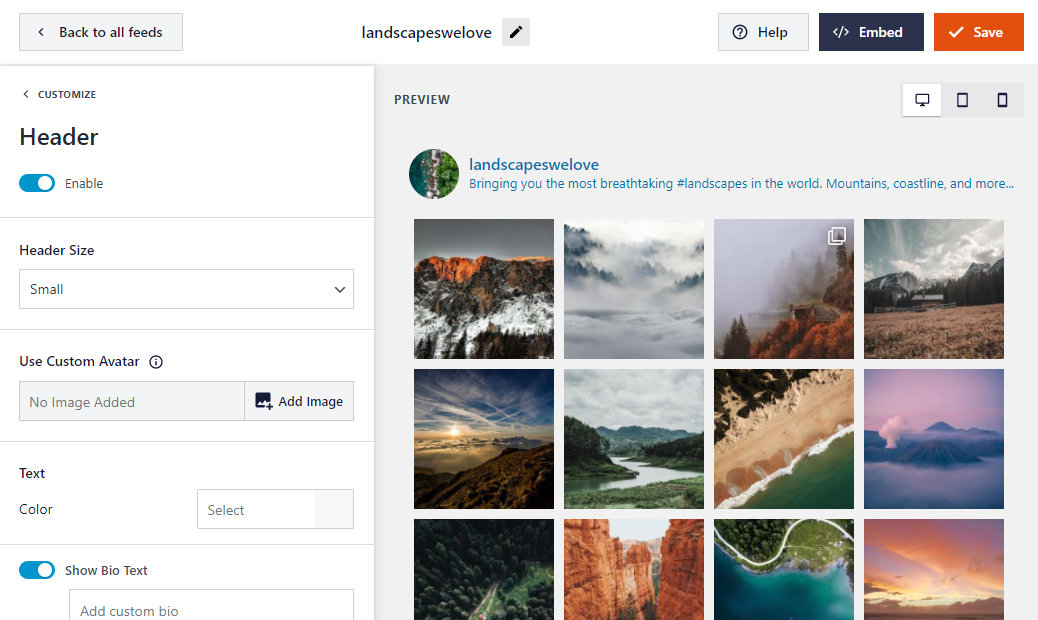
- Visual Customizer: Customize your feed layout, color scheme, header style, post settings, lightbox, and much more – in just a few clicks
- Photo Display Options: Choose to display thumbnail, medium, or full-size photos directly from your feed
- Beautiful Feed Header: Add a striking header to top off your feed beautifully
- “Follow on Instagram” Button: Increase followers by adding a “follow on Instagram” button at the bottom of your feed
- Flexible Photo Order: Display your Instagram photos in chronological order or mix it up with a random arrangement
- Infinite Scroll: Keep your visitors engaged by loading more of your Instagram photos with a handy “Load More” button
- Built-in Block: Easily add your feed to posts and pages with our convenient block for the block editor
- Instagram Widget: Embed on your site’s widget-ready areas such as sidebar and footer in seconds
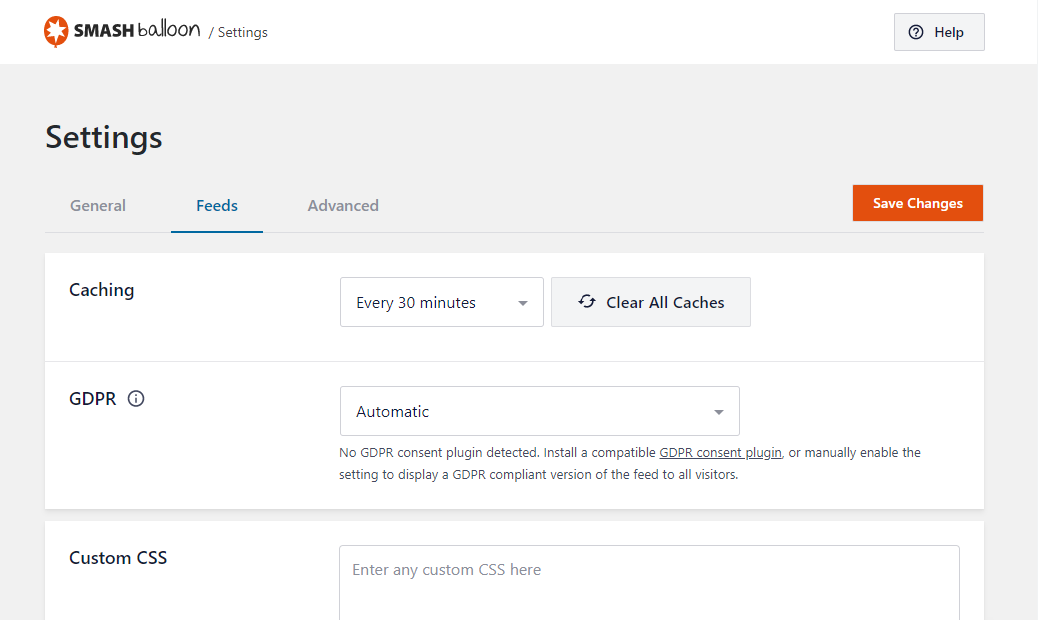
- GDPR Compliant: Automatically integrates with many of the popular GDPR cookie consent plugins and includes a 1-click easy GDPR setting
- Designed for All Users: Perfect for beginners and advanced users alike
- Advanced Customization: Add your own custom CSS and JavaScript for advanced customizations
- Page Builder Compatible: Fully compatible with Elementor, Divi, Beaver Builder and other popular page builders
Get More with Instagram Feed Pro
Want to truly maximize your Instagram content and make it work harder for your brand?
While Smash Balloon’s Social Photo Feed offers a free way to get started, our Pro version offers advanced features to help you get complete control over the way you show your Instagram photos and videos to your website visitors.
The Pro version, known as Instagram Feed Pro, allows you to:
-
Display hashtag feeds – Curate dynamic content around specific Instagram hashtags
Check Out Instagram Hashtag Feed Demo -
Show stunning lightboxes – View photos, Instagram reels and videos in a popup lightbox directly on your site
-
Add interactive elements – Display captions and show the number of likes and comments for each post
-
Embed Instagram carousel – Showcase eye-catching carousels from your posts
See Instagram Carousel Feed Demo -
Choose from multiple layout options – Use “Masonry” or “Highlight” layouts
View “Highlight” Layout in Action -
Use advanced feed moderation – Hide or show specific posts in just a few clicks
-
Filter Instagram posts – Display Instagram content based on hashtags, keywords or specific user posts
-
Create shoppable feeds – Add customized links to each post, like link in bio, so you can direct your site visitors to the page you’d like
-
Use professionally-designed themes – No need to start from scratch! Design beautiful feeds in minutes with pre-made feed themes to instantly create beautiful and unique feeds
Plus, enjoy these Pro benefits:
- Priority Support: Get quick and dedicated help from our support team
- Regular Updates: Benefit from continuous plugin improvements and new features
Check Out the Pro Version | Try the Pro Demo
Why Over 1 Million Users Love Smash Balloon
Trusted by over 1 million websites, Smash Balloon is the leading solution for seamlessly integrating Instagram feeds onto your site.
Our 4.9/5 star average rating from 4,000+ glowing reviews speaks for itself.
What Our Users Are Saying
“Awesome plugin and support – Awesome plugin that just works! Contacted support this week and they’ve quickly given a custom solution for a specific query I had! Very happy customer!”
– @tomteaweb“The best Instagram feed plugin – Whenever I need to display the Instagram feed in a WordPress site, I choose this plugin. It is not only easy to set up, but even in the free version you have enough features to have a nice feed. Do not spend more time looking for another Instagram feed plugin: This is the best!”
– @yordansoares“Simple and concise – Excellent plugin. Simple and non-bloated. I had a couple small issues with the plugin when I first started using it, but a quick comment on the support forums got a new version pushed out the next day with the fix. Awesome support!”
– @joshjones“Great plugin, greater support! – I’ve definitely noticed an increase in followers on Instagram since I added this plugin to my sidebar. Thanks for the help in making some adjustments…looks and works great!”
– @bnotp
Fast, Professional and Helpful Support
At Smash Balloon, we’re dedicated to providing the most customizable, robust, and well-supported Instagram plugin available.
Have a question, need help with a feature, or want to request a new feature?
Our dedicated support team is just a quick message away, ready to provide top-notch assistance for both free and premium versions:
- Documentation
- Free Support – Please open a ticket in the Support forum
- Premium Support – Premium users can reach out to us via this Contact Support form
You can instantly unlock priority support when you upgrade to Instagram Feed Pro now.
7 Reasons Why You Need Smash Balloon Social Photo Feed
- Boost Social Engagement – Increase engagement between you and your Instagram followers
- Save Time – Automatically display your Instagram photos on your website
- Display Your Content Your Way – Customize your feeds to blend seamlessly with your site
- Keep Your Site Looking Fresh – Automatically push new Instagram content to your site
- Super Simple Setup – Get started in 30 seconds with no Developer account needed
- Powers Instagram oEmbeds – Maintain working Instagram embeds across your site
- Professional Feed Themes – Use ready-made themes for quick, beautiful displays
What Can It Do?
- Display Instagram photos from any account you own
- Completely responsive and mobile ready
- Display multiple feeds on the same page
- Display posts from multiple Instagram User IDs
- Built-in customization options
- Infinite scroll with ‘Load More’ button
- Plus more features added regularly!
Completely Customizable Feeds
- Set number of photos to display
- Choose number of columns and photo sizes
- Show/hide feed elements (header, buttons)
- Control width, height and background color
- Set spacing between photos
- Display photos in chronological or random order
- Customize button text and colors
- Add custom CSS or JavaScript
- Style multiple feeds differently
- Plus more options added regularly!
Check Out the Pro Version | Try the Pro Demo
What’s Next
If you like our WordPress Instagram plugin, then consider checking out our other projects:
OptinMonster – Get more email subscribers with the most popular conversion optimization plugin for WordPress.
WPForms – #1 drag & drop online form builder for WordPress (trusted by 5 million sites).
AIOSEO – The original WordPress SEO plugin to help you rank higher in search results (trusted by over 3 million sites).
MonsterInsights – See the stats that matter and grow your business with confidence. Best Google Analytics plugin for WordPress.
SeedProd – Create beautiful landing pages with our powerful drag & drop landing page builder.
WP Mail SMTP – Improve email deliverability for your contact form with the most popular SMTP plugin for WordPress.
WPCode – must have WordPress code snippet management plugin to help you future-proof website customization (trusted by 1.5 million sites).
Duplicator – popular WordPress backup and migration plugin used by over 1 million websites.
WP Simple Pay – #1 Stripe payments plugin for WordPress. Start accepting one-time or recurring payments without a shopping cart.
PushEngage – Connect with visitors after they leave your website with the leading web push notification plugin.
RafflePress – Best WordPress giveaway and contest plugin to grow traffic and social followers.
TrustPulse – Add real-time social proof notifications to boost your store conversions by up to 15%.
SearchWP – The most advanced custom WordPress search plugin to improve WordPress search quality.
AffiliateWP – #1 affiliate management plugin for WordPress. Add a referral program to your online store.
Easy Digital Downloads – The best WordPress eCommerce plugin to sell digital products (eBooks, software, music, and more).
WPCharitable – Top-rated WordPress donation and fundraising plugin for WordPress.
Visit WPBeginner to learn from our WordPress Tutorials and about the best WordPress plugins.
Privacy Policy
=Data Collection=
Instagram Feed does not collect any personal data from your Meta accounts (Instagram, Facebook). All data retrieved from the Meta API is used solely for the purpose of displaying your feed on your WordPress site.
=External Connections=
This plugin connects to three external sites:
-
Smashballoon.com: Used for connecting and authenticating your sources. Occasionally, it sends dynamic notices to users. These notices can include information about major API changes, critical updates, and marketing messages.
-
Instagram.com and Facebook.com: Used to fetch posts so your visitors can view them directly on your site without needing to leave.
=Data Usage=
All data retrieved from the Meta API is used solely for displaying your Instagram feed on your WordPress site. No personal data is collected, stored, or shared beyond this purpose.
No installation instructions provided.
Screenshot Gallery
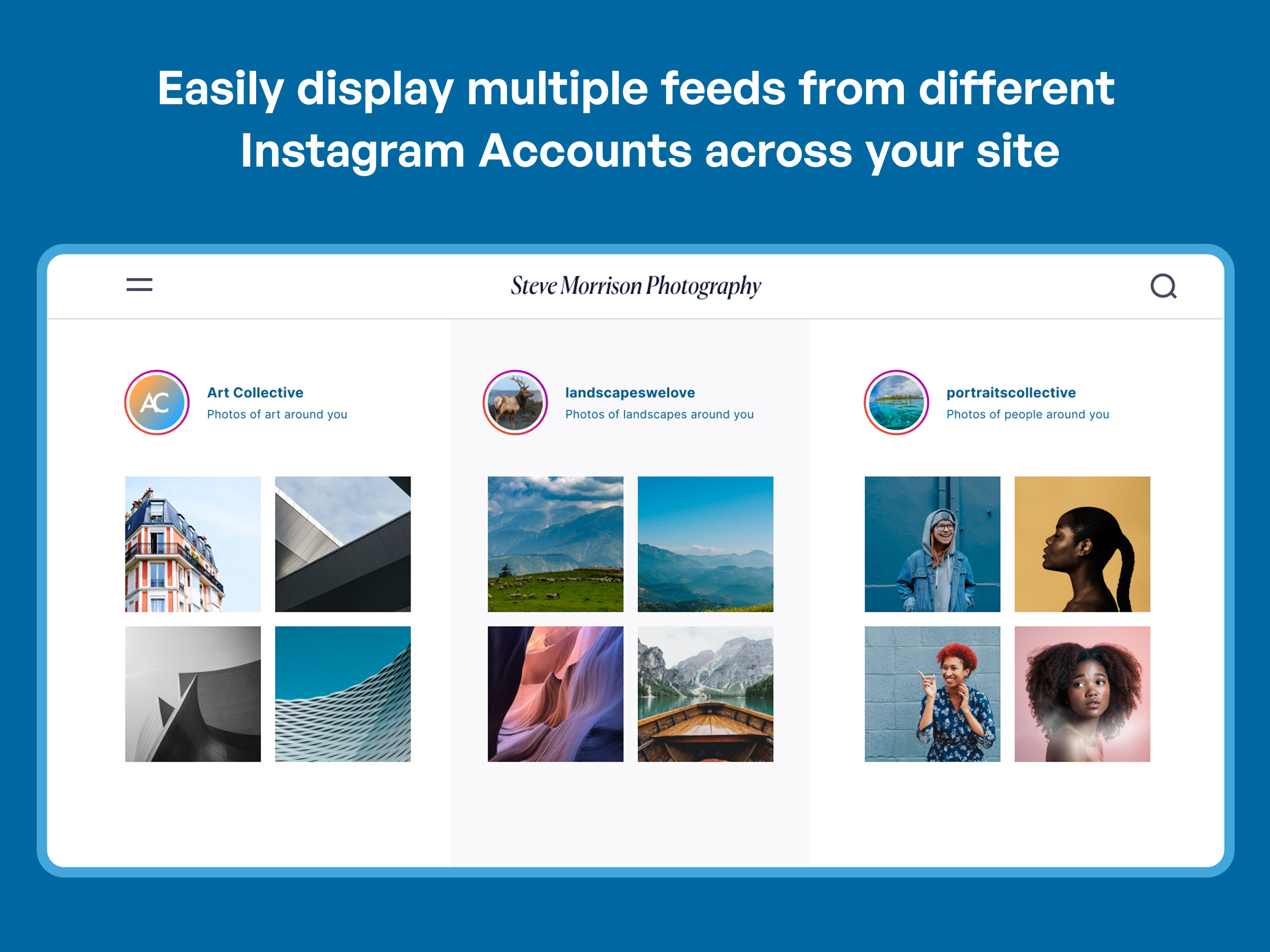
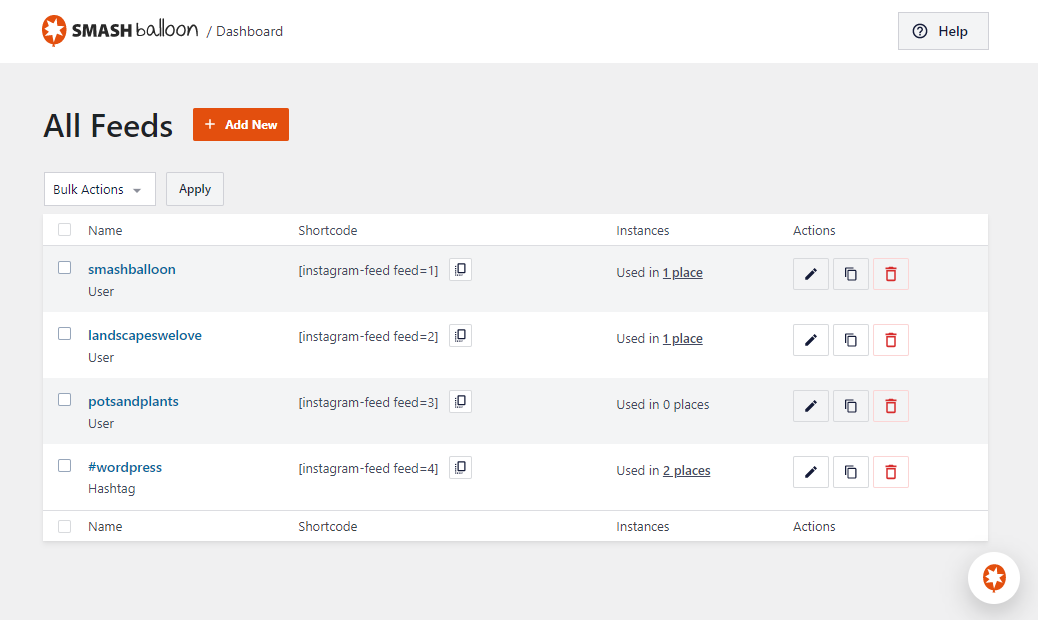

Yep. You can display multiple Instagram feeds by using our built-in feed creation tool, for example: [instagram-feed feed=2].
Yep. You can connect multiple accounts and include them as sources when creating a feed.
Yes. In version 2.5, support was added to allow the plugin to power your Instagram oEmbeds as official support for these is no longer available in WordPress core. Just connect your account on the oEmbeds settings page inside the plugin and we’ll do the rest. No developer app or account required.
Yes. Use the Instagram widget or Instagram block to display your feed in a sidebar or other widget area.
We’ve made it super easy. Just follow the steps outlined when onboarding and you will have a connected account with simple clicks.
There are a few common reasons for this:
- Your Access Token may not be valid. Try clicking on the blue Instagram login button on the plugin’s Settings page again and copy and paste the Instagram token it gives you into the plugin’s Access Token field.
- The plugin’s JavaScript file isn’t included in your page. This is most likely because your WordPress theme is missing the WordPress wp_footer function which is required for plugins to be able to add their JavaScript files to your page. You can fix this by opening your theme’s footer.php file and adding the following directly before the closing tag between two php tags:
wp_footer(); - Your website may contain a JavaScript error which is preventing JavaScript from running. The plugin uses JavaScript to load the Instagram photos into your page and so needs JavaScript to be running in order to work. You would need to remove any existing JavaScript errors on your website for the plugin to be able to load in your feed.
If you’re still having an issue displaying your feed then please open a ticket in the Support forum with a link to the page where you’re trying to display the Instagram feed and, if possible, a link to your Instagram account.
Nope. The Access Token used in the plugin is a “read only” token, which means that it could never be used maliciously to manipulate your account.
This is a feature of the Pro version of the plugin, which allows you to view the photos in a pop-up lightbox, support videos, display captions, display photos by hashtag + more!
You can embed your feed directly into a template file by using the WordPress do_shortcode function: <?php echo do_shortcode('[instagram-feed]'); ?>.
If your Instagram photos aren’t loading and all your see is a loading symbol then there are a few common reasons:
1) There’s an issue with the Instagram Access Token that you are using
You can obtain a new access token on the Instagram Feed Settings page by using the “connect” button to reconnect the account.
Occasionally the connect button inside the plugin does not successfully update the access token. You can try this link as well.
2) The plugin’s JavaScript file isn’t being included in your page
This is most likely because your WordPress theme is missing the WordPress wp_footer function which is required for plugins to be able to add their JavaScript files to your page. You can fix this by opening your theme’s footer.php file and adding the following directly before the closing tag:
3) There’s a JavaScript error on your site which is preventing the plugin’s JavaScript file from running
You can find out whether this is the case by right clicking on your page, selecting ‘Inspect Element’, and then clicking on the ‘Console’ tab, or by selecting the ‘JavaScript Console’ option from your browser’s Developer Tools.
If a JavaScript error is occurring on your site then you’ll see it listed in red along with the JavaScript file which is causing it.
4) The feed you are trying to display has no Instagram posts
If you are trying to display an Instagram feed that has no posts made to it, a loading symbol may be all that shows for the Instagram feed or nothing at all. Once you add an Instagram post the Instagram feed should display normally
5) The shortcode you are using is incorrect
You may have an error in the Instagram Feed shortcode you are using or are missing a necessary argument.
There are plenty of options to customize your feed! See the list below:
* General Options
* width of feed – The width of your feed.
* height of feed – The height of your feed.
* background color – The background color of the feed. Any hex color code.
*
* Photo Options
* sorting – Sort the Instagram posts by Newest to Oldest (none) or Random (random)
* number of posts – The number of posts to display initially.
*
* desktop columns – The number of columns in your feed when displayed on desktop devices
* tablet columns – The number of columns in your feed when displayed on tablet devices
* mobile columns – The number of columns in your feed when displayed on mobile or phone devices
*
* image spacing – The spacing around your photos
*
* Header Options
* show header – Whether to show the feed Header.
* show bio – Whether to show the account’s bio in the feed Header.
* custom avatar – URL of a custom Avatar image for the header (use whatever image you want for your account).
*
* header color – The color of the feed Header text.
*
* ‘Load More’ Button Options
* show load more button – Whether to show the ‘Load More’ button.
* button color – The background color of the button. Any hex color code
* button text color – The text color of the button.
* button text – The text used for the button – Example: “Load More Photos”
*
* ‘Follow on Instagram’ Button Options
* show the follow button ** – Whether to show the ‘Follow on Instagram’ button.
* **follow color – The background color of the ‘Follow on Instagram’ button.
* follow text color – The text color of the ‘Follow on Instagram’ button.
* follow text – The text used for the ‘Follow on Instagram’ button – Example: “Follow me”
For more options, check out the Pro version.
For more FAQs related to the Instagram Feed plugin please visit the FAQ section on our website.
Changelog
6.11.4
- New – Photos, Videos, and Reels filter toggles are now available in Instagram Feed Free.
- Fix – Instagram images now honor the intended image quality, and the Thumbnail feed size now uses the cached thumbnail file.
- Fix – Resolved an editor typography issue on WordPress versions below 7.0 caused by legacy block iframe styles.
- Fix – Additional plugin hardening.
6.11.3
- Fix – Notices now stay dismissed once closed, including on sites with multiple administrators.
6.11.2
- Fix – Additional plugin hardening.
6.11.1
- New – Added a Help widget to the feed builder for in-app access to documentation and support.
- Fix – The legacy Instagram Feed block now renders a live preview correctly inside the WP 7.0+ iframed block editor, and the legacy Elementor widget now renders correctly inside the Elementor preview.
- Fix – The Elementor widget title is now translatable.
6.11.0
- New – Added a modern Gutenberg block and Elementor widget for the Instagram feed. Existing feeds using the legacy block continue to render without reconfiguration.
- Tweak – Compatibility with WP 7.
- Fix – Plugin no longer removes the WordPress footer on plugin admin pages.
- Fix – Captions with multiple paragraphs no longer render duplicate anchor tags in screen-reader text.
- Fix – Instagram Trial Reels (test posts shown only to non-followers) are no longer included in feeds.
6.10.1
- Tweak – Added optional deactivation feedback survey to help us improve the plugin.
- Tweak – Various PHP 8.4 compatibility enhancements.
6.10.0
- New – Added support for Instagram’s Media API. This will future-proof the plugin and prevent issues with Instagram deprecating the ‘thumbnail_url’ from the oEmbed API.
- Fix – Added compatibility with Complianz GDPR plugin.
- Fix – Fixed accessibility issues related to the screenreader text.
- Fix – Additional code hardening.
6.9.1
- Fix – Additional code hardening.
6.9.0
- Important – Added accessibility improvements related to the front-end feed display. This may affect custom code applied to the feed. Please check and reach out to support if you need help.
- Important – To comply with Meta’s security standards, we have raised the minimum PHP version to 7.4.
- Fix – Instagram feed plugin no longer triggers the _load_textdomain_just_in_time warning
- Fix – Additional code hardening.
6.8.0
- New – Added a new setting to support Instagram’s new 3:4 aspect ratio. Edit your feed, select the “Layout” tab and choose among a 1:1 square, 4:5 portrait, or 3:4 Instagram official aspect ratio.
- New – Added support for a new GDPR consent plugin WPConsent.
6.7.1
- Fix – Prevented PHP error “Fatal error: Uncaught TypeError: unserialize()”
- Fix – Removed advertisements for ClickSocial that appear in the block editor.
6.7.0
- New – Added information regarding our newest product ClickSocial! Schedule your social media posts through the WordPress dashboard.
- Fix – Added a notice and more details if a database update fails. Most commonly this is due to the MySQL user not having permissions to alter tables.
- Fix – Improved our compatibility with the latest versions of Divi and Elementor.
- Fix – Resolved a PHP warning related to _load_textdomain_just_in_time.
- Fix – Additional plugin hardening.
6.6.1
- Tweak: Added support for our new Feed Analytics product. Get insights as to how your feeds are being used by site visitors.
6.6.0
- Important: For users with a personal account connection, you will need to reconnect your account before December 2024 after updating to version 6.6 or higher. Learn more
- New: Added support for GDPR Cookie Compliance by Moove Agency and Real Cookie Banner GDPR plugins.
- Fix: Existing data is no longer deleted after removing the free version if the Pro version is also installed.
- Fix: Fixed a rare issue causing 404 errors when editing a feed.
- Fix: Improved compatibility with the Thrive Architect plugin.
6.5.1
- Fix: Plugin hardening.
6.5.0
- New: Added webp image support for the local image optimization feature. This will improve the performance of your feed by serving images in the webp format when possible.
- New: Added Blocks to easily use our other social media feeds.
- Fix: Fixed an issue with images not loading in the post editor when using the Instagram Feed block.
6.4.3
- New: Added support for new version of CookieYes GDPR plugin.
- New: Updated the URL for oEmbed auth flow.
- Fix: Resolved conflict with TikTok Feeds and removed assets when callout is not shown.
- Fix: Fixed issues with admin notices not dismissing properly.
6.4.2
- Fix: PHP fatal error caused by dependencies not being prefixed with the correct namespace.
6.4.1
- Fix: PHP fatal error that could occur in some circumstances when using the plugin.
- Fix: JS error that occurred on the frontend.
6.4
- New: Added a checklist and callout feature to help users get started with all Smash Balloon products installed
- Tweak: Added some improvements to our onboarding wizard to make it clear what certain steps do.
- Tweak: Made improvements to our oEmbed connection process.
- Fix: Fixed AJAX themes not loading jQuery dependency causing the feed to break in some circumstances.
- Translations: Updated our translation .pot file.
6.3.1
- Fix: Fixed some admin notices not dismissing as expected.
- Fix: Fixed an issue that would cause a fatal error when trying to delete the plugin.
6.3
- New: Updated CSS floats to flexbox and grid for better layout support and compatibility with themes. If you have made customizations in form of CSS, JS, or custom feed templates, make sure your feed looks as expected after updating. If you need time to update your customizations, use the “Legacy CSS” setting on the “Advanced” tab to revert the CSS file to version 6.2.
- New: Improved how images are displayed to support lazy loading.
- Fix: Added support for Borlabs Cookie v3.0.
6.2.10
- New: Added a menu item to easily install our new TikTok Feeds plugin!
6.2.9
- New: Added Elementor widget and Divi module for Instagram Feed.
- Tweak: Enhanced the secure custom login tool for the support team to troubleshoot certain API issues on your site.
- Tweak: Improved and hardened our code base to improve reliability.
- Fix: Updated settings info to display in the debug report.
6.2.8
- Fix: Menu items for our other plugins were not working when clicked.
6.2.7
- Tweak: Improved and hardened our code base to improve reliability.
6.2.6
- Fix: Resetting optimized images would also reset Instagram Feed settings.
6.2.5
- Fix: Fixed a problem with our code that would remove admin footer text from other sources.
- Fix: Fixed an issue causing the minified CSS file to not actually be minified.
6.2.4
- Fix: Disabled translation for a string that would cause an error in some languages.
6.2.3
- Fix: Fixed translation bugs that would cause PHP errors on certain settings pages.
- Fix: Fixed a PHP error that would occur when the database record for translations was corrupted.
6.2.2
- Translations: Fixed many translation issues and added translation files for German, French, Japanese, and many more.
- Fix: Fixed an issue that would cause extra slashes to be added to text settings that contained single and double quotes.
- Fix: Fixed an issue that would cause the customizer to not work the first time it was accessed.
6.2.1
- Fix: Fixed a deprecation warning that would occur in PHP 8.2+.
- Fix: Fixed a PHP error that would occur when using PHP 8.0+, legacy feeds, and a shortcode with no arguments.
6.2
- New: Added an onboarding wizard for new users to easily get started with Instagram Feeds.
6.1.6
- Fix: Changed code related to account connection for increased reliability.
- Fix: Only 20 feeds were available for export when using the tool on the settings page.
- Fix: Fixed an issue causing a PHP error “creation of a dynamic property” when using PHP 8.2.
6.1.5
- Fix: Fixed personal accounts unable to retrieve new tweets and showing an error with the code 100.
- Fix: Updated API calls for business accounts to work with upcoming changes from Instagram.
6.1.4
- Fix: Removed the option to add a feed to a widget if the current theme does not support widgets.
- New: Added a menu item to easily install our new Reviews Feed plugin!
6.1.3
- Fix: Fixed a PHP Warning: strtotime(): Epoch doesn’t fit in a PHP integer.
- Fix: Header bio was not updating when the bio for the connected Instagram account was updated.
- Fix: Fixed a few text items not being translatable.
6.1.2
- Fix: When enabling Facebook oEmbeds from the oEmbed page, an Instagram icon would appear when the Custom Facebook Feed plugin was being activated.
- Fix: Fixed a CSS parsing error.
6.1.1
- Fix: When using the customizer to enable the setting for the header “show outside scrollable area” and adding a background color, the preview would not show the same result as the actual feed.
- Fix: Disabling the JavaScript image loading on the “Advanced” settings tab would cause the customizer preview to look distorted.
- Fix: When customizing a feed, the load more button would become active when switching the device preview.
- Fix: Fixed a PHP warning that would occur when bulk deleting feeds.
6.1
- New: Added the ability to filter “Reels” posts in feeds. When customizing a feed and using the moderation settings you can now choose to show or hide Instagram “Reels” posts.
- New: Add a header image and bio text for personal sources. Go to the settings page and click on the gear icon to add this to an existing source.
- New: Added support for Instagram “Reels” oEmbeds. Use WordPress’ embed block to create rich oEmbed links in blog posts and pages.
- Tweak: Vue.js code is now loaded from a local file shipped with the plugin rather than an external CDN for use with the customizer in the admin area.
6.0.8
- Tweak: Added a workaround to retrieve missing images if none were returned by Instagram for a post.
- Fix: Custom colors assigned to the Follow button would not apply when using a custom color palette.
- Fix: Added additional plugin hardening.
- Fix: A fatal error would occur with older versions of PHP and WordPress in some circumstances.
6.0.7
- Fix: Removed legacy “disable mobile” setting support as it was causing confusion for users updating from 2.x where changes to feed columns would not have an effect.
- Fix: Removed the reference in the feed CSS file to an image file that didn’t exist.in the feed CSS file.
- Fix: All sources would be removed when the grace period to address app permission issues ended. Now only the single source will be removed.
- Fix: The number of posts would be inaccurate in the feed preview when using the customizer for mobile devices.
6.0.6
- Tweak: Added a warning notice to allow a grace period before Instagram data is permanently deleted from your site after deauthorizing the Smash Balloon Instagram app. Due to Instagram requirements, any Instagram data on your site must be deleted within a reasonable time after the app has been deauthorized. The new warning notice provides a 7 day grace period to allow you time to reauthorize the app if you don’t want the data to be deleted.
- Tweak: Reconnecting an account now results in deleting the original connection in the database and adding a new one. This will prevent issues with some caching systems like Redis.
- Fix: Only the first 20 sources were available when creating feeds and changing sources for a feed.
- Fix: The link in some error messages were incorrect resulting in “access denied” error messages when clicking on them.
6.0.5
- Tweak: If WordPress cron is broken or behind schedule and causing background caching to not work, the plugin will update the feed when the page loads.
- Fix: Jetpack’s “Master Bar” feature was causing the sidebar in the customizer to be partially hidden.
- Fix: Added back support for the “class” shortcode setting for all feeds.
- Fix: Removed all Font Awesome icons and no longer include the CSS file from the Font Awesome CDN.
6.0.4
- Fix: Added back the ability to use up to 10 columns in feeds.
- Fix: The reconnect link that would display when an account had an error would not redirect to connect.smashballoon.com.
6.0.3
- Tweak: Updated our logo throughout the plugin to match our new website.
- Tweak: Changed how the hover color for follow and load more buttons is applied to prevent theme conflicts.
- Fix: Fixed JavaScript file not being added to the page when using the plugin GDPR Cookie Consent by WebToffee.
- Fix: Dismissing dashboard notifications would cause the “Add new feed” button to stop working until the page was refreshed.
6.0.2
- Fix: Fixed Instagram Feed JavaScript file missing from the page when using the “AJAX theme loading fix” setting causing blank images to display.
- Fix: Added the ability to create the custom database tables if there was an error when first trying to create them.
- Fix: Fixed the error message not displaying if there was an error when trying to connect a personal or basic account.
6.0.1
- Fix: Custom HTML templates were not applying to new feeds.
- Fix: Some custom tables were not being created for specific versions of MySQL.
- Fix: The shortcode setting “showfollow=false” was not working for legacy feeds.
- Fix: The shortcode settings “showheader” and “showbio” were applying for non-legacy feeds causing confusion when trying to change these settings in the customizer.
- Fix: The customizer would not resize images causing blank images to show when GDPR features were enabled.
- Fix: Fixed PHP warning “Undefined array key tagged”.
6.0
- Important: Minimum supported WordPress version has been raised from 3.5 to 4.1.
- New: Our biggest update ever! We’ve completely redesigned the plugin settings from head to toe to make it easier to create, manage, and customize your Instagram feeds.
- New: All your feeds are now displayed in one place on the “All Feeds” page. This shows a list of any existing (legacy) feeds and any new ones that you create. Note: If you updated from a version prior to v2.8 then you may need to view your feeds on your webpage so that the plugin can locate them and list them here.
- New: Easily edit individual feed settings for new feeds instead of cumbersome shortcode options.
- New: It’s now much easier to create feeds. Just click “Add New”, select your feed type, connect your account, and you’re done!
- New: Brand new feed customizer. We’ve completely redesigned feed customization from the ground up, reorganizing the settings to make them easier to find.
- New: Live Feed Preview. You can now see changes you make to your feeds in real time, right in the settings page. Easily preview them on desktop, tablet, and mobile sizes.
- New: Color Scheme option. It’s now easier than ever to change colors across your feed without needing to adjust individual color settings. Just set a color scheme to effortlessly change colors across your entire feed.
- New: You can now change the number of columns in your feed across desktop, tablet, and mobile.
- New: Easily import and export feed settings to make it simple to move feeds across sites.
" width="120" height="120">
Available Versions
| Version | Download | Type |
|---|---|---|
| 6.11.4 | Download | Stable |
| 6.11.3 | Download | Stable |
| 6.11.2 | Download | Stable |
| 6.11.1 | Download | Stable |
| 6.11.0 | Download | Stable |
| 6.10.1 | Download | Stable |
| 6.10.0 | Download | Stable |
| 6.9.1 | Download | Stable |
| 6.9.0 | Download | Stable |
| 6.8.0 | Download | Stable |
| 6.7.1 | Download | Stable |
| 6.7.0 | Download | Stable |
| 6.6.1 | Download | Stable |
| 6.6.0 | Download | Stable |
| 6.5.1 | Download | Stable |
| 6.5.0 | Download | Stable |
| 6.4.3 | Download | Stable |
| 6.4.2 | Download | Stable |
| 6.4.1 | Download | Stable |
| 6.4 | Download | Stable |
| 6.3.1 | Download | Stable |
| 6.3 | Download | Stable |
| 6.2.10 | Download | Stable |
| 6.2.9 | Download | Stable |
| 6.2.8 | Download | Stable |
| 6.2.7 | Download | Stable |
| 6.2.6 | Download | Stable |
| 6.2.5 | Download | Stable |
| 6.2.4 | Download | Stable |
| 6.2.3 | Download | Stable |
| 6.2.2 | Download | Stable |
| 6.2.1 | Download | Stable |
| 6.2 | Download | Stable |
| 6.1.6 | Download | Stable |
| 6.1.5 | Download | Stable |
| 6.1.4 | Download | Stable |
| 6.1.3 | Download | Stable |
| 6.1.2 | Download | Stable |
| 6.1.1 | Download | Stable |
| 6.1 | Download | Stable |
| 6.0.8 | Download | Stable |
| 6.0.7 | Download | Stable |
| 6.0.6 | Download | Stable |
| 6.0.5 | Download | Stable |
| 6.0.4 | Download | Stable |
| 6.0.3 | Download | Stable |
| 6.0.2 | Download | Stable |
| 6.0.1 | Download | Stable |
| 6.0 | Download | Stable |
| 2.9.10 | Download | Stable |
| 2.9.9 | Download | Stable |
| 2.9.8 | Download | Stable |
| 2.9.7 | Download | Stable |
| 2.9.6 | Download | Stable |
| 2.9.5 | Download | Stable |
| 2.9.4 | Download | Stable |
| 2.9.3.1 | Download | Stable |
| 2.9.3 | Download | Stable |
| 2.9.2 | Download | Stable |
| 2.9.1 | Download | Stable |
| 2.9 | Download | Stable |
| 2.8.2 | Download | Stable |
| 2.8.1 | Download | Stable |
| 2.8 | Download | Stable |
| 2.7 | Download | Stable |
| 2.6.2 | Download | Stable |
| 2.6.1 | Download | Stable |
| 2.6 | Download | Stable |
| 2.5.4 | Download | Stable |
| 2.5.3 | Download | Stable |
| 2.5.2 | Download | Stable |
| 2.5.1 | Download | Stable |
| 2.5 | Download | Stable |
| 2.4.7 | Download | Stable |
| 2.4.6 | Download | Stable |
| 2.4.5 | Download | Stable |
| 2.4.4 | Download | Stable |
| 2.4.3 | Download | Stable |
| 2.4.2 | Download | Stable |
| 2.4.1 | Download | Stable |
| 2.4 | Download | Stable |
| 2.2.2 | Download | Stable |
| 2.2.1 | Download | Stable |
| 2.2 | Download | Stable |
| 2.1.5 | Download | Stable |
| 2.1.4 | Download | Stable |
| 2.1.3 | Download | Stable |
| 2.1.2 | Download | Stable |
| 2.1.1 | Download | Stable |
| 2.1 | Download | Stable |
| 2.0.2 | Download | Stable |
| 2.0.1 | Download | Stable |
| 2.0 | Download | Stable |
| 1.12.2 | Download | Stable |
| 1.12.1 | Download | Stable |
| 1.12 | Download | Stable |
| 1.11.3 | Download | Stable |
| 1.11.2 | Download | Stable |
| 1.11.1 | Download | Stable |
| 1.11 | Download | Stable |
| 1.10.2 | Download | Stable |
| 1.10.1 | Download | Stable |
| 1.10 | Download | Stable |
| 1.9.1 | Download | Stable |
| 1.9 | Download | Stable |
| 1.8.3 | Download | Stable |
| 1.8.2 | Download | Stable |
| 1.8.1 | Download | Stable |
| 1.8 | Download | Stable |
| 1.7 | Download | Stable |
| 1.6.2 | Download | Stable |
| 1.6.1 | Download | Stable |
| 1.6 | Download | Stable |
| 1.5.1 | Download | Stable |
| 1.5 | Download | Stable |
| 1.4.9 | Download | Stable |
| 1.4.8 | Download | Stable |
| 1.4.7 | Download | Stable |
| 1.4.6.2 | Download | Stable |
| 1.4.6.1 | Download | Stable |
| 1.4.6 | Download | Stable |
| 1.4.5 | Download | Stable |
| 1.4.4 | Download | Stable |
| 1.4.3 | Download | Stable |
| 1.4.2 | Download | Stable |
| 1.4.1 | Download | Stable |
| 1.4 | Download | Stable |
| 1.3.11 | Download | Stable |
| 1.3.10 | Download | Stable |
| 1.3.9 | Download | Stable |
| 1.3.8 | Download | Stable |
| 1.3.7 | Download | Stable |
| 1.3.6 | Download | Stable |
| 1.3.5 | Download | Stable |
| 1.3.4 | Download | Stable |
| 1.3.3 | Download | Stable |
| 1.3.2 | Download | Stable |
| 1.3.1 | Download | Stable |
| 1.3.0 | Download | Stable |
| 1.2.3 | Download | Stable |
| 1.2.2 | Download | Stable |
| 1.2.1 | Download | Stable |
| 1.2 | Download | Stable |
| 1.1.6 | Download | Stable |
| 1.1.5 | Download | Stable |
| 1.1.4 | Download | Stable |
| 1.1.3 | Download | Stable |
| 1.1.2 | Download | Stable |
| 1.1.1 | Download | Stable |
| 1.1 | Download | Stable |
| 1.0.2 | Download | Stable |
| 1.0.1 | Download | Stable |
| 1.0 | Download | Stable |
| Development | Download | Trunk |
