
Imagify Image Optimization: Optimize Images | Compress & Convert to WebP/AVIF
Active Installs
1,000,000+
Last Updated
September 7, 2026
First Released
January 27, 2016
Download History (Last one month)
Image optimization in 1‑click: compress, resize & convert to WebP/AVIF – free up to 20MB/month. Enjoy the easiest WordPress image optimizer to set up.
🏆 The Easiest Image Optimization Plugin for WordPress
Imagify is the simplest image optimization plugin for WordPress to optimize images, so your website loads faster and images stay lighter. It’s designed for site owners who want quick and effective results with a very easy setup.
With Imagify, you can resize and compress images and convert them to WebP and AVIF directly from your WordPress dashboard, with up to 20MB of images optimized each month for free. Automatic image optimization takes just one click and does not require technical knowledge.
Whether you’re uploading new images, running bulk image optimization on an existing media library, or handling image optimization for WooCommerce product photos, Imagify makes the process simple, reliable, and easy to manage.
What sets Imagify apart:
-
WebP and AVIF conversion included in the free plan, so you can use next-gen image formats right away.
-
Easy to use, with no advanced configuration to learn.
-
Smart image compression and optimization that does the job for you and reduces file size while preserving image quality.
-
Bulk image optimization that runs in the background.
Watch the video and see for yourself why Imagify is the easiest image optimizer to make your images lighter and save time:
✨ Optimize Images with Imagify – Features at a Glance:
-
Smart Compression (Does the job for you) – Automatically balances image quality and performance. You don’t need to tweak settings. Imagify handles image optimization without losing quality, so you save time and get consistent results without having to choose any settings.
-
Lossless Compression (Optional) – Prefer pixel-perfect quality? Choose lossless compression. This option is ideal for photographers and quality-focused websites.
-
Next-Gen Formats: Convert WebP and Convert AVIF in One Click – Convert your images to WebP for wide compatibility or AVIF for superior compression in one click. This helps improve your Google PageSpeed performance score and Core Web Vitals grades.
-
Resize Large Images Automatically – Resize oversized images to a maximum width of up to 2560 pixels on upload or during optimization. This can reduce file size by up to 80 percent while keeping images optimized on all devices.
-
Asynchronous Bulk Image Optimization – Optimize your entire Media Library in the background without slowing down your site. Bulk optimization runs asynchronously, so you can keep working while Imagify handles the image optimization process for you – ideal for large WordPress image compression jobs.
-
On-the-Fly Image Resizing – Resize images directly from the app or within WordPress. This makes it easy to optimize images at the ideal size right away.
-
Original Image Backup – Keep your original images stored in a separate folder before the optimization process. This makes it easy to restore them at any time.
-
Flexible File and Size Optimization – Choose which WordPress image sizes you want to optimize, including thumbnail, medium, large, 1536 px, and 2048 px. This helps you optimize only what you actually use and manage your monthly quota more efficiently.
-
Auto-Optimize on Upload – New images are optimized automatically as soon as you upload them to WordPress. No manual steps and no forgotten images: you’ll get automatic image optimization from the moment you hit publish.
-
MCP: AI Access for Imagify – Connect Imagify to your AI tool of choice and get answers based on your Imagify data. Ask your AI about image optimization status, available quota, or whether your images have WebP and AVIF versions. You can also troubleshoot issues or optimize and restore a single image directly from the conversation. Imagify is the first image optimization plugin to offer this kind of AI connection.
✨ In short, you have everything you need to optimize images at scale while keeping quality high and your setup simple.
💡 Why Optimize Images with Imagify?
Imagify is an image optimizer built by the same team behind WP Rocket and focuses on delivering the best performance while saving you time, whether you are new to image optimization for WordPress or managing a large number of images across multiple websites.
Imagify helps you compress and optimize images, convert them to WebP and AVIF, and easily improve performance, including PageSpeed scores and Core Web Vitals. You’ll make your images load quicker without spending time adjusting settings.
📸 Optimize and Compress Images Easily
Imagify helps you optimize images by reducing their file size without losing image quality. Your pages load faster, without changing how your images look to your visitors.
You can compress and resize images as they are uploaded, or optimize existing images in your media library. Imagify supports common image formats, including PDFs.
If images are too large, you can set a maximum width. Oversized images are automatically resized during optimization, proportionally and without cropping.
The part you’ll love the most: Imagify uses Smart Compression to automatically choose the best balance between image quality and file size, so you get lighter images without visible quality loss or having to tweak settings yourself.
⚙️ Enjoy Image Optimization in the Background
If you have many images, image optimization in bulk lets you optimize them all at once. The process runs in the background, so you can keep working while Imagify optimizes images for you. Original images are always preserved and can be restored at any time.
🔄 Convert Images to WebP and AVIF
In addition to resizing and compressing, with Imagify you can convert images to WebP and AVIF without upgrading, as next-gen image conversion is included in all plans, including the free one.)
You can choose whether to generate WebP images, AVIF images, or both from the Imagify settings. Once enabled, Imagify creates next-gen versions of your images.
To serve these image formats on your site, you simply enable the option to display images in WebP and AVIF. Imagify then delivers the best format supported by each visitor’s browser.
Image fallback is handled automatically. If a browser does not support WebP or AVIF, the optimized JPG or PNG version is served instead, ensuring full compatibility.
Imagify supports next-gen conversion for all common image formats, including JPG, JPEG, PNG, and GIF.
For instance, you can convert GIF to WebP, JPEG and JPG to WebP, and even PNGto WebP. The same goes for AVIF: you can convert GIF to AVIF, JPEG and JPG to AVIF, PNG to AVIF.
⚡ Boost Your Pagespeed Insights Score and Optimize Core Web Vitals
Heavy images are one of the most common reasons pages load slowly. When images are too large or not served in modern formats, they drag down performance and user experience.
Imagify helps you fix this at the source by compressing images and converting them to the next-gen formats mentioned above, so pages load faster and feel smoother to visitors. Such image optimization tasks help your site meet Google’s performance recommendations, fix PageSpeed Insights audits such as “Serve images in next-gen formats”” and ““Efficiently encode images”, and improve key metrics like Core Web Vitals.
With lighter images across your site, you get faster load times and better performance where it matters most and, piece on the cake, without having to fine-tune performance settings yourself!
🔌 Connect Your AI Tool to Imagify with MCP
Running multiple websites? With MCP (Model Context Protocol), you can get answers about your websites from a single conversation with your AI tool.
Connect Imagify to an MCP-compatible AI tool such as Claude, GitHub Copilot, Codex, or ChatGPT, and it can access your actual Imagify data to answer questions, troubleshoot issues, and optimize or restore a single image when you ask. MCP is enabled by default, so there’s nothing to configure in Imagify itself. Just connect from your AI tool and you’re ready to go.
Ask questions like:
* “How many images still need optimization?”
* “Do I have enough quota left to optimize everything?”
* “Why wasn’t my hero image optimized?”
Your AI tool can also optimize or restore a single image when you ask it to. Nothing happens to your images unless you ask for it.
MCP is included in all Imagify plans, free and paid, at no extra cost. It works alongside the plugin, not instead of it. Bulk optimization and settings changes still happen in the Imagify plugin itself.
Requires WordPress 6.9+ and Imagify 2.3+.
💬 What Do Our Users Think of Imagify?
Here’s what our users have to say about us after optimizing their images with Imagify:
“Images and other media are the largest parts on your web pages (most likely). Therefore don’t forget to optimise images for the web before adding to your site. For WordPress there are many optimisation plugins available. My favourite is Imagify” — Mark Wilkinson
”To give your images a slimming treatment, without altering them aesthetically, there is a great plugin on WordPress: Imagify. Simple, efficient and functional, it’s really worth a look.”— WP Marmite
“Imagify is an awesome tool that is powerful & easy to use. It’s fast, rivals and surpasses other established plugins/software. Awesome!” — Simon Harper
“If you want to “squeeze” your images as much as possible and “trim out” your website on the highest professional level… Imagify” — Ivica Delic
“Clearly Imagify is the most awesome WordPress plugin to compress images on your website! A must try” — Eric Walter
💰 Is Imagify Free?
You can optimize for free 20MB of images (that’s about 200 images) every month. You can also convert to the next-gen WebP format for free.
Need to compress more images? Have a look at our plans: https://imagify.io/pricing
💡 Want Image Optimization Tips?
If you want to optimize images and know more about using WebP images on WordPress, improving your PageSpeed score with Imagify, or compressing multiple images online, take a look at our blog: https://imagify.io/blog/
It’s packed with advice on image compression and so much more!
- How to Convert Images to WebP on WordPress with Imagify
- How to Optimize Images on WordPress for Performance and SEO
- How to Reduce Image Size Without Losing Quality (and Save Space)
- How to Resize and Compress Multiple Images Online (Easy Methods)
- How to Make Photos Load Faster on WordPress: 6 Key Tactics
- How to Optimize Images for Page Speed (and Google)
👥 Who Are We?
We are WP Media, the company behind WP Rocket, the best caching plugin for WordPress.
Our mission is to improve the web, we are making it faster with WP Rocket and lighter with Imagify.
✉️ Get in Touch!
- Website: Imagify.io
- Contact Us: https://imagify.io/contact
- Twitter: https://twitter.com/imagify
🚀 Related Plugins
- WP Rocket: Best caching plugin to speed-up your WordPress website.
- Lazy Load: Best Lazy Load script to reduce the number of HTTP requests and improve the website’s loading time.
License: GPLv2 or later
License URI: http://www.gnu.org/licenses/gpl-2.0.html
WordPress Admin Method
- Go to you administration area in WordPress
Plugins > Add - Look for
Imagify(use search form) - Click on Install and activate the plugin
- Optional: find the settings page through
Settings > Imagify
FTP Method
- Upload the complete
imagifyfolder to the/wp-content/plugins/directory - Activate the plugin through the ‘Plugins’ menu in WordPress
- Optional: find the settings page through
Settings > Imagify


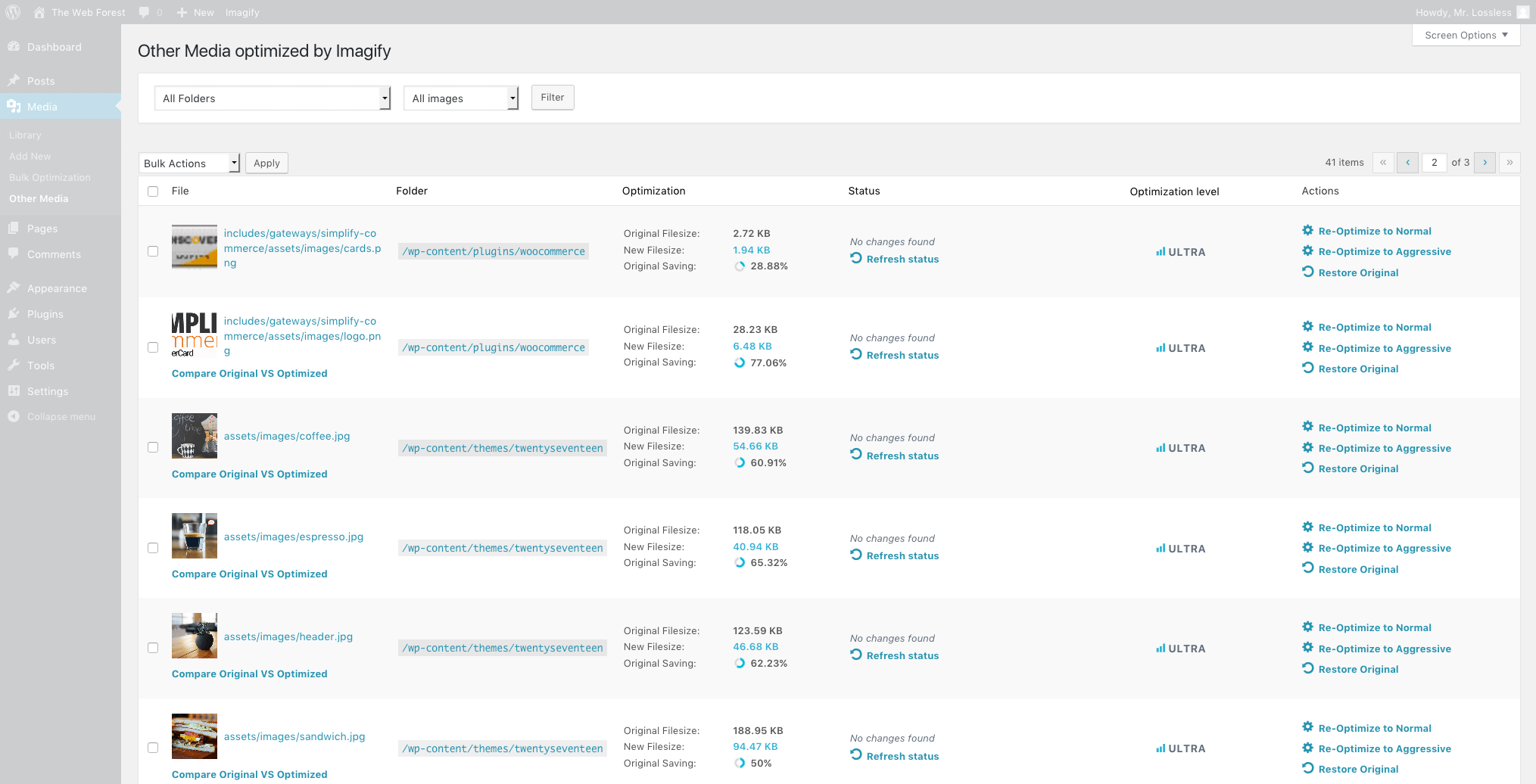
Absolutely. Imagify can be configured to automatically optimize images as they’re uploaded to your Media Library. This ensures every image is compressed using the best optimization settings the moment it appears on your site—saving you time and maximizing performance.
You can use GTMetrix and Google PageSpeed Insights to check the relevant suggestions. It is recommended to test the following metrics before and after the image optimization:
- Total Page Size (GTMetrix)
- Optimize images (GTMetrix)
- Serve images in next-gen formats (PageSpeed Insights)
- Efficiently encode images (PageSpeed Insights)
Imagify is an extremely powerful image optimizer: our advanced compressing algorithm will compress images, reduce their weight without sacrificing their quality.
Imagify is also super easy to use. Thanks to its intuitive design, you can easily get familiar with the interface and services without thinking about it.
And our dedicated customer support will help you fix any issue with your image optimizing process. Support is available via contact form, either on our website, or directly on your Imagify plugin settings page.
You can use Imagify on as many websites as you wish. Your image optimization quota to compress images will be shared evenly across all of the websites.
If you need more control over how your Imagify subscription is used, you should create sub-accounts to allocate a quota for each.
Imagify will deliver images in the original format for browsers that don’t support the next-gen WebP format automatically, so there is nothing further to be done.
Yes, Imagify is fully compatible with NextGEN Gallery, the most popular photo gallery plugin for WordPress. All Imagify optimization features related to NextGEN Gallery images are located and usable within the NextGEN Gallery menus and pages. So when you add images to your NextGEN galleries, you’ll be able to optimize them as well.
Imagify can optimize JPG, PNG, WebP, PDF files and GIFs (whether animated or not).
When you optimize JPG, PNG, and GIF files, Imagify will also create WebP and AVIF versions of your original images and all your thumbnail sizes (if you have this option enabled).
Don’t worry! Imagify comes with the Smart Compression Mode. It means that your images will be automatically optimized for the best possible compression ratio and quality. There’s nothing else to do – just enjoy your lighter and faster images.
The image optimization process is performed on our servers. Once done, Imagify returns the optimized image to your server. We do not edit images’ titles or any other information, so there is nothing further to be done on your end than to compress images. Your original images will be moved to a dedicated backup folder (just make sure to keep the Backup option active in Imagify settings).
With Imagify v2.2, the creation of WebP images is enabled by default. This means that when Imagify optimizes your images using its built-in WebP optimizer, a WebP version will automatically be generated, provided you have disabled the “Create AVIF versions of images” option in your plugin settings. Although the WebP files won’t be directly visible in your Media Library, you can verify their creation by checking for the “Next-Gen generated: yes” indication in the Imagify column of your Media Library.
Once your images have been optimized via the WP plugin, the compressed images stay on your end forever (even if you delete the Imagify account).
During the optimization process, compressed images sent via the API or WordPress plugin are stored for one hour on our server (they are already sent back to your site and stay there safely).
Using the online application, compressed images are stored for 24 hours (with a free account) and for unlimited time if you have a paid subscription.
Yes, as long as the Backup option is active in Imagify settings (it is active by default when you activate the WP Plugin).
Yes, your images will stay compressed even after removing Imagify (and even after you delete your Imagify account).
Do not waste your time resizing and optimizing your images in Photoshop. Imagify takes care of everything to compress your images!
EXIF data is not removed.
Absolutely. Most of the time, Imagify will still be able to optimize your images even if you have already compressed them with another tool.
No. Imagify automatically replaces the original images with an optimized image. The backup option allows you to keep the original images and restore them with one click.
Yes. By activating the backup option in the plugin, you can re-optimize each image to lossless compression with a single click.
When the plugin is disabled, your existing images remain optimized. Backups of the original images are still available if you have enabled the images backup option.
The plugin can be used on all hosts including “managed hosting” providers like WP Engine.
Yes, Imagify is 100% compatible with multi-site.
It is possible to use the Imagify plugin on WordPress.com if you have a Business account.
Yes, the Imagify team offers full email support for image optimization questions. You can contact us via https://imagify.io/contact/.
Our support is currently available Monday-Friday 8AM-10PM CET. We answer every email so you can expect the answer from us within 24h max (unless during the weekends).
Yes, and no credit card is required.
No. However, you get 20MB of quota per month for free to optimize your images (around 200 images).
You can report any security bugs found in the source code of the site-reviews plugin through the Patchstack Vulnerability Disclosure Program. The Patchstack team will assist you with verification, CVE assignment and take care of notifying the developers of this plugin.
Changelog
2.3.4
- Fix: Optimization no longer stops when a next-gen destination path is unavailable.
- Fix: The “Settings saved” notice is back on multisite when Imagify is network-activated.
- Fix: Failing to reach the MCP OAuth discovery documents is no longer reported as a critical issue in Site Health.
- Enhancement: Updated the WP Rocket banner copy on the bulk optimization page.
2.3.3
- New feature: MCP media abilities now accept a filename or media URL, not just an attachment ID.
- Enhancement: Respect WordPress 7.1’s resize opt-out on client-side uploads to avoid double scaling.
- Fix: Thumbnails from WordPress 7.1 client-side uploads are now optimized instead of skipped.
- Fix: Companion files recorded by WordPress 7.1 are kept when regenerating or restoring a media.
- Fix: The Media Library rating banner is readable again.
2.3.2
- New feature: Add a Missing Next-Gen filter to the Media Library.
- New feature: Add a manual stop button for bulk optimization.
- Enhancement: Prioritize newly uploaded and manually optimized images in bulk jobs.
- Enhancement: Chunk large database queries to avoid timeouts on restrictive hosts.
- Fix: The Next-Gen generation progress bar is visible again.
- Fix: The Next-Gen progress bar no longer shows a negative count.
- Fix: Next-Gen files are generated when the API reports an image as already compressed.
- Fix: Scaled uploads are no longer skipped by the bulk backup check.
- Fix: Improve WP Rocket CDN detection for CDN-hosted images.
- Fix: Restore correct capability handling for the Imagify network admin menu.
- Fix: Updated WP Mixpanel library to fix some loading issues that could surfaced.
2.3.1
- New feature: Add OAuth 2.1 + PKCE authentication for MCP clients such as Claude Desktop.
- New feature: Expose three new MCP abilities for AI agents interacting with Imagify.
- Enhancement: Add a documentation link to the out-of-quota popup covering all ways to keep optimizing.
- Enhancement: Require confirmation before MCP abilities consume optimization credits.
- Enhancement: Add a filter to exclude specific media from bulk optimization.
- Enhancement: Add a filter to customize supported mime types.
- Enhancement: Add the imagify_site_root_url filter, allowing multisites with domain mapping to declare the URL used to serve each subsite.
- Bugfix: Fix indefinite spinner and stuck progress in Generate Missing Next-Gen Images.
- Bugfix: Fix valid API key flagged as invalid when validation request is interrupted.
- Bugfix: Fix wrong orientation of Next-Gen images generated from EXIF-rotated backups.
- Bugfix: Fix layout shift and scrollbar inconsistency in the upgrade modal.
- Bugfix: Fix lightbox display issue caused by passing WordPress attributes to the picture tag.
- Bugfix: Images are no longer reported as having a next-gen version when none was generated, because the WebP or AVIF file would have been heavier than the optimized image.
2.3.0
- New feature: Added support for the Model Context Protocol (MCP), enabling compatible AI assistants to optimize images and manage Imagify through natural language.
- Enhancement: Improved validation to ensure only supported image files can be optimized through MCP.
- Fix: Improved error handling when requesting the status of media that no longer exists
2.2.9
- Enhancement: Add a new WP-CLI command to restore images in bulk.
- Enhancement: Add a one-click Reset Internal State tool to the troubleshooting page.
- Bugfix: Restore Imagify controls compatibility with NextGEN Gallery v4.x.
- Bugfix: Restore button icon alignment broken by WordPress 7.0.
- Bugfix: Fix the generate missing WebP button responsiveness.
- Bugfix: Prevent duplicate htaccess notices and fix undefined variable warnings.
- Bugfix: Fix incorrect flag passed to filter_input in bulk stats callback.
- Bugfix: Fix a fatal PHP error when optimizing a freshly uploaded NextGEN Gallery image with no metadata yet populated.
- Bugfix: Fix a fatal ArgumentCountError crashing the
wp imagify generate-missing-nextgenWP-CLI command.
2.2.8
- Bugfix: Fix jQuery deprecation notices
- Bugfix: Fix PHP deprecation notices
- Bugfix: Fix the _load_textdomain_just_in_time PHP notice
- Enhancement: Make sure to remove the transients when uninstalling Imagify
- Enhancement: Fix UI glitches
2.2.7
- Enhancement: improve code to follow correctly various WordPress coding standards rules
- Enhancement: Add a new filter
imagify_hide_plugin_familyto hide the Our Plugins section on the settings page
2.2.6
- Bugfix: Fix warning related to translation files being loaded too early, improving plugin stability during image optimization.
- 3rd-party library: Update bundled Action Scheduler to v3.9.2.
2.2.5
- Enhancement: Optimize SQL queries inside the plugin to calculate necessary data faster and improve image optimization at scale.
- Enhancement: Improve the design of banners displayed within the image optimizer plugin interface.
- Enhancement: Correct the upgrade link to ensure smoother navigation within the image optimization flow.
2.2.4
- Enhancement: Disable by default the calculation of media elements used for filters in the Media Library view to speed up image optimization workflows.
- Enhancement: Remove unnecessary API calls on each page load to enhance image optimizer performance.
- Enhancement: Update banner UI and remove an extra checkout step, streamlining the optimization setup.
- 3rd-party compatibility: Fix display issue with unstyled banners in the Gravity Forms plugin view, improving integration during image optimization tasks.
2.2.3.2
- Enhancement: Optimize and cache the modal attachment counter database query for better performance to optimize images in bulk.
2.2.3.1
- Enhancement: Reduce the number of requests sent to Imagify servers during large-scale image optimization operations.
2.2.3
- Enhancement: Cache license API calls to reduce load and improve how users optimize images.
- 3rd-party compatibility: Update template_redirect priority to improve compatibility with WP Rocket’s LazyLoad and optimized image delivery.
- Bugfix: Fix Uncaught TypeError: strpos() expects parameter 1 to be string fatal error.
- Enhancement: UI improvements across the image optimizer interface.
- Enhancement: Improve plugin architecture to support more efficient image optimization routines.
2.2.2
- Enhancement: Let users choose which Next-Gen image formats (WebP, AVIF) should be generated in the UI for more flexible image optimization.
- Enhancement: Add safeguards for image size values that are not strings to improve optimizer stability.
- Enhancement: Improve detection of file types for better image optimization compatibility.
- Bugfix: Fix fatal error related to “WP_List_Table”.
2.2.1
- Enhancement: Prevent unnecessary .htaccess updates when switching between AVIF and WebP generation, improving image optimization stability.
- Enhancement: Display the smallest image version in the Media Library image details section for easier review of optimized image output.
- Enhancement: Correctly delete all Next-Gen versions when restoring the original image.
- Enhancement: Bump minimum supported PHP version to 7.3.
- Bugfix: Fix progress bar issue when disabling AVIF generation.
- Bugfix: Fix incorrect image count in the Bulk Optimization section.
- Bugfix: Correct display bug in original vs. optimized image comparison.
- 3rd-party compatibility: Update compatibility with NextGen Gallery for AVIF support.
- 3rd-party compatibility: Improve compatibility of AVIF images with AMP, Regenerate Thumbnails, and WooCommerce for consistent image optimization results.
2.2.0.1
- Bugfix: Preserve “Display images in WebP format” setting when updating the plugin to maintain optimized image delivery.
2.2
- New Feature: Add AVIF generation support to provide next-gen image formats for advanced image optimization.
" width="120" height="120">
Available Versions
| Version | Download | Type |
|---|---|---|
| 2.3.4 | Download | Stable |
| 2.3.3 | Download | Stable |
| 2.3.2 | Download | Stable |
| 2.3.1 | Download | Stable |
| 2.3.0 | Download | Stable |
| 2.2.9 | Download | Stable |
| 2.2.8 | Download | Stable |
| 2.2.7 | Download | Stable |
| 2.2.6 | Download | Stable |
| 2.2.5 | Download | Stable |
| 2.2.4 | Download | Stable |
| 2.2.3.2 | Download | Stable |
| 2.2.3.1 | Download | Stable |
| 2.2.3 | Download | Stable |
| 2.2.2 | Download | Stable |
| 2.2.1 | Download | Stable |
| 2.2.0.1 | Download | Stable |
| 2.2 | Download | Stable |
| 2.1.3.1 | Download | Stable |
| 2.1.3 | Download | Stable |
| 2.1.2 | Download | Stable |
| 2.1.1 | Download | Stable |
| 2.1 | Download | Stable |
| 2.0 | Download | Stable |
| 1.10 | Download | Stable |
| 1.9.14 | Download | Stable |
| 1.9.13 | Download | Stable |
| 1.9.12 | Download | Stable |
| 1.9.11 | Download | Stable |
| 1.9.10 | Download | Stable |
| 1.9.9 | Download | Stable |
| 1.9.8.1 | Download | Stable |
| 1.9.8 | Download | Stable |
| 1.9.7 | Download | Stable |
| 1.9.6 | Download | Stable |
| 1.9.5 | Download | Stable |
| 1.9.4 | Download | Stable |
| 1.9.3.1 | Download | Stable |
| 1.9.3 | Download | Stable |
| 1.9.2 | Download | Stable |
| 1.9.1 | Download | Stable |
| 1.9 | Download | Stable |
| 1.8.4.1 | Download | Stable |
| 1.8.4 | Download | Stable |
| 1.8.3 | Download | Stable |
| 1.8.2 | Download | Stable |
| 1.8.1.1 | Download | Stable |
| 1.8.1 | Download | Stable |
| 1.8.0.1 | Download | Stable |
| 1.8 | Download | Stable |
| 1.7.1.3 | Download | Stable |
| 1.7.1.2 | Download | Stable |
| 1.7.1.1 | Download | Stable |
| 1.7.1 | Download | Stable |
| 1.7 | Download | Stable |
| 1.6.14.2 | Download | Stable |
| 1.6.14.1 | Download | Stable |
| 1.6.14 | Download | Stable |
| 1.6.13.1 | Download | Stable |
| 1.6.13 | Download | Stable |
| 1.6.12 | Download | Stable |
| 1.6.11 | Download | Stable |
| 1.6.10 | Download | Stable |
| 1.6.9.1 | Download | Stable |
| 1.6.9 | Download | Stable |
| 1.6.8 | Download | Stable |
| 1.6.7.1 | Download | Stable |
| 1.6.7 | Download | Stable |
| 1.6.6 | Download | Stable |
| 1.6.5 | Download | Stable |
| 1.6.4 | Download | Stable |
| 1.6.3 | Download | Stable |
| 1.6.2 | Download | Stable |
| 1.6.1 | Download | Stable |
| 1.6 | Download | Stable |
| 1.5.10 | Download | Stable |
| 1.5.9 | Download | Stable |
| 1.5.8 | Download | Stable |
| 1.5.7 | Download | Stable |
| 1.5.6 | Download | Stable |
| 1.5.5 | Download | Stable |
| 1.5.4 | Download | Stable |
| 1.5.3 | Download | Stable |
| 1.5.2.1 | Download | Stable |
| 1.5.2 | Download | Stable |
| 1.5.1 | Download | Stable |
| 1.5 | Download | Stable |
| 1.4.7 | Download | Stable |
| 1.4.6 | Download | Stable |
| 1.4.5 | Download | Stable |
| 1.4.4 | Download | Stable |
| 1.4.3 | Download | Stable |
| 1.4.2 | Download | Stable |
| 1.4.1 | Download | Stable |
| 1.4 | Download | Stable |
| 1.3.6.1 | Download | Stable |
| 1.3.6 | Download | Stable |
| 1.3.5.2 | Download | Stable |
| 1.3.5.1 | Download | Stable |
| 1.3.5 | Download | Stable |
| 1.3.4 | Download | Stable |
| 1.3.3 | Download | Stable |
| Development | Download | Trunk |
