
Image Optimizer – Compress Images and Convert to WebP or AVIF
Active Installs
1,000,000+
Last Updated
September 22, 2026
First Released
January 8, 2024
Download History (Last one month)
Contributors
Image Optimization (formally known as Image Optimizer) is an easy-to-use WordPress plugin that reduces image size through various compression and resizing techniques – all of which preserve the highest possible image quality. Image Optimization supports many popular formats, including JPEG, PNG, WebP, AVIF, and GIF.
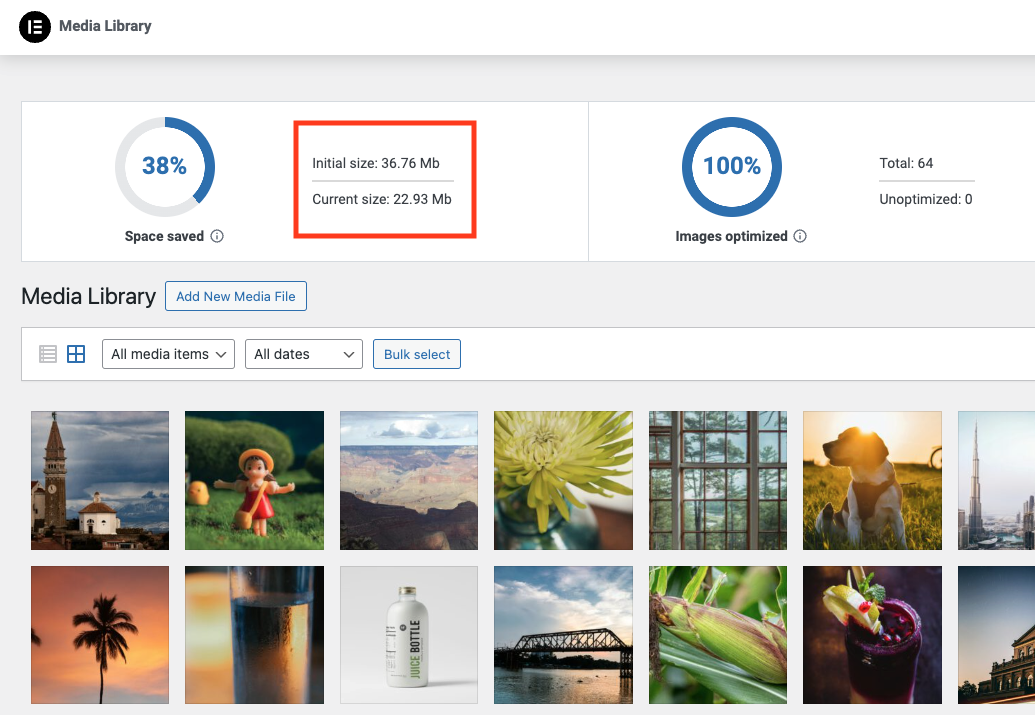
Reduced file sizes for boosted performance
Image Optimizer ensures faster loading times, enhanced user experience, and overall boosted website performance. It reduces the size of your website’s images, improving Core Web Vitals and search engine rankings. With Image Optimizer’s exceptional capabilities and unique algorithms, you can fine tune images and reduce their file sizes while retaining quality with lossless or lossy compression.
Features
- Image formats supported include JPEG, PNG, WebP, AVIF and GIF.
- Works in the background: The only plugin in the category that optimizes your images in the background, without you having to stay on the page during optimization.
- Resize large images: The user can set a maximum pixel width, after which images will automatically be resized. (default value set to 1920px)
- 2 compression levels: Lossless – highest quality with minimal compression; Lossy – maximum compression with somewhat reduced quality.
- Optimize on upload: Automatically optimizes images when you upload them.
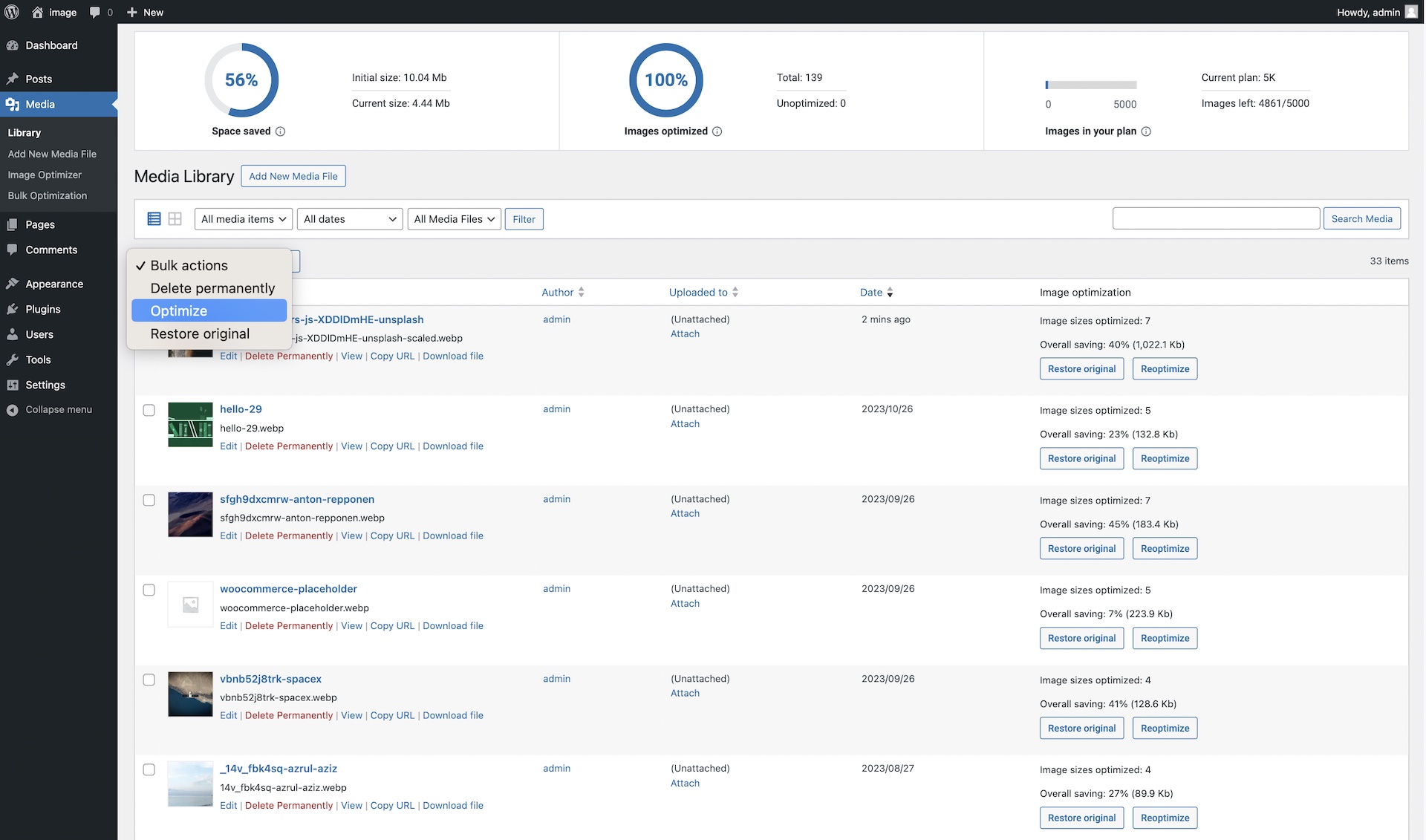
- Bulk or individual optimization: Flexible image optimization options, whether it’s on-demand scaling and compression, or bulk optimization for your entire image library.
- EXIF Metadata: Select whether to clear image metadata to reduce size even further without impacting image quality.
- Backup original images: Ability to delete backups permanently to save space. (We recommend backing up your website beforehand.)
- Restore original images (all sizes) for selected media files if needed.
- Convert to WebP and AVIF: Get efficient and faster-loading formats with WebP and AVIF for even better web performance.
- Image thumbnails: Resize all image sizes by default. Allow the user to choose specific image sizes based on WordPress-registered thumbnail sizes.
Bulk or single image optimization
Image Optimizer by Elementor lets you optimize all images in your library either one at a time, or in a batch according to your preferences and settings. Easily configure the plugin to scale or compress your images on-demand, or automatically have them triggered as they are being uploaded. Or, if you have a large number of images already uploaded, the bulk optimization feature allows you to resize and/or compress your entire library of existing images in just a few clicks.
Two Compression Levels
With Image Optimizer’s advanced algorithms, you can compress images and reduce their file size at the level that makes the most sense for you. We offer 2 types of compression for processing images giving you the perfect balance of compression and quality.
Lossless Compression: Lossless compression reduces image file sizes without sacrificing or diminishing the quality of your images. This type of compression reduces file sizes by removing unused or unnecessary data so that no image details are lost along the way. Hence, you are able to reduce the file size and still maintain the quality of your image.
Lossy Compression: Lossy compression performs maximum compression resulting in lightweight images and smaller file sizes. It reduces image size by removing image data that is generally invisible to the human eye and minimizes any compromise in image quality.
Convert to WebP and AVIF: Convert images to the slimmer WebP or AVIF formats for even better optimization with a 25-30% savings over JPEG and PNG. Most browsers support WebP, however if they don’t, you can have fallback versions of the image available in the same format as the original image.
By tailoring compression to the level you need, your visitors will enjoy faster load times, improved responsiveness, and a seamless browsing experience. Our approach also enables your website to rank higher in search results. Since a search engine’s ranking is heavily influenced by speed, user experience, and Core Web Vitals, Image Optimizer is an invaluable tool for any website, especially one that’s abundant with images.
Get started today
For more information about Image Optimizer, visit our official website or Try It Now.
If you have any questions or need support, feel free to contact us or visit our help center.
This plugin requires a connection to an active Elementor account in order to identify the user and provide the purchased service. This connection is triggered manually by the user via the plugin’s settings panel.
This plugin uses a 3rd party service operated by Elementor, which accepts a standard image in JPG, PNG, GIF or WEBP format and returns a web optimized image based on the selected settings. This flow is triggered by the user or automatically (based on the selected plugin settings) on a compatible image upload or by manually initiating the optimization process.
Related Plugins
Email Deliverability: Effortlessly manage transactional emails. High deliverability, logs and statistics, and no SMTP plugins needed.
Get started with a few easy steps
- Install using the WordPress built-in Plugin installer, or Extract the zip file and drop the contents in the wp-content/plugins/ directory of your WordPress installation.
- Activate the plugin through the ‘Plugins’ menu in WordPress.
- Go to the Image Optimization tab within the Elementor menu.
- Press the ‘Connect’ button and follow the instructions.

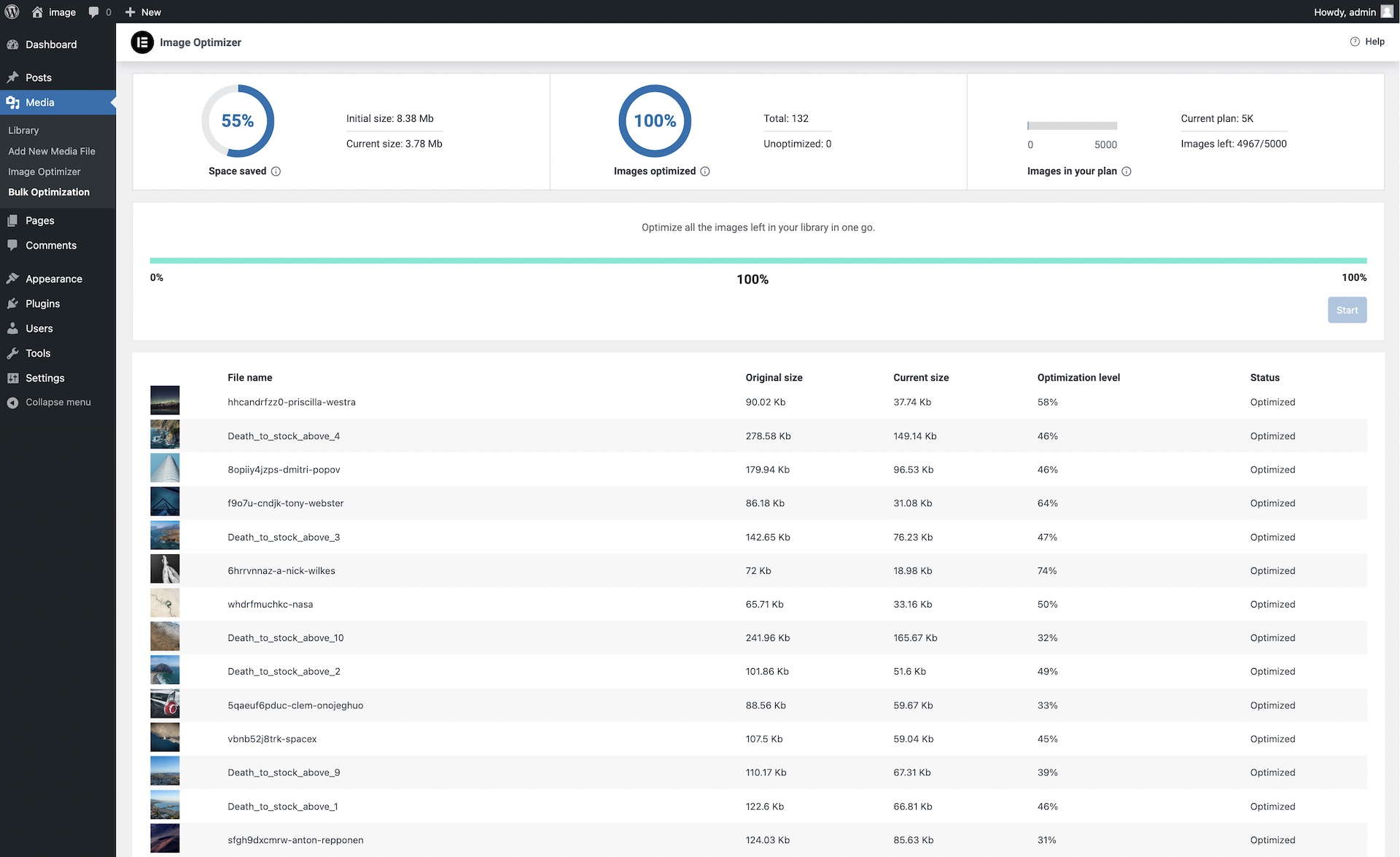
Absolutely. Elementor’s Image Optimization is a stand-alone WordPress plugin that can be used to optimize images for any or all of your WordPress websites.
Image optimization can significantly improve your website’s loading time, which is crucial for user experience and SEO. It reduces the size of your images without compromising their quality, leading to faster page load times and better performance scores.
This plugin takes a modern approach, designed to handle all the “heavy lifting” of converting and compressing images on a dedicated server, so your own server won’t suffer from downtime or the need to keep the tab open. It offers on-the-fly optimization, WebP and AVIF conversion, and other features tailored to WordPress users’ needs.
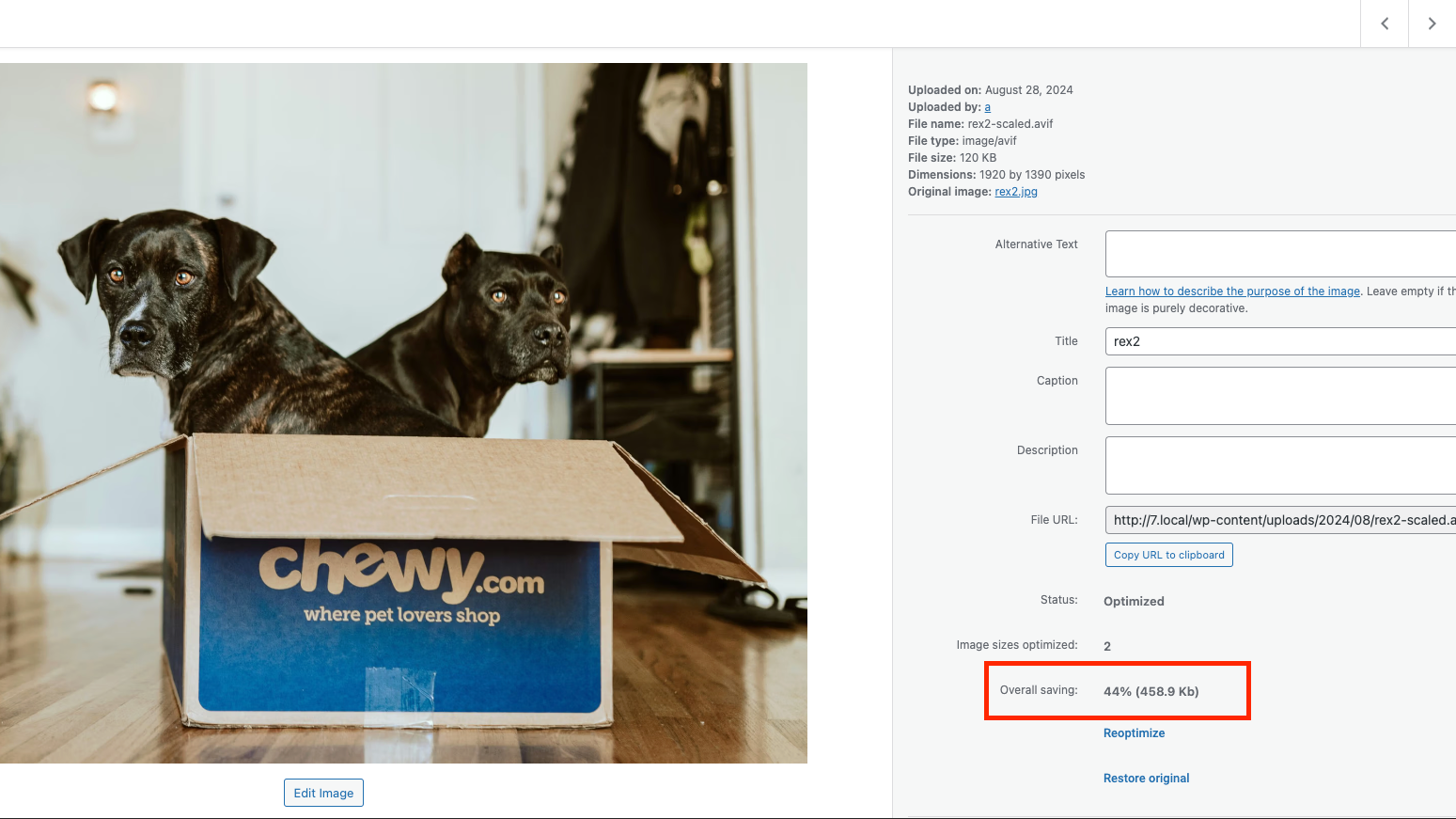
No, the Image Optimization plugin will save both the original and the compressed versions of your images. You can always restore the original image if needed.
WebP and AVIF are modern image formats that provide superior lossless and lossy compression. They can significantly reduce image file sizez, leading to faster website load times. Most web browsers today support these format, but if they don’t, the original backup will be used.
Absolutely! You can either compress images in bulk, compress specific image files individually, or automatically compress upon image upload.
EXIF data can be removed if you choose to in the settings page. Best practice for better image optimization would be to remove EXIF metadata.
Yes. By changing the requested level of optimization in the settings page, you can re-optimize all images at once. In addition, at any point in time, you can reoptimize any of your images individually, whether after restoring the original, making changes to the optimization settings, or for any other reason.
Yes, the Elementor team offers full support for image optimization questions. You can contact us via https://elementor.com/contact/
You can report security bugs through the Patchstack Vulnerability Disclosure Program. The Patchstack team help validate, triage and handle any security vulnerabilities. Report a security vulnerability.
Changelog
1.7.7 2026-09-16
- Tweak: Security enhancements for REST access control
1.7.6 2026-06-30
- Tweak: Renamed plugin to Image Optimization
- Tweak: Improved Elementor One migration flow
- Tweak: Updated Elementor packages
1.7.5 2026-06-02
- Tweak: Security enhancements for the restore functionality
- Fix: Bulk optimization shifts the Media screen layout
- Fix: Fix incorrect error handling in meta boxes
1.7.4 2026-03-31
- Tweak: Improved WPML support
- Fix: Optimize All button missing for Elementor One users
- Fix: Fix incorrect optimization status update
1.7.3 2026-02-17
- Tweak: Enabled display of WordPress admin notices for better visibility
- Fix: Resolved issues related to feature usage tracking
- Fix: Resolved a visual glitch on the Image Optimizer Stats in the Media Library screen
1.7.2 2026-01-29
- Tweak: Updated WordPress and PHP version compatibility for the testing environment
- Tweak: Improved bulk optimization logic for tracking remaining images
- Tweak: Security enhancements for access control
- Fix: Resolved missing style loading warnings in reviews
1.7.1 2026-01-20
Fix: Fatal error in edge cases when using old connect
1.7.0 2026-01-20
Tweak: Moved the plugin location under a unified Elementor menu
Tweak: Redesigned the plugin settings interface for a unified look and feel
Tweak: Added support for “Elementor One”
Fix: Corrected the direct upgrade link to include the specific subscription ID
1.6.9 2025-11-04
Tweak: Improved handling of stuck in-progress optimization statuses
Fix: Corrected bulk optimization flow to include missed image sizes
Fix: Resolved toast review notification issue
1.6.8 2025-09-10
New: Reviews & CSAT flow to gather user feedback
New: Added 80% usage reached notification
Tweak: Big galleries optimization for faster bulk image handling
Fix: Resolved image details issue appearing on some sites
1.6.7 2025-05-27
New: Added a Walk through video
Tweak: Added Bulk optimize shortcut from media library
Tweak: Harden connect security
Fix: Delayed translation loading
1.6.6 – 2025-04-10
Tweak: Added retry mechanism to improve optimization process
Tweak: Stop all operations before deactivation to avoid unexpected issues
Tweak: Improve the file size optimization indication for all media files
Tweak: Added What’s new modal for new features
1.6.5 – 2025-02-03
- Fix: Moved Connect Modal to Image Optimizer settings pages
1.6.4 – 2025-02-03
- Tweak: Connect flow improvements
- Fix: Cancel Bulk optimization button not working
- Fix: Connect refresh token stuck in edge cases
1.6.3 – 2024-12-19
- Fix: Blank settings panel on edge cases
1.6.2 – 2024-12-17
- New: Added Renewal notice for expired plans
- New: Added Upgrade notice for users with trial plan
1.6.1 – 2024-11-28
- Fix: RTL issue in certain scenarios
1.6.0 – 2024-11-19
- New: Added support for images up to 25Mb for eligible plans
- Tweak: Avoid creating past due actions
1.5.4 – 2024-10-01
- New: Added a notice to help users connect from dashboard
- Fix: Undefined property notice
- Fix: Improved support for caching plugins
1.5.3 – 2024-09-24
- New: Added an option to reset connect when invalid
- Tweak: Improved AVIF display support
- Fix: Invalid char in Plugin name header
1.5.2 – 2024-08-21
- New: Implemented a solution for site URL update
- Tweak: Added an fallback for AVIF dimensions calculation when coming from 3rd party solution
- Tweak: Added asynchronous size calculation for large image galleries
- Tweak: Updated plugin CTAs on the plugins page
- Fix: File extension issues
- Fix: Optimization button stuck on edge cases
- Fix: Stats calculation for the total/optimized count on edge cases
1.5.1 – 2024-07-29
- Fix: Optimized on upload not working in edge cases
1.5.0 – 2024-07-29
- New: Option to convert images to AVIF
- Fix: Overall Saving display
- Fix: Bulk optimization stats calculation for big galleries
1.4.1 – 2024-07-08
- Fix: API error message displayed when trying to reconnect
1.4.0 – 2024-06-26
- New: Implement to “One Step” connect & activate
- Tweak: New error message for JPEG/Lossless not converted to WebP
- Tweak: Description string of convert to webP
- Fix: Image not resizing when height and width are equal
- Fix: Pointer is displayed for non-admin users
- Fix: Overall savings for optimized images is not correct
1.3.0 – 2024-03-05
- Tweak: Updated reoptimization option when changing settings
- Tweak: Added RTL adjustments
- Fix: Optimization button status not updating
- Fix: Error while deactivating or switching Elementor account
1.2.1 – 2024-02-28
- Fix: Image optimization stats not loading
- Tweak: Added notice regarding extended bulk optimization not affecting user’s website
1.2.0 – 2024-02-19
- Tweak: Reduced status checks for better performance
- Tweak: Improved Elementor support by removing cached thumbnails
- Tweak: Added DB version check during activation to prevent requirement conflicts
- Fix: Optimization failed with numerous errors
- Fix: Bulk Optimization stopped with an Invalid WordPress image meta error
- Fix: Avoid optimizing too large image files as part of bulk optimization
- Fix: Added RTL support for plugin settings page
1.1.0 – 2024-02-06
- Tweak: Design for quota reached in top bar
- Tweak: Refresh bulk token if the current one is expired
- Tweak: Rename all plugin assets, namespace and text-domain to image-optimization
- Tweak: Replace hardcoded references in posts content when updating image type
- Tweak: Added file checksum validation before updating an image
- Tweak: Avoid overriding existing images with identical file names
- Fix: Columns are not distributed properly on bulk optimization screen
- Fix: Incorrect behavior when trying to optimize without enough credits
- Fix: File is missing Error incorrectly shown
- Fix: Clear local data on disconnect
- Fix: Optimization error with broken image
1.0.2 – 2024-01-16
- Tweak: Added tooltip to explain compression level in settings
- Tweak: Added failure notice when trying to activate the plugin without meeting requirements
- Fix: Usage progress bar filling incorrectly
1.0.1 – 2024-01-10
- Tweak: Quota reached user notification messaging
- Tweak: Add Bulk Optimize success message
- Tweak: Add progress percentage number below the bulk optimization progress bar
- Fix: Top bar “Try again” option with error doesn’t work
1.0.0 – 2024-01-08
- Initial release
" width="120" height="120">
Available Versions
| Version | Download | Type |
|---|---|---|
| 1.7.7 | Download | Stable |
| 1.7.6 | Download | Stable |
| 1.7.5 | Download | Stable |
| 1.7.4 | Download | Stable |
| 1.7.3 | Download | Stable |
| 1.7.2 | Download | Stable |
| 1.7.1 | Download | Stable |
| 1.7.0 | Download | Stable |
| 1.6.9 | Download | Stable |
| 1.6.8 | Download | Stable |
| 1.6.7 | Download | Stable |
| 1.6.6 | Download | Stable |
| 1.6.5 | Download | Stable |
| 1.6.4 | Download | Stable |
| 1.6.3 | Download | Stable |
| 1.6.2 | Download | Stable |
| 1.6.1 | Download | Stable |
| 1.6.0 | Download | Stable |
| 1.5.4 | Download | Stable |
| 1.5.3 | Download | Stable |
| 1.5.2 | Download | Stable |
| 1.5.1 | Download | Stable |
| 1.5.0 | Download | Stable |
| 1.4.1 | Download | Stable |
| 1.4.0 | Download | Stable |
| 1.3.0 | Download | Stable |
| 1.2.1 | Download | Stable |
| 1.2.0 | Download | Stable |
| 1.1.0 | Download | Stable |
| 1.0.2 | Download | Stable |
| 1.0.1 | Download | Stable |
| 1.0.0 | Download | Stable |
| Development | Download | Trunk |
