GSheetConnector for FluentForm
Active Installs
100+
Last Updated
May 21, 2026
First Released
September 27, 2025
Download History (Last one month)
Contributors
GSheetConnector for FluentForm is an addon plugin—a bridge between your WordPress based Fluent Form forms and Google Sheets.
When a visitor submits a Fluent Form on your website, their data is also sent to your connected Google Sheet.
📝 Fluent Form ➜ to ✍️ Google Sheets
Easily connect your Fluent Forms to Google Sheets without writing code. This plugin helps you avoid manual errors by guiding you through the setup of sheet names and column headers step-by-step.
⚡️ How to Use this Plugin
-
Step 1: In Google Sheets
➜ Log into your Google Account and open Google Sheets.
➜ Create a new Sheet and name it.
➜ Use or rename the default tab.
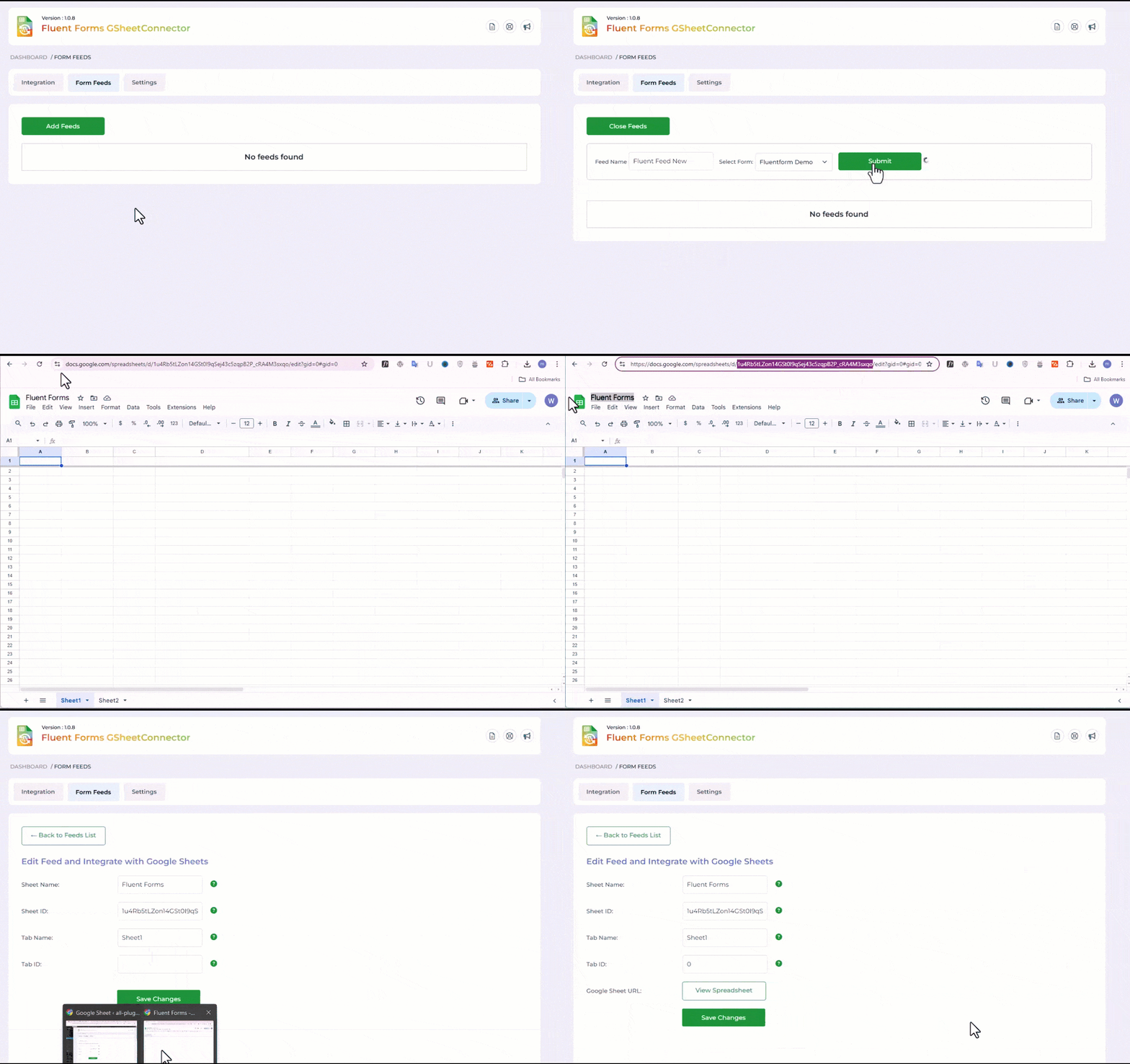
➜ Copy the Sheet Name, Sheet ID, Tab Name, and Tab ID (Refer to Screenshots) -
Step 2: In WordPress Admin
➜ Create or edit the Fluent Form you want to sync.
➜ Navigate to the “Google Sheets” tab.
➜ Paste the copied Sheet and Tab names and click “Save”. -
Step 3: Set up Google Sheet Columns
➜ In Row 1 of your Google Sheet, use “date” as the first column.
➜ Use Fluent Form field names (submission tags) as headers for the remaining columns.
Important Notes
➜ Ensure names and spellings match exactly between your Sheet and form settings. Mismatches may result in sync failure.
External services
This plugin connects Fluent Forms with Google Sheets using Google APIs.
- Google APIs (Sheets & Drive)
– Purpose: Send form submissions to Google Sheets.
– Data: Selected form submission data is sent. Tokens (and sheet details in Pro) are stored only in the site’s own database.
– Scopes: spreadsheets, drive.file
– Terms: https://policies.google.com/terms
– Privacy: https://policies.google.com/privacy
- Google OAuth 2.0
– Purpose: Secure authentication with Google.
– Data: Authentication requests and tokens (stored locally).
– Terms: https://developers.google.com/terms
– Privacy: https://policies.google.com/privacy
- GSheetConnector Auth Service
– Purpose: Facilitate Google OAuth connection.
– Data: Only site URL and plugin ID during authentication. No form data stored.
– Terms: https://www.gsheetconnector.com/terms-condition
– Privacy: https://www.gsheetconnector.com/privacy-policy
- Upload
gsheetsconnector-for-fluentformto/wp-content/plugins/, or install via Plugins > Add New > Search. - Activate the plugin via the ‘Plugins’ screen.
- Go to
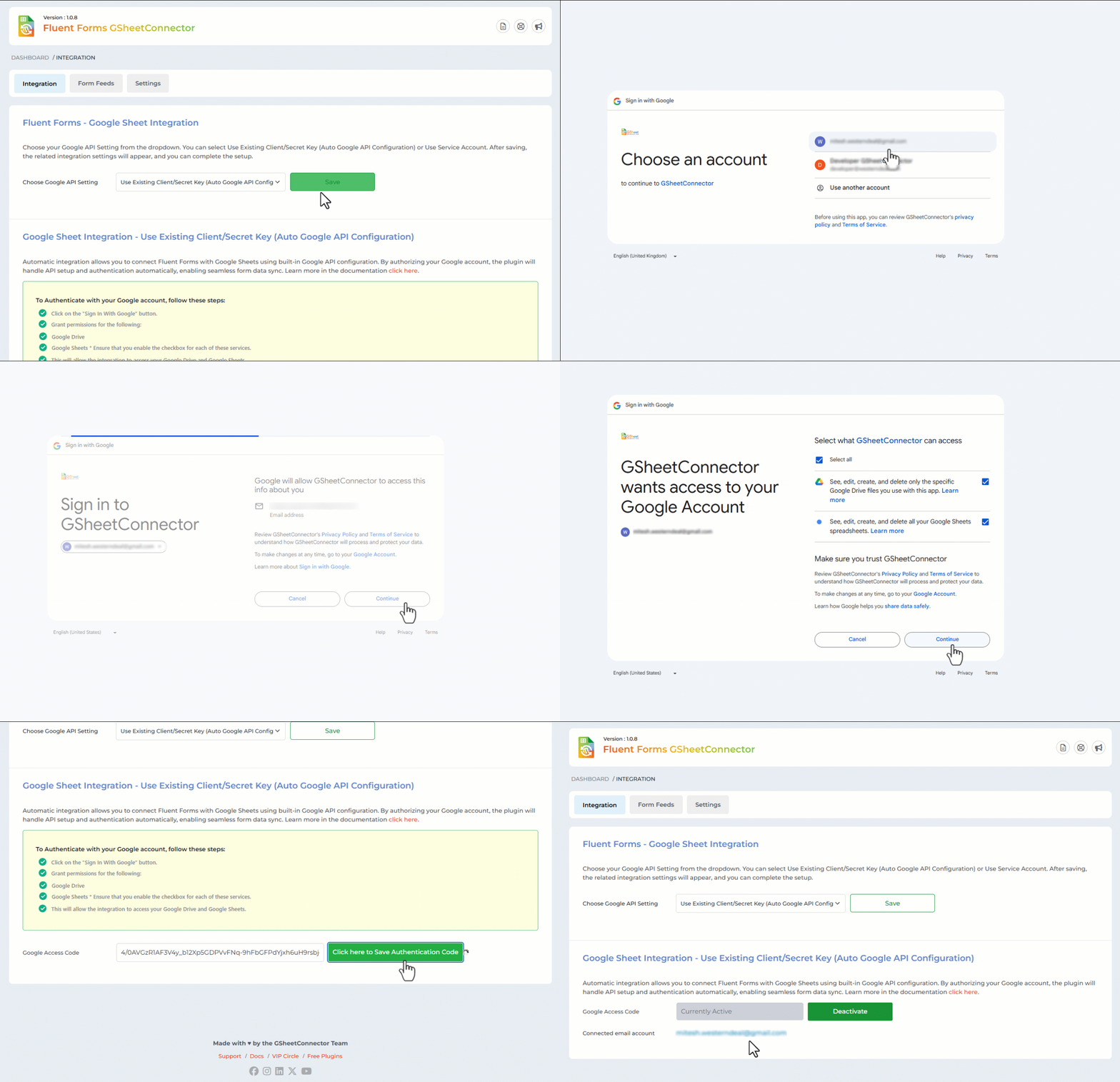
Fluent Form > Google Sheetsand click “Get Code” to authorize and connect to Google Sheets. - Paste the Access Code and save.
Screenshot Gallery


If it spins indefinitely and doesn’t send, check:
- Access Code is correct (see debug log)
- Sheet or Tab name spelling is correct
- Column headers follow the naming rules (use lowercase letters, no spaces, special characters, etc.)
- Go to
Fluent Form > Google Sheets, click “Get Code” - Allow access via your Google account
- Copy the generated code and paste it back into the plugin settings.
Changelog
1.1.0 (03-03-2026)
Improved: Major UI redesign for better usability and cleaner interface.
Added: Custom database table for storing feed settings.
Added: Migration process from post meta to the custom database table.
1.0.11 (22-11-2025)
Fixed: Responsive CSS.
1.0.10 (03-11-2025)
Fixed: Resolved an issue where entry data was missing in some cases.
1.0.9 (09-10-2025)
Updated: Lib folder compatibility changes for PHP 7.4
Added: Debug log in System Info.
Added: Extension tab.
Removed: Service Account.
Fixed: Warnings and errors reported by Plugin Check.
1.0.8 (27-09-2025)
Added: Add Freemius Integration.
1.0.7
Fixed: Removed heredoc in Batch.php to comply with coding standards.
1.0.6
Fixed: Update the library files to the latest google-api-php-client v2.18.3 for PHP 8.3.
1.0.5
Fixed: update library files to resolve compatibility issue.
1.0.4
Fixed: Warnings and errors reported by Plugin Check.
1.0
- First public release
- Integrates Fluent Form with Google Sheets
" width="120" height="120">
