
Google Authenticator
Active Installs
20,000+
Last Updated
April 7, 2026
First Released
May 16, 2011
Download History (Last one month)
Contributors
The Google Authenticator plugin for WordPress gives you two-factor authentication using the Google Authenticator app for Android/iPhone/Blackberry.
If you are security aware, you may already have the Google Authenticator app installed on your smartphone, using it for two-factor authentication on Gmail/Dropbox/Lastpass/Amazon etc.
The two-factor authentication requirement can be enabled on a per-user basis. You could enable it for your administrator account, but log in as usual with less privileged accounts.
If You need to maintain your blog using an Android/iPhone app, or any other software using the XMLRPC interface, you can enable the App password feature in this plugin,
but please note that enabling the App password feature will make your blog less secure.
Credits
Thanks to:
Oleksiy for a bugfix in multisite.
Paweł Nowacki for the Polish translation
Fabio Zumbi for the Portuguese translation
Guido Schalkx for the Dutch translation.
Henrik.Schack for writing/maintaining versions 0.20 through 0.48
Tobias Bäthge for his code rewrite and German translation.
Pascal de Bruijn for his “relaxed mode” idea.
Daniel Werl for his usability tips.
Dion Hulse for his bugfixes.
Aldo Latino for his Italian translation.
Kaijia Feng for his Simplified Chinese translation.
Alex Concha for his security tips.
Jerome Etienne for his jquery-qrcode plugin.
Sébastien Prunier for his Spanish and French translation.
- Make sure your webhost is capable of providing accurate time information for PHP/WordPress, ie. make sure a NTP daemon is running on the server.
- Install and activate the plugin.
- Enter a description on the Users -> Profile and Personal options page, in the Google Authenticator section.
- Scan the generated QR code with your phone, or enter the secret manually, remember to pick the time based one.
You may also want to write down the secret on a piece of paper and store it in a safe place. - Remember to hit the Update profile button at the bottom of the page before leaving the Personal options page.
- That’s it, your WordPress blog is now a little more secure.
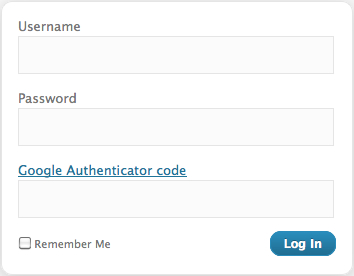
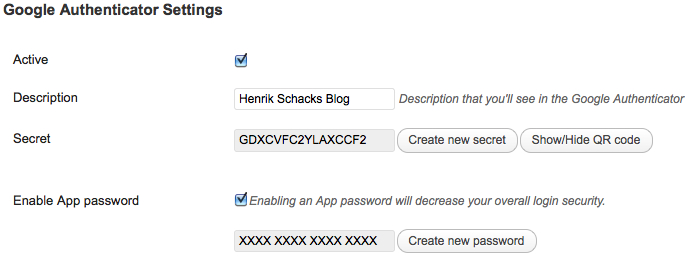
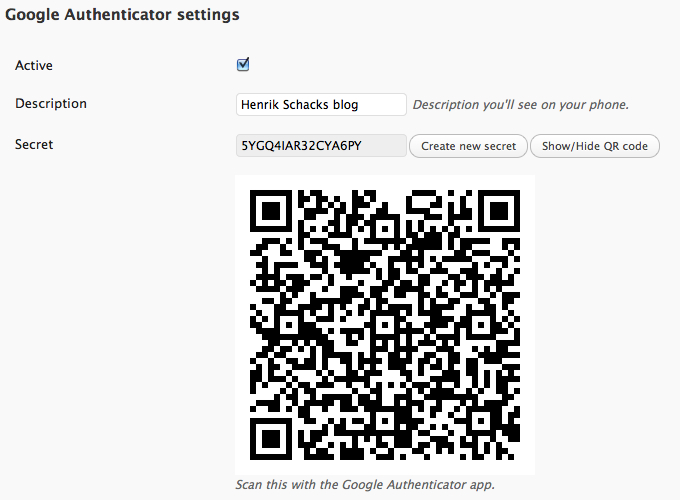
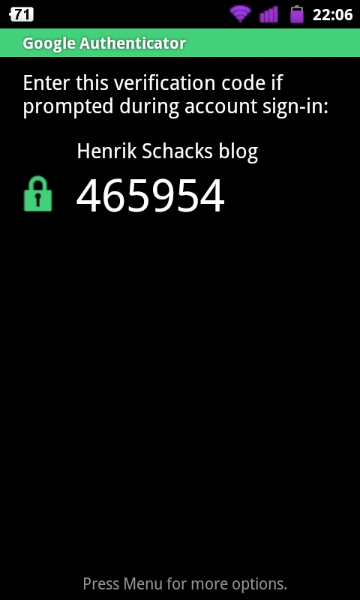

Yes, you can enable the App password feature to make that possible, but notice that the XMLRPC interface isn’t protected by two-factor authentication, only a long password.
No, you’ll have to delete the existing account from the Google Authenticator app on your smartphone before you scan the new QR code, that is unless you change the description as well.
The Google Authenticator verification codes are time based, so it’s crucial that the clock in your phone is accurate and in sync with the clock on the server where your WordPress installation is hosted.
If you have an Android phone, you can use an app like ClockSync to set your clock in case your Cell provider doesn’t provide accurate time information
Another option is to enable “relaxed mode” in the settings for the plugin, this will enable more valid codes by allowing up to a 4 min. timedrift in each direction.
Yes, each user has his own Google Authenticator settings.
If you have SSH or FTP access to your webhosting account, you can manually delete the plugin from your WordPress installation,
just delete the wp-content/plugins/google-authenticator directory, and you’ll be able to login using username/password again.
Yes, there is a webbased version here : https://gauth.apps.gbraad.nl/
Github project here : https://github.com/gbraad/gauth
No, but if you’re using an Android smartphone you can replace the Google Authenticator app with Authenticator Plus.
It’s a really nice app that can import your existing settings, sync between devices and backup/restore using your sd-card.
It’s not a free app, but it’s well worth the money.
Yes, the Man-in-the-middle attack/replay detection code isn’t compatible with the test/setup mode in the “Stop spammer registration plugin”,
please remember to remove the “Check credentials on all login attempts” checkmark before installing my plugin.
Changelog
0.55
- Improved PHP compatibility for PHP 7.4 through 8.5.
- Fixed deprecated and strict runtime issues in plugin code.
- Improved compatibility and safety of Base32 handling.
0.54
- Fixed a bug in multisite.
0.53
- Add a Polish translation
0.52
- Add a Dutch translation
- Add a Portuguese translation
0.51
- Fix a regression that broke app passwords
0.50
- New maintainer ivankk
- Conditionally include base32 class
0.49
- More streamlined sign-up flow for users, configuration screen for admins.
- Multisite support to either enable 2fa by role on a site, and/or on a network.
- Added filter google_authenticator_needs_setup to determine if user needs to enable 2fa.
- Added two part login process that can ask for 2fa code on a second login screen.
- Fixed a security bug that continued check_otp even if authenticate had already returned an error.
0.48
- Security fix / compatability with WordPress 4.5
0.47
- Google chart API replaced with jquery-qrcode
- QR codes now contain a heading saying WordPress (Feature request by Flemming Mahler)
- Danish translation & updated .pot file.
- Plugin now logs login attempts recognized as Man-in-the-middle attacks.
0.46
- Man-in-the-middle attack protection added.
- Show warning before displaying the QR code.
- FAQ updated.
0.45
- Spaces in the description field should now work on iPhones.
- Some depricated function calls replaced.
- Code inputfield easier to use for .jp users now.
- Sanitize description field input.
- App password hash function switched to one that doesn’t have rainbow tables available.
- PHP notices occurring during app password login removed.
0.44
- Installation/FAQ section updated.
- Simplified Chinese translation by Kaijia Feng added.
- Tabindex on loginpage removed, no longer needed, was used by older WordPress installations.
- Inputfield renamed to “googleotp”.
- Defaultdescription changed to “WordPressBlog” to avoid trouble for iPhone users.
- Compatibility with Ryan Hellyer’s plugin http://geek.ryanhellyer.net/products/deactivate-google-authenticator/
- Must enter all 6 code digits.
0.43
- It’s now possible for an admin to hide the Google Authenticaator settings on a per-user basis. (Feature request by : Skate-O)
0.42
- Autocomplete disabled on code input field. (Feature request by : hiphopsmurf)
0.41
- Italian translation by Aldo Latino added.
0.40
- Bugfix, typo corrected and PHP notices removed. Thanks to Dion Hulse for his patch.
0.39
- Bugfix, Description was not saved to WordPress database when updating profile. Thanks to xxdesmus for noticing this.
0.38
- Usability fix, input field for codes changed from password to text type.
0.37
- The plugin now supports “relaxed mode” when authenticating. If selected, codes from 4 minutes before and 4 minutes after will work. 30 seconds before and after is still the default setting.
0.36
- Bugfix, now an App password can only be used for XMLRPC/APP-Request logins.
0.35
- Initial WordPress app support added (XMLRPC).
0.30
- Code cleanup
- Changed generation of secret key, to no longer have requirement of SHA256 on the server
- German translation
0.20
- Initial release
" width="120" height="120">
Available Versions
| Version | Download | Type |
|---|---|---|
| 0.55 | Download | Stable |
| 0.54 | Download | Stable |
| 0.53 | Download | Stable |
| 0.52 | Download | Stable |
| 0.51 | Download | Stable |
| 0.50 | Download | Stable |
| 0.48 | Download | Stable |
| 0.47 | Download | Stable |
| 0.46 | Download | Stable |
| 0.45 | Download | Stable |
| 0.44 | Download | Stable |
| 0.43 | Download | Stable |
| 0.42 | Download | Stable |
| 0.41 | Download | Stable |
| 0.40 | Download | Stable |
| 0.39 | Download | Stable |
| 0.38 | Download | Stable |
| 0.37 | Download | Stable |
| 0.36 | Download | Stable |
| 0.35 | Download | Stable |
| 0.30 | Download | Stable |
| 0.20 | Download | Stable |
| Development | Download | Trunk |
