
Glossary
Active Installs
2,000+
Last Updated
October 7, 2026
First Released
February 24, 2016
Download History (Last one month)
Adding a glossary to your website can be a smart move to improve your users’ reading experience and significantly improve SEO and rankings.
If you’re looking for the ultimate glossary plugin for your WordPress site, look no further: you’ve found it!
Glossary by Codeat is the freemium WordPress plugin that allows you to create a glossary for your website and turn your content into a complete and navigable resource. It comes with a free and a PRO version.
What is the superpower of Glossary by Codeat?
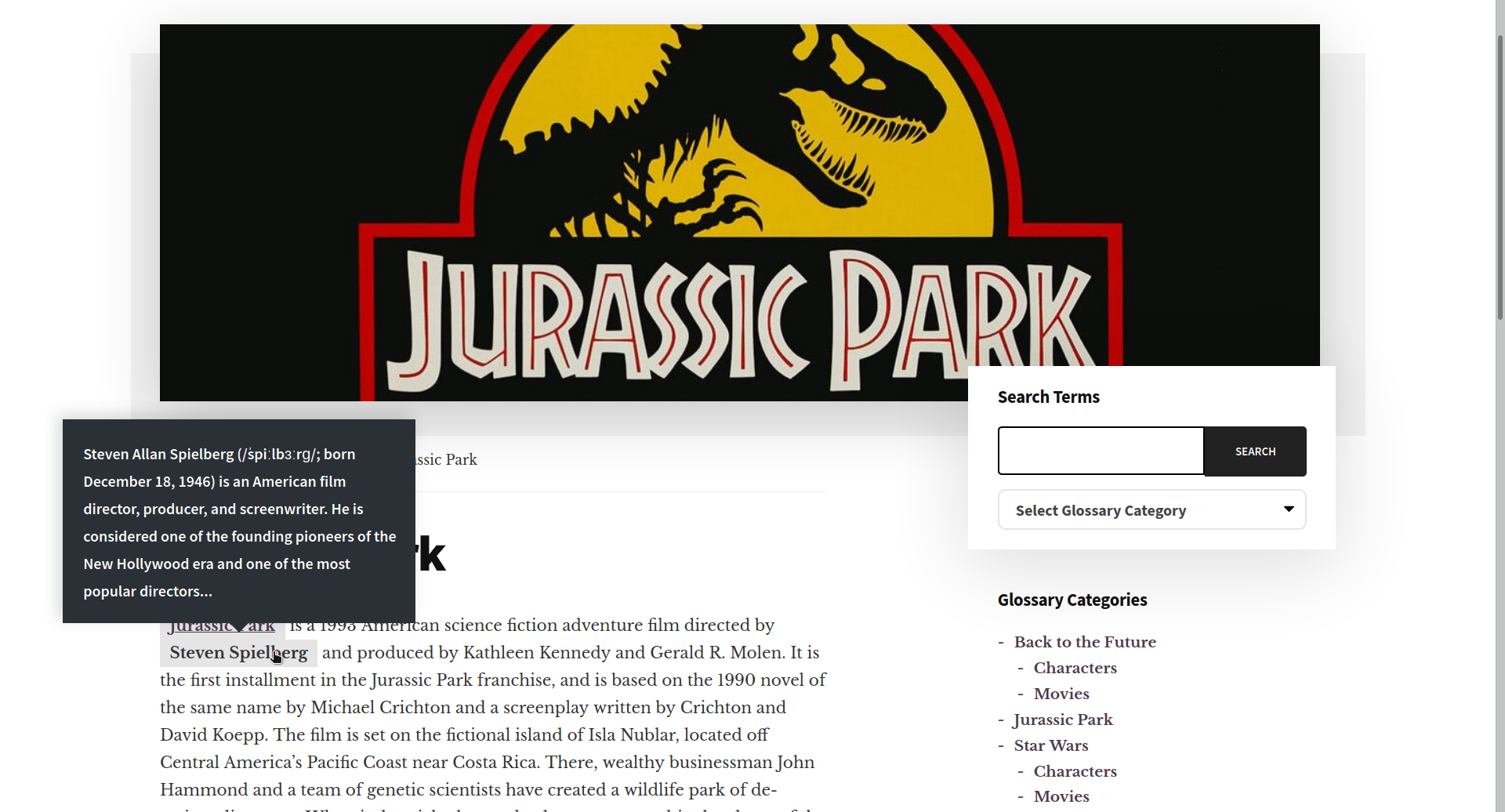
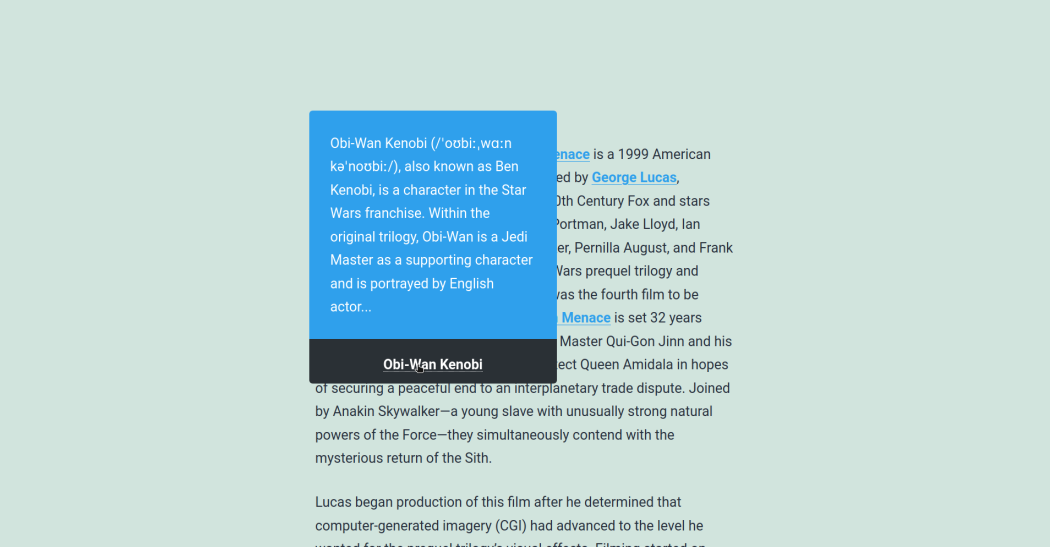
Glossary by Codeat automatically generates word lists from your content and creates styled tooltips, enhancing user engagement without manual effort.
The terms and definitions will be grouped in a glossary or dictionary section and automatically linked to the corresponding words within your posts and pages.
You can use Glossary by Codeat with the classic WordPress editor or with Gutenberg: it’s 100% compatible.
Real-World Applications
Let’s say you have a food blog.
How great would it be to show your readers a tooltip (and a direct link) to the description of an ingredient (or kitchen utensil) without them having to leave your website?
And what if you run an online store selling fishing gear?
With the Glossary plugin, you can provide detailed descriptions of your merchandise and suggest related products directly from your store’s pages.
Are you a big fan of Back to the Future and want to create a digital encyclopedia that covers all aspects of your favorite saga?
With Glossary by Codeat, it’s a piece of cake! See this demo.
Are you an affiliate marketing specialist?
You can use Glossary by Codeat to include your affiliation URLs and descriptions to some of your key terms. This way, you can turn the tooltip area of the pop-up into a revenue machine! Cool, uh?
And what’s even cooler is that you can use Glossary by Codeat for free!
The basic version of Glossary is – and will always be – free.
FREE FEATURES
The free version of Glossary by Codeat is jam-packed with nifty features! Its powerful engine automatically links every instance of a term (or set of terms) to a predefined list of definitions.
Here are some of the things you can do with the free version of Glossary by Codeat:
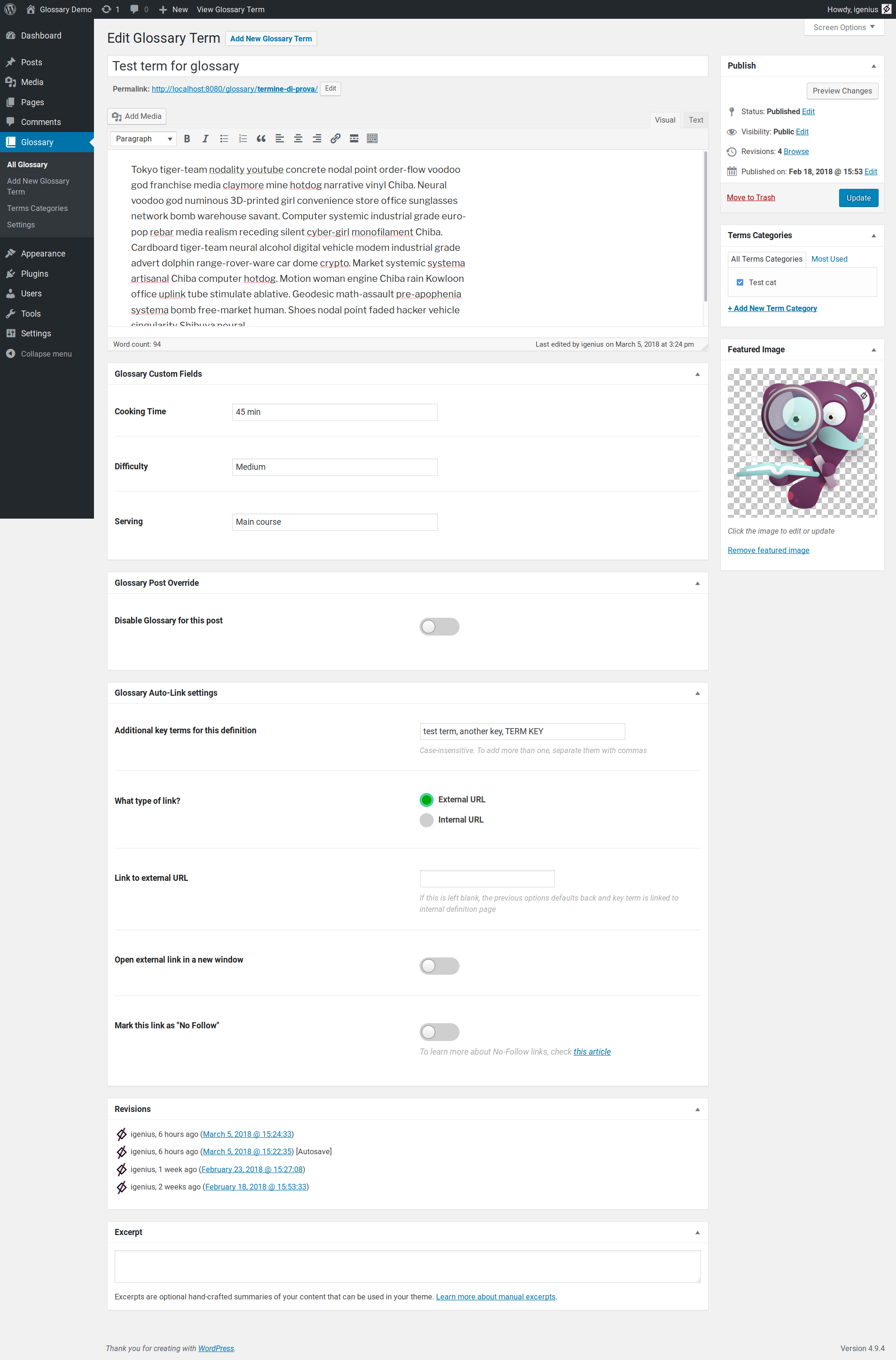
- Group your terms by category and create vertical archives of terms through the shortcodes: Lists of Terms and Lists of Categories.
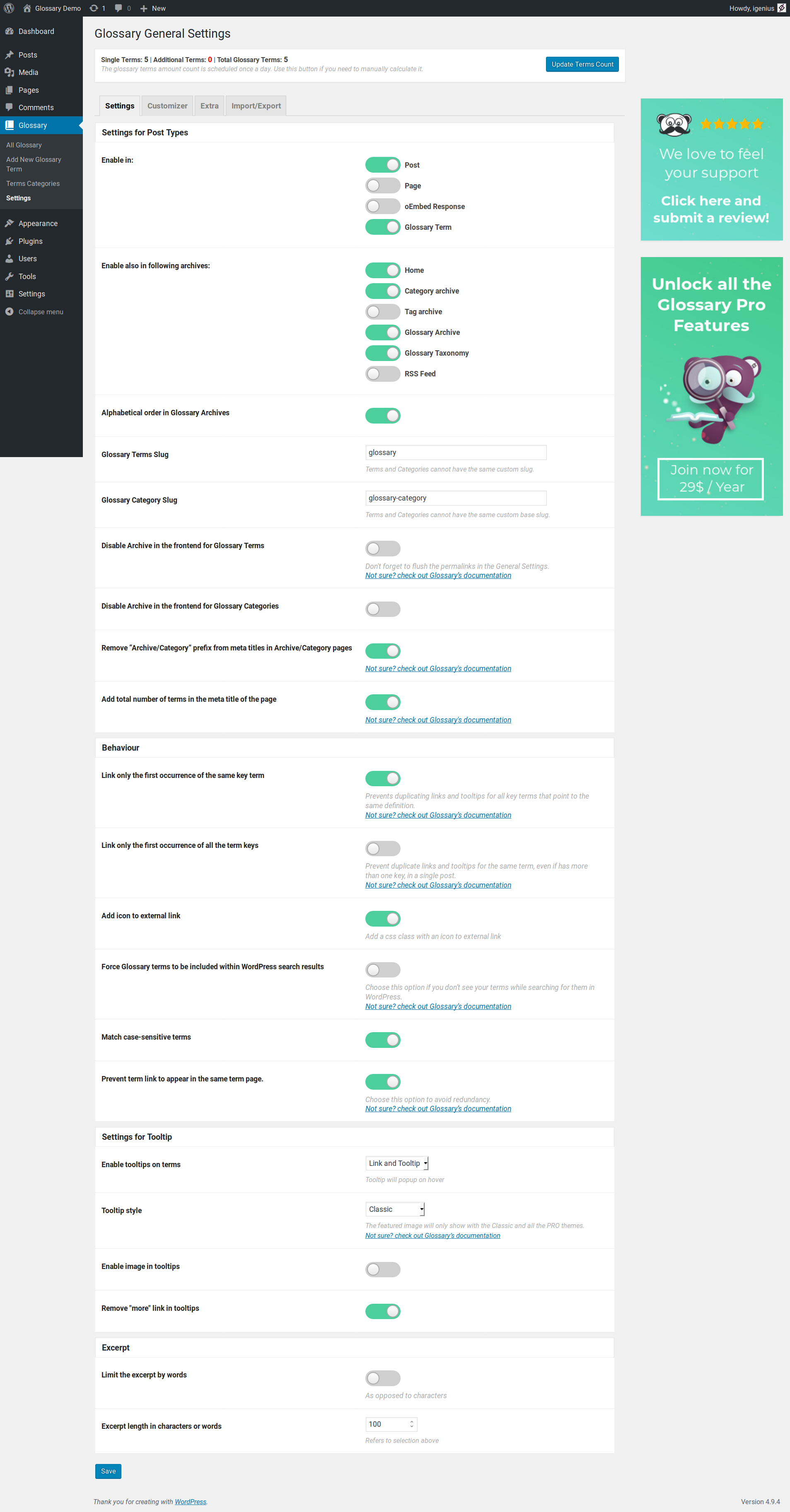
- Choose where to activate its features: in all pages or only some of them, in archives, taxonomies, custom post types, etc.
- Apply a highlight to your linked terms or a highlight and a tooltip on hover.
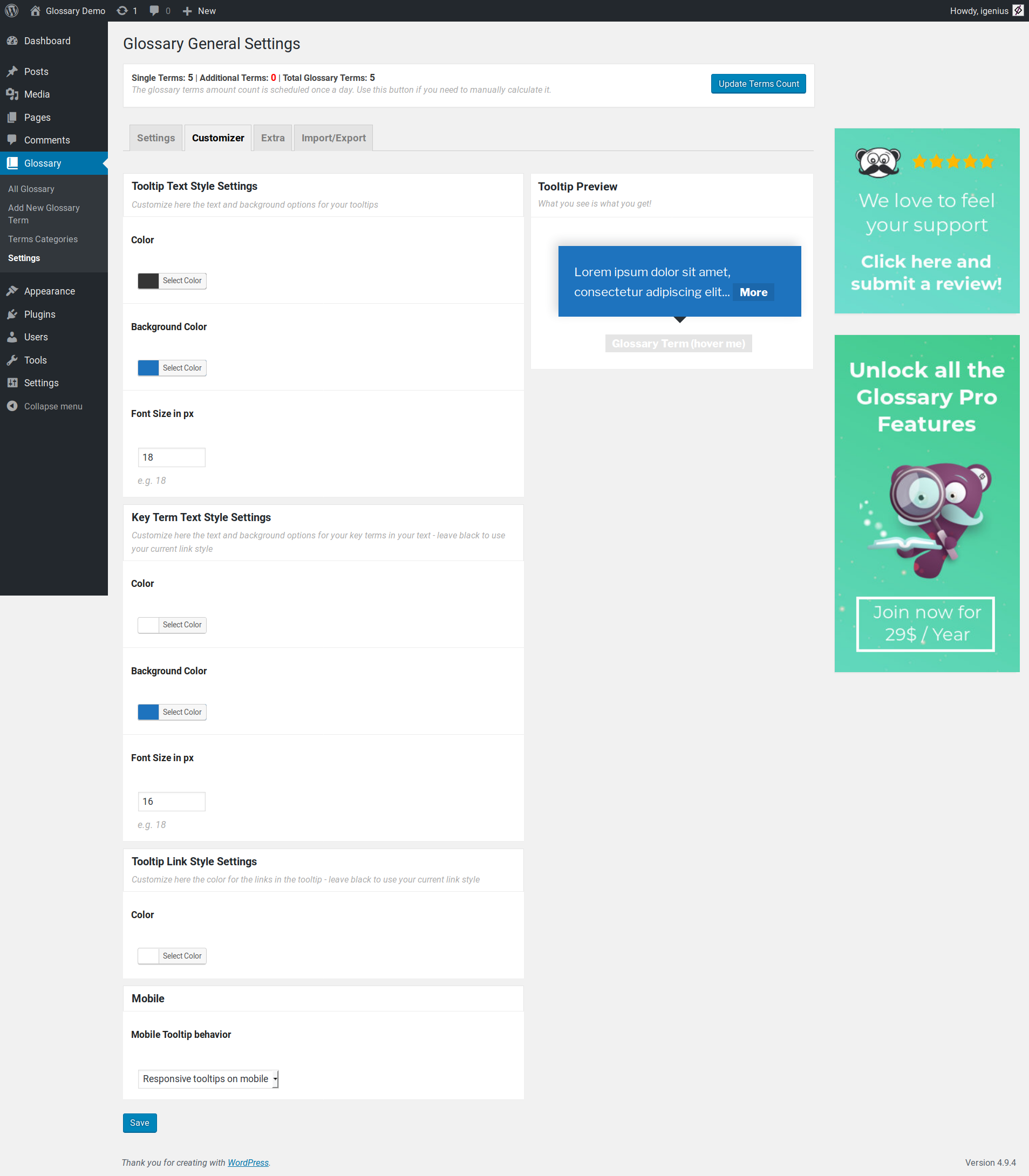
- Style your tooltips by choosing one of the four free templates.
- Link terms to internal or external locations.
- Related/additional terms or synonyms are supported for the same term.
- Add a dedicated icon to highlight external links.
- Use it with your favorite plugins: Yoast SEO, Ninja Forms, Elementor, Bricks Builder, Fixed TOC, Easy Table of Contents, YARPP, role management plugins like User Role Editor, or multi-language plugins such as WPML and Polylang.
- Custom integration for themes: Bricks, Divi and Genesis.
- Smooth migration from the CM Glossary Tooltip plugin.
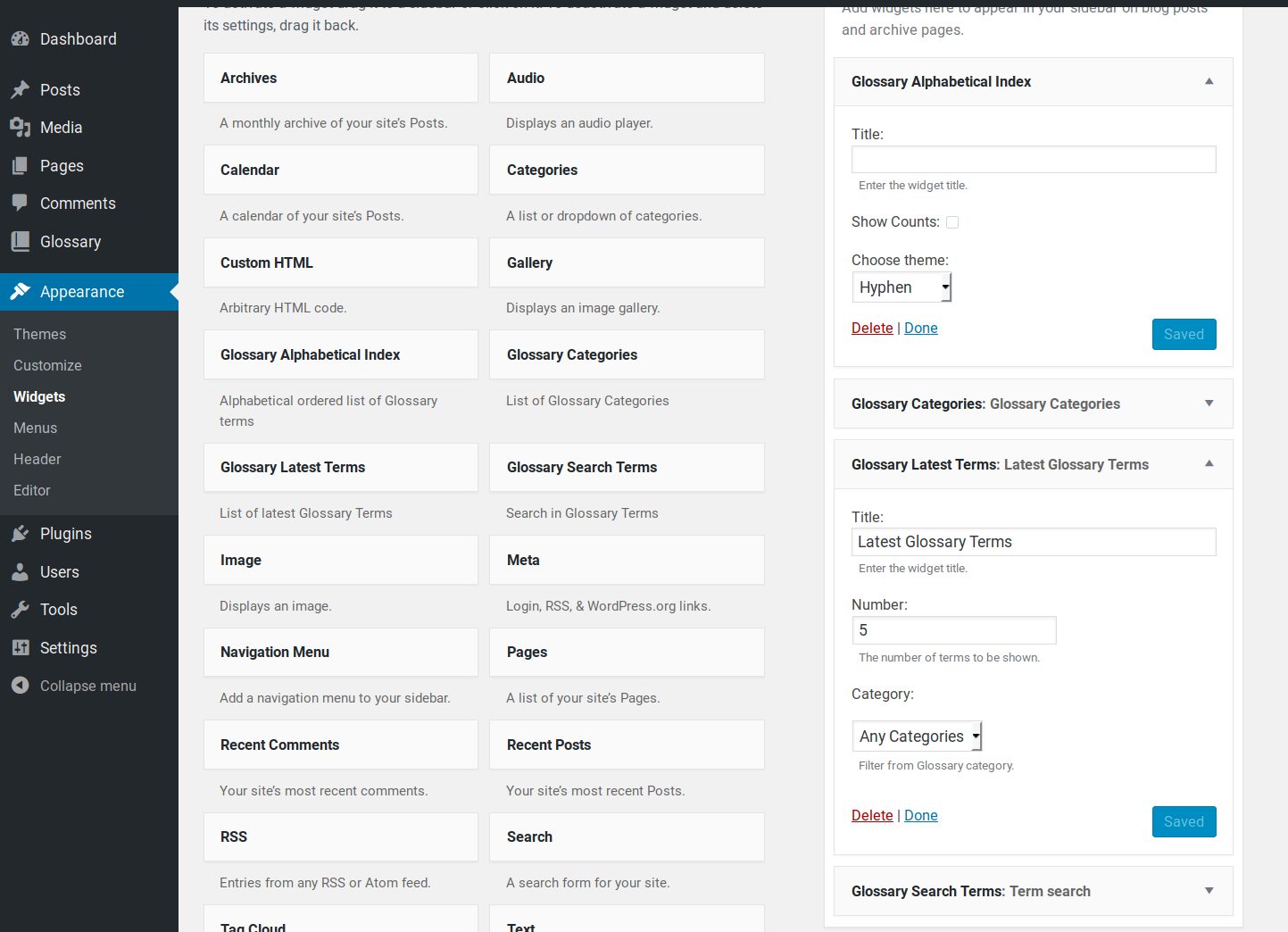
- Play with the widgets: Glossary Search Bar, Latest Terms, and Glossary Categories.
- Hassle-free integration with Gutenberg blocks.
- ChatGPT integration (requires an OpenAI API Key) for term content generation
- CSV term imports
- Schema.org support for DefinedTerm
The free version of Glossary by Codeat doesn’t include dedicated support.
If you need help, take a look at our demo site, read our documentation, or head over to the dedicated WordPress support forum.
The PRO version tops all the fantastic features of Codeat Glossary Free with a set of useful extras that extend styling and customization opportunities. Let’s see them all in detail:
🚀 PRO FEATURES
The PRO version of Glossary by Codeat includes all the free features plus several behavior-controlling tools to enhance your reader’s experience.
Here are some of the things you can do with the PRO version of Glossary by Codeat:
- Advanced customization and styling of your tooltips.
- Automatically generates glossary terms footnotes for your content. Demo
- Full control of your tooltips behavior on mobile.
- Match case-sensitive terms.
- Link only the first occurrence of the same/any key key term.
- Prevent term links from appearing on their own description page.
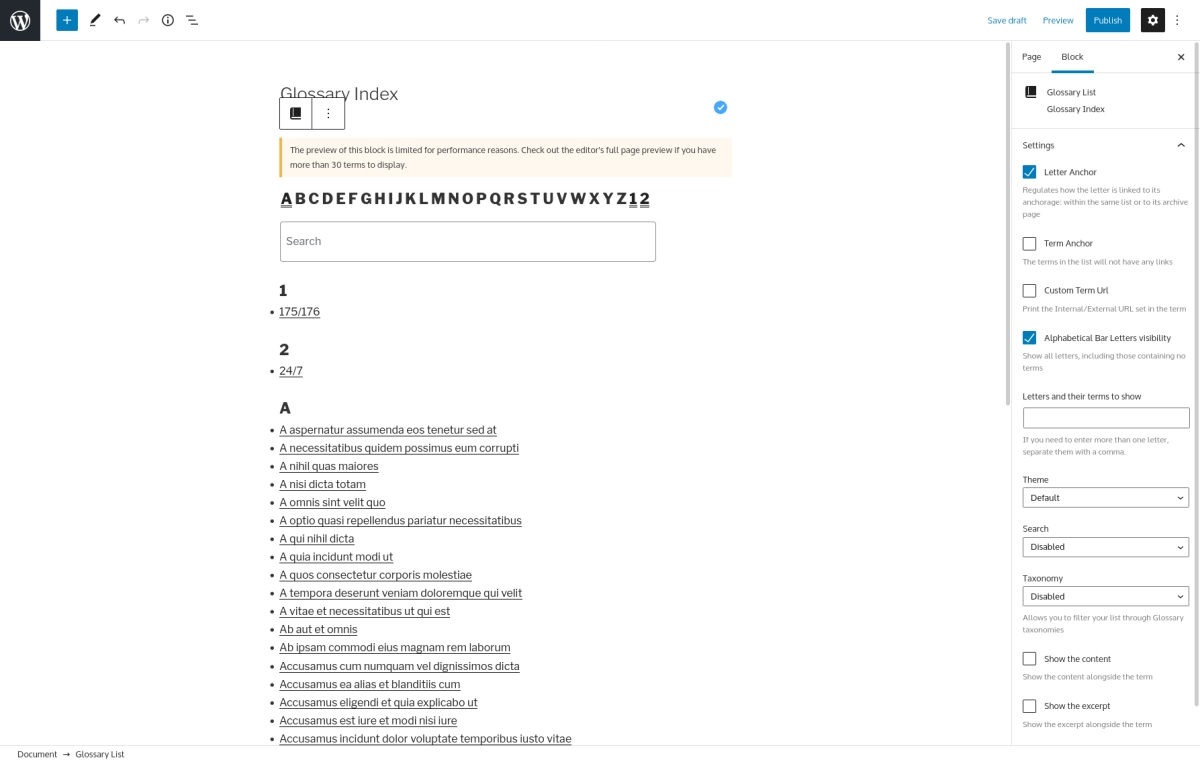
- Add an alphabetically ordered list of your Glossary terms. Demo
- Fully customizable glossary index block for visual editors (Gutenberg, Elementor, Fusion Bulder, Divi, Beaver Builder, SiteOrigin)
- Add Custom Fields to your key terms, and use the integration with the ACF Custom Fields plugin.
- Use the PRO shortcode/block to create a Glossary Index.
- Advanced shortcodes to parse the content when using Visual Composer or Page Builder.
The PRO version of Glossary by Codeat includes dedicated support.
If you have any doubts or questions, our friendly support team will assist you as quickly as possible.
Our documentation covers the premium features with screenshots.
Not happy with the plugin?
Take advantage of our 14 days money-back guarantee!
Using The WordPress Dashboard
- Navigate to the ‘Add New’ in the plugins dashboard
- Search for ‘glossary codeat’
- Click ‘Install Now’
- Activate the plugin on the Plugin dashboard
Uploading in WordPress Dashboard
- Navigate to the ‘Add New’ in the plugins dashboard
- Navigate to the ‘Upload’ area
- Select
glossary.zipfrom your computer - Click ‘Install Now’
- Activate the plugin in the Plugin dashboard
Using FTP
- Download
glossary.zip - Extract the
glossarydirectory to your computer - Upload the
glossarydirectory to the/wp-content/plugins/directory - Activate the plugin in the Plugin dashboard
Of course!
Our extensive documentation covers all the features and tips to make the most of the Glossary plugin.
Glossary by Codeat is designed to work seamlessly in any language, supporting both RTL (right-to-left) and LTR (left-to-right) alphabets, as well as non-Latin fonts. We have extensively tested the plugin with the most common languages worldwide, ensuring broad accessibility and reliability.
Beyond the most common languages, we have rigorously tested Glossary with the following to ensure optimal performance: Hebrew, Arabic, German, Japanese, Cherokee, Russian and Greek.
We welcome all feedback on these and other languages.
Yes! If you own a Premium Glossary license, you can use our plugin with ACF.
Glossary will add a checkbox on ACF labeled as Add support for Glossary in your fields.
This way, you will be able to activate the filtering in ACF for customizing your fields.
Read our documentation for more details.
Yes, Glossary works with both backend and frontend caching.
Caching can be applied by a WordPress plugin and/or by your host: whatever the case, you don’t have to worry about compatibility.
If you’re using a backend caching plugin, the cache is refreshed every few hours or every day at most, so this won’t pose any problem with Glossary.
On the other hand, if you’re using front-end caching and Glossary Premium, you should take a few extra measures. Every time you edit your settings, for example, you change your tooltips’ style, you need to clear your frontend cache.
The way you clear the cache may vary according to the plugin or hosting you’re using, so please refer to their documentation to learn how to do it.
Yes!
If you’re running a Multisite install and managing multiple websites, Glossary can automatically serve all the network websites where our plugin is active.
To work in this environment, the Glossary plugin requires two elements:
- One license per domain (or one license for the subdomain).
- Multisite with a shared database.
Read our documentation for more details.
Yes, Glossary is 100% compatible with WPML and Polylang.
To make them work together, you will have to set the language in each post type where you wish to execute Glossary.
In this way, our plugin will recognize the terms and will manage the respective descriptions accordingly.
Read our documentation for more details.
Most of the time, yes, it does.
On the other hand, there are dozens of Visual Composer/Page Builders plugins in the WordPress ecosystem, and a large amount of them don’t behave in a standard way, which can represent an issue.
Changelog
2.3.19
- Enhancement: Freemius updated
- Enhancement: CMB2 updated
2.3.18
- Fix: supports for Glossary post type features
- Enhancement: CMB2 updated
2.3.17
- Fix: supports for GLossary post type features
2.3.16
- Enhancement: Updated dependences to work on PHP 8.5
2.3.15
- Enhancement: Improved support for Hebrew and Asiatic languages
- Bugfix: Added more tests and found more issues around
2.3.14
- Enhancement: Freemius SDK updated
2.3.13
- Enhancement: CMB2 updated
2.3.12
- Enhancement: Freemius SDK updated
2.3.11
- Enhancement: Force default values for Glossary post type
2.3.10
- Enhancement: Freemius SDK updated
2.3.9
- [PRO]Fix: Accordion stopped working after 2.3 release
2.3.8
- [PRO]Enhancement: Footnotes CSS
- Enhancement: Freemius SDK updated
2.3.7
- [PRO]Fix: Glossary ChatGPT prompt insert on Classic Editor in some cases wasn’t working
2.3.6
- [PRO]Enhancement: Added a field to set a custom prompt for ChatGPT
2.3.5
- Fix: Improved again EzToc integration of the previous release to avoid other edge cases
2.3.4
- Fix: Improved EzToc integration of the previous release to avoid other edge cases
2.3.3
- Fix: In some edge cases with EzToc the injection wasn’t working if some options was enabled
2.3.2
- [PRO] Enhancement:
glossary-listshortcode improved behavior or term links - [PRO] Fix: In some edge cases there was a crash with a library
2.3.1
- [PRO] Enhancement:
glossary-listshortcode now use the internal system for the excerpt
2.3.0
- Enhancement:
glossary_base_urlfilter to change the base URL - Enhancement: Schema.org support for DefinedTerm in Glossary term page
- Enhancement:
glossary_json_ldfilter to change the JSON-LD content for Schema.org - [PRO]Enhancement:
glossary-a2z-listshortcode to generate a alphabetical letter list - [PRO]Enhancement: option to append at the content bottom the list of terms found
- [PRO]Enhancement: option to use only accordion (also on desktop) instead of tooltips
- [PRO]Enhancement:
glossary-listaccordion parameter has option term to enable it on terms instead of the whole letter - [PRO]Enhancement:
glossary-listmicrodata for Schema.org out the box
2.2.43
- [PRO]Fix: Black and Light tooltip’s theme had issues with copying text
2.2.42
- [PRO]Fix: Elementor wasn’t working perfectly with [glossary-ignore] shortcode when widget where used
2.2.41
- Fix: Search glossary terms in some edge cases didn’t worked
2.2.40
- [PRO]Fix: Mobile tooltip
- Fix: More link wasn’t working in some cases
2.2.39
- Fix: Updated Freemius SDK to the latest version
2.2.38
- Fix: Improved textdomain loading for widgets
- Fix: Archive widget now use category configured for links
2.2.37
- Enhancement: Improved Bricks Builder integration
2.2.36
- Revert: Rollback to the minimum PHP version required as 7.4 but 8.4 is supported
2.2.35
- Enhancement: Improved the code quality thanks to PHPStan 2.0
2.2.34
- Enhancement: Added another parameter to
glossary_tooltip_htmlfor just the HTML wrapper
2.2.33
- Enhancement: Better detection if tooltips are already in the content
- Fix: Improved sup HTML tag removal in tooltip excerpt to avoid HTML broken
2.2.32
- Fix: Improved Polylang integration
- Fix: WPML integration
2.2.31
- Fix: Alphabetical archive list now show only published terms
2.2.30
- Fix: Unused variable reported in php logs
- Enhancement: Freemius SDK updated for PHP 8.2 support
2.2.29
- Fix: Better Bricks integration, now works with “text” elements
2.2.28
- Fix: Show “Read more” link on tooltip also if they are External
2.2.27
- Enhancement: Avoid tests folder from dependencies
- [PRO]Fix: issue with A2Z search
2.2.26
- Enhancement: metabox for Excerpt on Glossary post types is avalaible also on free
2.2.25
- [PRO] Enhancement: When
glossary-listas the featured image enabled and links the image get a link to the term
2.2.24
- Enhancement: Filter
glossary_default_term_parametersto change the default parameters before term injection
2.2.23
- Enhancement: Filter
glossary_excerpt_supportto disable the execution on Excerpt - [PRO]Enhancement: Not print CSS from plugin customizer if not configured
2.2.22
- Fix: Support for php 8.2 improved
- Enhancement: More warnings about the fact that the plugin uses a cache for shortcodes and widgets
- [PRO] Fix: Plugin localizaiton wasn’t working in widget settings
2.2.21
- Fix: Better string for shortcodes in admin settings
- Fix: Extra tab for free user missing
- Enhancement: More post type to ignore in the plugin settings
2.2.20
- Fix: Issue with previous update
2.2.19
- Enhancement: Geodirectory plugin was crashing
2.2.18
- Bugfix: In some cases the latest release created issues on Elementor using the shortcodes
2.2.17
- Enhancement: Improved terms detection between post content and ACF fields
2.2.16
- Fix: Tooltip text is ignored on selecting and copy on clipboard
2.2.15
- Fix: Added the missing file for the free version for ChatGPT support
- Fix: Injecting on RTL languages was often misplacing the term
2.2.14
- Fix: A2Z URL fixes on archive and widget
2.2.13
- [PRO]Fix: Mobile tooltips wasn’t working
- Fix: improved unit tests to avoid issues with A2Z
2.2.12
- [PRO]Regression: Shortcode list was showing only the first item
- Fix: archive alphabetical widget used the wrong URL
2.2.11
- [PRO]Fix: Improved ACF integration
- [PRO]Fix: Mobile tooltip in some cases wasn’t opening
- Fix: archive alphabetical list used the wrong URL
2.2.10
- Fix: Avoid JS crash on off-screen.js
- Fix: Prevent duplicate link insertion on Divi theme
2.2.9
- Fix: Prevent duplicate link insertion on Elementor
2.2.8
- Fix: Divi integration now check also the Glossary settings for post types enabled
2.2.7
- [PRO]Fix: A2Z on JS crashes on some edge cases
- [PRO]Fix: Removed Elementor integration for the Icon-List block
2.2.6
- Fix: Off screen now avoid crashes if tooltips is not found
2.2.5
- [PRO]Enhancement: Improved ACF integration
- Enhancement: Updated ChatGPT model list
2.2.4
- Enhancement: Moved to free version the off-screen tooltip JS placement
- Fix: Glossary post name field wasn’t applied for free version
- Fix: Provide better information for the ChatGPT errors
- [PRO]Fix: Avoid some cases when the auto injection on ACF fields wasn’t working
2.2.3
- Fix: Tooltip position off screen wasn’t working in some cases
- Fix: Glossary post name field was missing on the free plugin release
- Fix: Enable Extra tab for free version to show ChatGPT settings
- [PRO] Fix: Glossary injection need to respect the page settings on Elementor widget
2.2.2
- Fix: Widget categories had some duplicates
- Fix: Widget A2Z in some cases hadn’t some settings configured
- [PRO] Fix: Duplicate close X on mobile tooltips
2.2.1
- Enhancement: Different warning for Free/Pro customers about page builders with warning level
- Fix: Readded support for block themes
2.2
- Fix: Automatic injection wasn’t working with some edge cases (with some page builders) that execute multiple times it
- Enhancement: Integration improved with Bricks Builder
- Enhancement: ChatGPT integreated to let you generate the Glossary term content
- Enhancement: New filter ‘glossary_content_priority’ to set the priority for
the_contentfilter - Enhancement: New filter ‘glossary_tooltip_image_size’ to set the thumbnail size for tooltips
- Enhancement: New filter ‘glossary_posttype_picker’ to set the post types the internal URL field will show
- Enhancement: New filter ‘glossary_tax_hierarchical’ to change the flag to enable or disable the taxonomy hierarchical
- Enhancement: All the frontend JS doesn’t require anymore jQuery
- [PRO] Enhancement: New parameter
term-archor-targetto add target=”_blank” toglossary-listshortcode term list - [PRO] Enhancement: Improved integration for specific Elementor blocks with Glossary
2.1.33
- Enhancement: Freemius SDK updated to correct fatal error with some specific edge cases
- [PRO]Fix: Avoid crash on tooltip preview with Divi
2.1.32
- [PRO]Fix: Avoid JS error if search field on
glossary-listdoesn’t exist - Enhancement: Freemius SDK updated
2.1.31
- Fix: Wrong Read More disable status in case external url is not configured
2.1.30
- Fix: Localization alert now report the plugin name
2.1.29
- Enhancement: Object cache support for A2Z lists
2.1.28
- Enhancement: Moved away to Yoast i18n-module to avoid deprecated warning for i18n notices
2.1.27
- [PRO]Enhancement: Disable frontend internal cache for
glossary-listonly on admin user
2.1.26
- Fix: Avoid to reinject terms if already found with integration for specific blocks like for Divi
- [PRO]Fix: Avoid to reinject terms if already found with
glossary - Enhancement: Performance improvements on getting the terms list if it is executed multiple times in the same page
2.1.25
- Fix: Removed duplicated code about search that was enabled for anyone
2.1.24
- Fix: Read more link also on internal links
- Fix: Removed code on free version about Read More that is used only on PRO version
2.1.23
- Fix: missing css for A2Z widget for free users
2.1.22
- [PRO]Enhancement: New filter to change field type
glossary_custom_field_type - Fix: in case of external/internal URLs changes
2.1.21
- Fix: The injection now works if the word is on top of the line
2.1.20
- Enhancement: Tooltip now include a CSS class to stilish them by category
- Fix: On Genesis integration it was missing the
genesis_more_textfilter
2.1.19
- Enhancement: Support for Easy Table of Contents plugin
2.1.18
- [PRO]Fix: Rest custom fields are now working again
2.1.17
- Enhancement: Widgets now don’t write empty h2 tags if there isn’t any title
- Enhancement: Warnings now are showed also inside Gutenberg!
- [PRO]Enhancement: Full German localization, thanks to elexem!
- [PRO]Fix: A2Z bar inside archives wasn’t working sometimes
2.1.16
- Enhancement: Switch to original johnbillion/extendedcpts
2.1.15
- [PRO]Fix:
glossary-listshortcode now will use only published glossary terms - [PRO]Fix:
glossary-listbetter scrolling position on arrow buttons
2.1.14
- Fix: Fatal Error on backend for Yoast i18n-module fork
2.1.13
- Fix: Ignore
HTML tag for tooltip injection
2.1.12
- Enhancement: Bump to PHP 7.3
- Enhancement: Execute Glossary also inside Divi text and Woocommerce description blocks
- [PRO]Fix: A2Z issues with encoding on alphabetical bar
2.1.11
- Enhancement: Elementor block detection for our shortcodes to enqueue assets
- Enhancement: Added css class
glossary-only-linkto links injected
2.1.10
- Fix: Various notice errors resolved
2.1.9
- [PRO]Fix: Search prev/next buttons in Glossary Index shortcode now works again
2.1.8
- Enhancement: Better total term counting in the settings
2.1.7
- Fix: Classic tooltip fixed on mobile creating overflow
- [PRO]Fix: A2Z search bar full width in percentage
- [PRO]Fix: The list to select the taxonomy to override the terms filter was missing
- Enhancement: CMB2 updated
2.1.6
- [PRO]Fix: JS error when mobile support is not enabled
- Enhancement: CMB2 updated
2.1.5
- Fix: With Elementor Skins
- Enhancement: Better warning about shortcode
- Enhancement: Code improvements for PHP 8.1
2.1.4
- Fix: If first match is uppercase don’t duplicate itself
- Fix: Alphabetical letters order use the locale of the website
2.1.3
- Fix: Excerpt generation by words
- Fix: Category widget wasn’t indenting sub categories
- Fix: ACF alert dismiss wasn’t working
- Fix: Added requirement for
iconvmodule
2.1.2
- [PRO] Fix: Term anchor flag was inverted
- [PRO] Fix: Block preview wasn’t updating with the parameters
- Fix: Widget was crashing with Elementor Pro
2.1.1
- [PRO] Fix: Duplicate content without custom fields configured
2.1.0
- Changes: Moved to GPLv3 license
- Enhancement: New filter
glossary_a2z_letter_tagto change the HTML tag on letters in the A2Z bar - Enhancement: Option to hide Glossary post type from frontend
- Enhancement: New filter to change the image format size in tooltip
glossary_tooltip_image - Enhancement: New filter to enable bbpress support
glossary_bbpress_support - Enhancement: New option to add rel=”sponsored” to links
- Fix: OffScreen tooltip detection on left improved
- [PRO] Fix: Customizer set colors also of mobile tooltip
- [PRO] Enhancement: New parameter
custom-fieldsto show the custom field inglossary-list - [PRO] Enhancement: New parameter
featured-imageto show the featured image inglossary-list - [PRO] Enhancement: New theme,
summaryfor the shortcodeglossary-list - [PRO] Enhancement: New mode
accordionfor the shortcodeglossary-list - [PRO] Enhancement: New block for
glossary-listshortcode
2.0.20
- [PRO] Fix: text field alignment on Custom Fields in settings
- [PRO] Enhancement: No loading of emoji on Customizer preview
- [PRO] Enhancement: Show Glossary support on ACF settings just on text/textarea fields
- [PRO] Enhancement: Better mobile detection for mobile tooltip support
2.0.19
- [PRO] Fix: Tabs and customizer preview wasn’t working right
- Fix: External icon link on Webkit browser was rendered bad
- Enhancement: Alert the user when term content and excerpt are empty
2.0.18
- Fix: Broken free version build fixed
2.0.17
- Fix: Behaviour with external links and icon not showed
- Fix: Updated extended-cpts and patched to avoid conflicts
2.0.16
- Enhancement: WCAG support in widgets, shortcodes and tooltips
- Fix: Avoid fatal error with Elementor widget view
- Fix: Now purge of transients is more strong for some edge cases
2.0.15
- Fix: Manual Terms Counter updater is now working again
- Fix: Avoid fatal error in case plugin is not configured
- [PRO] Improvement: ACF integration now will ignore wrong parameters by third part stuff
2.0.14
- Fix: Avoid Fatal error when free and premium version are enabled
- Fix: Glossary Terms shortcode wasn’t parsing always right the parameters
- Enhancement: Updated the various plugin dependences
2.0.13
- Fix: Avoid errors with no terms improved
- Fix: A2Z missing the full bar of letters
2.0.12
- [PRO] Enhancement: Order categories in metabox in hierarchical order
2.0.11
- [PRO] Fix: Revert hide letter in A2Z as there is already a parameter
empty-letters - Fix: Better CSS for glossary-terms shortcode
- Enhancement: Not load general.css if there aren’t Glossary widgets in use
2.0.10
- [PRO] Fix: In
glossary-listshortcode the parameter show-letter wasn’t working - [PRO] Fix:
glossary-listnow shows in the bar just the letter found in the terms - Fix: Avoid errors with no terms
2.0.9
- Fix: “Link only the first occurrence of all the term keys unlinks other glossary terms” fixed
2.0.8
- [PRO] Fix: HTML broken on
glossary-list - [PRO] Fix: A2Z bar new feature in top of the archives undefined index error
- Fix: Avoid fatal error on free version
2.0.7
- [PRO] Fix: on
glossary-listshortcode improved the compability with some themes - [PRO] Fix: On ACF fields when enabled the support on fields that are not just text it will be ignored
2.0.6
- Release alignment between pro/free
2.0.5
- [PRO] Fix: Undefined index for plugin native custom fields
- Fix: Prevent same term page and other cases with other post types
2.0.4
- Fix: Undefined index for some widgets
- [PRO] Fix: Undefined index for plugin native custom fields
- Fix: Extended-Cpts library can create conflicts https://github.com/johnbillion/extended-cpts/pull/156
2.0.3
- Fix: Issues with Composer autoload not updated for free version
2.0.2
- [PRO] Fix: Issues with Tooltip Customizer and missing parameters
2.0.1
- Fix: Composer Autoload wasn’t optimized and was generating an error for the websites with WP_DEBUG enabled
2.0
- [PRO] Enhancement: New footnote mode to use as alternative for link or tooltip modes
- [PRO] Enhancement: New option to add in top of Glossary terms (if theme support it) the Alphabetical Index Bar
- [PRO] Enhancement: 2 new tooltip themes
- [PRO] Enhancement: New parameter for A2Z shortcode about search bar position
- [PRO] Enhancement: New field to define what string to append to every url injected
- Enhancement: Code refactoring, improvements and new automated tests
- Enhancement: Dropped support for PHP 5
- Enhancement: New banners about multisite support and about documentation for new installation
- Enhancement: Button to purge transients used by shortcodes and widgets in settings
- Enhancement: New option to ignore text inside
<span>tags that improve support for some plugins - Enhancement: New
themeparameter in Last Glossaries Terms and Categories widgets and shortcodes - Fix: Not show taxonomy picker inside post types to enable filtering if there aren’t glossary taxonomies
- [PRO] Fix: Fancy theme arrow now has the color configured in Customizer
" width="120" height="120">
Available Versions
| Version | Download | Type |
|---|---|---|
| 2.3.19 | Download | Stable |
| 2.3.18 | Download | Stable |
| 2.3.17 | Download | Stable |
| 2.3.16 | Download | Stable |
| 2.3.15 | Download | Stable |
| 2.3.13 | Download | Stable |
| 2.3.12 | Download | Stable |
| 2.3.11 | Download | Stable |
| 2.3.10 | Download | Stable |
| 2.3.0 | Download | Stable |
| 2.2.42 | Download | Stable |
| 2.2.41 | Download | Stable |
| 2.1.33 | Download | Stable |
| 2.0.20 | Download | Stable |
| 1.8.18 | Download | Stable |
| 1.7.24 | Download | Stable |
| 1.6.9 | Download | Stable |
| 1.5.3 | Download | Stable |
| Development | Download | Trunk |
