
Giftvane – Gift Cards and Store Credit for WooCommerce
Active Installs
0+
Last Updated
October 23, 2026
First Released
October 4, 2026
Download History (Last one month)
Contributors
Giftvane sells a gift card or gift voucher as an ordinary WooCommerce product. Tick the “Gift card” box on any product and set its price to the card value. When the order is marked complete, the plugin generates a unique store credit code worth that price, records its balance in its own table, and emails the code to the recipient the buyer named, or to the buyer’s order email address.
WooCommerce leaves a paid order for virtual products in Processing. With the “Complete gift-card-only orders automatically” setting on (the default on new installs), a paid order whose every item is a virtual gift card goes straight to Completed, so the recipient gets the code without the shop stepping in. Orders with any other product keep the usual flow.
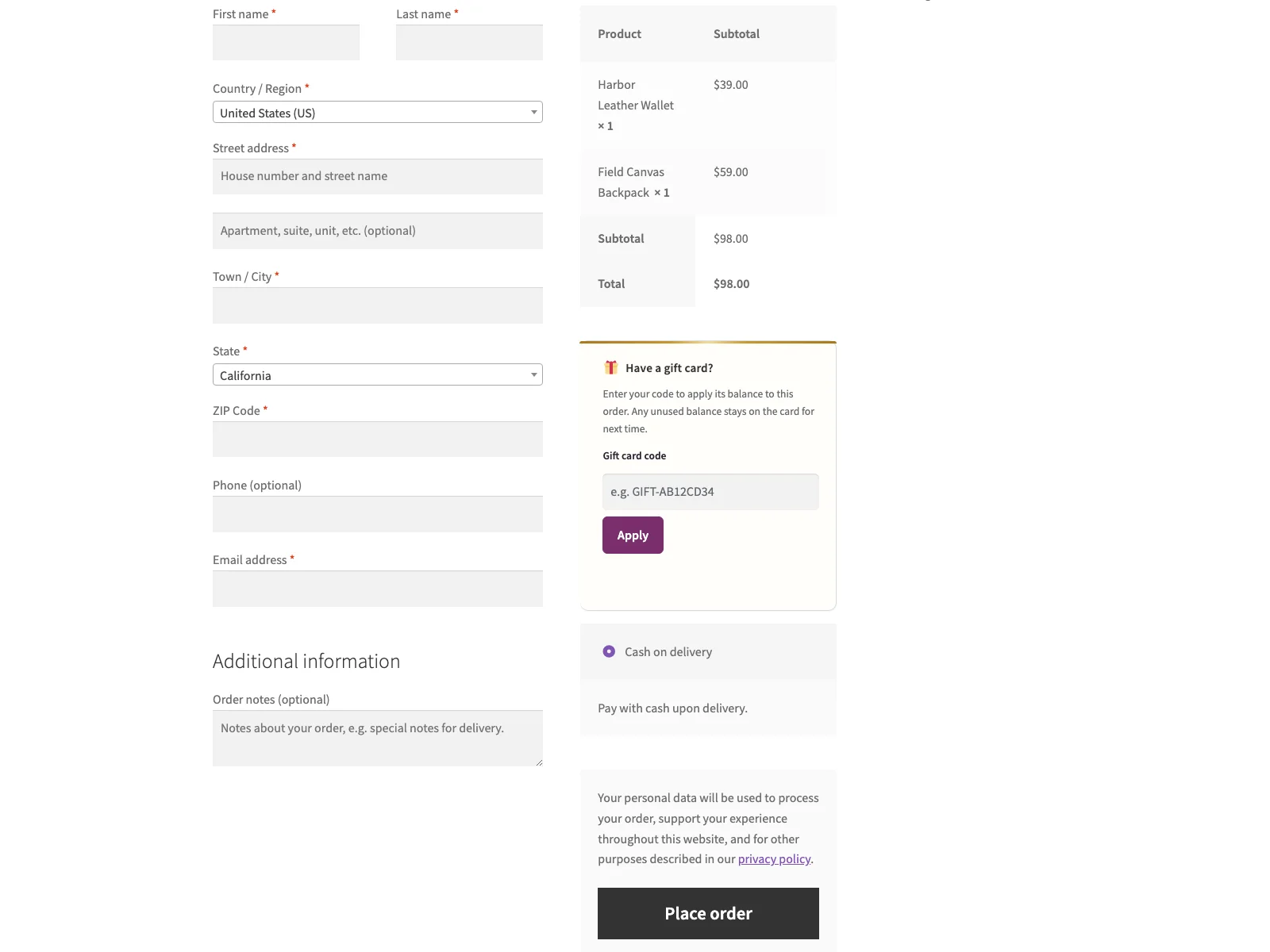
To spend a card, the customer enters the code in a field on the checkout. The balance is applied as a discount on that order. If the order costs less than the card is worth, the leftover stays on the code for a later purchase, so one card can cover several orders until it runs out.
The buyer also sees the code(s) their order issued on the order-confirmation page and in their WooCommerce order emails, so they have the code in hand without hunting through their inbox.
The code is built and tracked on GitHub. Source and bug reports: github.com/wppoland/plogins-giftcards
Documentation and links
- Documentation: plogins.com/plogins-giftcards/docs/
- Plugin page: plogins.com/plogins-giftcards/
- Source code: github.com/wppoland/plogins-giftcards
- Bug reports and feature requests: github.com/wppoland/plogins-giftcards/issues
What it does
- Turns any product into a gift card with one checkbox on the product editor’s General tab; the price is the card value.
- Generates a unique code on order completion and emails it to the buyer’s order email address.
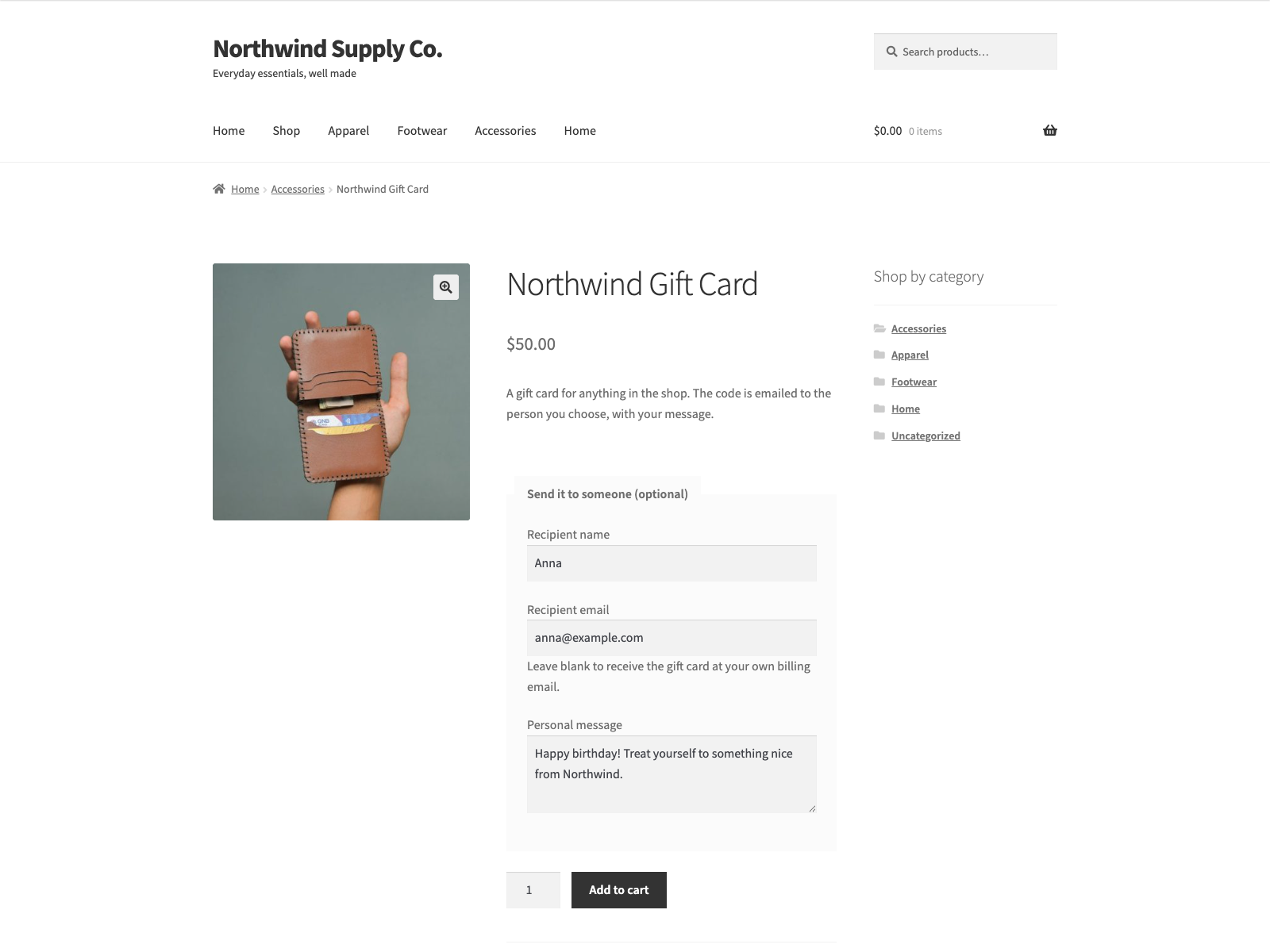
- Optional recipient name, recipient email and personal message on the gift card product page; the card is emailed to that recipient with the name and message, and the details show on the cart and order lines.
- Adds a redeem-code field to the classic checkout that applies the card balance as a discount.
- Accepts a gift card code in the WooCommerce coupon field too, so it can be redeemed on the block cart and checkout.
- Keeps the unused balance on the code after a partial spend, so it works across multiple orders.
- Shows the shopper what the card holds after this order, next to the applied card on the classic and block cart and checkout.
- Optionally completes a paid order automatically when every item is a virtual gift card, so the code goes out at once.
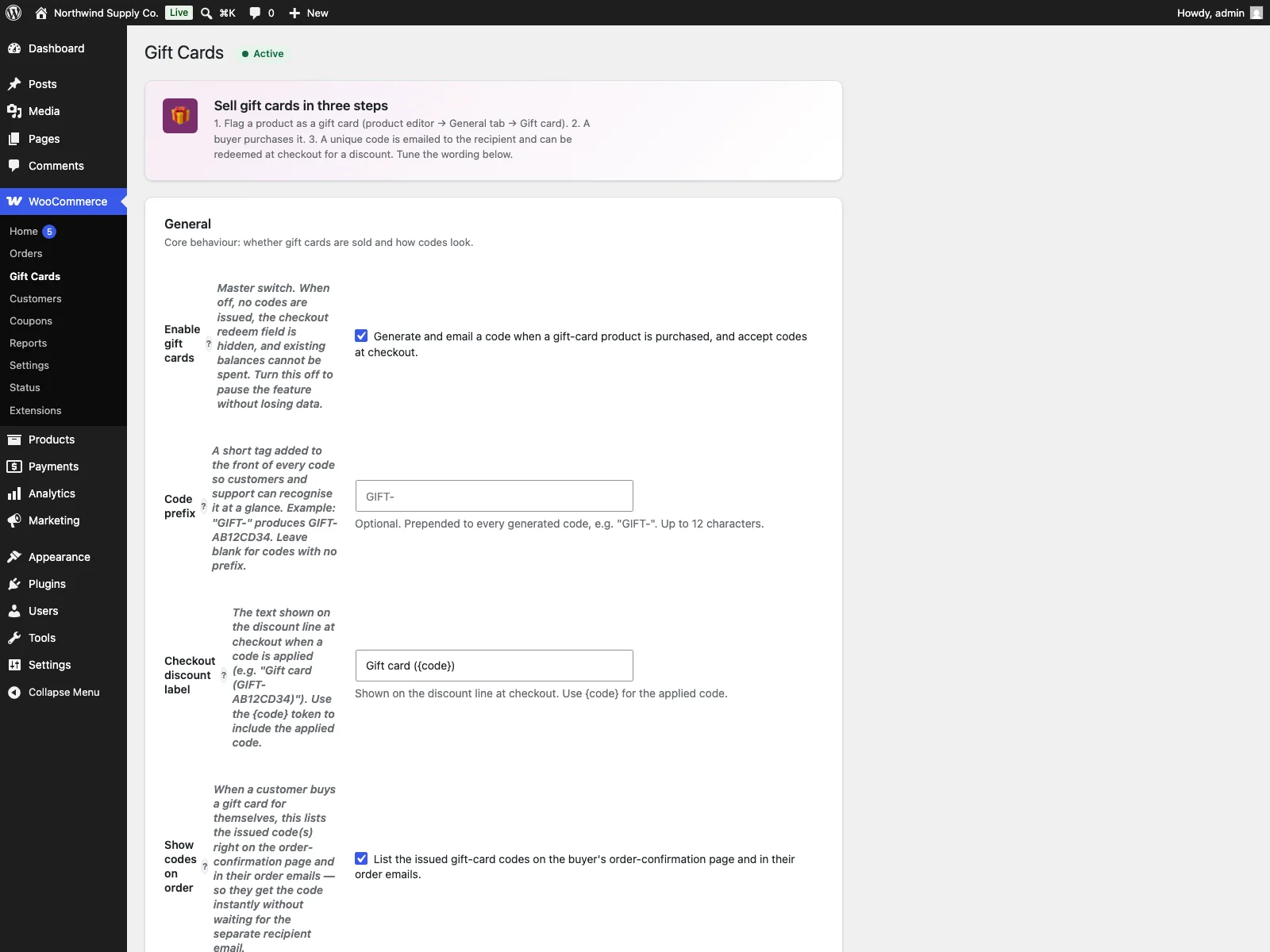
- Lets you set the code prefix, the checkout discount label and the recipient email subject and body.
- Optionally lists the issued codes on the buyer’s order page and in their order emails.
- Works with WooCommerce HPOS (custom order tables).
- Lets an AI assistant in your admin look up a code’s balance and list the codes an order issued, through the WordPress Abilities API on WordPress 6.9 and later. Reading only; it cannot change a balance or issue a code.
External Services
This plugin does not connect to, send data to, or rely on any external service, API or CDN. Everything runs on your own site. Gift-card codes and balances are stored in a single custom database table ({prefix}giftcards), the gift-card flag and any recipient name, address and message are kept in WooCommerce product and order-item meta (_giftcards_is_gift_card, _giftcards_recipient_name, _giftcards_recipient_email, _giftcards_recipient_message), and settings live in the giftcards_settings and giftcards_db_version options. The email carrying a code is delivered through your site’s own WooCommerce/WordPress mailer to the recipient address the buyer entered, or the order’s billing address; no message or customer data leaves your server.
Translations
Giftvane is fully translatable and ships the giftvane.pot template. Translations are delivered by WordPress.org language packs from translate.wordpress.org, which is where Polish, German and Spanish are being contributed; the package itself carries no compiled translation files.
- Upload the plugin to
/wp-content/plugins/giftvane, or install it from Plugins > Add New. - Activate it. WooCommerce must be active.
- Edit a product, tick Gift card on the General tab, and set its price to the value of the card.
- Set the code prefix and the recipient email under WooCommerce > Gift Cards.
Yes. WooCommerce 8.0 or later must be installed and active.
The value is the price of the gift-card product. Buying two of a $50 card issues two $50 codes.
The buyer can fill in a recipient name, recipient email and a personal message (up to 500 characters) on the gift card product page. All three are optional. With a recipient email the code goes to that address, greeting the recipient by name and carrying the message; without one it goes to the order’s billing email address. The buyer also sees the code on the order-confirmation page and in their order emails.
The customer types the code into the field at checkout. The balance comes off that order as a discount, and anything left over stays on the code for next time.
Codes are issued when the order is Completed, and WooCommerce leaves paid orders for virtual products in Processing. Turn on “Complete gift-card-only orders automatically” under WooCommerce > Gift Cards: a paid order made only of virtual gift card products then completes on its own. Mark the gift card product as Virtual for this to apply. Orders that also contain other products, or a gift card that ships, still need you to complete them. It applies when the payment method reports the payment, as card and wallet gateways do; bank transfer and cheque orders wait on hold for you, and you complete them yourself. The setting is on by default for new installs; sites that installed an earlier version keep it off until they turn it on.
Yes. If checkout uses only part of the balance, the remaining store credit stays on the same code for a later order.
Yes. Buying two units of a gift card product issues two separate store credit codes with the product price as each value.
Yes. Set the email subject and body under WooCommerce > Gift Cards, with tokens for the code and amount.
Yes, including HPOS. On the block cart and checkout the shopper types the gift card code into the coupon field. It is applied as a discount of up to the card balance and the card is debited when the order is placed, with the balance checked again at that moment. On the classic checkout the gift card field works as before, and the coupon field accepts a code too.
Through the coupon field a card covers products, not shipping. In a store that adds tax on top of its prices the discount is the net share of the balance, so the discount plus its tax stays within the card. One gift card can be used per order, and the same card cannot be applied twice. A shop coupon with the same code as a gift card takes precedence.
Yes. This plugin is compatible with WordPress Multisite. Network activate it or activate it on individual sites; each site keeps its own settings and data.
Changelog
1.4.0
- New setting “Complete gift-card-only orders automatically”: a paid order whose every item is a virtual gift card goes straight to Completed, so the card is issued and emailed without the merchant stepping in. Orders with any other product keep WooCommerce’s usual status. On by default for new installs; existing sites keep their current behaviour until they turn it on. A card is still issued once per unit however often the order is completed.
- After a gift card is applied, the classic checkout field, the classic coupon line and the block cart and checkout coupon show the balance left after this order, worked out from the card’s current balance.
1.3.1
- A gift card in the coupon field that was spent elsewhere between applying it and placing the order no longer goes through at a smaller discount and a higher total than the shopper saw: the order is stopped with a message and the updated total is shown. Applies to the block and classic checkout.
- A shop coupon with the same code as a gift card wins the discount and no longer also takes that amount off the gift card.
1.3.0
- Send a gift card to someone else: optional recipient name, recipient email and personal message fields on gift card products. The email address is checked when the card is added to the cart, the message is limited to 500 characters, and all three show on the cart and order lines. The card is emailed to the recipient, greeted by name and with the message; without a recipient email it still goes to the billing address.
1.2.9
- Gift cards can be redeemed on the block checkout: the code typed into the coupon field becomes a discount of up to the card balance. The card is debited once, when the order is placed, after its balance is checked again; a card that no longer covers the discount stops the order with a message. The classic checkout field works as before.
- One gift card per order. The same card entered in both the gift card field and the coupon field discounts the order once.
- A code entered in the classic gift card field and then carried into a block checkout discounted the order but was never taken off the card; it is now debited when the order is placed, as on the classic checkout.
1.2.8
- The read-only abilities are now flagged read-only where the Abilities API looks for it (meta.annotations), so they are called with GET as the API expects; GET used to return 405 and only POST worked. get-settings also accepts a call with no input.
1.2.7
- The checkout gift card field carries its own nonce, and the code is read only when that nonce verifies.
- The recipient email showed the amount with its currency symbol as a raw HTML entity (“$50.00” in the subject and body). It now reads “$50.00”.
- Plain-text customer emails list the issued codes as text; they used to receive the HTML table as literal tags.
- Deleting the plugin on a multisite network removes the gift card table, options and pending retries on every site, not only the main one.
- Every database query names the plugin table through a prepared placeholder, including the schema migration and uninstall.
- The bundled library files refuse direct access like the rest of the plugin.
1.2.6
- Security (low): the product gift-card status ability now checks that the caller may edit that specific product, not products in general, so it cannot reveal a draft or private product’s price.
1.2.5
- Fixed: a gift card’s balance came off only when the order reached Completed, often days after payment, so until then the same card could pay for any number of other orders. The balance is now taken at checkout in a single conditional write, and a second order the card no longer covers is refused before it is created.
- Fixed: completing an order took every negative fee on it off the card, including another plugin’s discount. Only the gift card’s own discount line is counted.
- Fixed: a shopper who was shown a gift-card discount the card no longer covered was charged the full price without warning. The order now stops with a message and the totals refresh first.
- Cancelling or refunding an order gives the redeemed amount back to the card, once.
1.2.4
- The upgrade notice’s “Coming soon” and “Get notified” labels are English source strings for every language; Polish sites used to get their own Polish source text, which translators in other languages then saw untranslated.
1.2.3
- The gift card checkbox in the product editor now carries its own security token and is only saved when the token checks out and the user can edit the product.
1.2.2
- Renamed to Giftvane, a plain English name in place of the Esperanto one. The text domain and the plugin folder follow the name; the stored settings, options and every hook are unchanged.
- The gift card table migration now documents every direct query it runs, so Plugin Check reports no warnings.
1.2.1
- Removed a nonce that was created, handed to the script and never sent or verified. The path it guarded is reached only through WooCommerce’s own update_order_review endpoint, which checks a nonce first, and it writes nothing but the visitor’s own session. A check that does not run is worse than none, because it reads like one does.
- The sidebar upgrade promo now follows the same dismissal as the banner. Dismissing the banner used to leave a full-height advert on the settings screen for good, which is not what the WordPress.org guideline on upgrade prompts means by used with moderation.
1.2.0
- Renamed to Donkarto. The WordPress.org review team asks a plugin name to lead with a distinctive, coined identifier rather than a generic descriptive word. Donkarto is Esperanto for a gift card. The text domain follows the name; the stored data, the settings and every hook are unchanged.
1.1.9
- Fixed: a retry never re-read the order’s status, so an order that left Completed while the retry was pending was still worked on. The retry comes round up to five times over more than an hour, and WooCommerce only announces the completion on the way in, so a refunded or cancelled order still had the rest of its gift cards funded and emailed, and the balance the shopper had redeemed still taken off their card. A scheduled attempt now checks that the order is still Completed and stops if it is not. Putting the order back into Completed runs the work it still owes, as before.
- Fixed: the note that says gift-card issuing never finished was written before the last attempt ran, so an order whose final attempt SUCCEEDED got the alarm anyway and the merchant went looking for a missing code through an order that was complete. The note is now written by the attempt that fails, and only by it, including when that attempt is killed outright rather than interrupted.
1.1.8
- Fixed: a completion run that was killed rather than interrupted (a fatal error, or the host stopping it on execution time) left the transient that guards the run standing for five minutes, because the release only ran when the run unwound normally. Anything that tried to finish the order inside that window was turned away by a lock whose run was already dead. The release now also happens when the process shuts down, which covers a fatal error, an execution-time stop and an outright exit.
- Fixed: nothing ever came back to an order whose gift-card run was interrupted. The order-completed event only fires when the order changes status, so an order that was already Completed never fired it again: the records that let the run resume were there, and nothing asked them to. A merchant had to notice the missing card themselves and move the order out of Completed and back. Each run now books a retry before it starts and clears it when it finishes, so an interrupted order is picked up on its own about fifteen minutes later, up to five times.
- Added: an order whose cards could not be issued on any of those attempts gets an order note saying so, with what to check and how to run it again. Until now a card that was never issued left no trace anywhere the merchant looks.
- Changed: deactivating or deleting the plugin now clears any retry still waiting for an order, so no scheduled event is left behind for a hook nothing answers.
1.1.7
- Fixed: when the order-completion run was interrupted part-way through (a fatal error, or the host stopping it on max execution time), the order had already been marked as done before the first card was created. Nothing ever retried it, so every remaining card on that order was paid for and never issued. Each card is now recorded as it is created, and the order is marked done only once every card exists and has been emailed, so a later completion of the same order finishes the job.
- Changed: after an interruption, the one recipient whose email was in flight can receive that email again. It carries the same code and the same balance as the first, it is not a second card.
- Fixed: a balance spent at checkout could stay on the card in full. The deduction ran after the cards were issued and the order was marked as done before either started, so a run interrupted in the issuing loop never reached the deduction and nothing came back for it: the shopper got the discount on that order and kept the balance to spend again. The deduction is now claimed on the order before it is made, so the run that finishes the order makes it exactly once.
1.1.6
- Fixed: the PRO upgrade promo kept selling to people who had already bought the paid edition. Only the banner could be dismissed, so the sidebar promo and the locked feature cards followed a paying customer around for good. The promo now checks whether the paid edition is active and steps aside when it is.
- Fixed: arrow glyphs in the admin menu paths, and in the strings handed to translators. An arrow inside a translatable string makes the glyph every translator’s problem and changes the layout in any locale that drops it.
1.1.5
- Fixed: deleting the plugin left the per-user “dismiss” flag from the PRO notice in the database. Uninstall now removes it for every user, not just the one who dismissed it.
1.1.4
- The translation template was regenerated. It still named an older version of the plugin and pointed at source lines that had since moved, which is what translation tools read to show a string in context.
1.1.3
- Renamed to Plogins Gift Cards – Store Credit for WooCommerce so the name leads with the brand rather than a generic word, which is what the WordPress.org plugin review team asks for. The plugin slug is unchanged.
1.1.2
- Tested against WordPress 7.1. Verified by activating this build on a clean 7.1 install with WooCommerce 11.1, not by editing the header.
1.1.1
- Fixed the PRO promo on the settings screen quoting a price in PLN. PRO is priced and charged in EUR, so an admin on a Polish site was shown a zloty amount and then billed in euro, and the zloty figure was a fixed conversion that drifted from the real charge as the rate moved. The promo now shows the euro price that is actually taken.
1.1.0
- An AI assistant working in your wp-admin can now read your gift cards for you, through the WordPress Abilities API (WordPress 6.9 and later). Ask it what is left on a code, which codes an order issued, whether a product is set up as a gift card, or how gift cards are configured on the shop.
- Reading only. Nothing an assistant can call changes a balance, issues a code or voids one, and no recipient address is ever returned. Only shop managers can use these, and on WordPress 6.8 and earlier nothing changes.
1.0.4
- Translations: completed Polish, German and Spanish for the PRO upgrade panel.
1.0.3
- Fixed low-contrast admin headings under an OS dark-mode preference.
1.0.2
- Added bundled Polish, German and Spanish translations for the plugin interface.
1.0.1
- First stable release.
0.2.1
- Renamed to Plogins Gift Cards for WooCommerce for a more distinctive plugin name.
0.2.0
- The recipient email subject and body set under WooCommerce > Gift Cards are now used for the email that’s sent. Earlier these stored values were ignored and a built-in default was always used.
- Added a setting for the checkout discount label shown when a code is applied; it accepts a {code} token.
- Added a setting to list the issued codes on the buyer’s order-confirmation page and order emails. It is on by default.
- The default email and label text is now translatable.
- Reworked the settings page: inline help, click-to-insert email tokens and a live preview of the email.
- Reworked the checkout redeem field and added a copy button to the issued-codes list.
- Storefront styles now follow the theme and respect dark mode and reduced-motion settings, with no layout shift at checkout. The markup is keyboard-accessible with ARIA labels and focus styles, and all CSS/JS ships as separate files.
0.1.0
- Initial release.
