
FunnelKode Funnel Builder Lite
Active Installs
0+
Last Updated
September 14, 2026
First Released
September 3, 2026
Download History (Last one month)
FunnelKode is a funnel builder for FluentCart. It adds a complete funnel-building layer on top of FluentCart so you can create structured, conversion-focused sales funnels entirely inside WordPress — without replacing or modifying how FluentCart handles products, pricing, checkout, or payments.
FluentCart manages your store. FunnelKode manages your funnels.
A funnel in FunnelKode is a sequence of connected steps: a landing page to present your offer, a checkout step powered by FluentCart, an optional order bump or upsell, and a thank-you page to confirm the sale. You control the structure, design, and flow. FluentCart continues to handle the cart, payment processing, and order management it was built for.
Build Sales Funnels with FluentCart
FunnelKode is designed specifically for FluentCart stores. Every part of the plugin is built around FluentCart’s checkout and order system, so you are not patching two incompatible tools together — you are extending FluentCart with a purpose-built funnel layer.
With FunnelKode you can build:
- Digital product funnels — sell ebooks, templates, software, or downloads with a focused landing page and one-step checkout.
- Course sales funnels — present your course offer, walk the buyer through checkout, and send them to a custom thank-you page with next steps.
- Service funnels — guide potential clients from a landing page to a booking or payment step.
- Promotional funnels — run limited-time offers with countdown timers and auto-applied discount coupons.
- Launch funnels — structure a product launch sequence with a dedicated landing page, checkout, and post-purchase upsell.
- Checkout funnels — strip away navigation and distractions so buyers move from offer to payment in as few steps as possible.
Funnel Canvas and Management
Create and manage all your funnels from a single admin screen. FunnelKode gives you two views:
- Canvas view — a visual map of your funnel steps showing the flow from landing page through to thank-you page. Add, remove, reorder, and preview steps without leaving the canvas.
- List view — a compact table of all your funnels, with quick access to settings, analytics, and editing for each step.
Every funnel step is a standard WordPress page, so you design it with whichever page builder you prefer.
FluentCart Checkout Steps
Each funnel can include one or more dedicated FluentCart checkout steps. Assign a specific product or product variation to the step, control what appears in the cart, and configure the checkout layout — all from the funnel step settings panel.
The checkout step uses FluentCart’s own checkout form, so all FluentCart payment methods, tax rules, and order flows work exactly as they do in your normal store.
FunnelKode adds a 2-column checkout layout option: the checkout form on one side, a sticky order summary on the other — matching the layout style of dedicated checkout plugins without requiring a separate tool.
Product Variations
If you sell a product with multiple variations — plans, sizes, or pricing tiers — you can add a variation selector before the FluentCart checkout form. Customers choose their option first, and the checkout updates to reflect their selection. Supports radio buttons, card-style selectors, and dropdown display.
Auto-Apply Coupons
Attach a coupon to any funnel step and it applies automatically when a visitor reaches that step. Two modes:
- Use existing — pick a coupon you have already created in FluentCart. Discount settings stay in FluentCart.
- Create custom — create a funnel-specific coupon with discount type (percentage or fixed), amount, expiry date, and usage limit, all from the funnel step settings. FunnelKode creates the coupon in FluentCart on save.
Modal Checkout
Add a checkout button to any page that opens the FluentCart checkout in a popup overlay. The visitor stays on the landing page — the checkout loads in a modal when they click the button. Useful for landing pages where you want to keep the user in context rather than navigating away.
Thank-You Pages
Every funnel can have its own thank-you page. Use the Order Confirmation widget to display the customer’s order number, purchased items, total, and payment details automatically — pulled from FluentCart’s order data after a successful payment.
The thank-you step also includes View Order and Complete Payment links so customers can easily return to their order or complete a pending payment.
Funnel Widgets for Elementor
FunnelKode includes a set of Elementor widgets built specifically for funnel pages:
- Checkout — embed the FluentCart checkout form with optional 2-column layout and sticky order summary.
- Order Confirmation — display order details on the thank-you page.
- Free Opt-in — give away a free ($0) product through a name + email form that creates a real FluentCart order, so downloads deliver and the lead becomes a customer.
- Mini Cart — slide-out cart drawer with live item count.
- Product Price — display the current product’s price with optional compare-at price.
- Product Description — pull in the product description from FluentCart.
- Countdown Timer — urgency timer that can redirect or hide content on expiry.
- Section, Button, Offer, Testimonial — layout and content blocks designed for funnel pages.
Elementor is recommended for the best design experience and access to the full template library. Bricks Builder is also supported — funnel steps built with Bricks render correctly on the frontend for both logged-in and guest visitors. Neither is required — see the Block Editor section below.
WordPress Block Editor
FunnelKode works with the WordPress block editor. When you choose the Block Editor as your page builder in Settings, new funnel steps are created with a starter layout appropriate to the step type — landing page, checkout, thank-you, or upsell — using core blocks and FunnelKode’s own blocks.
FunnelKode’s blocks (Checkout, Section, Button, Offer, Testimonial, Countdown) are available in the block inserter and render correctly on the frontend.
The template library and Elementor widget set are Elementor-specific. Block editor users get starter layouts and FunnelKode blocks.
Funnel Templates
FunnelKode includes a library of ready-made funnel step designs you can import in one click. All templates are bundled with the plugin — nothing is downloaded.
Templates are available for landing pages, checkout steps, and thank-you pages. Applying a template replaces the current step’s design with the template layout, so you can customise from a working starting point rather than a blank page.
Import and Export
Export any funnel as a JSON file and import it on another site. Useful for moving funnels between staging and production, or sharing a funnel structure with a client.
Built for FluentCart
FunnelKode does not modify FluentCart’s database, override its checkout process, or change how it handles payments and orders. It integrates through FluentCart’s public hooks and shortcodes.
Everything FluentCart manages — products, inventory, pricing, tax, payments, receipts, customer accounts — continues to work exactly as it always did. FunnelKode adds the funnel structure and conversion layer on top.
FunnelKode Pro
The free version of FunnelKode includes full funnel management, checkout steps, templates, modal checkout, variation selectors, and the block editor integration.
FunnelKode Pro adds conversion features designed to increase revenue after the initial sale:
- Order Bumps — show a complementary offer inside the checkout step. Customers add it with a single checkbox before completing payment.
- One-Click Upsells — present a post-purchase offer on a dedicated upsell page. Customers accept with one click, no re-entering payment details.
- Downsells — show an alternative, lower-priced offer when a customer declines an upsell.
- Funnel Analytics — track views, conversions, revenue, and drop-off rates for every step in your funnel.
- UTM Attribution — see which campaigns, ads, and traffic sources are driving funnel conversions.
- Auto-Apply Coupons — attach a coupon to any funnel step; it applies automatically when a visitor arrives, including on redirect-mode and cart-widget checkout pages.
- Opt-in Forms — collect leads with FluentForms integration before the checkout step.
Learn more about FunnelKode Pro
Who Is FunnelKode For?
FunnelKode is for WordPress site owners who use FluentCart and want to sell through structured funnels rather than a standard store layout.
It suits:
- Course creators selling digital courses or memberships through FluentCart.
- Digital product sellers who want focused, distraction-free checkout flows.
- Marketers running campaigns that need dedicated landing pages tied to specific FluentCart products.
- Agencies building sales infrastructure for clients who use FluentCart.
- Store owners who want to add upsell and cross-sell funnels without rebuilding their store.
External Services
This plugin does not connect to any external service. All templates are bundled with the plugin and imported locally; no data is sent anywhere. It communicates only with your own FluentCart installation on the same server.
Third-Party Libraries
This plugin bundles the following open-source library. Unminified source and license are included in the plugin package.
- Chart.js 4.5.1 — https://www.chartjs.org — MIT License — assets/js/vendor/chart.umd.js (source), assets/js/vendor/chart.umd.min.js (minified), assets/js/vendor/chart.js-LICENSE.md
- Upload the plugin folder to
/wp-content/plugins/, or install directly from the WordPress Plugins screen. - Activate the plugin.
- Make sure FluentCart is installed and active. Elementor is optional.
- Go to FunnelKode in your WordPress admin menu to create your first funnel.
Screenshot Gallery

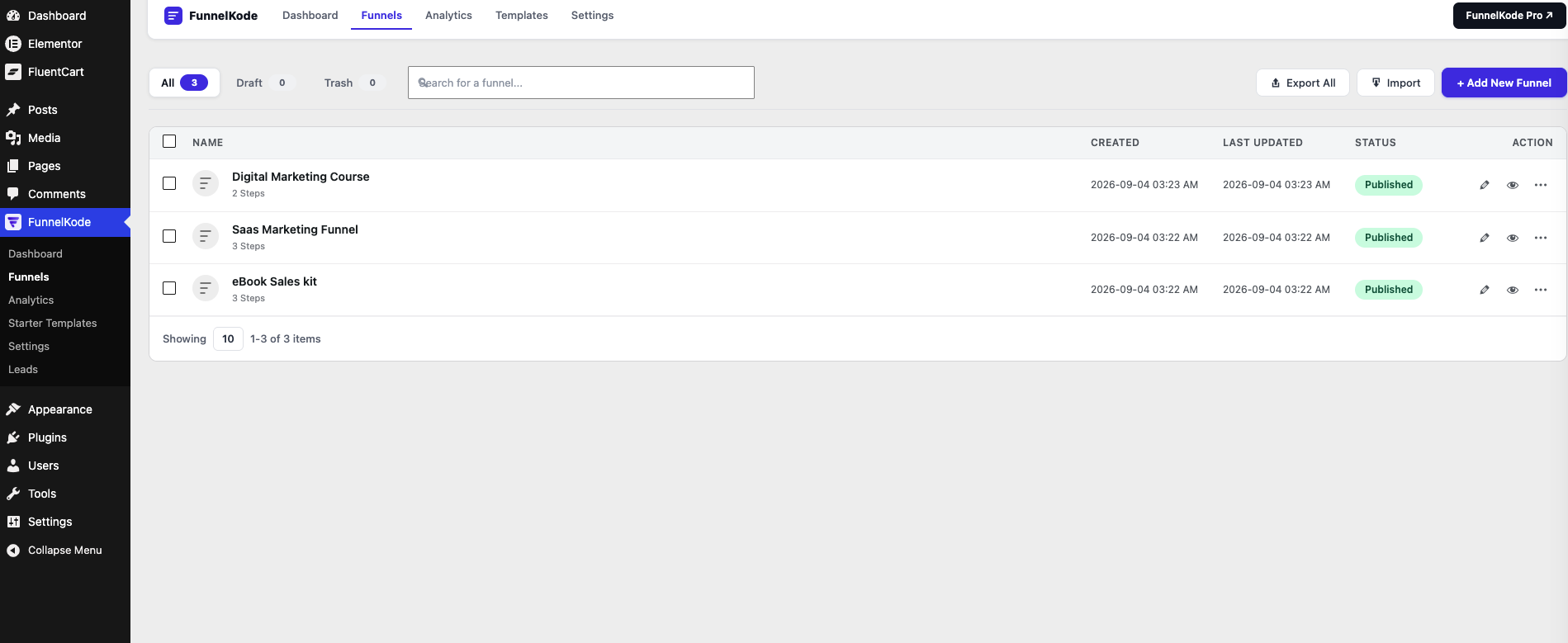
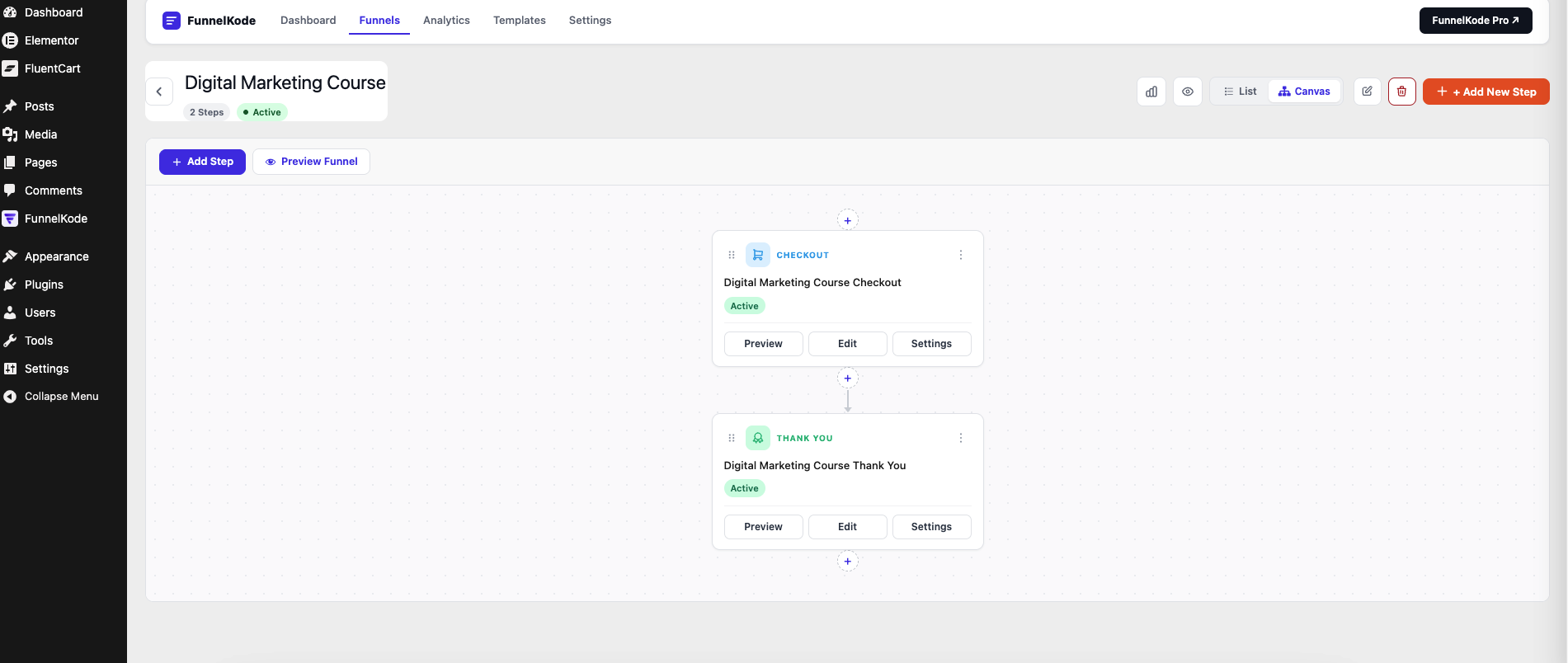
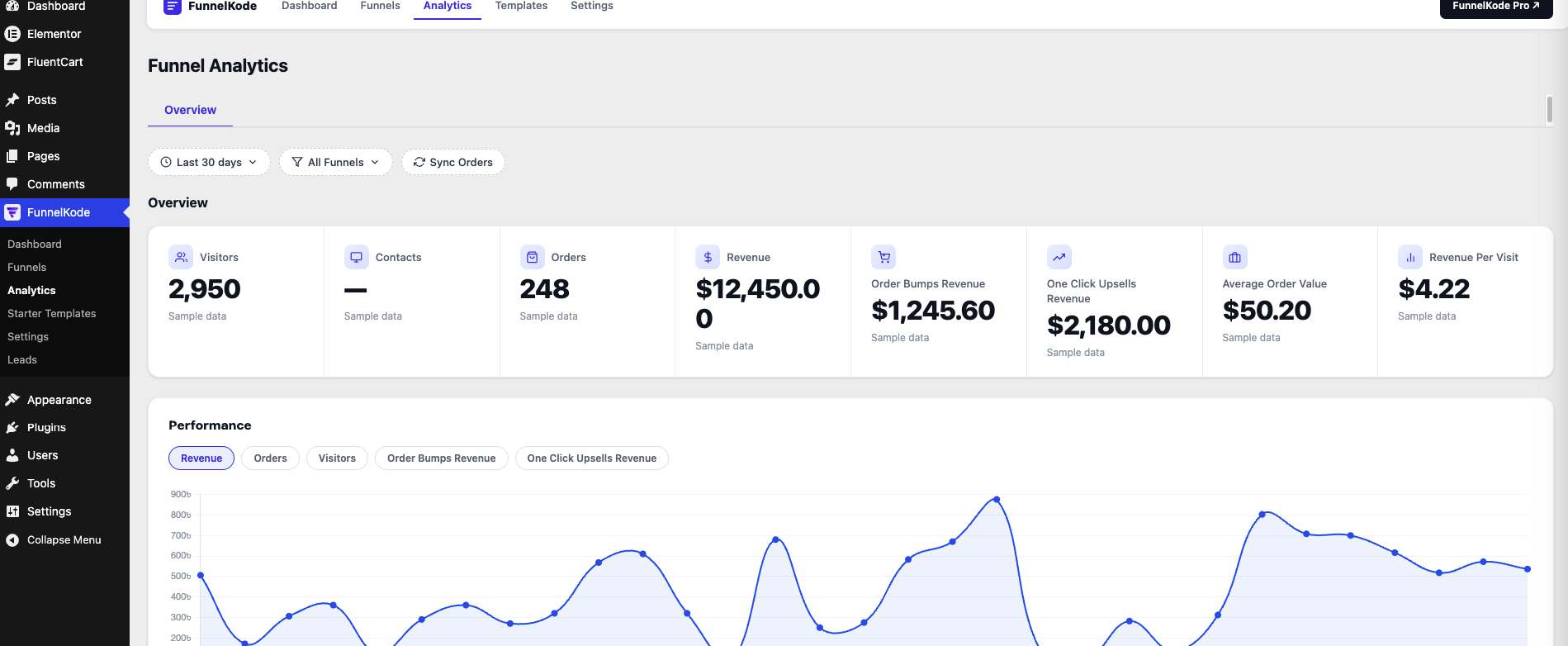
FunnelKode is a funnel builder plugin for WordPress that works with FluentCart. It lets you create structured sales funnels — landing pages, checkout steps, thank-you pages, and (with Pro) order bumps and upsells — using your existing FluentCart store as the commerce layer.
Yes. FunnelKode is built specifically for FluentCart. It adds funnel structure, step management, dedicated checkout pages, and conversion features on top of FluentCart’s existing product and payment system.
Yes. FunnelKode connects to FluentCart to create dedicated funnel pages for each step of your sales process. You design the pages, assign FluentCart products, and FunnelKode handles the flow between steps.
No. Elementor is recommended for the best design experience and gives you access to the full template library and all funnel widgets. You can also use the WordPress block editor — new steps get starter layouts and FunnelKode’s own blocks work in the block editor too.
Yes. Select WordPress Block Editor as your page builder in FunnelKode Settings. New funnel steps will be created with appropriate starter layouts using core blocks and FunnelKode blocks.
Yes. Each funnel step can include a dedicated FluentCart checkout form. You assign the product, control the layout, and optionally add a variation selector before the form.
Order bumps are a FunnelKode Pro feature. They appear inside the checkout step as a checkbox offer before payment. The free version shows the order bump settings panel as a Pro upgrade prompt.
One-click upsells and downsells are FunnelKode Pro features. They display as post-purchase offer pages after the FluentCart payment is confirmed.
Yes, this is included in the free version. Each funnel can have its own thank-you page with an Order Confirmation widget that displays the customer’s order details from FluentCart automatically.
Yes. You can attach a coupon to any funnel step and it applies automatically when a visitor arrives. Use an existing FluentCart coupon or create a custom one — with discount type, amount, expiry date, and usage limit — directly from the funnel step settings.
Yes. Export any funnel as a JSON file and import it on another WordPress site running FunnelKode.
No. FunnelKode integrates with FluentCart through its public hooks and shortcodes. It does not modify FluentCart’s database, override its checkout, or change how products, payments, or orders are managed.
FunnelKode Pro adds order bumps, one-click upsells, downsells, real funnel analytics (views, conversions, revenue per step), UTM attribution, and FluentForms opt-in form integration. Details at pxelcode.com.
Changelog
1.1.58
- Added: Bricks Builder support — funnel steps can now be built with Bricks alongside the existing Elementor integration
- Fixed: Auto-apply coupon no longer rendered on the frontend — coupon is now applied immediately after the inline cart is prepared, resolving the timing race between cart creation and coupon application
- Fixed: Funnel duplicate and export/import losing Elementor design — corrected meta slashing bug that stripped backslashes from _elementor_data JSON on copy
- Fixed: Visitor count always showing 0 on Pro dashboard — logged-in admins/editors are now counted as visitors by default (filter available to exclude them on team sites)
- Fixed: Funnel list share button now shows clean /funnel/slug/ permalink instead of the draft preview URL
- Fixed: Single-funnel analytics data missing — conversion reconciliation now runs globally on every admin page load, not only when the Dashboard is visited
- Improved: Funnel list now shows a Share panel with copy-to-clipboard for the clean funnel URL
1.1.57
- Fixed: Order Bump had no locked/upgrade fallback in the funnel overview’s checkout-step settings (it simply vanished when Pro was not unlocked, unlike every other Pro panel) — corrected, and its tab was accidentally nested inside a condition meant only to hide “Thank You” on checkout steps, hiding Order Bump there too where it belongs.
- Fixed: creating an Upsell or Downsell step from the canvas offered a landing-page template chooser instead of going straight to a blank offer page — Upsell/Downsell content is configured through its own dedicated Product panel, not imported page content, so the template step was never meaningful for these types and made the flow look broken. (Upsell/Downsell is a property of the step itself, set at creation — not a setting on the checkout step; an earlier build of this fix incorrectly added an “Upsell” tab to the checkout step’s settings and has been reverted.)
- Fixed: duplicating a funnel copied Elementor’s generated CSS cache (
_elementor_css) onto the cloned pages. Since that cache is keyed to the original page’s ID, the clone pointed at a stylesheet that did not exist for its own ID and rendered unstyled. Duplicate Funnel now excludes Elementor’s cache meta and clears Elementor’s file cache after cloning, matching how template import already behaves. - New: Bricks Builder support — native Bricks elements for Checkout, Thank You, Next Step Button, Countdown, Opt-in Form and Popup, sharing the same frontend assets and behaviour as the Elementor widgets (Pro controls appear when Pro is licensed). Choose Bricks under Settings Page Builder; step “Edit” then opens Bricks. Elementor sites are unaffected.
- New: setup wizard on first activation — choose Elementor, Bricks or the Block Editor, see whether each is installed/active, and install & activate Elementor from WordPress.org with one click. A notice stays visible on FunnelKode screens whenever the chosen builder is not active (with the fix one click away). The wizard is optional: skip it and FunnelKode uses the Block Editor (or Elementor if it is already active) so funnels can be created immediately; re-run it any time from Settings Page Builder.
- New: the template library and Add Funnel wizard have an Elementor / Bricks switch. It follows your Settings Page Builder choice by default and shows only templates built for that builder; kits carry a builder flag, and Bricks kits import as native Bricks element trees. Ships with a Bricks “Sales Funnel” starter kit; the library’s Preview panel (live iframe per step) works for Bricks kits too; the export plugin exports Bricks-built funnels as Bricks kits.
- Improved: Bricks builder canvas now shows a FluentCart-styled checkout preview and the store’s latest real receipt on the Thank You element (same previews as the Elementor editor). Countdown, Opt-in and Popup initialise inside the builder canvas and are guaranteed to load on live Bricks pages.
- Fixed: the old “works best with Elementor” / “Install Elementor” notices no longer appear when Bricks or the Block Editor is your page builder; admin notices now sit below the FunnelKode header instead of inside it.
- Fixed: products from other funnels (or earlier browsing) could remain in a funnel checkout’s cart, forcing a shipping method for a digital funnel. Cart isolation now runs whenever the checkout is inline and set to “Isolated”, independently of the auto-add toggle; auto-add defaults on for checkout steps; and saving a step from a panel that does not include the auto-add checkbox no longer switches it off. The Products panel warns when auto-add is off.
- Fixed: funnel checkout kept asking for a shipping address after a product was changed from Physical to Digital in FluentCart. The cart line added earlier still carried the old physical flag; the funnel now re-syncs its product’s cart line with the variation’s current fulfillment type on each checkout load.
- Improved: the checkout step’s Products panel shows whether the selected product’s FluentCart variation is Physical or Digital, and warns that a Physical variation makes the checkout ask for a shipping address (with a link to the product).
- Fixed: FunnelKode elements did not appear in the Bricks editor — the integration checked for Bricks at plugins_loaded, before the theme loads. It now registers at init.
- Fixed: selecting Bricks on the Page Builder tab was rejected by the builder switcher, so the preference never saved and step “Edit” kept opening Elementor. Bricks is now accepted end to end: new steps are marked Bricks-editable with no starter blocks, funnel CPTs are enabled in Bricks’ own settings, and every Edit link (overview, canvas, step panels) opens the Bricks editor.
- Improved: when two copies of FunnelKode are active (plugin uploaded under a different folder name), the notice now names both folders and versions and offers a one-click deactivate for the older copy.
- Fixed: WordPress.org review readiness — text-domain literals restored in the Thank You and FC Free Opt-in widgets, output escaping on Opt-in field IDs, translator comment on the Leads screen string.
1.1.58
- Added: Bricks Builder support — funnel steps can now be built with Bricks alongside Elementor
- Added: Slug editor on the funnel overview — change the funnel URL slug without visiting Settings Permalinks; old URL automatically 301-redirects
- Added: Quick Edit in the funnel list — inline edit title, slug, and status directly from the list row (same pattern as WordPress core Quick Edit)
- Added: Share link button on published funnels — copy the clean /funnel/slug/ URL to clipboard in one click
- Fixed: Auto-apply coupon not showing on frontend — coupon code is now appended to the FluentCart checkout URL and applied on arrival, covering both inline and cart-widget checkout modes
- Fixed: Funnel duplicate and export/import losing Elementor design — corrected meta slashing bug that stripped backslashes from _elementor_data JSON on copy
- Fixed: Frontend blank for guest/incognito visitors — step pages now sync publish status with their funnel; _elementor_edit_mode and _bricks_editor_mode are repaired automatically on first admin load
- Fixed: Visitor count always 0 on Pro analytics dashboard — logged-in admins/editors are now counted as visitors by default
- Fixed: coupon_enabled and coupon_source not included in funnel export/import, causing coupon to silently not apply after import
1.1.56
- New: FC Free Opt-in widget — a CartFlows-style opt-in step. Pick a free ($0) FluentCart product; the widget renders a slimmed FluentCart checkout (name + email, optional phone, custom button text, order summary hidden) that creates a real zero-payment order and continues to the Thank You step with the order attached. Downloadable products deliver through FluentCart; the lead becomes a real customer.
- New: Modal checkout trigger button — Product selector (place several trigger buttons on one page, each selling its own product, on any page type), icon with before/after position, size and spacing, alignment control, and full Normal/Hover style tabs (text, icon, background, border).
- New: FC Thank You widget previews FluentCart’s real receipt for the store’s latest order inside the Elementor editor (admins only), with a matching sample fallback when the store has no orders yet — so every style control previews exactly what customers see.
- Fixed: FluentCart’s own receipt page could render blank while a funnel had a thank-you step — funnel steps are no longer treated as store-wide receipt-page templates. Only a standalone Theme Builder thank-you template can override the receipt page.
- Fixed: Order Confirmation widget fatal error on unpaid/pending orders (missing class import), duplicate Background/Width style controls, and the resulting full-width layout.
- Fixed: FC Checkout (modal + inline), FC Cart, Mini-Cart drawer and FC Thank You could render without FluentCart’s CSS/JS because these widgets call FluentCart’s shortcodes from PHP, outside FluentCart’s own asset detection. FluentCart assets are now loaded whenever such a widget is present, including in Theme Builder header/footer templates on free Elementor.
- Fixed: FC Thank You showed the visitor’s raw cart in the editor instead of a receipt preview.
- Fixed: steps with no product configured now clear a stale isolated cart, so leftover items or discounts no longer appear in the checkout summary.
- Changed: all coupon functionality moved to FunnelKode Pro. The free plugin ships only the locked panel and extension hooks. Requires Pro 2.2.3 or later for coupons.
- Changed: no inline event handlers anywhere (Popup widget triggers, Starter Templates preview backdrop, and Builder settings cards now use data attributes with enqueued scripts); inline styles moved to stylesheets; output escaping reviewed. The plugin makes no external requests — all templates are bundled.
1.1.47
- New admin menu icon: the FunnelKode brand mark, as a monochrome SVG that follows the WordPress admin colour scheme.
1.1.46
- Creating or importing a funnel whose name already exists now gets a numbered name (“Name (2)”) and matching step titles/URLs, instead of two identically named funnels.
1.1.45
- Funnel list shows a Preview icon for draft funnels (imported funnels start as drafts); template preview panel no longer upscales small screenshots.
1.1.44
- Removed the online/remote template library entirely — the plugin now ships bundled templates only and makes no external requests. Funnel kits can be a single JSON file with each step’s design inline (drop into templates/kits/). New and imported funnels are created as drafts and named after the kit/funnel, not “Imported Funnel”.
1.1.43
- Template library: bundled page templates can now carry their Elementor design inline (used when no built-in layout exists), previews may be local files or URLs, and design images can reference {{PLUGIN_URL}} so exported template packs drop straight into the plugin folder.
1.1.42
- Order Confirmation widget: container styles now ship in the widget’s own stylesheet (registered early so Elementor always loads it), new Container style section (background, border, radius, padding, shadow, max width), and line items show their pre-discount price so the Discount row adds up.
1.1.41
- All admin notices (import/export results, save errors, canvas actions) now use FunnelKode’s styled modal instead of browser alert() dialogs.
1.1.40
- Fixed Thank You steps not opening in Elementor, Order Details background not applying, and a PHP deprecation on hidden admin pages. Coupon settings panel is now provided entirely by FunnelKode Pro. Requires Pro 2.0.24+ if Pro is active.
1.1.39
- Checkout and Thank You widget style controls rebuilt on FluentCart’s real markup: Form Fields (section headings, labels, inputs, placeholder, focus/error, border, radius, padding, spacing), Payment & Selection Options (normal/hover/selected tabs), Order Details (box, heading, items, prices, subtotal rows, discount, divider, total), Place Order button, and a new Order Receipt section on the Thank You widget.
1.1.38
- Checkout layouts (1 Column / 2 Columns) now style FluentCart’s own checkout structure in place instead of moving elements, so coupons, summary refresh and payment keep working; Order Details style controls target FluentCart’s real summary markup. Thank You page selection moved to the Thank You step’s settings.
1.1.37
- Popup checkout now uses FluentCart’s native modal checkout (the same mechanism as FluentCart’s own Elementor add-on) — the trigger renders FluentCart’s Buy Now button with modal checkout enabled, so add-to-cart, popup and payment are all handled by FluentCart core. Fixed a PHP deprecation from a hidden admin page with a null menu title.
1.1.36
- Modal checkout now embeds the real FluentCart checkout on the page (opens instantly; adds the product to the cart first when needed). Checkout layouts simplified to 1 Column (order summary on top) and 2 Columns (form left, summary right) with Order Details and Selection Field style controls on both checkout widgets. Template library trimmed to 3 funnel kits, 2 checkout and 2 thank-you page templates. Coupon Pro notice now only appears on the Coupon tab; Thank You tab removed from checkout-step settings.
1.1.35
- Auto-apply coupon engine moved entirely to FunnelKode Pro; the free plugin now ships only the settings panel. Order Confirmation widget inline styles moved to the stylesheet. Requires Pro 2.0.19+ if Pro is active.
1.1.34
- Audit pass: Order Confirmation buttons now have default styling (were unstyled after Elementor controls were added); coupon meta is no longer wiped on save when the Pro panel is locked; auto-apply is gated server-side in Free; fixed a modal iframe listener leak and a PHP notice on the funnel overview.
1.1.33
- Fixed: Pro template kits were not showing as locked in the library — they showed nothing. They now appear as locked cards with a crown badge and “Pro” label; clicking the card opens the preview as before.
- Moved auto-apply coupon to Pro. The coupon panel in both the funnel step metabox and the overview sidebar now shows a Pro upgrade prompt when Pro is not active.
1.1.32
- Added 2-column checkout layout (sticky order summary, configurable width and gap), modal checkout popup, custom coupon creation (type, amount, expiry, usage limit), and block editor starter layouts per step type.
- Fixed currency symbols encoded as $, Elementor template full-width rendering, canvas empty when Elementor inactive, step Edit links ignoring Page Builder setting, and several widget output/escaping issues.
- Renamed internal identifiers to meet WordPress.org prefix requirements. Requires FunnelKode Pro 2.0.18+ if Pro is active.
1.1.19
- Removed the published-funnel limit. Create as many funnels as you need.
- Updated bundled Chart.js to 4.5.1.
- Security and code quality improvements throughout.
1.1.2
- Fixed fatal error on funnel checkout pages when the Pro add-on’s UTM attribution was active.
- Fixed Order Bumps / Upsells / Recent Orders analytics queried database columns that do not exist.
" width="120" height="120">
