
Fullworks Active Users Monitor
Active Installs
30+
Last Updated
September 17, 2025
First Released
September 4, 2025
Download History (Last one month)
Contributors
Fullworks Active Users Monitor provides administrators with real-time visibility of logged-in users on your WordPress site. Using WordPress’s native session tokens system, this plugin accurately tracks user login states and provides powerful monitoring tools.
Key Features
- Real-Time Tracking – Uses WordPress session tokens for accurate online/offline status
- Comprehensive Audit Trail – Track all login/logout events with detailed logging
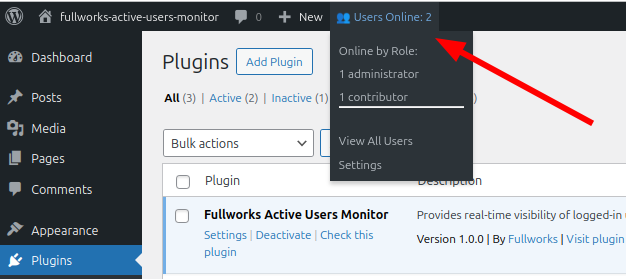
- Admin Bar Widget – Quick overview of online users with role breakdown
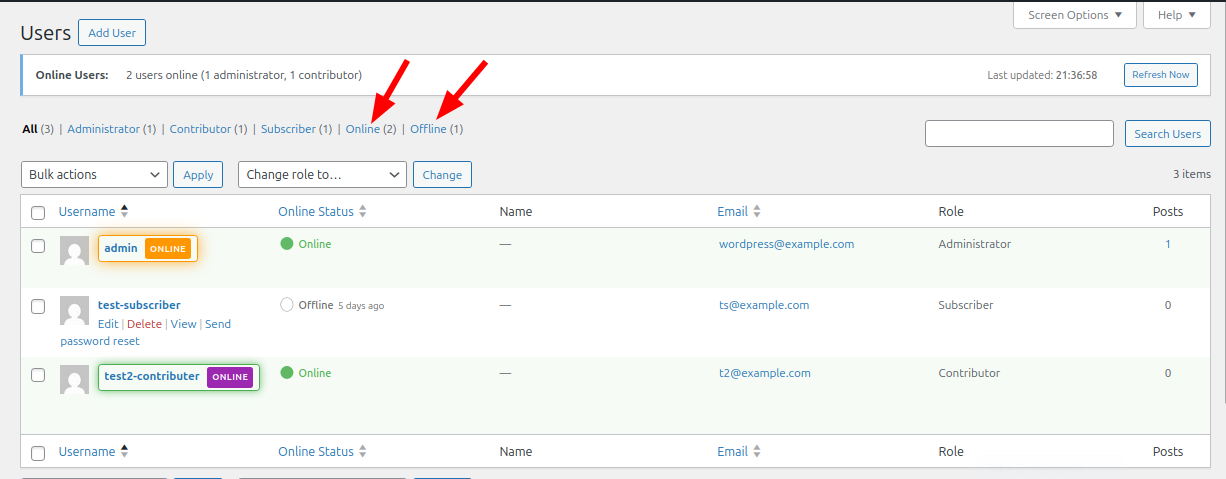
- Enhanced Users List – Visual indicators, status columns, and filtering options
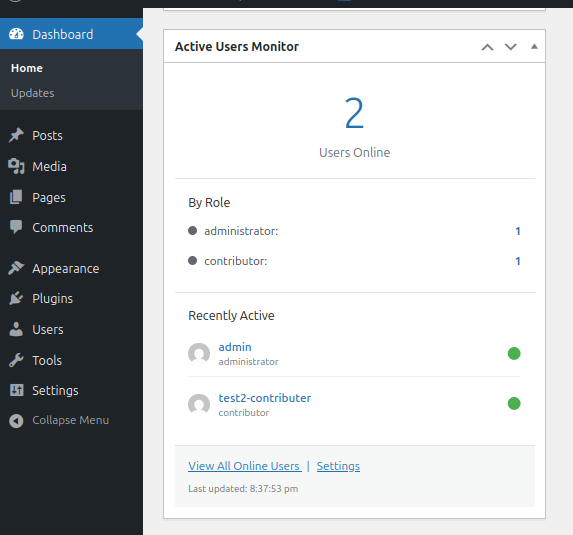
- Dashboard Widget – At-a-glance view of active users on your dashboard
- Audit Log Export – Export user activity to CSV, JSON, or Excel formats
- Auto-Refresh – Configurable automatic updates without page reload
- Role-Based Display – Color-coded indicators for different user roles
- WP-CLI Support – Command line tools for monitoring and management
- Performance Optimized – Smart caching and efficient queries
- Fully Translatable – Ready for localization
Visual Indicators
The plugin provides clear visual feedback for online users:
- Green status dots for online users
- Gold/orange borders for administrators
- Color-coded role indicators
- Animated pulse effects (optional)
- “ONLINE” badges in user lists
- Last seen timestamps for offline users
Perfect For
- Membership sites monitoring user activity
- Educational platforms tracking student engagement
- Multi-author blogs coordinating content creation
- Support teams managing customer interactions
- Any site requiring user activity insights
Developer Friendly
- Clean, well-documented code
- Action and filter hooks for customization
- WP-CLI commands for automation
- Follows WordPress coding standards
- Compatible with multisite installations
WP-CLI Commands
The plugin provides powerful WP-CLI commands for monitoring and automation:
Basic Commands
wp active-users list– List all online userswp active-users stats– Display online user statisticswp active-users check <user>– Check if a specific user is onlinewp active-users monitor– Real-time monitoring in terminalwp active-users clear-cache– Clear the online users cache
Automation Commands
Check if any users are online (for scripting):
wp active-users any [--quiet] [--count] [--json]
--quiet– Returns exit code only (0 = users online, 1 = no users online)--count– Returns just the number of online users--json– Returns detailed JSON output
Wait until no users are online:
wp active-users wait-clear [--timeout=<seconds>] [--check-interval=<seconds>] [--quiet]
--timeout– Maximum time to wait (default: 300 seconds)--check-interval– How often to check (default: 30 seconds)--quiet– Suppress progress messages
Example Automation Scripts
Safe upgrade script:
`bash
!/bin/bash
Only upgrade when no users are online
if wp active-users any –quiet; then
echo “Users are online, postponing upgrade”
else
echo “No users online, safe to upgrade”
wp core update
wp plugin update –all
fi
`
Maintenance with user wait:
`bash
Wait for users to go offline, then perform maintenance
wp active-users wait-clear –timeout=600 && {
wp maintenance-mode activate
wp db optimize
wp cache flush
wp maintenance-mode deactivate
}
`
Monitoring script:
`bash
Get online user count for monitoring dashboard
ONLINE_COUNT=$(wp active-users any –count)
if [ “$ONLINE_COUNT” -gt “100” ]; then
# Send alert about high user activity
echo “High activity: $ONLINE_COUNT users online”
fi
`
These commands make it easy to create maintenance scripts that respect user activity, ensuring updates and maintenance tasks only run when appropriate.
Privacy Policy
This plugin does not collect or store any personal data beyond what WordPress already tracks for logged-in users. It only reads existing session data to determine online status. No data is sent to external services.
Credits
Developed by Fullworks
Icons and visual elements use WordPress core styles for consistency.
Automatic Installation
- Go to Plugins > Add New in your WordPress admin
- Search for “Fullworks Active Users Monitor”
- Click “Install Now” and then “Activate”
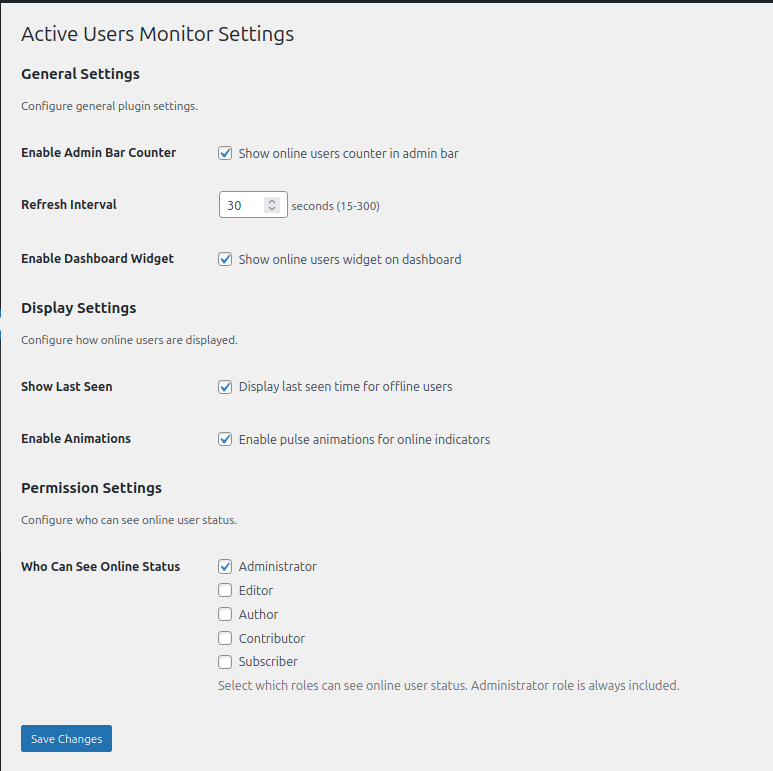
- Configure settings under Settings > Active Users Monitor
Manual Installation
- Download the plugin ZIP file
- Upload to
/wp-content/plugins/directory - Extract the ZIP file
- Activate through the Plugins menu in WordPress
- Configure under Settings > Active Users Monitor
After Activation
- Visit Settings > Active Users Monitor to configure options
- Check the admin bar for the online users counter
- View the Users page to see enhanced status indicators
- Optional: Add the dashboard widget for quick monitoring
The plugin uses WordPress’s built-in WP_Session_Tokens class to check for active session tokens. This ensures accurate detection regardless of the authentication method used (standard login, SSO, 2FA, etc.).
Yes, but only if you enable the audit trail feature. The plugin creates one table (wp_fwaum_audit_log) to store login/logout event history. The core monitoring functionality uses WordPress’s existing session management system without any custom tables.
Yes. In the plugin settings, you can configure which user roles have permission to view online user status. By default, only administrators can see this information.
The refresh interval is configurable from 15 to 300 seconds. The default is 30 seconds. You can adjust this in Settings > Active Users Monitor.
Yes. The plugin uses AJAX for real-time updates, which works independently of page caching. The plugin also implements its own transient caching for optimal performance.
Yes. The plugin is fully compatible with WordPress multisite installations. Super Admins can monitor users across the network.
Yes. The plugin automatically detects and supports all custom user roles in addition to WordPress default roles.
The plugin provides CSS classes for all elements and includes filter hooks for developers to customize the output. You can override styles in your theme’s CSS.
Yes. The plugin includes comprehensive WP-CLI support with commands for monitoring, automation, and scripting. See the WP-CLI Commands section below for details.
No. The plugin is optimized for performance with smart caching, efficient queries, and optional features you can disable if needed.
Changelog
1.1.0
- Added comprehensive audit trail functionality to track user login/logout events
- New audit log table under Users menu with advanced filtering and search
- Export audit logs to CSV, JSON, or Excel formats
- Track login methods (standard, social, two-factor, API, etc.)
- Monitor session durations and failed login attempts
- Configurable retention periods and privacy settings
- Database migration support for existing user data
- Updated minimum WordPress version to 6.2 for enhanced security features
- Fully compliant with WordPress Coding Standards
- Integration with Fullworks Free Plugin Library for promotional features
1.0.1
- Fixed contributor name and donation link
- Added WordPress Playground blueprint for easy preview
- Added plugin assets to readme
- Minor documentation improvements
1.0.0
- Initial release
- Real-time user monitoring using session tokens
- Admin bar counter with role breakdown
- Enhanced users list with visual indicators
- Dashboard widget for quick overview
- Configurable auto-refresh intervals
- WP-CLI command support
- Comprehensive settings page
- Full internationalization support
" width="120" height="120">
